light CHEVROLET EQUINOX 2008 1.G User Guide
[x] Cancel search | Manufacturer: CHEVROLET, Model Year: 2008, Model line: EQUINOX, Model: CHEVROLET EQUINOX 2008 1.GPages: 436, PDF Size: 2.42 MB
Page 77 of 436
Replacing Restraint System Parts
After a Crash
{CAUTION:
A crash can damage the restraint systems
in your vehicle. A damaged restraint system
may not properly protect the person using it,
resulting in serious injury or even death in
a crash. To help make sure your restraint
systems are working properly after a crash,
have them inspected and any necessary
replacements made as soon as possible.If you have had a crash, do you need new belts or
LATCH system (if equipped) parts?
After a very minor crash, nothing may be necessary.
But the belt assemblies that were used during any
crash may have been stressed or damaged. See your
dealer/retailer to have your safety belt assemblies
inspected or replaced.
If your vehicle has the LATCH system and it was being
used during a crash, you may need new LATCH
system parts.
New parts and repairs may be necessary even if the
belt or LATCH system (if equipped), was not being
used at the time of the crash.
If an airbag inates, you will need to replace airbag
system parts. See the part on the airbag system earlier
in this section.
Have your safety belt pretensioners checked if your
vehicle has been in a crash, if your airbag readiness
light stays on after you start your vehicle, or while you
are driving. SeeAirbag Readiness Light on page 3-27.
1-73
Page 86 of 436
Remote Vehicle Start
Your vehicle may have the remote start feature. This
feature allows you to start the engine from outside
the vehicle. See “REMOTE START” underDIC Vehicle
Personalization on page 3-58for instructions on how
to enable and disable this feature.
During a remote start, the climate control system will
turn on at the fan, temperature, and mode settings the
vehicle was set to when the vehicle was last turned
off. The rear window defogger will also turn on.
If your vehicle has heated seats, they may turn on
during colder outside temperatures and will shut
off when the key is turned to ON/RUN. You may not
notice an increase in seat surface temperature until the
seat is occupied for a short period of time.
Laws in some local communities may restrict the use of
remote starters. For example, some laws may require
a person using remote start to have the vehicle in view
when doing so. Check local regulations for any
requirements on remote starting of vehicles.
/(Remote Vehicle Start):This button will be on the
RKE transmitter if you have remote start.
Your RKE transmitter, with the remote start button,
provides an increased range of operation. However,
the range may be less while the vehicle is running.
As a result, you may need to be closer to your
vehicle to turn it off, than you were to turn it on.If your vehicle is low on fuel, do not use the remote
start feature. The vehicle may run out of fuel.
To start the engine using the remote start feature:
1. Aim the RKE transmitter, that has a remote vehicle
start button, at the vehicle.
2. Press and release the transmitter’s lock button,
then immediately press and hold the remote
vehicle start button. Hold the remote start button
until the vehicle’s turn signal lamps ash, or
for at least four seconds if the vehicle’s lights are
not visible. The vehicle’s doors will be locked.
Pressing the remote start button again after the
vehicle has started will turn off the ignition.
When the vehicle’s engine starts, the parking
lamps will turn on and remain on while the engine
is running.
3. To extend the engine run time by 10 minutes,
repeat Steps 1 and 2 while the engine is still
running. The engine run time can only be extended
if it is the rst remote start since the vehicle has
been driven. Remote start can be extended
one time.
If the remote start procedure is used again before
the rst 10 minute time frame has ended, the
rst 10 minutes will immediately expire and the
second 10 minute time frame will start.
2-8
Page 95 of 436

To stop the window while it is lowering, press and
release the top of the switch.
Window Lockout
o
(Window Lockout):Your vehicle has a lockout
feature to prevent rear seat passengers from operating
the windows. Press the lockout button, located with
the power window switches, to turn the feature on and
off. The window switch has a light that will come on
when the switch is active.
Sun Visors
To block out glare, swing the sun visor down. You
can also detach the driver’s sun visor from the center
mount and slide it along the rod from side-to-side
for greater coverage.
Visor Vanity Mirrors
Your vehicle has covered visor vanity mirrors on
both the driver’s and passenger’s side.
Theft-Deterrent Systems
Vehicle theft is big business, especially in some cities.
Although your vehicle has a number of theft-deterrent
features, we know that nothing we put on it can make
it impossible to steal.
Content Theft-Deterrent
Your vehicle has a content theft-deterrent alarm system.
To activate the theft-deterrent system:
1. Open the door.
2. Lock the door with the power door lock switch
or the Remote Keyless Entry (RKE) transmitter.
If you are using the RKE transmitter, the door
does not need to be open.
3. Close all doors.
The key must be removed from the ignition to
arm the system.
If the theft-deterrent system is activated and a door or
the liftgate is opened without using the RKE transmitter,
a 10 second pre-alarm will occur, and the security light
will ash. The horn will sound rapidly for 10 seconds.
If you do not press unlock on the RKE transmitter or
insert the key in the ignition and turn if from the LOCK/
OFF position, the alarm will go off. The horn will sound
and the headlamps will ash for 30 seconds.
After the alarm has sounded for 30 seconds,
the system will re-arm itself automatically.
To disarm the theft-deterrent system, do one of
the following:
1. Unlock the doors with the RKE transmitter.
2. Insert the key in the ignition and turn it from
the LOCK/OFF position.
2-17
Page 96 of 436
PASS-Key®III+
The PASS-Key®III+ system operates on a radio
frequency subject to Federal Communications
Commission (FCC) Rules and with Industry Canada.
This device complies with Part 15 of the FCC Rules.
Operation is subject to the following two conditions:
1. This device may not cause harmful interference.
2. This device must accept any interference received,
including interference that may cause undesired
operation.
This device complies with RSS-210 of Industry Canada.
Operation is subject to the following two conditions:
1. This device may not cause interference.
2. This device must accept any interference received,
including interference that may cause undesired
operation of the device.
Changes or modications to this system by other than
an authorized service facility could void authorization to
use this equipment.
PASS-Key
®III+ uses a radio frequency transponder
in the key that matches a decoder in your vehicle.
PASS-Key®III+ Operation
Your vehicle has PASS-Key®III+ (Personalized
Automotive Security System) theft-deterrent system.
PASS-Key
®III+ is a passive theft-deterrent system.
The system is automatically armed when the key
is removed from the ignition.
The system is automatically disarmed when the key is
turned to ON/RUN, ACC/ACCESSORY or START
from the LOCK/OFF position.
You do not have to manually arm or disarm the system.
The security light will come on if there is a problem
with arming or disarming the theft-deterrent system.
When the PASS-Key
®III+ system senses that someone
is using the wrong key, it prevents the vehicle from
starting. Anyone using a trial-and-error method to start
the vehicle will be discouraged because of the high
number of electrical key codes.
If the engine does not start and the security light on the
instrument panel comes on when trying to start the
vehicle, there may be a problem with your theft-deterrent
system. Turn the ignition off and try again.
2-18
Page 97 of 436

If the engine still does not start, and the key appears
to be undamaged, try another ignition key. At this time,
you may also want to check the fuse, seeFuses
and Circuit Breakers on page 5-100. If the engine still
does not start with the other key, your vehicle needs
service. If your vehicle does start, the rst key may
be faulty. See your dealer/retailer who can service
the PASS-Key
®III+ to have a new key made. In
an emergency, contact Roadside Assistance.
It is possible for the PASS-Key
®III+ decoder to “learn”
the transponder value of a new or replacement key.
Up to nine additional keys may be programmed for the
vehicle. The following procedure is for programming
additional keys only. If all the currently programmed
keys are lost or do not operate, you must see your
dealer/retailer or a locksmith who can service
PASS-Key
®III+ to have keys made and programmed
to the system.
See your dealer/retailer or a locksmith who can service
PASS-Key
®III+ to get a new key blank that is cut
exactly as the ignition key that operates the system.To program the new additional key:
1. Verify that the new key has a
1stamped on it.
2. Insert the original, already programmed, key in the
ignition and start the engine. If the engine will not
start, see your dealer/retailer for service.
3. After the engine has started, turn the key to
LOCK/OFF, and remove the key.
4. Insert the new key to be programmed and turn it
to the ON/RUN position within ve seconds of
removing the original key.
The security light will turn off once the key has
been programmed.
5. Repeat Steps 1 through 4 if additional keys are to
be programmed.
If you lose or damage your PASS-Key
®III+ key, see
your dealer/retailer or a locksmith who can service
PASS-Key
®III+ to have a new key made.
Do not leave the key or device that disarms or
deactivates the theft deterrent system in the vehicle.
2-19
Page 99 of 436
The ignition switch cannot be turned to LOCK/OFF
unless the shift lever is in PARK (P).
ACC (ACC/ACCESSORY):This position operates
some of your electrical accessories.
R(ON/RUN):This is the position the switch returns
to after you start your engine and release the switch.
The switch stays in the ON/RUN position when the
engine is running. But even when the engine is
not running, you can use ON/RUN to operate your
electrical accessories and to display some warning
and indicator lights.
The battery could be drained if you leave the key in
the ACC/ACCESSORY or ON/RUN position with
the engine off. You may not be able to start your
vehicle if the battery is allowed to drain for an
extended period of time.
/(START):This position starts the engine. When
the engine starts, release the key. The ignition switch
will return to ON/RUN for normal driving.
Key In the Ignition
Never leave your vehicle with the keys inside, as it is
an easy target for joy riders or thieves. If you leave
the key in the ignition and park your vehicle, a chime
will sound, when you open the driver’s door. Always
remember to remove your key from the ignition and take
it with you. This will lock your ignition and transmission.
Also, always remember to lock the doors.
The battery could be drained if you leave the key in the
ignition while your vehicle is parked. You may not be
able to start your vehicle after it has been parked for
an extended period of time.
Retained Accessory Power (RAP)
These vehicle accessories can be used for up to
10 minutes after the engine is turned off:
Audio System
Power Windows
Sunroof (if equipped)
Power to these accessories will continue to operate for
up to 10 minutes or until the driver’s door is opened.
All these features will work when the key is in ON/RUN
or ACC/ACCESSORY.
2-21
Page 104 of 436
DRIVE (D):This position is for normal driving with
the automatic transmission. It provides the best
fuel economy for your vehicle. If you need more
power for passing, and you are:
Going less than about 35 mph (55 km/h),
push your accelerator pedal about halfway down.
Going about 35 mph (55 km/h), push your
accelerator all the way down.
Downshifting the transmission in slippery road conditions
could result in skidding, see “Skidding” underLoss of
Control on page 4-13.
INTERMEDIATE (I):This position is also used for
normal driving. However, it reduces vehicle speed without
using your brakes for slight downgrades where the
vehicle would otherwise accelerate due to steepness
of grade. If constant upshifting or downshifting occurs
while driving up steep hills, this position can be used to
prevent repetitive types of shifts. You might choose
INTERMEDIATE (I) instead of DRIVE (D) when driving
on hilly, winding roads and when towing a trailer, so that
there is less shifting between gears.
LOW (L):This position reduces vehicle speed more
than INTERMEDIATE (I) without actually using
your brakes. You can use it on very steep hills, or in
deep snow or mud. If the shift lever is put in LOW (L),
the transmission will not shift into LOW (L) until the
vehicle is going slowly enough.Notice:Spinning the tires or holding the vehicle
in one place on a hill using only the accelerator
pedal may damage the transmission. The repair will
not be covered by your warranty. If you are stuck,
do not spin the tires. When stopping on a hill,
use the brakes to hold the vehicle in place.Transmission Overheating
If the transmission uid temperature rises above 284°F
(140°C) or rises rapidly, the Engine Coolant
Temperature Warning Light will ash. SeeEngine
Coolant Temperature Warning Light on page 3-33for
more information. When the transmission overheats
it will go into a protection mode and will default shift into
fth gear if in the DRIVE (D) position, or second gear
if in the LOW (L) position. Continue driving the vehicle in
either position depending on the required vehicle
speed and load. Once the uid temperature lowers to
the normal temperature range, the transmission will
return to the normal shift patterns. Towing or driving on
long hills can cause the transmission uid temperature
to be higher than normal. If the transmission uid
temperature will not cool, you may need to pull over and
check the transmission uid level. You should also
check the engine coolant temperature. If it is hot, see
Engine Overheating on page 5-24.
2-26
Page 108 of 436
In manual shift mode all six forward gears can be
selected.
While using the MSM feature the vehicle will have
operation similar to a manual transmission. You can
use this for sport driving or when driving hilly roads to
stay in gear longer or to downshift for more power
or engine braking.
The transmission will only allow you to shift into gears
appropriate for the vehicle speed:
The transmission will not automatically shift to the
next higher gear without moving the shift lever.
The transmission will not allow shifting to the next
lower gear if the vehicle speed is too high.
If the vehicle does not respond to a gear change,
or detects a problem with the transmission, the range
of gears may be reduced and the Malfunction Indicator
Lamp will come on. SeeMalfunction Indicator Lamp
on page 3-34.
Transmission Overheating
If the transmission uid temperature rises above
270°F (132°C) or rises rapidly, the Engine Coolant
Temperature Warning Light will ash. SeeEngine
Coolant Temperature Warning Light on page 3-33for
more information. When the transmission overheats
it will go into a protection mode and will default into a
different shift sequence to help cool the transmission
uid. This shift sequence is the same for both DRIVE (D)
position and manual mode. Continue driving the
vehicle in either position depending on the required
vehicle speed and load. Once the uid temperature
lowers to the normal temperature range, the
transmission will return to the normal shift patterns.
Towing or driving on long hills can cause the
transmission uid temperature to be higher than
normal. If the transmission uid temperature will
not cool, you may need to pull over and check the
transmission uid level. You should also check
the engine coolant temperature. If it is hot, see
Engine Overheating on page 5-24.
2-30
Page 109 of 436
SECOND (2) and THIRD (3) Gear
Start Feature
When accelerating your vehicle from a stop in snowy
and icy conditions, you may want to select SECOND (2)
and THIRD (3) gear. A higher gear, and light application
of the gas pedal, may allow you to gain more traction
on slippery surfaces.
With the Manual Shift Mode, the vehicle can accelerate
from a stop in SECOND (2) or THIRD (3).
1. Move the shift lever from DRIVE (D) into the
manual gate.
2. With the vehicle stopped, move the shift lever
forward to select SECOND (2) or THIRD (3).
The vehicle will start from a stop position in
SECOND (2) or THIRD (3).
3. Once the vehicle is moving select the desired
drive gear or move the shift lever to the
DRIVE (D) position.
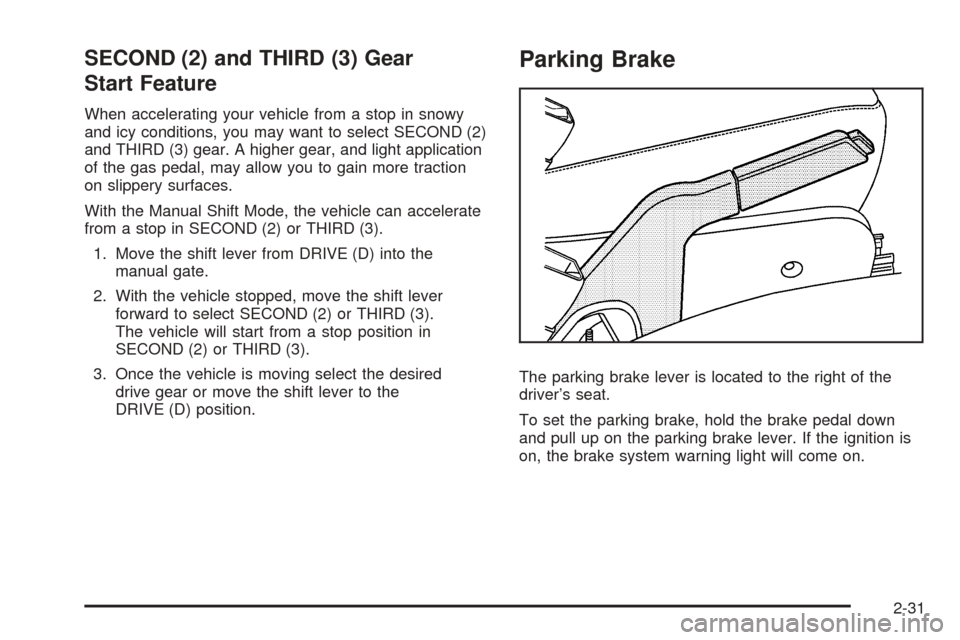
Parking Brake
The parking brake lever is located to the right of the
driver’s seat.
To set the parking brake, hold the brake pedal down
and pull up on the parking brake lever. If the ignition is
on, the brake system warning light will come on.
2-31
Page 110 of 436
To release the parking brake, hold the brake pedal
down. Pull the parking brake lever up until you can
press the release button. Hold the release button in
as you move the brake lever all the way down.
Make sure to release the parking brake before driving
the vehicle.
If the parking brake is applied and the vehicle is
moving at least 4 mph (6 km/h), a chime will activate
to remind you to release the parking brake.
Notice:Driving with the parking brake on can
overheat the brake system and cause premature
wear or damage to brake system parts. Make
sure that the parking brake is fully released and
the brake warning light is off before driving.Shifting Into PARK (P)
{CAUTION:
It can be dangerous to get out of your vehicle if
the shift lever is not fully in PARK (P) with the
parking brake rmly set. Your vehicle can roll.
If you have left the engine running, the vehicle
can move suddenly. You or others could be
injured. To be sure your vehicle will not move,
even when you are on fairly level ground, use
the steps that follow. If you are pulling a trailer,
seeTowing a Trailer on page 4-33.
1. Hold the brake pedal down with your foot and set
the parking brake. SeeParking Brake on page 2-31
for more information.
2. Move the shift lever into PARK (P) by pressing the
button on the shift lever and pushing the lever all
the way toward the front of the vehicle.
3. Turn the ignition key to LOCK/OFF.
4. Remove the key and take it with you. If you can
leave your vehicle with the key, your vehicle is
in PARK (P).
2-32