reset CHEVROLET EQUINOX 2009 1.G User Guide
[x] Cancel search | Manufacturer: CHEVROLET, Model Year: 2009, Model line: EQUINOX, Model: CHEVROLET EQUINOX 2009 1.GPages: 442, PDF Size: 2.46 MB
Page 175 of 442
DIC Compass
Your vehicle may have a compass in the Driver
Information Center (DIC).
Compass Zone
The zone is set to zone eight upon leaving the factory.
Your dealer/retailer will set the correct zone for your
location.
Under certain circumstances, such as during a long
distance cross-country trip or moving to a new state or
province, it will be necessary to compensate for
compass variance by resetting the zone through the
DIC if the zone is not set correctly.
Compass variance is the difference between the earth’s
magnetic north and true geographic north. If the compass
is not set to the zone where you live, the compass may
give false readings. The compass must be set to the
variance zone in which the vehicle is traveling.
To adjust for compass variance, use the following
procedure:
Compass Variance (Zone) Procedure
1. Do not set the compass zone when the vehicle is
moving. Only set it when the vehicle is in P (Park).
Press the vehicle information button until PRESS
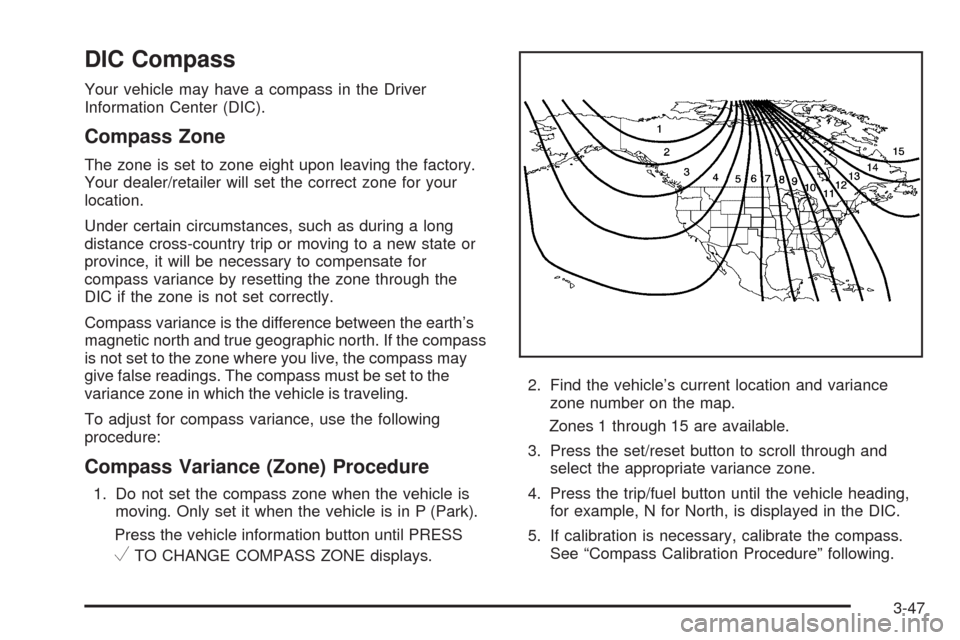
VTO CHANGE COMPASS ZONE displays.2. Find the vehicle’s current location and variance
zone number on the map.
Zones 1 through 15 are available.
3. Press the set/reset button to scroll through and
select the appropriate variance zone.
4. Press the trip/fuel button until the vehicle heading,
for example, N for North, is displayed in the DIC.
5. If calibration is necessary, calibrate the compass.
See “Compass Calibration Procedure” following.
3-47
Page 176 of 442
Compass Calibration
The compass can be manually calibrated. Only calibrate
the compass in a magnetically clean and safe location,
such as an open parking lot, where driving the vehicle in
circles is not a danger. It is suggested to calibrate
away from tall buildings, utility wires, manhole covers, or
other industrial structures, if possible.
If CAL should ever appear in the DIC display, the
compass should be calibrated.
If the DIC display does not show a heading, for example,
N for North, or the heading does not change after
making turns, there may be a strong magnetic eld
interfering with the compass. Such interference may be
caused by a magnetic CB or cell phone antenna
mount, a magnetic emergency light, magnetic note pad
holder, or any other magnetic item. Turn off the
vehicle, move the magnetic item, then turn on the
vehicle and calibrate the compass.To calibrate the compass, use the following procedure:Compass Calibration Procedure
1. Before calibrating the compass, make sure the
compass zone is set to the variance zone in
which the vehicle is located. See “Compass
Variance (Zone) Procedure” earlier in this section.
Do not operate any switches such as window,
sunroof, climate controls, seats, etc. during
the calibration procedure.
2. Press the vehicle information button until PRESS
V
TO CALIBRATE COMPAS (Compass) displays.
3. Press the set/reset button to start the compass
calibration.
4. The DIC will display CALIBRATING: DRIVE IN
CIRCLES. Drive the vehicle in tight circles at
less than 5 mph (8 km/h) to complete the
calibration. The DIC will display CALIBRATION
COMPLETE for a few seconds when the calibration
is complete. The DIC display will then return to
the previous menu.
3-48
Page 177 of 442
DIC Warnings and Messages
Messages are displayed on the DIC to notify the driver
that the status of the vehicle has changed and that
some action may be needed by the driver to correct the
condition. Multiple messages may appear one after
another.
Some messages may not require immediate action,
but you can press the set/reset button to acknowledge
that you received the messages and to clear them
from the display. Pressing any of the DIC buttons also
acknowledge and clear any messages.
Some messages cannot be cleared from the DIC display
because they are more urgent. These messages
require action before they can be cleared. You should
take any messages that appear on the display seriously
and remember that clearing the messages will only
make the messages disappear, not correct the problem.
The following are the possible messages that can be
displayed and some information about them.
ALL WHEEL DRIVE OFF
If your vehicle has the All-Wheel Drive (AWD) system,
this message displays along with the All-Wheel
Drive Disabled light when the rear drive system is
overheating. This message turns off when the rear drive
system cools down. If the warning message stays on
for a while, you need to reset the warning message.
To reset the warning message, turn the ignition off and
then back on again. If the message stays on, see
your dealer/retailer right away. SeeAll-Wheel Drive
(AWD) System on page 4-8andAll-Wheel Drive
Disabled Light on page 3-39for more information.
BATTERY SAVER ACTIVE
This message displays when the charging system
detects that the battery is being drained. You may
notice that the vehicle attempts to reduce the drain for
you by turning off accessories, such as interior fans, rear
defogger, and heated seats. Turn off all accessories.
If the vehicle is not running, start and run the engine
for at least 10 minutes to allow the battery to recharge.
If the engine is running and the condition persists,
see your dealer/retailer. SeeElectric Power
Management on page 3-16for more information.
3-49
Page 178 of 442
CALIBRATING: DRIVE IN CIRCLES
This message displays when calibrating the compass.
Drive the vehicle in circles at less than 5 mph (8 km/h)
to complete the calibration. SeeDIC Compass on
page 3-47for more information.
CALIBRATION COMPLETE
This message displays when the compass calibration is
complete. SeeDIC Compass on page 3-47for more
information.
CHANGE ENGINE OIL SOON
This message displays and the Change Engine Oil Light
in the instrument panel cluster turns on when service
is required for the vehicle. See your dealer/retailer.
SeeChange Engine Oil Light on page 3-36,Engine Oil
on page 5-15andScheduled Maintenance on page 6-4
for more information.
Acknowledging this message will not reset the OIL LIFE
REMAINING display. That must be done at the OIL
LIFE screen under the vehicle information menu.
See “OIL LIFE” underDIC Operation and Displays on
page 3-42andEngine Oil Life System on page 5-18for
more information.
CHECK TIRE PRESSURE
This message displays when the pressure in one or
more of the vehicle’s tires needs to be checked.
This message also displays LEFT FRONT, RIGHT
FRNT (Front), LEFT REAR, or RIGHT REAR to indicate
which tire needs to be checked. You can receive
more than one tire pressure message at a time. To read
the other messages that may have been sent at the
same time, press the set/reset button. If a tire pressure
message appears on the DIC, stop as soon as you
can. Have the tire pressures checked and set to those
shown on the Tire Loading Information label. SeeTires
on page 5-52,Loading the Vehicle on page 4-20,
andInflation - Tire Pressure on page 5-59. The DIC
also shows the tire pressure values. SeeDIC Operation
and Displays on page 3-42. If the tire pressure is low,
the low tire pressure warning light comes on. SeeTire
Pressure Light on page 3-32.
DRIVER DOOR OPEN
This message displays when the driver door is not
closed properly. Close the door completely.
3-50
Page 182 of 442
SERVICE BRAKE SYSTEM
This message displays and a chime sounds when the
brake uid level is low. The brake system warning
light also appears on the instrument panel cluster when
this message appears on the DIC. SeeBrake System
Warning Light on page 3-29. Have the brake system
serviced by your dealer/retailer as soon as possible.
SERVICE POWER STEERING
On some vehicles, this message displays when a
problem is detected with the power steering system.
When this message is displayed, you may notice
that the effort required to steer the vehicle increases or
feels heavier, but you will still be able to steer the
vehicle. Have your vehicle serviced by your
dealer/retailer immediately.
SERVICE STABILITRAK
This message displays if there has been a problem
detected with the StabiliTrak®System. A warning
light also appears on the instrument panel cluster.
SeeTraction Control System (TCS) Warning Light on
page 3-31. SeeStabiliTrak
®System on page 4-6
for more information.If this message turns on while you are driving, pull off
the road as soon as possible and stop carefully.
Try resetting the system by turning the ignition off and
then back on. If this message still stays on or turns back
on again while you are driving, your vehicle needs
service. Have the StabiliTrak
®System inspected by your
dealer/retailer as soon as possible.
SERVICE THEFT DETERRENT SYSTEM
This message displays when there is a problem with
the theft-deterrent system. A fault has been detected in
the system which means that the system is disabled
and it is not protecting the vehicle. The vehicle usually
restarts; however, you may want to take the vehicle
to your dealer/retailer before turning off the engine.
SeePASS-Key
®III+ Electronic Immobilizer Operation
on page 2-18for more information.
SERVICE TIRE MONITOR SYSTEM
This message displays if a part on the Tire Pressure
Monitor System (TPMS) is not working properly. The tire
pressure light also ashes and then remains on during
the same ignition cycle. SeeTire Pressure Light on
page 3-32. Several conditions may cause this message
to appear. SeeTire Pressure Monitor Operation on
page 5-63for more information. If the warning comes on
and stays on, there may be a problem with the TPMS.
See your dealer/retailer.
3-54
Page 185 of 442
TRACTION CONTROL ON
This message displays when the Traction Control
System (TCS) turns on. SeeTraction Control System
(TCS) on page 4-7for more information.
TURN SIGNAL ON
This message displays as a reminder to turn off the
turn signal if you drive your vehicle for more than about
0.75 mile (1.2 km) with a turn signal on. SeeTurn
Signal/Multifunction Lever on page 3-7.
This message displays and a chime sounds only when
the ignition is in ON/RUN. The message will not
disappear until the turn signal is manually turned off,
or a turn is completed.
DIC Vehicle Personalization
Your vehicle has personalization capabilities that allow
you to program certain features to one preferred setting.
All of the personalization options may not be available
on your vehicle. Only the options available will be
displayed on the DIC.The default settings for the personalization features were
set when your vehicle left the factory, but may have been
changed from their default state since then.
The personalization preferences are automatically
recalled.
To change personalization preferences, use the
following procedure.
Entering the Feature Settings Menu
1. Turn the ignition on and place the vehicle in P (Park).
To avoid excessive drain on the battery, it is
recommended that the headlamps are turned off.
2. Press the vehicle information button until FEATURE
SETTNGS (Settings): PRESS
VTO SELCT (Select)
appears on the DIC display.
3. Press the set/reset button to enter the feature
settings menu.
If the menu is not available, FEATURE SETTNGS
(Settings): AVAILABLE IN PRK (Park) will display.
Before entering the menu, make sure the vehicle is
in P (Park).
3-57
Page 186 of 442
Feature Settings Menu Items
The following are personalization features that allow you
to program settings to the vehicle:
DISPLAY ENGLISH
This feature will only display if a language other than
English has been set. This feature allows you to change
the language in which the DIC messages appear to
English.
Press the vehicle information button until the PRESS
V
TO DISPLAY ENGLISH screen appears on the DIC
display. Press the set/reset button to display all
DIC messages in English.
DISPLAY LANG. (Language)
This feature allows you to select the language in which
the DIC messages will appear.
Press the vehicle information button until DISPLAY
LANG. (Language) appears on the DIC display. Press
the set/reset button to access the settings for this
feature. Then press the vehicle information button to
scroll through the following settings:
ENGLISH (default):All messages will appear in English.
FRENCH:All messages will appear in French.
SPANISH:All messages will appear in Spanish.NO CHANGE:No change will be made to this feature.
The current setting will remain.
To select a setting, press the set/reset button while the
desired setting is displayed on the DIC.
AUTO LOCK
This feature allows you to select when the vehicle’s
doors will automatically lock. SeeProgrammable
Automatic Door Locks on page 2-11for more
information.
Press the vehicle information button until AUTO LOCK
appears on the DIC display. Press the set/reset button
to access the settings for this feature. Then press the
vehicle information button to scroll through the following
settings:
OUT OF PARK (default):The vehicle’s doors
automatically lock when the doors are closed and the
vehicle is shifted out of P (Park).
AT SPEED:The vehicle’s doors automatically lock
when the vehicle speed is above 5 mph (8 km/h)
for three seconds.
NO CHANGE:No change will be made to this feature.
The current setting will remain.
To select a setting, press the set/reset button while the
desired setting is displayed on the DIC.
3-58
Page 187 of 442
AUTO UNLOCK
This feature allows you to select whether or not to
turn off the automatic door unlocking feature. It also
allows you to select which doors and when the doors will
automatically unlock. SeeProgrammable Automatic
Door Locks on page 2-11for more information.
Press the vehicle information button until AUTO
UNLOCK appears on the DIC display. Press the
set/reset button to access the settings for this feature.
Then press the vehicle information button to scroll
through the following settings:
OFF:None of the doors will automatically unlock.
DRIVER KEY OUT:Only the driver’s door will unlock
when the key is taken out of the ignition.
DRIVER IN PARK:Only the driver’s door will unlock
when the vehicle is shifted into P (Park).
ALL AT KEY OUT:All of the doors will unlock when
the key is taken out of the ignition.
ALL IN PARK (default):All of the doors will unlock
when the vehicle is shifted into P (Park).
NO CHANGE:No change will be made to this feature.
The current setting will remain.
To select a setting, press the set/reset button while the
desired setting is displayed on the DIC.
REMOTE LOCK
This feature allows you to select the type of feedback
you will receive when locking the vehicle with the
Remote Keyless Entry (RKE) transmitter. You will not
receive feedback when locking the vehicle with the RKE
transmitter if any of the doors are open. SeeRemote
Keyless Entry (RKE) System Operation on page 2-5for
more information.
Press the vehicle information button until REMOTE
LOCK appears on the DIC display. Press the set/reset
button to access the settings for this feature. Then
press the vehicle information button to scroll through the
following settings:
HORN/LIGHTS OFF:There will be no feedback when
you press the lock button on the RKE transmitter.
LIGHTS ONLY:The exterior lamps will ash when you
press the lock button on the RKE transmitter.
HORN CHIRP ONLY:The horn will sound on the
second press of the lock button on the RKE transmitter.
HORN/LIGHTS ON (default):The exterior lamps will
ash when you press the lock button on the RKE
transmitter, and the horn will sound when the lock button
is pressed again within ve seconds of the previous
command.
3-59
Page 188 of 442
NO CHANGE:No change will be made to this feature.
The current setting will remain.
To select a setting, press the set/reset button while the
desired setting is displayed on the DIC.
REMOTE UNLOCK
This feature allows you to select the type of feedback
you will receive when unlocking the vehicle with the
RKE transmitter. You will not receive feedback when
unlocking the vehicle with the RKE transmitter if
the doors are open. SeeRemote Keyless Entry (RKE)
System Operation on page 2-5for more information.
Press the vehicle information button until REMOTE
UNLOCK appears on the DIC display. Press the
set/reset button to access the settings for this feature.
Then press the vehicle information button to scroll
through the following settings:
LIGHTS OFF:The exterior lamps will not ash when
you press the unlock button on the RKE transmitter.
LIGHTS ON (default):The exterior lamps will
ash when you press the unlock button on the RKE
transmitter.
NO CHANGE:No change will be made to this feature.
The current setting will remain.
To select a setting, press the set/reset button while the
desired setting is displayed on the DIC.
DELAY LOCK
This feature allows you to select whether or not the
locking of the vehicle’s doors and liftgate will be delayed.
When locking the doors and liftgate with the power
door lock switch and a door or the liftgate is open, this
feature will delay locking the doors and liftgate until
ve seconds after the last door is closed. You will hear
three chimes to signal that the delayed locking feature
is in use. The key must be out of the ignition for
this feature to work. You can temporarily override
delayed locking by pressing the power door lock switch
twice or the lock button on the RKE transmitter twice.
SeeDelayed Locking on page 2-10for more information.
Press the vehicle information button until DELAY LOCK
appears on the DIC display. Press the set/reset button
to access the settings for this feature. Then press
the vehicle information button to scroll through the
following settings:
LOCK DELAY OFF:There will be no delayed locking
of the vehicle’s doors.
LOCK DELAY ON (default):The doors will not lock
until ve seconds after the last door or the liftgate
is closed.
NO CHANGE:No change will be made to this feature.
The current setting will remain.
To select a setting, press the set/reset button while the
desired setting is displayed on the DIC.
3-60
Page 189 of 442
EXIT LIGHTNG (Lighting)
This feature allows you to select the amount of time you
want the exterior lamps to remain on when it is dark
enough outside. This happens after the key is turned
from ON/RUN to LOCK/OFF.
Press the vehicle information button until EXIT
LIGHTNG (Lighting) appears on the DIC display.
Press the set/reset button to access the settings for this
feature. Then press the vehicle information button to
scroll through the following settings:
OFF:The exterior lamps will not turn on.
30 SECONDS (default):The exterior lamps will stay
on for 30 seconds.
1 MINUTE:The exterior lamps will stay on for
one minute.
2 MINUTES:The exterior lamps will stay on for
two minutes.
NO CHANGE:No change will be made to this feature.
The current setting will remain.
To select a setting, press the set/reset button while the
desired setting is displayed on the DIC.
APPRCH (Approach) LIGHTNG (Lighting)
This feature allows you to select whether or not to have
the exterior lights turn on briey during low light periods
after unlocking the vehicle using the RKE transmitter.
Press the vehicle information button until APPRCH
(Approach) LIGHTNG (Lighting) appears on the DIC
display. Press the set/reset button to access the settings
for this feature. Then press the vehicle information
button to scroll through the following settings:
OFF:The exterior lights will not turn on when you
unlock the vehicle with the RKE transmitter.
ON (default):If it is dark enough outside, the exterior
lights will turn on briey when you unlock the vehicle
with the RKE transmitter.
The lights will remain on for 20 seconds or until the
lock button on the RKE transmitter is pressed, or
the vehicle is no longer off. SeeRemote Keyless
Entry (RKE) System Operation on page 2-5for more
information.
NO CHANGE:No change will be made to this feature.
The current setting will remain.
To select a setting, press the set/reset button while the
desired setting is displayed on the DIC.
3-61