cruise control CHEVROLET EQUINOX 2011 2.G User Guide
[x] Cancel search | Manufacturer: CHEVROLET, Model Year: 2011, Model line: EQUINOX, Model: CHEVROLET EQUINOX 2011 2.GPages: 446, PDF Size: 6.68 MB
Page 256 of 446
Black plate (18,1)Chevrolet Equinox Owner Manual - 2011
9-18 Driving and Operating
Driving on Wet Roads
Rain and wet roads can reduce
vehicle traction and affect your
ability to stop and accelerate.
Always drive slower in these types
of driving conditions and avoid
driving through large puddles and
deep‐standing or flowing water.
{WARNING
Wet brakes can cause crashes.
They might not work as well in a
quick stop and could cause
pulling to one side. You could
lose control of the vehicle.
After driving through a large
puddle of water or a car/vehicle
wash, lightly apply the brake
pedal until the brakes work
normally.(Continued)
WARNING (Continued)
Flowing or rushing water creates
strong forces. Driving through
flowing water could cause your
vehicle to be carried away. If this
happens, you and other vehicle
occupants could drown. Do not
ignore police warnings and be
very cautious about trying to drive
through flowing water.
Hydroplaning
Hydroplaning is dangerous. Water
can build up under the vehicle's
tires so they actually ride on the
water. This can happen if the road is
wet enough and you are going fast
enough. When the vehicle is
hydroplaning, it has little or no
contact with the road. There is no hard and fast rule about
hydroplaning. The best advice is to
slow down when the road is wet.
Other Rainy Weather Tips
Besides slowing down, other wet
weather driving tips include:
.Allow extra following distance.
.Pass with caution.
.Keep windshield wiping
equipment in good shape.
.Keep the windshield washer fluid
reservoir filled.
.Have good tires with proper
tread depth. See
Tires on
page 10‑46.
.Turn off cruise control.
Page 258 of 446
Black plate (20,1)Chevrolet Equinox Owner Manual - 2011
9-20 Driving and Operating
Winter Driving
Driving on Snow or Ice
Drive carefully when there is snow
or ice between the tires and the
road, creating less traction or grip.
Wet ice can occur at about 0°C
(32°F) when freezing rain begins to
fall, resulting in even less traction.
Avoid driving on wet ice or in
freezing rain until roads can be
treated with salt or sand.
Drive with caution, whatever the
condition. Accelerate gently so
traction is not lost. Accelerating too
quickly causes the wheels to spin
and makes the surface under the
tires slick, so there is even
less traction.
Try not to break the fragile traction.
If you accelerate too fast, the drive
wheels will spin and polish the
surface under the tires even more.The
Antilock Brake System (ABS)
on page 9‑39 improves vehicle
stability during hard stops on
slippery roads, but apply the brakes
sooner than when on dry pavement.
Allow greater following distance on
any slippery road and watch for
slippery spots. Icy patches can
occur on otherwise clear roads in
shaded areas. The surface of a
curve or an overpass can remain icy
when the surrounding roads are
clear. Avoid sudden steering
maneuvers and braking while
on ice.
Turn off cruise control on slippery
surfaces.
Blizzard Conditions
Being stuck in snow can be a
serious situation. Stay with the
vehicle unless there is help nearby.
If possible, use the Roadside
Assistance Program on page 13‑6.
To get help and keep everyone in
the vehicle safe:
.Turn on the hazard warning
flashers.
.Tie a red cloth to an outside
mirror.
{WARNING
Snow can trap engine exhaust
under the vehicle. This may
cause exhaust gases to get
inside. Engine exhaust contains
Carbon Monoxide (CO) which
cannot be seen or smelled.
It can cause unconsciousness
and even death.
(Continued)
Page 275 of 446
Black plate (37,1)Chevrolet Equinox Owner Manual - 2011
Driving and Operating 9-37
The repairs would not be covered
by the vehicle warranty. Be sure
the engine is not running at high
speed when shifting the vehicle.
D (Drive):This position is for
normal driving. It provides the best
fuel economy. If you need more
power for passing, and you are:
.Going less than 56 km/h
(35 mph), push the accelerator
pedal about halfway down.
.Going about 56 km/h (35 mph) or
more, push the accelerator all
the way down.
Notice: If the vehicle seems to
accelerate slowly or not shift
gears when you go faster, and
you continue to drive the vehicle
that way, you could damage the
transmission. Have the vehicle
serviced right away.
M (Manual Mode): Allows the
driver to select the range of gear
positions. See Manual Mode on
page 9‑37.
Manual Mode
Electronic Range Select
(ERS) Mode
ERS or manual mode allows for the
selection of the range of gear
positions. Use this mode when
driving downhill or towing a trailer to
limit the top gear and vehicle speed.
The shift position indicator within
the Driver Information Center (DIC)
will display a number next to the
M indicating the highest available
gear under manual mode and the
driving conditions when manual
mode was selected.
To use this feature:
1. Move the shift lever to M (Manual Mode).
2. Press the plus/minus button on the shift lever, to increase or
decrease the gear range
available. When shifting to M (Manual Mode),
the transmission will shift to a preset
lower gear range. For this preset
range, the highest gear available is
displayed next to the M in the DIC.
See
Driver Information Center (DIC)
on page 5‑22 for more information.
All gears below that number are
available to use. For example, when
4 (Fourth) is shown next to the M,
1 (First) through 4 (Fourth) gears are
shifted automatically. To shift to
5 (Fifth) gear, press the + (Plus)
button or shift into D (Drive).
M (Manual Mode) will prevent
shifting to a lower gear range if the
engine speed is too high. If vehicle
speed is not reduced within the time
allowed, the lower gear range shift
will not be completed. Slow the
vehicle, then press the −(Minus)
button to the desired lower gear
range.
While using the ERS, cruise control
can be used.
Page 280 of 446
Black plate (42,1)Chevrolet Equinox Owner Manual - 2011
9-42 Driving and Operating
When this message is displayed
and
dcomes on and stays on, the
vehicle is safe to drive but the
system is not operational. Driving
should be adjusted accordingly.
Notice: Do not repeatedly brake
or accelerate heavily when TCS is
off. The vehicle's driveline could
be damaged.
If
dcomes on and stays on, reset
the system by:
1. Stopping the vehicle.
2. Turning the engine off and waiting 15 seconds.
3. Starting the engine.
If
dstill comes on and stays on at a
speed above 20 km/h (13 mph), see
your dealer for service.
A chime may also sound when the
light comes on steady.
The
gis located on the console.
The TCS off light comes on and
TRACTION CONTROL OFF is
displayed on the Driver Information
Center (DIC) to indicate that the
traction control system has been
turned off. See Ride Control System
Messages on page 5‑30.
TCS can be turned off by pressing
and releasing
g. When TCS is
turned off,
icomes on and the
system will not limit wheel spin.
Driving should be adjusted
accordingly. Press and release
g
again to turn the system back on.
When TCS is turned off on AWD
vehicles, the system may still make
noise. This is normal and necessary
with AWD hardware. It may be necessary to turn the
system off if the vehicle ever gets
stuck in sand, mud or snow and
rocking the vehicle is required. See
If the Vehicle is Stuck on page 9‑22
for more information. See also
Winter Driving on page 9‑20
for
information on using TCS when
driving in snowy or icy conditions.
If cruise control is being used when
TCS activates, cruise control will
automatically disengage. Press the
cruise control button to re‐engage
when road conditions allow. See
Cruise Control on page 9‑44.
Adding non‐GM accessories can
affect the vehicle's performance.
See Accessories and Modifications
on page 10‑3 for more information.
Page 282 of 446
Black plate (44,1)Chevrolet Equinox Owner Manual - 2011
9-44 Driving and Operating
Both StabiliTrak and Traction
Control can be turned off if needed
by pressing and holding
guntilg
andicome on the instrument
panel. When StabiliTrak is turned
off, the system will not assist with
directional control of the vehicle or
limit wheel spin. Driving should be
adjusted accordingly. Press and
release
gagain to turn the system
back on.
If cruise control is being used when
StabiliTrak activates, the cruise
control will automatically disengage.
Press the cruise control button to
reengage when road conditions
allow. See Cruise Control on
page 9‑44 for more information.
Cruise Control
With cruise control, the vehicle can
maintain a speed of about 40 km/h
(25 mph) or more without keeping
your foot on the accelerator. Cruise
control does not work at speeds
below 40 km/h (25 mph).
If the brakes are applied, the cruise
control is disengaged.
If the vehicle has the StabiliTrak
®
system and begins to limit wheel
spin while using cruise control, the
cruise control automatically
disengages. See StabiliTrak
®
System on page 9‑43 orTraction
Control System (TCS) on
page 9‑41. When road conditions
allow you to safely use it again, the
cruise control can be turned
back on.
{WARNING
Cruise control can be dangerous
where you cannot drive safely at
a steady speed. So, do not use
the cruise control on winding
roads or in heavy traffic.
Cruise control can be dangerous
on slippery roads. On such roads,
fast changes in tire traction can
cause excessive wheel slip, and
you could lose control. Do not use
cruise control on slippery roads.
Page 283 of 446
Black plate (45,1)Chevrolet Equinox Owner Manual - 2011
Driving and Operating 9-45
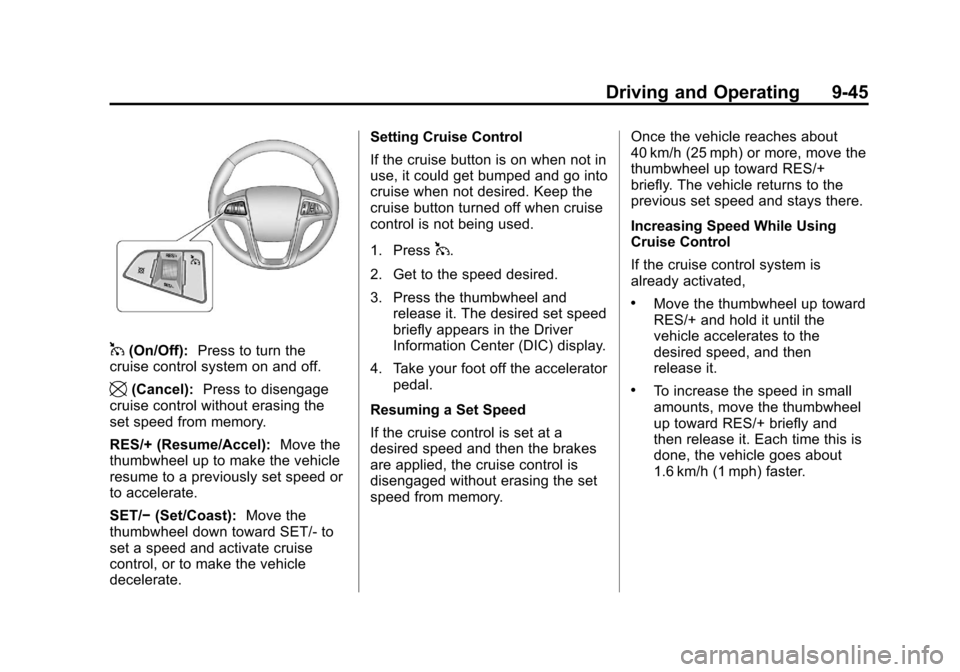
1(On/Off):Press to turn the
cruise control system on and off.
\(Cancel): Press to disengage
cruise control without erasing the
set speed from memory.
RES/+ (Resume/Accel): Move the
thumbwheel up to make the vehicle
resume to a previously set speed or
to accelerate.
SET/− (Set/Coast): Move the
thumbwheel down toward SET/- to
set a speed and activate cruise
control, or to make the vehicle
decelerate. Setting Cruise Control
If the cruise button is on when not in
use, it could get bumped and go into
cruise when not desired. Keep the
cruise button turned off when cruise
control is not being used.
1. Press
1.
2. Get to the speed desired.
3. Press the thumbwheel and release it. The desired set speed
briefly appears in the Driver
Information Center (DIC) display.
4. Take your foot off the accelerator pedal.
Resuming a Set Speed
If the cruise control is set at a
desired speed and then the brakes
are applied, the cruise control is
disengaged without erasing the set
speed from memory. Once the vehicle reaches about
40 km/h (25 mph) or more, move the
thumbwheel up toward RES/+
briefly. The vehicle returns to the
previous set speed and stays there.
Increasing Speed While Using
Cruise Control
If the cruise control system is
already activated,
.Move the thumbwheel up toward
RES/+ and hold it until the
vehicle accelerates to the
desired speed, and then
release it.
.To increase the speed in small
amounts, move the thumbwheel
up toward RES/+ briefly and
then release it. Each time this is
done, the vehicle goes about
1.6 km/h (1 mph) faster.
Page 284 of 446
Black plate (46,1)Chevrolet Equinox Owner Manual - 2011
9-46 Driving and Operating
Reducing Speed While Using
Cruise Control
If the cruise control system is
already activated,
.Move the thumbwheel toward
SET/−and hold until the desired
lower speed is reached, then
release it.
.To slow down in small amounts,
move the thumbwheel toward
SET/− briefly. Each time this is
done, the vehicle goes about
1.6 km/h (1 mph) slower.
Passing Another Vehicle While
Using Cruise Control
Use the accelerator pedal to
increase the vehicle speed. When
you take your foot off the pedal, the
vehicle will slow down to the
previous set cruise speed.
Using Cruise Control on Hills
How well the cruise control works
on hills depends upon the vehicle
speed, load, and the steepness of
the hills. When going up steep hills, you might have to step on the
accelerator pedal to maintain the
vehicle speed. When going
downhill, you might have to brake or
shift to a lower gear to maintain the
vehicle's speed. When the brakes
are applied the cruise control is
disengaged.
Ending Cruise Control
There are three ways to end cruise
control:
.To disengage cruise control;
step lightly on the brake pedal.
The indicator light will go off.
.Press\.
.To turn off the cruise control,
press
1. The cruise control
cannot be resumed.
Erasing Speed Memory
The cruise control set speed is
erased from memory by pressing
the
1button or if the ignition is
turned off.
Object Detection
Systems
Ultrasonic Parking Assist
For vehicles with the Ultrasonic
Rear Parking Assist (URPA) system,
it assists the driver with parking
and avoiding objects while in
R (Reverse). URPA operates at
speeds less than 8 km/h (5 mph),
and the sensors on the rear bumper
detect objects up to 2.5 m (8 ft)
behind the vehicle, and at least
20 cm (8 in) off the ground.
Page 437 of 446

Black plate (3,1)Chevrolet Equinox Owner Manual - 2011
INDEX i-3
CleaningExterior Care . . . . . . . . . . . . . . . 10-86
Interior Care . . . . . . . . . . . . . . . . 10-90
Climate Control Systems . . . . . . . 8-1 Air Conditioning . . . . . . . . . . . . . . . 8-1
Automatic . . . . . . . . . . . . . . . . . . . . . . 8-3
Heating . . . . . . . . . . . . . . . . . . . . . . . . 8-1
Clock . . . . . . . . . . . . . . . . . . . . . . . 5-6, 5-7
Cluster, IP . . . . . . . . . . . . . . . . . . . . . . 5-9
Collision Damage Repair . . . . . 13-11
Compact Spare Tire . . . . . . . . . . 10-77
Compass . . . . . . . . . . . . . . . . . . . . . . . 5-5
Compass Messages . . . . . . . . . . . 5-27
Control of a Vehicle . . . . . . . . . . . . . 9-3
Convenience Net . . . . . . . . . . . . . . . 4-2
Convex Mirrors . . . . . . . . . . . . . . . . 2-14
Coolant Engine . . . . . . . . . . . . . . . . . . . . . . 10-18
Engine TemperatureGauge . . . . . . . . . . . . . . . . . . . . . . 5-11 Cooling System . . . . . . . . . . . . . . . 10-17
Engine Messages . . . . . . . . . . . . 5-27
Courtesy Transportation Program . . . . . . . . . . . . . . . . . . . . . . 13-9
Covers Cargo . . . . . . . . . . . . . . . . . . . . . . . . . . 4-2
Engine . . . . . . . . . . . . . . . . . . . . . . 10-10
Cruise Control . . . . . . . . . . . . . . . . . 9-44 Light . . . . . . . . . . . . . . . . . . . . . . . . . . 5-22
Messages . . . . . . . . . . . . . . . . . . . . 5-27
Cupholders . . . . . . . . . . . . . . . . . . . . . 4-1
Customer Assistance . . . . . . . . . . 13-4
Offices . . . . . . . . . . . . . . . . . . . . . . . . 13-3
Text Telephone (TTY)Users . . . . . . . . . . . . . . . . . . . . . . . 13-4
Customer Information
Service PublicationsOrdering Information . . . . . . 13-13
Customer Satisfaction Procedure . . . . . . . . . . . . . . . . . . . . 13-1D
Damage Repair, Collision . . . . . 13-11
Danger, Warnings, andCautions . . . . . . . . . . . . . . . . . . . . . . . . .v
Data Recorders, Event . . . . . . . 13-16
Daytime Running Lamps (DRL) . . . . . . . . . . . . . . . . . . 6-2
Defensive Driving . . . . . . . . . . . . . . . 9-2
Devices, Auxiliary . . . . . . . 7-28, 7-31
Dome Lamps . . . . . . . . . . . . . . . . . . . 6-4
Door Ajar Messages . . . . . . . . . . . . . . . 5-27
Locks . . . . . . . . . . . . . . . . . . . . . . . . . . 2-6
Power Locks . . . . . . . . . . . . . . . . . . . 2-7
Drive Systems All-Wheel Drive . . . . . . . 10-28, 9-38
Driver Information Center (DIC) . . . . . . . . . . . . . . . . . 5-22
Page 440 of 446

Black plate (6,1)Chevrolet Equinox Owner Manual - 2011
i-6 INDEX
Headlamps (cont.)High-Beam On Light . . . . . . . . . . 5-21
High/Low Beam Changer . . . . . . 6-2
Lamps On Reminder . . . . . . . . . 5-22
Heated Front Seats . . . . . . . . . . . . . 3-9
Heated Mirrors . . . . . . . . . . . . . . . . . 2-15
Heater Engine Coolant . . . . . . . . . . . . . . . 9-32
Heating and Air
Conditioning . . . . . . . . . . . . . . . 8-1, 8-3
High-Beam On Light . . . . . . . . . . . 5-21
Highway Hypnosis . . . . . . . . . . . . . 9-19
Hill and Mountain Roads . . . . . . . 9-19
Hill Start Assist (HSA) . . . . . . . . . 9-41
Hood . . . . . . . . . . . . . . . . . . . . . . . . . . 10-4
Horn . . . . . . . . . . . . . . . . . . . . . . . . . . . . 5-3
How to Wear Safety Belts Properly . . . . . . . . . . . . . . . . . . . . . . 3-15
I
Ignition Positions . . . . . . . . . . . . . . 9-28
Ignition Transmission Lock
Check . . . . . . . . . . . . . . . . . . . . . . . 10-30
Immobilizer . . . . . . . . . . . . . . . . . . . . 2-13
Infants and Young Children, Restraints . . . . . . . . . . . . . . . . . . . . 3-45 Instrument Cluster . . . . . . . . . . . . . . 5-9
Instrument Panel
Storage Area . . . . . . . . . . . . . . . . . . 4-1
Introduction . . . . . . . . . . . . . . . . . . .iii, 7-1
J
Jump Starting . . . . . . . . . . . . . . . . . 10-78
K
Key and Lock Messages . . . . . . . 5-29
Keyless Entry Remote (RKE) System . . . . . . . . 2-3
Keys . . . . . . . . . . . . . . . . . . . . . . . . . . . . 2-2
L
Labeling, Tire Sidewall . . . . . . . . 10-47
Lamps Daytime Running (DRL) . . . . . . . 6-2
Dome . . . . . . . . . . . . . . . . . . . . . . . . . . 6-4
Exterior Controls . . . . . . . . . . . . . . . 6-1
License Plate . . . . . . . . . . . . . . . 10-38
Malfunction Indicator . . . . . . . . . 5-14
On Reminder . . . . . . . . . . . . . . . . . 5-22
Reading . . . . . . . . . . . . . . . . . . . . . . . 6-4
Lap-Shoulder Belt . . . . . . . . . . . . . 3-20 LATCH System
Replacing Parts After a
Crash . . . . . . . . . . . . . . . . . . . . . . . 3-57
Latch, Lower Anchors and Tethers for Children . . . . . . . . . . 3-52
Liftgate Carbon Monoxide . . . . . . . . . 2-8, 2-9
Lighting Entry . . . . . . . . . . . . . . . . . . . . . . . . . . 6-4
Illumination Control . . . . . . . . . . . . 6-4
Lights
Airbag Readiness . . . . . . . . . . . . . 5-12
Antilock Brake System(ABS) Warning . . . . . . . . . . . . . . 5-17
Brake System Warning . . . . . . . 5-16
Charging System . . . . . . . . . . . . . 5-13
Cruise Control . . . . . . . . . . . . . . . . 5-22
Engine Oil Pressure . . . . . . . . . . 5-20
Flash-to-Pass . . . . . . . . . . . . . . . . . . 6-2
Front Fog Lamps . . . . . . . . . . . . . 5-21
Fuel Economy . . . . . . . . . . . . . . . . 5-20
High-Beam On . . . . . . . . . . . . . . . . 5-21
High/Low Beam Changer . . . . . . 6-2
Low Fuel Warning . . . . . . . . . . . . 5-21
Safety Belt Reminders . . . . . . . . 5-11
Security . . . . . . . . . . . . . . . . . . . . . . 5-21