CD player CHEVROLET EQUINOX 2011 2.G Owners Manual
[x] Cancel search | Manufacturer: CHEVROLET, Model Year: 2011, Model line: EQUINOX, Model: CHEVROLET EQUINOX 2011 2.GPages: 446, PDF Size: 6.68 MB
Page 1 of 446

Black plate (1,1)Chevrolet Equinox Owner Manual - 2011
2011 Chevrolet Equinox Owner ManualM
In Brief. . . . . . . . . . . . . . . . . . . . . . . . 1-1
Instrument Panel . . . . . . . . . . . . . . 1-2
Initial Drive Information . . . . . . . . 1-4
Vehicle Features . . . . . . . . . . . . . 1-19
Performance and Maintenance . . . . . . . . . . . . . . . . 1-24
Keys, Doors and Windows . . . 2-1
Keys and Locks . . . . . . . . . . . . . . . 2-2
Doors . . . . . . . . . . . . . . . . . . . . . . . . . . 2-8
Vehicle Security . . . . . . . . . . . . . . 2-12
Exterior Mirrors . . . . . . . . . . . . . . . 2-14
Interior Mirrors . . . . . . . . . . . . . . . . 2-16
Windows . . . . . . . . . . . . . . . . . . . . . 2-16
Roof . . . . . . . . . . . . . . . . . . . . . . . . . . 2-19
Seats and Restraints . . . . . . . . . 3-1
Head Restraints . . . . . . . . . . . . . . . 3-2
Front Seats . . . . . . . . . . . . . . . . . . . . 3-3
Rear Seats . . . . . . . . . . . . . . . . . . . 3-10
Safety Belts . . . . . . . . . . . . . . . . . . 3-11
Airbag System . . . . . . . . . . . . . . . . 3-27
Child Restraints . . . . . . . . . . . . . . 3-43 Storage
. . . . . . . . . . . . . . . . . . . . . . . 4-1
Storage Compartments . . . . . . . . 4-1
Additional Storage Features . . . 4-2
Roof Rack System . . . . . . . . . . . . . 4-3
Instruments and Controls . . . . 5-1
Controls . . . . . . . . . . . . . . . . . . . . . . . 5-2
Warning Lights, Gauges, and
Indicators . . . . . . . . . . . . . . . . . . . . 5-8
Information Displays . . . . . . . . . . 5-22
Vehicle Messages . . . . . . . . . . . . 5-26
Vehicle Personalization . . . . . . . 5-32
Lighting . . . . . . . . . . . . . . . . . . . . . . . 6-1
Exterior Lighting . . . . . . . . . . . . . . . 6-1
Interior Lighting . . . . . . . . . . . . . . . . 6-4
Lighting Features . . . . . . . . . . . . . . 6-4
Infotainment System . . . . . . . . . 7-1
Introduction . . . . . . . . . . . . . . . . . . . . 7-1
Radio . . . . . . . . . . . . . . . . . . . . . . . . . 7-11
Audio Players . . . . . . . . . . . . . . . . 7-19
Rear Seat Infotainment . . . . . . . 7-33
Phone . . . . . . . . . . . . . . . . . . . . . . . . 7-46 Climate Controls
. . . . . . . . . . . . . 8-1
Climate Control Systems . . . . . . 8-1
Air Vents . . . . . . . . . . . . . . . . . . . . . . . 8-5
Maintenance . . . . . . . . . . . . . . . . . . . 8-6
Driving and Operating . . . . . . . . 9-1
Driving Information . . . . . . . . . . . . . 9-2
Starting and Operating . . . . . . . 9-28
Engine Exhaust . . . . . . . . . . . . . . 9-34
Automatic Transmission . . . . . . 9-35
Drive Systems . . . . . . . . . . . . . . . . 9-38
Brakes . . . . . . . . . . . . . . . . . . . . . . . 9-39
Ride Control Systems . . . . . . . . 9-41
Cruise Control . . . . . . . . . . . . . . . . 9-44
Object Detection Systems . . . . 9-46
Fuel . . . . . . . . . . . . . . . . . . . . . . . . . . 9-53
Towing . . . . . . . . . . . . . . . . . . . . . . . 9-59
Conversions and Add-Ons . . . 9-68
Page 9 of 446

Black plate (3,1)Chevrolet Equinox Owner Manual - 2011
In Brief 1-3
A.Air Vents on page 8‑5.
B. Turn and Lane‐Change Lever. See Turn and Lane-Change
Signals on page 6‑3.
Exterior Lamp Controls on
page 6‑1.
Fog Lamps on page 6‑3
(If Equipped).
C. Instrument Cluster on page 5‑9.
D. Windshield Wiper/Washer on
page 5‑4.
Rear Window Wiper/Washer on
page 5‑5.
E. Power Door Locks on page 2‑7.
F. Instrument Panel Storage on
page 4‑1.
G. Safety Locks on page 2‑8.
H. AM-FM Radio on page 7‑11.
Navigation System
(If Equipped). See Navigation
System Manual. I. Data Link Connector (DLC).
See Malfunction Indicator Lamp
on page 5‑14.
J. Cruise Control on page 9‑44.
K. Instrument Panel Illumination
Control on page 6‑4.
L. Steering Wheel Adjustment on
page 5‑2.
M. Horn on page 5‑3.
N. Steering Wheel Controls on
page 5‑3.
O. Ignition Positions on page 9‑28.
P. Climate Control Systems on
page 8‑1 (If Equipped).
Automatic Climate Control
System on page 8‑3
(If Equipped).
Q. Shift Lever. See Shifting Into
Park on page 9‑32.
R. Fuel Economy Mode on
page 9‑38 (If Equipped). S.
StabiliTrak®System on
page 9‑43.
T. Cupholders on page 4‑1.
U. Power Outlets on page 5‑7.
V. CD Player on page 7‑19.
W. Driver Information Center Buttons (If Equipped). See
Driver Information Center (DIC)
on page 5‑22.
X. Hazard Warning Flashers on
page 6‑3.
Y. Glove Box on page 4‑1.
Page 27 of 446
Black plate (21,1)Chevrolet Equinox Owner Manual - 2011
In Brief 1-21
Portable Audio Devices
This vehicle may have a 3.5 mm
(1/8 in) auxiliary input and a USB
port located in the center console.
External devices such as iPods
®,
laptop computers, MP3 players,
CD changers, and USB storage
devices may be connected,
depending on the audio system.
For more information, see Auxiliary
Devices (Radio with CD) on
page 7‑28 orAuxiliary Devices
(Radio with CD/DVD/MEM) on
page 7‑31.
Bluetooth®
The Bluetooth®system allows users
with a Bluetooth-enabled cell phone
to make and receive hands-free
calls using the vehicle audio
system, microphone, and controls.
The Bluetooth-enabled cell phone
must be paired with the in-vehicle
Bluetooth system before it can be
used in the vehicle. Not all phones
will support all functions. See
Bluetooth (Overview) on
page 7‑46 orBluetooth
(Infotainment Controls) on
page 7‑47 orBluetooth
(Voice Recognition) on page 7‑51.
Steering Wheel Controls
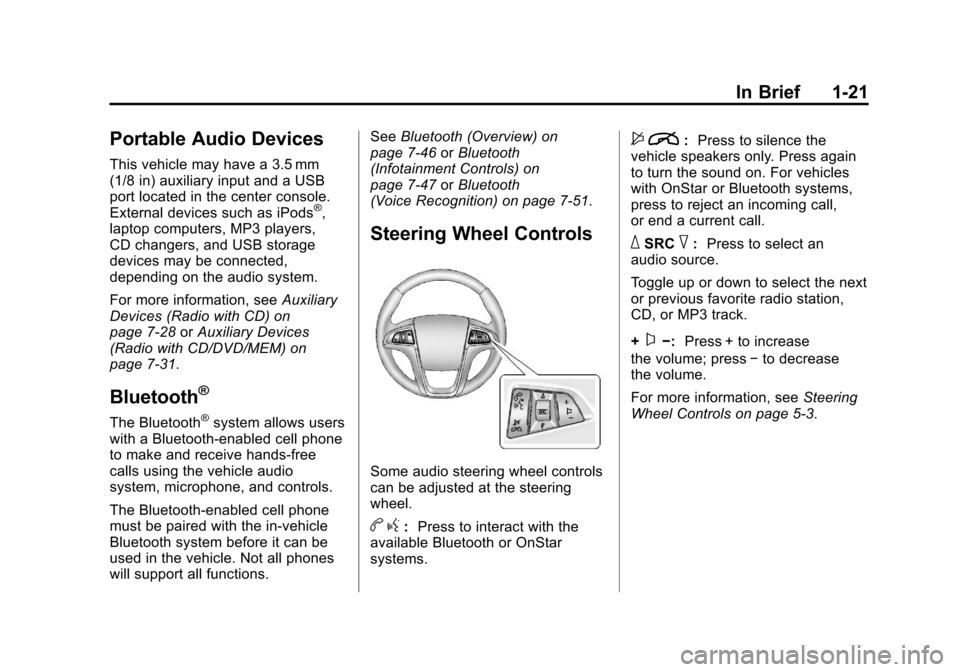
Some audio steering wheel controls
can be adjusted at the steering
wheel.
b g: Press to interact with the
available Bluetooth or OnStar
systems.
$ i: Press to silence the
vehicle speakers only. Press again
to turn the sound on. For vehicles
with OnStar or Bluetooth systems,
press to reject an incoming call,
or end a current call.
_SRC^: Press to select an
audio source.
Toggle up or down to select the next
or previous favorite radio station,
CD, or MP3 track.
+
x−: Press + to increase
the volume; press −to decrease
the volume.
For more information, see Steering
Wheel Controls on page 5‑3.
Page 30 of 446
Black plate (24,1)Chevrolet Equinox Owner Manual - 2011
1-24 In Brief
Roof Rack System
The roof rack cross rails can be
locked in four positions along the
roof rack side rails. Lift the lever to
release and move the cross rail.
Push the lever down to completely
engage into the side rail holes. Slide
the cross rails back and forth until
the lock pins engage in the holes
and a click is heard.
When the roof rack is not in use,
lock one cross rail at the furthest
forward position and lock the other
cross rail at the furthest rearward
position to reduce wind noise. See
Roof Rack System on page 4‑3.
Power Outlets
The accessory power outlets
can be used to connect electrical
equipment, such as a cell phone or
MP3 player.
There are four accessory power
outlets in the following locations:
below the CD slot, inside the center
console storage, on the rear of the
center console storage, and in the
rear cargo compartment.
To use the outlets, remove the cover
and close when not in use.
SeePower Outlets on page 5‑7.
Performance and
Maintenance
Traction Control
System (TCS)
The traction control system limits
wheel spin. The system is on when
the vehicle is started.
.To turn off traction control, press
and release
glocated on the
console.
iilluminates and the
appropriate DIC message
displays. See Vehicle Messages
on page 5‑26.
.Press and releasegagain to
turn traction control back on.
For more information, see Traction
Control System (TCS) on
page 9‑41.
Page 131 of 446
Black plate (7,1)Chevrolet Equinox Owner Manual - 2011
Instruments and Controls 5-7
Clock (Without Date
Display)
The infotainment system controls,
located on the instrument panel, are
used to access the time and date
settings through the menu system.
SeeOperation on page 7‑7 for
information about how to use the
menu system.
Setting the Time
1. Turn the infotainment system ON.
2. Press the CONFIG button and select Time Settings, or press
the
Hbutton.
3. Select Set Time.
4. Turn the MENU/SEL knob to adjust the highlighted value.
5. Press the MENU/SEL knob to select the next value. 6. To save the time and return to
the Time Settings menu, press
the
}BACK button at any time
or press the SELECT button
after adjusting the minutes.
Setting the 12/24 Hour Format
1. Turn the infotainment system ON.
2. Press the CONFIG button and select Time Settings, or press
the
Hbutton.
3. Highlight 12/24 Hour Format.
4. Press the MENU/SEL knob to select the 12 hour or 24 hour
display format.
Power Outlets
The accessory power outlets can
be used to connect electrical
equipment, such as a cell phone or
MP3 player. There are four accessory power
outlets in the following locations:
below the CD slot, inside the center
console storage, on the rear of the
center console storage, and in the
rear cargo compartment.
To use the outlets, remove the cover
and close when not in use.
Notice:
Leaving electrical
equipment plugged in for an
extended period of time while the
vehicle is off will drain the
battery. Always unplug electrical
equipment when not in use and
do not plug in equipment that
exceeds the maximum 20 ampere
rating.
Certain accessory plugs may not be
compatible with the accessory
power outlets and could overload
vehicle and adapter fuses. If a
problem is experienced, see
your dealer.
Page 169 of 446
Black plate (1,1)Chevrolet Equinox Owner Manual - 2011
Infotainment System 7-1
Infotainment
System
Introduction
Introduction . . . . . . . . . . . . . . . . . . . 7-1
Theft-Deterrent Feature . . . . . . . 7-2
Overview (Radio with CD) . . . . . 7-3
Overview (Radio with CD/DVD/MEM) . . . . . . . . . . . . . . . . . . 7-5
Operation . . . . . . . . . . . . . . . . . . . . . 7-7
Radio
AM-FM Radio . . . . . . . . . . . . . . . . 7-11
Satellite Radio . . . . . . . . . . . . . . . 7-14
Radio Reception . . . . . . . . . . . . . 7-18
Multi-Band Antenna . . . . . . . . . . 7-18
Audio Players
CD Player . . . . . . . . . . . . . . . . . . . 7-19
CD/DVD Player . . . . . . . . . . . . . . 7-21
Mass Storage Media (MEM) . . . . . . . . . . . . . . . 7-24
Auxiliary Devices (Radio
with CD) . . . . . . . . . . . . . . . . . . . . 7-28
Auxiliary Devices (Radio with CD/DVD/MEM) . . . . . . . . . . . . . 7-31
Rear Seat Infotainment
Rear Seat Entertainment(RSE) System . . . . . . . . . . . . . . 7-33
Rear Seat Audio (RSA) System . . . . . . . . . . . . . . . . . . . . . 7-43
Phone
Bluetooth (Overview) . . . . . . . . 7-46
Bluetooth (InfotainmentControls) . . . . . . . . . . . . . . . . . . . 7-47
Bluetooth (Voice Recognition) . . . . . . . . . . . . . . . 7-51
Introduction
Read the following pages to
become familiar with the audio
system's features.
{WARNING
Taking your eyes off the road
for extended periods could cause
a crash resulting in injury or
death to you or others. Do not
give extended attention to
entertainment tasks while driving.
This system provides access to
many audio and non‐audio listings.
Page 172 of 446

Black plate (4,1)Chevrolet Equinox Owner Manual - 2011
7-4 Infotainment System
F. FAV
.Radio: Opens the
favorites list.
G. TONE
.Opens the tone menu.
H. CONFIG
.Opens the settings menu.
I. MENU/SEL
.Press: Opens the menus
and selects menu items.
.Turn: Highlights menu
items or sets values while
in a menu. Manually
selects radio stations while
listening to the radio.
J. CD Slot
.Insert a CD.
K.
k
.CD: Pauses the CD. L. CD
.Selects the CD player
when listening to a
different audio source.
M.
X(CD Eject)
.Removes a disc from the
CD slot.
N.
lSEEK
.Radio: Seeks the next
station.
.CD: Selects the next track
or fast forwards within a
track.
O. INFO
.Radio: Shows available
information about the
current station.
.CD: Shows available
information about the
current track. P.
5/>
.Opens the phone
main menu.
.Mutes the audio system.
Q.
H
.Opens the clock menu.
R.
}BACK
.Menu: Moves one
level back.
.Character Input: Deletes
the last character.
Page 177 of 446
Black plate (9,1)Chevrolet Equinox Owner Manual - 2011
Infotainment System 7-9
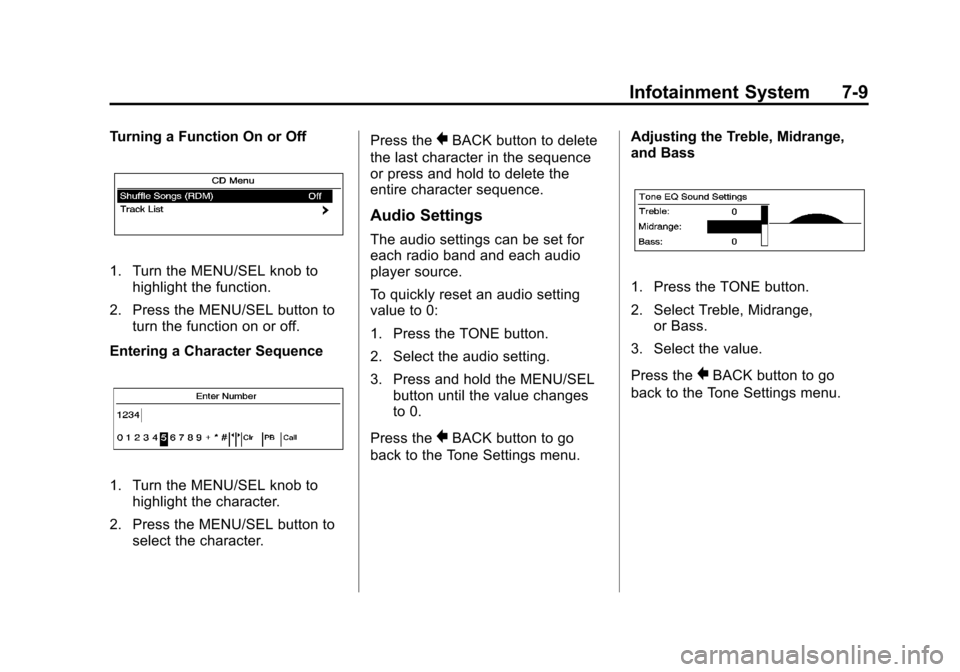
Turning a Function On or Off
1. Turn the MENU/SEL knob tohighlight the function.
2. Press the MENU/SEL button to turn the function on or off.
Entering a Character Sequence
1. Turn the MENU/SEL knob to highlight the character.
2. Press the MENU/SEL button to select the character. Press the
}BACK button to delete
the last character in the sequence
or press and hold to delete the
entire character sequence.
Audio Settings
The audio settings can be set for
each radio band and each audio
player source.
To quickly reset an audio setting
value to 0:
1. Press the TONE button.
2. Select the audio setting.
3. Press and hold the MENU/SEL button until the value changes
to 0.
Press the
}BACK button to go
back to the Tone Settings menu. Adjusting the Treble, Midrange,
and Bass
1. Press the TONE button.
2. Select Treble, Midrange,
or Bass.
3. Select the value.
Press the
}BACK button to go
back to the Tone Settings menu.
Page 187 of 446
Black plate (19,1)Chevrolet Equinox Owner Manual - 2011
Infotainment System 7-19
Audio Players
CD Player
The CD player can play audio CDs
and MP3 CDs.
The CD player will not play
8 cm (3 in) CDs.
Care of CDs
Sound quality can be reduced due
to disc quality, recording method,
quality of the music recorded, and
how the disc has been handled.
Handle discs carefully and store
them in their original cases or other
protective cases away from direct
sunlight and dust. If the bottom
surface of a disc is damaged, the
disc may not play properly or at all.
Do not touch the bottom surface of
a disc while handling it; this could
damage the surface. Pick up discs
by grasping the outer edges or the
edge of the hole and the outer edge.
If the bottom surface of a disc is
dirty, take a soft lint‐free cloth,
or dampen a clean soft cloth in amild neutral detergent solution
mixed with water, and clean it.
Wipe the disc from the center to the
outer edge.
Care of the CD Player
Do not add a label to a disc, as it
could get caught in the CD player.
If a label is needed, label the top of
the recorded disc with a
marking pen.
Do not use disc lens cleaners
because they could contaminate the
lens of the disc optics and damage
the CD player.
Notice:
If a label is added to a
CD, or more than one CD is
inserted into the slot at a time,
or an attempt is made to play
scratched or damaged CDs, the
CD player could be damaged.
While using the CD player, use
only CDs in good condition
without any label, load one CD at
a time, and keep the CD player
and the loading slot free of
foreign materials, liquids,
and debris.
Control Buttons
The buttons used to control the
CD player are:
CD: Press to choose between the
CD and AUX player.
lSEEK orgSEEK: Press to
select tracks or to fast forward or
rewind within a track.
INFO: Press to display additional
information about the CD that may
be available.
MENU/SEL: Turn to select tracks.
X(Eject):Press to remove
the CD.
k: Press to pause a CD or
MP3 track; press again to resume
playback.
Inserting a CD
With the printed side facing up,
insert a disc into the CD slot until it
is drawn in.
Page 188 of 446
Black plate (20,1)Chevrolet Equinox Owner Manual - 2011
7-20 Infotainment System
Removing a CD
Press theXbutton.
The disc is pushed out of the
CD slot.
If the disc is not removed after it is
ejected, it is pulled back in after a
few seconds.
Playing a CD or MP3 CD
Press the CD button. If there is a
disc in the player it begins playing.
Information about the disc and
current track is shown on the
display depending on the
data stored.
Selecting a CD Track
Using the control buttons:
.PressgSEEK orlSEEK to
select the previous or next track.
.Turn the MENU/SEL knob. Using the CD Menu:
1. Press the MENU/SEL knob.
2. Select Tracks list.
3. Select the track.
Playing Tracks in Random Order
Press the MENU/SEL knob and
then set Shuffle Songs to On.
Fast Forward and Rewind
Press and hold
lSEEK or
gSEEK to fast forward or
rewind within the current track.
Selecting an MP3 Track
Using the control buttons:
.PressgSEEK orlSEEK to
select the previous or next track.
.Turn the MENU/SEL knob.
Using the CD Menu:
1. Press the MENU/SEL knob.
2. Select Playlists/Folders.
3. Select the playlist or folder.
4. Select the track. Searching for MP3 Tracks
The search feature may take some
time to display the information after
reading the disc due to the amount
of information stored on the disc.
FM automatically plays while the
disc is being read.
Tracks can be searched by:
.Playlists
.Artists
.Albums
.Song Titles
.Genres
.Folder View
To search for tracks:
1. Press the MENU/SEL knob.
2. Select Search.
3. Select: Playlists, Artists, Albums, Song Titles, Genres,
or Folder View.
4. Select the track.