keyless CHEVROLET EQUINOX 2013 2.G User Guide
[x] Cancel search | Manufacturer: CHEVROLET, Model Year: 2013, Model line: EQUINOX, Model: CHEVROLET EQUINOX 2013 2.GPages: 388, PDF Size: 6.53 MB
Page 40 of 388
Black plate (10,1)Chevrolet Equinox Owner Manual - 2013 - CRC - 5/21/12
2-10 Keys, Doors, and Windows
Choose the power liftgate mode by
turning the dial on the switch until
the indicator lines up with the
desired position. The vehicle must
be in P (Park).
The three modes are:
MAX:The liftgate power opens to
the full open height.
3/4: The liftgate power opens to a
reduced open height that can be set
by the vehicle operator. Use this
setting to prevent the liftgate from
opening into overhead obstructions
such as a garage door or roof
mounted cargo during power
operation. The liftgate can still be
fully opened manually.
OFF: The liftgate only operates
manually in this position.
Manual operation of a liftgate that
also has power operation requires
more effort than a standard manual
liftgate. The liftgate can be opened manually
by pressing the touch pad under the
liftgate handle, with the doors
unlocked and lifting up.
In either the MAX or the 3/4 mode,
the liftgate can be power opened
and closed by:
.Pressing and holdingVon the
RKE transmitter until the liftgate
starts moving. See Remote
Keyless Entry (RKE) System
Operation on page 2‑3.
.Pressing the power liftgate
button in the center of the mode
switch on the overhead console,
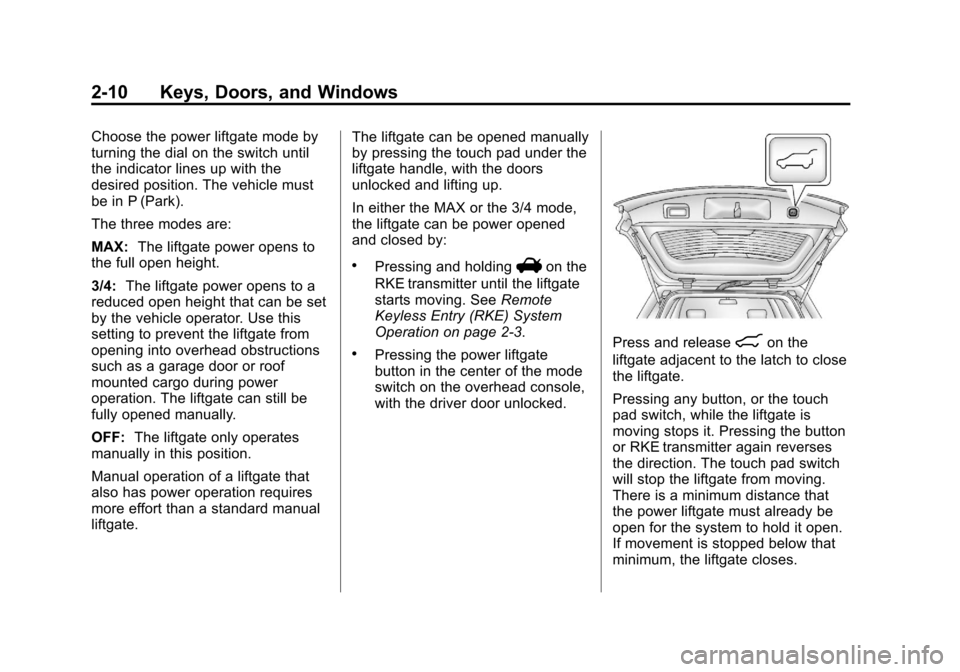
with the driver door unlocked.Press and release8on the
liftgate adjacent to the latch to close
the liftgate.
Pressing any button, or the touch
pad switch, while the liftgate is
moving stops it. Pressing the button
or RKE transmitter again reverses
the direction. The touch pad switch
will stop the liftgate from moving.
There is a minimum distance that
the power liftgate must already be
open for the system to hold it open.
If movement is stopped below that
minimum, the liftgate closes.
Page 56 of 388
Black plate (6,1)Chevrolet Equinox Owner Manual - 2013 - CRC - 5/21/12
3-6 Seats and Restraints
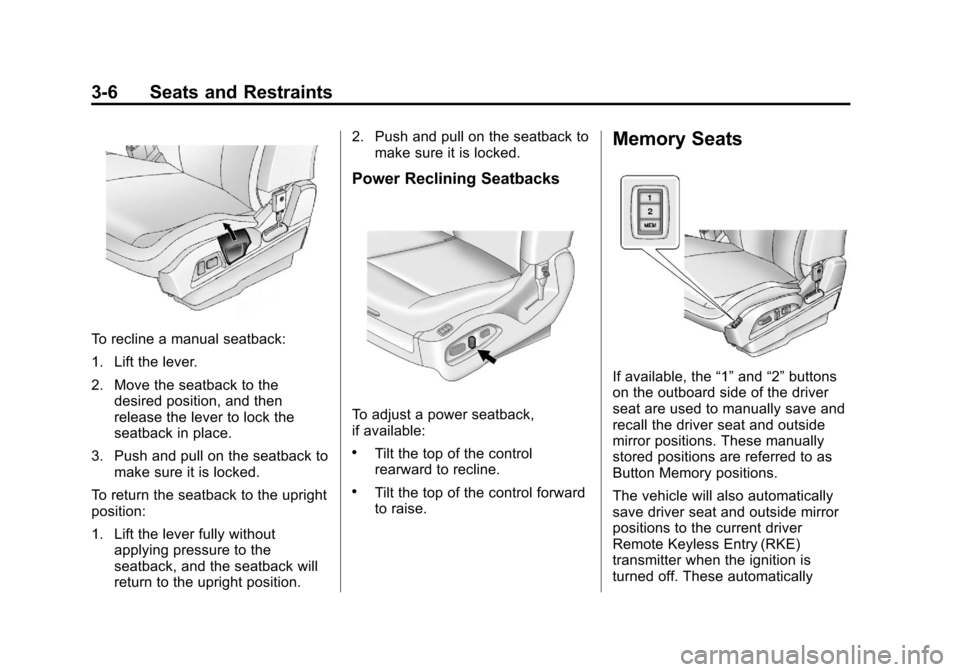
To recline a manual seatback:
1. Lift the lever.
2. Move the seatback to thedesired position, and then
release the lever to lock the
seatback in place.
3. Push and pull on the seatback to make sure it is locked.
To return the seatback to the upright
position:
1. Lift the lever fully without applying pressure to the
seatback, and the seatback will
return to the upright position. 2. Push and pull on the seatback to
make sure it is locked.
Power Reclining Seatbacks
To adjust a power seatback,
if available:
.Tilt the top of the control
rearward to recline.
.Tilt the top of the control forward
to raise.
Memory Seats
If available, the “1”and “2”buttons
on the outboard side of the driver
seat are used to manually save and
recall the driver seat and outside
mirror positions. These manually
stored positions are referred to as
Button Memory positions.
The vehicle will also automatically
save driver seat and outside mirror
positions to the current driver
Remote Keyless Entry (RKE)
transmitter when the ignition is
turned off. These automatically
Page 57 of 388
Black plate (7,1)Chevrolet Equinox Owner Manual - 2013 - CRC - 5/21/12
Seats and Restraints 3-7
stored positions are referred to as
RKE Memory positions. See
Remote Keyless Entry (RKE)
System Operation on page 2‑3.
Storing Button Memory Positions
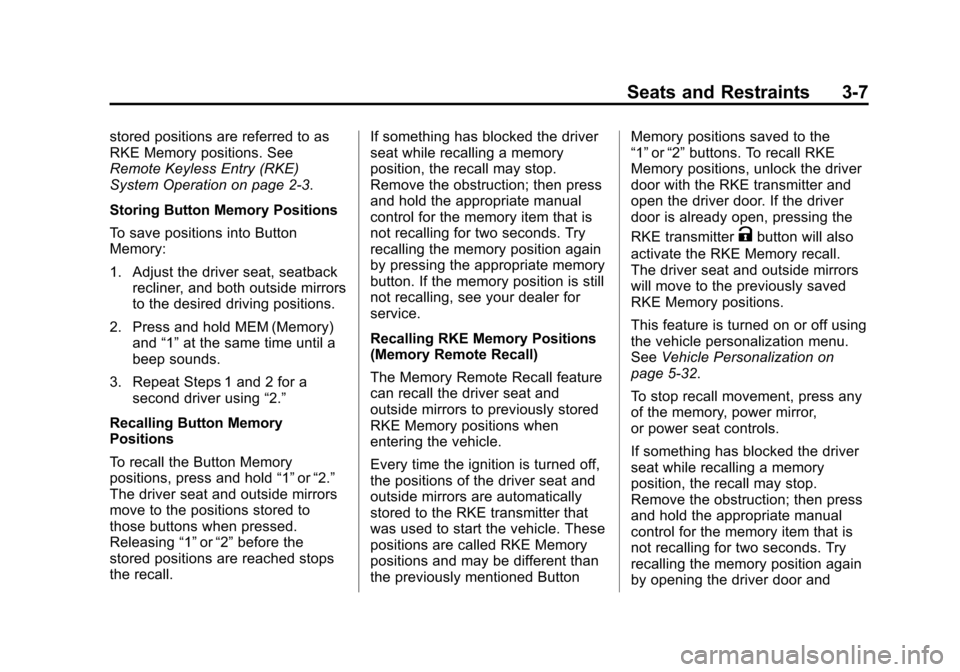
To save positions into Button
Memory:
1. Adjust the driver seat, seatbackrecliner, and both outside mirrors
to the desired driving positions.
2. Press and hold MEM (Memory) and “1”at the same time until a
beep sounds.
3. Repeat Steps 1 and 2 for a second driver using “2.”
Recalling Button Memory
Positions
To recall the Button Memory
positions, press and hold “1”or“2.”
The driver seat and outside mirrors
move to the positions stored to
those buttons when pressed.
Releasing “1”or“2” before the
stored positions are reached stops
the recall. If something has blocked the driver
seat while recalling a memory
position, the recall may stop.
Remove the obstruction; then press
and hold the appropriate manual
control for the memory item that is
not recalling for two seconds. Try
recalling the memory position again
by pressing the appropriate memory
button. If the memory position is still
not recalling, see your dealer for
service.
Recalling RKE Memory Positions
(Memory Remote Recall)
The Memory Remote Recall feature
can recall the driver seat and
outside mirrors to previously stored
RKE Memory positions when
entering the vehicle.
Every time the ignition is turned off,
the positions of the driver seat and
outside mirrors are automatically
stored to the RKE transmitter that
was used to start the vehicle. These
positions are called RKE Memory
positions and may be different than
the previously mentioned ButtonMemory positions saved to the
“1”
or“2” buttons. To recall RKE
Memory positions, unlock the driver
door with the RKE transmitter and
open the driver door. If the driver
door is already open, pressing the
RKE transmitter
Kbutton will also
activate the RKE Memory recall.
The driver seat and outside mirrors
will move to the previously saved
RKE Memory positions.
This feature is turned on or off using
the vehicle personalization menu.
See Vehicle Personalization on
page 5‑32.
To stop recall movement, press any
of the memory, power mirror,
or power seat controls.
If something has blocked the driver
seat while recalling a memory
position, the recall may stop.
Remove the obstruction; then press
and hold the appropriate manual
control for the memory item that is
not recalling for two seconds. Try
recalling the memory position again
by opening the driver door and
Page 134 of 388
Black plate (28,1)Chevrolet Equinox Owner Manual - 2013 - CRC - 5/21/12
5-28 Instruments and Controls
Engine Power Messages
ENGINE POWER IS REDUCED
This message displays when the
vehicle's engine power is reduced.
Reduced engine power can affect
the vehicle's ability to accelerate.
If this message is on, but there is no
reduction in performance, proceed
to your destination. The
performance may be reduced the
next time the vehicle is driven. The
vehicle may be driven at a reduced
speed while this message is on, but
maximum acceleration and speed
may be reduced. Anytime this
message stays on, the vehicle
should be taken to your dealer for
service as soon as possible.
Fuel System Messages
ECO MODE ON
On some models, this message
displays when the fuel economy
mode has been turned on bypressing the eco button near the
shift lever. See
Fuel Economy Mode
on page 9‑29 for more information.
FUEL LEVEL LOW
This message displays when the
vehicle is low on fuel. Refuel as
soon as possible.
TIGHTEN GAS CAP
This message displays when the
fuel cap is not on tight. Tighten the
fuel cap.
Key and Lock Messages
REPLACE BATTERY IN
REMOTE KEY
This message displays when the
battery in the Remote Keyless Entry
(RKE) transmitter needs to be
replaced.
Object Detection System
Messages
FORWARD COLLISION
ALERT OFF
If your vehicle has the Forward
Collision Alert (FCA) system, this
message may display if the FCA
system cannot activate due to a
temporary condition. See Forward
Collision Alert (FCA) System on
page 9‑37.
FRONT CAMERA BLOCKED,
CLEAN WINDSHIELD
This message displays when the
Lane Departure Warning (LDW) and
Forward Collision Alert (FCA)
systems are disabled because the
camera view is blocked and cannot
operate properly. It may also
activate during heavy rain or due to
road spray. To clean the system,
clean the outside of the windshield
area in front of the LDW/FCA
camera sensor.
Page 151 of 388
Black plate (5,1)Chevrolet Equinox Owner Manual - 2013 - CRC - 5/21/12
Lighting 6-5
1(Door):The lamps come on
automatically when a door is
opened.
+(On): Turns the dome lamps on.
The dome lamps can also be turned
on and off by pressing the buttons
next to the lamps.
Reading Lamps
The reading lamps are located on
the overhead console. These lamps
come on automatically when any
door is opened.
For manual operation, press the
button next to each lamp to turn it
on or off.
Lighting Features
Entry Lighting
The dome lamp, cargo lamp, and
foot lamp inside the vehicle come
on when any door is opened, if the
dome lamp is in the door position. In
addition, these lamps come on
when the Remote Keyless Entry
(RKE) unlock button is pressed.
They stay on for 20 seconds or until
a door is opened. After the door is
opened and then closed, the light
remains on for 20 seconds, or until
the ignition is turned to ON/RUN.
Battery Load
Management
The vehicle has Electric Power
Management (EPM) that estimates
the battery's temperature and state
of charge. It then adjusts the voltage
for best performance and extended
life of the battery.
When the battery's state of charge
is low, the voltage is raised slightly
to quickly bring the charge back up.
When the state of charge is high,
the voltage is lowered slightly to
prevent overcharging. If the vehicle
has a voltmeter gauge or a voltage
display on the Driver Information
Center (DIC), you may see the
voltage move up or down. This is
normal. If there is a problem, an
alert will be displayed.
Page 254 of 388
Black plate (2,1)Chevrolet Equinox Owner Manual - 2013 - CRC - 5/21/12
10-2 Vehicle Care
When It Is Time for NewTires . . . . . . . . . . . . . . . . . . . . . . 10-50
Buying New Tires . . . . . . . . . . . 10-51
Different Size Tires and Wheels . . . . . . . . . . . . . . . . . . . 10-52
Uniform Tire Quality Grading . . . . . . . . . . . . . . . . . . . 10-53
Wheel Alignment and Tire Balance . . . . . . . . . . . . . . . . . . . 10-54
Wheel Replacement . . . . . . . . 10-55
Tire Chains . . . . . . . . . . . . . . . . . 10-55
If a Tire Goes Flat . . . . . . . . . . 10-56
Tire Changing . . . . . . . . . . . . . . 10-58
Compact Spare Tire . . . . . . . . 10-64
Jump Starting
Jump Starting . . . . . . . . . . . . . . 10-65
Towing
Towing the Vehicle . . . . . . . . . 10-68
Recreational Vehicle Towing . . . . . . . . . . . . . . . . . . . . 10-68
Appearance Care
Exterior Care . . . . . . . . . . . . . . . 10-71
Interior Care . . . . . . . . . . . . . . . . 10-74
Floor Mats . . . . . . . . . . . . . . . . . . 10-77
General Information
For service and parts needs, visit
your dealer. You will receive
genuine GM parts and GM-trained
and supported service people.
Genuine GM parts have one of
these marks:
California Proposition
65 Warning
Most motor vehicles, including this
one, contain and/or emit chemicals
known to the State of California to cause cancer and birth defects or
other reproductive harm. Engine
exhaust, many parts and systems,
many fluids, and some component
wear by-products contain and/or
emit these chemicals.
California Perchlorate
Materials Requirements
Certain types of automotive
applications, such as airbag
initiators, safety belt pretensioners,
and lithium batteries contained in
Remote Keyless Entry transmitters,
may contain perchlorate materials.
Special handling may be necessary.
For additional information, see
www.dtsc.ca.gov/hazardouswaste/
perchlorate.
Accessories and
Modifications
Adding non‐dealer accessories or
making modifications to the vehicle
can affect vehicle performance and
safety, including such things as
airbags, braking, stability, ride and
Page 319 of 388
Black plate (67,1)Chevrolet Equinox Owner Manual - 2013 - CRC - 5/21/12
Vehicle Care 10-67
{WARNING
An electric fan can start up even
when the engine is not running
and can injure you. Keep hands,
clothing and tools away from any
underhood electric fan.
5. The remote positive (+) terminal (1) is located on the
underhood fuse block, on the
driver side. Lift the red cap to
uncover the terminal.
The remote negative (−)
terminal (2) is a stud behind the
metal tab stamped with GND (−)
near the driver side strut tower.
6. The jumper cables should be in good working condition with no
loose or missing insulation. The
vehicles could be damaged if
they are not.
7. Connect the red positive (+) cable to the positive (+) terminal
on the vehicle with the dead battery. Use a remote
positive (+) terminal if the
vehicle has one.
8. Do not let the other end touch metal. Connect it to the
positive (+) terminal of the good
battery. Use a remote
positive (+) terminal if the
vehicle has one.
9. Connect the black negative (−) cable to the negative (−) terminal
of the good battery. Use a
remote negative (−) terminal if
the vehicle has one.
Do not let the other end touch
anything until the next step. The
other end of the negative (−)
cable does not go to the dead
battery. It goes to a heavy,
unpainted metal engine part or
to a remote negative (−) terminal
on the vehicle with the dead
battery.
10. Connect the other end of the negative (−) cable away from
the dead battery, but not near
engine parts that move. 11. Start the vehicle with the good
battery and run the engine.
12. Press the unlock symbol on the remote keyless entry
transmitter to disarm the
security system, if equipped.
13. Try to start the vehicle that had the dead battery. If it will not
start after a few tries, it needs
service.
Notice: If the jumper cables are
connected or removed in the
wrong order, electrical shorting
may occur and damage the
vehicle. The repairs would not be
covered by the vehicle warranty.
Always connect and remove the
jumper cables in the correct
order, making sure that the
cables do not touch each other or
other metal.
Jumper Cable Removal
Reverse the sequence exactly when
removing the jumper cables.
Page 365 of 388
Black plate (15,1)Chevrolet Equinox Owner Manual - 2013 - CRC - 5/21/12
Customer Information 13-15
system may result in the storage of
destinations, addresses, telephone
numbers, and other trip information.
See the infotainment manual for
information on stored data and for
deletion instructions.
Radio Frequency
Identification (RFID)
RFID technology is used in some
vehicles for functions such as tire
pressure monitoring and ignition
system security, as well as in
connection with conveniences such
as Remote Keyless Entry (RKE)
transmitters for remote door locking/
unlocking and starting, and
in-vehicle transmitters for garage
door openers. RFID technology in
GM vehicles does not use or record
personal information or link with any
other GM system containing
personal information.
Radio Frequency
Statement
This vehicle has systems that
operate on a radio frequency that
comply with Part 15 of the Federal
Communications Commission (FCC)
rules and with Industry Canada
Standards RSS‐GEN/210/220/310.
Operation is subject to the following
two conditions:
1. The device may not causeharmful interference.
2. The device must accept any interference received, including
interference that may cause
undesired operation of the
device.
Changes or modifications to any of
these systems by other than an
authorized service facility could void
authorization to use this equipment.
Page 382 of 388

Black plate (6,1)Chevrolet Equinox Owner Manual - 2013 - CRC - 5/21/12
i-6 INDEX
Infotainment . . . . . . . . . . . . . . . . . . . . 7-1
Infotainment System . . . . . . . . . . 13-14
Instrument Cluster . . . . . . . . . . . . . . 5-8
Instrument PanelStorage Area . . . . . . . . . . . . . . . . . . 4-1
Introduction . . . . . . . . . . . . . . . . . . . . . . . iii
J
Jump Starting . . . . . . . . . . . . . . . . . 10-65
K
Key and Lock Messages . . . . . . . 5-28
Keyless Entry Remote (RKE) System . . . . . . . . 2-3
Keys . . . . . . . . . . . . . . . . . . . . . . . . . . . . 2-1
L
Labeling, Tire Sidewall . . . . . . . . 10-38
Lamps Daytime Running (DRL) . . . . . . . 6-2
Dome . . . . . . . . . . . . . . . . . . . . . . . . . . 6-4
Exterior Controls . . . . . . . . . . . . . . . 6-1
License Plate . . . . . . . . . . . . . . . 10-29 Lamps (cont'd)
Malfunction Indicator . . . . . . . . . 5-13
On Reminder . . . . . . . . . . . . . . . . . 5-21
Reading . . . . . . . . . . . . . . . . . . . . . . . 6-5
Lane Departure Warning . . . . . . . 9-44
Lane Departure Warning Light . . . . . . . . . . . . . . . . . . . . . . . . . 5-17
Lap-Shoulder Belt . . . . . . . . . . . . . 3-12
LATCH System Replacing Parts after aCrash . . . . . . . . . . . . . . . . . . . . . . . 3-45
LATCH, Lower Anchors and Tethers for Children . . . . . . . . . . 3-40
Liftgate
Carbon Monoxide . . . . . . . . . . . . . . 2-8
Lighting Entry . . . . . . . . . . . . . . . . . . . . . . . . . . 6-5
Illumination Control . . . . . . . . . . . . 6-4
Lights Airbag Readiness . . . . . . . . . . . . . 5-11
Antilock Brake System(ABS) Warning . . . . . . . . . . . . . . 5-16
Brake System Warning . . . . . . . 5-15
Charging System . . . . . . . . . . . . . 5-13
Cruise Control . . . . . . . . . . . . . . . . 5-21
Engine Oil Pressure . . . . . . . . . . 5-19
Flash-to-Pass . . . . . . . . . . . . . . . . . . 6-2 Lights (cont'd)
Front Fog Lamp . . . . . . . . . . . . . . 5-21
Fuel Economy . . . . . . . . . . . . . . . . 5-20
High-Beam On . . . . . . . . . . . . . . . . 5-21
High/Low Beam Changer . . . . . . 6-1
Lane Departure Warning . . . . . . 5-17
Low Fuel Warning . . . . . . . . . . . . 5-20
Safety Belt Reminders . . . . . . . . 5-11
Security . . . . . . . . . . . . . . . . . . . . . . 5-20
StabiliTrak
®OFF . . . . . . . . . . . . . 5-18
Tire Pressure . . . . . . . . . . . . . . . . . 5-19
Traction Control System (TCS)/StabiliTrak
®. . . . . . . . . . 5-18
Traction Off . . . . . . . . . . . . . . . . . . . 5-17
Locks Door . . . . . . . . . . . . . . . . . . . . . . . . . . . 2-6
Power Door . . . . . . . . . . . . . . . . . . . . 2-7
Safety . . . . . . . . . . . . . . . . . . . . . . . . . 2-8
Loss of Control . . . . . . . . . . . . . . . . . 9-5
Low Fuel Warning Light . . . . . . . . 5-20
Lower Anchors and Tethers for Children (LATCH
System) . . . . . . . . . . . . . . . . . . . . . . 3-40
Lumbar Adjustment . . . . . . . . . . . . . 3-5 Front Seats . . . . . . . . . . . . . . . . . . . . 3-5
Page 385 of 388

Black plate (9,1)Chevrolet Equinox Owner Manual - 2013 - CRC - 5/21/12
INDEX i-9
Remote Keyless Entry(RKE) System . . . . . . . . . . . . . 2-2, 2-3
Remote Vehicle Start . . . . . . . . . . . 2-4
Replacement Bulbs . . . . . . . . . . . 10-30
Replacement Parts Airbags . . . . . . . . . . . . . . . . . . . . . . . 3-32
Maintenance . . . . . . . . . . . . . . . . .11-13
Replacing Airbag System . . . . . . 3-32
Replacing LATCH System Parts after a Crash . . . . . . . . . . . 3-45
Replacing Safety Belt
System Parts after a Crash . . . 3-18
Reporting Safety Defects Canadian Government . . . . . . 13-13
General Motors . . . . . . . . . . . . . 13-13
U.S. Government . . . . . . . . . . . 13-12
Restraints Where to Put . . . . . . . . . . . . . . . . . 3-38
Retained Accessory Power (RAP) . . . . . . . . . . . . . . . . . 9-22
Ride Control Systems
Messages . . . . . . . . . . . . . . . . . . . . 5-29
Roads Driving, Wet . . . . . . . . . . . . . . . . . . 9-10
Roadside Assistance
Program . . . . . . . . . . . . . . . . . . . . . . 13-5 Roof
Sunroof . . . . . . . . . . . . . . . . . . . . . . . 2-18
Roof Rack System . . . . . . . . . . . . . . 4-2
Rotation, Tires . . . . . . . . . . . . . . . . 10-49
Routing, Engine Drive Belt . . . . . 12-4
Running the Vehicle While Parked . . . . . . . . . . . . . . . . . . . . . . . 9-26
S
Safety Belts . . . . . . . . . . . . . . . . . . . 3-10
Care . . . . . . . . . . . . . . . . . . . . . . . . . . 3-17
Extender . . . . . . . . . . . . . . . . . . . . . . 3-17
How to Wear Safety BeltsProperly . . . . . . . . . . . . . . . . . . . . . 3-12
Lap-Shoulder Belt . . . . . . . . . . . . 3-12
Reminders . . . . . . . . . . . . . . . . . . . . 5-11
Replacing after a Crash . . . . . . 3-18
Use During Pregnancy . . . . . . . . 3-16
Safety Defects Reporting Canadian Government . . . . . . 13-13
General Motors . . . . . . . . . . . . . 13-13
U.S. Government . . . . . . . . . . . 13-12
Safety Locks . . . . . . . . . . . . . . . . . . . . 2-8
Safety System Check . . . . . . . . . . 3-17
Satellite Radio . . . . . . . . . . . . . . . . . . 7-9
Scheduling Appointments . . . . . . 13-7 Seats
Adjustment, Front . . . . . . . . . . . . . . 3-3
Head Restraints . . . . . . . . . . . . . . . 3-2
Heated Front . . . . . . . . . . . . . . . . . . 3-8
Lumbar Adjustment, Front . . . . . 3-5
Memory . . . . . . . . . . . . . . . . . . . . . . . . 3-6
Power Adjustment, Front . . . . . . 3-4
Rear . . . . . . . . . . . . . . . . . . . . . . . . . . . 3-9
Reclining Seatbacks . . . . . . . . . . . 3-5
Securing Child Restraints . . . . . . . . . . . . . . 3-46, 3-49
Security Light . . . . . . . . . . . . . . . . . . . . . . . . . . 5-20
Messages . . . . . . . . . . . . . . . . . . . . 5-30
OnStar
®. . . . . . . . . . . . . . . . . . . . . . 14-2
Vehicle . . . . . . . . . . . . . . . . . . . . . . . 2-12
Vehicle Alarm . . . . . . . . . . . . . . . . . 2-12
Service Accessories andModifications . . . . . . . . . . . . . . . . 10-2
Doing Your Own Work . . . . . . . . 10-3
Engine Soon Light . . . . . . . . . . . . 5-13
Maintenance Records . . . . . . .11-15
Maintenance, General Information . . . . . . . . . . . . . . . . . . 11-1
Parts Identification Label . . . . . 12-1