remote start CHEVROLET EQUINOX 2013 2.G User Guide
[x] Cancel search | Manufacturer: CHEVROLET, Model Year: 2013, Model line: EQUINOX, Model: CHEVROLET EQUINOX 2013 2.GPages: 388, PDF Size: 6.53 MB
Page 40 of 388
Black plate (10,1)Chevrolet Equinox Owner Manual - 2013 - CRC - 5/21/12
2-10 Keys, Doors, and Windows
Choose the power liftgate mode by
turning the dial on the switch until
the indicator lines up with the
desired position. The vehicle must
be in P (Park).
The three modes are:
MAX:The liftgate power opens to
the full open height.
3/4: The liftgate power opens to a
reduced open height that can be set
by the vehicle operator. Use this
setting to prevent the liftgate from
opening into overhead obstructions
such as a garage door or roof
mounted cargo during power
operation. The liftgate can still be
fully opened manually.
OFF: The liftgate only operates
manually in this position.
Manual operation of a liftgate that
also has power operation requires
more effort than a standard manual
liftgate. The liftgate can be opened manually
by pressing the touch pad under the
liftgate handle, with the doors
unlocked and lifting up.
In either the MAX or the 3/4 mode,
the liftgate can be power opened
and closed by:
.Pressing and holdingVon the
RKE transmitter until the liftgate
starts moving. See Remote
Keyless Entry (RKE) System
Operation on page 2‑3.
.Pressing the power liftgate
button in the center of the mode
switch on the overhead console,
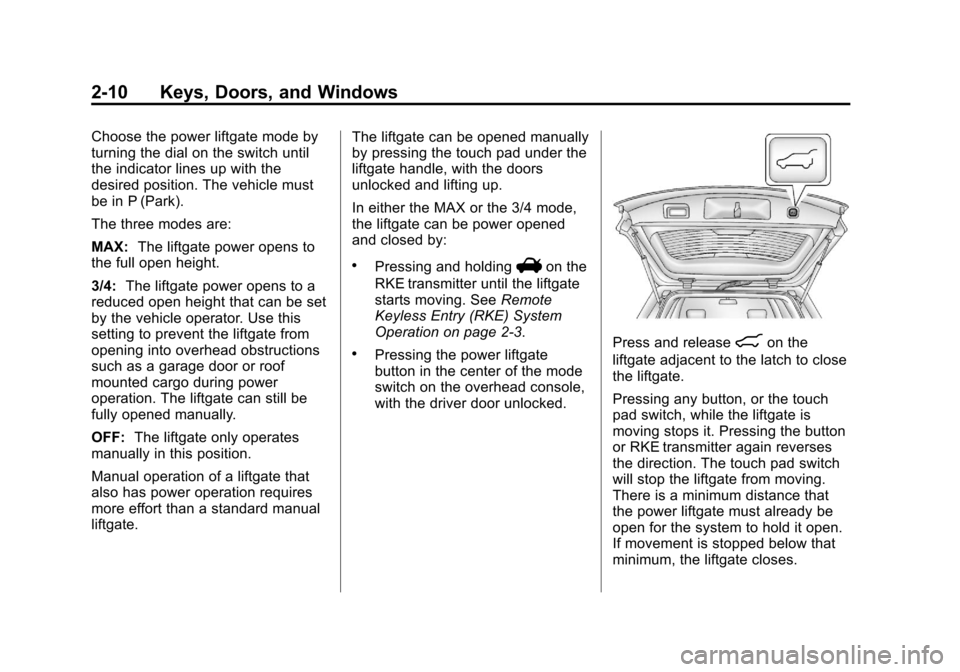
with the driver door unlocked.Press and release8on the
liftgate adjacent to the latch to close
the liftgate.
Pressing any button, or the touch
pad switch, while the liftgate is
moving stops it. Pressing the button
or RKE transmitter again reverses
the direction. The touch pad switch
will stop the liftgate from moving.
There is a minimum distance that
the power liftgate must already be
open for the system to hold it open.
If movement is stopped below that
minimum, the liftgate closes.
Page 57 of 388
Black plate (7,1)Chevrolet Equinox Owner Manual - 2013 - CRC - 5/21/12
Seats and Restraints 3-7
stored positions are referred to as
RKE Memory positions. See
Remote Keyless Entry (RKE)
System Operation on page 2‑3.
Storing Button Memory Positions
To save positions into Button
Memory:
1. Adjust the driver seat, seatbackrecliner, and both outside mirrors
to the desired driving positions.
2. Press and hold MEM (Memory) and “1”at the same time until a
beep sounds.
3. Repeat Steps 1 and 2 for a second driver using “2.”
Recalling Button Memory
Positions
To recall the Button Memory
positions, press and hold “1”or“2.”
The driver seat and outside mirrors
move to the positions stored to
those buttons when pressed.
Releasing “1”or“2” before the
stored positions are reached stops
the recall. If something has blocked the driver
seat while recalling a memory
position, the recall may stop.
Remove the obstruction; then press
and hold the appropriate manual
control for the memory item that is
not recalling for two seconds. Try
recalling the memory position again
by pressing the appropriate memory
button. If the memory position is still
not recalling, see your dealer for
service.
Recalling RKE Memory Positions
(Memory Remote Recall)
The Memory Remote Recall feature
can recall the driver seat and
outside mirrors to previously stored
RKE Memory positions when
entering the vehicle.
Every time the ignition is turned off,
the positions of the driver seat and
outside mirrors are automatically
stored to the RKE transmitter that
was used to start the vehicle. These
positions are called RKE Memory
positions and may be different than
the previously mentioned ButtonMemory positions saved to the
“1”
or“2” buttons. To recall RKE
Memory positions, unlock the driver
door with the RKE transmitter and
open the driver door. If the driver
door is already open, pressing the
RKE transmitter
Kbutton will also
activate the RKE Memory recall.
The driver seat and outside mirrors
will move to the previously saved
RKE Memory positions.
This feature is turned on or off using
the vehicle personalization menu.
See Vehicle Personalization on
page 5‑32.
To stop recall movement, press any
of the memory, power mirror,
or power seat controls.
If something has blocked the driver
seat while recalling a memory
position, the recall may stop.
Remove the obstruction; then press
and hold the appropriate manual
control for the memory item that is
not recalling for two seconds. Try
recalling the memory position again
by opening the driver door and
Page 59 of 388
Black plate (9,1)Chevrolet Equinox Owner Manual - 2013 - CRC - 5/21/12
Seats and Restraints 3-9
The passenger seat may take
longer to heat up.
Remote Start Heated Seats
When it is cold outside, the heated
seats can be programmed to turn on
automatically during a remote
vehicle start. The heated seats will
be canceled when the ignition is
turned on. Press the heated seat
button to use the heated seats after
the vehicle is started.
The heated seat button lights will
not turn on during a remote start.
The temperature of an unoccupied
seat may be reduced.
To program the heated seat feature
to enabled, seeVehicle
Personalization on page 5‑32.Rear Seats
Split Folding Seatbacks
With this feature, either side of the
rear seatback can be folded down
for more cargo space.
{WARNING
If either seatback is not locked, it
could move forward in a sudden
stop or crash. That could cause
injury to the person sitting there.
Always push and pull on the
seatbacks to be sure they are
locked.
{WARNING
A safety belt that is improperly
routed, not properly attached,
or twisted will not provide the
protection needed in a crash. The
person wearing the belt could be
(Continued)
WARNING (CONTINUED)
seriously injured. After raising the
rear seatback, always check to be
sure that the safety belts are
properly routed and attached, and
are not twisted.
To fold the seatback down:
Notice: Folding a rear seat with
the safety belts still fastened may
cause damage to the seat or the
safety belts. Always unbuckle the
safety belts and return them to
their normal stowed position
before folding a rear seat.
1. Unbuckle the rear safety belts and place the front seatbacks in
the upright position. See
Reclining Seatbacks on
page 3‑5.
Page 76 of 388
Black plate (26,1)Chevrolet Equinox Owner Manual - 2013 - CRC - 5/21/12
3-26 Seats and Restraints
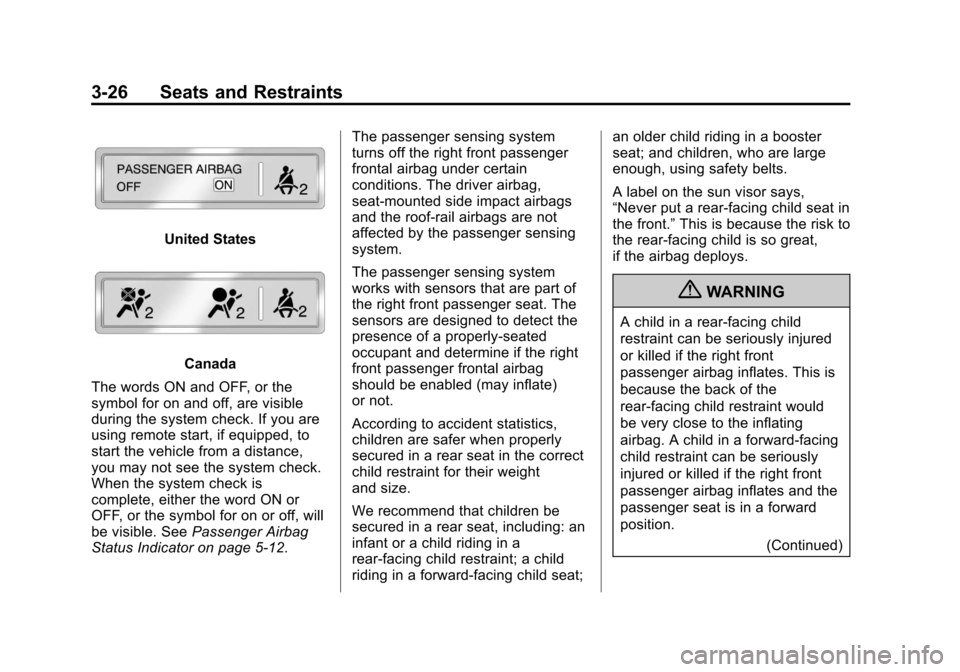
United States
Canada
The words ON and OFF, or the
symbol for on and off, are visible
during the system check. If you are
using remote start, if equipped, to
start the vehicle from a distance,
you may not see the system check.
When the system check is
complete, either the word ON or
OFF, or the symbol for on or off, will
be visible. See Passenger Airbag
Status Indicator on page 5‑12. The passenger sensing system
turns off the right front passenger
frontal airbag under certain
conditions. The driver airbag,
seat-mounted side impact airbags
and the roof-rail airbags are not
affected by the passenger sensing
system.
The passenger sensing system
works with sensors that are part of
the right front passenger seat. The
sensors are designed to detect the
presence of a properly-seated
occupant and determine if the right
front passenger frontal airbag
should be enabled (may inflate)
or not.
According to accident statistics,
children are safer when properly
secured in a rear seat in the correct
child restraint for their weight
and size.
We recommend that children be
secured in a rear seat, including: an
infant or a child riding in a
rear-facing child restraint; a child
riding in a forward-facing child seat;an older child riding in a booster
seat; and children, who are large
enough, using safety belts.
A label on the sun visor says,
“Never put a rear-facing child seat in
the front.”
This is because the risk to
the rear-facing child is so great,
if the airbag deploys.
{WARNING
A child in a rear-facing child
restraint can be seriously injured
or killed if the right front
passenger airbag inflates. This is
because the back of the
rear-facing child restraint would
be very close to the inflating
airbag. A child in a forward-facing
child restraint can be seriously
injured or killed if the right front
passenger airbag inflates and the
passenger seat is in a forward
position.
(Continued)
Page 118 of 388
Black plate (12,1)Chevrolet Equinox Owner Manual - 2013 - CRC - 5/21/12
5-12 Instruments and Controls
The airbag readiness light comes on
for several seconds when the
vehicle is started. If the light does
not come on then, have it fixed
immediately.
{WARNING
If the airbag readiness light stays
on after the vehicle is started or
comes on while driving, it means
the airbag system might not be
working properly. The airbags in
the vehicle might not inflate in a
crash, or they could even inflate
without a crash. To help avoid
injury, have the vehicle serviced
right away.
If there is a problem with the airbag
system, a Driver Information Center
(DIC) message may also come on.
See Airbag System Messages on
page 5‑30.
Passenger Airbag Status
Indicator
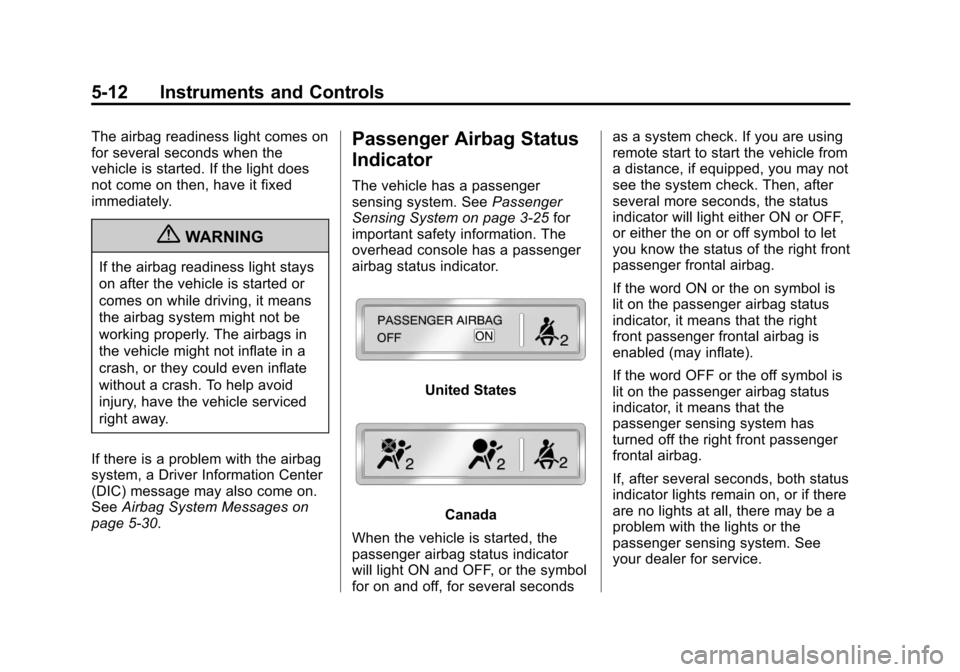
The vehicle has a passenger
sensing system. See Passenger
Sensing System on page 3‑25 for
important safety information. The
overhead console has a passenger
airbag status indicator.
United States
Canada
When the vehicle is started, the
passenger airbag status indicator
will light ON and OFF, or the symbol
for on and off, for several seconds as a system check. If you are using
remote start to start the vehicle from
a distance, if equipped, you may not
see the system check. Then, after
several more seconds, the status
indicator will light either ON or OFF,
or either the on or off symbol to let
you know the status of the right front
passenger frontal airbag.
If the word ON or the on symbol is
lit on the passenger airbag status
indicator, it means that the right
front passenger frontal airbag is
enabled (may inflate).
If the word OFF or the off symbol is
lit on the passenger airbag status
indicator, it means that the
passenger sensing system has
turned off the right front passenger
frontal airbag.
If, after several seconds, both status
indicator lights remain on, or if there
are no lights at all, there may be a
problem with the lights or the
passenger sensing system. See
your dealer for service.
Page 138 of 388
Black plate (32,1)Chevrolet Equinox Owner Manual - 2013 - CRC - 5/21/12
5-32 Instruments and Controls
Vehicle
Personalization
The audio system controls are used
to access the personalization
menus for customizing vehicle
features.
CONFIG (Configuration):Press to
access the Configuration
Settings Menu.
MENU/SEL Knob: Press the
center of this knob to enter the
menus and select menu items. Turn
the knob to scroll through the
menus.
EBACK: Press to exit or move
backwards in a menu. Entering the Personalization
Menus
1. Turn the infotainment system on
and press the CONFIG button to
access the Configuration
Settings menu.
2. Turn the MENU/SEL knob to highlight Vehicle Settings.
3. Press the center of the MENU/ SEL knob to select the Vehicle
Settings menu.
The following list of menu items will
be available:
.Climate and Air Quality
.Comfort and Convenience
.Collision/Detection Systems
.Languages
.Lighting
.Power Door Locks
.Remote Lock/Unlock/Start
.Return to Factory Settings Turn the MENU/SEL knob to
highlight the menu. Press the knob
to select it. Each of the menus is
detailed in the following information.
All of the menus may not be
available. Only those tied to the
features on your vehicle will be
shown.
Climate and Air Quality
Select the Climate and Air Quality
menu and the following will be
displayed:
.Auto Fan Speed
.Air Conditioning Mode
.Remote Start Auto Heat Seats
.Auto Defog
.Auto Rear Defog
Auto Fan Speed
This selection is available on
vehicles with the Automatic Climate
Control System. Choose from the
following blower speed settings:
High: Increased speed.
Page 139 of 388
Black plate (33,1)Chevrolet Equinox Owner Manual - 2013 - CRC - 5/21/12
Instruments and Controls 5-33
Low:Reduced speed.
Normal: Moderate speed.
Press the MENU/SEL knob when
Auto Fan Speed is highlighted. Turn
the knob to highlight “High,”
“Normal,” or“Low.” Press the knob
to confirm the selection and go back
to the last menu.
Air Conditioning Mode
This will allow you to select whether
or not the air conditioning comes on
automatically the next time the
vehicle is started. “On”means that
the air conditioning will be on at
start up, regardless of whether it
was on or off the last time the
vehicle was turned off. “Off”means
the air conditioning will be off at the
next start up, regardless of whether
it was on or off the last time the
vehicle was turned off. “Last
Setting” means that when the
vehicle is started, the air
conditioning will resume whichever
setting it was at the last time the
vehicle was turned off. Press the MENU/SEL knob when
Air Conditioning Mode is
highlighted. Turn the knob to
highlight
“On,” “Off,” or“Last
Setting.” Press the knob to confirm
the selection and go back to the
last menu.
Remote Start Auto Heat Seats
When on, this feature will turn the
heated seats on when using remote
start on cold days.
Press the MENU/SEL knob when
“Remote Start Auto Heat Seats” is
highlighted to toggle between “On”
or “Off.” Press
EBACK to confirm
the selection and go back to the
last menu.
Auto Defog
When turned on and high humidity
is detected, the climate control
system may adjust to outside air
supply and turn on the air
conditioner or the heater. The fan
speed may slightly increase to help
prevent fogging. When high humidity is no longer detected, the
system will return to its prior
operation.
Press the MENU/SEL knob when
“Auto Defog”
is highlighted to toggle
between “On”or“Off.” Press
E
BACK to confirm the selection and
go back to the last menu.
Auto Rear Defog
When on, this feature turns on the
rear defogger at vehicle start when
the interior temperature is cold and
fog is likely. The auto rear defog
function can be disabled by
pressing
1. When off, the feature
can be turned on by pressing
1.
See “Rear Window Defogger” under
Climate Control Systems on
page 8‑1 orAutomatic Climate
Control System on page 8‑3 for
more information.
Press the MENU/SEL knob when
“Auto Rear Defog” is highlighted to
toggle between “On”or“Off.” Press
EBACK to confirm the selection
and go back to the last menu.
Page 142 of 388
Black plate (36,1)Chevrolet Equinox Owner Manual - 2013 - CRC - 5/21/12
5-36 Instruments and Controls
Delayed Door Lock
When on, this feature will delay the
locking of the doors. If you want to
override the delay you can press the
power door lock on the instrument
panel.
Press the MENU/SEL knob when
“Delayed Door Lock”is highlighted.
Turn the knob to select “On”or“Off.”
Press the knob to confirm and go
back to the last menu.
Remote Lock/Unlock/Start
Select Remote Lock/Unlock/Start
and the following will be displayed:
.Remote Unlock Light Feedback
.Remote Lock Feedback
.Remote Door Unlock
.Memory Remote Recall Remote Unlock Light Feedback
When on, the exterior lamps will
flash when unlocking the vehicle
with the RKE transmitter.
Press the MENU/SEL knob when
“Remote Unlock Light Feedback”
is
highlighted. Turn the knob to select
“Flash Lights” or“Off. ”Press the
knob to confirm and go back to the
last menu.
Remote Lock Feedback
This allows selection of what type of
feedback is given when unlocking
the vehicle with the RKE transmitter.
Press the MENU/SEL knob when
“Remote Lock Feedback” is
highlighted. Turn the knob to select
“Lights and Horn,” “Lights Only,”
“Horn Only,” or“Off. ”Press the knob
to confirm and go back to the
last menu. Remote Door Unlock
This allows selection of which doors
will unlock when pressing the unlock
button on the RKE transmitter.
Press the MENU/SEL knob when
“Remote Door Unlock”
is
highlighted. Turn the knob to select
“All Doors” or“Driver Door.” Press
the knob to confirm and go back to
the last menu.
Memory Remote Recall
This allows the Memory Remote
Recall feature to be turned on or off.
When on, this feature will recall the
current driver's last seat, outside
mirrors upon unlocking the driver
door with the RKE, and opening that
door. The current driver is identified
when the RKE transmitter is used to
unlock the driver door. See “Memory
Remote Recall” underMemory
Seats on page 3‑6 for more
information.
Page 144 of 388
Black plate (38,1)Chevrolet Equinox Owner Manual - 2013 - CRC - 5/21/12
5-38 Instruments and Controls
When programming a garage door,
park outside of the garage. Park
directly in line with and facing the
garage door opener motor-head or
gate motor-head. Be sure that
people and objects are clear of the
garage door or gate being
programmed.
It is recommended that a new
battery be installed in the hand-held
transmitter for quicker and more
accurate transmission of the
radio-frequency signal.
Programming the Universal
Remote System
For questions or help programming
the Universal Remote system, call
1-800-355-3515 or go to
www.homelink.com.
Programming a garage door opener
involves time-sensitive actions, so
read the entire procedure before
starting. Otherwise, the device will
time out and the procedure will have
to be repeated.To program up to three devices:
1. Hold the end of the hand-held
transmitter about 3 to 8 cm (1 to
3 in) away from the Universal
Remote system buttons while
keeping the indicator light in
view. The hand-held transmitter
was supplied by the
manufacturer of the garage door
opener receiver
(motor-head unit).
2. At the same time, press and hold both the hand-held
transmitter button and one of the
three Universal Remote system
buttons to be used to operate
the garage door. Do not release
the Universal Remote system
button or the hand-held
transmitter button until the
indicator light changes from a
slowly to a rapidly flashing light.
You now may release both
buttons. Some entry gates and garage
door openers may require
substitution of Step 2 with the
procedure noted in
“Gate
Operator and Canadian
Programming” later in this
section.
3. Press and hold for five seconds the newly trained Universal
Remote system button (the
button selected in Step 2) while
observing the indicator light and
garage door activation.
.If the indicator light stays on
continuously or the garage
door starts to move when
the Universal Remote
system button is pressed
and released, then the
programming is complete.
There is no need to
continue programming
Steps 4–6.
Page 191 of 388
Black plate (5,1)Chevrolet Equinox Owner Manual - 2013 - CRC - 5/21/12
Climate Controls 8-5
Rear Window Defogger
1REAR (Rear Defogger):Press
to turn the rear window defogger on
or off. The rear window defogger
turns off after about 10 minutes.
It can also be turned off by putting
the ignition in ACC/ACCESSORY or
LOCK/OFF. If turned on again, it
runs for about five minutes before
turning off.
The ignition must be on to use the
rear window defogger.
Do not drive the vehicle until all the
windows are clear.
Notice: Do not use a razor blade
or sharp object to clear the inside
rear window. Do not adhere
anything to the defogger grid
lines in the rear glass. These
actions may damage the rear
defogger. Repairs would not be
covered by your warranty.
L/M(Driver and Passenger
Heated Seats): For vehicles with
heated seats, see Heated Front
Seats on page 3‑8.
Remote Start Climate Control
Operation: For vehicles with the
remote start feature, the climate
control system may run when the
vehicle is started remotely. The
system uses the driver ’s previous
settings to heat or cool the inside of
the vehicle. The rear defog may
come on during remote start based
on cold ambient conditions. The
rear defog indicator light does not
come on during a remote start. If the
vehicle has heated front seats, they
may come on during a remote start.
See Remote Vehicle Start on
page 2‑4 andHeated Front Seats
on page 3‑8.Sensors
The solar sensor, located on top of
the instrument panel near the
windshield, monitors the solar heat.
The climate control system uses the
information to adjust the
temperature, fan speed,
recirculation, and air delivery mode.
Do not cover the solar sensor or the
system will not work properly.