reset infotainment system CHEVROLET EQUINOX 2013 2.G Owners Manual
[x] Cancel search | Manufacturer: CHEVROLET, Model Year: 2013, Model line: EQUINOX, Model: CHEVROLET EQUINOX 2013 2.GPages: 388, PDF Size: 6.53 MB
Page 154 of 388
Black plate (2,1)Chevrolet Equinox Owner Manual - 2013 - CRC - 5/21/12
7-2 Infotainment System
To minimize taking your eyes off the
road while driving, do the following
while the vehicle is parked:
.Become familiar with the
operation and controls of the
audio system.
.Set up the tone, speaker
adjustments, and preset radio
stations.
For more information, see Defensive
Driving on page 9‑3.
This vehicle's infotainment system
may be equipped with a noise
reduction system which can work
improperly if the audio amplifier,
engine calibrations, exhaust system,
microphones, radio, or speakers are
modified or replaced. This could
result in more noticeable engine
noise at certain speeds.
Notice: Contact your dealer
before adding any equipment. Adding audio or communication
equipment could interfere with
the operation of the engine, radio,
or other systems, and could
damage them. Follow federal
rules covering mobile radio and
telephone equipment.
The vehicle has Retained
Accessory Power (RAP). With RAP,
the audio system can be played
even after the ignition is turned off.
See
Retained Accessory Power
(RAP) on page 9‑22 for more
information.
Navigation System
For vehicles with a navigation
system, see the infotainment
manual.
Theft-Deterrent Feature
The theft-deterrent feature works by
learning a portion of the Vehicle
Identification Number (VIN) to the
infotainment system. The
infotainment system does not
operate if it is stolen or moved to a
different vehicle.
Page 155 of 388
Black plate (3,1)Chevrolet Equinox Owner Manual - 2013 - CRC - 5/21/12
Infotainment System 7-3
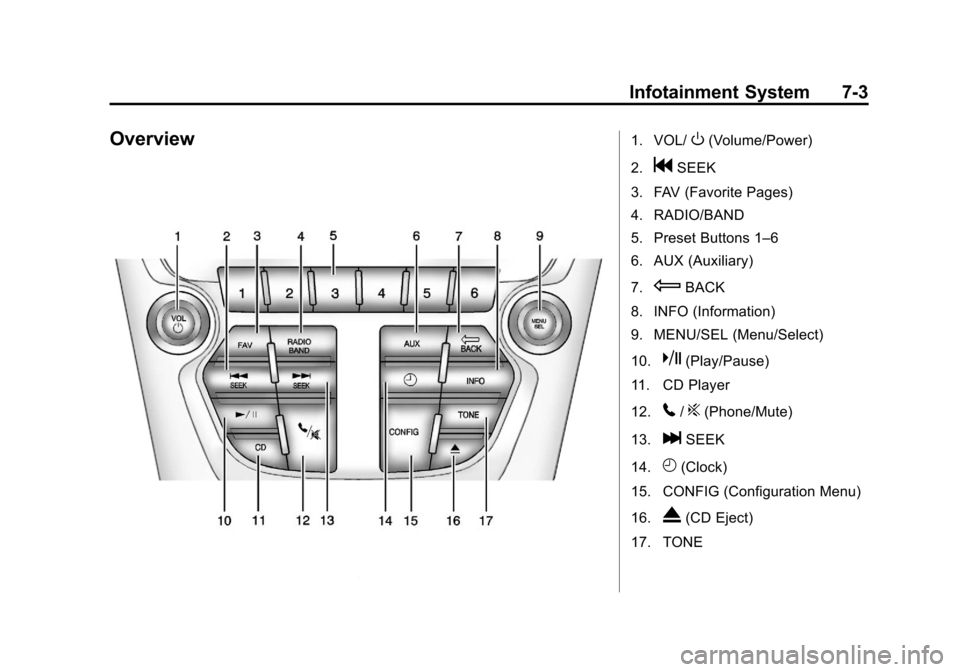
Overview1. VOL/O(Volume/Power)
2.
gSEEK
3. FAV (Favorite Pages)
4. RADIO/BAND
5. Preset Buttons 1–6
6. AUX (Auxiliary)
7.
EBACK
8. INFO (Information)
9. MENU/SEL (Menu/Select)
10.
k(Play/Pause)
11. CD Player
12.
5/?(Phone/Mute)
13.
lSEEK
14.
H(Clock)
15. CONFIG (Configuration Menu)
16.
X(CD Eject)
17. TONE
Page 157 of 388
Black plate (5,1)Chevrolet Equinox Owner Manual - 2013 - CRC - 5/21/12
Infotainment System 7-5
2. Press the MENU/SEL button toselect the highlighted option.
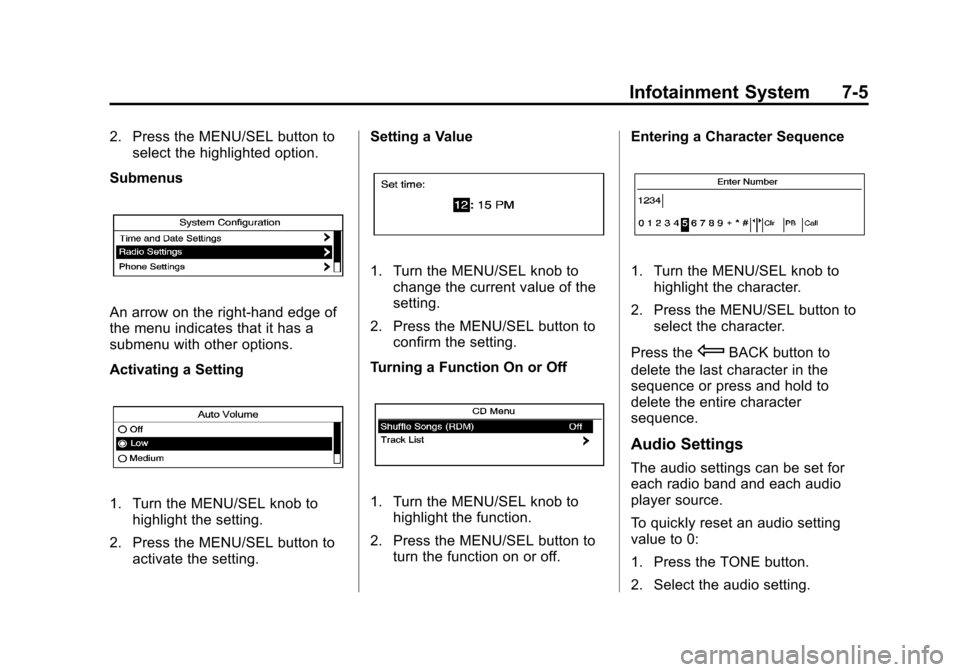
Submenus
An arrow on the right-hand edge of
the menu indicates that it has a
submenu with other options.
Activating a Setting
1. Turn the MENU/SEL knob to highlight the setting.
2. Press the MENU/SEL button to activate the setting. Setting a Value
1. Turn the MENU/SEL knob to
change the current value of the
setting.
2. Press the MENU/SEL button to confirm the setting.
Turning a Function On or Off
1. Turn the MENU/SEL knob to highlight the function.
2. Press the MENU/SEL button to turn the function on or off. Entering a Character Sequence
1. Turn the MENU/SEL knob to
highlight the character.
2. Press the MENU/SEL button to select the character.
Press the
EBACK button to
delete the last character in the
sequence or press and hold to
delete the entire character
sequence.
Audio Settings
The audio settings can be set for
each radio band and each audio
player source.
To quickly reset an audio setting
value to 0:
1. Press the TONE button.
2. Select the audio setting.
Page 159 of 388
Black plate (7,1)Chevrolet Equinox Owner Manual - 2013 - CRC - 5/21/12
Infotainment System 7-7
Auto Volume
The auto volume feature
automatically adjusts the radio
volume to compensate for road and
wind noise as the vehicle speeds up
or slows down, so that the volume
level is consistent.
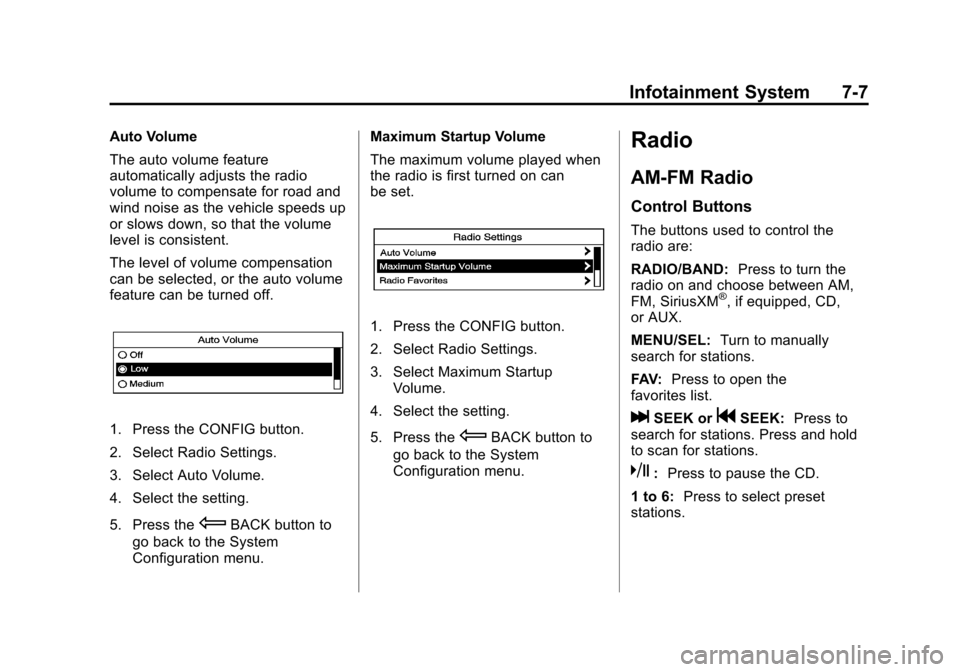
The level of volume compensation
can be selected, or the auto volume
feature can be turned off.
1. Press the CONFIG button.
2. Select Radio Settings.
3. Select Auto Volume.
4. Select the setting.
5. Press the
EBACK button to
go back to the System
Configuration menu. Maximum Startup Volume
The maximum volume played when
the radio is first turned on can
be set.
1. Press the CONFIG button.
2. Select Radio Settings.
3. Select Maximum Startup
Volume.
4. Select the setting.
5. Press the
EBACK button to
go back to the System
Configuration menu.
Radio
AM-FM Radio
Control Buttons
The buttons used to control the
radio are:
RADIO/BAND: Press to turn the
radio on and choose between AM,
FM, SiriusXM
®, if equipped, CD,
or AUX.
MENU/SEL: Turn to manually
search for stations.
FAV: Press to open the
favorites list.
lSEEK orgSEEK: Press to
search for stations. Press and hold
to scan for stations.
k: Press to pause the CD.
1 to 6: Press to select preset
stations.
Page 162 of 388
Black plate (10,1)Chevrolet Equinox Owner Manual - 2013 - CRC - 5/21/12
7-10 Infotainment System
1 to 6:Press to select preset
stations.
MENU/SEL: Turn to select stations.
Press to open the SiriusXM Satellite
Radio menu.
Selecting the SiriusXM Band
Press the RADIO/BAND button to
choose between the AM, FM, and
SiriusXM bands. The last channel
played in that band begins to play
when that band is selected.
Removing or Adding
Categories
SiriusXM channels are organized in
categories.
Channels in a category that have
been removed can still be accessed
by using the
gSEEK orlSEEK
buttons, or the MENU/SEL knob.
To add or remove categories:
1. Press the CONFIG button.
2. Select Radio Settings.
3. Select XM Categories. 4. Turn the MENU/SEL knob to
highlight the category.
5. Press the MENU/SEL knob to remove or add the category.
Selecting a SiriusXM Channel
SiriusXM channels can be selected
by using
gSEEK,lSEEK, the
MENU/SEL knob, or the menu
system.
Selecting a Channel Using
g
SEEK orlSEEK
.Press and releasegSEEK or
lSEEK to go to the previous
or next channel.
.Press and holdgSEEK orl
SEEK to scroll through the
previous or next channel until
the channel is reached. Selecting a Channel Using the
MENU/SEL Knob
To select an XM channel using the
MENU/SEL knob:
Turn the MENU/SEL knob to
highlight an XM channel. The
channel is selected after a short
delay.
To select a channel using the menu:
1. Turn the MENU/SEL knob and
select Channel List.
2. Select the desired channel.
Selecting a Channel Using the
Menu System
1. Turn the MENU/SEL knob.
2. Select XM Category List.
3. Select the category.
4. Select the channel.
Storing a SiriusXM Channel as a
Favorite
Channels from all bands can be
stored in any order in the favorite
pages.