lock CHEVROLET EQUINOX 2016 2.G Workshop Manual
[x] Cancel search | Manufacturer: CHEVROLET, Model Year: 2016, Model line: EQUINOX, Model: CHEVROLET EQUINOX 2016 2.GPages: 324, PDF Size: 5.7 MB
Page 126 of 324
Chevrolet Equinox Owner Manual (GMNA-Localizing-U.S./Canada/Mexico-
9234773) - 2016 - crc - 9/3/15
Instruments and Controls 125
the ground near the rear wheels.
They will return to their previous
driving position when the vehicle is
shifted out of R (Reverse), the
ignition is turned to OFF, or the
vehicle is left in R (Reverse). See
Reverse Tilt Mirrors038
ii.
Select On or Off.
Memory Remote Recall
This feature automatically recalls
the current driver ’s previously stored
1 or 2 button positions when
entering the vehicle. See "Recalling
RKE Memory Positions (Memory
Remote Recall)" under Memory
Seats 048
ii.
Select On or Off.
Button Chime
When enabled, a sound will be
heard when a selection is made
using the infotainment system.
Select to enable or disable.
Collision Detection Systems
Select and the following may
display:
. Park Assist .
Side Blind Zone Alert
. Rear Cross Traffic Alert
Park Assist
This allows the Parking Assist
feature to be turned on or off.
Select On, Off, or On with Tow Bar
Attached.
Side Blind Zone Alert (SBZA)
This allows the SBZA feature to be
turned on or off. See Side Blind
Zone Alert (SBZA) 0182
ii.
Select On or Off.
Rear Cross Traffic Alert
This allows the Rear Cross Traffic
Alert feature to be turned on or off.
Select On or Off.
See Rear Vision Camera (RVC)
0 176
ii.
Lighting
Select and the following may
display:
.
Vehicle Locator Lights
. Exit Lighting Vehicle Locator Lights
This allows the vehicle locator lights
to be turned on or off.
Select to enable or disable.
Exit Lighting
This allows the selection of how
long the exterior lamps stay on
when leaving the vehicle when it is
dark outside.
Select Off, 30 Seconds, 1 Minute,
or 2 Minutes.
Power Door Locks
Select and depending on the radio
the following may display:
.
Auto Door Unlock
. Delayed Door Lock
Auto Door Unlock
This allows selection of which doors
will automatically unlock when the
vehicle is shifted into P (Park).
Select All Doors, Driver Door, or Off.
Page 127 of 324
Chevrolet Equinox Owner Manual (GMNA-Localizing-U.S./Canada/Mexico-
9234773) - 2016 - crc - 9/3/15
126 Instruments and Controls
Delayed Door Lock
When on, this feature will delay the
locking of the doors. SeeDelayed
Locking 030
ii.
Select to enable or disable.
Remote Lock/Unlock/Start
Select and depending on the radio
the following may display:
. Remote Unlock Feedback
. Remote Unlock Light Feedback
. Remote Lock Feedback
. Remote Door Unlock
Remote Unlock Feedback or
Remote Unlock Light Feedback
When on, the exterior lamps will
flash when unlocking the vehicle
with the RKE transmitter.
Depending on the radio select Flash
Lights or Off, or select to enable or
disable.
Remote Lock Feedback
This allows selection of what
feedback is provided when
unlocking the vehicle with the RKE
transmitter. Select Lights and Horn, Lights Only,
Horn Only, or Off.
Remote Door Unlock
This allows selection of which doors
will unlock on the first press of
Kon
the RKE transmitter.
Select Driver Door or All Doors.
If Driver Door is selected, all doors
will unlock on the second press
of
Kwithin five seconds of the prior
press.
Return to Factory Settings?
This returns all of the vehicle
personalization settings to the
factory settings.
Select Yes or No.
Universal Remote
System
See Radio Frequency Statement
0 299ii.
Universal Remote System
Programming
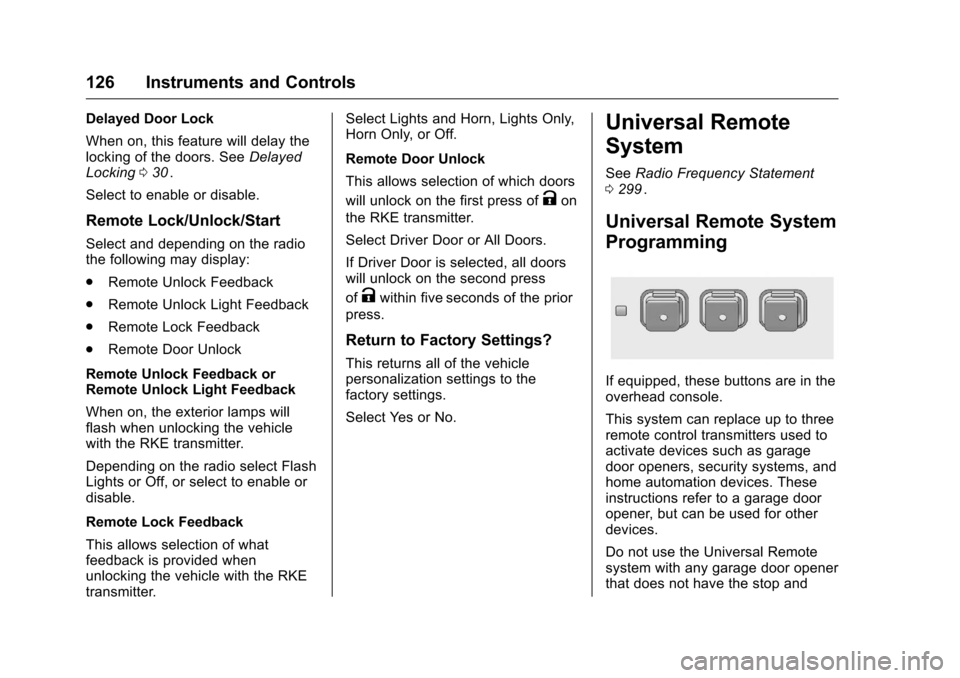
If equipped, these buttons are in the
overhead console.
This system can replace up to three
remote control transmitters used to
activate devices such as garage
door openers, security systems, and
home automation devices. These
instructions refer to a garage door
opener, but can be used for other
devices.
Do not use the Universal Remote
system with any garage door opener
that does not have the stop and
Page 132 of 324
Chevrolet Equinox Owner Manual (GMNA-Localizing-U.S./Canada/Mexico-
9234773) - 2016 - crc - 9/3/15
Lighting 131
Flash-to-Pass
The flash-to-pass feature works with
the low beams or Daytime Running
Lamps (DRL) on or off.
To flash the high beams, pull the
turn signal lever all the way toward
you, then release it.
Daytime Running
Lamps (DRL)
DRL can make it easier for others to
see the front of your vehicle during
the day.
The low-beam headlamps or
dedicated DRL, if equipped, come
on at a reduced brightness in
daylight when the following
conditions are met:
.The ignition is on.
. The exterior lamp control is
in AUTO.
. The transmission is not in
P (Park).
. The light sensor determines it is
daytime.
. The parking brake is released. Fully functional DRL are required on
all vehicles first sold in Canada.
When the DRL are on, the taillamps,
sidemarker, instrument panel lights,
and other lamps will not be on. The
instrument cluster will be lit.
When the exterior lamp control is
turned to
5, the low-beam
headlamps come on. The other
lamps that come on with the
headlamps will also come on.
To idle your vehicle with the DRL
off, move the shift lever to P (Park).
The DRL will stay off until the shift
lever is moved out of the P (Park)
position.
For vehicles first sold in the United
States or Mexico, the DRL can also
be turned off by turning the lamp
control counterclockwise. The DRL
will stay off until the next ignition
cycle.
The regular headlamp system
should be turned on when needed.
Automatic Headlamp
System
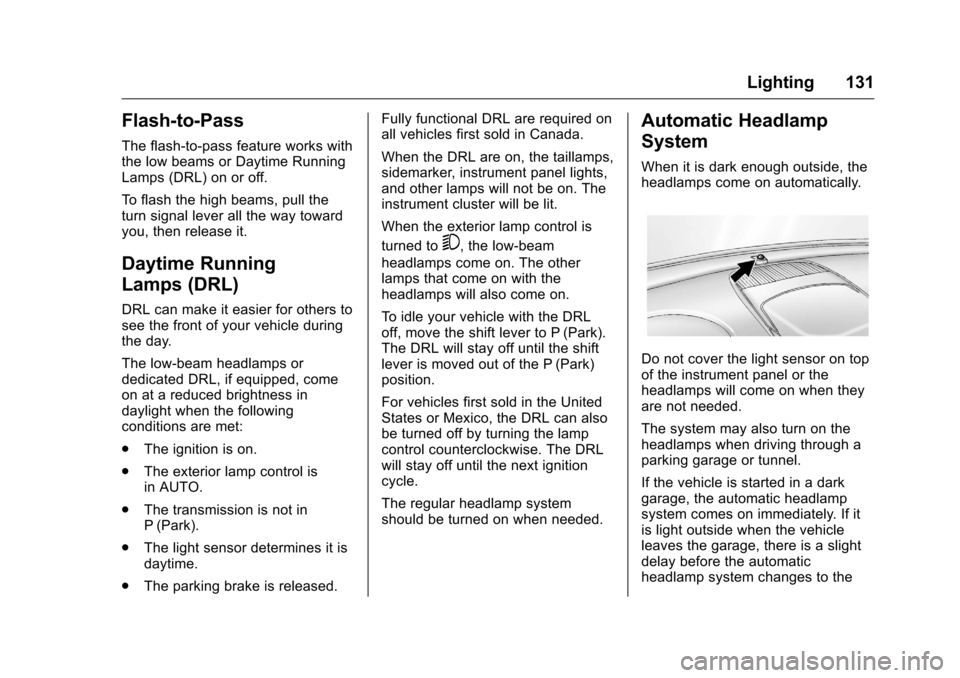
When it is dark enough outside, the
headlamps come on automatically.
Do not cover the light sensor on top
of the instrument panel or the
headlamps will come on when they
are not needed.
The system may also turn on the
headlamps when driving through a
parking garage or tunnel.
If the vehicle is started in a dark
garage, the automatic headlamp
system comes on immediately. If it
is light outside when the vehicle
leaves the garage, there is a slight
delay before the automatic
headlamp system changes to the
Page 134 of 324
Chevrolet Equinox Owner Manual (GMNA-Localizing-U.S./Canada/Mexico-
9234773) - 2016 - crc - 9/3/15
Lighting 133
Have any burned out bulbs
replaced. If a bulb is not burned out,
check the fuse; seeFuses0224
ii.
Fog Lamps
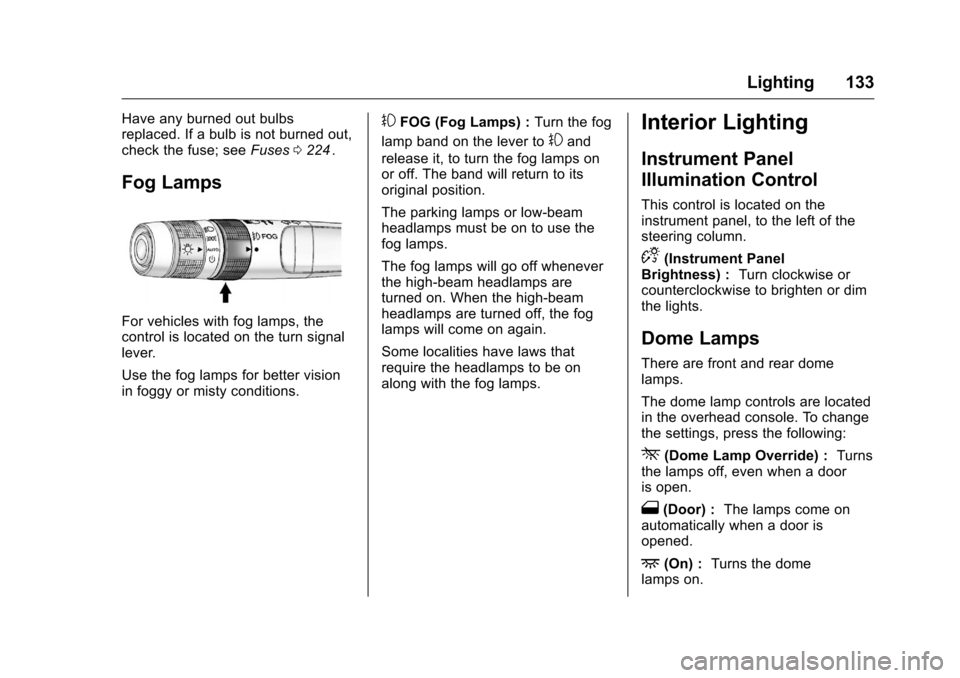
For vehicles with fog lamps, the
control is located on the turn signal
lever.
Use the fog lamps for better vision
in foggy or misty conditions.
#FOG (Fog Lamps) : Turn the fog
lamp band on the lever to
#and
release it, to turn the fog lamps on
or off. The band will return to its
original position.
The parking lamps or low-beam
headlamps must be on to use the
fog lamps.
The fog lamps will go off whenever
the high-beam headlamps are
turned on. When the high-beam
headlamps are turned off, the fog
lamps will come on again.
Some localities have laws that
require the headlamps to be on
along with the fog lamps.
Interior Lighting
Instrument Panel
Illumination Control
This control is located on the
instrument panel, to the left of the
steering column.
D(Instrument Panel
Brightness) : Turn clockwise or
counterclockwise to brighten or dim
the lights.
Dome Lamps
There are front and rear dome
lamps.
The dome lamp controls are located
in the overhead console. To change
the settings, press the following:
*(Dome Lamp Override) : Turns
the lamps off, even when a door
is open.
1(Door) : The lamps come on
automatically when a door is
opened.
+(On) : Turns the dome
lamps on.
Page 135 of 324
Chevrolet Equinox Owner Manual (GMNA-Localizing-U.S./Canada/Mexico-
9234773) - 2016 - crc - 9/3/15
134 Lighting
The dome lamps can also be turned
on and off by pressing the buttons
next to the lamps.
Reading Lamps
The reading lamps are located on
the overhead console. These lamps
come on automatically when any
door is opened.
For manual operation, press the
button next to each lamp to turn it
on or off.
Lighting Features
Entry Lighting
The dome lamp, cargo lamp, and
foot lamp inside the vehicle come
on when any door is opened, if the
dome lamp is in the door position. In
addition, these lamps come on
when the Remote Keyless Entry
(RKE) unlock button is pressed.
They stay on for 20 seconds or until
a door is opened. After the door is
opened and then closed, the light
remains on for 20 seconds, or until
the ignition is turned to ON/RUN.
This feature can be changed. See
“Vehicle Locator Lights”under
Vehicle Personalization 0120
ii.
Exit Lighting
Some exterior lamps and interior
lamps come on at night, or in areas
with limited lighting, when the key is
removed from the ignition. The
dome lamp comes on after the
ignition is changed to the OFF
position. The exterior lamps and dome lamp remain on for a set
amount of time, then automatically
turn off.
The exterior lamps turn off
immediately by turning the exterior
lamp control off.
This feature can be changed. See
Vehicle Personalization
0120
ii.
Battery Load
Management
The vehicle has Electric Power
Management (EPM) that estimates
the battery's temperature and state
of charge. It then adjusts the voltage
for best performance and extended
life of the battery.
When the battery's state of charge
is low, the voltage is raised slightly
to quickly bring the charge back up.
When the state of charge is high,
the voltage is lowered slightly to
prevent overcharging. If the vehicle
has a voltmeter gauge or a voltage
display on the Driver Information
Center (DIC), you may see the
Page 138 of 324
Chevrolet Equinox Owner Manual (GMNA-Localizing-U.S./Canada/Mexico-
9234773) - 2016 - crc - 9/3/15
Climate Controls 137
Climate Controls
Climate Control Systems
Climate Control Systems . . . . . 137
Automatic Climate ControlSystem . . . . . . . . . . . . . . . . . . . . . . 139
Air Vents
Air Vents . . . . . . . . . . . . . . . . . . . . . 142
Maintenance
Passenger Compartment AirFilter . . . . . . . . . . . . . . . . . . . . . . . . 143
Climate Control Systems
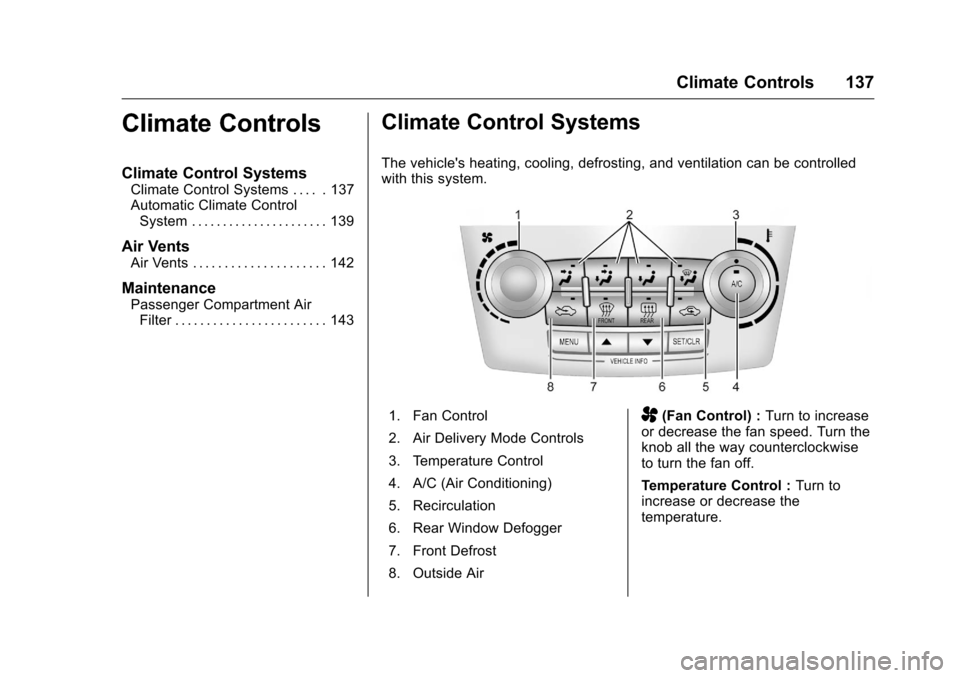
The vehicle's heating, cooling, defrosting, and ventilation can be controlled
with this system.
1. Fan Control
2. Air Delivery Mode Controls
3. Temperature Control
4. A/C (Air Conditioning)
5. Recirculation
6. Rear Window Defogger
7. Front Defrost
8. Outside AirA(Fan Control) : Turn to increase
or decrease the fan speed. Turn the
knob all the way counterclockwise
to turn the fan off.
Temperature Control : Turn to
increase or decrease the
temperature.
Page 139 of 324
Chevrolet Equinox Owner Manual (GMNA-Localizing-U.S./Canada/Mexico-
9234773) - 2016 - crc - 9/3/15
138 Climate Controls
Air Delivery Mode Control :To
change the current mode, select
one of the following:
F (Vent) : Air is directed to the
instrument panel outlets.
* (Bi-Level) : Air is directed to the
instrument panel outlets and the
floor outlets.
7 (Floor) : Air is directed to the
floor outlets with some air directed
to the windshield and the side
window outlets.
W(Defog) : Clears the windows of
fog or moisture. Air is directed to the
windshield with some air directed to
the floor and side window outlets.
0FRONT (Front Defrost) : Press
to clear the windshield of fog or frost
more quickly. Air is directed to the
windshield and side window outlets.
The system allows outside air into
the vehicle and the air conditioning
compressor will run, unless the
outside temperature is below
freezing.
For best results, clear all snow and
ice from the windshield before
defrosting. Do not drive the vehicle until all the
windows are clear.
If equipped with the Fuel Economy
Mode, the climate controls may take
longer to heat or cool the cabin and
the rear window defogger will turn
off sooner, when this feature is in
use. See
Fuel Economy Mode
0 169
ii.
Air Conditioning
A/C (Air Conditioning) : Press to
turn the air conditioning on or off. An
indicator light comes on to show
that the air conditioning is enabled.
If the fan is turned off, the air
conditioner will not run. The A/C
light will stay on even if the outside
temperature is below freezing.
h(Recirculation) : Press to turn
on the recirculation. An indicator
light comes on. Air is recirculated
inside the vehicle. It helps to quickly
cool the air inside the vehicle and
reduce the outside air and odor that
might enter. The air conditioning
may come on under certain
conditions. To improve fuel efficiency and to
cool the vehicle faster, recirculation
may be automatically selected in
warm weather. The recirculation
light will not come on. To override
this feature, select outside air.
%(Outside Air) :
Press to turn
on the outside air. An indicator light
comes on. Outside air is circulated
throughout the vehicle.
Rear Window Defogger
1REAR (Rear Defogger) : Press
to turn the rear window defogger on
or off. An indicator light on the
button comes on to show that the
rear window defogger is on. It turns
off if the ignition is put in the ACC/
ACCESSORY or LOCK/OFF
position.
The ignition must be on to use the
rear window defogger.
Do not drive the vehicle until all the
windows are clear.
Page 142 of 324
Chevrolet Equinox Owner Manual (GMNA-Localizing-U.S./Canada/Mexico-
9234773) - 2016 - crc - 9/3/15
Climate Controls 141
h(Recirculation) :Press to turn
on the recirculation. Press to
alternate between recirculation and
outside air, if the vehicle does not
have a separate outside air button.
The indicator light turns on when
recirculation is selected. Air is
recirculated inside the vehicle.
It helps to quickly cool the air inside
the vehicle and reduce the outside
air and odors that might enter.
%(Outside Air, If Equipped) :
Press to turn on the outside air. An
indicator light comes on. Outside air
is circulated throughout the vehicle.
Auto Defog : The climate control
system has a sensor to
automatically detect high humidity
inside the vehicle. When high
humidity is detected, the climate
control system may adjust to
outside air supply and turn on the
air conditioner. If the climate control
system does not detect possible
window fogging, it returns to normal
operation. To turn Auto Defog on or
off, see “Climate and Air Quality”
under Vehicle Personalization
0 120
ii.
Rear Window Defogger
1REAR (Rear Defogger) : Press
to turn the rear window defogger on
or off. An indicator light on the
button comes on to show that the
rear window defogger is on. It turns
off if the ignition is put in the ACC/
ACCESSORY or LOCK/OFF
position.
The ignition must be on to use the
rear window defogger.
Do not drive the vehicle until all the
windows are clear.
Caution
Do not use a razor blade or sharp
object to clear the inside rear
window. Do not adhere anything
to the defogger grid lines in the
rear glass. These actions may
damage the rear defogger.
Repairs would not be covered by
the vehicle warranty.
z/J(Driver and Passenger
Heated Seats) : If equipped with
heated seats, see Heated Front
Seats 050
ii.
Remote Start Climate Control
Operation : If equipped with the
remote start feature, the climate
control system may run when the
vehicle is started remotely. The
system uses the driver ’s previous
settings to heat or cool the inside of
the vehicle. The rear defog may
come on during remote start based
on cold ambient conditions. The
rear defog indicator light does not
come on during a remote start. If the
vehicle has heated front seats, they
may come on during a remote start.
See Remote Vehicle Start 028
iiand
Heated Front Seats 050ii.
Page 143 of 324
Chevrolet Equinox Owner Manual (GMNA-Localizing-U.S./Canada/Mexico-
9234773) - 2016 - crc - 9/3/15
142 Climate Controls
Sensors
The solar sensor, located on top of
the instrument panel near the
windshield, monitors the solar heat.
The climate control system uses the
information to adjust the
temperature, fan speed,
recirculation, and air delivery mode.
Do not cover the solar sensor or the
system will not work properly.
Air Vents
Center Air Vents
Use the louvers located on the air
vents to change the direction of the
airflow. Use the thumbwheels to
open or close off the airflow.
Side Air Vents
Use the louvers located on the air
vents to change the direction of the
airflow or to open or close off the
airflow.
Operation Tips
.Clear away any ice, snow,
or leaves from air inlets at the
base of the windshield that could
block the flow of air into the
vehicle.
. Keep the path under the front
seats clear of objects to help
circulate the air inside of the
vehicle more effectively.
. Use of non-GM approved hood
deflectors can adversely affect
the performance of the system. Check with your dealer before
adding equipment to the outside
of the vehicle.
. Do not attach any devices to the
air vent slats. This restricts
airflow and may cause damage
to the air vents.
Page 145 of 324
Chevrolet Equinox Owner Manual (GMNA-Localizing-U.S./Canada/Mexico-
9234773) - 2016 - crc - 9/3/15
144 Driving and Operating
Driving and
Operating
Driving Information
Distracted Driving . . . . . . . . . . . . 145
Defensive Driving . . . . . . . . . . . . . 145
Drunk Driving . . . . . . . . . . . . . . . . . 145
Control of a Vehicle . . . . . . . . . . . 146
Braking . . . . . . . . . . . . . . . . . . . . . . . 146
Steering . . . . . . . . . . . . . . . . . . . . . . 146
Off-Road Recovery . . . . . . . . . . . 147
Loss of Control . . . . . . . . . . . . . . . 148
Off-Road Driving . . . . . . . . . . . . . 148
Driving on Wet Roads . . . . . . . . 152
Hill and Mountain Roads . . . . . 153
Winter Driving . . . . . . . . . . . . . . . . 154
If the Vehicle Is Stuck . . . . . . . . 155
Vehicle Load Limits . . . . . . . . . . . 156
Starting and Operating
New Vehicle Break-In . . . . . . . . . 159
Ignition Positions . . . . . . . . . . . . . 160
Starting the Engine . . . . . . . . . . . 161
Retained AccessoryPower (RAP) . . . . . . . . . . . . . . . . 162
Engine Coolant Heater . . . . . . . 163
Shifting Into Park . . . . . . . . . . . . . 164
Shifting out of Park . . . . . . . . . . . 165 Parking over Things
That Burn . . . . . . . . . . . . . . . . . . . 165
Engine Exhaust
Engine Exhaust . . . . . . . . . . . . . . 166
Running the Vehicle WhileParked . . . . . . . . . . . . . . . . . . . . . . 166
Automatic Transmission
Automatic Transmission . . . . . . 167
Manual Mode . . . . . . . . . . . . . . . . . 168
Fuel Economy Mode . . . . . . . . . 169
Drive Systems
All-Wheel Drive . . . . . . . . . . . . . . . 170
Brakes
Antilock BrakeSystem (ABS) . . . . . . . . . . . . . . . 170
Parking Brake . . . . . . . . . . . . . . . . 171
Brake Assist . . . . . . . . . . . . . . . . . . 171
Hill Start Assist (HSA) . . . . . . . . 172
Ride Control Systems
Traction Control/Electronic
Stability Control . . . . . . . . . . . . . 172
Cruise Control
Cruise Control . . . . . . . . . . . . . . . . 174
Driver Assistance Systems
Rear Vision Camera (RVC) . . . 176
Parking Assist . . . . . . . . . . . . . . . . 178 Forward Collision Alert (FCA)
System . . . . . . . . . . . . . . . . . . . . . . 180
Side Blind Zone Alert (SBZA) . . . . . . . . . . . . . . . . 182
Lane Departure
Warning (LDW) . . . . . . . . . . . . . 184
Fuel
Fuel . . . . . . . . . . . . . . . . . . . . . . . . . . 185
California FuelRequirements . . . . . . . . . . . . . . . 186
Fuels in Foreign Countries . . . 187
Fuel Additives . . . . . . . . . . . . . . . . 187
E85 or FlexFuel . . . . . . . . . . . . . . 187
Filling the Tank . . . . . . . . . . . . . . . 188
Filling a Portable Fuel Container . . . . . . . . . . . . . . . . . . . 189
Trailer Towing
General Towing
Information . . . . . . . . . . . . . . . . . . 190
Driving Characteristics and Towing Tips . . . . . . . . . . . . . . . . . 190
Trailer Towing . . . . . . . . . . . . . . . . 193
Towing Equipment . . . . . . . . . . . . 195
Trailer Sway Control (TSC) . . . 195
Conversions and Add-Ons
Add-On Electrical Equipment . . . . . . . . . . . . . . . . . . 196