remote start CHEVROLET EQUINOX 2017 2.G User Guide
[x] Cancel search | Manufacturer: CHEVROLET, Model Year: 2017, Model line: EQUINOX, Model: CHEVROLET EQUINOX 2017 2.GPages: 327, PDF Size: 5.54 MB
Page 35 of 327
Chevrolet Equinox Owner Manual (GMNA-Localizing-U.S./Canada/Mexico-
9918169) - 2017 - CRC - 3/23/16
34 Keys, Doors, and Windows
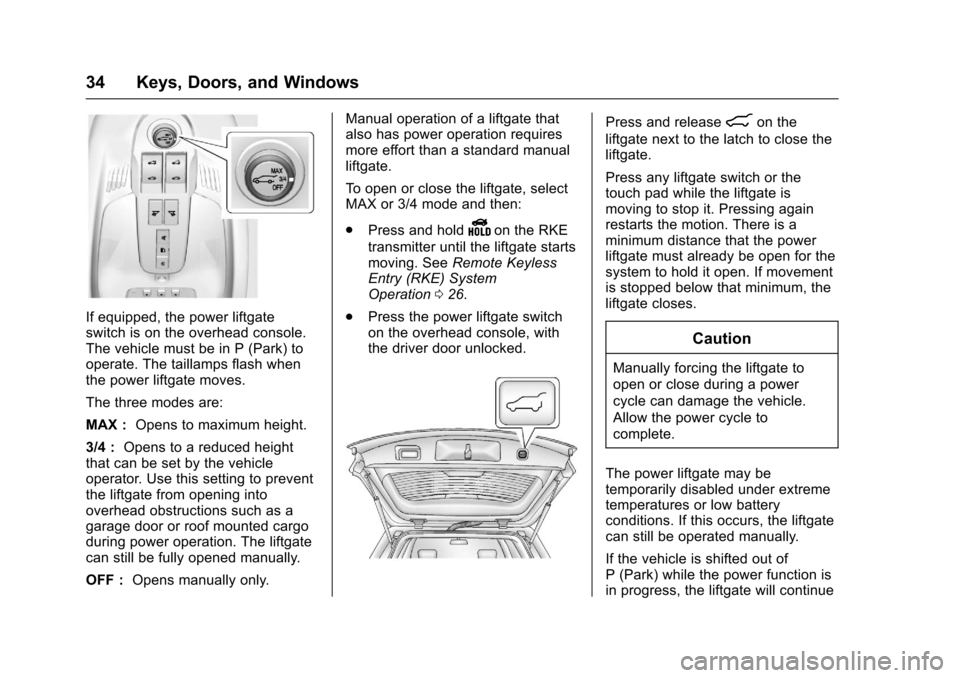
If equipped, the power liftgate
switch is on the overhead console.
The vehicle must be in P (Park) to
operate. The taillamps flash when
the power liftgate moves.
The three modes are:
MAX :Opens to maximum height.
3/4 : Opens to a reduced height
that can be set by the vehicle
operator. Use this setting to prevent
the liftgate from opening into
overhead obstructions such as a
garage door or roof mounted cargo
during power operation. The liftgate
can still be fully opened manually.
OFF : Opens manually only. Manual operation of a liftgate that
also has power operation requires
more effort than a standard manual
liftgate.
To open or close the liftgate, select
MAX or 3/4 mode and then:
.
Press and hold
Yon the RKE
transmitter until the liftgate starts
moving. See Remote Keyless
Entry (RKE) System
Operation 026.
. Press the power liftgate switch
on the overhead console, with
the driver door unlocked.
Press and release8on the
liftgate next to the latch to close the
liftgate.
Press any liftgate switch or the
touch pad while the liftgate is
moving to stop it. Pressing again
restarts the motion. There is a
minimum distance that the power
liftgate must already be open for the
system to hold it open. If movement
is stopped below that minimum, the
liftgate closes.
Caution
Manually forcing the liftgate to
open or close during a power
cycle can damage the vehicle.
Allow the power cycle to
complete.
The power liftgate may be
temporarily disabled under extreme
temperatures or low battery
conditions. If this occurs, the liftgate
can still be operated manually.
If the vehicle is shifted out of
P (Park) while the power function is
in progress, the liftgate will continue
Page 51 of 327
Chevrolet Equinox Owner Manual (GMNA-Localizing-U.S./Canada/Mexico-
9918169) - 2017 - CRC - 3/23/16
50 Seats and Restraints
If something has blocked the driver
seat while recalling a memory
position, the recall may stop.
Remove the obstruction; then press
and hold the appropriate manual
control for the memory item that is
not recalling for two seconds. Try
recalling the memory position again
by pressing the appropriate memory
button. If the memory position is still
not recalling, see your dealer for
service.
Recalling RKE Memory Positions
(Memory Remote Recall)
The Memory Remote Recall feature
can recall the driver seat and
outside mirrors to previously stored
RKE Memory positions when
entering the vehicle.
Every time the ignition is turned off,
the positions of the driver seat and
outside mirrors are automatically
stored to the RKE transmitter that
was used to start the vehicle. These
positions are called RKE Memory
positions and may be different than
the previously mentioned Button
Memory positions saved to the
1 or 2 buttons. To recall RKEMemory positions, unlock the driver
door with the RKE transmitter and
open the driver door. If the driver
door is already open, pressing the
RKE transmitter
Kbutton will also
activate the RKE Memory recall.
The driver seat and outside mirrors
will move to the previously saved
RKE Memory positions.
This feature is turned on or off using
the vehicle personalization menu.
See Vehicle Personalization 0123.
To stop recall movement, press any
of the memory, power mirror,
or power seat controls.
If something has blocked the driver
seat while recalling a memory
position, the recall may stop.
Remove the obstruction; then press
and hold the appropriate manual
control for the memory item that is
not recalling for two seconds.
Try recalling the memory position
again by opening the driver door
and pressing
Kon the RKE
transmitter. RKE transmitters are not labeled
with a number. If your memory seat
position is stored to 1 or 2 but this
position is not automatically
recalling, then store your positions
to the other button or switch RKE
transmitters with the other driver.
If the memory position is still not
recalling, see your dealer for
service.
Easy Exit Driver Seat
This feature moves the seat
rearward allowing the driver more
room to exit the vehicle.
To activate, turn the ignition off and
open the driver door. If the driver
door is already open, turning the
ignition off will activate the recall.
This feature can be turned on or off
using the vehicle personalization
menu. See
Vehicle
Personalization 0123.
To stop recall movement, press one
of the memory or power seat
controls.
Page 52 of 327
Chevrolet Equinox Owner Manual (GMNA-Localizing-U.S./Canada/Mexico-
9918169) - 2017 - CRC - 3/23/16
Seats and Restraints 51
If something has blocked the driver
seat while recalling the exit position,
the recall may stop. Remove the
obstruction; then press and hold the
power seat control rearward for
two seconds. Try recalling the exit
position again. If the exit position is
still not recalling, see your dealer for
service.
Heated Front Seats
{Warning
If you cannot feel temperature
change or pain to the skin, the
seat heater may cause burns. To
reduce the risk of burns, people
with such a condition should use
care when using the seat heater,
especially for long periods of
time. Do not place anything on
the seat that insulates against
heat, such as a blanket, cushion,
cover, or similar item. This may
cause the seat heater to
overheat. An overheated seat
heater may cause a burn or may
damage the seat.
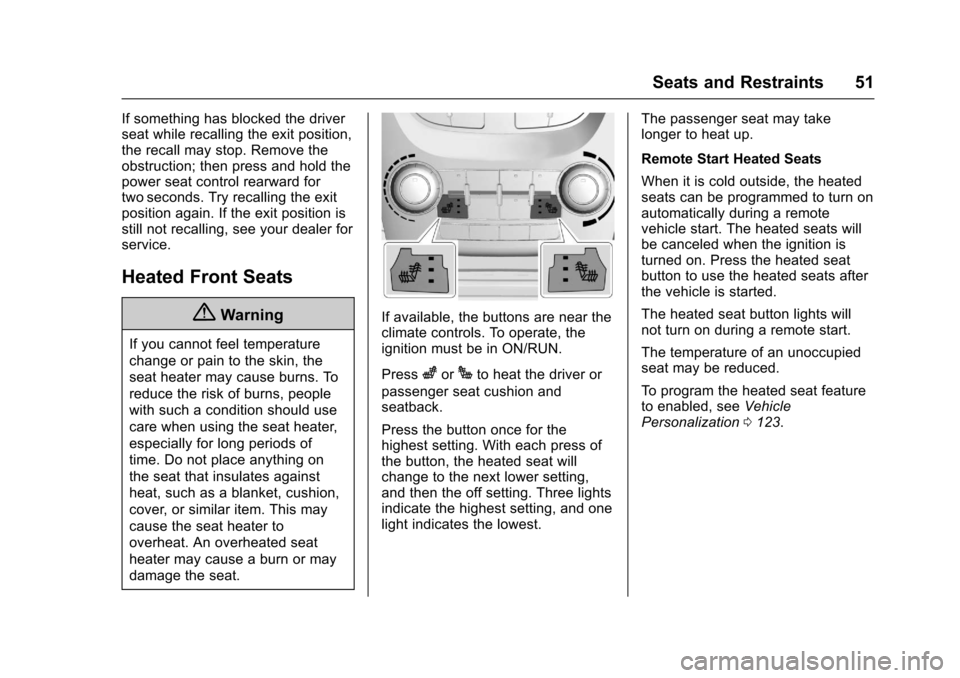
If available, the buttons are near the
climate controls. To operate, the
ignition must be in ON/RUN.
Press
zorJto heat the driver or
passenger seat cushion and
seatback.
Press the button once for the
highest setting. With each press of
the button, the heated seat will
change to the next lower setting,
and then the off setting. Three lights
indicate the highest setting, and one
light indicates the lowest. The passenger seat may take
longer to heat up.
Remote Start Heated Seats
When it is cold outside, the heated
seats can be programmed to turn on
automatically during a remote
vehicle start. The heated seats will
be canceled when the ignition is
turned on. Press the heated seat
button to use the heated seats after
the vehicle is started.
The heated seat button lights will
not turn on during a remote start.
The temperature of an unoccupied
seat may be reduced.
To program the heated seat feature
to enabled, see
Vehicle
Personalization 0123.
Page 97 of 327
Chevrolet Equinox Owner Manual (GMNA-Localizing-U.S./Canada/Mexico-
9918169) - 2017 - CRC - 3/23/16
96 Instruments and Controls
Universal Remote System
Universal Remote System . . . . 130
Universal Remote SystemProgramming . . . . . . . . . . . . . . . 130
Universal Remote System Operation . . . . . . . . . . . . . . . . . . . 132Controls
Steering Wheel
Adjustment
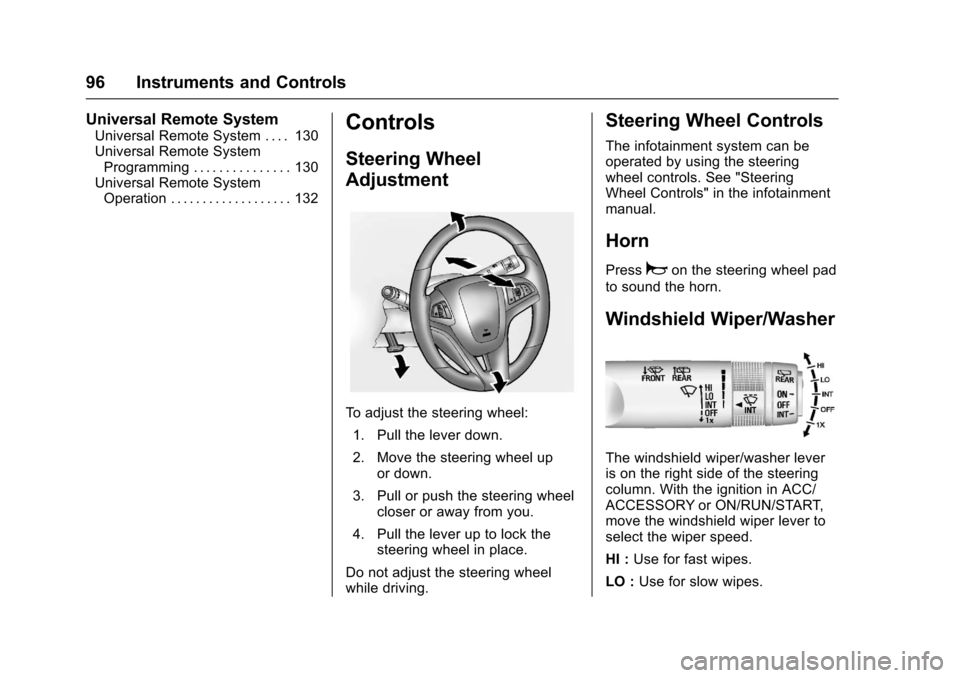
To adjust the steering wheel:
1. Pull the lever down.
2. Move the steering wheel up or down.
3. Pull or push the steering wheel closer or away from you.
4. Pull the lever up to lock the steering wheel in place.
Do not adjust the steering wheel
while driving.
Steering Wheel Controls
The infotainment system can be
operated by using the steering
wheel controls. See "Steering
Wheel Controls" in the infotainment
manual.
Horn
Pressaon the steering wheel pad
to sound the horn.
Windshield Wiper/Washer
The windshield wiper/washer lever
is on the right side of the steering
column. With the ignition in ACC/
ACCESSORY or ON/RUN/START,
move the windshield wiper lever to
select the wiper speed.
HI : Use for fast wipes.
LO : Use for slow wipes.
Page 128 of 327
Chevrolet Equinox Owner Manual (GMNA-Localizing-U.S./Canada/Mexico-
9918169) - 2017 - CRC - 3/23/16
Instruments and Controls 127
Vehicle Settings
Select and the following may
display:
.Climate and Air Quality
. Comfort and Convenience
. Collision Detection Systems
. Lighting
. Power Door Locks
. Remote Lock/Unlock/Start
. Return to Factory Settings?
Climate and Air Quality
Select and the following may
display:
.Auto Fan Speed
. Air Conditioning Mode
. Remote Start Auto Heat Seats
. Auto Defog
. Auto Rear Defog
Auto Fan Speed
This selection is available on
vehicles with the Automatic Climate
Control System. Choose the blower
speed settings. Select High, Medium, or Low
Air Conditioning Mode
This will allow you to select whether
or not the air conditioning comes on
automatically the next time the
vehicle is started. On means that
the air conditioning will be on at
start up, regardless of whether it
was on or off the last time the
vehicle was turned off. Off means
the air conditioning will be off at the
next start up, regardless of whether
it was on or off the last time the
vehicle was turned off. Last Setting
means that when the vehicle is
started, the air conditioning will
resume whichever setting it was at
the last time the vehicle was
turned off.
Select On, Off, or Last Setting.
Remote Start Auto Heat Seats
When on, this feature will turn the
heated seats on when using remote
start on cold days.
Select to enable or disable.
Auto Defog
When turned on and high humidity
is detected, the climate control
system may adjust to outside air
supply and turn on the air
conditioner or the heater. The fan
speed may slightly increase to help
prevent fogging. When high
humidity is no longer detected, the
system will return to its prior
operation.
Select On or Off.
Auto Rear Defog
When on, this feature turns on the
rear defogger at vehicle start when
the interior temperature is cold and
fog is likely. The auto rear defog
function can be disabled by
pressing
1REAR. When off, the
feature can be turned on by
pressing
1REAR. See “Rear
Window Defogger” underClimate
Control Systems 0140 orAutomatic
Climate Control System 0142.
Select On or Off.
Page 130 of 327
Chevrolet Equinox Owner Manual (GMNA-Localizing-U.S./Canada/Mexico-
9918169) - 2017 - CRC - 3/23/16
Instruments and Controls 129
Vehicle Locator Lights
This allows the vehicle locator lights
to be turned on or off.
Select to enable or disable.
Exit Lighting
This allows the selection of how
long the exterior lamps stay on
when leaving the vehicle when it is
dark outside.
Select Off, 30 Seconds, 1 Minute,
or 2 Minutes.
Power Door Locks
Select and depending on the radio
the following may display:
.Auto Door Unlock
. Delayed Door Lock
Auto Door Unlock
This allows selection of which doors
will automatically unlock when the
vehicle is shifted into P (Park).
Select All Doors, Driver Door, or Off. Delayed Door Lock
When on, this feature will delay the
locking of the doors. See
Delayed
Locking 031.
Select to enable or disable.
Remote Lock/Unlock/Start
Select and depending on the radio
the following may display:
. Remote Unlock Feedback
. Remote Unlock Light Feedback
. Remote Lock Feedback
. Remote Door Unlock
Remote Unlock Feedback or
Remote Unlock Light Feedback
When on, the exterior lamps will
flash when unlocking the vehicle
with the RKE transmitter.
Depending on the radio select Flash
Lights or Off, or select to enable or
disable. Remote Lock Feedback
This allows selection of what
feedback is provided when
unlocking the vehicle with the RKE
transmitter.
Select Lights and Horn, Lights Only,
Horn Only, or Off.
Remote Door Unlock
This allows selection of which doors
will unlock on the first press of
Kon
the RKE transmitter.
Select Driver Door or All Doors.
If Driver Door is selected, all doors
will unlock on the second press of
Kwithin five seconds of the prior
press.
Return to Factory Settings?
This returns all of the vehicle
personalization settings to the
factory settings.
Select Yes or No.
Page 145 of 327
Chevrolet Equinox Owner Manual (GMNA-Localizing-U.S./Canada/Mexico-
9918169) - 2017 - CRC - 3/23/16
144 Climate Controls
h:Press to turn on the
recirculation. Press to alternate
between recirculation and outside
air, if the vehicle does not have a
separate outside air button.
The indicator light turns on when
recirculation is selected. Air is
recirculated inside the vehicle.
It helps to quickly cool the air inside
the vehicle and reduce the outside
air and odors that might enter.
%: If equipped, press to turn on
the outside air. An indicator light
comes on. Outside air is circulated
throughout the vehicle.
Auto Defog : The climate control
system has a sensor to
automatically detect high humidity
inside the vehicle. When high
humidity is detected, the climate
control system may adjust to
outside air supply and turn on the
air conditioner. If the climate control
system does not detect possible
window fogging, it returns to
normal operation. To turn Auto
Defog on or off, see “Climate and
Air Quality” underVehicle
Personalization 0123.
Rear Window Defogger
1REAR : Press to turn the rear
window defogger on or off. An
indicator light on the button comes
on to show that the rear window
defogger is on. It turns off if the
ignition is put in the ACC/
ACCESSORY or LOCK/OFF
position.
The ignition must be on to use the
rear window defogger.
Do not drive the vehicle until all the
windows are clear.
Caution
Do not use a razor blade or sharp
object to clear the inside rear
window. Do not adhere anything
to the defogger grid lines in the
rear glass. These actions may
damage the rear defogger.
Repairs would not be covered by
the vehicle warranty.
z/J: If equipped with heated
seats, see Heated Front Seats 051. Remote Start Climate Control
Operation :
If equipped with the
remote start feature, the climate
control system may run when the
vehicle is started remotely. The
system uses the driver ’s previous
settings to heat or cool the inside of
the vehicle. The rear defog may
come on during remote start based
on cold ambient conditions. The
rear defog indicator light does not
come on during a remote start. If the
vehicle has heated front seats, they
may come on during a remote start.
See Remote Vehicle Start 028 and
Heated Front Seats 051.
Sensors
The solar sensor, located on top of
the instrument panel near the
windshield, monitors the solar heat.
The climate control system uses the
information to adjust the
temperature, fan speed,
recirculation, and air delivery mode.
Do not cover the solar sensor or the
system will not work properly.
Page 202 of 327
Chevrolet Equinox Owner Manual (GMNA-Localizing-U.S./Canada/Mexico-
9918169) - 2017 - CRC - 3/23/16
Vehicle Care 201
Wheel Alignment and TireBalance . . . . . . . . . . . . . . . . . . . . . 250
Wheel Replacement . . . . . . . . . . 250
Tire Chains . . . . . . . . . . . . . . . . . . . 251
If a Tire Goes Flat . . . . . . . . . . . . 251
Tire Changing . . . . . . . . . . . . . . . . 253
Compact Spare Tire . . . . . . . . . . 259
Jump Starting
Jump Starting - North America . . . . . . . . . . . . . . . . . . . . . 260
Towing the Vehicle
Towing the Vehicle . . . . . . . . . . . 263
Recreational VehicleTowing . . . . . . . . . . . . . . . . . . . . . . 263
Appearance Care
Exterior Care . . . . . . . . . . . . . . . . . 266
Interior Care . . . . . . . . . . . . . . . . . . 271
Floor Mats . . . . . . . . . . . . . . . . . . . . 274
General Information
For service and parts needs, visit
your dealer. You will receive
genuine GM parts and GM-trained
and supported service people.
Genuine GM parts have one of
these marks:
California Proposition
65 Warning
WARNING: Most motor vehicles,
including this one, as well as many
of its service parts and fluids, contain and/or emit chemicals
known to the State of California to
cause cancer and birth defects or
other reproductive harm. Engine
exhaust, many parts and systems,
many fluids, and some component
wear by-products contain and/or
emit these chemicals.
See
Battery - North America 0221
and Jump Starting - North
America 0260.
California Perchlorate
Materials Requirements
Certain types of automotive
applications, such as airbag
initiators, safety belt pretensioners,
and lithium batteries contained in
Remote Keyless Entry transmitters,
may contain perchlorate materials.
Special handling may be necessary.
For additional information, see
www.dtsc.ca.gov/hazardouswaste/
perchlorate.
Page 206 of 327

Chevrolet Equinox Owner Manual (GMNA-Localizing-U.S./Canada/Mexico-
9918169) - 2017 - CRC - 3/23/16
Vehicle Care 205
1.Engine Air Cleaner/Filter 0211.
2. Engine Cover 0207.
3. Engine Oil Dipstick (Out of View). See Engine Oil0207.
4. Engine Oil Fill Cap. See Engine Oil 0207.
5. Brake Fluid Reservoir. See Brake Fluid 0220. 6.
Engine Compartment Fuse
Block 0228.
7. Remote Positive (+) Terminal. See Jump Starting - North
America 0260.
8. Remote Negative (−) Terminal. See Jump Starting - North
America 0260. 9.
Battery - North America 0221
(Out of View).
10. Engine Coolant Surge Tank and Pressure Cap. See Engine
Coolant 0213.
11. Windshield Washer Fluid Reservoir. See Washer
Fluid 0219.
Page 208 of 327
Chevrolet Equinox Owner Manual (GMNA-Localizing-U.S./Canada/Mexico-
9918169) - 2017 - CRC - 3/23/16
Vehicle Care 207
1.Engine Air Cleaner/Filter 0211.
2. Power Steering Fluid Reservoir (Under Engine Cover). See
Power Steering Fluid (2.4L L4
Engine) 0218 orPower
Steering Fluid (3.6L
V6 Engine) 0218.
3. Engine Oil Fill Cap. See Engine Oil 0207.
4. Engine Cover 0207.
5. Engine Oil Dipstick (Out of View). See Engine Oil0207.
6. Brake Fluid Reservoir. See Brake Fluid 0220.
7. Engine Compartment Fuse
Block 0228.
8. Remote Positive (+) Terminal. See Jump Starting - North
America 0260.
9. Remote Negative (−) Terminal. See Jump Starting - North
America 0260.
10. Battery - North America 0221
(Out of View). 11. Engine Coolant Surge Tank
and Pressure Cap. See Engine
Coolant 0213.
12. Windshield Washer Fluid Reservoir. See Washer
Fluid 0219.
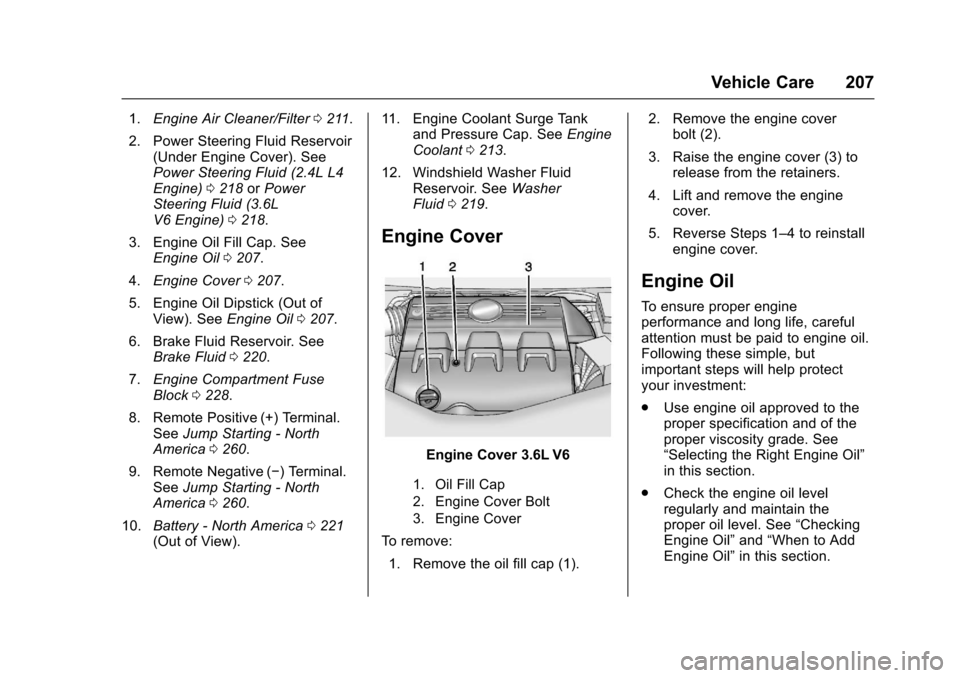
Engine Cover
Engine Cover 3.6L V6
1. Oil Fill Cap
2. Engine Cover Bolt
3. Engine Cover
To remove:
1. Remove the oil fill cap (1). 2. Remove the engine cover
bolt (2).
3. Raise the engine cover (3) to release from the retainers.
4. Lift and remove the engine cover.
5. Reverse Steps 1–4 to reinstall engine cover.
Engine Oil
To ensure proper engine
performance and long life, careful
attention must be paid to engine oil.
Following these simple, but
important steps will help protect
your investment:
.Use engine oil approved to the
proper specification and of the
proper viscosity grade. See
“Selecting the Right Engine Oil”
in this section.
. Check the engine oil level
regularly and maintain the
proper oil level. See “Checking
Engine Oil” and“When to Add
Engine Oil” in this section.