Fuel CHEVROLET EQUINOX 2019 Owner's Guide
[x] Cancel search | Manufacturer: CHEVROLET, Model Year: 2019, Model line: EQUINOX, Model: CHEVROLET EQUINOX 2019Pages: 426, PDF Size: 6.38 MB
Page 148 of 426
Chevrolet Equinox Owner Manual (GMNA-Localizing-U.S./Canada/Mexico-
12145779) - 2019 - CRC - 7/30/18
Instruments and Controls 147
V:Press to open a menu or select
a menu item. Press and hold to
reset values on certain screens.
Info Page Options
The info pages on the DIC can be
turned on or off through the
Options menu.
1. Press
oorpto scroll to the
Options application.
2. Press
worxto scroll to the
Info Page Options and
press
V.
3. Press
worxto move
through the list of possible
information displays.
4. Press
Vwhile an item is
highlighted to select or
deselect that item. When an
item is selected, a checkmark
will appear next to it.
Info Pages
The following is the list of all
possible DIC info page displays.
Some may not be available for your particular vehicle. Some items may
not be turned on by default but can
be turned on through the Options
app. See
“Info Page Options”
earlier in this section.
Speed : Shows the vehicle speed in
either kilometers per hour (km/h) or
miles per hour (mph). If equipped,
press
Vto open the menu and
select to display speed limit signs.
The sign will show “− −”when there
is no detected speed limit or the
system is unavailable.
Trip 1 or Trip 2 : Shows the current
distance traveled, in either
kilometers (km) or miles (mi), since
the trip odometer was last reset.
If equipped, shows the average fuel
economy since the last reset. This
number reflects only the
approximate average fuel economy
that the vehicle has right now, and
will change as driving conditions
change. The average fuel economy
can be displayed as mpg, km/L,
or L/100km where applicable. If equipped, shows the average
speed since the last reset. This
number reflects only the
approximate average speed that the
vehicle has, and will change as
driving conditions change. Average
speed can be displayed as mph
or km/h where applicable.
PressVwhile this display is active
to show a confirmation window to
reset all values to zero. Use
oorp
to select yes or no and pressV.
Fuel Information or Fuel Range :
Shows the approximate distance the
vehicle can be driven without
refueling. LOW will be displayed
when the vehicle is low on fuel. The
fuel range estimate is based on an
average of the vehicle's fuel
economy over recent driving history
and the amount of fuel remaining in
the fuel tank. If equipped, may also
show the instantaneous fuel
economy.
Page 149 of 426
Chevrolet Equinox Owner Manual (GMNA-Localizing-U.S./Canada/Mexico-
12145779) - 2019 - CRC - 7/30/18
148 Instruments and Controls
Oil Life :Shows an estimate of the
oil's remaining useful life.
If REMAINING OIL LIFE 99% is
displayed, that means 99% of the
current oil life remains.
When the remaining oil life is low,
the CHANGE ENGINE OIL SOON
message will appear on the display.
The oil should be changed as soon
as possible. See Engine Oil0285.
In addition to the engine oil life
system monitoring the oil life,
additional maintenance is
recommended in the Maintenance
Schedule. See Maintenance
Schedule 0370.
The Oil Life display must be reset
after each oil change. It will not
reset itself. Do not reset the Oil Life
display at any time other than when
the oil has just been changed.
It cannot be reset accurately until
the next oil change. To reset the
engine oil life system, press
Vwhile
this display is active to show a
confirmation window. Use
oorpto
select yes or no and press
V. See
Engine Oil Life System 0289. Fuel Filter Life Remaining (Diesel
Engine Only) :
If equipped, an
estimate of the fuel filter's remaining
useful life is shown. If 90% Fuel
Filter Life Remaining is displayed, it
means 90% of the current fuel filter
life remains. The fuel filter life
system will alert when to change the
fuel filter on a schedule consistent
with your driving conditions.
When the remaining fuel filter life is
low, the CHANGE FUEL FILTER
message will appear on the display.
Change the fuel filter as soon as
possible.
The Fuel Filter Life display must be
reset after each Fuel Filter change.
It will not reset itself. Do not reset
the Fuel Filter Life display at any
time other than when the fuel filter
has just been changed. To reset the
Fuel Filter Life system press
V
while the display is active to show a
confirmation window to reset.
Press
oorpto select yes or no
and press
V. See Fuel Filter
Replacement (Diesel) 0258. Tire Pressure :
Shows the
approximate pressures of all four
tires. Tire pressure is displayed in
either kilopascal (kPa) or in pounds
per square inch (psi). If the pressure
is low, the value for that tire is
shown in amber. See Tire Pressure
Monitor System 0325 andTire
Pressure Monitor Operation 0326.
Average Speed : Displays the
average vehicle speed of the
vehicle in kilometers per hour (km/h)
or miles per hour (mph). This
average is based on the various
vehicle speeds recorded since the
last reset. Reset the average speed
by pressing
Vwhile this display is
active to show a confirmation
window to select yes or no and
press
V.
Fuel Economy : The center
displays the approximate
instantaneous fuel economy as a
number and bar graph. Displayed
above the bar graph is a running
average of fuel economy for the
most recently traveled selected
distance. Displayed below the bar
graph is the best average fuel
Page 150 of 426
Chevrolet Equinox Owner Manual (GMNA-Localizing-U.S./Canada/Mexico-
12145779) - 2019 - CRC - 7/30/18
Instruments and Controls 149
economy that has been achieved for
the selected distance. The selected
distance is displayed at the top of
the page as“last xxx mi/km.”
Press
Vto select the distance or
reset best value. Use
wandxto
choose the distance and press
V.
Press
wandxto select “Reset
Best Score.” Press
Vto reset the
best average fuel economy. After
reset, the best value displays “-,-”
until the selected distance has been
traveled.
The display provides information on
how current driving behavior affects
the running average and how well
recent driving compares to the best
that has been achieved for the
selected distance.
Follow Distance/Gap Setting :
If equipped, the current follow time
to the vehicle ahead is displayed as
a time value on this page. When
Adaptive Cruise Control (ACC) has
been engaged, the display switches to the gap setting page. This page
shows the current gap setting along
with the vehicle ahead indicator.
Driver Assistance :
If equipped,
shows information for Lane Keep
Assist (LKA), Lane Departure
Warning (LDW), and Forward
Collision Alert (FCA).
Economy Trend : Shows history of
the Average Fuel Economy from the
last 50 km (30 mi). Each bar
represents about 5 km (3 mi) of
driving. During driving the bars will
shift to always reflect the most
recent distance on the right side.
Press
Vto open the menu while
this display is active to clear the
graph. Select yes or no and
press
V.
Timer : This display can be used as
a timer. To start the timer, press
V
to open the menu while this display
is active. Use
wandxto select Start Timer or Reset. Press
V. To
stop the timer, press
Vwhile this
display is active. The display will
show the amount of time that has
passed since the timer was last
reset.
Speed Limit : Shows sign
information, which comes from a
roadway database in the onboard
navigation, if equipped. The sign will
show “− −”when there is no
detected speed limit or the system
is unavailable.
Press
Vwhile this display is active
to toggle Speed Limit sign on or off.
Battery Voltage : Displays the
current battery voltage, if equipped.
Battery voltage changes are normal
while driving. See Charging System
Light 0131. If there is a problem
with the battery charging system, a
DIC will display a message.
Page 172 of 426
Chevrolet Equinox Owner Manual (GMNA-Localizing-U.S./Canada/Mexico-
12145779) - 2019 - CRC - 7/30/18
Climate Controls 171
Dual Automatic Climate Control System
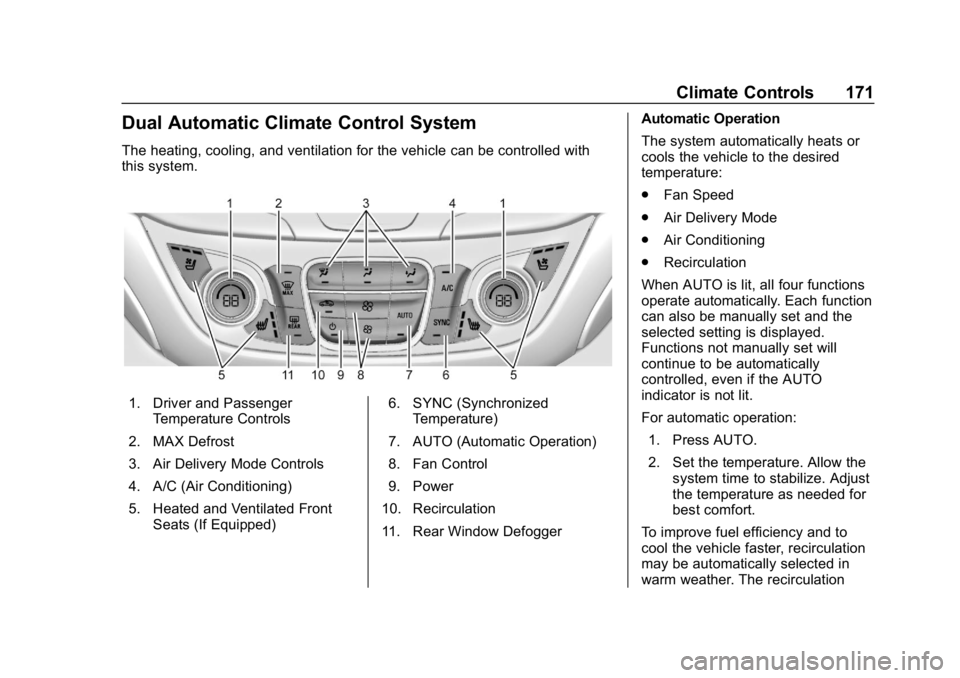
The heating, cooling, and ventilation for the vehicle can be controlled with
this system.
1. Driver and PassengerTemperature Controls
2. MAX Defrost
3. Air Delivery Mode Controls
4. A/C (Air Conditioning)
5. Heated and Ventilated Front Seats (If Equipped) 6. SYNC (Synchronized
Temperature)
7. AUTO (Automatic Operation)
8. Fan Control
9. Power
10. Recirculation
11. Rear Window Defogger Automatic Operation
The system automatically heats or
cools the vehicle to the desired
temperature:
.
Fan Speed
. Air Delivery Mode
. Air Conditioning
. Recirculation
When AUTO is lit, all four functions
operate automatically. Each function
can also be manually set and the
selected setting is displayed.
Functions not manually set will
continue to be automatically
controlled, even if the AUTO
indicator is not lit.
For automatic operation: 1. Press AUTO.
2. Set the temperature. Allow the system time to stabilize. Adjust
the temperature as needed for
best comfort.
To improve fuel efficiency and to
cool the vehicle faster, recirculation
may be automatically selected in
warm weather. The recirculation
Page 179 of 426
Chevrolet Equinox Owner Manual (GMNA-Localizing-U.S./Canada/Mexico-
12145779) - 2019 - CRC - 7/30/18
178 Driving and Operating
Fuel
Top Tier Fuel (Gasoline) . . . . . . 250
Top Tier Fuel (Diesel) . . . . . . . . . 251
Recommended Fuel (LYX -1.5L L4 Turbo Engine) . . . . . . 251
Recommended Fuel (LTG -
2.0L L4 Turbo Engine) . . . . . . 251
Prohibited Fuels (Gasoline) . . . 251
Fuels in Foreign Countries . . . 252
Fuel Additives (Gasoline) . . . . . 252
Fuel Additives (Diesel) . . . . . . . 252
Fuel for Diesel Engines . . . . . . . 252
Biodiesel . . . . . . . . . . . . . . . . . . . . . 254
Cold Weather Operation (Diesel) . . . . . . . . . . . . . . . . . . . . . 255
Water in Fuel (Diesel) . . . . . . . . 255
Running Out of Fuel (Diesel) . . . . . . . . . . . . . . . . . . . . . 258
Fuel Filter Replacement (Diesel) . . . . . . . . . . . . . . . . . . . . . 258
Filling the Tank (Gasoline) . . . . 259
Filling the Tank (Diesel) . . . . . . . 261
Filling a Portable Fuel Container (Gasoline) . . . . . . . . 263
Filling a Portable Fuel Container (Diesel) . . . . . . . . . . . 263
Trailer Towing
General TowingInformation . . . . . . . . . . . . . . . . . . 264
Driving Characteristics and Towing Tips . . . . . . . . . . . . . . . . . 264
Trailer Towing . . . . . . . . . . . . . . . . 268
Towing Equipment . . . . . . . . . . . . 271
Conversions and Add-Ons
Add-On Electrical
Equipment . . . . . . . . . . . . . . . . . . 273
Driving Information
Driver Behavior
Driving is an important
responsibility. Driver behavior, the
driving environment, and the
vehicle's design all affect how well a
vehicle performs.
Being aware of these factors can
help in understanding how the
vehicle handles and what can be
done to avoid many types of
crashes, including a rollover crash.
Most serious injuries and fatalities to
unbelted occupants can be reduced
or prevented by the use of seat
belts. In a rollover crash, an
unbelted person is significantly
more likely to die than a person
wearing a seat belt. In addition,
avoiding excessive speed, sudden
or abrupt turns, and drunken or
aggressive driving can help make
trips safer and avoid the possibility
of a crash.
Page 184 of 426
Chevrolet Equinox Owner Manual (GMNA-Localizing-U.S./Canada/Mexico-
12145779) - 2019 - CRC - 7/30/18
Driving and Operating 183
{Warning
When driving off-road, bouncing
and quick changes in direction
can easily throw you out of
position. This could cause you to
lose control and crash. You and
your passengers should always
wear seat belts.
Before Driving Off-Road
.Have all necessary maintenance
and service work completed.
. Fuel the vehicle, fill fluid levels,
and check inflation pressure in
all tires, including the spare,
if equipped.
. Read all the information about
all-wheel-drive vehicles in this
manual.
. Make sure all underbody
shields, if equipped, are properly
attached.
. Know the local laws that apply to
off-road driving.
Loading the Vehicle for
Off-Road Driving
{Warning
.Unsecured cargo on the
load floor can be tossed
about when driving over
rough terrain. You or your
passengers can be struck
by flying objects. Secure the
cargo properly.
. Keep cargo in the cargo
area as far forward and as
low as possible. The
heaviest things should be
on the floor, forward of the
rear axle.
. Heavy loads on the roof
raise the vehicle's center of
gravity, making it more likely
to roll over. You can be
seriously or fatally injured if
the vehicle rolls over. Put
heavy loads inside the
cargo area, not on the roof. For more information about loading
the vehicle, see
Vehicle Load Limits
0 190.
Environmental Concerns
.
Always use established trails,
roads, and areas that have been
set aside for public off-road
recreational driving and obey all
posted regulations.
. Do not damage shrubs, flowers,
trees, or grasses or disturb
wildlife.
. Do not park over things that
burn. See Parking over Things
That Burn 0202.
Driving on Hills
Driving safely on hills requires good
judgment and an understanding of
what the vehicle can and cannot do.
{Warning
Many hills are simply too steep
for any vehicle. Driving up hills
can cause the vehicle to stall.
(Continued)
Page 187 of 426
Chevrolet Equinox Owner Manual (GMNA-Localizing-U.S./Canada/Mexico-
12145779) - 2019 - CRC - 7/30/18
186 Driving and Operating
braking. Drive at a reduced speed
and avoid sharp turns or abrupt
maneuvers.
Traction is reduced on hard packed
snow and ice and it is easy to lose
control. Reduce vehicle speed when
driving on hard packed snow
and ice.
{Warning
Driving on frozen lakes, ponds,
or rivers can be dangerous. Ice
conditions vary greatly and the
vehicle could fall through the ice;
you and your passengers could
drown. Drive your vehicle on safe
surfaces only.
Driving in Water
{Warning
Driving through rushing water can
be dangerous. Deep water can
sweep your vehicle downstream
and you and your passengers(Continued)
Warning (Continued)
could drown. If it is only shallow
water, it can still wash away the
ground from under your tires.
Traction could be lost, and the
vehicle could roll over. Do not
drive through rushing water.
Caution
Do not drive through standing
water if it is deep enough to cover
the wheel hubs, axles, or exhaust
pipe. Deep water can damage the
axle and other vehicle parts.
If the standing water is not too deep,
drive through it slowly. At faster
speeds, water can get into the
engine and cause it to stall. Stalling
can occur if the exhaust pipe is
under water. Do not turn off the
ignition when driving through water.
If the exhaust pipe is under water,
the engine will not start. When going
through water, the brakes get wet and it may take longer to stop. See
Driving on Wet Roads
0186 later in
this section.
After Off-Road Driving
Remove any brush or debris that
has collected on the underbody or
chassis, or under the hood. These
accumulations can be a fire hazard.
After operation in mud or sand,
have the brake linings cleaned and
checked. These substances can
cause glazing and uneven braking.
Check the body structure, steering,
suspension, wheels, tires, and
exhaust system for damage and
check the fuel lines and cooling
system for any leakage.
More frequent maintenance service
is required. See Maintenance
Schedule 0370.
Driving on Wet Roads
Rain and wet roads can reduce
vehicle traction and affect your
ability to stop and accelerate.
Always drive slower in these types
Page 190 of 426
Chevrolet Equinox Owner Manual (GMNA-Localizing-U.S./Canada/Mexico-
12145779) - 2019 - CRC - 7/30/18
Driving and Operating 189
{Warning
Snow can trap engine exhaust
under the vehicle. This may
cause exhaust gases to get
inside. Engine exhaust contains
carbon monoxide (CO), which
cannot be seen or smelled. It can
cause unconsciousness and even
death.
If the vehicle is stuck in snow:. Clear snow from the base of
the vehicle, especially any
blocking the exhaust pipe.
. Open a window about 5 cm
(2 in) on the vehicle side
that is away from the wind,
to bring in fresh air.
. Fully open the air outlets on
or under the instrument
panel.
. Adjust the climate control
system to circulate the air
inside the vehicle and set
(Continued)
Warning (Continued)
the fan speed to the highest
setting. See“Climate
Control Systems.”
For more information about CO,
see Engine Exhaust 0203.
To save fuel, run the engine for
short periods to warm the vehicle
and then shut the engine off and
partially close the window. Moving
about to keep warm also helps.
If it takes time for help to arrive,
when running the engine, push the
accelerator pedal slightly so the
engine runs faster than the idle
speed. This keeps the battery
charged to restart the vehicle and to
signal for help with the headlamps.
Do this as little as possible, to
save fuel.
If the Vehicle Is Stuck
Slowly and cautiously spin the
wheels to free the vehicle when
stuck in sand, mud, ice, or snow. If stuck too severely for the traction
system to free the vehicle, turn the
traction system off and use the
rocking method. See
Traction
Control/Electronic Stability Control
0 218.
{Warning
If the vehicle's tires spin at high
speed, they can explode, and you
or others could be injured. The
vehicle can overheat, causing an
engine compartment fire or other
damage. Spin the wheels as little
as possible and avoid going
above 56 km/h (35 mph).
Rocking the Vehicle to Get
it Out
Turn the steering wheel left and
right to clear the area around the
front wheels. Turn off any traction
system. Shift back and forth
between R (Reverse) and a low
forward gear, spinning the wheels
as little as possible. To prevent
transmission wear, wait until the
Page 194 of 426
Chevrolet Equinox Owner Manual (GMNA-Localizing-U.S./Canada/Mexico-
12145779) - 2019 - CRC - 7/30/18
Driving and Operating 193
Refer to the vehicle's tire and
loading information label for
specific information about the
vehicle's capacity weight and
seating positions. The combined
weight of the driver, passengers,
and cargo should never exceed
the vehicle's capacity weight.
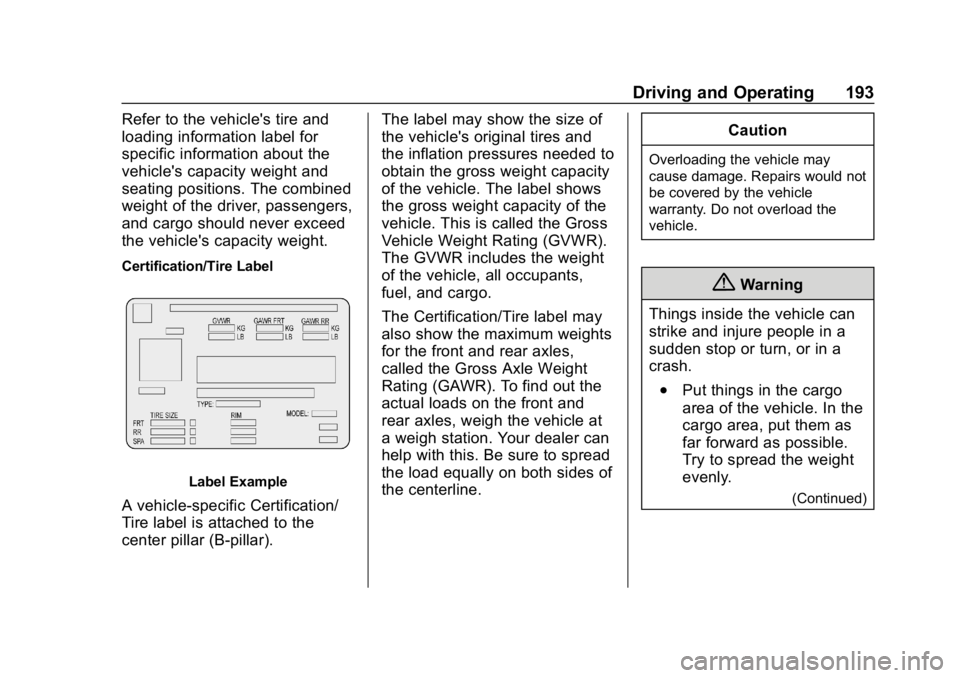
Certification/Tire Label
Label Example
A vehicle-specific Certification/
Tire label is attached to the
center pillar (B-pillar).The label may show the size of
the vehicle's original tires and
the inflation pressures needed to
obtain the gross weight capacity
of the vehicle. The label shows
the gross weight capacity of the
vehicle. This is called the Gross
Vehicle Weight Rating (GVWR).
The GVWR includes the weight
of the vehicle, all occupants,
fuel, and cargo.
The Certification/Tire label may
also show the maximum weights
for the front and rear axles,
called the Gross Axle Weight
Rating (GAWR). To find out the
actual loads on the front and
rear axles, weigh the vehicle at
a weigh station. Your dealer can
help with this. Be sure to spread
the load equally on both sides of
the centerline.
Caution
Overloading the vehicle may
cause damage. Repairs would not
be covered by the vehicle
warranty. Do not overload the
vehicle.
{Warning
Things inside the vehicle can
strike and injure people in a
sudden stop or turn, or in a
crash.
.Put things in the cargo
area of the vehicle. In the
cargo area, put them as
far forward as possible.
Try to spread the weight
evenly.
(Continued)
Page 199 of 426
Chevrolet Equinox Owner Manual (GMNA-Localizing-U.S./Canada/Mexico-
12145779) - 2019 - CRC - 7/30/18
198 Driving and Operating
If you are trying to start the engine
after you have run out of fuel, follow
the steps inRunning Out of Fuel
(Diesel) 0258.
When the engine is cold, let it run
for a few minutes before driving.
This lets oil pressure build up. The
engine will sound louder when it
is cold.
Cold Weather Starting (Diesel
Engine)
Use the recommended engine oil
when the outside temperature drops
below freezing. See Engine Oil
0 285. When the outside
temperature drops below –18°C
(0°F), use of the engine heater is
recommended.
See Fuel for Diesel Engines 0252
for information on what fuel to use in
cold weather.
If the Diesel Engine Will Not
Start
If you have run out of fuel, see
Running Out of Fuel (Diesel) 0258. If the vehicle is not out of fuel, and
the engine will not start:
Press ENGINE START/STOP.
Immediately after the wait-to-start
light goes off, press ENGINE
START/STOP to start the vehicle.
If the light does not go off, wait a
few seconds, then try starting the
engine again. See your dealer for a
starting system check.
If the light comes on and then goes
off, and it is known that the battery
is charged, but the engine still will
not start, the vehicle needs service.
If the light does not come on when
the engine is cold, the vehicle
needs service.
If the battery does not have enough
charge to start the engine, see
Battery - North America
0300.
Check that the correct engine oil
has been used and changed at
appropriate intervals. If the wrong oil
is used, the engine may be harder
to start. Be sure to use the proper fuel for
existing weather conditions. See
Fuel for Diesel Engines
0252.
If the engine starts, runs a short
time, then stops, the vehicle needs
service.
{Warning
Do not use gasoline or starting
aids, such as ether, in the air
intake. They could damage the
engine, which may not be
covered by the vehicle warranty.
They could also cause a fire,
which could cause serious
personal injury.
Stop/Start System
If equipped, the Stop/Start system
will shut off the engine to help
conserve fuel. It has components
designed for the increased number
of starts.