Ess CHEVROLET EQUINOX 2020 Owner's Manual
[x] Cancel search | Manufacturer: CHEVROLET, Model Year: 2020, Model line: EQUINOX, Model: CHEVROLET EQUINOX 2020Pages: 415, PDF Size: 6.46 MB
Page 156 of 415
Chevrolet Equinox Owner Manual (GMNA-Localizing-U.S./Canada/Mexico-
13555863) - 2020 - CRC - 8/2/19
Climate Controls 155
Air Delivery Mode Controls :
Press
{,z, and0or a
combination of the buttons to
change the direction of the airflow.
The indicator light in the button will
turn on.
To change the current mode, select
one or more of the following:
0: Clears the windows of fog or
moisture. Air is directed to the
windshield.
{: Air is directed to the
instrument panel outlets.
z: Air is directed to the floor
outlets.
0MAX : Air is directed to the
windshield and the fan runs at a
higher speed. Fog or frost is cleared
from the windshield more quickly.
When the button is pressed again,
the system returns to the previous
mode setting.
For best results, clear all snow and
ice from the windshield before
defrosting. A/C :
Press to turn the air
conditioning system on or off. If the
climate control system is turned off
or the outside temperature falls
below freezing, the air conditioner
will not run.
@: Press to turn on recirculation.
An indicator light comes on. Air is
recirculated to quickly cool the
inside of the vehicle or to reduce the
entry of outside air and odors.
Rear Window Defogger
K: Press to turn the rear window
defogger on or off. An indicator light
on the button comes on to show that
the rear window defogger is on.
The defogger can be turned off by
turning the ignition off or to ACC/
ACCESSORY.
The rear window defogger can be
set to automatic operation. See
“Climate and Air Quality” under
Vehicle Personalization 0134.
When Auto Rear Defog is selected,
the rear window defogger turns on
automatically when the interior
temperature is cold and the outside temperature is about 7 °C (44 °F)
and below. The auto rear defogger
turns off automatically.
If the vehicle is equipped with
heated outside mirrors, they turn on
when the rear window defogger
button is on and help to clear fog or
frost from the surface of the mirror.
See
Heated Mirrors 029.
Caution
Do not try to clear frost or other
material from the inside of the
front windshield and rear window
with a razor blade or anything
else that is sharp. This may
damage the rear window
defogger grid and affect the
radio's ability to pick up stations
clearly. The repairs would not be
covered by the vehicle warranty.
MorL:If equipped, pressMorL
to heat the driver or passenger seat.
See Heated and Ventilated Front
Seats 043.
Page 157 of 415
Chevrolet Equinox Owner Manual (GMNA-Localizing-U.S./Canada/Mexico-
13555863) - 2020 - CRC - 8/2/19
156 Climate Controls
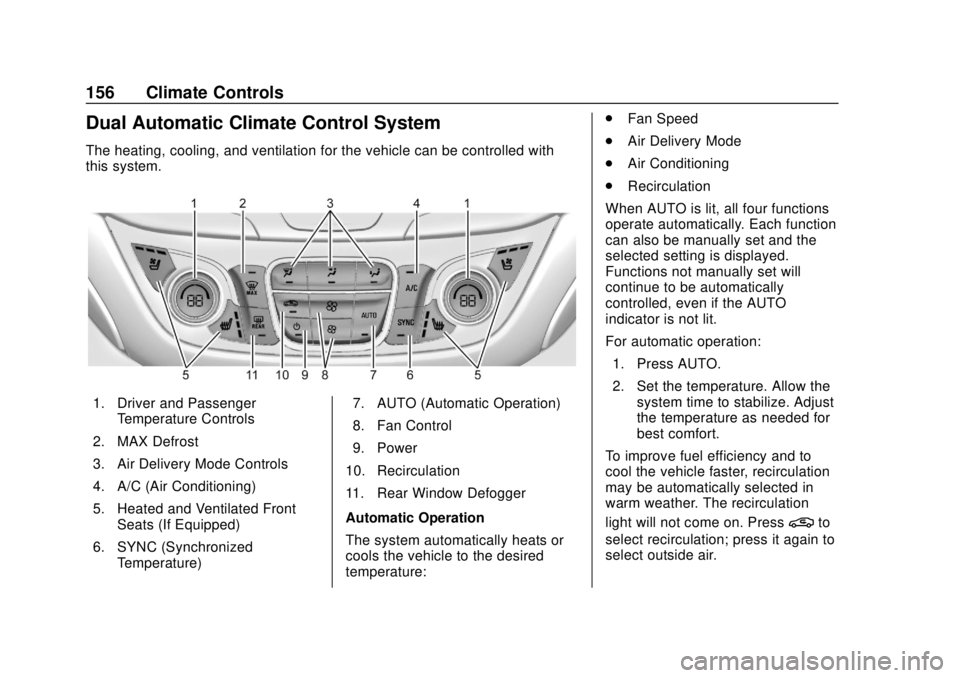
Dual Automatic Climate Control System
The heating, cooling, and ventilation for the vehicle can be controlled with
this system.
1. Driver and PassengerTemperature Controls
2. MAX Defrost
3. Air Delivery Mode Controls
4. A/C (Air Conditioning)
5. Heated and Ventilated Front Seats (If Equipped)
6. SYNC (Synchronized Temperature) 7. AUTO (Automatic Operation)
8. Fan Control
9. Power
10. Recirculation
11. Rear Window Defogger
Automatic Operation
The system automatically heats or
cools the vehicle to the desired
temperature: .
Fan Speed
. Air Delivery Mode
. Air Conditioning
. Recirculation
When AUTO is lit, all four functions
operate automatically. Each function
can also be manually set and the
selected setting is displayed.
Functions not manually set will
continue to be automatically
controlled, even if the AUTO
indicator is not lit.
For automatic operation: 1. Press AUTO.
2. Set the temperature. Allow the system time to stabilize. Adjust
the temperature as needed for
best comfort.
To improve fuel efficiency and to
cool the vehicle faster, recirculation
may be automatically selected in
warm weather. The recirculation
light will not come on. Press
@to
select recirculation; press it again to
select outside air.
Page 158 of 415
Chevrolet Equinox Owner Manual (GMNA-Localizing-U.S./Canada/Mexico-
13555863) - 2020 - CRC - 8/2/19
Climate Controls 157
Driver and Passenger
Temperature Control :The
temperature can be adjusted
separately for the driver and the
passenger. Turn the knob clockwise
or counterclockwise to increase or
decrease the temperature.
SYNC : Press to link all climate
zone settings to the driver setting.
The SYNC indicator light will turn
on. When the passenger settings
are adjusted, the SYNC indicator
light turns off.
Manual Operation
O: Press to turn the fan off or on.
When off, no air will flow into the
vehicle. Turning the fan on, pressing
any other button, or turning a knob
will turn the system back on using
the current setting.
^: Press to increase or decrease
the fan speed. The fan speed
setting appears on the main display.
Pressing either button cancels
automatic fan control and the fan is
controlled manually. Press AUTO to
return to automatic operation. Air Delivery Mode Controls :
Press any combination of
X,Y,
or
[to change the direction of the
airflow. The indicator light in the
button will turn on. The current
mode appears in the display screen.
Pressing any of the three buttons
cancels automatic air delivery
control and the direction of the
airflow is controlled manually. Press
AUTO to return to automatic
operation.
To change the current mode, select
one or more of the following:
X: Clears the windows of fog or
moisture. Air is directed to the
windshield.
Y: Air is directed to the instrument
panel outlets.
[: Air is directed to the floor
outlets.
0MAX : Air is directed to the
windshield and the fan runs at a
higher speed. Fog or frost is cleared
from the windshield more quickly. When the button is pressed again,
the system returns to the previous
mode setting.
For best results, clear all snow and
ice from the windshield before
defrosting.
A/C :
Press to turn the air
conditioning system on or off. If the
climate control system is turned off
or the outside temperature falls
below freezing, the air conditioner
will not run.
Pressing this button cancels
automatic air conditioning and turns
off the air conditioner. Press AUTO
to return to automatic operation and
the air conditioner runs
automatically as needed. When the
indicator light is on, the air
conditioner runs automatically to
cool the air inside the vehicle or to
dry the air needed to defog the
windshield faster.
@: Press to turn on recirculation.
An indicator light comes on. Air is
recirculated to quickly cool the
inside of the vehicle or to reduce the
entry of outside air and odors.
Page 159 of 415
Chevrolet Equinox Owner Manual (GMNA-Localizing-U.S./Canada/Mexico-
13555863) - 2020 - CRC - 8/2/19
158 Climate Controls
Auto Defog :The climate control
system may have a sensor to
automatically detect high humidity
inside the vehicle. When high
humidity is detected, the climate
control system may adjust to
outside air supply and turn on the
air conditioner. The fan speed may
slightly increase to help prevent
fogging. If the climate control
system does not detect possible
window fogging, it returns to normal
operation.
To turn Auto Defog off or on, see
“Climate and Air Quality” under
Vehicle Personalization 0134.
Rear Window Defogger
K:Press to turn the rear window
defogger on or off. An indicator light
on the button comes on to show that
the rear window defogger is on. The
defogger only works when the
ignition is on.
The defogger can be turned off by
turning the ignition to off or ACC/
ACCESSORY. The rear window defogger can be
set to automatic operation. See
“Climate and Air Quality”
under
Vehicle Personalization 0134.
When auto rear defog is selected,
the rear window defogger turns on
automatically when the interior
temperature is cold and the outside
temperature is about 7 °C (44 °F)
and below. The Auto Rear Defogger
turns off automatically.
If the vehicle is equipped with
heated outside mirrors, they turn on
when the rear window defogger
button is on and help to clear fog or
frost from the surface of the mirror.
See Heated Mirrors 029.Caution
Do not try to clear frost or other
material from the inside of the
front windshield and rear window
with a razor blade or anything
else that is sharp. This may
damage the rear window
defogger grid and affect the
(Continued)
Caution (Continued)
radio's ability to pick up stations
clearly. The repairs would not be
covered by the vehicle warranty.
Driver and Passenger Heated and
Ventilated Front Seats :
If equipped, press
LorMto heat
the driver or passenger seat.
If equipped, press
{orCto
ventilate the driver or passenger
seat. See Heated and Ventilated
Front Seats 043.
Remote Start Climate Control
Operation (If Equipped) : If the
vehicle is equipped with the remote
start feature, the climate control
system may run when the vehicle is
started remotely. The system uses
the driver ’s previous settings to heat
or cool the inside of the vehicle. The
rear defog may come on during
remote start based on cold ambient
conditions. If the vehicle has heated
or ventilated seats, they may come
Page 162 of 415
Chevrolet Equinox Owner Manual (GMNA-Localizing-U.S./Canada/Mexico-
13555863) - 2020 - CRC - 8/2/19
Climate Controls 161
4. Remove the two screwssecuring the door.
5. Press the latches on either side of the service door inward to
release. Open the service door
and remove the old filter.
6. Install the new air filter.
7. Close the service door completely.
8. Reverse the steps to reinstall the glove box.
See your dealer if additional
assistance is needed.
Service
All vehicles have a label underhood
that identifies the refrigerant used in
the vehicle. The refrigerant system
should only be serviced by trained
and certified technicians. The air
conditioning evaporator should
never be repaired or replaced by
one from a salvage vehicle.
It should only be replaced by a new
evaporator to ensure proper and
safe operation. During service, all refrigerants
should be reclaimed with proper
equipment. Venting refrigerants
directly to the atmosphere is harmful
to the environment and may also
create unsafe conditions based on
inhalation, combustion, frostbite,
or other health-based concerns.
The air conditioning system requires
periodic maintenance. See
Maintenance Schedule
0360.
Page 163 of 415
Chevrolet Equinox Owner Manual (GMNA-Localizing-U.S./Canada/Mexico-
13555863) - 2020 - CRC - 8/2/19
162 Driving and Operating
Driving and
Operating
Driving Information
Driver Behavior . . . . . . . . . . . . . . . 163
Driving Environment . . . . . . . . . . 164
Vehicle Design . . . . . . . . . . . . . . . 164
Driving for Better FuelEconomy . . . . . . . . . . . . . . . . . . . . 164
Distracted Driving . . . . . . . . . . . . 164
Defensive Driving . . . . . . . . . . . . . 165
Drunk Driving . . . . . . . . . . . . . . . . . 165
Control of a Vehicle . . . . . . . . . . . 166
Braking . . . . . . . . . . . . . . . . . . . . . . . 166
Steering . . . . . . . . . . . . . . . . . . . . . . 166
Off-Road Recovery . . . . . . . . . . . 167
Loss of Control . . . . . . . . . . . . . . . 168
Off-Road Driving . . . . . . . . . . . . . 168
Driving on Wet Roads . . . . . . . . 172
Hill and Mountain Roads . . . . . 173
Winter Driving . . . . . . . . . . . . . . . . 174
If the Vehicle Is Stuck . . . . . . . . 175
Vehicle Load Limits . . . . . . . . . . . 176
Starting and Operating
New Vehicle Break-In . . . . . . . . . 180
Ignition Positions . . . . . . . . . . . . . 180
Starting the Engine . . . . . . . . . . . 182 Stop/Start System . . . . . . . . . . . . 184
Winter Cover . . . . . . . . . . . . . . . . . 185
Engine Heater . . . . . . . . . . . . . . . . 187
Retained Accessory
Power (RAP) . . . . . . . . . . . . . . . . 188
Shifting Into Park . . . . . . . . . . . . . 188
Shifting out of Park . . . . . . . . . . . 189
Parking over Things That Burn . . . . . . . . . . . . . . . . . . . 190
Extended Parking . . . . . . . . . . . . 190
Engine Exhaust
Engine Exhaust . . . . . . . . . . . . . . 190
Running the Vehicle While Parked . . . . . . . . . . . . . . . . . . . . . . 191
Diesel Particulate Filter
Diesel Particulate Filter . . . . . . . 191
Diesel Exhaust Fluid
Diesel Exhaust Fluid . . . . . . . . . . 195
Automatic Transmission
Automatic Transmission . . . . . . 200
Manual Mode . . . . . . . . . . . . . . . . . 202
Tow/Haul Mode . . . . . . . . . . . . . . . 203
Drive Systems
All-Wheel Drive . . . . . . . . . . . . . . . 204
Brakes
Antilock BrakeSystem (ABS) . . . . . . . . . . . . . . . 205
Electric Parking Brake . . . . . . . . 205
Brake Assist . . . . . . . . . . . . . . . . . . 207
Hill Start Assist (HSA) . . . . . . . . 207
Ride Control Systems
Traction Control/Electronic Stability Control . . . . . . . . . . . . . 208
Cruise Control
Cruise Control . . . . . . . . . . . . . . . . 212
Adaptive Cruise Control . . . . . . 214
Driver Assistance Systems
Driver Assistance Systems . . . 225
Assistance Systems forParking or Backing . . . . . . . . . . 226
Assistance Systems for Driving . . . . . . . . . . . . . . . . . . . . . . 230
Forward Collision Alert (FCA) System . . . . . . . . . . . . . . . . . . . . . . 230
Automatic Emergency Braking (AEB) . . . . . . . . . . . . . . . 232
Front Pedestrian Braking (FPB) System . . . . . . . . . . . . . . . 234
Side Blind Zone Alert (SBZA) . . . . . . . . . . . . . . . . 236
Lane Change Alert (LCA) . . . . . 236
Lane Keep Assist (LKA) . . . . . . 238
Page 164 of 415
Chevrolet Equinox Owner Manual (GMNA-Localizing-U.S./Canada/Mexico-
13555863) - 2020 - CRC - 8/2/19
Driving and Operating 163
Fuel
Top Tier Fuel (Gasoline) . . . . . . 241
Top Tier Fuel (Diesel) . . . . . . . . . 241
Recommended Fuel (LYX -1.5L L4 Turbo Engine) . . . . . . 241
Recommended Fuel (LTG -
2.0L L4 Turbo Engine) . . . . . . 242
Prohibited Fuels (Gasoline) . . . 242
Fuels in Foreign Countries . . . 242
Fuel Additives (Gasoline) . . . . . 243
Fuel Additives (Diesel) . . . . . . . 243
Fuel for Diesel Engines . . . . . . . 243
Biodiesel . . . . . . . . . . . . . . . . . . . . . 244
Cold Weather Operation (Diesel) . . . . . . . . . . . . . . . . . . . . . 245
Water in Fuel (Diesel) . . . . . . . . 245
Running Out of Fuel (Diesel) . . . . . . . . . . . . . . . . . . . . . 249
Fuel Filter Replacement (Diesel) . . . . . . . . . . . . . . . . . . . . . 249
Filling the Tank (Gasoline) . . . . 250
Filling the Tank (Diesel) . . . . . . . 251
Filling a Portable Fuel Container . . . . . . . . . . . . . . . . . . . 253
Trailer Towing
General TowingInformation . . . . . . . . . . . . . . . . . . 254
Driving Characteristics and Towing Tips . . . . . . . . . . . . . . . . . 254 Trailer Towing . . . . . . . . . . . . . . . . 258
Towing Equipment . . . . . . . . . . . . 261
Conversions and Add-Ons
Add-On Electrical
Equipment . . . . . . . . . . . . . . . . . . 263
Driving Information
Driver Behavior
Driving is an important
responsibility. Driver behavior, the
driving environment, and the
vehicle's design all affect how well a
vehicle performs.
Being aware of these factors can
help in understanding how the
vehicle handles and what can be
done to avoid many types of
crashes, including a rollover crash.
Most serious injuries and fatalities to
unbelted occupants can be reduced
or prevented by the use of seat
belts. In a rollover crash, an
unbelted person is significantly
more likely to die than a person
wearing a seat belt. In addition,
avoiding excessive speed, sudden
or abrupt turns, and drunken or
aggressive driving can help make
trips safer and avoid the possibility
of a crash.
Page 166 of 415
Chevrolet Equinox Owner Manual (GMNA-Localizing-U.S./Canada/Mexico-
13555863) - 2020 - CRC - 8/2/19
Driving and Operating 165
regarding driver distraction. Become
familiar with the local laws in
your area.
To avoid distracted driving, keep
your eyes on the road, keep your
hands on the steering wheel, and
focus your attention on driving.
.Do not use a phone in
demanding driving situations.
Use a hands-free method to
place or receive necessary
phone calls.
. Watch the road. Do not read,
take notes, or look up
information on phones or other
electronic devices.
. Designate a front seat
passenger to handle potential
distractions.
. Become familiar with vehicle
features before driving, such as
programming favorite radio
stations and adjusting climate
control and seat settings.
Program all trip information into
any navigation device prior to
driving. .
Wait until the vehicle is parked
to retrieve items that have fallen
to the floor.
. Stop or park the vehicle to tend
to children.
. Keep pets in an appropriate
carrier or restraint.
. Avoid stressful conversations
while driving, whether with a
passenger or on a cell phone.
{Warning
Taking your eyes off the road too
long or too often could cause a
crash resulting in injury or death.
Focus your attention on driving.
Refer to the infotainment manual for
more information on using that
system and the navigation system,
if equipped, including pairing and
using a cell phone.
Defensive Driving
Defensive driving means “always
expect the unexpected.” The first
step in driving defensively is to wear
the seat belt. See Seat Belts048.
. Assume that other road users
(pedestrians, bicyclists, and
other drivers) are going to be
careless and make mistakes.
Anticipate what they might do
and be ready.
. Allow enough following distance
between you and the driver in
front of you.
. Focus on the task of driving.
Drunk Driving
Death and injury associated with
drinking and driving is a global
tragedy.
Page 167 of 415
Chevrolet Equinox Owner Manual (GMNA-Localizing-U.S./Canada/Mexico-
13555863) - 2020 - CRC - 8/2/19
166 Driving and Operating
{Warning
Drinking and then driving is very
dangerous. Your reflexes,
perceptions, attentiveness, and
judgment can be affected by even
a small amount of alcohol. You
can have a serious—or even
fatal —collision if you drive after
drinking.
Do not drink and drive or ride with
a driver who has been drinking.
Ride home in a cab; or if you are
with a group, designate a driver
who will not drink.
Control of a Vehicle
Braking, steering, and accelerating
are important factors in helping to
control a vehicle while driving.
Braking
Braking action involves perception
time and reaction time. Deciding to
push the brake pedal is perception
time. Actually doing it is
reaction time.
Average driver reaction time is
about three-quarters of a second. In
that time, a vehicle moving at
100 km/h (60 mph) travels 20 m
(66 ft), which could be a lot of
distance in an emergency.
Helpful braking tips to keep in mind
include:
. Keep enough distance between
you and the vehicle in front
of you.
. Avoid needless heavy braking.
. Keep pace with traffic.
If the engine ever stops while the
vehicle is being driven, brake
normally but do not pump the
brakes. Doing so could make the
pedal harder to push down. If the
engine stops, there will be some
power brake assist but it will be
used when the brake is applied. Once the power assist is used up, it
can take longer to stop and the
brake pedal will be harder to push.
Steering
Electric Power Steering
Caution
To avoid damage to the steering
system, do not drive over curbs,
parking barriers, or similar objects
at speeds greater than 3 km/h
(1 mph). Use care when driving
over other objects such as lane
dividers and speed bumps.
Damage caused by misuse of the
vehicle is not covered by the
vehicle warranty.
Page 169 of 415
Chevrolet Equinox Owner Manual (GMNA-Localizing-U.S./Canada/Mexico-
13555863) - 2020 - CRC - 8/2/19
168 Driving and Operating
1. Ease off the accelerator andthen, if there is nothing in the
way, steer the vehicle so that it
straddles the edge of the
pavement.
2. Turn the steering wheel about one-eighth of a turn, until the
right front tire contacts the
pavement edge.
3. Turn the steering wheel to go straight down the roadway.
Loss of Control
Skidding
There are three types of skids that
correspond to the vehicle's three
control systems:
.Braking Skid —wheels are not
rolling.
. Steering or Cornering Skid —
too much speed or steering in a
curve causes tires to slip and
lose cornering force.
. Acceleration Skid —too much
throttle causes the driving
wheels to spin. Defensive drivers avoid most skids
by taking reasonable care suited to
existing conditions, and by not
overdriving those conditions. But
skids are always possible.
If the vehicle starts to slide, follow
these suggestions:
.
Ease your foot off the
accelerator pedal and steer the
way you want the vehicle to go.
The vehicle may straighten out.
Be ready for a second skid if it
occurs.
. Slow down and adjust your
driving according to weather
conditions. Stopping distance
can be longer and vehicle
control can be affected when
traction is reduced by water,
snow, ice, gravel, or other
material on the road. Learn to
recognize warning clues —such
as enough water, ice, or packed
snow on the road to make a
mirrored surface —and slow
down when you have any doubt. .
Try to avoid sudden steering,
acceleration, or braking,
including reducing vehicle speed
by shifting to a lower gear. Any
sudden changes could cause
the tires to slide.
Remember: Antilock brakes help
avoid only the braking skid.
Off-Road Driving
All-wheel-drive vehicles can be
used for off-road driving. Vehicles
without all-wheel drive and vehicles
not equipped with All Terrain (AT) or
On-Off Road (OOR) tires must not
be driven off-road except on a level,
solid surface. To contact the tire
manufacturer for more information
about the original equipment tires,
see the warranty manual.
Controlling the vehicle is the key to
successful off-road driving. One of
the best ways to control the vehicle
is to control the speed.