reset CHEVROLET EQUINOX 2020 User Guide
[x] Cancel search | Manufacturer: CHEVROLET, Model Year: 2020, Model line: EQUINOX, Model: CHEVROLET EQUINOX 2020Pages: 415, PDF Size: 6.46 MB
Page 129 of 415
Chevrolet Equinox Owner Manual (GMNA-Localizing-U.S./Canada/Mexico-
13555863) - 2020 - CRC - 8/2/19
128 Instruments and Controls
and select reset. PressVto reset.
See Fuel Filter Replacement
(Diesel) 0249.
Tire Pressure : Shows the
approximate pressures of all four
tires. Tire pressure is displayed in
either kilopascal (kPa) or in pounds
per square inch (psi). If the pressure
is low, the value for that tire is
shown in amber. See Tire Pressure
Monitor System 0315 and
Tire Pressure Monitor Operation
0 316.
Average Speed : Displays the
average vehicle speed of the
vehicle in kilometers per hour (km/h)
or miles per hour (mph). This
average is based on the various
vehicle speeds recorded since the
last reset. Press and hold
Vwhile
this display is active to reset the
average speed. Average speed can
also be reset by pressing
pand
choosing reset.
Fuel Economy : The center
displays the approximate
instantaneous fuel economy as a number and bar graph. Displayed
above the bar graph is a running
average of fuel economy for the
most recently traveled selected
distance. Displayed below the bar
graph is the best average fuel
economy that has been achieved for
the selected distance. The selected
distance is displayed at the top of
the page as
“last xxx mi/km.”
Press
pto select the distance or
reset best value. Use
wandxto
choose the distance and press
V.
Press
wandxto select “Reset
Best Score.” Press
Vto reset the
best average fuel economy. After
reset, the best value displays “-,-”
until the selected distance has been
traveled.
The display provides information on
how current driving behavior affects
the running average and how well
recent driving compares to the best
that has been achieved for the
selected distance. Economy Trend :
Shows history of
the Average Fuel Economy from the
last 50 km (30 mi). Each bar
represents about 5 km (3 mi) of
driving. During driving the bars will
shift to always reflect the most
recent distance on the right side.
Press and hold
Vto clear the graph
or press
pto reset through
the menu.
Timer : This display can be used as
a timer. To start the timer, press
V
to open the menu while this display
is active. The display will show the
amount of time that has passed
since the timer was last reset. To
stop the timer, press
Vbriefly while
this display is active and the timer is
running. To reset the timer to zero,
press and hold
Vwhile this display
is active, or press
pand select
reset.
Page 130 of 415
Chevrolet Equinox Owner Manual (GMNA-Localizing-U.S./Canada/Mexico-
13555863) - 2020 - CRC - 8/2/19
Instruments and Controls 129
Follow Distance :If equipped, the
current follow time to the vehicle
ahead is displayed as a time value
on this page.
Battery Voltage : Displays the
current battery voltage, if equipped.
Battery voltage changes are normal
while driving. See Charging System
Light 0114. If there is a problem
with the battery charging system, a
DIC will display a message.
Coolant Temperature : Displays
the coolant temperature in degrees
Celsius (°C) or degrees Fahrenheit
(°F).
Diesel Exhaust Fluid (DEF) Level
(Diesel Engine Only) : If equipped,
the DEF level will be displayed as
either OK, XX%, or LOW. When
LOW appears on the display, add
DEF as soon as possible. See
Diesel Exhaust Fluid 0195.
Oil Pressure : Oil pressure is
displayed in either kilopascal (kPa)
or in pounds per square inch (psi).
Oil pressure can vary with engine
speed, outside temperature, and oil
viscosity. On some models, the oil pump will vary engine oil pressure
according to engine needs. Oil
pressure may change quickly as the
engine speed or load varies. This is
normal. If the oil pressure warning
light or Driver Information Center
(DIC) message indicates oil
pressure outside the normal
operating range, check the vehicle's
oil as soon as possible.
Driver Information Center
(DIC) (Uplevel)
The DIC displays are shown in the
center of the instrument cluster in
the Info App. See
Instrument Cluster
(Base and Midlevel) 0102 or
Instrument Cluster (Uplevel) 0106.
The displays show the status of
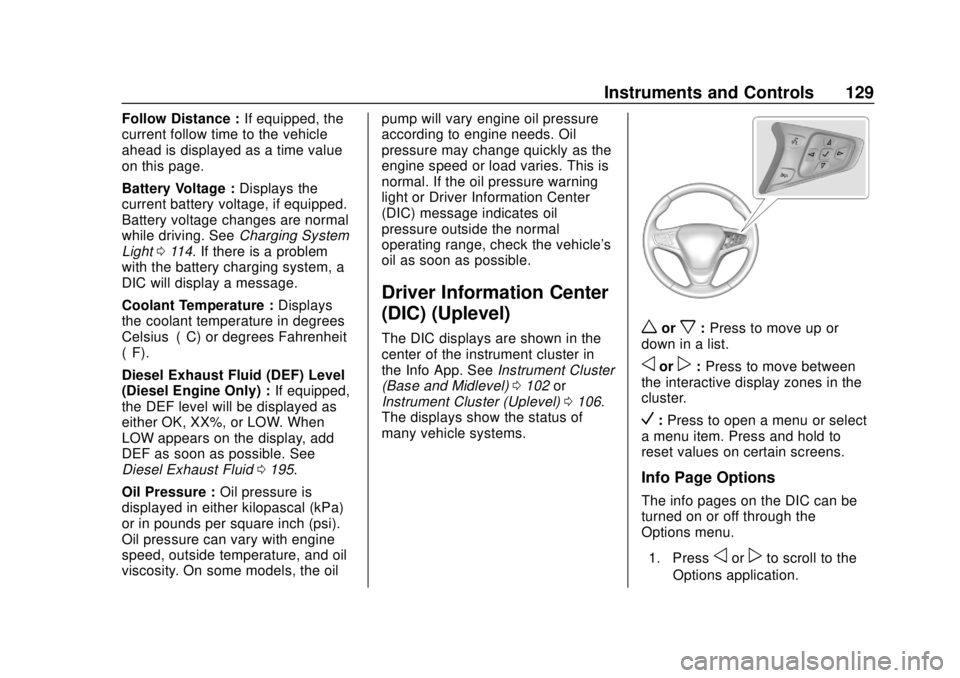
many vehicle systems.worx: Press to move up or
down in a list.
oorp: Press to move between
the interactive display zones in the
cluster.
V: Press to open a menu or select
a menu item. Press and hold to
reset values on certain screens.
Info Page Options
The info pages on the DIC can be
turned on or off through the
Options menu.
1. Press
oorpto scroll to the
Options application.
Page 131 of 415
Chevrolet Equinox Owner Manual (GMNA-Localizing-U.S./Canada/Mexico-
13555863) - 2020 - CRC - 8/2/19
130 Instruments and Controls
2. Pressworxto scroll to the
Info Page Options and
press
V.
3. Press
worxto move
through the list of possible
information displays.
4. Press
Vwhile an item is
highlighted to select or
deselect that item. When an
item is selected, a checkmark
will appear next to it.
Info Pages
The following is the list of all
possible DIC info page displays.
Some may not be available for your
particular vehicle. Some items may
not be turned on by default but can
be turned on through the Options
app. See “Info Page Options”
earlier in this section.
Speed : Shows the vehicle speed in
either kilometers per hour (km/h) or
miles per hour (mph). If equipped,
press
Vto open the menu and
select to display speed limit signs. The sign will show
“− −”when there
is no detected speed limit or the
system is unavailable.
Trip 1 or Trip 2 : Shows the current
distance traveled, in either
kilometers (km) or miles (mi), since
the trip odometer was last reset.
If equipped, shows the average fuel
economy since the last reset. This
number reflects only the
approximate average fuel economy
that the vehicle has right now, and
will change as driving conditions
change. The average fuel economy
can be displayed as mpg, km/L,
or L/100km where applicable.
If equipped, shows the average
speed since the last reset. This
number reflects only the
approximate average speed that the
vehicle has, and will change as
driving conditions change. Average
speed can be displayed as mph
or km/h where applicable. Press
Vwhile this display is active
to show a confirmation window to
reset all values to zero. Use
oorp
to select yes or no and pressV.
Fuel Information or Fuel Range :
Shows the approximate distance the
vehicle can be driven without
refueling. LOW will be displayed
when the vehicle is low on fuel. The
fuel range estimate is based on an
average of the vehicle's fuel
economy over recent driving history
and the amount of fuel remaining in
the fuel tank. If equipped, may also
show the instantaneous fuel
economy.
Oil Life : Shows an estimate of the
oil's remaining useful life.
If REMAINING OIL LIFE 99% is
displayed, that means 99% of the
current oil life remains.
When the remaining oil life is low,
the CHANGE ENGINE OIL SOON
message will appear on the display.
The oil should be changed as soon
as possible. See Engine Oil0275.
In addition to the engine oil life
Page 132 of 415
Chevrolet Equinox Owner Manual (GMNA-Localizing-U.S./Canada/Mexico-
13555863) - 2020 - CRC - 8/2/19
Instruments and Controls 131
system monitoring the oil life,
additional maintenance is
recommended in the Maintenance
Schedule. SeeMaintenance
Schedule 0360.
The Oil Life display must be reset
after each oil change. It will not
reset itself. Do not reset the Oil Life
display at any time other than when
the oil has just been changed.
It cannot be reset accurately until
the next oil change. To reset the
engine oil life system, press
Vwhile
this display is active to show a
confirmation window. Use
oorpto
select yes or no and press
V. See
Engine Oil Life System 0279.
Fuel Filter Life Remaining (Diesel
Engine Only) : If equipped, an
estimate of the fuel filter's remaining
useful life is shown. If 90% Fuel
Filter Life Remaining is displayed, it
means 90% of the current fuel filter
life remains. The fuel filter life
system will alert when to change the
fuel filter on a schedule consistent
with your driving conditions. When the remaining fuel filter life is
low, the CHANGE FUEL FILTER
message will appear on the display.
Change the fuel filter as soon as
possible.
The Fuel Filter Life display must be
reset after each Fuel Filter change.
It will not reset itself. Do not reset
the Fuel Filter Life display at any
time other than when the fuel filter
has just been changed. To reset the
Fuel Filter Life system press
V
while the display is active to show a
confirmation window to reset. Press
oorpto select yes or no and
press
V. See Fuel Filter
Replacement (Diesel) 0249.
Tire Pressure : Shows the
approximate pressures of all four
tires. Tire pressure is displayed in
either kilopascal (kPa) or in pounds
per square inch (psi). If the pressure
is low, the value for that tire is
shown in amber. See Tire Pressure
Monitor System 0315 and
Tire Pressure Monitor Operation
0 316. Average Speed :
Displays the
average vehicle speed of the
vehicle in kilometers per hour (km/h)
or miles per hour (mph). This
average is based on the various
vehicle speeds recorded since the
last reset. Reset the average speed
by pressing
Vwhile this display is
active to show a confirmation
window to select yes or no and
press
V.
Fuel Economy : The center
displays the approximate
instantaneous fuel economy as a
number and bar graph. Displayed
above the bar graph is a running
average of fuel economy for the
most recently traveled selected
distance. Displayed below the bar
graph is the best average fuel
economy that has been achieved for
the selected distance. The selected
distance is displayed at the top of
the page as “last xxx mi/km.”
Press
Vto select the distance or
reset best value. Use
wandxto
choose the distance and press
V.
Page 133 of 415
Chevrolet Equinox Owner Manual (GMNA-Localizing-U.S./Canada/Mexico-
13555863) - 2020 - CRC - 8/2/19
132 Instruments and Controls
Presswandxto select“Reset
Best Score.” Press
Vto reset the
best average fuel economy. After
reset, the best value displays “-,-”
until the selected distance has been
traveled.
The display provides information on
how current driving behavior affects
the running average and how well
recent driving compares to the best
that has been achieved for the
selected distance.
Follow Distance/Gap Setting :
If equipped, the current follow time
to the vehicle ahead is displayed as
a time value on this page. When
Adaptive Cruise Control (ACC) has
been engaged, the display switches
to the gap setting page. This page
shows the current gap setting along
with the vehicle ahead indicator.
Driver Assistance : If equipped,
shows information for Lane Keep
Assist (LKA), Lane Departure
Warning (LDW), and Forward
Collision Alert (FCA). Economy Trend :
Shows history of
the Average Fuel Economy from the
last 50 km (30 mi). Each bar
represents about 5 km (3 mi) of
driving. During driving the bars will
shift to always reflect the most
recent distance on the right side.
Press
Vto open the menu while
this display is active to clear the
graph. Select yes or no and
press
V.
Timer : This display can be used as
a timer. To start the timer, press
V
to open the menu while this display
is active. Use
wandxto select
Start Timer or Reset. Press
V. To
stop the timer, press
Vwhile this
display is active. The display will
show the amount of time that has
passed since the timer was last
reset.
Speed Limit : Shows sign
information, which comes from a
roadway database in the onboard
navigation, if equipped. The sign will show
“− −”when there is no
detected speed limit or the system
is unavailable.
Press
Vwhile this display is active
to toggle Speed Limit sign on or off.
Battery Voltage : Displays the
current battery voltage, if equipped.
Battery voltage changes are normal
while driving. See Charging System
Light 0114. If there is a problem
with the battery charging system, a
DIC will display a message.
Oil Pressure : Oil pressure is
displayed in either kilopascal (kPa)
or in pounds per square inch (psi).
Oil pressure can vary with engine
speed, outside temperature, and oil
viscosity. On some models, the oil
pump will vary engine oil pressure
according to engine needs. Oil
pressure may change quickly as the
engine speed or load varies. This is
normal. If the oil pressure warning
light or DIC message indicates oil
pressure outside the normal
operating range, check the vehicle's
oil as soon as possible.
Page 191 of 415
Chevrolet Equinox Owner Manual (GMNA-Localizing-U.S./Canada/Mexico-
13555863) - 2020 - CRC - 8/2/19
190 Driving and Operating
If you still cannot move the shift
lever from P (Park), see your dealer
for service.
Parking over Things
That Burn
{Warning
Things that can burn could touch
hot exhaust parts under the
vehicle and ignite. Do not park
over papers, leaves, dry grass,
or other things that can burn.
Extended Parking
It is best not to park with the vehicle
running. If the vehicle is left running,
be sure it will not move and there is
adequate ventilation.
SeeShifting Into Park 0188 and
Engine Exhaust 0190.
If the vehicle is left parked and
running with the RKE transmitter
outside the vehicle, it will continue
to run for up to half an hour. If the vehicle is left parked and
running with the RKE transmitter
inside the vehicle, it will continue to
run for up to an hour.
The vehicle could turn off sooner if it
is parked on a hill, due to lack of
available fuel.
The timer will reset if the vehicle is
taken out of P (Park) while it is
running.
Engine Exhaust
{Warning
Engine exhaust contains carbon
monoxide (CO), which cannot be
seen or smelled. Exposure to CO
can cause unconsciousness and
even death.
Exhaust may enter the vehicle if:
. The vehicle idles in areas
with poor ventilation
(parking garages, tunnels,
deep snow that may block
underbody airflow or tail
pipes).
. The exhaust smells or
sounds strange or different.
. The exhaust system leaks
due to corrosion or damage.
. The vehicle exhaust system
has been modified,
damaged, or improperly
repaired.
(Continued)
Page 195 of 415
Chevrolet Equinox Owner Manual (GMNA-Localizing-U.S./Canada/Mexico-
13555863) - 2020 - CRC - 8/2/19
194 Driving and Operating
.The shift lever is in P (Park).
. The fuel tank is at least
one-eighth full.
. All fluids are at the proper level.
. No diagnostic trouble codes
have been set, and the
malfunction indicator lamp is
not on.
. The engine coolant temperature
is above 71 °C (160 °F).
After making sure all safety
conditions have been met, press the
trip odometer reset stem or
thumbwheel on the steering wheel
for at least one second to select
Start on the infotainment display.
Follow the instructions in the DIC
messages. Touch ACCEPT to
acknowledge that all of these safety
conditions have been met and to
activate regeneration.
If the infotainment display returns to
the previous screen, then one or
more of the necessary safety
conditions has not been met. If you
cannot determine which condition has not been met, see
www.gmupfitter.com to contact the
GM Upfitter Integration Group.
Continue to follow the instructions in
the DIC messages. Hold the
exhaust brake switch on the center
stack below the climate controls for
more than three seconds, and then
release it, to begin the regeneration
process.
If the EXHAUST BRAKE ON
message displays, then the switch
was released too soon. Press it
again to turn off the exhaust brake,
then try again when the DIC
message prompts.
When manual regeneration begins,
the engine speed increases, the
engine cooling fan sound increases,
and a DIC message indicates that
cleaning is in progress.
A DIC message will display when
cleaning is complete. Cleaning
could take up to 30 minutes. Upon
completion, the engine will return to
normal idle, but exhaust
components will remain hot for
several minutes. Do not move thevehicle until the exhaust has had
time to cool. Manual regeneration
can be canceled at any time by
pressing the brake pedal or by
turning the engine off. Unusual
noises may be heard if regeneration
is interrupted.
Page 204 of 415
Chevrolet Equinox Owner Manual (GMNA-Localizing-U.S./Canada/Mexico-
13555863) - 2020 - CRC - 8/2/19
Driving and Operating 203
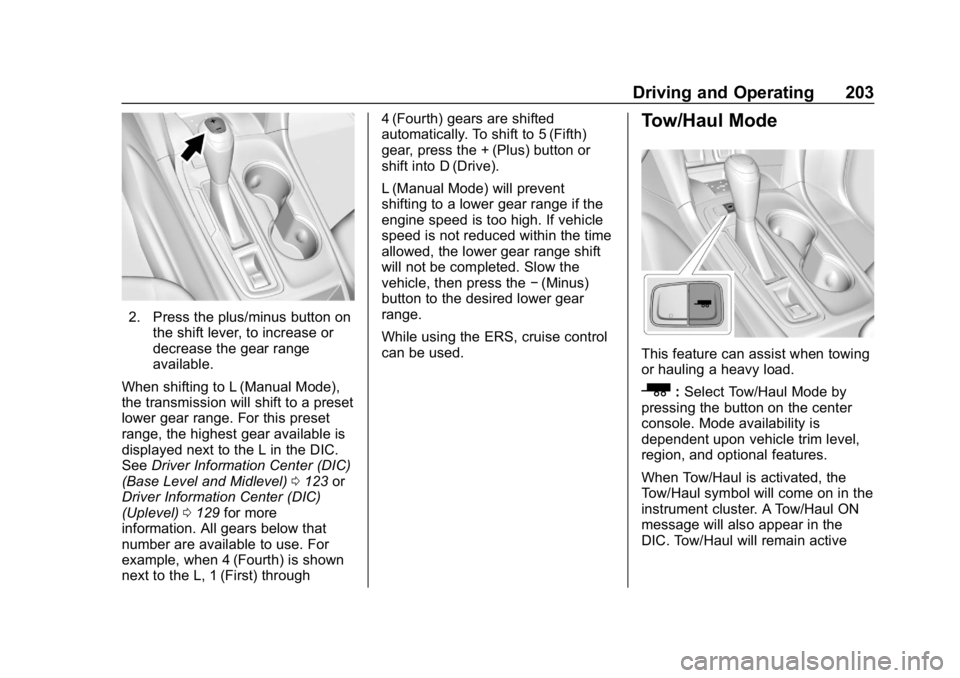
2. Press the plus/minus button onthe shift lever, to increase or
decrease the gear range
available.
When shifting to L (Manual Mode),
the transmission will shift to a preset
lower gear range. For this preset
range, the highest gear available is
displayed next to the L in the DIC.
See Driver Information Center (DIC)
(Base Level and Midlevel) 0123 or
Driver Information Center (DIC)
(Uplevel) 0129 for more
information. All gears below that
number are available to use. For
example, when 4 (Fourth) is shown
next to the L, 1 (First) through 4 (Fourth) gears are shifted
automatically. To shift to 5 (Fifth)
gear, press the + (Plus) button or
shift into D (Drive).
L (Manual Mode) will prevent
shifting to a lower gear range if the
engine speed is too high. If vehicle
speed is not reduced within the time
allowed, the lower gear range shift
will not be completed. Slow the
vehicle, then press the
−(Minus)
button to the desired lower gear
range.
While using the ERS, cruise control
can be used.
Tow/Haul Mode
This feature can assist when towing
or hauling a heavy load.
_: Select Tow/Haul Mode by
pressing the button on the center
console. Mode availability is
dependent upon vehicle trim level,
region, and optional features.
When Tow/Haul is activated, the
Tow/Haul symbol will come on in the
instrument cluster. A Tow/Haul ON
message will also appear in the
DIC. Tow/Haul will remain active
Page 205 of 415
Chevrolet Equinox Owner Manual (GMNA-Localizing-U.S./Canada/Mexico-
13555863) - 2020 - CRC - 8/2/19
204 Driving and Operating
until the next key cycle. SeeDriving
Characteristics and Towing Tips
0 254.
Automatic Engine Grade
Braking
Automatic Engine Grade Braking
assists when driving downhill.
It maintains vehicle speed by
automatically implementing a shift
pattern that uses the engine and the
transmission to slow the vehicle.
The system will automatically
command downshifts to reduce
vehicle speed. The normal shift
pattern will return once the vehicle
is on a low grade or when the
accelerator pedal is pressed.
While in the Electronic Range
Select (ERS) mode, grade braking
is deactivated, allowing the driver to
select a range and limiting the
highest gear available. Grade
braking is available for normal
driving and in Tow/Haul Mode.
See Automatic Transmission 0200.
Drive Systems
All-Wheel Drive
Vehicles with this feature can
operate in All-Wheel
Drive (AWD) Mode.
The AWD system delivers power to
all four wheels and the system
adjusts as needed to improve
traction.
Press the AWD switch on the center
console to activate the system. The
AWD light will flash briefly while the
system is engaging and stay lit to
indicate AWD is active. Press the
switch again to disable the system.
The light will flash briefly while the
system disables and then stay off.
The AWD Mode will stay selected
until the mode is changed.
When operated in two-wheel drive,
the vehicle will deliver power to the
front wheels only and may provide
better fuel economy. A system off message displays
when there is a temporary condition
making the AWD system
unavailable. The vehicle will run in
two-wheel drive.
This could be caused by:
.
A compact spare tire on the
vehicle.
. AWD system overheat.
. Loss of wheel or vehicle speed.
. Certain other vehicle electrical
conditions.
The message turns off when the
compact spare tire is replaced by a
full-size tire, the differential fluid
cools, or the above conditions are
no longer present and the warning
message is reset.
To reset the warning message
manually, turn the ignition off and
then back on again after
30 seconds. If the message stays
on, see your dealer.
Page 251 of 415
Chevrolet Equinox Owner Manual (GMNA-Localizing-U.S./Canada/Mexico-
13555863) - 2020 - CRC - 8/2/19
250 Driving and Operating
8. Start the engine and let it idlefor five minutes. Check the fuel
filter and air bleed valve for
leaks.
9. Reset the fuel filter monitor. See Driver Information Center
(DIC) (Base Level and
Midlevel) 0123 or
Driver Information Center (DIC)
(Uplevel) 0129.
Filling the Tank
(Gasoline)
An arrow on the fuel gauge
indicates which side of the vehicle
the fuel door is on. See Fuel Gauge
0 110.
{Warning
Fuel vapors and fuel fires burn
violently and can cause injury or
death.
Follow these guidelines to help
avoid injuries to you and others:
(Continued)
Warning (Continued)
.Read and follow all the
instructions on the fuel
pump island.
. Turn off the engine when
refueling.
. Keep sparks, flames, and
smoking materials away
from fuel.
. Do not leave the fuel pump
unattended.
. Avoid using electronic
devices while refueling.
. Do not re-enter the vehicle
while pumping fuel.
. Keep children away from
the fuel pump and never let
children pump fuel.
. Before touching the fill
nozzle, touch a metallic
object to discharge static
electricity from your body.
(Continued)
Warning (Continued)
.Fuel can spray out if the fill
nozzle is inserted too
quickly. This spray can
happen if the tank is nearly
full, and is more likely in hot
weather. Insert the fill nozzle
slowly and wait for any hiss
noise to stop before
beginning to flow fuel.
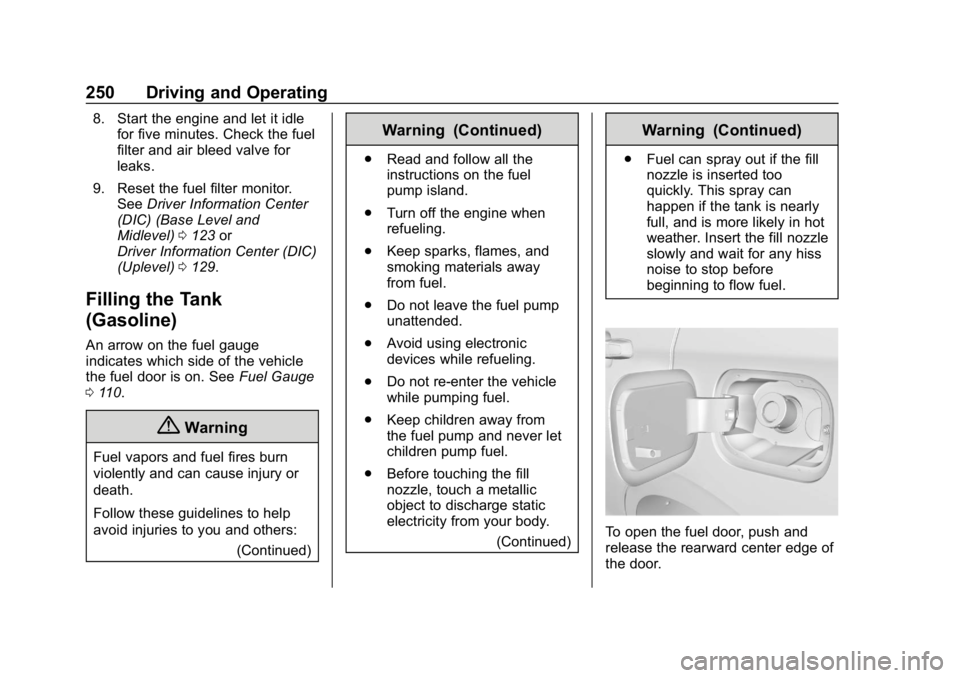
To open the fuel door, push and
release the rearward center edge of
the door.