warning CHEVROLET EQUINOX 2020 Repair Manual
[x] Cancel search | Manufacturer: CHEVROLET, Model Year: 2020, Model line: EQUINOX, Model: CHEVROLET EQUINOX 2020Pages: 415, PDF Size: 6.46 MB
Page 122 of 415
Chevrolet Equinox Owner Manual (GMNA-Localizing-U.S./Canada/Mexico-
13555863) - 2020 - CRC - 8/2/19
Instruments and Controls 121
When the Light Flashes First and
Then Is On Steady
If the light flashes for about a minute
and then stays on, there may be a
problem with the TPMS. If the
problem is not corrected, the light
will come on at every ignition cycle.
SeeTire Pressure Monitor
Operation 0316.
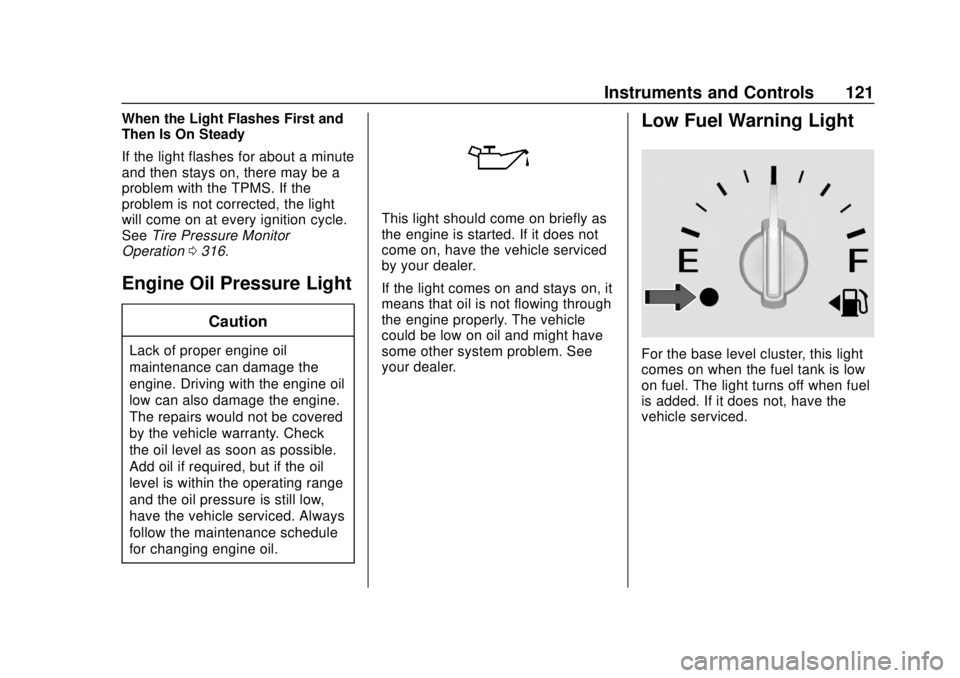
Engine Oil Pressure Light
Caution
Lack of proper engine oil
maintenance can damage the
engine. Driving with the engine oil
low can also damage the engine.
The repairs would not be covered
by the vehicle warranty. Check
the oil level as soon as possible.
Add oil if required, but if the oil
level is within the operating range
and the oil pressure is still low,
have the vehicle serviced. Always
follow the maintenance schedule
for changing engine oil.
This light should come on briefly as
the engine is started. If it does not
come on, have the vehicle serviced
by your dealer.
If the light comes on and stays on, it
means that oil is not flowing through
the engine properly. The vehicle
could be low on oil and might have
some other system problem. See
your dealer.
Low Fuel Warning Light
For the base level cluster, this light
comes on when the fuel tank is low
on fuel. The light turns off when fuel
is added. If it does not, have the
vehicle serviced.
Page 123 of 415
Chevrolet Equinox Owner Manual (GMNA-Localizing-U.S./Canada/Mexico-
13555863) - 2020 - CRC - 8/2/19
122 Instruments and Controls
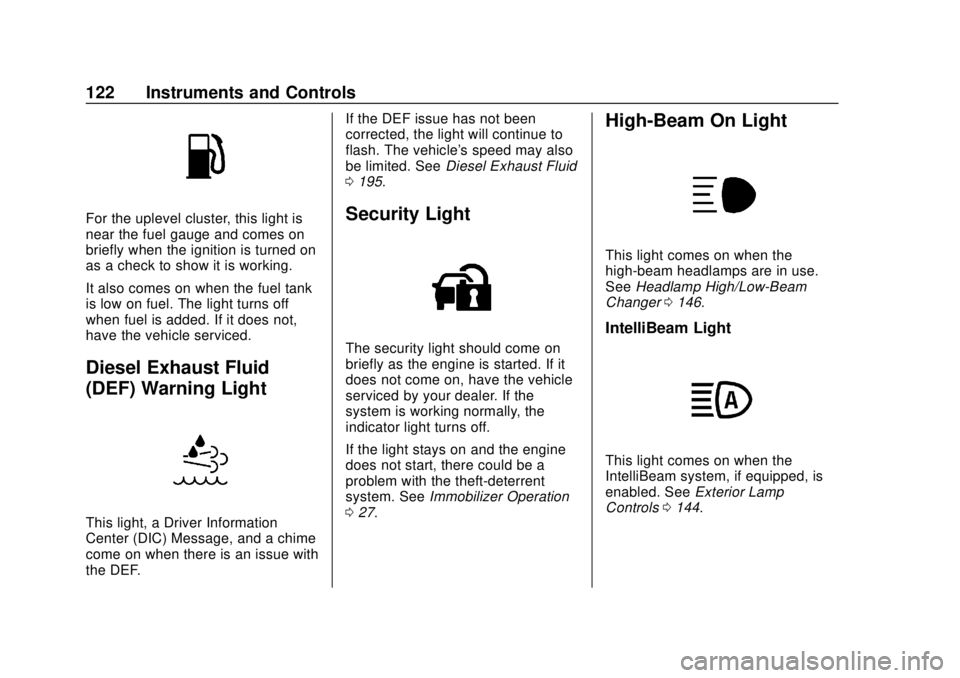
For the uplevel cluster, this light is
near the fuel gauge and comes on
briefly when the ignition is turned on
as a check to show it is working.
It also comes on when the fuel tank
is low on fuel. The light turns off
when fuel is added. If it does not,
have the vehicle serviced.
Diesel Exhaust Fluid
(DEF) Warning Light
This light, a Driver Information
Center (DIC) Message, and a chime
come on when there is an issue with
the DEF.If the DEF issue has not been
corrected, the light will continue to
flash. The vehicle's speed may also
be limited. See
Diesel Exhaust Fluid
0 195.
Security Light
The security light should come on
briefly as the engine is started. If it
does not come on, have the vehicle
serviced by your dealer. If the
system is working normally, the
indicator light turns off.
If the light stays on and the engine
does not start, there could be a
problem with the theft-deterrent
system. See Immobilizer Operation
0 27.
High-Beam On Light
This light comes on when the
high-beam headlamps are in use.
See Headlamp High/Low-Beam
Changer 0146.
IntelliBeam Light
This light comes on when the
IntelliBeam system, if equipped, is
enabled. See Exterior Lamp
Controls 0144.
Page 126 of 415
Chevrolet Equinox Owner Manual (GMNA-Localizing-U.S./Canada/Mexico-
13555863) - 2020 - CRC - 8/2/19
Instruments and Controls 125
Vehicle Information Menu
(VEHICLE) Items
Units :Choose between Metric or
US when Units is active. Press
Vto
confirm the setting. This will change
the displays on the DIC to the type
of measurements you select.
Speed Warning : This display is
used to set the vehicle speed at
which the speed warning chime
sounds and the alert is displayed.
The speed can be set by pressing
Vwhile the speed warning display
is showing.
Remaining Oil Life : Displays an
estimate of the oil's remaining useful
life. If REMAINING OIL LIFE 99% is
displayed, that means 99% of the
current oil life remains.
When the remaining oil life is low,
the CHANGE ENGINE OIL SOON
message will appear on the display.
The oil should be changed as soon
as possible. See Engine Oil0275.
In addition to the engine oil life
system monitoring the oil life,
additional maintenance is recommended in the Maintenance
Schedule in this manual. See
Maintenance Schedule
0360.
The Oil Life display must be reset
after each oil change. Do not reset
the Oil Life display accidentally at
any time other than when the oil has
just been changed. It cannot be
reset accurately until the next oil
change. To reset the engine oil life
system, see Engine Oil Life System
0 279.
Oil Pressure : Oil pressure is
displayed in either kilopascal (kPa)
or in pounds per square inch (psi).
Fuel Filter Life (Diesel Engine
Only) : This display shows an
estimate of the fuel filter's remaining
useful life. If 90% Fuel Filter Life
Remaining is displayed, it means
90% of the current fuel filter life
remains. The fuel filter life system
will alert when to change the fuel
filter on a schedule consistent with
your driving conditions. When the
remaining fuel filter life is low, the
CHANGE FUEL FILTER message
will appear on the display. Change
the fuel filter as soon as possible. Diesel Exhaust Fluid (DEF) Level
(Diesel Engine Only) :
The DEF
level will be displayed as either OK,
XX%, or LOW. When LOW appears
on the display, add DEF as soon as
possible. See Diesel Exhaust Fluid
0 195.
Tire Pressure : Displays a vehicle
with the approximate pressures of
all four tires. Tire pressure is
displayed in either kilopascal (kPa)
or in pounds per square inch (psi).
See Tire Pressure Monitor System
0 315 and
Tire Pressure Monitor Operation
0 316.
Battery Voltage : Displays the
current battery voltage, if equipped.
Battery voltage changes are normal
while driving. See Charging System
Light 0114. If there is a problem
with the battery charging system,
the DIC will display a message.
Coolant Temperature : Displays
the coolant temperature in degrees
Celsius (°C) or degrees Fahrenheit
(°F).
Page 130 of 415
Chevrolet Equinox Owner Manual (GMNA-Localizing-U.S./Canada/Mexico-
13555863) - 2020 - CRC - 8/2/19
Instruments and Controls 129
Follow Distance :If equipped, the
current follow time to the vehicle
ahead is displayed as a time value
on this page.
Battery Voltage : Displays the
current battery voltage, if equipped.
Battery voltage changes are normal
while driving. See Charging System
Light 0114. If there is a problem
with the battery charging system, a
DIC will display a message.
Coolant Temperature : Displays
the coolant temperature in degrees
Celsius (°C) or degrees Fahrenheit
(°F).
Diesel Exhaust Fluid (DEF) Level
(Diesel Engine Only) : If equipped,
the DEF level will be displayed as
either OK, XX%, or LOW. When
LOW appears on the display, add
DEF as soon as possible. See
Diesel Exhaust Fluid 0195.
Oil Pressure : Oil pressure is
displayed in either kilopascal (kPa)
or in pounds per square inch (psi).
Oil pressure can vary with engine
speed, outside temperature, and oil
viscosity. On some models, the oil pump will vary engine oil pressure
according to engine needs. Oil
pressure may change quickly as the
engine speed or load varies. This is
normal. If the oil pressure warning
light or Driver Information Center
(DIC) message indicates oil
pressure outside the normal
operating range, check the vehicle's
oil as soon as possible.
Driver Information Center
(DIC) (Uplevel)
The DIC displays are shown in the
center of the instrument cluster in
the Info App. See
Instrument Cluster
(Base and Midlevel) 0102 or
Instrument Cluster (Uplevel) 0106.
The displays show the status of
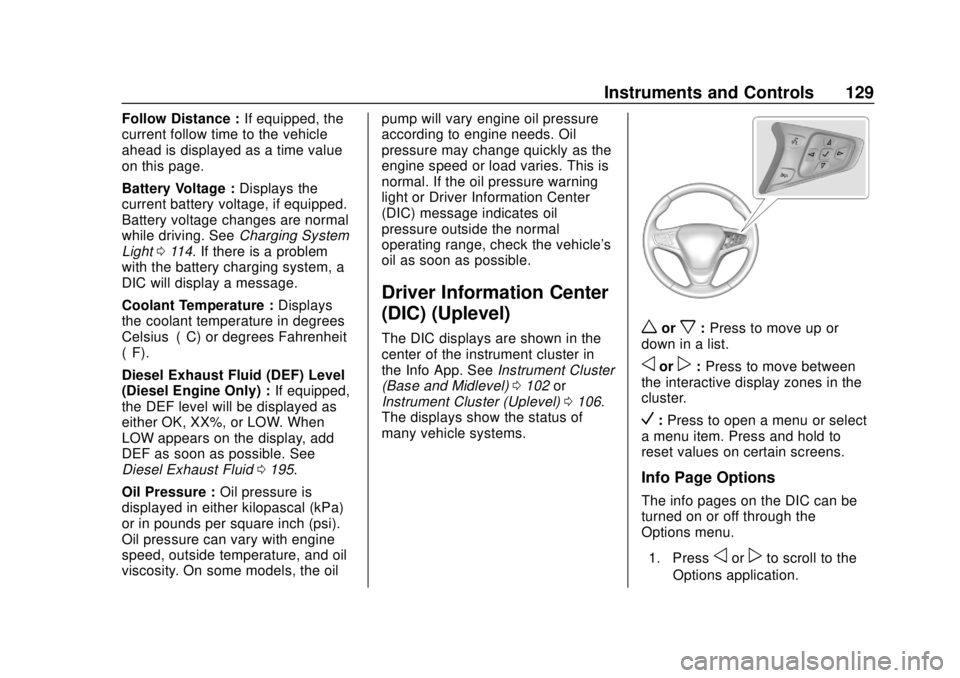
many vehicle systems.worx: Press to move up or
down in a list.
oorp: Press to move between
the interactive display zones in the
cluster.
V: Press to open a menu or select
a menu item. Press and hold to
reset values on certain screens.
Info Page Options
The info pages on the DIC can be
turned on or off through the
Options menu.
1. Press
oorpto scroll to the
Options application.
Page 133 of 415
Chevrolet Equinox Owner Manual (GMNA-Localizing-U.S./Canada/Mexico-
13555863) - 2020 - CRC - 8/2/19
132 Instruments and Controls
Presswandxto select“Reset
Best Score.” Press
Vto reset the
best average fuel economy. After
reset, the best value displays “-,-”
until the selected distance has been
traveled.
The display provides information on
how current driving behavior affects
the running average and how well
recent driving compares to the best
that has been achieved for the
selected distance.
Follow Distance/Gap Setting :
If equipped, the current follow time
to the vehicle ahead is displayed as
a time value on this page. When
Adaptive Cruise Control (ACC) has
been engaged, the display switches
to the gap setting page. This page
shows the current gap setting along
with the vehicle ahead indicator.
Driver Assistance : If equipped,
shows information for Lane Keep
Assist (LKA), Lane Departure
Warning (LDW), and Forward
Collision Alert (FCA). Economy Trend :
Shows history of
the Average Fuel Economy from the
last 50 km (30 mi). Each bar
represents about 5 km (3 mi) of
driving. During driving the bars will
shift to always reflect the most
recent distance on the right side.
Press
Vto open the menu while
this display is active to clear the
graph. Select yes or no and
press
V.
Timer : This display can be used as
a timer. To start the timer, press
V
to open the menu while this display
is active. Use
wandxto select
Start Timer or Reset. Press
V. To
stop the timer, press
Vwhile this
display is active. The display will
show the amount of time that has
passed since the timer was last
reset.
Speed Limit : Shows sign
information, which comes from a
roadway database in the onboard
navigation, if equipped. The sign will show
“− −”when there is no
detected speed limit or the system
is unavailable.
Press
Vwhile this display is active
to toggle Speed Limit sign on or off.
Battery Voltage : Displays the
current battery voltage, if equipped.
Battery voltage changes are normal
while driving. See Charging System
Light 0114. If there is a problem
with the battery charging system, a
DIC will display a message.
Oil Pressure : Oil pressure is
displayed in either kilopascal (kPa)
or in pounds per square inch (psi).
Oil pressure can vary with engine
speed, outside temperature, and oil
viscosity. On some models, the oil
pump will vary engine oil pressure
according to engine needs. Oil
pressure may change quickly as the
engine speed or load varies. This is
normal. If the oil pressure warning
light or DIC message indicates oil
pressure outside the normal
operating range, check the vehicle's
oil as soon as possible.
Page 145 of 415
Chevrolet Equinox Owner Manual (GMNA-Localizing-U.S./Canada/Mexico-
13555863) - 2020 - CRC - 8/2/19
144 Lighting
Lighting
Exterior Lighting
Exterior Lamp Controls . . . . . . . 144
Headlamp High/Low-BeamChanger . . . . . . . . . . . . . . . . . . . . 146
Flash-to-Pass . . . . . . . . . . . . . . . . 146
Daytime Running Lamps (DRL) . . . . . . . . . . . . . . . 146
Automatic Headlamp System . . . . . . . . . . . . . . . . . . . . . . 147
Hazard Warning Flashers . . . . . 148
Turn and Lane-Change Signals . . . . . . . . . . . . . . . . . . . . . . 148
Fog Lamps . . . . . . . . . . . . . . . . . . . 148
Interior Lighting
Instrument Panel Illumination Control . . . . . . . . . . . . . . . . . . . . . . 149
Courtesy Lamps . . . . . . . . . . . . . . 149
Dome Lamps . . . . . . . . . . . . . . . . . 149
Reading Lamps . . . . . . . . . . . . . . 150
Lighting Features
Entry Lighting . . . . . . . . . . . . . . . . 151
Exit Lighting . . . . . . . . . . . . . . . . . . 151
Battery Load Management . . . 151
Battery Power Protection . . . . . 152
Exterior Lighting Battery Saver . . . . . . . . . . . . . . . . . . . . . . . 152Exterior Lighting
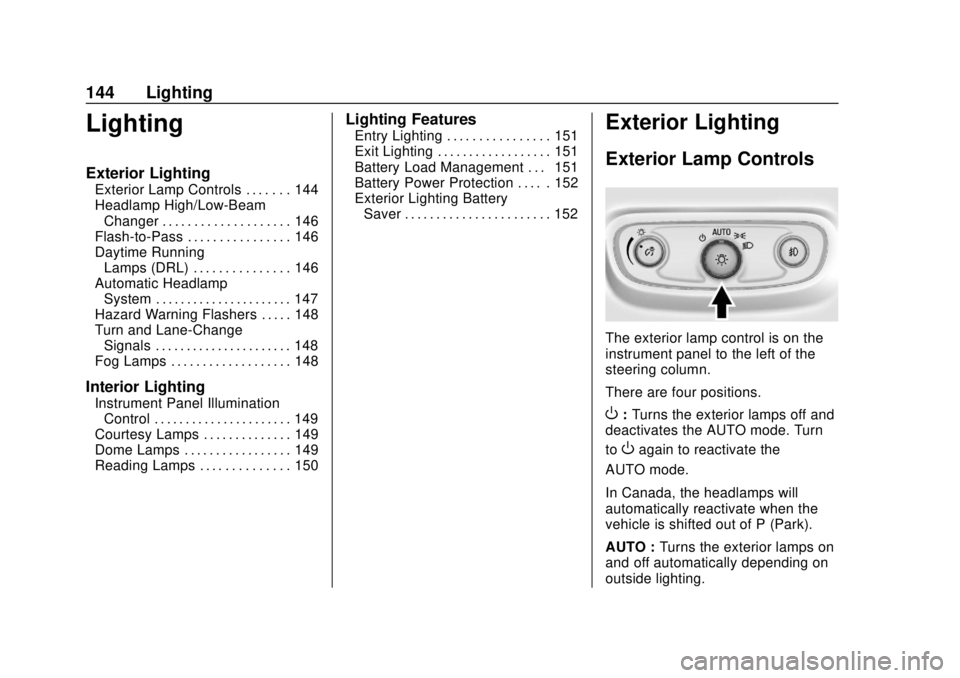
Exterior Lamp Controls
The exterior lamp control is on the
instrument panel to the left of the
steering column.
There are four positions.
O: Turns the exterior lamps off and
deactivates the AUTO mode. Turn
to
Oagain to reactivate the
AUTO mode.
In Canada, the headlamps will
automatically reactivate when the
vehicle is shifted out of P (Park).
AUTO : Turns the exterior lamps on
and off automatically depending on
outside lighting.
Page 149 of 415
Chevrolet Equinox Owner Manual (GMNA-Localizing-U.S./Canada/Mexico-
13555863) - 2020 - CRC - 8/2/19
148 Lighting
Hazard Warning Flashers
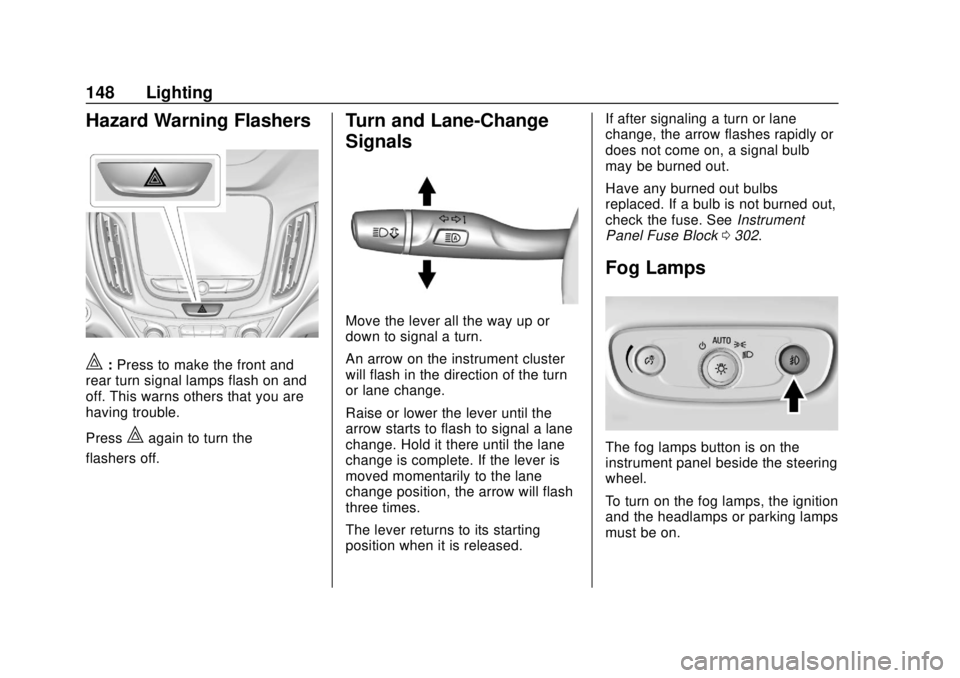
|:Press to make the front and
rear turn signal lamps flash on and
off. This warns others that you are
having trouble.
Press
|again to turn the
flashers off.
Turn and Lane-Change
Signals
Move the lever all the way up or
down to signal a turn.
An arrow on the instrument cluster
will flash in the direction of the turn
or lane change.
Raise or lower the lever until the
arrow starts to flash to signal a lane
change. Hold it there until the lane
change is complete. If the lever is
moved momentarily to the lane
change position, the arrow will flash
three times.
The lever returns to its starting
position when it is released. If after signaling a turn or lane
change, the arrow flashes rapidly or
does not come on, a signal bulb
may be burned out.
Have any burned out bulbs
replaced. If a bulb is not burned out,
check the fuse. See
Instrument
Panel Fuse Block 0302.
Fog Lamps
The fog lamps button is on the
instrument panel beside the steering
wheel.
To turn on the fog lamps, the ignition
and the headlamps or parking lamps
must be on.
Page 166 of 415
Chevrolet Equinox Owner Manual (GMNA-Localizing-U.S./Canada/Mexico-
13555863) - 2020 - CRC - 8/2/19
Driving and Operating 165
regarding driver distraction. Become
familiar with the local laws in
your area.
To avoid distracted driving, keep
your eyes on the road, keep your
hands on the steering wheel, and
focus your attention on driving.
.Do not use a phone in
demanding driving situations.
Use a hands-free method to
place or receive necessary
phone calls.
. Watch the road. Do not read,
take notes, or look up
information on phones or other
electronic devices.
. Designate a front seat
passenger to handle potential
distractions.
. Become familiar with vehicle
features before driving, such as
programming favorite radio
stations and adjusting climate
control and seat settings.
Program all trip information into
any navigation device prior to
driving. .
Wait until the vehicle is parked
to retrieve items that have fallen
to the floor.
. Stop or park the vehicle to tend
to children.
. Keep pets in an appropriate
carrier or restraint.
. Avoid stressful conversations
while driving, whether with a
passenger or on a cell phone.
{Warning
Taking your eyes off the road too
long or too often could cause a
crash resulting in injury or death.
Focus your attention on driving.
Refer to the infotainment manual for
more information on using that
system and the navigation system,
if equipped, including pairing and
using a cell phone.
Defensive Driving
Defensive driving means “always
expect the unexpected.” The first
step in driving defensively is to wear
the seat belt. See Seat Belts048.
. Assume that other road users
(pedestrians, bicyclists, and
other drivers) are going to be
careless and make mistakes.
Anticipate what they might do
and be ready.
. Allow enough following distance
between you and the driver in
front of you.
. Focus on the task of driving.
Drunk Driving
Death and injury associated with
drinking and driving is a global
tragedy.
Page 167 of 415
Chevrolet Equinox Owner Manual (GMNA-Localizing-U.S./Canada/Mexico-
13555863) - 2020 - CRC - 8/2/19
166 Driving and Operating
{Warning
Drinking and then driving is very
dangerous. Your reflexes,
perceptions, attentiveness, and
judgment can be affected by even
a small amount of alcohol. You
can have a serious—or even
fatal —collision if you drive after
drinking.
Do not drink and drive or ride with
a driver who has been drinking.
Ride home in a cab; or if you are
with a group, designate a driver
who will not drink.
Control of a Vehicle
Braking, steering, and accelerating
are important factors in helping to
control a vehicle while driving.
Braking
Braking action involves perception
time and reaction time. Deciding to
push the brake pedal is perception
time. Actually doing it is
reaction time.
Average driver reaction time is
about three-quarters of a second. In
that time, a vehicle moving at
100 km/h (60 mph) travels 20 m
(66 ft), which could be a lot of
distance in an emergency.
Helpful braking tips to keep in mind
include:
. Keep enough distance between
you and the vehicle in front
of you.
. Avoid needless heavy braking.
. Keep pace with traffic.
If the engine ever stops while the
vehicle is being driven, brake
normally but do not pump the
brakes. Doing so could make the
pedal harder to push down. If the
engine stops, there will be some
power brake assist but it will be
used when the brake is applied. Once the power assist is used up, it
can take longer to stop and the
brake pedal will be harder to push.
Steering
Electric Power Steering
Caution
To avoid damage to the steering
system, do not drive over curbs,
parking barriers, or similar objects
at speeds greater than 3 km/h
(1 mph). Use care when driving
over other objects such as lane
dividers and speed bumps.
Damage caused by misuse of the
vehicle is not covered by the
vehicle warranty.
Page 169 of 415
Chevrolet Equinox Owner Manual (GMNA-Localizing-U.S./Canada/Mexico-
13555863) - 2020 - CRC - 8/2/19
168 Driving and Operating
1. Ease off the accelerator andthen, if there is nothing in the
way, steer the vehicle so that it
straddles the edge of the
pavement.
2. Turn the steering wheel about one-eighth of a turn, until the
right front tire contacts the
pavement edge.
3. Turn the steering wheel to go straight down the roadway.
Loss of Control
Skidding
There are three types of skids that
correspond to the vehicle's three
control systems:
.Braking Skid —wheels are not
rolling.
. Steering or Cornering Skid —
too much speed or steering in a
curve causes tires to slip and
lose cornering force.
. Acceleration Skid —too much
throttle causes the driving
wheels to spin. Defensive drivers avoid most skids
by taking reasonable care suited to
existing conditions, and by not
overdriving those conditions. But
skids are always possible.
If the vehicle starts to slide, follow
these suggestions:
.
Ease your foot off the
accelerator pedal and steer the
way you want the vehicle to go.
The vehicle may straighten out.
Be ready for a second skid if it
occurs.
. Slow down and adjust your
driving according to weather
conditions. Stopping distance
can be longer and vehicle
control can be affected when
traction is reduced by water,
snow, ice, gravel, or other
material on the road. Learn to
recognize warning clues —such
as enough water, ice, or packed
snow on the road to make a
mirrored surface —and slow
down when you have any doubt. .
Try to avoid sudden steering,
acceleration, or braking,
including reducing vehicle speed
by shifting to a lower gear. Any
sudden changes could cause
the tires to slide.
Remember: Antilock brakes help
avoid only the braking skid.
Off-Road Driving
All-wheel-drive vehicles can be
used for off-road driving. Vehicles
without all-wheel drive and vehicles
not equipped with All Terrain (AT) or
On-Off Road (OOR) tires must not
be driven off-road except on a level,
solid surface. To contact the tire
manufacturer for more information
about the original equipment tires,
see the warranty manual.
Controlling the vehicle is the key to
successful off-road driving. One of
the best ways to control the vehicle
is to control the speed.