camera CHEVROLET EQUINOX 2021 Owner's Manual
[x] Cancel search | Manufacturer: CHEVROLET, Model Year: 2021, Model line: EQUINOX, Model: CHEVROLET EQUINOX 2021Pages: 369, PDF Size: 8.71 MB
Page 6 of 369
Chevrolet Equinox Owner Manual (GMNA-Localizing-U.S./Canada/Mexico-
14420010) - 2021 - CRC - 11/10/20
Introduction 5
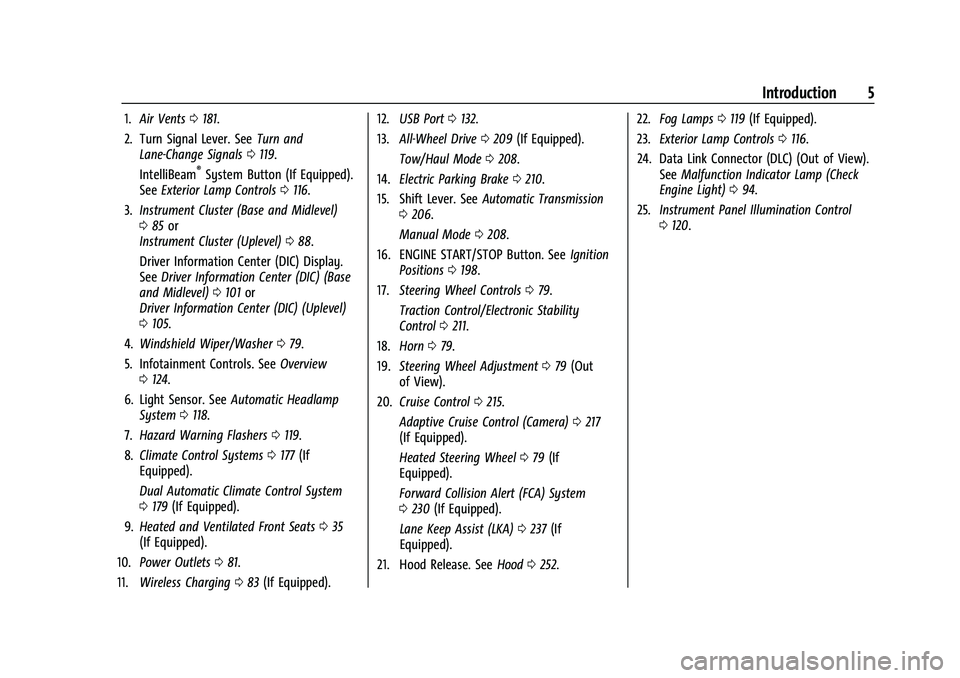
1.Air Vents 0181.
2. Turn Signal Lever. See Turn and
Lane-Change Signals 0119.
IntelliBeam
®System Button (If Equipped).
See Exterior Lamp Controls 0116.
3. Instrument Cluster (Base and Midlevel)
085 or
Instrument Cluster (Uplevel) 088.
Driver Information Center (DIC) Display.
See Driver Information Center (DIC) (Base
and Midlevel) 0101 or
Driver Information Center (DIC) (Uplevel)
0 105.
4. Windshield Wiper/Washer 079.
5. Infotainment Controls. See Overview
0 124.
6. Light Sensor. See Automatic Headlamp
System 0118.
7. Hazard Warning Flashers 0119.
8. Climate Control Systems 0177 (If
Equipped).
Dual Automatic Climate Control System
0 179 (If Equipped).
9. Heated and Ventilated Front Seats 035
(If Equipped).
10. Power Outlets 081.
11. Wireless Charging 083 (If Equipped). 12.
USB Port 0132.
13. All-Wheel Drive 0209 (If Equipped).
Tow/Haul Mode 0208.
14. Electric Parking Brake 0210.
15. Shift Lever. See Automatic Transmission
0 206.
Manual Mode 0208.
16. ENGINE START/STOP Button. See Ignition
Positions 0198.
17. Steering Wheel Controls 079.
Traction Control/Electronic Stability
Control 0211.
18. Horn 079.
19. Steering Wheel Adjustment 079 (Out
of View).
20. Cruise Control 0215.
Adaptive Cruise Control (Camera) 0217
(If Equipped).
Heated Steering Wheel 079 (If
Equipped).
Forward Collision Alert (FCA) System
0 230 (If Equipped).
Lane Keep Assist (LKA) 0237 (If
Equipped).
21. Hood Release. See Hood0252. 22.
Fog Lamps 0119 (If Equipped).
23. Exterior Lamp Controls 0116.
24. Data Link Connector (DLC) (Out of View). SeeMalfunction Indicator Lamp (Check
Engine Light) 094.
25. Instrument Panel Illumination Control
0120.
Page 101 of 369
Chevrolet Equinox Owner Manual (GMNA-Localizing-U.S./Canada/Mexico-
14420010) - 2021 - CRC - 11/12/20
100 Instruments and Controls
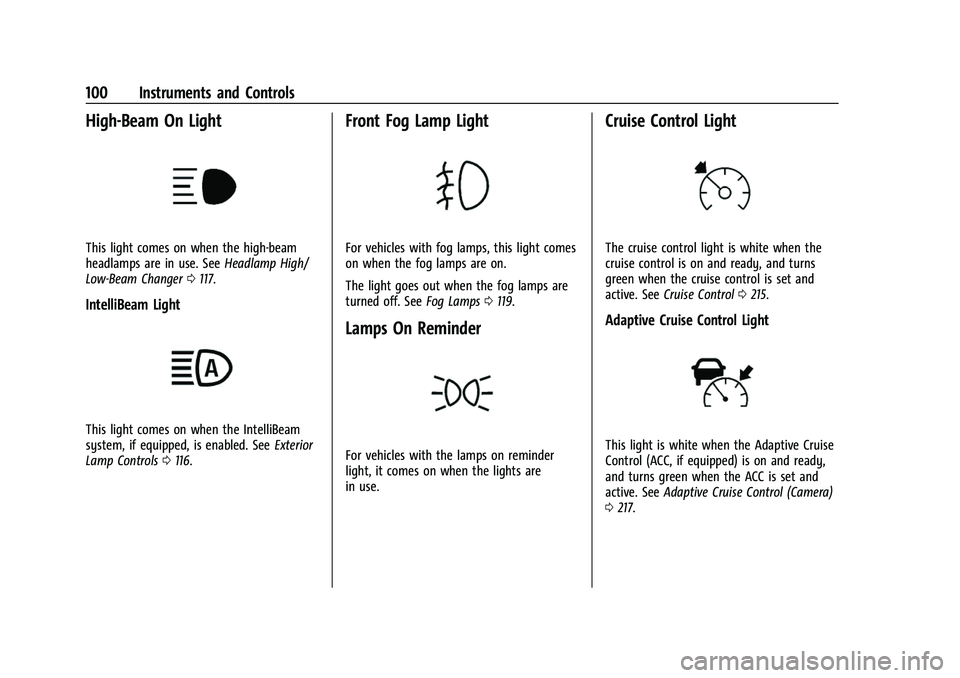
High-Beam On Light
This light comes on when the high-beam
headlamps are in use. SeeHeadlamp High/
Low-Beam Changer 0117.
IntelliBeam Light
This light comes on when the IntelliBeam
system, if equipped, is enabled. See Exterior
Lamp Controls 0116.
Front Fog Lamp Light
For vehicles with fog lamps, this light comes
on when the fog lamps are on.
The light goes out when the fog lamps are
turned off. See Fog Lamps0119.
Lamps On Reminder
For vehicles with the lamps on reminder
light, it comes on when the lights are
in use.
Cruise Control Light
The cruise control light is white when the
cruise control is on and ready, and turns
green when the cruise control is set and
active. See Cruise Control 0215.
Adaptive Cruise Control Light
This light is white when the Adaptive Cruise
Control (ACC, if equipped) is on and ready,
and turns green when the ACC is set and
active. See Adaptive Cruise Control (Camera)
0 217.
Page 110 of 369
Chevrolet Equinox Owner Manual (GMNA-Localizing-U.S./Canada/Mexico-
14420010) - 2021 - CRC - 11/12/20
Instruments and Controls 109
4. Touch9orRto turn a feature off or on.
5. Touch
zto go to the top level of the
Settings menu.
The menu may contain the following:
Rear Seat Reminder
This allows for a chime and a message when
the rear door has been opened before or
during operation of the vehicle.
Touch Off or On.
Climate and Air Quality
Touch and the following may display:
.Auto Fan Speed
.Air Quality Sensor
.Auto Cooled Seats
.Auto Heated Seats
.Auto Defog
.Auto Rear Defog
Auto Fan Speed
This setting specifies the amount of airflow
when the climate control fan setting is
Auto Fan.
Touch Low, Medium, or High. Air Quality Sensor
This setting switches the system into
Recirculation Mode based on the quality of
the outside air.
Touch Off, Low Sensitivity, or High
Sensitivity.
Auto Cooled Seats
When enabled, this feature will
automatically activate ventilated seats at
the level required by the interior
temperature. See
Heated and Ventilated
Front Seats 035.
Touch Off or On.
Auto Heated Seats
When enabled, this feature will
automatically activate the heated seats at
the level required by the interior
temperature. The auto heated seats can be
turned off by using the heated seat buttons
on the center console. See Heated and
Ventilated Front Seats 035.
Touch Off or On.
Auto Defog
This setting automatically turns the front
defogger on when the engine is started.
Touch Off or On. Auto Rear Defog
This setting automatically turns the rear
defogger on when the engine is started.
Touch Off or On.
Collision/Detection Systems
Touch and the following may display:
.Alert Type
.Forward Collision System
.Front Pedestrian Detection
.Adaptive Cruise Go Notifier
.Lane Change Alert
.Park Assist
.Rear Camera Park Assist Symbols
.Rear Cross Traffic Alert
Alert Type
This feature will set the type of alert
received from the driver assistance systems
to help avoid crashes, either Beeps or Safety
Alert Seat vibration pulses.
Touch Beeps or Safety Alert Seat.
Forward Collision System
This setting can alert of a potential crash
with a detected vehicle ahead and can apply
brakes to help reduce a collision’s severity.
Page 111 of 369
Chevrolet Equinox Owner Manual (GMNA-Localizing-U.S./Canada/Mexico-
14420010) - 2021 - CRC - 11/12/20
110 Instruments and Controls
Touch Off, Alert, or Alert and Brake.
Front Pedestrian Detection
This feature may help avoid or reduce the
harm caused by front-end crashes with
nearby pedestrians.
SeeFront Pedestrian Braking (FPB) System
0 233.
Select Off, Alert, or Alert and Brake.
Adaptive Cruise Go Notifier
This setting determines if an alert will
appear when Adaptive Cruise Control brings
the vehicle to a complete stop and the
vehicle ahead of you starts moving again.
See Adaptive Cruise Control (Camera) 0217.
Touch Off or On.
Lane Change Alert
The LCA system is a lane-changing aid that
assists drivers with avoiding lane change
crashes. See Lane Change Alert (LCA) 0235.
When Lane Change Alert is disabled, Side
Blind Zone Alert is also disabled.
Touch Off or On. Park Assist
If equipped, this allows the feature to be
turned on or off. See
Assistance Systems for
Parking or Backing 0227.
Touch Off or On.
Rear Camera Park Assist Symbols
This setting enables the Rear Camera Park
Assist Symbols. See Assistance Systems for
Parking or Backing 0227.
Touch Off or On.
Rear Cross Traffic Alert
This allows the Rear Cross Traffic Alert
feature to be turned on or off. See
Assistance Systems for Parking or Backing
0 227.
Touch Off or On.
Comfort and Convenience
Touch and the following may display:
.Chime Volume
.Hands Free Liftgate Control
.Reverse Tilt Mirror
.Auto Wipe in Reverse Gear
.Extended Hill Start Assist Chime Volume
This determines the chime volume level.
Touch the controls on the infotainment
display to adjust the volume.
Hands Free Liftgate Control
The liftgate may be operated with a kicking
motion under the rear bumper between the
left exhaust pipe and the license plate. See
Liftgate
018.
Touch Off, On-Open and Close,
or On-Open Only.
Reverse Tilt Mirror
When on, the driver, passenger, or both
driver and passenger outside mirrors will tilt
downward when the vehicle is shifted into
R (Reverse) to improve visibility of the
ground near the rear wheels. They may
move from their tilted position when the
vehicle is shifted out of R (Reverse) or
turned off. See Reverse Tilt Mirrors 025.
Touch Off, On - Driver and Passenger, On -
Driver, or On - Passenger.
Auto Wipe in Reverse Gear
When on and the front wiper is on, the rear
wiper will automatically activate when the
vehicle is shifted to R (Reverse).
Page 128 of 369
Chevrolet Equinox Owner Manual (GMNA-Localizing-U.S./Canada/Mexico-
14420010) - 2021 - CRC - 11/10/20
Infotainment System 127
Apps
If equipped, in-vehicle apps are available for
download. Touch the Apps icon on the
Home Page to begin.
Downloading and using in-vehicle apps
requires Internet connectivity which can be
accessed with a data plan through the
vehicle’s built-in 4G LTE Wi-Fi hotspot,
if equipped, or a compatible mobile device
hotspot. On most mobile devices, activation
of the Wi-Fi hotspot is in the device’s
Settings menu under Mobile Network
Sharing, Personal Hotspot, Mobile Hotspot,
or similar.
Availability of apps and connectivity varies
by vehicle, conditions, and location. Data
plan rates apply. Features are subject to
change. For more information, see
www.my.chevrolet.com/learn.
OnStar Services
If equipped, touch the OnStar Services icon
to display the OnStar Services and Account
pages. SeeOnStar Overview 0349 and
OnStar System 0136.
Camera
If equipped, touch the Camera icon to access
the camera application. See Assistance
Systems for Parking or Backing 0227.
Shortcut Tray
The shortcut tray is near the bottom of the
display. It shows up to four applications.
Infotainment Display Features
Infotainment display features show on the
display when available. When a feature is
unavailable, it may gray out. When a
feature is touched, it may highlight.
Haptic Feedback
If equipped, haptic feedback is a pulse that
occurs when an icon or option is touched on
the display or when controls on the center
stack are pressed.
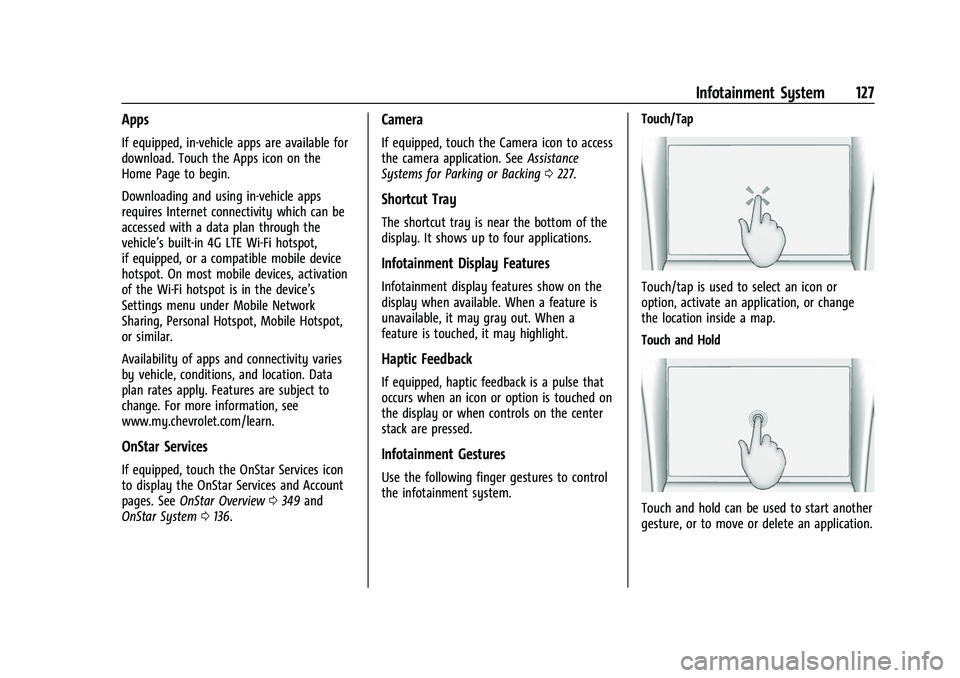
Infotainment Gestures
Use the following finger gestures to control
the infotainment system. Touch/Tap
Touch/tap is used to select an icon or
option, activate an application, or change
the location inside a map.
Touch and Hold
Touch and hold can be used to start another
gesture, or to move or delete an application.
Page 141 of 369
Chevrolet Equinox Owner Manual (GMNA-Localizing-U.S./Canada/Mexico-
14420010) - 2021 - CRC - 11/10/20
140 Infotainment System
Alert Preferences
Set alerts on or off during both inactive and
active guidance views. The following alerts
may be available:
.Road Safety Alerts–Touch to display
upcoming School Zones.
.Traffic Camera Alerts
Manage History
Touch Manage History to access the History
options:
.Clear Recent Destinations –Touch\to
clear the recent destinations.
.Clear Search History –Touch\to clear
the search history.
About
Touch to display software information,
such as:
.Telenav Terms and Conditions
.Telenav Privacy Statement
.Navigation Version
Maps
The Nav application requires a map database
to run. It is stored on an SD card that is
connected to the infotainment system. If the
map database is not available, a missing SD
card error message will be displayed.
SD Card Error Messages
The SD card only works for one unique
vehicle. The SD card must pass
authentication verification to be used for
that specific vehicle. Potential error scenarios
and messages include:
.The SD card has initialized for the first
time: “Once initialized, this SD card can
only be used for navigation in this
vehicle.”
.The SD card is not working properly: “SD
card is not functioning properly.
(Error Code).”
.The SD card is not paired with the
existing system: “This SD card is not valid
in this vehicle for navigation. See Owner’s
Manual for more detail or visit your
dealer. (Error Code).”
.The SD card has been removed from the
slot: “SD card has been removed.
(Error Code).” Touch Continue to resume after the
initialization error message. For the other
messages, touch OK to return to the
Home Page.
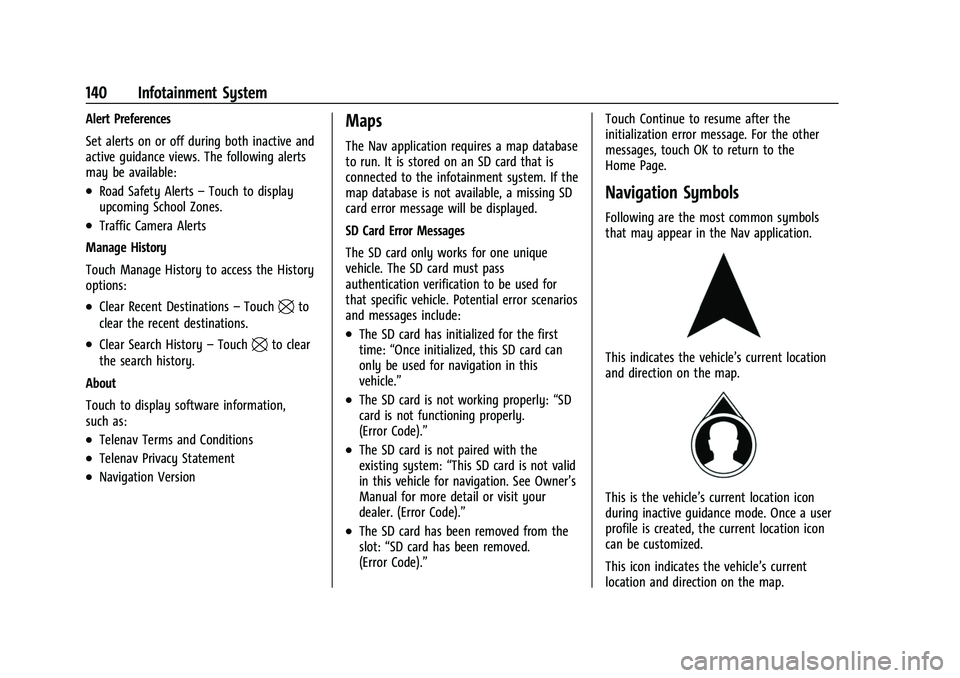
Navigation Symbols
Following are the most common symbols
that may appear in the Nav application.
This indicates the vehicle’s current location
and direction on the map.
This is the vehicle’s current location icon
during inactive guidance mode. Once a user
profile is created, the current location icon
can be customized.
This icon indicates the vehicle’s current
location and direction on the map.
Page 185 of 369
Chevrolet Equinox Owner Manual (GMNA-Localizing-U.S./Canada/Mexico-
14420010) - 2021 - CRC - 11/12/20
184 Driving and Operating
Driving and Operating
Driving Information
Driver Behavior . . . . . . . . . . . . . . . . . . . . . . . . 185
Driving Environment . . . . . . . . . . . . . . . . . . . 185
Vehicle Design . . . . . . . . . . . . . . . . . . . . . . . . . 185
Driving for Better Fuel Economy . . . . . . . 186
Distracted Driving . . . . . . . . . . . . . . . . . . . . . 186
Defensive Driving . . . . . . . . . . . . . . . . . . . . . . 186
Impaired Driving . . . . . . . . . . . . . . . . . . . . . . . 187
Control of a Vehicle . . . . . . . . . . . . . . . . . . . 187
Braking . . . . . . . . . . . . . . . . . . . . . . . . . . . . . . . . 187
Steering . . . . . . . . . . . . . . . . . . . . . . . . . . . . . . . 187
Off-Road Recovery . . . . . . . . . . . . . . . . . . . . . 188
Loss of Control . . . . . . . . . . . . . . . . . . . . . . . . 189
Off-Road Driving . . . . . . . . . . . . . . . . . . . . . . . 189
Driving on Wet Roads . . . . . . . . . . . . . . . . . 192
Hill and Mountain Roads . . . . . . . . . . . . . . 193
Winter Driving . . . . . . . . . . . . . . . . . . . . . . . . . 193
If the Vehicle Is Stuck . . . . . . . . . . . . . . . . . 194
Vehicle Load Limits . . . . . . . . . . . . . . . . . . . . 195
Starting and Operating
New Vehicle Break-In . . . . . . . . . . . . . . . . . . 198
Ignition Positions . . . . . . . . . . . . . . . . . . . . . . 198
Starting the Engine . . . . . . . . . . . . . . . . . . . 200
Stop/Start System . . . . . . . . . . . . . . . . . . . . . 201Winter Cover . . . . . . . . . . . . . . . . . . . . . . . . . . 201
Engine Heater . . . . . . . . . . . . . . . . . . . . . . . . . 203
Retained Accessory Power (RAP) . . . . . . 204
Shifting Into Park . . . . . . . . . . . . . . . . . . . . . 204
Shifting out of Park . . . . . . . . . . . . . . . . . . . 205
Parking over Things That Burn . . . . . . . . 205
Extended Parking . . . . . . . . . . . . . . . . . . . . . . 205
Engine Exhaust
Engine Exhaust . . . . . . . . . . . . . . . . . . . . . . . . 205
Running the Vehicle While Parked . . . . 206
Automatic Transmission
Automatic Transmission . . . . . . . . . . . . . . . 206
Manual Mode . . . . . . . . . . . . . . . . . . . . . . . . . 208
Tow/Haul Mode . . . . . . . . . . . . . . . . . . . . . . . 208
Drive Systems
All-Wheel Drive . . . . . . . . . . . . . . . . . . . . . . . 209
Brakes
Antilock Brake System (ABS) . . . . . . . . . . 209
Electric Parking Brake . . . . . . . . . . . . . . . . . . 210
Brake Assist . . . . . . . . . . . . . . . . . . . . . . . . . . . . 211
Hill Start Assist (HSA) . . . . . . . . . . . . . . . . . . 211
Ride Control Systems
Traction Control/Electronic Stability
Control . . . . . . . . . . . . . . . . . . . . . . . . . . . . . . . 211
Cruise Control
Cruise Control . . . . . . . . . . . . . . . . . . . . . . . . . . 215
Adaptive Cruise Control (Camera) . . . . . . 217
Driver Assistance Systems
Driver Assistance Systems . . . . . . . . . . . . . 225
Assistance Systems for Parking orBacking . . . . . . . . . . . . . . . . . . . . . . . . . . . . . . 227
Assistance Systems for Driving . . . . . . . . 230
Forward Collision Alert (FCA) System . . . . . . . . . . . . . . . . . . . . . . . . . . . . . . 230
Automatic Emergency Braking (AEB) . . . 232
Front Pedestrian Braking (FPB) System . . . . . . . . . . . . . . . . . . . . . . . . . . . . . . 233
Side Blind Zone Alert (SBZA) . . . . . . . . . . . 235
Lane Change Alert (LCA) . . . . . . . . . . . . . . . 235
Lane Keep Assist (LKA) . . . . . . . . . . . . . . . . . 237
Fuel
Top Tier Fuel . . . . . . . . . . . . . . . . . . . . . . . . . . 239
Recommended Fuel (LYX - 1.5L L4 Turbo Engine) . . . . . . . . . . . . . . . . . . . . . . . . . . . . . . 239
Prohibited Fuels . . . . . . . . . . . . . . . . . . . . . . . 239
Fuels in Foreign Countries . . . . . . . . . . . . . 240
Fuel Additives . . . . . . . . . . . . . . . . . . . . . . . . . 240
Filling the Tank . . . . . . . . . . . . . . . . . . . . . . . 240
Filling a Portable Fuel Container . . . . . . . 241
Page 218 of 369
Chevrolet Equinox Owner Manual (GMNA-Localizing-U.S./Canada/Mexico-
14420010) - 2021 - CRC - 11/12/20
Driving and Operating 217
Using Cruise Control on Hills
How well the cruise control works on hills
depends upon the vehicle speed, load, and
the steepness of the hills. When going up
steep hills, you might have to step on the
accelerator pedal to maintain the vehicle
speed. When going downhill, you might
have to brake or shift to a lower gear to
keep your speed down. If the brake pedal is
applied, cruise control will disengage.
Ending Cruise Control
There are four ways to end cruise control:
.Step lightly on the brake pedal.
.Press*.
.Shift the transmission to N (Neutral).
.To turn off cruise control, press5.
Erasing Speed Memory
The cruise control set speed is erased from
memory if
5is pressed or if the ignition is
turned off.
Adaptive Cruise Control (Camera)
If equipped, Adaptive Cruise Control (ACC)
allows the cruise control set speed and
following gap to be selected. Read this
entire section before using this system. The following gap is the following time between
your vehicle and a vehicle detected directly
ahead in your path, moving in the same
direction. If no vehicle is detected in your
path, ACC works like regular cruise control.
ACC uses a windshield mounted front
camera sensor.
If a vehicle is detected in your path, ACC can
apply acceleration or limited, moderate
braking to maintain the selected following
gap. To disengage ACC, apply the brake.
If ACC is controlling the vehicle speed when
the Traction Control System (TCS) or
StabiliTrak/Electronic Stability Control (ESC)
system activates, ACC may automatically
disengage. See
Traction Control/Electronic
Stability Control 0211. When road conditions
allow ACC to be safely used, ACC can be
turned back on. Disabling the TCS or
StabiliTrak/ESC system will disengage and
prevent engagement of ACC.
ACC can reduce the need for you to
frequently brake and accelerate, especially
when used on expressways, freeways, and
interstate highways. When used on other
roads, you may need to take over the
control of braking or acceleration more
often.
{Warning
ACC has limited braking ability and may
not have time to slow the vehicle down
enough to avoid a collision with another
vehicle you are following. This can occur
when vehicles suddenly slow or stop
ahead, or enter your lane. Also see
“Alerting the Driver” later in this section.
Complete attention is always required
while driving and you should be ready to
take action and apply the brakes. See
Defensive Driving 0186.
{Warning
ACC will not detect or brake for children,
pedestrians, animals, or other objects.
Do not use ACC when:
.On winding and hilly roads or when
the camera sensor is blocked by snow,
ice, or dirt. The system may not
detect a vehicle ahead. Keep the
windshield and headlamps clean.
.When visibility is poor due to rain,
snow, fog, dirt, insect residue, or dust;
when other foreign objects obscure
(Continued)
Page 219 of 369
Chevrolet Equinox Owner Manual (GMNA-Localizing-U.S./Canada/Mexico-
14420010) - 2021 - CRC - 11/12/20
218 Driving and Operating
Warning (Continued)
the camera’s view; or when the
vehicle in front or oncoming traffic
causes additional environmental
obstructions, such as road spray. ACC
performance is limited under these
conditions.
.On slippery roads where fast changes
in tire traction can cause excessive
wheel slip
.With extremely heavy cargo loaded in
the cargo area or rear seat
.When towing a trailer
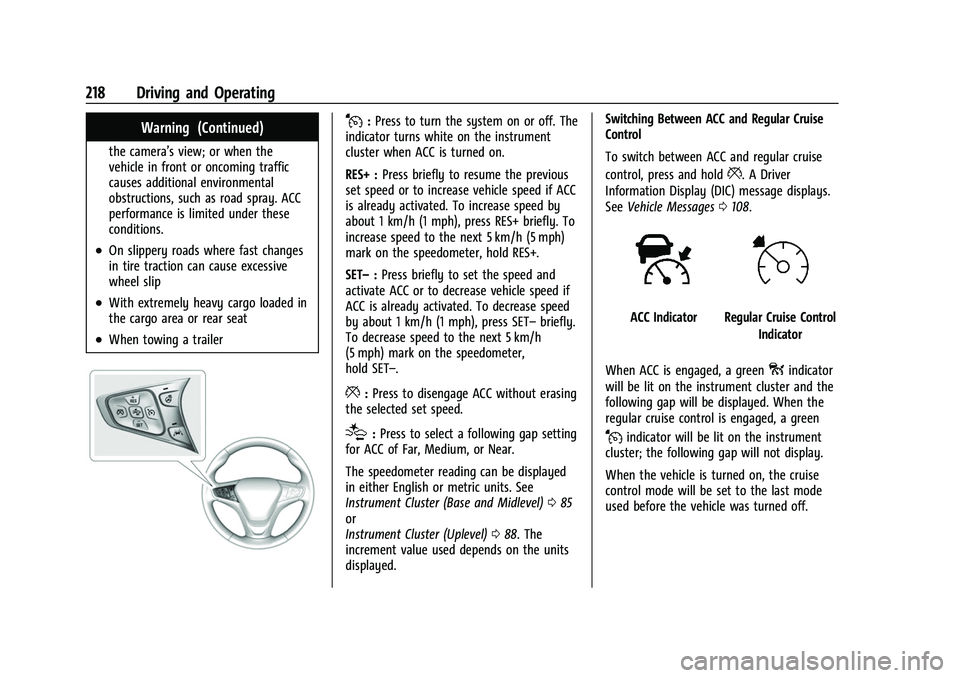
J:Press to turn the system on or off. The
indicator turns white on the instrument
cluster when ACC is turned on.
RES+ : Press briefly to resume the previous
set speed or to increase vehicle speed if ACC
is already activated. To increase speed by
about 1 km/h (1 mph), press RES+ briefly. To
increase speed to the next 5 km/h (5 mph)
mark on the speedometer, hold RES+.
SET– :Press briefly to set the speed and
activate ACC or to decrease vehicle speed if
ACC is already activated. To decrease speed
by about 1 km/h (1 mph), press SET– briefly.
To decrease speed to the next 5 km/h
(5 mph) mark on the speedometer,
hold SET–.
*: Press to disengage ACC without erasing
the selected set speed.
[: Press to select a following gap setting
for ACC of Far, Medium, or Near.
The speedometer reading can be displayed
in either English or metric units. See
Instrument Cluster (Base and Midlevel) 085
or
Instrument Cluster (Uplevel) 088. The
increment value used depends on the units
displayed. Switching Between ACC and Regular Cruise
Control
To switch between ACC and regular cruise
control, press and hold
*. A Driver
Information Display (DIC) message displays.
See Vehicle Messages 0108.
ACC IndicatorRegular Cruise Control
Indicator
When ACC is engaged, a green
oindicator
will be lit on the instrument cluster and the
following gap will be displayed. When the
regular cruise control is engaged, a green
Jindicator will be lit on the instrument
cluster; the following gap will not display.
When the vehicle is turned on, the cruise
control mode will be set to the last mode
used before the vehicle was turned off.
Page 223 of 369
Chevrolet Equinox Owner Manual (GMNA-Localizing-U.S./Canada/Mexico-
14420010) - 2021 - CRC - 11/12/20
222 Driving and Operating
Warning (Continued)
ahead changing lanes. Your vehicle may
not stop and could cause a crash. Use
caution when using ACC. Your complete
attention is always required while driving
and you should be ready to take action
and apply the brakes.
Irregular Objects Affecting ACC
ACC may have difficulty detecting the
following objects:
.Vehicles in front of your vehicle that have
a rear aspect that is low, small,
or irregular
.An empty truck or trailer that has no
cargo in the cargo bed
.Vehicles with cargo extending from the
back end
.Non-standard shaped vehicles, such as
vehicle transport, vehicles with a side car
fitted, or horse carriages
.Vehicles that are low to the road surface
.Objects that are close to the front of your
vehicle
.Vehicles on which extremely heavy cargo
is loaded in the cargo area or rear seat
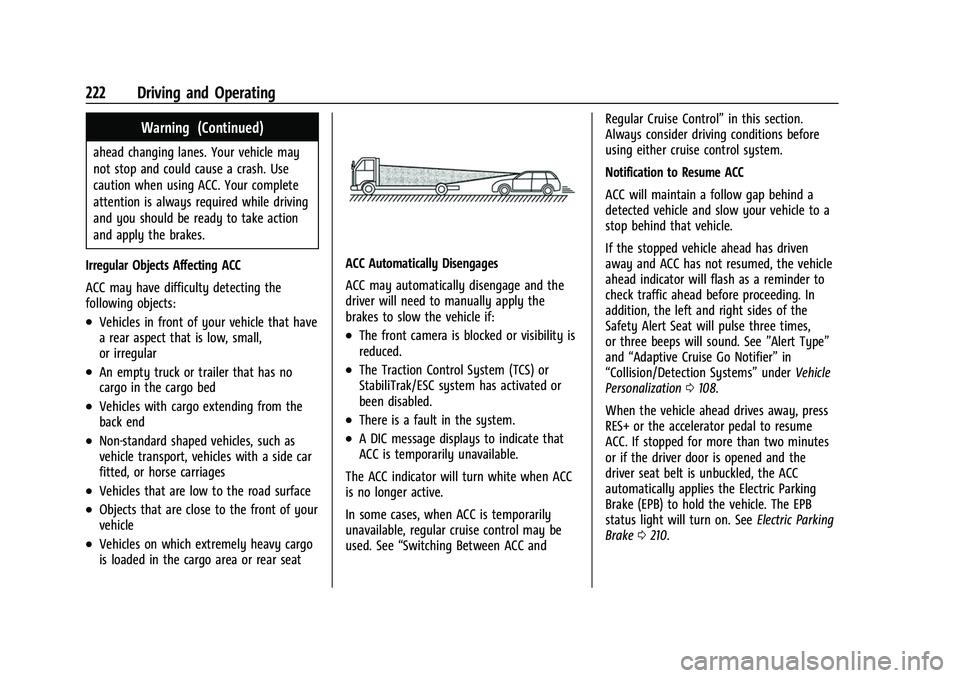
ACC Automatically Disengages
ACC may automatically disengage and the
driver will need to manually apply the
brakes to slow the vehicle if:
.The front camera is blocked or visibility is
reduced.
.The Traction Control System (TCS) or
StabiliTrak/ESC system has activated or
been disabled.
.There is a fault in the system.
.A DIC message displays to indicate that
ACC is temporarily unavailable.
The ACC indicator will turn white when ACC
is no longer active.
In some cases, when ACC is temporarily
unavailable, regular cruise control may be
used. See “Switching Between ACC and Regular Cruise Control”
in this section.
Always consider driving conditions before
using either cruise control system.
Notification to Resume ACC
ACC will maintain a follow gap behind a
detected vehicle and slow your vehicle to a
stop behind that vehicle.
If the stopped vehicle ahead has driven
away and ACC has not resumed, the vehicle
ahead indicator will flash as a reminder to
check traffic ahead before proceeding. In
addition, the left and right sides of the
Safety Alert Seat will pulse three times,
or three beeps will sound. See ”Alert Type”
and “Adaptive Cruise Go Notifier” in
“Collision/Detection Systems” underVehicle
Personalization 0108.
When the vehicle ahead drives away, press
RES+ or the accelerator pedal to resume
ACC. If stopped for more than two minutes
or if the driver door is opened and the
driver seat belt is unbuckled, the ACC
automatically applies the Electric Parking
Brake (EPB) to hold the vehicle. The EPB
status light will turn on. See Electric Parking
Brake 0210.