stop start CHEVROLET EQUINOX 2022 Service Manual
[x] Cancel search | Manufacturer: CHEVROLET, Model Year: 2022, Model line: EQUINOX, Model: CHEVROLET EQUINOX 2022Pages: 360, PDF Size: 14.71 MB
Page 250 of 360
Chevrolet Equinox Owner Manual (GMNA-Localizing-U.S./Canada-
16540728) - 2023 - crc - 6/16/22
Vehicle Care 249
If doing some of your own service work, use
the proper service manual. It tells you much
more about how to service the vehicle than
this manual can. To order the proper service
manual, seePublication Ordering
Information 0334.
This vehicle has an airbag system. Before
attempting to do your own service work,
see Servicing the Airbag-Equipped Vehicle
0 56.
If equipped with remote vehicle start, open
the hood before performing any service
work to prevent remote starting the vehicle
accidentally. See Remote Vehicle Start 014.
Keep a record with all parts receipts and list
the mileage and the date of any service
work performed. See Maintenance Records
0 322.
Caution
Even small amounts of contamination can
cause damage to vehicle systems. Do not
allow contaminants to contact the fluids,
reservoir caps, or dipsticks.
Hood
{Warning
For vehicles with auto engine stop/start,
turn the vehicle off before opening the
hood. If the vehicle is on, the engine will
start when the hood is opened. You or
others could be injured.
{Warning
Components under the hood can get hot
from running the engine. To help avoid
the risk of burning unprotected skin,
never touch these components until they
have cooled, and always use a glove or
towel to avoid direct skin contact.
Clear any snow from the hood before
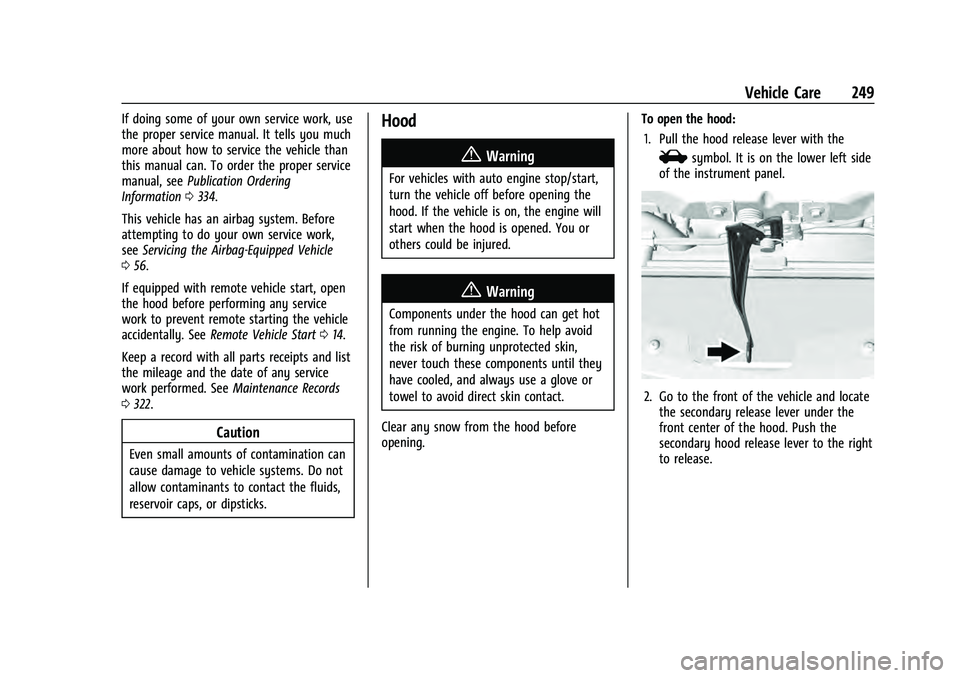
opening. To open the hood:
1. Pull the hood release lever with the
isymbol. It is on the lower left side
of the instrument panel.
2. Go to the front of the vehicle and locate the secondary release lever under the
front center of the hood. Push the
secondary hood release lever to the right
to release.
Page 260 of 360
Chevrolet Equinox Owner Manual (GMNA-Localizing-U.S./Canada-
16540728) - 2023 - crc - 6/16/22
Vehicle Care 259
How to Add Coolant to the Surge Tank
{Warning
Spilling coolant on hot engine parts can
burn you. Coolant contains ethylene
glycol and it will burn if the engine parts
are hot enough.
{Warning
Steam and scalding liquids from a hot
cooling system are under pressure.
Turning the pressure cap, even a little,
can cause them to come out at high
speed and you could be burned. Never
turn the cap when the cooling system,
including the pressure cap, is hot. Wait
for the cooling system and pressure cap
to cool.
Caution
Failure to follow the specific coolant fill
procedure could cause the engine to
overheat and could cause system
damage. If coolant is not visible in the
surge tank, contact your dealer.
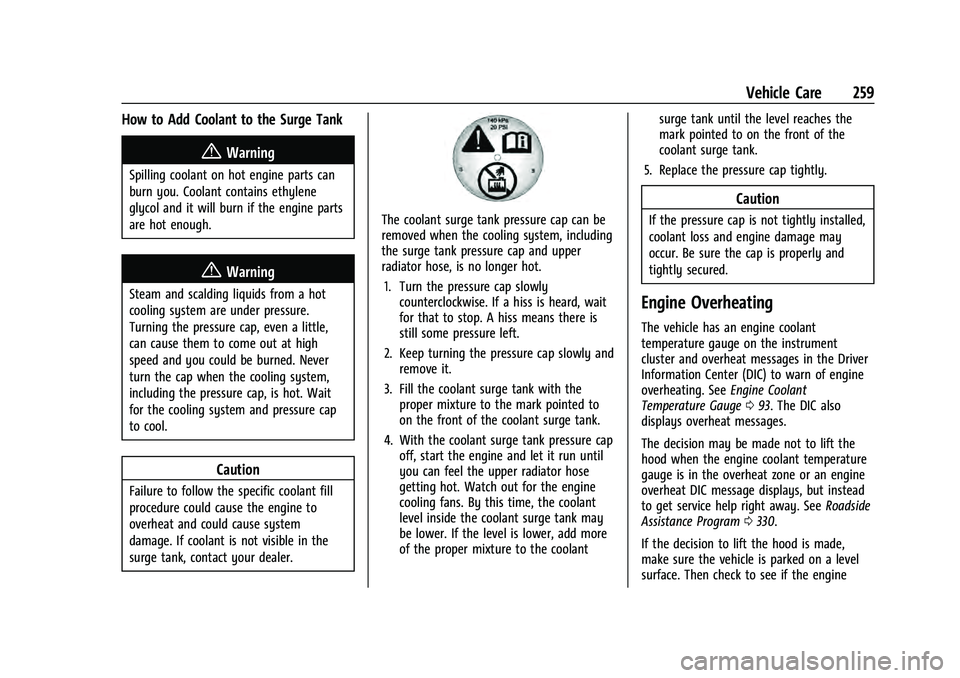
The coolant surge tank pressure cap can be
removed when the cooling system, including
the surge tank pressure cap and upper
radiator hose, is no longer hot.1. Turn the pressure cap slowly counterclockwise. If a hiss is heard, wait
for that to stop. A hiss means there is
still some pressure left.
2. Keep turning the pressure cap slowly and remove it.
3. Fill the coolant surge tank with the proper mixture to the mark pointed to
on the front of the coolant surge tank.
4. With the coolant surge tank pressure cap off, start the engine and let it run until
you can feel the upper radiator hose
getting hot. Watch out for the engine
cooling fans. By this time, the coolant
level inside the coolant surge tank may
be lower. If the level is lower, add more
of the proper mixture to the coolant surge tank until the level reaches the
mark pointed to on the front of the
coolant surge tank.
5. Replace the pressure cap tightly.
Caution
If the pressure cap is not tightly installed,
coolant loss and engine damage may
occur. Be sure the cap is properly and
tightly secured.
Engine Overheating
The vehicle has an engine coolant
temperature gauge on the instrument
cluster and overheat messages in the Driver
Information Center (DIC) to warn of engine
overheating. See Engine Coolant
Temperature Gauge 093. The DIC also
displays overheat messages.
The decision may be made not to lift the
hood when the engine coolant temperature
gauge is in the overheat zone or an engine
overheat DIC message displays, but instead
to get service help right away. See Roadside
Assistance Program 0330.
If the decision to lift the hood is made,
make sure the vehicle is parked on a level
surface. Then check to see if the engine
Page 264 of 360
Chevrolet Equinox Owner Manual (GMNA-Localizing-U.S./Canada-
16540728) - 2023 - crc - 6/16/22
Vehicle Care 263
Battery - North America
The original equipment battery is
maintenance free. Do not remove the cap
and do not add fluid.
Refer to the replacement number shown on
the original battery label when a new
battery is needed. SeeEngine Compartment
Overview 0251 for battery location.
For replacement of the battery, see your
dealer.
The vehicle has an Absorbed Glass Mat
(AGM) 12-volt battery. Installation of a
standard 12-volt battery will result in
reduced 12-volt battery life.
Some 12-volt battery chargers have an AGM
battery setting on the charger. If available,
use the AGM setting on the charger to limit
charge voltage to 14.8 volts. Follow the
charger manufacturer's instructions.
Stop/Start System
The vehicle has a Stop/Start system to shut
off the engine to help conserve fuel. See
Stop/Start System 0192.{Warning
WARNING: Battery posts, terminals and
related accessories can expose you to
chemicals including lead and lead
compounds, which are known to the
State of California to cause cancer and
birth defects or other reproductive harm.
Wash hands after handling. For more
information go to
www.P65Warnings.ca.gov.
See California Proposition 65 Warning 01.
Vehicle Storage
{Warning
Batteries have acid that can burn you and
gas that can explode. You can be badly
hurt if you are not careful. Always wear
eye protection. See Jump Starting - North
America 0300 for tips on working
around a battery without getting hurt.
Infrequent Usage: Remove the black,
negative (−) cable from the battery to keep
the battery from running down. Extended Storage: Remove the black,
negative (−) cable from the battery or use a
battery trickle charger.
All-Wheel Drive
Transfer Case
Under normal driving conditions, transfer
case fluid does not require maintenance
unless there is a fluid leak or unusual noise.
If required, have the transfer case serviced
by your dealer.
Park Brake and P (Park)
Mechanism Check
{Warning
When you are doing this check, the
vehicle could begin to move. You or
others could be injured and property
could be damaged. Make sure there is
room in front of the vehicle in case it
begins to roll. Be ready to apply the
regular brake at once should the vehicle
begin to move.
Park on a fairly steep hill, with the vehicle
facing downhill. Keeping your foot on the
regular brake, set the parking brake.
Page 271 of 360
Chevrolet Equinox Owner Manual (GMNA-Localizing-U.S./Canada-
16540728) - 2023 - crc - 6/16/22
270 Vehicle Care
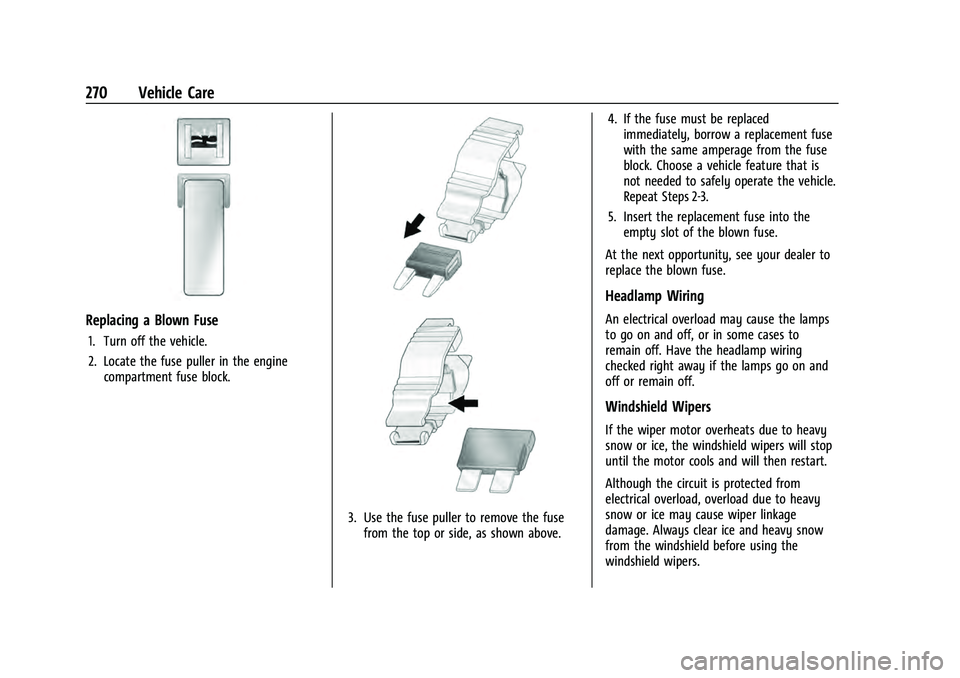
Replacing a Blown Fuse
1. Turn off the vehicle.
2. Locate the fuse puller in the enginecompartment fuse block.
3. Use the fuse puller to remove the fusefrom the top or side, as shown above. 4. If the fuse must be replaced
immediately, borrow a replacement fuse
with the same amperage from the fuse
block. Choose a vehicle feature that is
not needed to safely operate the vehicle.
Repeat Steps 2-3.
5. Insert the replacement fuse into the empty slot of the blown fuse.
At the next opportunity, see your dealer to
replace the blown fuse.
Headlamp Wiring
An electrical overload may cause the lamps
to go on and off, or in some cases to
remain off. Have the headlamp wiring
checked right away if the lamps go on and
off or remain off.
Windshield Wipers
If the wiper motor overheats due to heavy
snow or ice, the windshield wipers will stop
until the motor cools and will then restart.
Although the circuit is protected from
electrical overload, overload due to heavy
snow or ice may cause wiper linkage
damage. Always clear ice and heavy snow
from the windshield before using the
windshield wipers.
Page 285 of 360
Chevrolet Equinox Owner Manual (GMNA-Localizing-U.S./Canada-
16540728) - 2023 - crc - 6/16/22
284 Vehicle Care
failure. Under-inflation also reduces energy
efficiency and tire tread life, and may affect
the vehicle's handling and stopping ability.
Please note that the TPMS is not a
substitute for proper tire maintenance, and
it is the driver's responsibility to maintain
correct tire pressure, even if under-inflation
has not reached the level to trigger
illumination of the TPMS low tire pressure
telltale.
Your vehicle has also been equipped with a
TPMS malfunction indicator to indicate when
the system is not operating properly. The
TPMS malfunction indicator is combined
with the low tire pressure telltale. When the
system detects a malfunction, the telltale
will flash for approximately one minute and
then remain continuously illuminated. This
sequence will continue upon subsequent
vehicle start-ups as long as the malfunction
exists.
When the malfunction indicator is
illuminated, the system may not be able to
detect or signal low tire pressure as
intended. TPMS malfunctions may occur for
a variety of reasons, including the
installation of replacement or alternate tires
or wheels on the vehicle that prevent the
TPMS from functioning properly. Alwayscheck the TPMS malfunction telltale after
replacing one or more tires or wheels on
your vehicle to ensure that the replacement
or alternate tires and wheels allow the
TPMS to continue to function properly.
See
Tire Pressure Monitor Operation 0284.
See Radio Frequency Statement 0335.
Tire Pressure Monitor Operation
This vehicle may have a Tire Pressure
Monitor System (TPMS). The TPMS is
designed to warn the driver when a low tire
pressure condition exists. TPMS sensors are
mounted onto each tire and wheel
assembly, excluding the spare tire and
wheel assembly. The TPMS sensors monitor
the air pressure in the tires and transmit the
tire pressure readings to a receiver located
in the vehicle.
When a low tire pressure condition is
detected, the TPMS illuminates the low tire
pressure warning light located on the instrument cluster. If the warning light
comes on, stop as soon as possible and
inflate the tires to the recommended
pressure shown on the Tire and Loading
Information label. See
Vehicle Load Limits
0 187.
A message to check the pressure in a
specific tire displays in the Driver
Information Center (DIC). The low tire
pressure warning light and the DIC warning
message come on at each ignition cycle
until the tires are inflated to the correct
inflation pressure. Using the DIC, tire
pressure levels can be viewed. For additional
information and details about the DIC
operation and displays see Driver
Information Center (DIC) (Base and Midlevel)
0 103 or
Driver Information Center (DIC) (Uplevel)
0 107.
The low tire pressure warning light may
come on in cool weather when the vehicle is
first started, and then turn off as the vehicle
is driven. This could be an early indicator
that the air pressure is getting low and
needs to be inflated to the proper pressure.
A Tire and Loading Information label,
attached to your vehicle, shows the size of
the original equipment tires and the correct
Page 287 of 360
Chevrolet Equinox Owner Manual (GMNA-Localizing-U.S./Canada-
16540728) - 2023 - crc - 6/16/22
286 Vehicle Care
When the recommended pressure is
reached, the horn sounds once and the
turn signal lamp will stop flashing and
briefly turn solid.
Repeat these steps for all underinflated tires
that have illuminated the low tire pressure
warning light.
{Warning
Overinflating a tire could cause the tire
to rupture and you or others could be
injured. Do not exceed the maximum
pressure listed on the tire sidewall. See
Tire Sidewall Labeling 0278 and
Vehicle Load Limits 0187.
If the tire is overinflated by more than
35 kPa (5 psi), the horn will sound multiple
times and the turn signal lamp will continue
to flash for several seconds after filling
stops. To release and correct the pressure,
while the turn signal lamp is still flashing,
briefly press the center of the valve stem.
When the recommended pressure is reached,
the horn sounds once.
If the turn signal lamp does not flash within
15 seconds after starting to inflate the tire,
the tire fill alert has not been activated or is
not working. If the hazard warning flashers are on, the
tire fill alert visual feedback will not work
properly.
The TPMS will not activate the tire fill alert
properly under the following conditions:
.There is interference from an external
device or transmitter.
.The air pressure from the inflation device
is not sufficient to inflate the tire.
.There is a malfunction in the TPMS.
.There is a malfunction in the horn or turn
signal lamps.
.The identification code of the TPMS
sensor is not registered to the system.
.The battery of the TPMS sensor is low.
If the tire fill alert does not operate due to
TPMS interference, move the vehicle about
1 m (3 ft) back or forward and try again.
If the tire fill alert feature is not working,
use a tire pressure gauge.
TPMS Sensor Matching Process
Each TPMS sensor has a unique
identification code. The identification code
needs to be matched to a new tire/wheel
position after rotating the vehicle’s tires or
replacing one or more of the TPMS sensors.
The TPMS sensor matching process should also be performed after replacing a spare
tire with a road tire containing the TPMS
sensor. The malfunction light and the DIC
message should go off at the next ignition
cycle. The sensors are matched to the tire/
wheel positions, using a TPMS relearn tool,
in the following order: driver side front tire,
passenger side front tire, passenger side rear
tire, and driver side rear. See your dealer for
service or to purchase a relearn tool.
A TPMS relearn tool can also be purchased.
See Tire Pressure Monitor Sensor Activation
Tool at www.gmtoolsandequipment.com or
call 1-800-GM TOOLS (1-800-468-6657).
There are two minutes to match the first
tire/wheel position, and five minutes overall
to match all four tire/wheel positions. If it
takes longer, the matching process stops
and must be restarted.
The TPMS sensor matching process is:
1. Set the parking brake.
2. Place the vehicle in Service Mode. See Ignition Positions 0190.
3. Make sure the Tire Pressure info page option is turned on. The info pages on
the DIC can be turned on and off
Page 305 of 360
Chevrolet Equinox Owner Manual (GMNA-Localizing-U.S./Canada-
16540728) - 2023 - crc - 6/16/22
304 Vehicle Care
Install the tow eye into the socket and turn
it until it is fully tightened.
When the tow eye is removed, reinstall the
cover with the notch in the original position.
To tow the vehicle behind another vehicle
for recreational purposes, such as behind a
motor home, seeRecreational Vehicle
Towing 0304.
Recreational Vehicle Towing
Recreational vehicle towing means towing
the vehicle behind another vehicle, such as
behind a motor home. The two most
common types of recreational vehicle
towing are known as dinghy towing and
dolly towing. Dinghy towing is towing the
vehicle with all four wheels on the ground.
Dolly towing is towing the vehicle with two
wheels on the ground and two wheels up
on a device known as a dolly.
Here are some important things to consider
before recreational vehicle towing:
.Become familiar with the local laws that
apply to recreational vehicle towing.
These laws may vary by region.
.Be sure you know the towing capacity of
the towing vehicle. Read the tow vehicle
manufacturer's recommendations.
.Know how far the vehicle will be towed.
Some vehicles have restrictions on how
far and how long they can tow.
.Get the proper towing equipment. See
your dealer or trailering professional for
additional advice and equipment
recommendations.
.If the vehicle is ready to be towed, just
as preparing the vehicle for a long trip,
ensure the vehicle is prepared to be
towed.
Dinghy Towing
All vehicles may be dinghy towed from the
front. These vehicles can also be towed by
placing them on a platform trailer with all
four wheels off of the ground. All other
engine/transmission combinations must be
towed by platform trailer. Also see the
information on dolly towing later in this
section.
For vehicles being dinghy towed, the vehicle
should be run at the beginning of each day
and at each RV fuel stop for about
five minutes. This will ensure proper
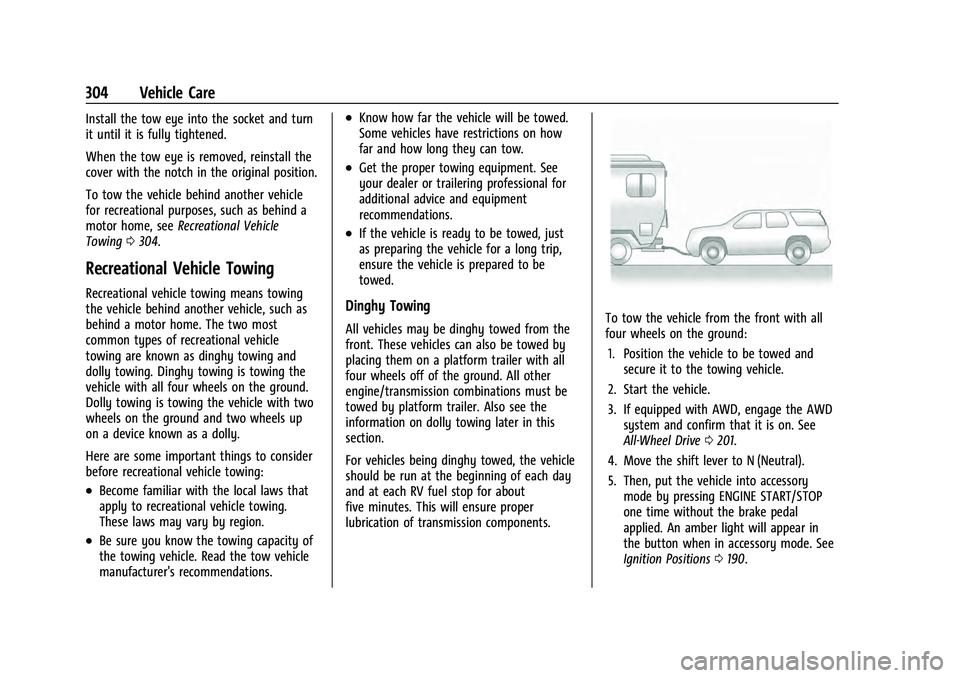
lubrication of transmission components.To tow the vehicle from the front with all
four wheels on the ground:
1. Position the vehicle to be towed and secure it to the towing vehicle.
2. Start the vehicle.
3. If equipped with AWD, engage the AWD system and confirm that it is on. See
All-Wheel Drive 0201.
4. Move the shift lever to N (Neutral).
5. Then, put the vehicle into accessory mode by pressing ENGINE START/STOP
one time without the brake pedal
applied. An amber light will appear in
the button when in accessory mode. See
Ignition Positions 0190.
Page 346 of 360
Chevrolet Equinox Owner Manual (GMNA-Localizing-U.S./Canada-
16540728) - 2023 - crc - 6/16/22
Connected Services 345
Ensuring Security
.Change the default passwords for the
Wi-Fi hotspot and myChevrolet mobile
application. Make these passwords
different from each other and use a
combination of letters and numbers to
increase the security.
.Change the default name of the SSID
(Service Set Identifier). This is your
network’s name that is visible to other
wireless devices. Choose a unique name
and avoid family names or vehicle
descriptions.
Wi-Fi Hotspot (If Equipped)
The vehicle may have a built-in Wi-Fi
hotspot that provides access to the Internet
and web content at 4G LTE speed. Up to
seven mobile devices can be connected.
A data plan is required. Use the in-vehicle
controls only when it is safe to do so. 1. To retrieve Wi-Fi hotspot information, press
=to open the OnStar app on the
infotainment display, then select Wi-Fi
Hotspot. On some vehicles, touch Wi-Fi
or Wi-Fi Settings on the screen.
2. The Wi-Fi settings will display the Wi-Fi hotspot name (SSID), password, and on
some vehicles, the connection type (no Internet connection, 3G, 4G, 4G LTE), and
signal quality (poor, good, excellent). The
LTE icon shows connection to Wi-Fi. It is
possible that the icon may not illuminate
even though the vehicle has an active
connection.
3. To change the SSID or password, press
Qor call 1-888-4ONSTAR to connect
with an Advisor. On some vehicles, the
SSID and password can be changed in
the Wi-Fi Hotspot menu.
After initial set-up, your vehicle’s Wi-Fi
hotspot will connect automatically to your
mobile devices. Manage data usage by
turning Wi-Fi on or off on your mobile
device, using the myChevrolet mobile app,
or by contacting an OnStar Advisor. On
some vehicles, Wi-Fi can also be managed
from the Wi-Fi Hotspot menu.
MyChevrolet Mobile App (If Available)
Download the myChevrolet mobile app to
compatible Apple and Android smartphones.
Chevrolet users can access the following
services from a smartphone:
.Remotely start/stop the vehicle,
if factory-equipped.
.Lock/unlock doors, if equipped with
automatic locks.
.Activate the horn and lamps.
.Check the vehicle’s fuel level, oil life,
or tire pressure, if factory-equipped with
the Tire Pressure Monitor System.
.Send destinations to the vehicle.
.Locate the vehicle on a map (U.S.
market only).
.Turn the vehicle's Wi-Fi hotspot on/off,
manage settings, and monitor data
consumption, if equipped.
.Locate a dealer and schedule service.
.Request Roadside Assistance.
.Set a parking reminder with pin drop,
take a photo, make a note, and set a
timer.
.Connect with Chevrolet on social media.
Features are subject to change. For
myChevrolet mobile app information and
compatibility, see my.chevrolet.com.
An active OnStar or connected service plan
may be required. A compatible device,
factory-installed remote start, and power
locks are required. Data rates apply. See
www.onstar.com for details and system
limitations.
Page 357 of 360
Chevrolet Equinox Owner Manual (GMNA-Localizing-U.S./Canada-
16540728) - 2023 - crc - 6/16/22
356 Index
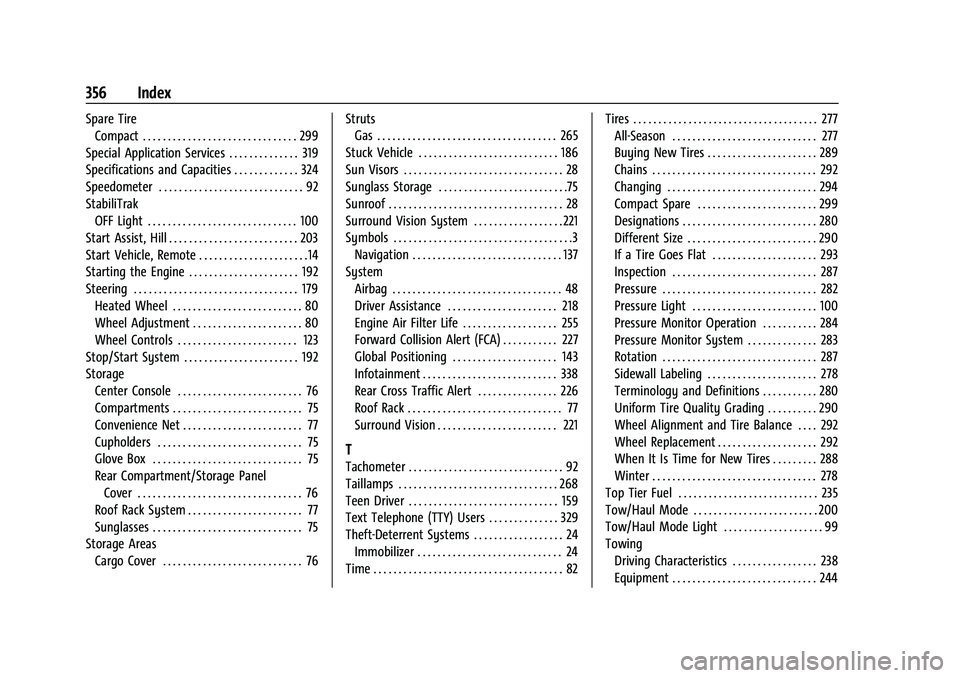
Spare TireCompact . . . . . . . . . . . . . . . . . . . . . . . . . . . . . . . 299
Special Application Services . . . . . . . . . . . . . . 319
Specifications and Capacities . . . . . . . . . . . . . 324
Speedometer . . . . . . . . . . . . . . . . . . . . . . . . . . . . . 92
StabiliTrak OFF Light . . . . . . . . . . . . . . . . . . . . . . . . . . . . . . 100
Start Assist, Hill . . . . . . . . . . . . . . . . . . . . . . . . . . 203
Start Vehicle, Remote . . . . . . . . . . . . . . . . . . . . . .14
Starting the Engine . . . . . . . . . . . . . . . . . . . . . . 192
Steering . . . . . . . . . . . . . . . . . . . . . . . . . . . . . . . . . 179 Heated Wheel . . . . . . . . . . . . . . . . . . . . . . . . . . 80
Wheel Adjustment . . . . . . . . . . . . . . . . . . . . . . 80
Wheel Controls . . . . . . . . . . . . . . . . . . . . . . . . 123
Stop/Start System . . . . . . . . . . . . . . . . . . . . . . . 192
Storage Center Console . . . . . . . . . . . . . . . . . . . . . . . . . 76
Compartments . . . . . . . . . . . . . . . . . . . . . . . . . . 75
Convenience Net . . . . . . . . . . . . . . . . . . . . . . . . 77
Cupholders . . . . . . . . . . . . . . . . . . . . . . . . . . . . . 75
Glove Box . . . . . . . . . . . . . . . . . . . . . . . . . . . . . . 75
Rear Compartment/Storage PanelCover . . . . . . . . . . . . . . . . . . . . . . . . . . . . . . . . . 76
Roof Rack System . . . . . . . . . . . . . . . . . . . . . . . 77
Sunglasses . . . . . . . . . . . . . . . . . . . . . . . . . . . . . . 75
Storage Areas Cargo Cover . . . . . . . . . . . . . . . . . . . . . . . . . . . . 76 Struts
Gas . . . . . . . . . . . . . . . . . . . . . . . . . . . . . . . . . . . . 265
Stuck Vehicle . . . . . . . . . . . . . . . . . . . . . . . . . . . . 186
Sun Visors . . . . . . . . . . . . . . . . . . . . . . . . . . . . . . . . 28
Sunglass Storage . . . . . . . . . . . . . . . . . . . . . . . . . .75
Sunroof . . . . . . . . . . . . . . . . . . . . . . . . . . . . . . . . . . . 28
Surround Vision System . . . . . . . . . . . . . . . . . . 221
Symbols . . . . . . . . . . . . . . . . . . . . . . . . . . . . . . . . . . . .3 Navigation . . . . . . . . . . . . . . . . . . . . . . . . . . . . . . 137
System Airbag . . . . . . . . . . . . . . . . . . . . . . . . . . . . . . . . . . 48
Driver Assistance . . . . . . . . . . . . . . . . . . . . . . 218
Engine Air Filter Life . . . . . . . . . . . . . . . . . . . 255
Forward Collision Alert (FCA) . . . . . . . . . . . 227
Global Positioning . . . . . . . . . . . . . . . . . . . . . 143
Infotainment . . . . . . . . . . . . . . . . . . . . . . . . . . . 338
Rear Cross Traffic Alert . . . . . . . . . . . . . . . . 226
Roof Rack . . . . . . . . . . . . . . . . . . . . . . . . . . . . . . . 77
Surround Vision . . . . . . . . . . . . . . . . . . . . . . . . 221
T
Tachometer . . . . . . . . . . . . . . . . . . . . . . . . . . . . . . . 92
Taillamps . . . . . . . . . . . . . . . . . . . . . . . . . . . . . . . . 268
Teen Driver . . . . . . . . . . . . . . . . . . . . . . . . . . . . . . 159
Text Telephone (TTY) Users . . . . . . . . . . . . . . 329
Theft-Deterrent Systems . . . . . . . . . . . . . . . . . . 24
Immobilizer . . . . . . . . . . . . . . . . . . . . . . . . . . . . . 24
Time . . . . . . . . . . . . . . . . . . . . . . . . . . . . . . . . . . . . . . 82 Tires . . . . . . . . . . . . . . . . . . . . . . . . . . . . . . . . . . . . . 277
All-Season . . . . . . . . . . . . . . . . . . . . . . . . . . . . . 277
Buying New Tires . . . . . . . . . . . . . . . . . . . . . . 289
Chains . . . . . . . . . . . . . . . . . . . . . . . . . . . . . . . . . 292
Changing . . . . . . . . . . . . . . . . . . . . . . . . . . . . . . 294
Compact Spare . . . . . . . . . . . . . . . . . . . . . . . . 299
Designations . . . . . . . . . . . . . . . . . . . . . . . . . . . 280
Different Size . . . . . . . . . . . . . . . . . . . . . . . . . . 290
If a Tire Goes Flat . . . . . . . . . . . . . . . . . . . . . 293
Inspection . . . . . . . . . . . . . . . . . . . . . . . . . . . . . 287
Pressure . . . . . . . . . . . . . . . . . . . . . . . . . . . . . . . 282
Pressure Light . . . . . . . . . . . . . . . . . . . . . . . . . 100
Pressure Monitor Operation . . . . . . . . . . . 284
Pressure Monitor System . . . . . . . . . . . . . . 283
Rotation . . . . . . . . . . . . . . . . . . . . . . . . . . . . . . . 287
Sidewall Labeling . . . . . . . . . . . . . . . . . . . . . . 278
Terminology and Definitions . . . . . . . . . . . 280
Uniform Tire Quality Grading . . . . . . . . . . 290
Wheel Alignment and Tire Balance . . . . 292
Wheel Replacement . . . . . . . . . . . . . . . . . . . . 292
When It Is Time for New Tires . . . . . . . . . 288
Winter . . . . . . . . . . . . . . . . . . . . . . . . . . . . . . . . . 278
Top Tier Fuel . . . . . . . . . . . . . . . . . . . . . . . . . . . . 235
Tow/Haul Mode . . . . . . . . . . . . . . . . . . . . . . . . . 200
Tow/Haul Mode Light . . . . . . . . . . . . . . . . . . . . 99
Towing Driving Characteristics . . . . . . . . . . . . . . . . . 238
Equipment . . . . . . . . . . . . . . . . . . . . . . . . . . . . . 244