check CHEVROLET EQUINOX 2022 Owners Manual
[x] Cancel search | Manufacturer: CHEVROLET, Model Year: 2022, Model line: EQUINOX, Model: CHEVROLET EQUINOX 2022Pages: 360, PDF Size: 14.71 MB
Page 7 of 360
Chevrolet Equinox Owner Manual (GMNA-Localizing-U.S./Canada-
16540728) - 2023 - crc - 6/16/22
6 Introduction
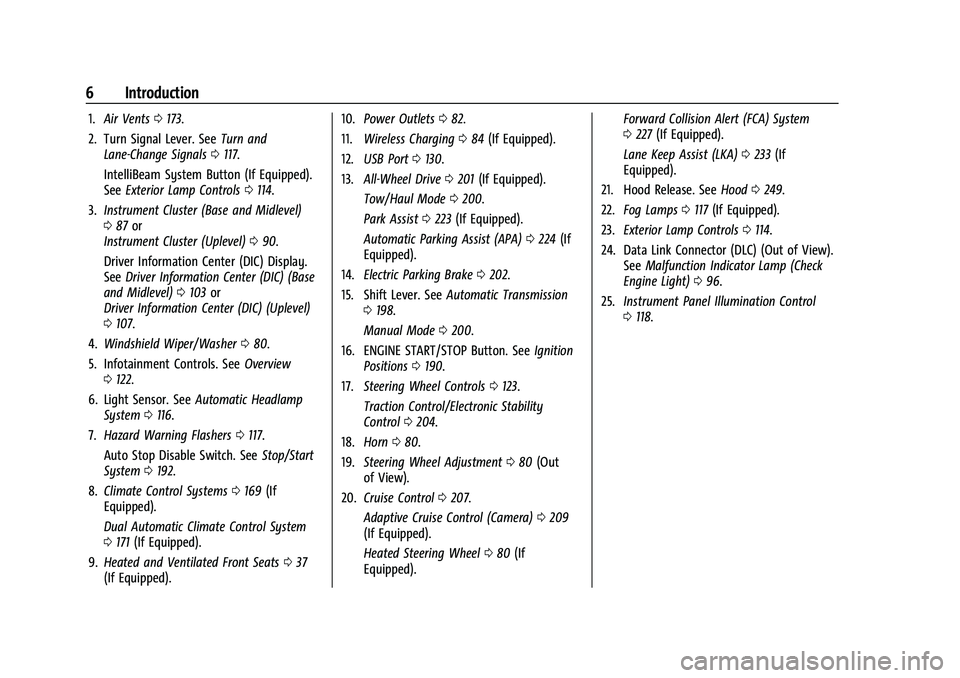
1.Air Vents 0173.
2. Turn Signal Lever. See Turn and
Lane-Change Signals 0117.
IntelliBeam System Button (If Equipped).
See Exterior Lamp Controls 0114.
3. Instrument Cluster (Base and Midlevel)
087 or
Instrument Cluster (Uplevel) 090.
Driver Information Center (DIC) Display.
See Driver Information Center (DIC) (Base
and Midlevel) 0103 or
Driver Information Center (DIC) (Uplevel)
0 107.
4. Windshield Wiper/Washer 080.
5. Infotainment Controls. See Overview
0 122.
6. Light Sensor. See Automatic Headlamp
System 0116.
7. Hazard Warning Flashers 0117.
Auto Stop Disable Switch. See Stop/Start
System 0192.
8. Climate Control Systems 0169 (If
Equipped).
Dual Automatic Climate Control System
0 171 (If Equipped).
9. Heated and Ventilated Front Seats 037
(If Equipped). 10.
Power Outlets 082.
11. Wireless Charging 084 (If Equipped).
12. USB Port 0130.
13. All-Wheel Drive 0201 (If Equipped).
Tow/Haul Mode 0200.
Park Assist 0223 (If Equipped).
Automatic Parking Assist (APA) 0224 (If
Equipped).
14. Electric Parking Brake 0202.
15. Shift Lever. See Automatic Transmission
0 198.
Manual Mode 0200.
16. ENGINE START/STOP Button. See Ignition
Positions 0190.
17. Steering Wheel Controls 0123.
Traction Control/Electronic Stability
Control 0204.
18. Horn 080.
19. Steering Wheel Adjustment 080 (Out
of View).
20. Cruise Control 0207.
Adaptive Cruise Control (Camera) 0209
(If Equipped).
Heated Steering Wheel 080 (If
Equipped). Forward Collision Alert (FCA) System
0
227 (If Equipped).
Lane Keep Assist (LKA) 0233 (If
Equipped).
21. Hood Release. See Hood0249.
22. Fog Lamps 0117 (If Equipped).
23. Exterior Lamp Controls 0114.
24. Data Link Connector (DLC) (Out of View). SeeMalfunction Indicator Lamp (Check
Engine Light) 096.
25. Instrument Panel Illumination Control
0118.
Page 9 of 360
Chevrolet Equinox Owner Manual (GMNA-Localizing-U.S./Canada-
16540728) - 2023 - crc - 6/16/22
8 Keys, Doors, and Windows
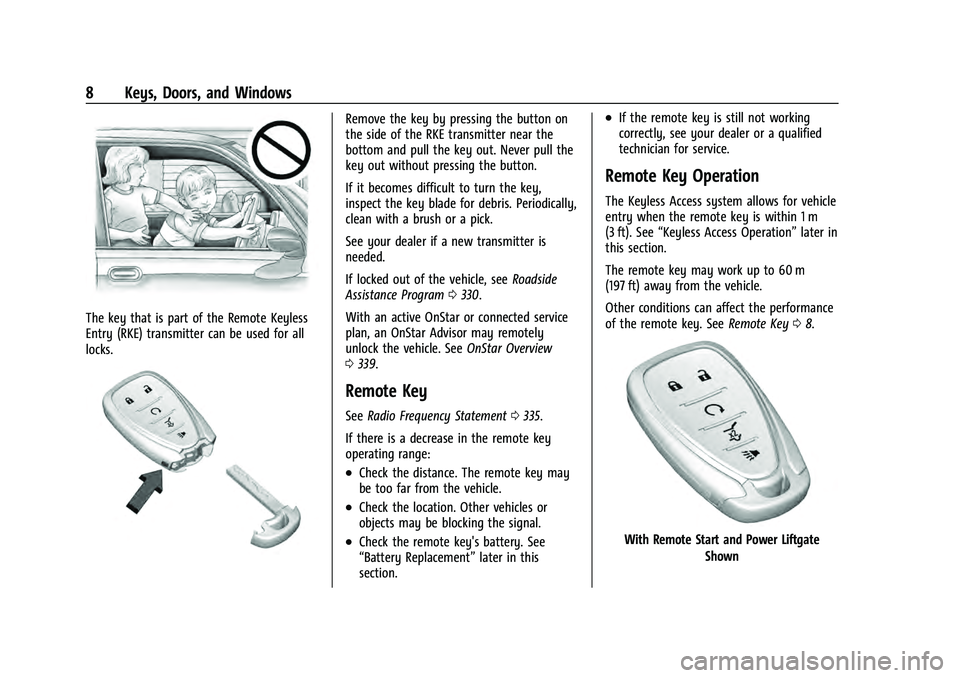
The key that is part of the Remote Keyless
Entry (RKE) transmitter can be used for all
locks.
Remove the key by pressing the button on
the side of the RKE transmitter near the
bottom and pull the key out. Never pull the
key out without pressing the button.
If it becomes difficult to turn the key,
inspect the key blade for debris. Periodically,
clean with a brush or a pick.
See your dealer if a new transmitter is
needed.
If locked out of the vehicle, seeRoadside
Assistance Program 0330.
With an active OnStar or connected service
plan, an OnStar Advisor may remotely
unlock the vehicle. See OnStar Overview
0 339.
Remote Key
See Radio Frequency Statement 0335.
If there is a decrease in the remote key
operating range:
.Check the distance. The remote key may
be too far from the vehicle.
.Check the location. Other vehicles or
objects may be blocking the signal.
.Check the remote key's battery. See
“Battery Replacement” later in this
section.
.If the remote key is still not working
correctly, see your dealer or a qualified
technician for service.
Remote Key Operation
The Keyless Access system allows for vehicle
entry when the remote key is within 1 m
(3 ft). See “Keyless Access Operation” later in
this section.
The remote key may work up to 60 m
(197 ft) away from the vehicle.
Other conditions can affect the performance
of the remote key. See Remote Key08.
With Remote Start and Power Liftgate
Shown
Page 11 of 360
Chevrolet Equinox Owner Manual (GMNA-Localizing-U.S./Canada-
16540728) - 2023 - crc - 6/16/22
10 Keys, Doors, and Windows
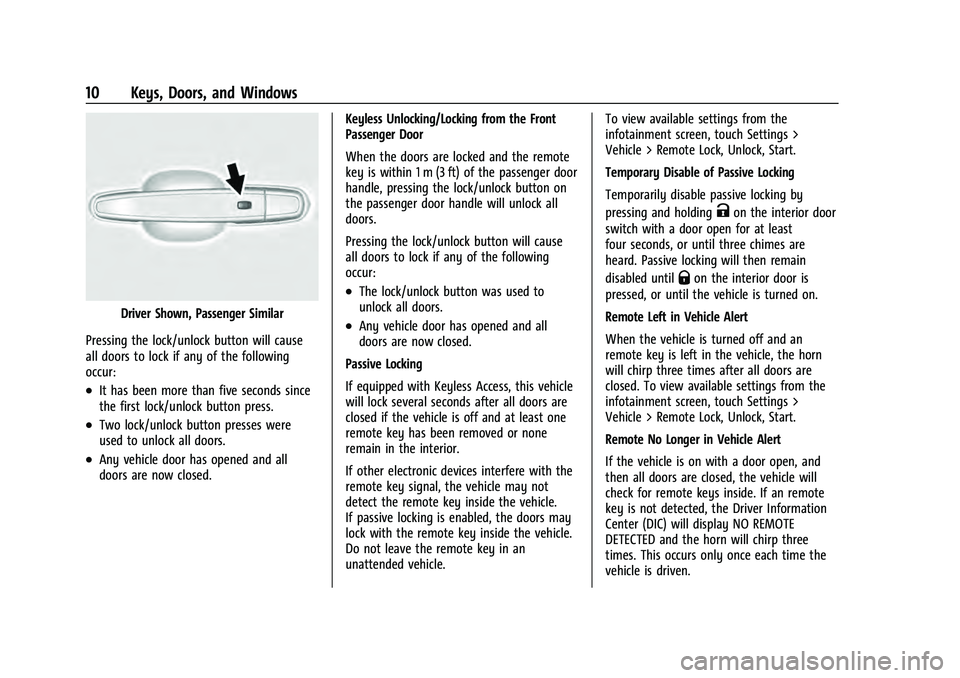
Driver Shown, Passenger Similar
Pressing the lock/unlock button will cause
all doors to lock if any of the following
occur:
.It has been more than five seconds since
the first lock/unlock button press.
.Two lock/unlock button presses were
used to unlock all doors.
.Any vehicle door has opened and all
doors are now closed. Keyless Unlocking/Locking from the Front
Passenger Door
When the doors are locked and the remote
key is within 1 m (3 ft) of the passenger door
handle, pressing the lock/unlock button on
the passenger door handle will unlock all
doors.
Pressing the lock/unlock button will cause
all doors to lock if any of the following
occur:
.The lock/unlock button was used to
unlock all doors.
.Any vehicle door has opened and all
doors are now closed.
Passive Locking
If equipped with Keyless Access, this vehicle
will lock several seconds after all doors are
closed if the vehicle is off and at least one
remote key has been removed or none
remain in the interior.
If other electronic devices interfere with the
remote key signal, the vehicle may not
detect the remote key inside the vehicle.
If passive locking is enabled, the doors may
lock with the remote key inside the vehicle.
Do not leave the remote key in an
unattended vehicle. To view available settings from the
infotainment screen, touch Settings >
Vehicle > Remote Lock, Unlock, Start.
Temporary Disable of Passive Locking
Temporarily disable passive locking by
pressing and holding
Kon the interior door
switch with a door open for at least
four seconds, or until three chimes are
heard. Passive locking will then remain
disabled until
Qon the interior door is
pressed, or until the vehicle is turned on.
Remote Left in Vehicle Alert
When the vehicle is turned off and an
remote key is left in the vehicle, the horn
will chirp three times after all doors are
closed. To view available settings from the
infotainment screen, touch Settings >
Vehicle > Remote Lock, Unlock, Start.
Remote No Longer in Vehicle Alert
If the vehicle is on with a door open, and
then all doors are closed, the vehicle will
check for remote keys inside. If an remote
key is not detected, the Driver Information
Center (DIC) will display NO REMOTE
DETECTED and the horn will chirp three
times. This occurs only once each time the
vehicle is driven.
Page 15 of 360
Chevrolet Equinox Owner Manual (GMNA-Localizing-U.S./Canada-
16540728) - 2023 - crc - 6/16/22
14 Keys, Doors, and Windows
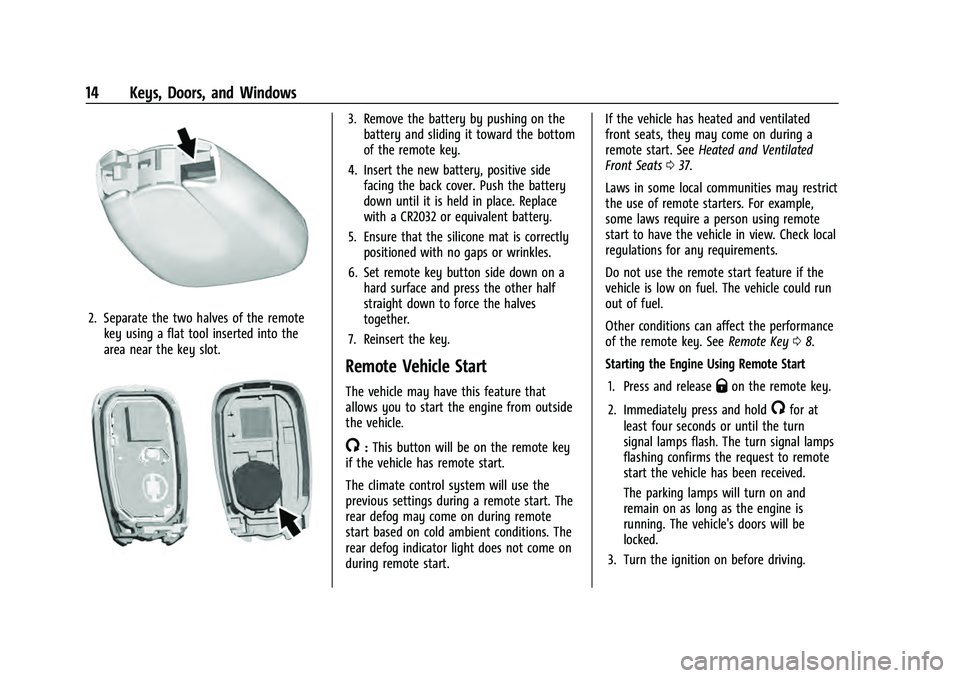
2. Separate the two halves of the remotekey using a flat tool inserted into the
area near the key slot.
3. Remove the battery by pushing on thebattery and sliding it toward the bottom
of the remote key.
4. Insert the new battery, positive side facing the back cover. Push the battery
down until it is held in place. Replace
with a CR2032 or equivalent battery.
5. Ensure that the silicone mat is correctly positioned with no gaps or wrinkles.
6. Set remote key button side down on a hard surface and press the other half
straight down to force the halves
together.
7. Reinsert the key.
Remote Vehicle Start
The vehicle may have this feature that
allows you to start the engine from outside
the vehicle.
/: This button will be on the remote key
if the vehicle has remote start.
The climate control system will use the
previous settings during a remote start. The
rear defog may come on during remote
start based on cold ambient conditions. The
rear defog indicator light does not come on
during remote start. If the vehicle has heated and ventilated
front seats, they may come on during a
remote start. See
Heated and Ventilated
Front Seats 037.
Laws in some local communities may restrict
the use of remote starters. For example,
some laws require a person using remote
start to have the vehicle in view. Check local
regulations for any requirements.
Do not use the remote start feature if the
vehicle is low on fuel. The vehicle could run
out of fuel.
Other conditions can affect the performance
of the remote key. See Remote Key08.
Starting the Engine Using Remote Start
1. Press and release
Qon the remote key.
2. Immediately press and hold
/for at
least four seconds or until the turn
signal lamps flash. The turn signal lamps
flashing confirms the request to remote
start the vehicle has been received.
The parking lamps will turn on and
remain on as long as the engine is
running. The vehicle's doors will be
locked.
3. Turn the ignition on before driving.
Page 18 of 360
Chevrolet Equinox Owner Manual (GMNA-Localizing-U.S./Canada-
16540728) - 2023 - crc - 6/16/22
Keys, Doors, and Windows 17
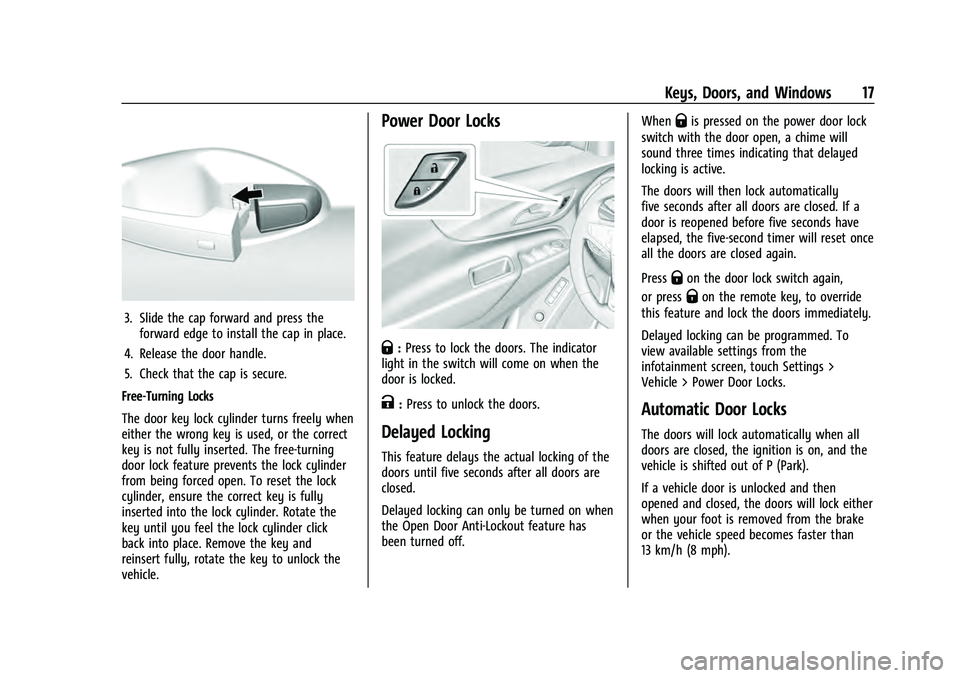
3. Slide the cap forward and press theforward edge to install the cap in place.
4. Release the door handle.
5. Check that the cap is secure.
Free-Turning Locks
The door key lock cylinder turns freely when
either the wrong key is used, or the correct
key is not fully inserted. The free-turning
door lock feature prevents the lock cylinder
from being forced open. To reset the lock
cylinder, ensure the correct key is fully
inserted into the lock cylinder. Rotate the
key until you feel the lock cylinder click
back into place. Remove the key and
reinsert fully, rotate the key to unlock the
vehicle.
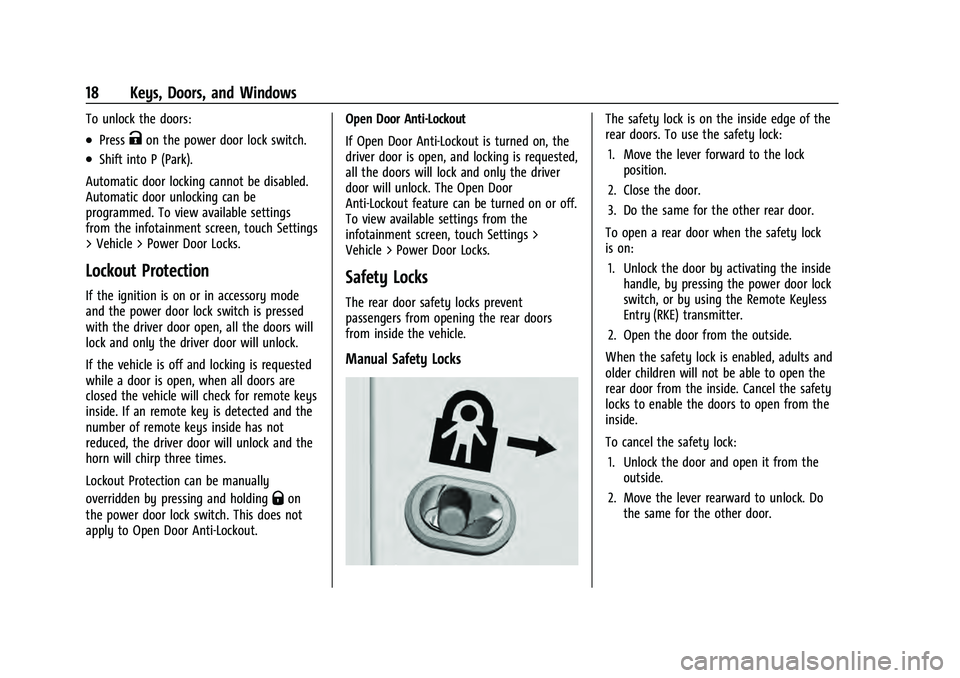
Power Door Locks
Q: Press to lock the doors. The indicator
light in the switch will come on when the
door is locked.
K: Press to unlock the doors.
Delayed Locking
This feature delays the actual locking of the
doors until five seconds after all doors are
closed.
Delayed locking can only be turned on when
the Open Door Anti-Lockout feature has
been turned off. When
Qis pressed on the power door lock
switch with the door open, a chime will
sound three times indicating that delayed
locking is active.
The doors will then lock automatically
five seconds after all doors are closed. If a
door is reopened before five seconds have
elapsed, the five-second timer will reset once
all the doors are closed again.
Press
Qon the door lock switch again,
or press
Qon the remote key, to override
this feature and lock the doors immediately.
Delayed locking can be programmed. To
view available settings from the
infotainment screen, touch Settings >
Vehicle > Power Door Locks.
Automatic Door Locks
The doors will lock automatically when all
doors are closed, the ignition is on, and the
vehicle is shifted out of P (Park).
If a vehicle door is unlocked and then
opened and closed, the doors will lock either
when your foot is removed from the brake
or the vehicle speed becomes faster than
13 km/h (8 mph).
Page 19 of 360
Chevrolet Equinox Owner Manual (GMNA-Localizing-U.S./Canada-
16540728) - 2023 - crc - 6/16/22
18 Keys, Doors, and Windows
To unlock the doors:
.PressKon the power door lock switch.
.Shift into P (Park).
Automatic door locking cannot be disabled.
Automatic door unlocking can be
programmed. To view available settings
from the infotainment screen, touch Settings
> Vehicle > Power Door Locks.
Lockout Protection
If the ignition is on or in accessory mode
and the power door lock switch is pressed
with the driver door open, all the doors will
lock and only the driver door will unlock.
If the vehicle is off and locking is requested
while a door is open, when all doors are
closed the vehicle will check for remote keys
inside. If an remote key is detected and the
number of remote keys inside has not
reduced, the driver door will unlock and the
horn will chirp three times.
Lockout Protection can be manually
overridden by pressing and holding
Qon
the power door lock switch. This does not
apply to Open Door Anti-Lockout. Open Door Anti-Lockout
If Open Door Anti-Lockout is turned on, the
driver door is open, and locking is requested,
all the doors will lock and only the driver
door will unlock. The Open Door
Anti-Lockout feature can be turned on or off.
To view available settings from the
infotainment screen, touch Settings >
Vehicle > Power Door Locks.
Safety Locks
The rear door safety locks prevent
passengers from opening the rear doors
from inside the vehicle.
Manual Safety Locks
The safety lock is on the inside edge of the
rear doors. To use the safety lock:
1. Move the lever forward to the lock position.
2. Close the door.
3. Do the same for the other rear door.
To open a rear door when the safety lock
is on: 1. Unlock the door by activating the inside handle, by pressing the power door lock
switch, or by using the Remote Keyless
Entry (RKE) transmitter.
2. Open the door from the outside.
When the safety lock is enabled, adults and
older children will not be able to open the
rear door from the inside. Cancel the safety
locks to enable the doors to open from the
inside.
To cancel the safety lock: 1. Unlock the door and open it from the outside.
2. Move the lever rearward to unlock. Do the same for the other door.
Page 22 of 360
Chevrolet Equinox Owner Manual (GMNA-Localizing-U.S./Canada-
16540728) - 2023 - crc - 6/16/22
Keys, Doors, and Windows 21
Caution
Manually forcing the liftgate to open or
close during a power cycle can damage
the vehicle. Allow the power cycle to
complete.
The power liftgate may be temporarily
disabled under extreme low temperatures,
or after repeated power cycling over a short
period of time. If this occurs, the liftgate can
still be operated manually.
If the vehicle is shifted out of P (Park) while
the power function is in progress, the
liftgate will continue to completion. If the
vehicle is accelerated before the liftgate has
completed moving, the liftgate may stop or
reverse direction. Check for Driver
Information Center (DIC) messages and make
sure the liftgate is closed and latched before
driving.
Falling Liftgate Detection
If the power liftgate automatically closes
after a power opening cycle, it indicates that
the system is reacting to excess weight on
the liftgate or a possible support strut
failure. A repetitive chime will sound while
the falling liftgate detection feature is
operating. Remove any excess weight. If the liftgate continues to automatically close
after opening, see your dealer for service
before using the power liftgate.
Interfering with the power liftgate motion
or manually closing the liftgate too quickly
after power opening may resemble a
support strut failure. This could also activate
the falling liftgate detection feature. Allow
the liftgate to complete its operation and
wait a few seconds before manually closing
the liftgate.
Obstacle Detection Features
If the liftgate encounters an obstacle during
a power open or close cycle, the liftgate will
automatically reverse direction and move a
short distance away from the obstacle. After
removing the obstruction, the power liftgate
operation can be used again. If the liftgate
encounters multiple obstacles on the same
power cycle, the power function will
deactivate. After removing the obstructions,
manually close the liftgate, This will allow
normal power operation functions to
resume.
If the vehicle is locked while the liftgate is
closing, and an obstacle is encountered that
prevents the liftgate from completely
closing, the horn will sound as an alert that
the liftgate did not close.
Setting the 3/4 Mode
To change the position the liftgate stops at
when opening:
1. Select MAX or 3/4 mode and power open the liftgate.
2. Stop the liftgate movement at the desired height by pressing any liftgate
button. Manually adjust the liftgate
position if needed.
3. Press and hold
lnext to the pull cup
on the outside of the liftgate until the
turn signals flash and a beep sounds.
This indicates the setting has been
recorded.
The liftgate cannot be set below a minimum
programmable height. If there is no light
flash or sound, then the height adjustment
may be too low.
Manual Operation
Select OFF to manually operate the liftgate.
See “Manual Liftgate” at the beginning of
this section.
Page 26 of 360
Chevrolet Equinox Owner Manual (GMNA-Localizing-U.S./Canada-
16540728) - 2023 - crc - 6/16/22
Keys, Doors, and Windows 25
Warning (Continued)
into the right lane, you could hit a
vehicle on the right. Check the inside
mirror or glance over your shoulder
before changing lanes.
The passenger side mirror is convex shaped.
A convex mirror surface is curved so more
can be seen from the driver seat.
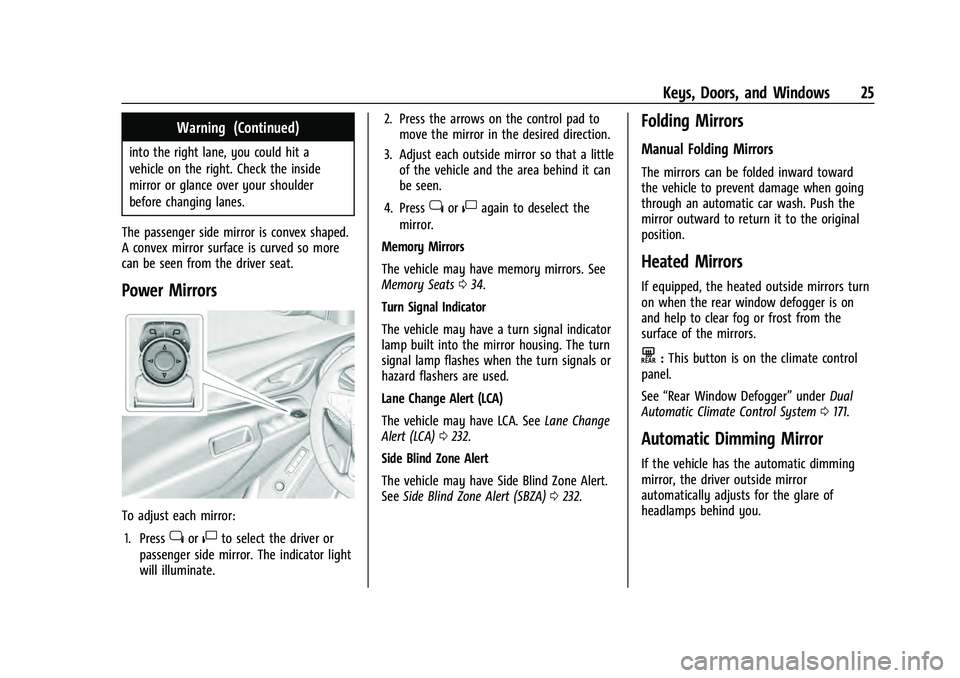
Power Mirrors
To adjust each mirror: 1. Press
jor|to select the driver or
passenger side mirror. The indicator light
will illuminate. 2. Press the arrows on the control pad to
move the mirror in the desired direction.
3. Adjust each outside mirror so that a little of the vehicle and the area behind it can
be seen.
4. Press
jor|again to deselect the
mirror.
Memory Mirrors
The vehicle may have memory mirrors. See
Memory Seats 034.
Turn Signal Indicator
The vehicle may have a turn signal indicator
lamp built into the mirror housing. The turn
signal lamp flashes when the turn signals or
hazard flashers are used.
Lane Change Alert (LCA)
The vehicle may have LCA. See Lane Change
Alert (LCA) 0232.
Side Blind Zone Alert
The vehicle may have Side Blind Zone Alert.
See Side Blind Zone Alert (SBZA) 0232.
Folding Mirrors
Manual Folding Mirrors
The mirrors can be folded inward toward
the vehicle to prevent damage when going
through an automatic car wash. Push the
mirror outward to return it to the original
position.
Heated Mirrors
If equipped, the heated outside mirrors turn
on when the rear window defogger is on
and help to clear fog or frost from the
surface of the mirrors.
K:This button is on the climate control
panel.
See “Rear Window Defogger” underDual
Automatic Climate Control System 0171.
Automatic Dimming Mirror
If the vehicle has the automatic dimming
mirror, the driver outside mirror
automatically adjusts for the glare of
headlamps behind you.
Page 31 of 360
Chevrolet Equinox Owner Manual (GMNA-Localizing-U.S./Canada-
16540728) - 2023 - crc - 6/16/22
30 Seats and Restraints
Seats and Restraints
Head Restraints
Head Restraints . . . . . . . . . . . . . . . . . . . . . . . . 30
Front Seats
Seat Adjustment . . . . . . . . . . . . . . . . . . . . . . . . 31
Power Seat Adjustment . . . . . . . . . . . . . . . . . 32
Reclining Seatbacks . . . . . . . . . . . . . . . . . . . . . 33
Lumbar Adjustment . . . . . . . . . . . . . . . . . . . . 34
Memory Seats . . . . . . . . . . . . . . . . . . . . . . . . . . 34
Heated and Ventilated Front Seats . . . . . 37
Rear Seats
Rear Seats . . . . . . . . . . . . . . . . . . . . . . . . . . . . . . 38
Heated Rear Seats . . . . . . . . . . . . . . . . . . . . . . 40
Seat Belts
Seat Belts . . . . . . . . . . . . . . . . . . . . . . . . . . . . . . . 41
Buckle To Drive . . . . . . . . . . . . . . . . . . . . . . . . . 41
How to Wear Seat Belts Properly . . . . . . 42
Lap-Shoulder Belt . . . . . . . . . . . . . . . . . . . . . . . 44
Seat Belt Use During Pregnancy . . . . . . . . 46
Seat Belt Extender . . . . . . . . . . . . . . . . . . . . . 46
Safety System Check . . . . . . . . . . . . . . . . . . . 47
Seat Belt Care . . . . . . . . . . . . . . . . . . . . . . . . . . 47
Replacing Seat Belt System Parts after aCrash . . . . . . . . . . . . . . . . . . . . . . . . . . . . . . . . . 47
Airbag System
Airbag System . . . . . . . . . . . . . . . . . . . . . . . . . 48 Where Are the Airbags? . . . . . . . . . . . . . . . . 49
When Should an Airbag Inflate? . . . . . . . . 50
What Makes an Airbag Inflate? . . . . . . . . . 51
How Does an Airbag Restrain? . . . . . . . . . . 51
What Will You See after an Airbag
Inflates? . . . . . . . . . . . . . . . . . . . . . . . . . . . . . . 52
Passenger Sensing System . . . . . . . . . . . . . . 53
Servicing the Airbag-Equipped Vehicle . . . . . . . . . . . . . . . . . . . . . . . . . . . . . . . 56
Adding Equipment to the Airbag-Equipped Vehicle . . . . . . . . . . . . . . 56
Airbag System Check . . . . . . . . . . . . . . . . . . . 57
Replacing Airbag System Parts after a Crash . . . . . . . . . . . . . . . . . . . . . . . . . . . . . . . . . 57
Child Restraints
Older Children . . . . . . . . . . . . . . . . . . . . . . . . . . 58
Infants and Young Children . . . . . . . . . . . . . 59
Child Restraint Systems . . . . . . . . . . . . . . . . . 61
Where to Put the Restraint . . . . . . . . . . . . . 63
Lower Anchors and Tethers for Children(LATCH System) . . . . . . . . . . . . . . . . . . . . . . 64
Replacing LATCH System Parts After a Crash . . . . . . . . . . . . . . . . . . . . . . . . . . . . . . . . . 69
Securing Child Restraints (With the Seat Belt in the Rear Seat) . . . . . . . . . . . . . . . . . 70
Securing Child Restraints (With the Seat Belt in the Front Seat) . . . . . . . . . . . . . . . . 71
Head Restraints
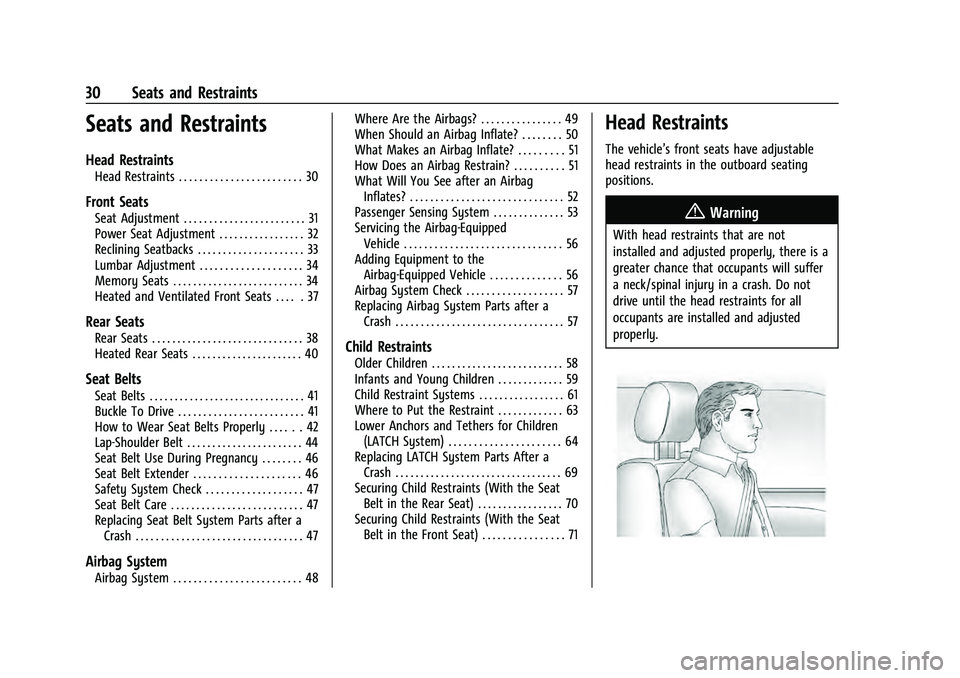
The vehicle’s front seats have adjustable
head restraints in the outboard seating
positions.
{Warning
With head restraints that are not
installed and adjusted properly, there is a
greater chance that occupants will suffer
a neck/spinal injury in a crash. Do not
drive until the head restraints for all
occupants are installed and adjusted
properly.
Page 39 of 360
Chevrolet Equinox Owner Manual (GMNA-Localizing-U.S./Canada-
16540728) - 2023 - crc - 6/16/22
38 Seats and Restraints
The temperature performance of an
unoccupied seat may be reduced. This is
normal.
To enable or disable remote start heated or
ventilated seats, select Settings > Vehicle >
Remote Lock, Unlock, and Start > Remote
Start Auto Heat Seats or Remote Start Auto
Cool Seats > ON or OFF. SeeRemote Vehicle
Start 014.
Rear Seats
Rear Seat Reminder
If equipped, the message REAR SEAT
REMINDER LOOK IN REAR SEAT displays
under certain conditions indicating there
may be an item or passenger in the rear
seat. Check before exiting the vehicle.
This feature will activate when a second row
door is opened while the vehicle is on or up
to 10 minutes before the vehicle is turned
on. There will be an alert when the vehicle
is turned off. The alert does not directly
detect objects in the rear seat; instead,
under certain conditions, it detects when a
rear door is opened and closed, indicating
that there may be something in the
rear seat. The feature is active only once each time
the vehicle is turned on and off, and will
require reactivation by opening and closing
the second row doors. There may be an
alert even when there is nothing in the rear
seat; for example, if a child entered the
vehicle through the rear door and left the
vehicle without the vehicle being shut off.
The feature can be turned on or off. Select
Settings > Vehicle > Rear Seat Reminder >
ON or OFF.
Reclining the Seatback
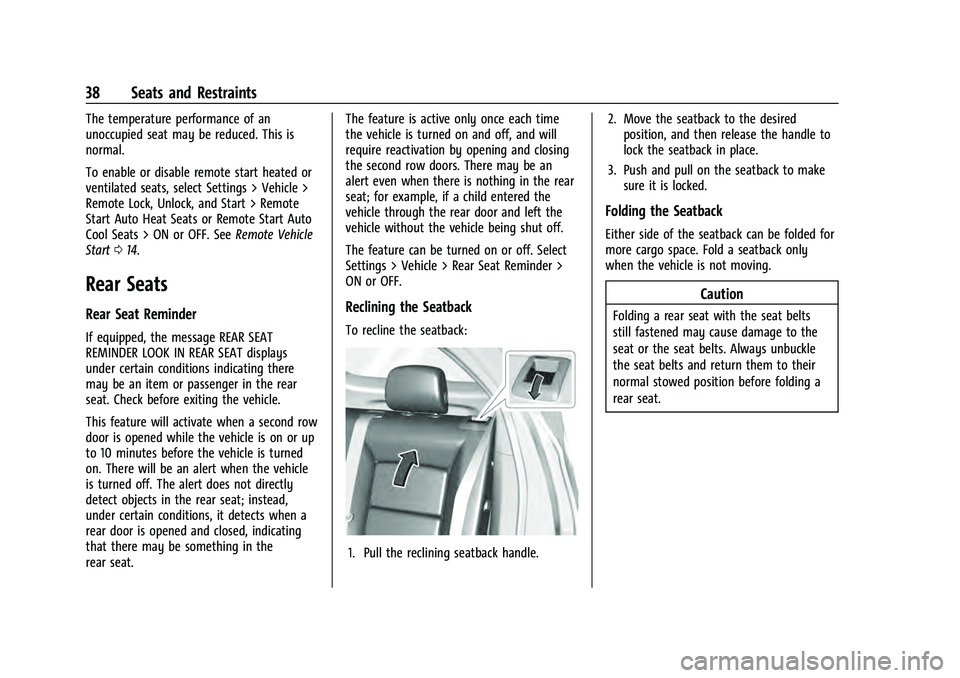
To recline the seatback:
1. Pull the reclining seatback handle.
2. Move the seatback to the desired
position, and then release the handle to
lock the seatback in place.
3. Push and pull on the seatback to make sure it is locked.
Folding the Seatback
Either side of the seatback can be folded for
more cargo space. Fold a seatback only
when the vehicle is not moving.
Caution
Folding a rear seat with the seat belts
still fastened may cause damage to the
seat or the seat belts. Always unbuckle
the seat belts and return them to their
normal stowed position before folding a
rear seat.