Tom CHEVROLET EQUINOX 2023 Owners Manual
[x] Cancel search | Manufacturer: CHEVROLET, Model Year: 2023, Model line: EQUINOX, Model: CHEVROLET EQUINOX 2023Pages: 360, PDF Size: 14.71 MB
Page 1 of 360
2023 Equinox
Scan to Access
United States
United States and Canada
Connected Services1-888-4-ONSTAR Customer Assistance
1-800-263-3777
Canada
• Owner’s Manuals
• Warranty Information
• Connected Services
• My Chevrolet Rewards
• myChevrolet Mobile App
• How-To Videos
• Vehicle Diagnostics
• Scheduled Maintenance
• Vehicle Features
• Many Additional Resources
United States
Customer Assistance 1-800-222-1020
Roadside Assistance 1-800-243-8872
84895933 A
Equinox
Owner’s Manual
Roadside Assistance1-800-268-6800
Canada
C
M
Y
CM
MY
CY
CMY
K
ai165573252129_23_CHEV_Equinox_COV_en_US_84895933 A_2022JUN27.pdf 1 \
6/20/2022 9:42:02 AM
Page 2 of 360
Chevrolet Equinox Owner Manual (GMNA-Localizing-U.S./Canada-
16540728) - 2023 - crc - 6/16/22
Contents
Introduction . . . . . . . . . . . . . . . . . . . . . . . . . . . . . . 1
Keys, Doors, and Windows . . . . . . . . . . . . . . . 7
Seats and Restraints . . . . . . . . . . . . . . . . . . . . . 30
Storage . . . . . . . . . . . . . . . . . . . . . . . . . . . . . . . . . . 75
Instruments and Controls . . . . . . . . . . . . . . . 79
Lighting . . . . . . . . . . . . . . . . . . . . . . . . . . . . . . . . . 114
Infotainment System . . . . . . . . . . . . . . . . . . . 121
Climate Controls . . . . . . . . . . . . . . . . . . . . . . . 169
Driving and Operating . . . . . . . . . . . . . . . . . . 176
Vehicle Care . . . . . . . . . . . . . . . . . . . . . . . . . . . . 247
Service and Maintenance . . . . . . . . . . . . . . . 315
Technical Data . . . . . . . . . . . . . . . . . . . . . . . . . . 323
Customer Information . . . . . . . . . . . . . . . . . . 327
Reporting Safety Defects . . . . . . . . . . . . . . . 335
OnStar . . . . . . . . . . . . . . . . . . . . . . . . . . . . . . . . . 339
Connected Services . . . . . . . . . . . . . . . . . . . . . 344
Index . . . . . . . . . . . . . . . . . . . . . . . . . . 347
Introduction
California Proposition 65 Warning
Litho in U.S.A.
Part No. 84895933 A First Printing©2022 General Motors LLC. All Rights Reserved.
Page 3 of 360
Chevrolet Equinox Owner Manual (GMNA-Localizing-U.S./Canada-
16540728) - 2023 - crc - 6/16/22
2 Introduction
Introduction
The names, logos, emblems, slogans, vehicle
model names, and vehicle body designs
appearing in this manual including, but not
limited to, GM, the GM logo, CHEVROLET,
the CHEVROLET Emblem, and EQUINOX are
trademarks and/or service marks of General
Motors LLC, its subsidiaries, affiliates,
or licensors.
For vehicles first sold in Canada, substitute
the name“General Motors of Canada
Company” for Chevrolet Motor Division
wherever it appears in this manual.
This manual describes features that may or
may not be on the vehicle because of
optional equipment that was not purchased
on the vehicle, model variants, country
specifications, features/applications that may
not be available in your region, or changes
subsequent to the printing of this owner’s
manual, including changes in standard or
optional content. Refer to the purchase documentation
relating to your specific vehicle to confirm
the features.
Keep this manual in the vehicle for quick
reference.
Canadian Vehicle Owners
A French language manual can be obtained
from your dealer, at www.helminc.com,
or from:
Propriétaires Canadiens
On peut obtenir un exemplaire de ce guide
en français auprès du concessionnaire ou à
l'adresse suivante:
Helm, Incorporated
Attention: Customer Service
47911 Halyard Drive
Plymouth, MI 48170
USA
Using this Manual
To quickly locate information about the
vehicle, use the Index in the back of the
manual. It is an alphabetical list of what is
in the manual and the page number where
it can be found.
About Driving the Vehicle
As with other vehicles of this type, failure to
operate this vehicle correctly may result in
loss of control or a crash. Be sure to read
the driving guidelines in this manual in the
section called
“Driving and Operating” and
specifically Driver Behavior 0177, Driving
Environment 0177, and Vehicle Design 0177.
Page 7 of 360
Chevrolet Equinox Owner Manual (GMNA-Localizing-U.S./Canada-
16540728) - 2023 - crc - 6/16/22
6 Introduction
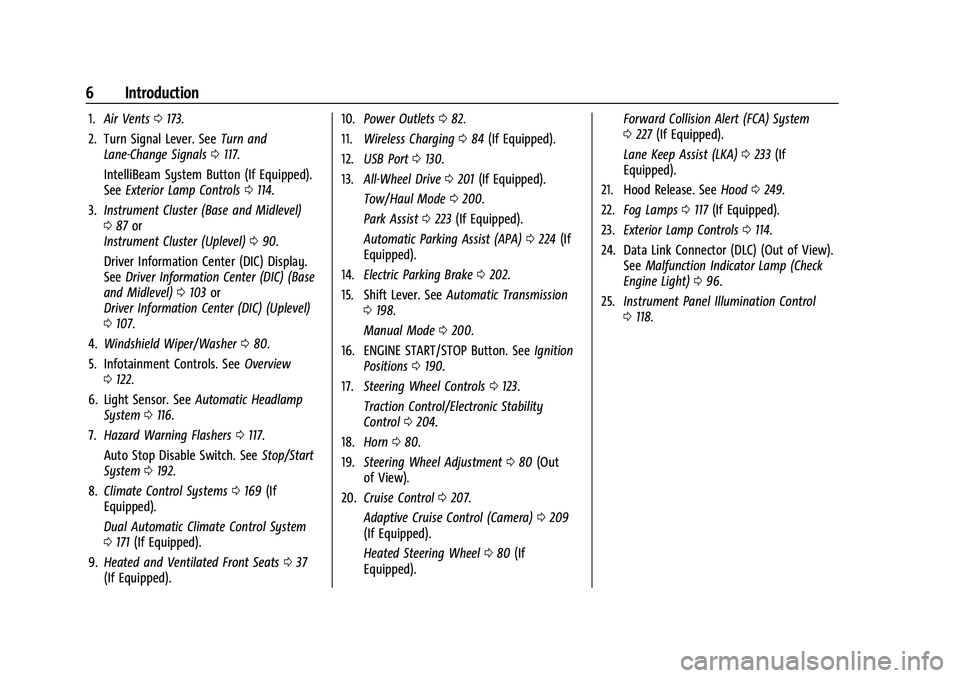
1.Air Vents 0173.
2. Turn Signal Lever. See Turn and
Lane-Change Signals 0117.
IntelliBeam System Button (If Equipped).
See Exterior Lamp Controls 0114.
3. Instrument Cluster (Base and Midlevel)
087 or
Instrument Cluster (Uplevel) 090.
Driver Information Center (DIC) Display.
See Driver Information Center (DIC) (Base
and Midlevel) 0103 or
Driver Information Center (DIC) (Uplevel)
0 107.
4. Windshield Wiper/Washer 080.
5. Infotainment Controls. See Overview
0 122.
6. Light Sensor. See Automatic Headlamp
System 0116.
7. Hazard Warning Flashers 0117.
Auto Stop Disable Switch. See Stop/Start
System 0192.
8. Climate Control Systems 0169 (If
Equipped).
Dual Automatic Climate Control System
0 171 (If Equipped).
9. Heated and Ventilated Front Seats 037
(If Equipped). 10.
Power Outlets 082.
11. Wireless Charging 084 (If Equipped).
12. USB Port 0130.
13. All-Wheel Drive 0201 (If Equipped).
Tow/Haul Mode 0200.
Park Assist 0223 (If Equipped).
Automatic Parking Assist (APA) 0224 (If
Equipped).
14. Electric Parking Brake 0202.
15. Shift Lever. See Automatic Transmission
0 198.
Manual Mode 0200.
16. ENGINE START/STOP Button. See Ignition
Positions 0190.
17. Steering Wheel Controls 0123.
Traction Control/Electronic Stability
Control 0204.
18. Horn 080.
19. Steering Wheel Adjustment 080 (Out
of View).
20. Cruise Control 0207.
Adaptive Cruise Control (Camera) 0209
(If Equipped).
Heated Steering Wheel 080 (If
Equipped). Forward Collision Alert (FCA) System
0
227 (If Equipped).
Lane Keep Assist (LKA) 0233 (If
Equipped).
21. Hood Release. See Hood0249.
22. Fog Lamps 0117 (If Equipped).
23. Exterior Lamp Controls 0114.
24. Data Link Connector (DLC) (Out of View). SeeMalfunction Indicator Lamp (Check
Engine Light) 096.
25. Instrument Panel Illumination Control
0118.
Page 8 of 360
Chevrolet Equinox Owner Manual (GMNA-Localizing-U.S./Canada-
16540728) - 2023 - crc - 6/16/22
Keys, Doors, and Windows 7
Keys, Doors, and
Windows
Keys and Locks
Keys . . . . . . . . . . . . . . . . . . . . . . . . . . . . . . . . . . . . . 7
Remote Key . . . . . . . . . . . . . . . . . . . . . . . . . . . . . 8
Remote Key Operation . . . . . . . . . . . . . . . . . . 8
Remote Vehicle Start . . . . . . . . . . . . . . . . . . . 14
Door Locks . . . . . . . . . . . . . . . . . . . . . . . . . . . . . . 15
Power Door Locks . . . . . . . . . . . . . . . . . . . . . . . 17
Delayed Locking . . . . . . . . . . . . . . . . . . . . . . . . 17
Automatic Door Locks . . . . . . . . . . . . . . . . . . . 17
Lockout Protection . . . . . . . . . . . . . . . . . . . . . . 18
Safety Locks . . . . . . . . . . . . . . . . . . . . . . . . . . . . 18
Doors
Liftgate . . . . . . . . . . . . . . . . . . . . . . . . . . . . . . . . . 19
Vehicle Security
Vehicle Security . . . . . . . . . . . . . . . . . . . . . . . . 23
Vehicle Alarm System . . . . . . . . . . . . . . . . . . 23
Immobilizer . . . . . . . . . . . . . . . . . . . . . . . . . . . . . 24
Immobilizer Operation . . . . . . . . . . . . . . . . . . 24
Exterior Mirrors
Convex Mirrors . . . . . . . . . . . . . . . . . . . . . . . . . 24
Power Mirrors . . . . . . . . . . . . . . . . . . . . . . . . . . 25
Folding Mirrors . . . . . . . . . . . . . . . . . . . . . . . . . 25
Heated Mirrors . . . . . . . . . . . . . . . . . . . . . . . . . 25
Automatic Dimming Mirror . . . . . . . . . . . . . 25Reverse Tilt Mirrors . . . . . . . . . . . . . . . . . . . . 26
Interior Mirrors
Interior Rearview Mirrors . . . . . . . . . . . . . . . 26
Manual Rearview Mirror . . . . . . . . . . . . . . . . 26
Automatic Dimming Rearview Mirror . . . 26
Windows
Windows . . . . . . . . . . . . . . . . . . . . . . . . . . . . . . . 26
Power Windows . . . . . . . . . . . . . . . . . . . . . . . . 26
Sun Visors . . . . . . . . . . . . . . . . . . . . . . . . . . . . . . 28
Roof
Sunroof . . . . . . . . . . . . . . . . . . . . . . . . . . . . . . . . . 28
Keys and Locks
Keys
{Warning
Leaving children in a vehicle with a
Remote Keyless Entry (RKE) transmitter is
dangerous and children or others could
be seriously injured or killed. They could
operate the power windows or other
controls or make the vehicle move. The
windows will function with the RKE
transmitter in the vehicle, and children or
others could be caught in the path of a
closing window. Do not leave children in
a vehicle with an RKE transmitter.
Page 9 of 360

Chevrolet Equinox Owner Manual (GMNA-Localizing-U.S./Canada-
16540728) - 2023 - crc - 6/16/22
8 Keys, Doors, and Windows
The key that is part of the Remote Keyless
Entry (RKE) transmitter can be used for all
locks.
Remove the key by pressing the button on
the side of the RKE transmitter near the
bottom and pull the key out. Never pull the
key out without pressing the button.
If it becomes difficult to turn the key,
inspect the key blade for debris. Periodically,
clean with a brush or a pick.
See your dealer if a new transmitter is
needed.
If locked out of the vehicle, seeRoadside
Assistance Program 0330.
With an active OnStar or connected service
plan, an OnStar Advisor may remotely
unlock the vehicle. See OnStar Overview
0 339.
Remote Key
See Radio Frequency Statement 0335.
If there is a decrease in the remote key
operating range:
.Check the distance. The remote key may
be too far from the vehicle.
.Check the location. Other vehicles or
objects may be blocking the signal.
.Check the remote key's battery. See
“Battery Replacement” later in this
section.
.If the remote key is still not working
correctly, see your dealer or a qualified
technician for service.
Remote Key Operation
The Keyless Access system allows for vehicle
entry when the remote key is within 1 m
(3 ft). See “Keyless Access Operation” later in
this section.
The remote key may work up to 60 m
(197 ft) away from the vehicle.
Other conditions can affect the performance
of the remote key. See Remote Key08.
With Remote Start and Power Liftgate
Shown
Page 15 of 360
Chevrolet Equinox Owner Manual (GMNA-Localizing-U.S./Canada-
16540728) - 2023 - crc - 6/16/22
14 Keys, Doors, and Windows
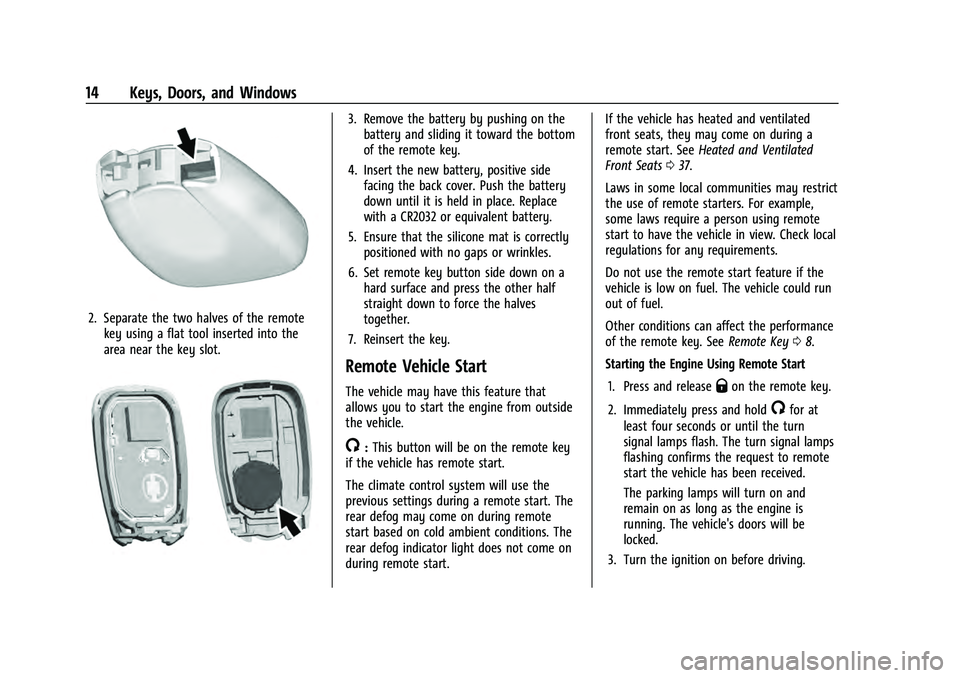
2. Separate the two halves of the remotekey using a flat tool inserted into the
area near the key slot.
3. Remove the battery by pushing on thebattery and sliding it toward the bottom
of the remote key.
4. Insert the new battery, positive side facing the back cover. Push the battery
down until it is held in place. Replace
with a CR2032 or equivalent battery.
5. Ensure that the silicone mat is correctly positioned with no gaps or wrinkles.
6. Set remote key button side down on a hard surface and press the other half
straight down to force the halves
together.
7. Reinsert the key.
Remote Vehicle Start
The vehicle may have this feature that
allows you to start the engine from outside
the vehicle.
/: This button will be on the remote key
if the vehicle has remote start.
The climate control system will use the
previous settings during a remote start. The
rear defog may come on during remote
start based on cold ambient conditions. The
rear defog indicator light does not come on
during remote start. If the vehicle has heated and ventilated
front seats, they may come on during a
remote start. See
Heated and Ventilated
Front Seats 037.
Laws in some local communities may restrict
the use of remote starters. For example,
some laws require a person using remote
start to have the vehicle in view. Check local
regulations for any requirements.
Do not use the remote start feature if the
vehicle is low on fuel. The vehicle could run
out of fuel.
Other conditions can affect the performance
of the remote key. See Remote Key08.
Starting the Engine Using Remote Start
1. Press and release
Qon the remote key.
2. Immediately press and hold
/for at
least four seconds or until the turn
signal lamps flash. The turn signal lamps
flashing confirms the request to remote
start the vehicle has been received.
The parking lamps will turn on and
remain on as long as the engine is
running. The vehicle's doors will be
locked.
3. Turn the ignition on before driving.
Page 17 of 360
Chevrolet Equinox Owner Manual (GMNA-Localizing-U.S./Canada-
16540728) - 2023 - crc - 6/16/22
16 Keys, Doors, and Windows
.Use the key in the driver door. The key
lock cylinder is covered with a cap.
To lock or unlock the doors from the inside:
.PressQorKon the power door lock
switch.
.Push down on the door lock knob to lock
a door.
.Pull the door handle once to unlock the
door. Pull the handle again to unlatch it.
Keyless Access
The remote key must be within 1 m (3 ft) of
the liftgate or door being opened. Press the
button on the front door handle to open.
See Remote Key Operation 08.
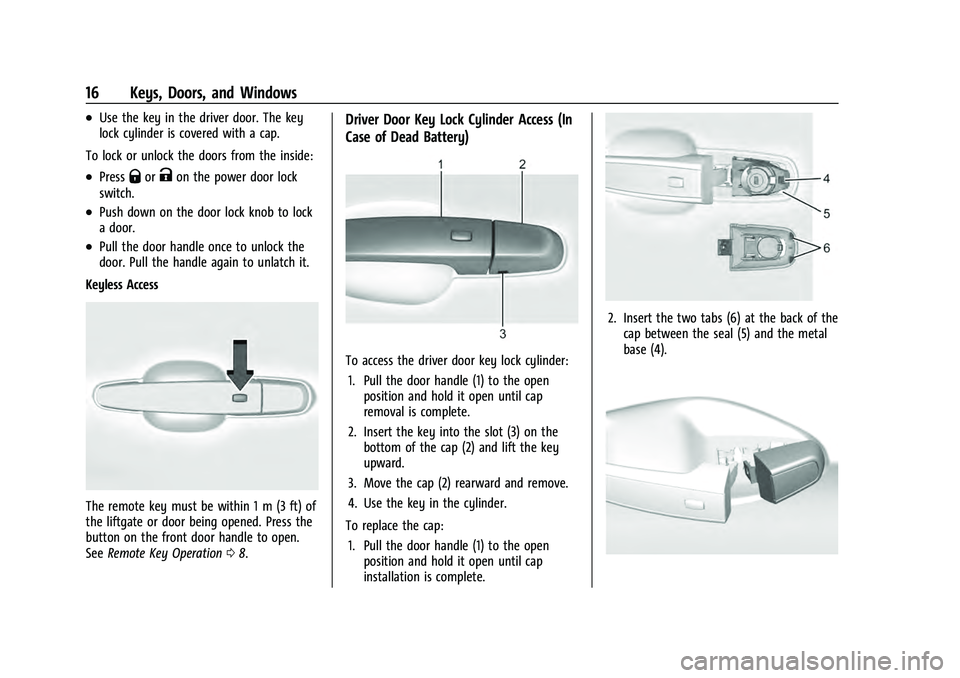
Driver Door Key Lock Cylinder Access (In
Case of Dead Battery)
To access the driver door key lock cylinder:
1. Pull the door handle (1) to the open position and hold it open until cap
removal is complete.
2. Insert the key into the slot (3) on the bottom of the cap (2) and lift the key
upward.
3. Move the cap (2) rearward and remove.
4. Use the key in the cylinder.
To replace the cap: 1. Pull the door handle (1) to the open position and hold it open until cap
installation is complete.
2. Insert the two tabs (6) at the back of thecap between the seal (5) and the metal
base (4).
Page 18 of 360
Chevrolet Equinox Owner Manual (GMNA-Localizing-U.S./Canada-
16540728) - 2023 - crc - 6/16/22
Keys, Doors, and Windows 17
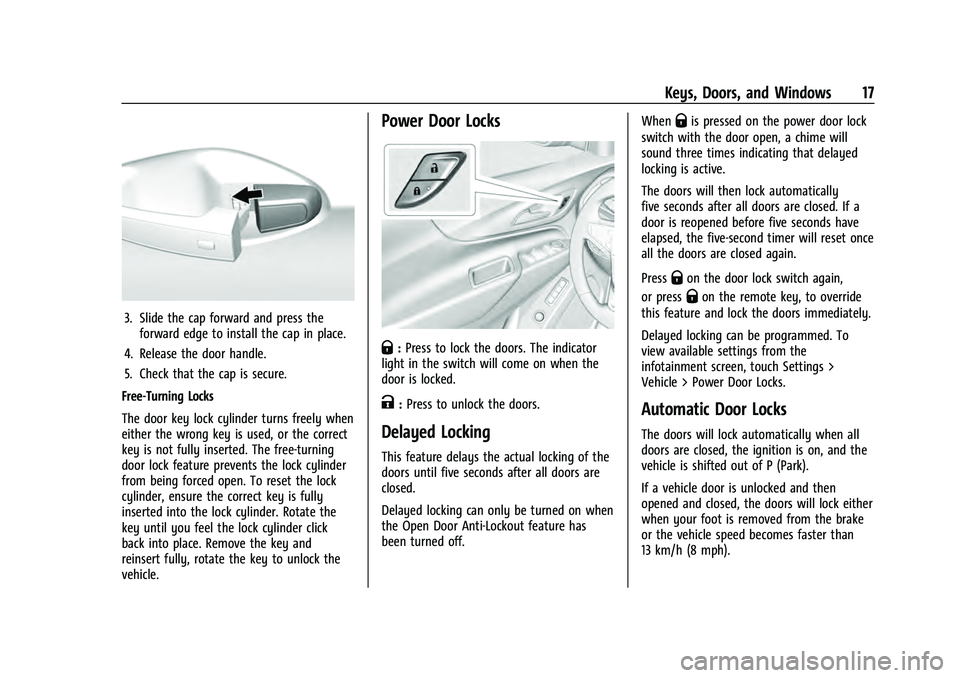
3. Slide the cap forward and press theforward edge to install the cap in place.
4. Release the door handle.
5. Check that the cap is secure.
Free-Turning Locks
The door key lock cylinder turns freely when
either the wrong key is used, or the correct
key is not fully inserted. The free-turning
door lock feature prevents the lock cylinder
from being forced open. To reset the lock
cylinder, ensure the correct key is fully
inserted into the lock cylinder. Rotate the
key until you feel the lock cylinder click
back into place. Remove the key and
reinsert fully, rotate the key to unlock the
vehicle.
Power Door Locks
Q: Press to lock the doors. The indicator
light in the switch will come on when the
door is locked.
K: Press to unlock the doors.
Delayed Locking
This feature delays the actual locking of the
doors until five seconds after all doors are
closed.
Delayed locking can only be turned on when
the Open Door Anti-Lockout feature has
been turned off. When
Qis pressed on the power door lock
switch with the door open, a chime will
sound three times indicating that delayed
locking is active.
The doors will then lock automatically
five seconds after all doors are closed. If a
door is reopened before five seconds have
elapsed, the five-second timer will reset once
all the doors are closed again.
Press
Qon the door lock switch again,
or press
Qon the remote key, to override
this feature and lock the doors immediately.
Delayed locking can be programmed. To
view available settings from the
infotainment screen, touch Settings >
Vehicle > Power Door Locks.
Automatic Door Locks
The doors will lock automatically when all
doors are closed, the ignition is on, and the
vehicle is shifted out of P (Park).
If a vehicle door is unlocked and then
opened and closed, the doors will lock either
when your foot is removed from the brake
or the vehicle speed becomes faster than
13 km/h (8 mph).
Page 19 of 360
Chevrolet Equinox Owner Manual (GMNA-Localizing-U.S./Canada-
16540728) - 2023 - crc - 6/16/22
18 Keys, Doors, and Windows
To unlock the doors:
.PressKon the power door lock switch.
.Shift into P (Park).
Automatic door locking cannot be disabled.
Automatic door unlocking can be
programmed. To view available settings
from the infotainment screen, touch Settings
> Vehicle > Power Door Locks.
Lockout Protection
If the ignition is on or in accessory mode
and the power door lock switch is pressed
with the driver door open, all the doors will
lock and only the driver door will unlock.
If the vehicle is off and locking is requested
while a door is open, when all doors are
closed the vehicle will check for remote keys
inside. If an remote key is detected and the
number of remote keys inside has not
reduced, the driver door will unlock and the
horn will chirp three times.
Lockout Protection can be manually
overridden by pressing and holding
Qon
the power door lock switch. This does not
apply to Open Door Anti-Lockout. Open Door Anti-Lockout
If Open Door Anti-Lockout is turned on, the
driver door is open, and locking is requested,
all the doors will lock and only the driver
door will unlock. The Open Door
Anti-Lockout feature can be turned on or off.
To view available settings from the
infotainment screen, touch Settings >
Vehicle > Power Door Locks.
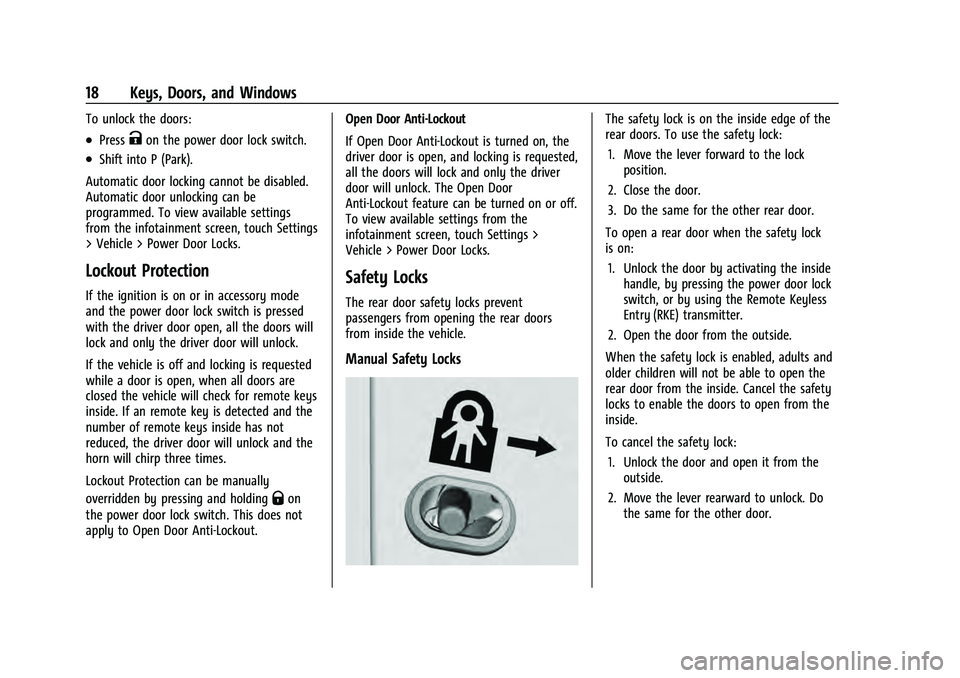
Safety Locks
The rear door safety locks prevent
passengers from opening the rear doors
from inside the vehicle.
Manual Safety Locks
The safety lock is on the inside edge of the
rear doors. To use the safety lock:
1. Move the lever forward to the lock position.
2. Close the door.
3. Do the same for the other rear door.
To open a rear door when the safety lock
is on: 1. Unlock the door by activating the inside handle, by pressing the power door lock
switch, or by using the Remote Keyless
Entry (RKE) transmitter.
2. Open the door from the outside.
When the safety lock is enabled, adults and
older children will not be able to open the
rear door from the inside. Cancel the safety
locks to enable the doors to open from the
inside.
To cancel the safety lock: 1. Unlock the door and open it from the outside.
2. Move the lever rearward to unlock. Do the same for the other door.