AUX CHEVROLET EXPRESS 1996 1.G Owners Manual
[x] Cancel search | Manufacturer: CHEVROLET, Model Year: 1996, Model line: EXPRESS, Model: CHEVROLET EXPRESS 1996 1.GPages: 376, PDF Size: 18.83 MB
Page 8 of 376
Downloaded from www.Manualslib.com manuals search engine u
CHEVROLET
GENERAL MOTORS, GM, the GM Emblem,
CHEVROLET,
the CHEVROLET Emblem and the
name EXPRESS are registered trademarks
of General
Motors Corporation.
This manual includes the latest information at the time
it
was printed. We reserve the right to make changes in the
product after that time without further notice. For
vehicles first sold in Canada, substitute the name
“General Motors
of Canada Limited” for Chevrolet
Division whenever
it appears in this manual.
Please keep this manual
in your vehicle, so it will be
there if
you ever need it when you’re on the road. If you
sell the vehicle, please leave this manual in
it so the new
owner can use it.
Litho
in U.S.A.
C9614
B First Edition
WE SUPPORT
VOLUNTARY TECHNICIAN
CERTIFICATION THROUGH
AUTOMOTIVE
National Institute for
SERVICE EXCELLENCE
We support voluntary
technician certification.
For Canadian Owners Who Prefer a
French Language Manual:
Aux propriktaires canadiens: Vous pouvez vous
procurer un exemplaire de ce guide en franGais chez
votre concessionaire
ou au:
DGN Marketing Services Ltd.
1500 Bonhill Rd.
Mississauga, Ontario L5T IC7
@Copyright General Motors Corporation
1996
All Rights Reserved
ii
Page 105 of 376
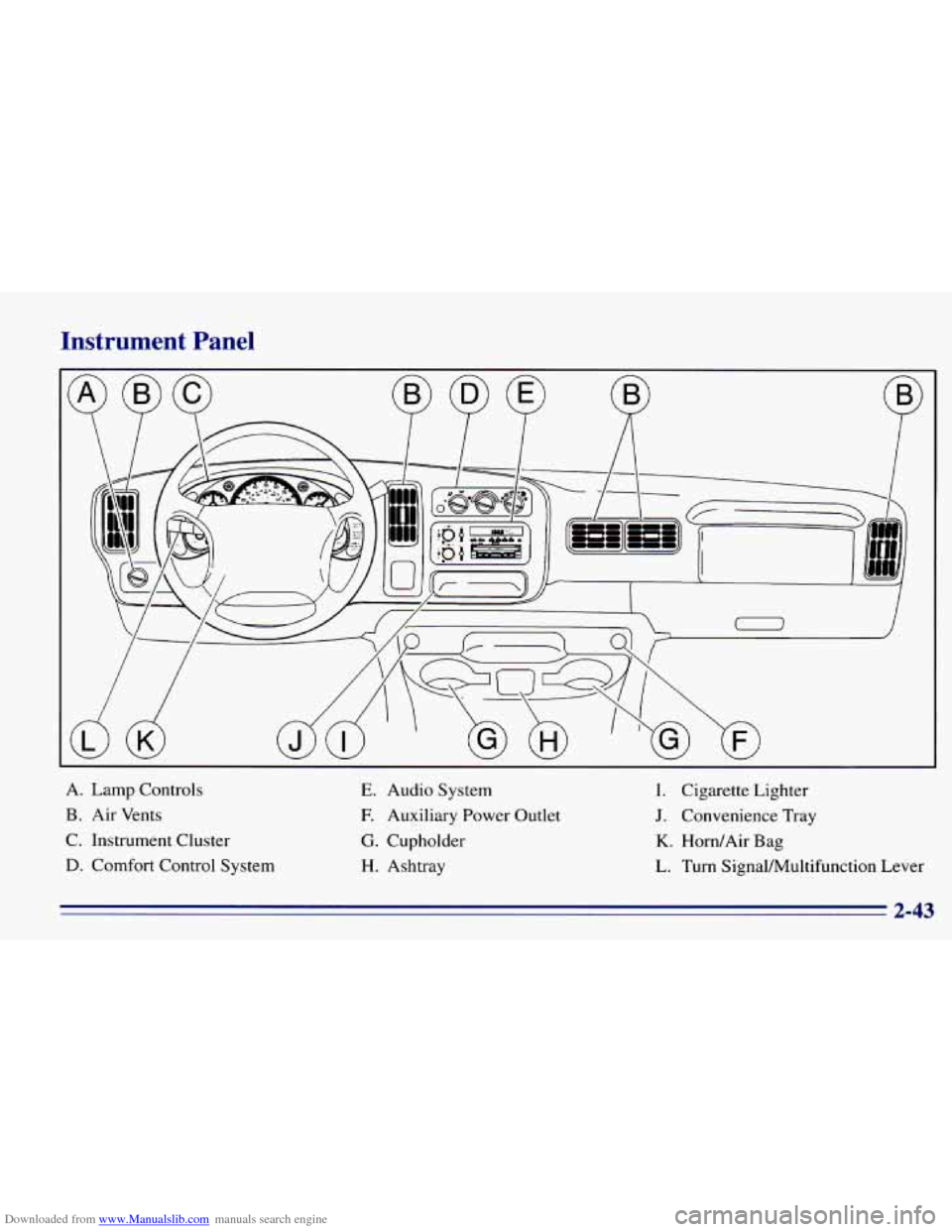
Downloaded from www.Manualslib.com manuals search engine Instrument Panel
A. Lamp Controls
B. Air Vents
C, Instrument Cluster
D. Comfort Control System
E. Audio System
E Auxiliary Power Outlet
G. Cupholder
H. Ashtray
I. Cigarette Lighter
J. Convenience Tray
K. Horn/Air Bag
L. Turn SignalAhltifunction Lever
2-43
Page 136 of 376
Downloaded from www.Manualslib.com manuals search engine Once the tape is playing, use the VOL, BAL, FADE,
TREB and BASS controls just as you do for the radio.
The tape symbol and a direction arrow will be on the
display whenever a tape is being played. Anytime a tape
is inserted, the top side is selected for play first.
PREV (I): Press the PREV or the SEEK left arrow to
search for
the previous selection. A minimum
three-second blank gap
is required for the player to stop
at the beginning
of the selection. The tape direction
arrow will blink during the SEEK operation.
PROG (2): Press this button to switch from one side of
the tape to the other.
NEXT (3): Press NEXT or the SEEK right arrow to
search for
the next selection. A minimum three-second
blank gap is required for the player
to stop at the
beginning of the selection. The tape direction arrow will
blink during the SEEK operation.
REV (4): Press this button to rapidly reverse the tape to
the beginning
of the cassette reel or until you press REV
again. The radio will play the last selected station while
reversing
the tape. The tape direction arrow will blink
during
REV operation.
00 (5): Press this button to reduce cassette tape noise.
The double-D symbol will appear on the display while
the player is in this mode. Dolby Noise Reduction
is manufactured under a license
from Dolby Laboratories Licensing Corporation. Dolby
and
the double-D symbol are trademarks of Dolby
Laboratories Licensing Corporation.
FWD (6): Press this button to rapidly forward the tape
to the end of the cassette reel or until you press FWD
again. The radio will play the last selected station while
forwarding
the tape. The tape direction arrow will blink
during FWD operation.
AM-FM: Press this button to switch from a tape to
the radio.
TAPE AUX: Press this button to return to the tape
player. The lighted arrow will appear and show the
direction
of play when a tape is in the active mode.
EJECT Press this button to remove the tape. The radio
will now play. EJECT can be used with either
the ignition
or radio
off. To load a cassette tape with the ignition or
radio
off, press EJECT before loading the cassette.
CLN: This message may appear on the display. If it
does, your cassette tape player needs to be cleaned. It
will still play tapes, but
you should clean it as soon as
possible to prevent damage to your tapes and player. See
“Care of Your Cassette Tape Player’’ in the Index.
After
you clean the player, press and hold EJECT for
five seconds
to reset the CLN indicator. The radio will
display
--- to show the indicator was reset.
Page 137 of 376
Downloaded from www.Manualslib.com manuals search engine CD Adapter Kits
Although this is not a recommended practice, it is possible
to
use a CD adapter kit with your cassette tape player.
The adapter kit cassette should begin playing like
a regular
audio cassette tape once inserted.
If the cassette
immediately ejects,
turn the radio off, turn the ignition on
and press and hold the
TAPE AUX button until the tape
icon flashes on the display. Irisert the adapter cassette
again. It will power up the radio and begin playing.
This override routine will remain active
until EJECT
is pressed.
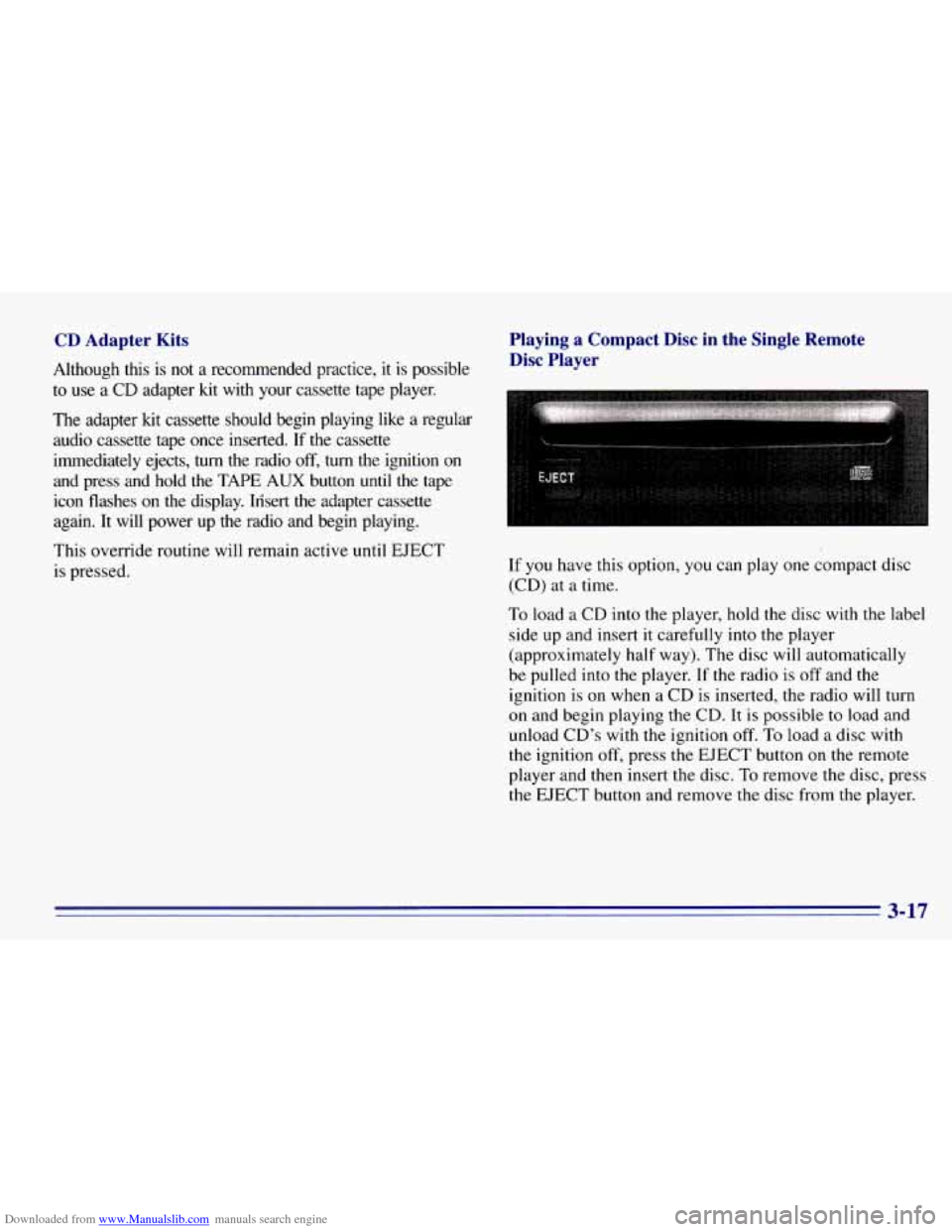
Playing a Compact Disc in the Single Remote Disc Player
If you have this option, you can play one compact disc
(CD) at a time.
To load a CD into the player, hold the disc with the label
side up and insert
it carefully into the player
(approximately half way). The disc will automatically
be pulled into the player.
If the radio is off and the
ignition is on when a CD is inserted, the radio will turn
on and begin playing the CD. It is possible to load and
unload CD’s with the ignition
off. To load a disc with
the ignition off, press the EJECT button on the remote
player and
then insert the disc. To remove the disc, press
the
EJECT button and remove the disc from the player.
3-17
Page 139 of 376
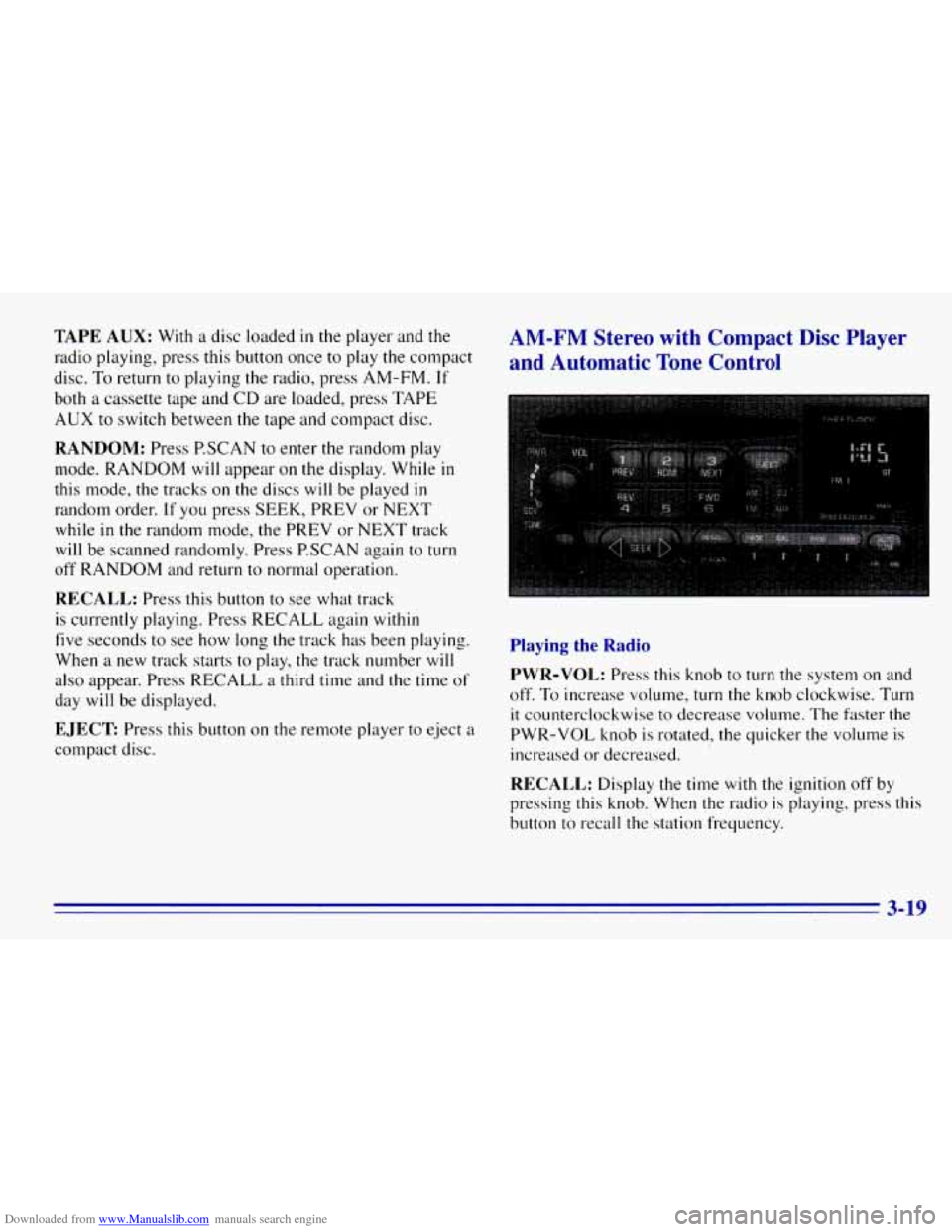
Downloaded from www.Manualslib.com manuals search engine TAPE AUX: With a disc loaded in the player and the
radio playing, press
this button once to play the compact
disc.
To return to playing the radio, press AM-FM. If
both a cassette tape and CD are loaded, press TAPE
AUX to switch between the tape and compact disc.
RANDOM: Press P.SCAN to enter the random play
mode. RANDOM will appear
on the display. While in
this mode, the tracks on the discs will be played in
random order. If you press SEEK, PREV or NEXT
while
in the random mode, the PREV or NEXT track
will be scanned randomly. Press P.SCAN again to
turn
off RANDOM and return to normal operation.
RECALL: Press this button to see what track
is currently playing. Press RECALL again
within
five seconds to see how long the track has been playing.
When a new track starts to play,
the track number will
also appear. Press RECALL a third time and the time of
day will be displayed.
EJECT Press this button on the remote player to eject a
compact disc.
AM-FM Stereo with Compact Disc Player
and Automatic Tone Control
Playing the Radio
PWR-VOL:
Press this knob to turn the system on and
off.
To increase volume, turn the knob clockwise. Turn
it counterclockwise to decrease volume. The faster the
PWR-VOL knob is rotated, the quicker the volume is
increased or decreased.
RECALL: Display the time with the ignition off by
pressing
this knob. When the radio is playing, press this
button to recall the station frequency.
3-19
Page 143 of 376
Downloaded from www.Manualslib.com manuals search engine a REV (4): Press and hold REV to return rapidly to a
favorite passage. You will hear the disc selection play at
high speed while
you press the REV button. This allows
you to listen and find out when the disc is at the desired
selection. Release
REV to resume playing.
FWD (6): Press and hold this button to advance rapidly
within a track. You will hear the disc selection play at
high speed while you press the FWD button. This allows
you to listen and find out when the disc is
at the desired
selection. Release FWD to resume playing.
AM-FM: While in the CD mode, press this button to
stop playing the CD and play the radio. The CD symbol
will still display but the word CD will be replaced with
either
AM, FM I or FM2. (If the radio is turned off, the
disc stays
in the player and will resume playing at the
point where
it stopped.)
CD AUX: To switch between the player and the radio
when
a disc is playing, press the AM-FM button. To
return to the player, press CD
AUX. When a disc is
playing, the letters CD and the CD symbol
will appear
on the display.
(If the radio is turned off, the disc stays
in the player and will resume playing at the point where
it stopped.)
EJECT Press this button to eject the disc from the
player and play the radio. When the same or a new disc
is inserted, the disc
will start playing on track one. Ifa
compact disc is left sitting in the opening for more than
a few seconds, the player will pull the CD back in. The
radio will continue playing. When the ignition is off,
press this button to load
a CD.
Theft-Deterrent Feature
THEFTLOCK TM is designed to discourage theft of your
radio.
It works by using a secret code to disable all radio
functions whenever battery power is removed.
The THEFTLOCK feature for
the radio may be used or
ignored.
If ignored, the system plays normally and the
radio is not protected by the feature.
If THEFTLOCK is
activated, your radio
will not operate if stolen.
When THEFTLOCK
is activated, the radio will display
LOC
to indicate a locked condition anytime battery
power is removed.
If your battery loses power for any
reason,
you must unlock the radio with the secret code
before
it will operate.
3-23
Page 237 of 376
Downloaded from www.Manualslib.com manuals search engine If your vehicle has a 7.4L engine and air conditioning,
your vehicle will have
a auxiliary engine fan in addition
to the belt driven fan.
A CAUTION:
If your vehicle has air conditioning, the auxiliary
engine fan under the hood can start up and
injure you even when the engine is not running.
Keep hands, clothing and tools
away from any
underhood electric fan.
Things that burn can get on hot engine parts and
start
a fire. These include liquids like gasoline,
oil, coolant, brake fluid, windshield washer and
other fluids, and plastic or rubber.
You or others
could be burned. Be careful not to drop or spill
things that will burn onto a hot engine.
Before closing the hood, be sure all the filler caps are
on properly.
Then lift the hood to relieve pressure
on the hood prop.
Remove the hood prop from the slot in the hood and
return the prop
to its retainer. Then just let the hood
down and close
it firmly.
Noise Control System
The following information relates to compliance with
Federal noise emission standards for vehicles with a
Gross Vehicle Weight Rating (GVWR) of more than
10,000
lbs. (4 536 kg). The Maintenance Schedule
booklet provides information on maintaining the noise
control system
to minimize degradation of the noise
emission control system during the life of your vehicle.
The noise control system warranty is given
in your
Warranty booklet.
These standards apply
only to vehicles sold in the
United States.
6-9
Page 291 of 376
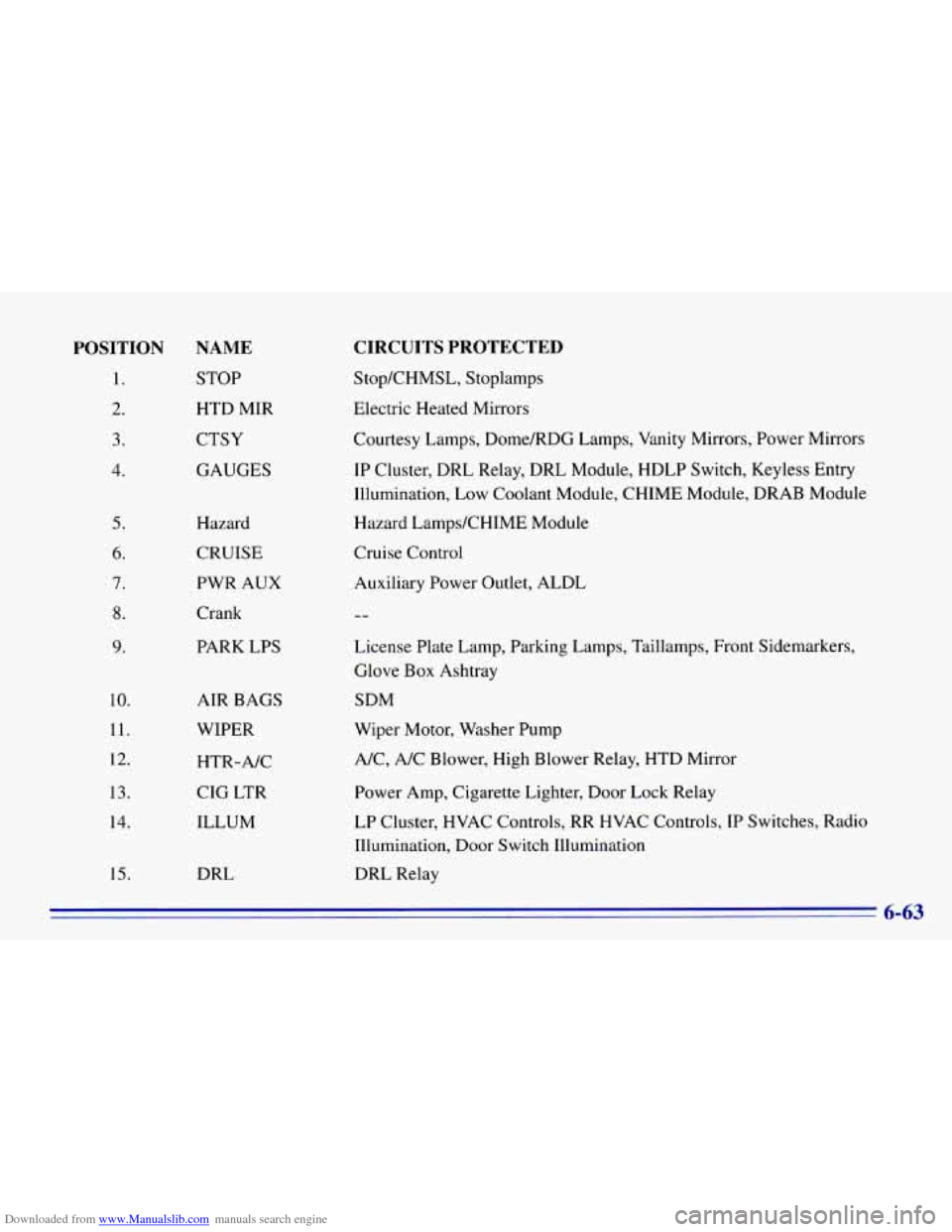
Downloaded from www.Manualslib.com manuals search engine POSITION NAME
1. STOP
2. HTD MIR
3. CTSY
4 GAUGES
5.
6.
7.
8.
9.
10.
11.
12.
13.
14.
15.
Hazard
CRUISE
PWR AUX
Crank
PARK LPS
AIR BAGS
WIPER
HTR-A/C
CIG LTR
ILLUM
DRL
CIRCUITS PROTECTED
Stop/CHMSL, Stoplamps
Electric Heated Mirrors
Courtesy
Lamps, Dome/RDG Lamps, Vanity Mirrors, Power Mirrors
IP Cluster, DRL Relay, DRL Module, HDLP Switch, Keyless Entry
Illumination, Low Coolant Module, CHIME Module, DRAB Module
Hazard LampsKHIME Module
Cruise Control Auxiliary Power Outlet, ALDL
License Plate Lamp, Parking Lamps, Taillamps, Front Sidemarkers,
Glove Box Ashtray
SDM
Wiper Motor, Washer Pump
NC, A/C Blower, High Blower Relay, HTD Mirror
Power Amp, Cigarette Lighter, Door Lock Relay
LP Cluster, HVAC Controls, RR HVAC Controls, IP Switches, Radio
Illumination, Door Switch Illumination
DRL Relay
6-63