steering wheel CHEVROLET EXPRESS 2007 User Guide
[x] Cancel search | Manufacturer: CHEVROLET, Model Year: 2007, Model line: EXPRESS, Model: CHEVROLET EXPRESS 2007Pages: 440, PDF Size: 2.42 MB
Page 91 of 440
In any particular crash, no one can say whether an
airbag should have inflated simply because of the
damage to a vehicle or because of what the repair costs
were. For frontal airbags, inflation is determined by
what the vehicle hits, the angle of the impact, and how
quickly the vehicle slows down. For roof-rail airbags,
deployment is determined by the location and severity of
the side impact.
What Makes an Airbag Inate?
In a deployment event, the sensing system sends an
electrical signal triggering a release of gas from
the inflator. Gas from the inflator fills the airbag causing
the bag to break out of the cover and deploy. The
inflator, the airbag, and related hardware are all part of
the airbag module.
Frontal airbag modules are located inside the steering
wheel and instrument panel. For vehicles with
roof-rail airbags, there are airbag modules in the ceiling
of the vehicle, near the side windows for the first,
second, and third rows (if equipped). SeeWhere Are
the Airbags? on page 2-63for more information.
How Does an Airbag Restrain?
In moderate to severe frontal or near frontal collisions,
even belted occupants can contact the steering wheel or
the instrument panel. In moderate to severe side
collisions, even belted occupants can contact the inside
of the vehicle.
Airbags supplement the protection provided by safety
belts. Frontal airbags distribute the force of the
impact more evenly over the occupant’s upper body,
stopping the occupant more gradually. Roof-rail airbags
distribute the force of the impact more evenly over
the occupant’s upper body.
Rollover capable roof-rail airbags are designed to help
contain the head and chest of occupants in the
outboard seating positions in the first, second, and third
rows, if equipped. The rollover capable roof-rail
airbags are designed to help reduce the risk of full or
partial ejection in rollover events, although no system
can prevent all such ejections.
But airbags would not help in many types of collisions,
primarily because the occupant’s motion is not
toward those airbags. SeeWhen Should an Airbag
Inate? on page 2-65for more information.
Airbags should never be regarded as anything more
than a supplement to safety belts.
2-67
Page 103 of 440
Adding Equipment to Your
Airbag-Equipped Vehicle
Q:Is there anything I might add to or change
about the vehicle that could keep the airbags
from working properly?
A:Yes. If you add things that change the vehicle’s
frame, bumper system, height, front end or side
sheet metal, they may keep the airbag system from
working properly. Changing or moving any parts
of the front seats, safety belts, the airbag sensing
and diagnostic module, steering wheel, instrument
panel, roof-rail airbag modules, ceiling headliner
or pillar garnish trim, front sensors, or airbag wiring
can affect the operation of the airbag system.
In addition, the vehicle may have a passenger
sensing system for the right front passenger
position, which includes sensors that are part of the
passenger seat. The passenger sensing system
may not operate properly if the original seat trim is
replaced with non-GM covers, upholstery or
trim, or with GM covers, upholstery or trim designed
for a different vehicle. Any object, such as an
aftermarket seat heater or a comfort enhancing pad
or device, installed under or on top of the seat
fabric, could also interfere with the operation of thepassenger sensing system. This could either
prevent proper deployment of the passenger
airbag(s) or prevent the passenger sensing system
from properly turning off the passenger airbag(s).
SeePassenger Sensing System on page 2-73.
If you have any questions about this, you should
contact Customer Assistance before you modify the
vehicle. The phone numbers and addresses for
Customer Assistance are in Step Two of the
Customer Satisfaction Procedure in this manual.
SeeCustomer Satisfaction Procedure on page 8-2.
If the vehicle has rollover roof-rail airbags, see
Different Size Tires and Wheels on page 6-80for
additional important information.
Q:Because I have a disability, I have to get my
vehicle modied. How can I nd out whether
this will affect my airbag system?
A:If you have questions, call Customer Assistance.
The phone numbers and addresses for Customer
Assistance are in Step Two of the Customer
Satisfaction Procedure in this manual. See
Customer Satisfaction Procedure on page 8-2.
In addition, your dealer/retailer and the service manual
have information about the location of the airbag sensors,
sensing and diagnostic module and airbag wiring.
2-79
Page 131 of 440
Fast Idle System
Fast Idle System with Switch
If the vehicle has this feature it is available only with
cruise control. The manual fast idle switch is operated
using the cruise control buttons located on the left
hand side of the steering wheel.
This system can be used to increase engine idle speed
whenever the following conditions are met:
•The park brake is set.
•The brake pedal is not pressed.
•The vehicle must not be moving and the accelerator
must not be pressed.
To control the fast idle:
•To Enable the Fast idle, press and release the
Cruise Control On/Off button and ensure that
the LED is lit.
•For the preset Fast Idle, press and release the
cruise set switch. This will set the preset fast
idle speed.
•For the variable fast idle, press and hold the
accelerator at the desired RPM, then press
and release the cruise control cruise set switch to
set the desired idle speed.When the fast idle is active the Driver Information
Center (DIC) will display “FAST IDLE ON.”
One of the following actions will turn off the fast idle:
•Pressing the brake.
•Selecting the Cancel button.
•Releasing the Parking Brake.
•The transmission shifter is moved out of P (Park) or
N (Neutral).
•Selecting the cruise control on/off button when it
was previously on.
Engine Coolant Heater
If the vehicle has the DURAMAX Diesel engine, see the
DURAMAX Diesel manual for more information.
The engine coolant heater can provide easier starting
and better fuel economy during engine warm-up in cold
weather conditions at or below 0°F (−18°C). Vehicles
with an engine coolant heater should be plugged
in at least four hours before starting. An internal
thermostat in the plug-end of the cord may exist which
will prevent engine coolant heater operation at
temperatures above 0°F (−18°C).
3-25
Page 137 of 440
To use this feature, do the following:
1. Move the shift lever to M (Manual Mode).
2. Press the plus/minus buttons, located on the
steering column shift lever, to select the desired
range of gears for current driving conditions.
When M (Manual Mode) is selected a number displays
in the DIC next to the M indicating the current gear.
This number is the highest gear that can be used.
However, the vehicle can automatically shift to lower
gears as it adjusts to driving conditions. This means that
all gears below that number are available. When
5 (Fifth) is selected, 1 (First) through 5 (Fifth) gears are
automatically shifted by the vehicle, but 6 (Sixth)
cannot be used until the plus/minus button located on
the steering column lever is used to change to the gear.
Grade Braking is not available when Range Selection
Mode is active. SeeTow/Haul Mode on page 3-34.While using Range Selection Mode, cruise control and
the Tow/Haul mode can be used.
Notice:Spinning the tires or holding the vehicle in
one place on a hill using only the accelerator
pedal may damage the transmission. The repair will
not be covered by the vehicle warranty. If you
are stuck, do not spin the tires. When stopping on a
hill, use the brakes to hold the vehicle in place.
Low Traction Mode
Low Traction Mode can assist in vehicle acceleration
when road conditions are slippery. While the vehicle is at
a stop, select the second gear range using Range
Selection Mode. This will limit torque to the wheels after
it detects wheel slip, preventing the tires from spinning.
3-31
Page 141 of 440
Turn the tow/haul mode on and off by pressing the
button, located to the right of the steering wheel on the
instrument panel. When tow/haul is on, a light on
the instrument panel cluster will come on.
SeeTow/Haul Mode Light on page 4-35for more
information.
Also see “Tow Haul Mode” underTowing a Trailer on
page 5-30for more information.
Grade Braking (Six Speed Automatic
Transmission)
The Grade Braking shift modes can be activated by
pressing the tow/haul button on the dash. While
in Range Selection Mode, Grade Braking is deactivated
allowing the driver to select a desired range of gears.
Grade Braking is only active while the Tow/Haul Mode is
selected and you are not in the Range Selection
Mode. See “Tow/Haul Mode listed previously and
Automatic Transmission Operation (Six Speed Automatic
Transmission) on page 3-27orAutomatic Transmission
Operation (Four Speed Automatic Transmission) on
page 3-32for more information on the Range Selection
Mode. Grade Braking assists in maintaining desired
vehicle speeds when driving on downhill grades
by automatically shifting to lower gears when the driver
desires to slow the vehicle by applying the brake.
This reduces wear on the braking system and increases
control of the vehicle.
Also seeTowing a Trailer on page 5-30for more
information.
3-35
Page 152 of 440
Security Light...............................................4-34
Cruise Control Light......................................4-35
Highbeam On Light.......................................4-35
Tow/Haul Mode Light....................................4-35
Fuel Gage...................................................4-35
Driver Information Center (DIC).......................4-36
DIC Operation and Displays...........................4-37
DIC Compass..............................................4-42
DIC Warnings and Messages.........................4-44
DIC Vehicle Customization.............................4-52Audio System(s).............................................4-59
Setting the Clock..........................................4-60
Radio(s)......................................................4-62
Using an MP3..............................................4-72
Theft-Deterrent Feature..................................4-77
Audio Steering Wheel Controls.......................4-77
Radio Reception...........................................4-78
Fixed Mast Antenna......................................4-78
Section 4 Instrument Panel
4-2
Page 153 of 440
Instrument Panel Overview
Hazard Warning Flashers
|(Hazard Warning Flasher):Press this button
located on top of the steering column, to make the front
and rear turn signal lamps flash on and off. This warns
others that you are having trouble. Press again to turn the
flashers off.
When the hazard warning flashers are on, the vehicle’s
turn signals will not work.
Horn
Press the horn symbol in the middle of the steering
wheel to sound the horn.
Tilt Wheel
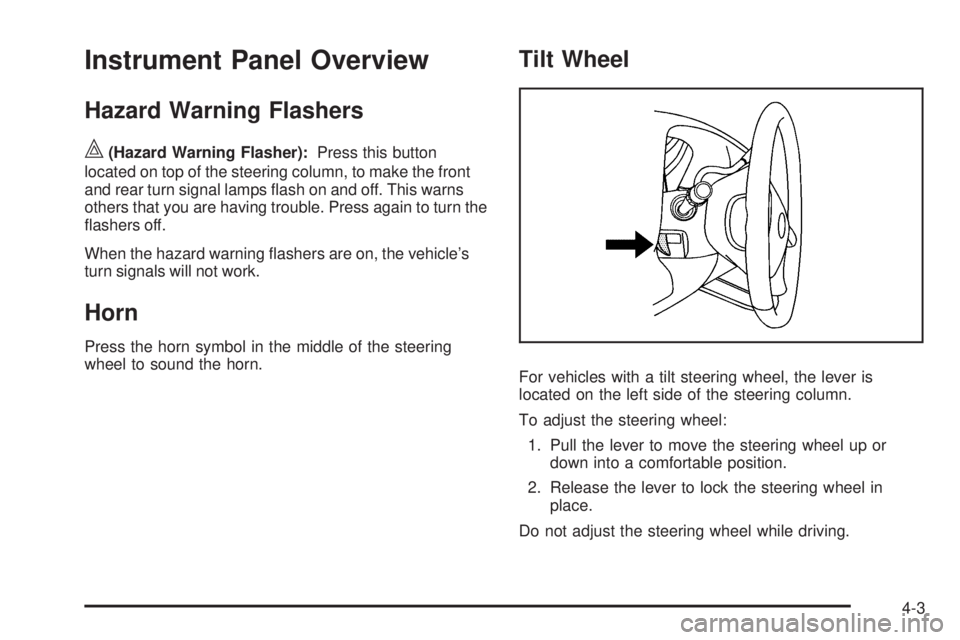
For vehicles with a tilt steering wheel, the lever is
located on the left side of the steering column.
To adjust the steering wheel:
1. Pull the lever to move the steering wheel up or
down into a comfortable position.
2. Release the lever to lock the steering wheel in
place.
Do not adjust the steering wheel while driving.
4-3
Page 155 of 440
Headlamp High/Low-Beam Changer
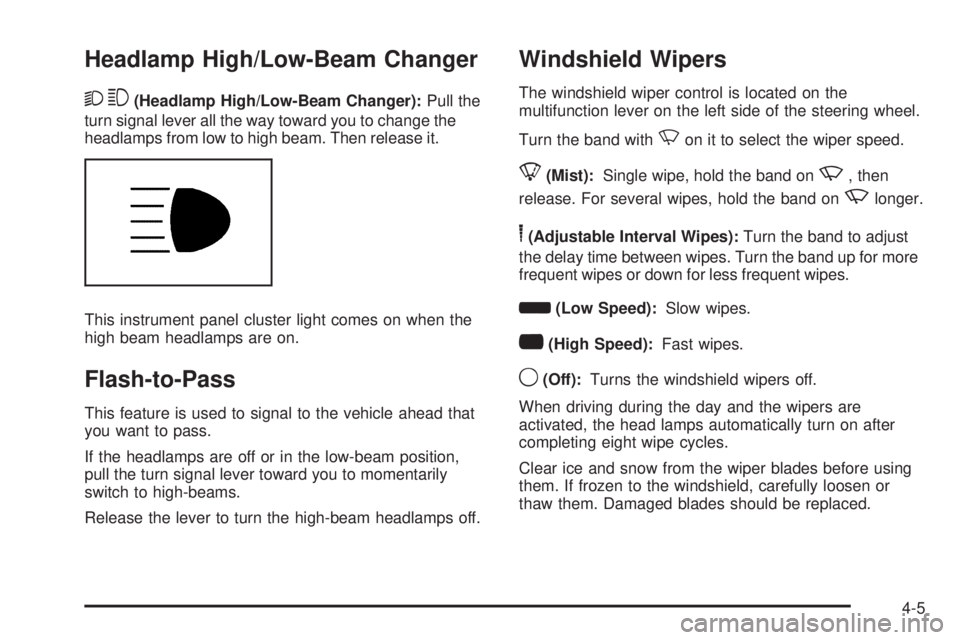
23(Headlamp High/Low-Beam Changer):Pull the
turn signal lever all the way toward you to change the
headlamps from low to high beam. Then release it.
This instrument panel cluster light comes on when the
high beam headlamps are on.
Flash-to-Pass
This feature is used to signal to the vehicle ahead that
you want to pass.
If the headlamps are off or in the low-beam position,
pull the turn signal lever toward you to momentarily
switch to high-beams.
Release the lever to turn the high-beam headlamps off.
Windshield Wipers
The windshield wiper control is located on the
multifunction lever on the left side of the steering wheel.
Turn the band with
Non it to select the wiper speed.
8(Mist):Single wipe, hold the band onz, then
release. For several wipes, hold the band on
zlonger.
6(Adjustable Interval Wipes):Turn the band to adjust
the delay time between wipes. Turn the band up for more
frequent wipes or down for less frequent wipes.
d(Low Speed):Slow wipes.
a(High Speed):Fast wipes.
9(Off):Turns the windshield wipers off.
When driving during the day and the wipers are
activated, the head lamps automatically turn on after
completing eight wipe cycles.
Clear ice and snow from the wiper blades before using
them. If frozen to the windshield, carefully loosen or
thaw them. Damaged blades should be replaced.
4-5
Page 157 of 440
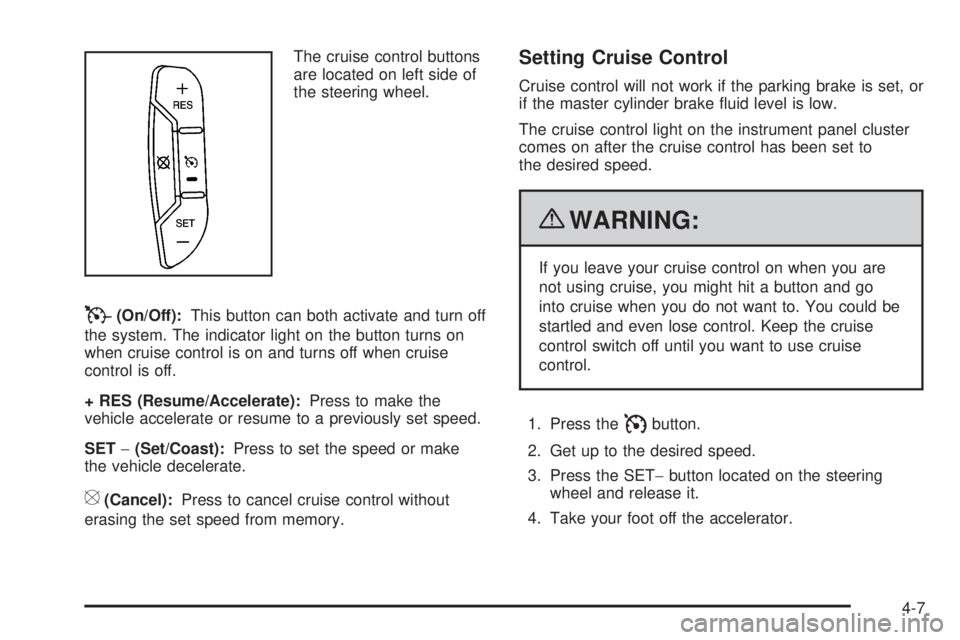
The cruise control buttons
are located on left side of
the steering wheel.
T(On/Off):This button can both activate and turn off
the system. The indicator light on the button turns on
when cruise control is on and turns off when cruise
control is off.
+ RES (Resume/Accelerate):Press to make the
vehicle accelerate or resume to a previously set speed.
SET−(Set/Coast):Press to set the speed or make
the vehicle decelerate.
[(Cancel):Press to cancel cruise control without
erasing the set speed from memory.
Setting Cruise Control
Cruise control will not work if the parking brake is set, or
if the master cylinder brake fluid level is low.
The cruise control light on the instrument panel cluster
comes on after the cruise control has been set to
the desired speed.
{WARNING:
If you leave your cruise control on when you are
not using cruise, you might hit a button and go
into cruise when you do not want to. You could be
startled and even lose control. Keep the cruise
control switch off until you want to use cruise
control.
1. Press the
Ibutton.
2. Get up to the desired speed.
3. Press the SET−button located on the steering
wheel and release it.
4. Take your foot off the accelerator.
4-7
Page 158 of 440
Resuming a Set Speed
If the cruise control is set at a desired speed and then
the brakes are applied, this shuts off the cruise
control. But it does not need to be reset.
Once the vehicle speed reaches about 25 mph
(40 km/h) or more, press the +RES button on the
steering wheel. The vehicle returns to the previously set
speed and stays there.
Increasing Speed While Using Cruise
Control
To increase the cruise speed while using cruise control:
•Press and hold the +RES button on the steering
wheel until the desired speed is reached, then
release it.
•To increase vehicle speed in small increments,
press the +RES button. Each time this is done,
the vehicle goes about 1 mph (1.6 km/h) faster.
Reducing Speed While Using Cruise
Control
To reduce the vehicle speed while using cruise control:
•Press and hold the SET– button on the steering
wheel until the desired lower speed is reached,
then release it.
•To slow down in very small amounts, press the
SET– button on the steering wheel briefly. Each
time this is done, the vehicle goes about 1 mph
(1.6 km/h) slower.
Passing Another Vehicle While Using
Cruise Control
Use the accelerator pedal to increase the vehicle speed.
When you take your foot off the pedal, the vehicle will
slow down to the previous set cruise speed.
Using Cruise Control on Hills
How well the cruise control will work on hills depends
upon the vehicle speed, load, and the steepness of the
hills. When going up steep hills, you might have to step
on the accelerator pedal to maintain the vehicle’s speed.
When going downhill, you might have to brake or shift to
a lower gear to keep the vehicle’s speed down. When the
brakes are applied the cruise control turns off.
4-8