roof CHEVROLET EXPRESS 2008 User Guide
[x] Cancel search | Manufacturer: CHEVROLET, Model Year: 2008, Model line: EXPRESS, Model: CHEVROLET EXPRESS 2008Pages: 440, PDF Size: 2.42 MB
Page 161 of 440
The automatic headlamp system automatically switches
from DRL to the headlamps depending on the
darkness of the surroundings.
To turn off the DRL, turn the exterior lamp control to the
off position and then release it. For vehicles first sold
in Canada, the transmission must be in the P (Park)
position, before the DRL can be turned off.
Automatic Headlamp System
When it is dark enough outside and the headlamp
switch is in AUTO, the automatic headlamp system turns
on the headlamps, along with the taillamps, sidemarker,
parking lamps, roof marker lamps, and the instrument
panel lights. The radio lights will also be dim.
To turn off the automatic headlamp system, turn the
exterior lamps switch to the off position and then
release. For vehicles first sold in Canada, the
transmission must be in the P (Park) position, before
the automatic headlamp system can be turned off.
The vehicle has a light sensor located on the top of the
instrument panel. Do not cover the sensor or the
system will come on whenever the ignition is on.
The system may also turn on the headlamps when
driving through a parking garage or tunnel.There is a delay in the transition between the daytime
and nighttime operation of the Daytime Running
Lamps (DRL) and the automatic headlamp systems so
that driving under bridges or bright overhead street lights
does not affect the system. The DRL and automatic
headlamp system is only affected when the light sensor
sees a change in lighting lasting longer than the delay.
If the vehicle is started in a dark garage, the automatic
headlamp system comes on immediately. Once the
vehicle leaves the garage, it takes approximately
30 seconds for the automatic headlamp system to
change to DRL if it is light outside. During that delay, the
instrument panel cluster may not be as bright as usual.
Make sure the instrument panel brightness control is in
the full bright position. SeeInstrument Panel Brightness
on page 4-11.
Instrument Panel Brightness
The knob for this feature is located next to the exterior
lamps control.
D(Instrument Panel Lights):Push the knob to
extend and then turn clockwise or counterclockwise to
brighten or dim the instrument panel lights and the radio
display. This only works if the headlamps or parking
lamps are on.
To turn on the dome lamps, with the vehicle doors
closed, turn the knob all the way clockwise.
4-11
Page 193 of 440
Compass Calibration
The compass can be manually calibrated. Only calibrate
the compass in a magnetically clean and safe location,
such as an open parking lot, where driving the vehicle
in circles is not a danger. It is suggested to calibrate
away from tall buildings, utility wires, manhole covers,
or other industrial structures, if possible.
If CAL should ever appear in the DIC display, the
compass should be calibrated.
If the DIC display does not show a heading, for example,
N for North, or the heading does not change after
making turns, there may be a strong magnetic field
interfering with the compass. Such interference may
be caused by a magnetic CB or cell phone antenna
mount, a magnetic emergency light, magnetic note
pad holder, or any other magnetic item. Turn off
the vehicle, move the magnetic item, then turn on
the vehicle and calibrate the compass.To calibrate the compass, use the following procedure:Compass Calibration Procedure
1. Before calibrating the compass, make sure the
compass zone is set to the variance zone in
which the vehicle is located. See “Compass
Variance (Zone) Procedure” earlier in this section.
Do not operate any switches such as window,
sunroof, climate controls, seats, etc. during
the calibration procedure.
2. Press the vehicle information button until
PRESS
VTO CALIBRATE COMPASS displays.
3. Press the set/reset button to start the compass
calibration.
4. The DIC will display CALIBRATING: DRIVE IN
CIRCLES. Drive the vehicle in tight circles at
less than 5 mph (8 km/h) to complete the calibration.
The DIC will display CALIBRATION COMPLETE
for a few seconds when the calibration is complete.
The DIC display will then return to PRESS
VTO
CALIBRATE COMPASS.
4-43
Page 326 of 440
Center High-Mounted
Stoplamp (CHMSL)
The Center High-Mounted Stoplamp (CHMSL) is located
above the rear doors at the center of the vehicle.
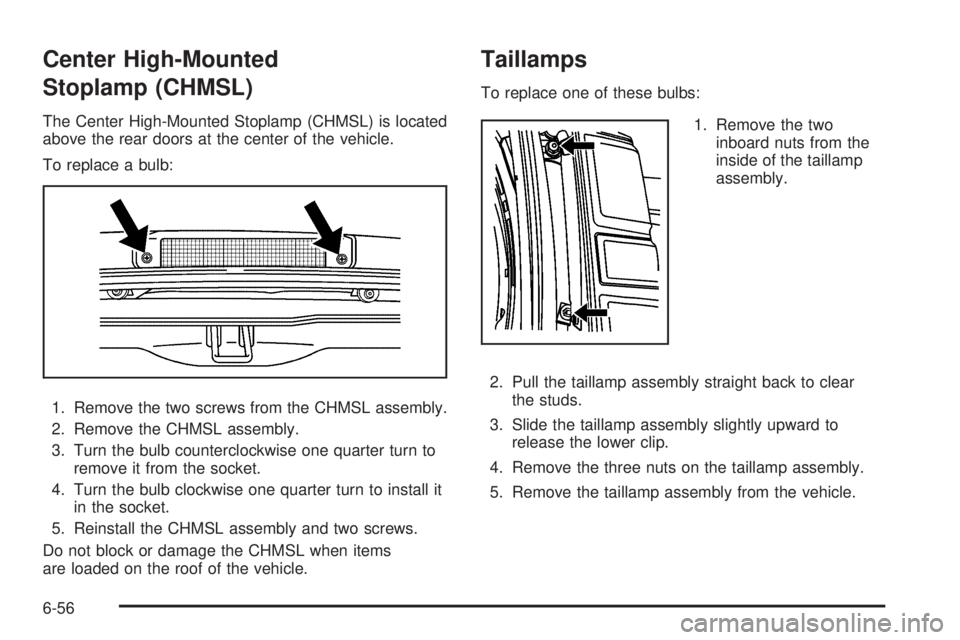
To replace a bulb:
1. Remove the two screws from the CHMSL assembly.
2. Remove the CHMSL assembly.
3. Turn the bulb counterclockwise one quarter turn to
remove it from the socket.
4. Turn the bulb clockwise one quarter turn to install it
in the socket.
5. Reinstall the CHMSL assembly and two screws.
Do not block or damage the CHMSL when items
are loaded on the roof of the vehicle.
Taillamps
To replace one of these bulbs:
1. Remove the two
inboard nuts from the
inside of the taillamp
assembly.
2. Pull the taillamp assembly straight back to clear
the studs.
3. Slide the taillamp assembly slightly upward to
release the lower clip.
4. Remove the three nuts on the taillamp assembly.
5. Remove the taillamp assembly from the vehicle.
6-56