fuel CHEVROLET EXPRESS 2008 Owner's Manual
[x] Cancel search | Manufacturer: CHEVROLET, Model Year: 2008, Model line: EXPRESS, Model: CHEVROLET EXPRESS 2008Pages: 440, PDF Size: 2.42 MB
Page 189 of 440
Average Economy
Press the trip/fuel button until AVG ECONOMY displays.
This display shows the approximate average liters
per 100 kilometers (L/100 km) or miles per gallon (mpg).
This number is calculated based on the number
of L/100 km (mpg) recorded since the last time this menu
item was reset. To reset AVG ECONOMY, press and
hold the set/reset button. The display will return to zero.
Fuel Used
Press the trip/fuel button until FUEL USED displays.
This display shows the number of liters (L) or
gallons (gal) of fuel used since the last reset of this
menu item. To reset the fuel used information, press
and hold the set/reset button while FUEL USED is
displayed.
Timer
Press the trip/fuel button until TIMER displays.
This display can be used as a timer.
To start the timer, press the set/reset button while
TIMER is displayed. The display will show the amount
of time that has passed since the timer was last
reset, not including time the ignition is off. Time will
continue to be counted as long as the ignition is
on, even if another display is being shown on the DIC.The timer will record up to 99 hours, 59 minutes and
59 seconds (99:59:59) after which the display will return
to zero.
To stop the timer, press the set/reset button briefly while
TIMER is displayed.
To reset the timer to zero, press and hold the set/reset
button while TIMER is displayed.
Average Speed
Press the trip/fuel button until AVERAGE SPEED
displays. This display shows the average speed of the
vehicle in kilometers per hour (km/h) or miles per
hour (mph). This average is calculated based on the
various vehicle speeds recorded since the last reset of
this value. To reset the value, press and hold the
set/reset button. The display will return to zero.
Digital Tachometer
Press the trip/fuel button until Tachometer ##00 RPM
displays. This display shows the engine speed in
revolutions per minute (RPM).
Blank Display
This display shows no information.
4-39
Page 192 of 440
DIC Compass
Your vehicle may have a compass in the Driver
Information Center (DIC).
Compass Zone
Your dealer/retailer will set the correct zone for your
location.
Under certain circumstances, such as during a long
distance cross-country trip or moving to a new state
or province, it will be necessary to compensate for
compass variance by resetting the zone through the
DIC if the zone is not set correctly.
Compass variance is the difference between the earth’s
magnetic north and true geographic north. If the
compass is not set to the zone where you live, the
compass may give false readings. The compass must
be set to the variance zone in which the vehicle is
traveling.
To adjust for compass variance, use the following
procedure:
Compass Variance (Zone) Procedure
1. Do not set the compass zone when the vehicle is
moving. Only set it when the vehicle is in P (Park).
Press the vehicle information button until
PRESS
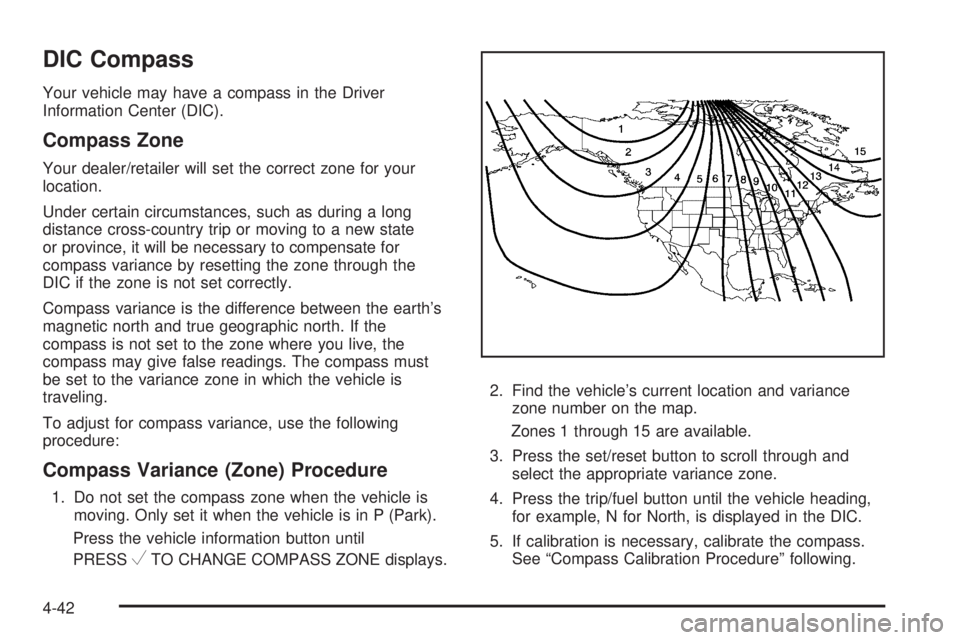
VTO CHANGE COMPASS ZONE displays.2. Find the vehicle’s current location and variance
zone number on the map.
Zones 1 through 15 are available.
3. Press the set/reset button to scroll through and
select the appropriate variance zone.
4. Press the trip/fuel button until the vehicle heading,
for example, N for North, is displayed in the DIC.
5. If calibration is necessary, calibrate the compass.
See “Compass Calibration Procedure” following.
4-42
Page 197 of 440
The vehicle may be driven at a reduced speed while
this message is on, but acceleration and speed may be
reduced. Anytime this message stays on, the vehicle
should be taken to your dealer/retailer for service
as soon as possible.
FUEL LEVEL LOW
This message displays if the fuel level is low. Refuel as
soon as possible. SeeFuel Gage on page 4-35and
Fuel on page 6-5for more information.
ICE POSSIBLE DRIVE WITH CARE
This message displays when the outside air temperature
is cold enough to create icy road conditions. Adjust
your driving accordingly.
LEFT REAR DOOR OPEN
On some vehicles, this message displays and a chime
sounds if the driver side rear door is not fully closed and
the vehicle is in a drive gear. Stop and turn off the vehicle,
check the door for obstructions, and close the door again.
Check to see if the message still appears on the DIC.
OIL PRESSURE LOW STOP ENGINE
Notice:If you drive your vehicle while the engine
oil pressure is low, severe engine damage may
occur. If a low oil pressure warning appears on the
Driver Information Center (DIC), stop the vehicle
as soon as possible. Do not drive the vehicle until
the cause of the low oil pressure is corrected.
SeeEngine Oil on page 6-15for more information.
This message displays if low oil pressure levels occur.
Stop the vehicle as soon as safely possible and do not
operate it until the cause of the low oil pressure has been
corrected. Check the oil as soon as possible and have
your vehicle serviced by your dealer/retailer. SeeEngine
Oil on page 6-15.
PASSENGER DOOR OPEN
This message displays and a chime sounds if the
passenger door is not fully closed and the vehicle is
in a drive gear. Stop and turn off the vehicle, check the
door for obstructions, and close the door again.
Check to see if the message still appears on the DIC.
4-47
Page 201 of 440
STARTING DISABLED SERVICE
THROTTLE
This message displays if the starting of the engine is
disabled due to the electronic throttle control system.
Have your vehicle serviced by your dealer/retailer
immediately.
This message only appears while the ignition is in
ON/RUN, and will not disappear until the problem is
resolved.
This message cannot be acknowledged.
TIGHTEN GAS CAP
This message may display and a chime may be heard
along with the check engine light on the instrument
panel cluster if the vehicle’s fuel cap is not tightened
properly. SeeMalfunction Indicator Lamp on page 4-30.
Reinstall the fuel cap fully. SeeFilling the Tank on
page 6-10. The diagnostic system can determine if
the fuel cap has been left off or improperly installed.
A loose or missing fuel cap allows fuel to evaporate
into the atmosphere. A few driving trips with the
cap properly installed should turn this light and
message off.
TIRE LEARNING ACTIVE
If your vehicle has the Tire Pressure Monitor
System (TPMS), this message displays when the
system is re-learning the tire positions on your vehicle.
SeeDIC Operation and Displays on page 4-37for more
information. The tire positions must be re-learned after
rotating the tires or after replacing a tire or sensor. See
Tire Inspection and Rotation on page 6-75,Tire Pressure
Monitor System on page 6-70, andInation - Tire
Pressure on page 6-68for more information.
TRACTION CONTROL OFF
If your vehicle has StabiliTrak, this message displays
when the Traction Control System (TCS) is turned
off. Adjust your driving accordingly. SeeStabiliTrak
®
System on page 5-5for more information.
4-51
Page 208 of 440
NO CHANGE:No change will be made to this feature.
The current setting will remain.
There is no default for chime volume. The volume will
stay at the last known setting.
To select a setting, press the set/reset button while the
desired setting is displayed on the DIC.
FACTORY SETTINGS
This feature allows you to set all of the customization
features back to their factory default settings.
Press the customization button until FACTORY
SETTINGS appears on the DIC display. Press the
set/reset button once to access the settings for
this feature. Then press the customization button to
scroll through the following settings:
RESTORE ALL (default):The customization features
will be set to their factory default settings.
DO NOT RESTORE:The customization features will
not be set to their factory default settings.
To select a setting, press the set/reset button while the
desired setting is displayed on the DIC.
EXIT FEATURE SETTINGS
This feature allows you to exit the feature
settings menu.
Press the customization button until FEATURE
SETTINGS PRESS
VTO EXIT appears in the DIC
display. Press the set/reset button once to exit the menu.
If you do not exit, pressing the customization button
again will return you to the beginning of the feature
settings menu.
Exiting the Feature Settings Menu
The feature settings menu will be exited when any of
the following occurs:
•The vehicle is no longer in ON/RUN.
•The trip/fuel or vehicle information DIC buttons are
pressed.
•The end of the feature settings menu is reached
and exited.
•A 40 second time period has elapsed with no
selection made.
4-58
Page 242 of 440
Before Leaving on a Long Trip
To prepare your vehicle for a long trip, consider having
it serviced by your dealer/retailer before departing.
Things to check on your own include:
•Windshield Washer Fluid:Reservoir full? Windows
clean — inside and outside?
•Wiper Blades:In good shape?
•Fuel, Engine Oil, Other Fluids:All levels checked?
•Lamps:Do they all work and are lenses clean?
•Tires:Are treads good? Are tires inflated to
recommended pressure?
•Weather and Maps:Safe to travel? Have
up-to-date maps?
Highway Hypnosis
Always be alert and pay attention to your surroundings
while driving. If you become tired or sleepy, find a
safe place to park your vehicle and rest.
Other driving tips include:
•Keep the vehicle well ventilated.
•Keep interior temperature cool.
•Keep your eyes moving — scan the road ahead
and to the sides.
•Check the rearview mirror and vehicle instruments
often.
5-14
Page 245 of 440
Blizzard Conditions
Being stuck in snow can be in a serious situation. Stay
with the vehicle unless there is help nearby. If possible,
use theRoadside Assistance Program on page 8-8.To
get help and keep everyone in the vehicle safe:
•Turn on theHazard Warning Flashers on page 4-3.
•Tie a red cloth to an outside mirror.
{WARNING:
Snow can trap engine exhaust under the vehicle.
This may cause exhaust gases to get inside.
Engine exhaust contains carbon monoxide (CO)
which cannot be seen or smelled. It can cause
unconsciousness and even death.
If the vehicle is stuck in the snow:
•Clear away snow from around the base of your
vehicle, especially any that is blocking the
exhaust pipe and/or the fuel operated heater
exhaust system, if equipped. If the vehicle has
a diesel engine and a fuel operated heater, see
“Fuel Operated Heater (FOH)” in the diesel
engine supplement.
WARNING: (Continued)
WARNING: (Continued)
•
Check again from time to time to be sure
snow does not collect there.
•Open a window about 5 cm (two inches) on
the side of the vehicle that is away from the
wind to bring in fresh air.
•Fully open the air outlets on or under the
instrument panel.
•Adjust the Climate Control system to a setting
that circulates the air inside the vehicle and
set the fan speed to the highest setting. See
Climate Control System in the Index.
For more information about carbon monoxide, see
Engine Exhaust on page 3-40.
Snow can trap exhaust gases under your vehicle.
This can cause deadly CO (carbon monoxide) gas
to get inside. CO could overcome you and kill you.
You cannot see it or smell it, so you might not
know it is in your vehicle. Clear away snow from
around the base of your vehicle, especially any
that is blocking the exhaust.
Run the engine for short periods only as needed to
keep warm, but be careful.
5-17
Page 246 of 440
To save fuel, run the engine for only short periods as
needed to warm the vehicle and then shut the engine off
and close the window most of the way to save heat.
Repeat this until help arrives but only when you
feel really uncomfortable from the cold. Moving about to
keep warm also helps.
If it takes some time for help to arrive, now and then
when you run the engine, push the accelerator
pedal slightly so the engine runs faster than the idle
speed. This keeps the battery charged to restart
the vehicle and to signal for help with the headlamps.
Do this as little as possible to save fuel.
If Your Vehicle is Stuck in Sand,
Mud, Ice, or Snow
Slowly and cautiously spin the wheels to free the
vehicle when stuck in sand, mud, ice, or snow. See
Rocking Your Vehicle to Get It Out on page 5-19.If the vehicle has a traction system, it can often help to
free a stuck vehicle. Refer to the vehicle’s traction
system in the Index. If stuck too severely for the traction
system to free the vehicle, turn the traction system off
and use the rocking method.
{WARNING:
If the vehicle’s tires spin at high speed, they can
explode, and you or others could be injured.
The vehicle can overheat, causing an engine
compartment fire or other damage. Spin the
wheels as little as possible and avoid going above
55 km/h (35 mph) as shown on the speedometer.
For information about using tire chains on the vehicle,
seeTire Chains on page 6-84.
5-18
Page 252 of 440
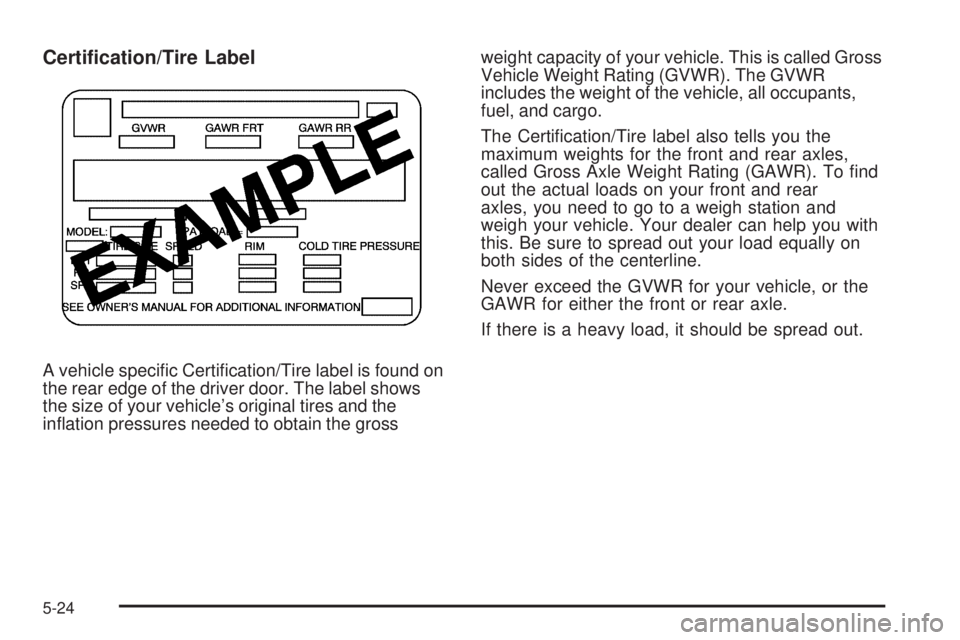
Certication/Tire Label
A vehicle specific Certification/Tire label is found on
the rear edge of the driver door. The label shows
the size of your vehicle’s original tires and the
inflation pressures needed to obtain the grossweight capacity of your vehicle. This is called Gross
Vehicle Weight Rating (GVWR). The GVWR
includes the weight of the vehicle, all occupants,
fuel, and cargo.
The Certification/Tire label also tells you the
maximum weights for the front and rear axles,
called Gross Axle Weight Rating (GAWR). To find
out the actual loads on your front and rear
axles, you need to go to a weigh station and
weigh your vehicle. Your dealer can help you with
this. Be sure to spread out your load equally on
both sides of the centerline.
Never exceed the GVWR for your vehicle, or the
GAWR for either the front or rear axle.
If there is a heavy load, it should be spread out.
5-24
Page 258 of 440
Towing a Trailer
If the vehicle has a diesel engine, see the DURAMAX®
Diesel manual for more information.
{WARNING:
The driver can lose control when pulling a trailer if
the correct equipment is not used or the vehicle is
not driven properly. For example, if the trailer is
too heavy, the brakes may not work well — or
even at all. The driver and passengers could be
seriously injured. The vehicle may also be
damaged; the resulting repairs would not be
covered by the vehicle warranty. Pull a trailer only
if all the steps in this section have been followed.
Ask your dealer/retailer for advice and information
about towing a trailer with the vehicle.Notice:Pulling a trailer improperly can damage the
vehicle and result in costly repairs not covered
by the vehicle warranty. To pull a trailer correctly,
follow the advice in this section and see your
dealer/retailer for important information about
towing a trailer with the vehicle.
To identify the trailering capacity of the vehicle, read the
information in “Weight of the Trailer” that appears
later in this section.
Trailering is different than just driving the vehicle by
itself. Trailering means changes in handling,
acceleration, braking, durability and fuel economy.
Successful, safe trailering takes correct equipment, and
it has to be used properly.
The following information has many time-tested,
important trailering tips and safety rules. Many of
these are important for your safety and that of your
passengers. So please read this section carefully before
pulling a trailer.
5-30