key CHEVROLET EXPRESS 2012 Owner's Manual
[x] Cancel search | Manufacturer: CHEVROLET, Model Year: 2012, Model line: EXPRESS, Model: CHEVROLET EXPRESS 2012Pages: 379, PDF Size: 5.15 MB
Page 41 of 379
Black plate (14,1)Chevrolet Express Owner Manual (GMNA-Localizing-U.S./Canada/Mexico-
7707481) - 2015 - CRC - 4/30/14
2-14 Keys, Doors, and Windows
Windows
{Warning
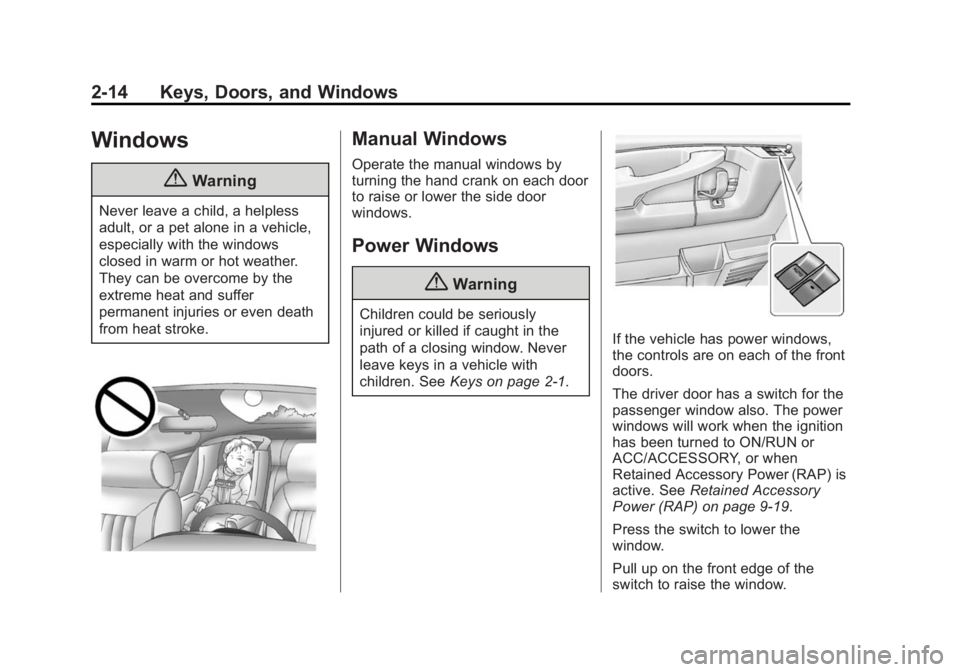
Never leave a child, a helpless
adult, or a pet alone in a vehicle,
especially with the windows
closed in warm or hot weather.
They can be overcome by the
extreme heat and suffer
permanent injuries or even death
from heat stroke.
Manual Windows
Operate the manual windows by
turning the hand crank on each door
to raise or lower the side door
windows.
Power Windows
{Warning
Children could be seriously
injured or killed if caught in the
path of a closing window. Never
leave keys in a vehicle with
children. SeeKeys on page 2-1.
If the vehicle has power windows,
the controls are on each of the front
doors.
The driver door has a switch for the
passenger window also. The power
windows will work when the ignition
has been turned to ON/RUN or
ACC/ACCESSORY, or when
Retained Accessory Power (RAP) is
active. SeeRetained Accessory
Power (RAP) on page 9-19.
Press the switch to lower the
window.
Pull up on the front edge of the
switch to raise the window.
Page 42 of 379
Black plate (15,1)Chevrolet Express Owner Manual (GMNA-Localizing-U.S./Canada/Mexico-
7707481) - 2015 - CRC - 4/30/14
Keys, Doors, and Windows 2-15
Express-Down
The driver window switch also has
an express-down feature that allows
the window to be lowered without
holding the switch. Press fully and
release the window switch marked
AUTO to activate the express-down
mode. This mode can be canceled
at any time by pulling up on the
switch. To open the window part
way, lightly tap the switch until the
window is at the desired position.
Swing-Out Windows
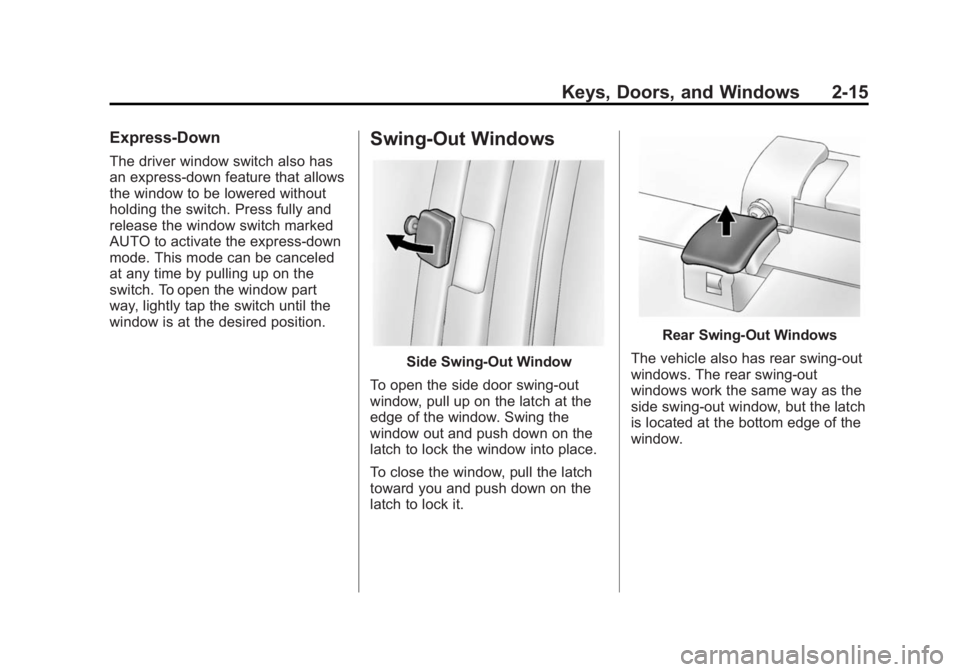
Side Swing-Out Window
To open the side door swing-out
window, pull up on the latch at the
edge of the window. Swing the
window out and push down on the
latch to lock the window into place.
To close the window, pull the latch
toward you and push down on the
latch to lock it.
Rear Swing‐Out Windows
The vehicle also has rear swing‐out
windows. The rear swing-out
windows work the same way as the
side swing‐out window, but the latch
is located at the bottom edge of the
window.
Page 43 of 379
Black plate (16,1)Chevrolet Express Owner Manual (GMNA-Localizing-U.S./Canada/Mexico-
7707481) - 2015 - CRC - 4/30/14
2-16 Keys, Doors, and Windows
Enhanced Technology
Glass
The vehicle may be equipped with
Enhanced Technology Glass (ETG).
ETG is part of the overall occupant
protection system on passenger and
crew vans. ETG may help keep
passengers sitting next to these
fixed windows from being ejected
through the glass in some, but not
all crashes. Even with this glass,
safety belts must still be worn at all
times. For passenger and crew
vans, use only ETG glass approved
for the vehicle for replacement when
damaged.The following table shows laminated glass location, based on vehicle model
and options.
Vehicle Configuration ETG Locations
12- and 15-Seat Passenger Vans Sliding door forward window and
rear-most side windows
Long Wheelbase Cargo Vans Rear-most side windows
Crew Vans Sliding door forward window
Sun Visors
To block out glare, swing down the
sun visors. You can also swing them
to the side.
Visor Vanity Mirror
The vehicle may have visor vanity
mirrors, with or without lamps. Lift
the mirror cover to turn the lamps
on, if equipped.
Page 47 of 379
Black plate (4,1)Chevrolet Express Owner Manual (GMNA-Localizing-U.S./Canada/Mexico-
7707481) - 2015 - CRC - 4/30/14
3-4 Seats and Restraints
{Warning
Sitting in a reclined position when
the vehicle is in motion can be
dangerous. Even when buckled
up, the safety belts cannot do
their job.
The shoulder belt will not be
against your body. Instead, it will
be in front of you. In a crash, you
could go into it, receiving neck or
other injuries.
The lap belt could go up over
your abdomen. The belt forces
would be there, not at your pelvic
bones. This could cause serious
internal injuries.
For proper protection when the
vehicle is in motion, have the
seatback upright. Then sit well
back in the seat and wear the
safety belt properly.
Do not have a seatback reclined if
the vehicle is moving.
Rear Seats
Removing the Rear Seat
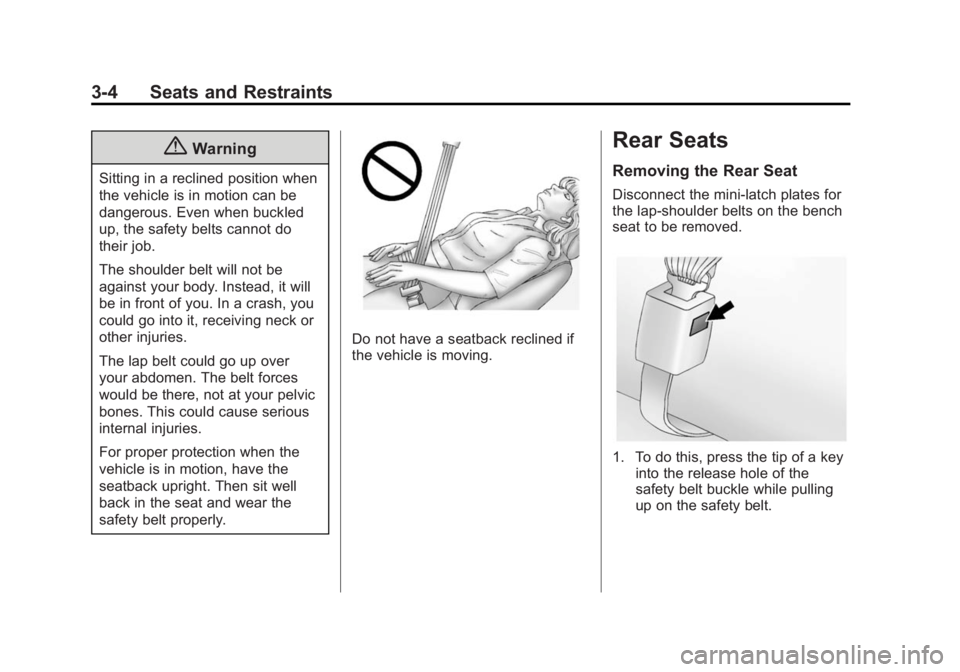
Disconnect the mini-latch plates for
the lap-shoulder belts on the bench
seat to be removed.
1. To do this, press the tip of a keyinto the release hole of the
safety belt buckle while pulling
up on the safety belt.
Page 58 of 379
Black plate (15,1)Chevrolet Express Owner Manual (GMNA-Localizing-U.S./Canada/Mexico-
7707481) - 2015 - CRC - 4/30/14
Seats and Restraints 3-15
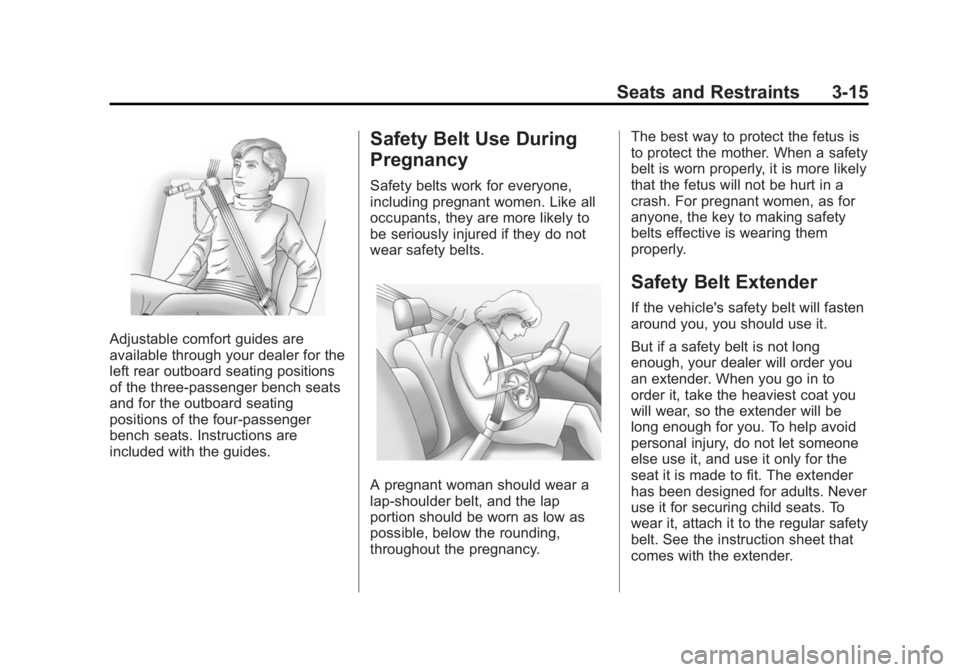
Adjustable comfort guides are
available through your dealer for the
left rear outboard seating positions
of the three-passenger bench seats
and for the outboard seating
positions of the four-passenger
bench seats. Instructions are
included with the guides.
Safety Belt Use During
Pregnancy
Safety belts work for everyone,
including pregnant women. Like all
occupants, they are more likely to
be seriously injured if they do not
wear safety belts.
A pregnant woman should wear a
lap-shoulder belt, and the lap
portion should be worn as low as
possible, below the rounding,
throughout the pregnancy.The best way to protect the fetus is
to protect the mother. When a safety
belt is worn properly, it is more likely
that the fetus will not be hurt in a
crash. For pregnant women, as for
anyone, the key to making safety
belts effective is wearing them
properly.
Safety Belt Extender
If the vehicle's safety belt will fasten
around you, you should use it.
But if a safety belt is not long
enough, your dealer will order you
an extender. When you go in to
order it, take the heaviest coat you
will wear, so the extender will be
long enough for you. To help avoid
personal injury, do not let someone
else use it, and use it only for the
seat it is made to fit. The extender
has been designed for adults. Never
use it for securing child seats. To
wear it, attach it to the regular safety
belt. See the instruction sheet that
comes with the extender.
Page 68 of 379
Black plate (25,1)Chevrolet Express Owner Manual (GMNA-Localizing-U.S./Canada/Mexico-
7707481) - 2015 - CRC - 4/30/14
Seats and Restraints 3-25
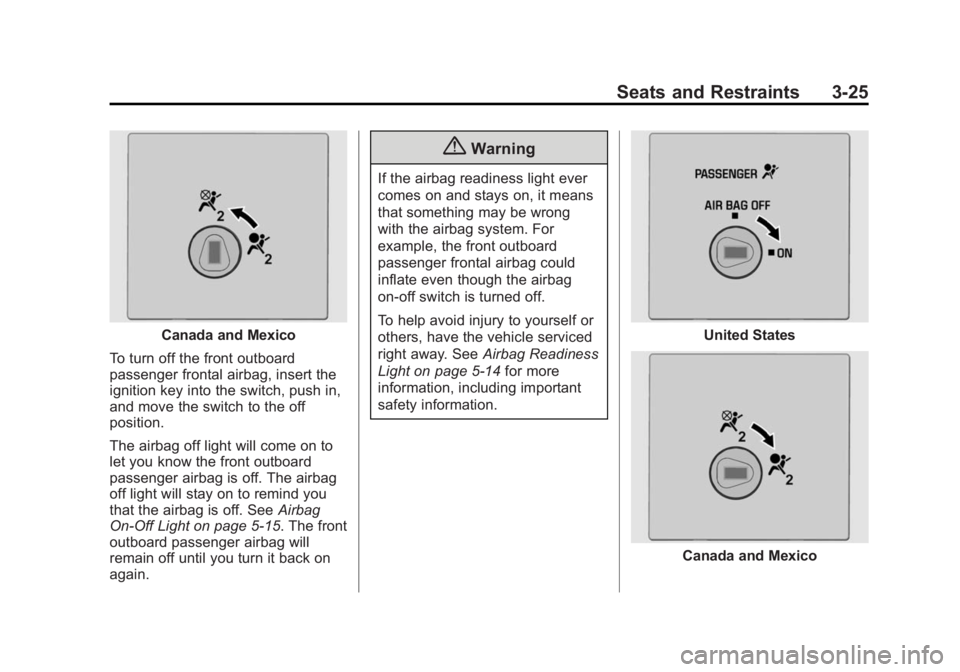
Canada and Mexico
To turn off the front outboard
passenger frontal airbag, insert the
ignition key into the switch, push in,
and move the switch to the off
position.
The airbag off light will come on to
let you know the front outboard
passenger airbag is off. The airbag
off light will stay on to remind you
that the airbag is off. See Airbag
On-Off Light on page 5-15. The front
outboard passenger airbag will
remain off until you turn it back on
again.
{Warning
If the airbag readiness light ever
comes on and stays on, it means
that something may be wrong
with the airbag system. For
example, the front outboard
passenger frontal airbag could
inflate even though the airbag
on-off switch is turned off.
To help avoid injury to yourself or
others, have the vehicle serviced
right away. See Airbag Readiness
Light on page 5-14 for more
information, including important
safety information.
United States
Canada and Mexico
Page 69 of 379
Black plate (26,1)Chevrolet Express Owner Manual (GMNA-Localizing-U.S./Canada/Mexico-
7707481) - 2015 - CRC - 4/30/14
3-26 Seats and Restraints
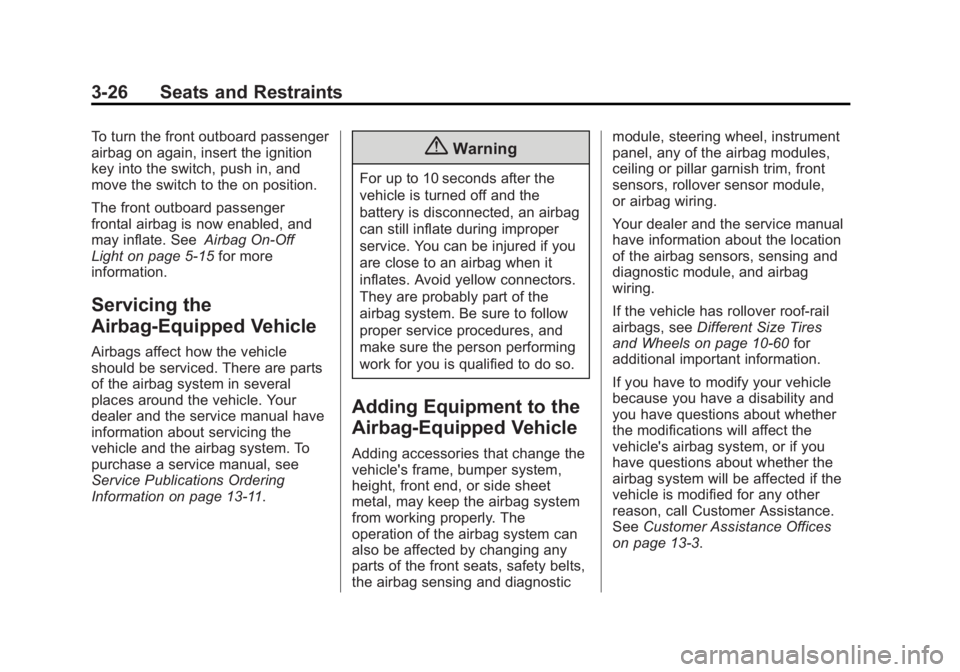
To turn the front outboard passenger
airbag on again, insert the ignition
key into the switch, push in, and
move the switch to the on position.
The front outboard passenger
frontal airbag is now enabled, and
may inflate. SeeAirbag On-Off
Light on page 5-15 for more
information.
Servicing the
Airbag-Equipped Vehicle
Airbags affect how the vehicle
should be serviced. There are parts
of the airbag system in several
places around the vehicle. Your
dealer and the service manual have
information about servicing the
vehicle and the airbag system. To
purchase a service manual, see
Service Publications Ordering
Information on page 13-11.
{Warning
For up to 10 seconds after the
vehicle is turned off and the
battery is disconnected, an airbag
can still inflate during improper
service. You can be injured if you
are close to an airbag when it
inflates. Avoid yellow connectors.
They are probably part of the
airbag system. Be sure to follow
proper service procedures, and
make sure the person performing
work for you is qualified to do so.
Adding Equipment to the
Airbag-Equipped Vehicle
Adding accessories that change the
vehicle's frame, bumper system,
height, front end, or side sheet
metal, may keep the airbag system
from working properly. The
operation of the airbag system can
also be affected by changing any
parts of the front seats, safety belts,
the airbag sensing and diagnostic module, steering wheel, instrument
panel, any of the airbag modules,
ceiling or pillar garnish trim, front
sensors, rollover sensor module,
or airbag wiring.
Your dealer and the service manual
have information about the location
of the airbag sensors, sensing and
diagnostic module, and airbag
wiring.
If the vehicle has rollover roof-rail
airbags, see
Different Size Tires
and Wheels on page 10-60 for
additional important information.
If you have to modify your vehicle
because you have a disability and
you have questions about whether
the modifications will affect the
vehicle's airbag system, or if you
have questions about whether the
airbag system will be affected if the
vehicle is modified for any other
reason, call Customer Assistance.
See Customer Assistance Offices
on page 13-3.
Page 94 of 379
Black plate (1,1)Chevrolet Express Owner Manual (GMNA-Localizing-U.S./Canada/Mexico-
7707481) - 2015 - CRC - 4/30/14
Instruments and Controls 5-1
Instruments and
Controls
Controls
Steering Wheel Adjustment . . . 5-2
Steering Wheel Controls . . . . . . 5-2
Horn . . . . . . . . . . . . . . . . . . . . . . . . . . 5-3
Windshield Wiper/Washer . . . . . 5-3
Compass . . . . . . . . . . . . . . . . . . . . . 5-4
Clock . . . . . . . . . . . . . . . . . . . . . . . . . 5-6
Power Outlets . . . . . . . . . . . . . . . . . 5-7
Cigarette Lighter . . . . . . . . . . . . . . 5-8
Ashtrays . . . . . . . . . . . . . . . . . . . . . . 5-8
Warning Lights, Gauges, and
Indicators
Warning Lights, Gauges, andIndicators . . . . . . . . . . . . . . . . . . . . 5-9
Instrument Cluster . . . . . . . . . . . 5-10
Speedometer . . . . . . . . . . . . . . . . 5-11
Odometer . . . . . . . . . . . . . . . . . . . . 5-11
Trip Odometer . . . . . . . . . . . . . . . 5-11
Fuel Gauge . . . . . . . . . . . . . . . . . . 5-11
Engine Oil Pressure Gauge . . . . . . . . . . . . . . . . . . . . . . 5-12
Engine Coolant Temperature Gauge . . . . . . . . . . . . . . . . . . . . . . 5-13 Voltmeter Gauge . . . . . . . . . . . . . 5-13
Safety Belt Reminders . . . . . . . 5-14
Airbag Readiness Light . . . . . . 5-14
Airbag On-Off Light . . . . . . . . . . 5-15
Charging System Light . . . . . . 5-16
Malfunction
Indicator Lamp . . . . . . . . . . . . . 5-17
Brake System Warning Light . . . . . . . . . . . . . . . . . . . . . . . 5-19
Antilock Brake System (ABS) Warning Light . . . . . . . . . . . . . . 5-20
Tow/Haul Mode Light . . . . . . . . 5-21
StabiliTrak
®OFF Light . . . . . . . 5-21
Traction Control System (TCS)/StabiliTrak
®Light . . . . 5-21
Tire Pressure Light . . . . . . . . . . 5-22
Engine Oil Pressure Light . . . . 5-22
Low Fuel Warning Light . . . . . . 5-23
Security Light . . . . . . . . . . . . . . . . 5-23
High-Beam On Light . . . . . . . . . 5-23
Cruise Control Light . . . . . . . . . 5-23
Information Displays
Driver Information Center (DIC) . . . . . . . . . . . . . . . 5-24
Vehicle Messages
Vehicle Messages . . . . . . . . . . . 5-29
Battery Voltage and ChargingMessages . . . . . . . . . . . . . . . . . . 5-29
Brake System Messages . . . . 5-29
Compass Messages . . . . . . . . . 5-30
Door Ajar Messages . . . . . . . . . 5-30
Engine Cooling System Messages . . . . . . . . . . . . . . . . . . 5-31
Engine Oil Messages . . . . . . . . 5-31
Engine Power Messages . . . . 5-32
Fuel System Messages . . . . . . 5-32
Key and Lock Messages . . . . . 5-32
Lamp Messages . . . . . . . . . . . . . 5-33
Object Detection System Messages . . . . . . . . . . . . . . . . . . 5-33
Ride Control System Messages . . . . . . . . . . . . . . . . . . 5-33
Airbag System Messages . . . . 5-35
Security Messages . . . . . . . . . . 5-35
Service Vehicle Messages . . . 5-35
Tire Messages . . . . . . . . . . . . . . . 5-36
Transmission Messages . . . . . 5-36
Vehicle Reminder Messages . . . . . . . . . . . . . . . . . . 5-37
Vehicle Personalization
Vehicle Personalization . . . . . . 5-38
Page 99 of 379
Black plate (6,1)Chevrolet Express Owner Manual (GMNA-Localizing-U.S./Canada/Mexico-
7707481) - 2015 - CRC - 4/30/14
5-6 Instruments and Controls
4. The DIC will displayCALIBRATING: DRIVE IN
CIRCLES. Drive the vehicle in
tight circles at less than 8 km/h
(5 mph) to complete the
calibration. The DIC will display
CALIBRATION COMPLETE for a
few seconds when the
calibration is complete. The DIC
display will then return to
PRESS
VTO CALIBRATE
COMPASS.
Clock
The clock can be set with either the
radio turned on or off.
AM-FM Radio
To set the time:
1. Press
Huntil the hour begins
flashing on the display. Press
this button a second time and
the minutes begin flashing on
display. Press
Ha third time and the
12HR or 24HR time format
begins flashing.
2. While either the hour or the minutes are flashing, turn the
f
knob, on the upper right side of
the radio, clockwise or
counterclockwise to increase or
decrease the time. While the
12HR or 24HR time format is
flashing, turn the
fknob
clockwise or counterclockwise to
select the default time settings.
3. Press
Hagain until the clock
display stops flashing to set the
currently displayed time;
otherwise, the flashing stops
after five seconds and the
current time displayed is
automatically set.
Radio with CD/MP3
To set the time and date:
1. Press
Hand the HR, MIN, MM,
DD, YYYY (hour, minute, month,
day, and year) display. 2. Press the softkey under any one
of the tabs to be changed. Every
time the softkey is pressed
again, the time or the date if
selected, increases by one.
Another way to increase the
time or date is to press
¨SEEK
or
\FWD (forward).
3. To decrease, press
©SEEK or
sREV. Turn thefknob, on
the upper right side of the radio,
to adjust the selected setting.
Changing the Time and Date
Default Settings
To change the time or date default
settings:
1. Press
Hand then the softkey
under the forward arrow that is
currently displayed on the radio
screen until the time 12H (hour)
and 24H (hour), and the date
MM/DD (month and day) and
DD/MM (day and month) are
displayed.
Page 100 of 379
Black plate (7,1)Chevrolet Express Owner Manual (GMNA-Localizing-U.S./Canada/Mexico-
7707481) - 2015 - CRC - 4/30/14
Instruments and Controls 5-7
2. Press the softkey under thedesired option.
3. Press
Hagain to apply the
selected default, or let the
screen time out.
Power Outlets
The accessory power outlets can be
used to plug in electrical equipment,
such as a cell phone or an MP3
player.
The vehicle may have two
accessory power outlets on the
instrument panel.
Remove the cover to access and
replace when not in use.
Certain power accessory plugs may
not be compatible to the accessory
power outlet and could overload
vehicle or adapter fuses. If a
problem is experienced, see your
dealer.
{Warning
Power is always supplied to the
outlets. Do not leave electrical
equipment plugged in when the
vehicle is not in use because the
vehicle could catch fire and cause
injury or death.
{Caution
Leaving electrical equipment
plugged in for an extended period
of time while the vehicle is off will
drain the battery. Always unplug
electrical equipment when not in
use and do not plug in equipment
that exceeds the maximum
20 amp rating.
When adding electrical equipment,
be sure to follow the proper
installation instructions included with
the equipment. See Add-On
Electrical Equipment on page 9-54.
{Caution
Hanging heavy equipment from
the power outlet can cause
damage not covered by the
vehicle warranty. The power
outlets are designed for
accessory power plugs only, such
as cell phone charge cords.
Power Outlet 110 Volt
Alternating Current
This power outlet can be used to
plug in electrical equipment that
uses a maximum limit of 150 watts.
The 110 volt power outlet is on the
instrument panel.
An indicator light on the outlet turns
on to show it is in use. The light
comes on when the ignition is in
ON/RUN, equipment requiring less
than 150 watts is plugged into the
outlet, and no system fault is
detected.