horn CHEVROLET EXPRESS 2018 Owner's Manual
[x] Cancel search | Manufacturer: CHEVROLET, Model Year: 2018, Model line: EXPRESS, Model: CHEVROLET EXPRESS 2018Pages: 356, PDF Size: 5.14 MB
Page 8 of 356

Chevrolet Express Owner Manual (GMNA-Localizing-U.S./Canada/Mexico-
11374212) - 2018 - crc - 2/2/18
In Brief 7
1.Air Vents 0161.
2. Driver Information Center (DIC) Buttons (Out of View). See
Driver Information Center (DIC)
0111.
3. Turn Signal Lever. See Turn
and Lane-Change Signals
0 125.
Windshield Wiper/Washer 092.
4. Horn 092.
5. Hazard Warning Flashers
0125.
6. Instrument Cluster 098.
7. Shift Lever. See Automatic
Transmission 0182.
Manual Mode 0185 (If
Equipped).
8. Climate Control Systems
0156.
9. Infotainment 0129.
10. Power Outlets 095.
11. USB Port (If Equipped). See Auxiliary Devices 0143. 12. Power Outlet 110/120 Volt
Alternating Current. See Power
Outlets 095.
13. Rear Heating System 0158 (If
Equipped).
14. Passenger Airbag On-Off Switch (If Equipped). See
Airbag On-Off Switch 063.
15. Traction Control/Electronic
Stability Control 0188.
16. Tow/Haul Mode Button (If Equipped). See Tow/Haul
Mode 0185.
17. Steering Wheel Controls 091
(If Equipped).
18. Steering Wheel Adjustment
091 (Out of View), (If
Equipped).
19. Parking Brake Release. See Parking Brake 0187.
20. Cruise Control 0191 (If
Equipped).
Fast Idle System 0176 (If
Equipped).
21. Parking Brake 0187. 22. Data Link Connector (DLC)
(Out of View). See Malfunction
Indicator Lamp (Check Engine
Light) 0105.
23. Instrument Panel Illumination
Control 0126.
Dome Lamp Override. See
Dome Lamps 0126.
24. Exterior Lamp Controls 0122.
Page 28 of 356
Chevrolet Express Owner Manual (GMNA-Localizing-U.S./Canada/Mexico-
11374212) - 2018 - crc - 2/2/18
Keys, Doors, and Windows 27
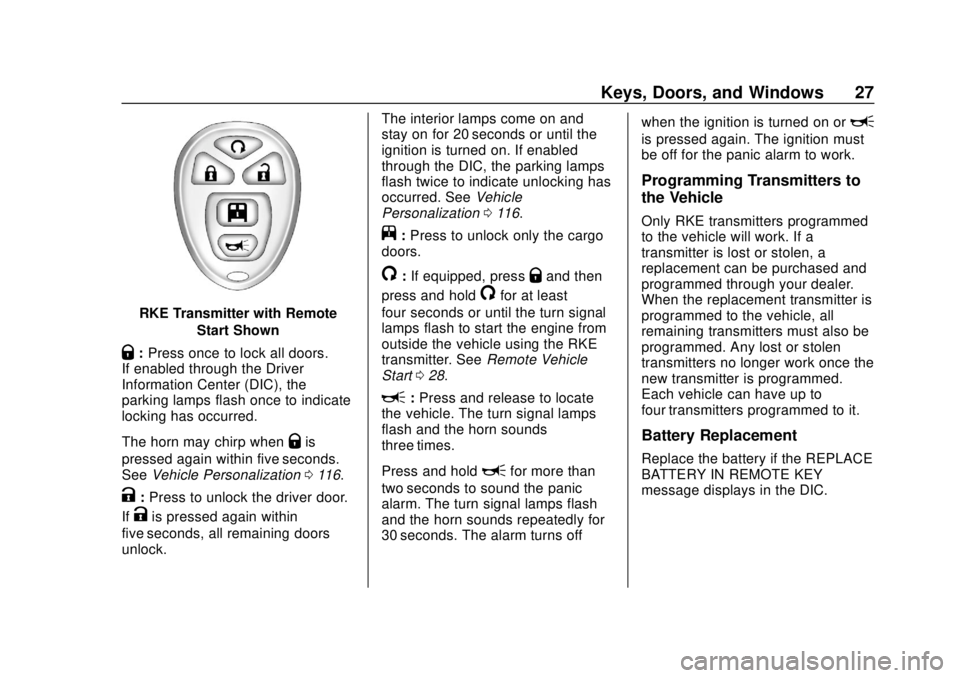
RKE Transmitter with RemoteStart Shown
Q:Press once to lock all doors.
If enabled through the Driver
Information Center (DIC), the
parking lamps flash once to indicate
locking has occurred.
The horn may chirp when
Qis
pressed again within five seconds.
See Vehicle Personalization 0116.
K:Press to unlock the driver door.
If
Kis pressed again within
five seconds, all remaining doors
unlock. The interior lamps come on and
stay on for 20 seconds or until the
ignition is turned on. If enabled
through the DIC, the parking lamps
flash twice to indicate unlocking has
occurred. See
Vehicle
Personalization 0116.
j:Press to unlock only the cargo
doors.
/: If equipped, pressQand then
press and hold
/for at least
four seconds or until the turn signal
lamps flash to start the engine from
outside the vehicle using the RKE
transmitter. See Remote Vehicle
Start 028.
L:Press and release to locate
the vehicle. The turn signal lamps
flash and the horn sounds
three times.
Press and hold
Lfor more than
two seconds to sound the panic
alarm. The turn signal lamps flash
and the horn sounds repeatedly for
30 seconds. The alarm turns off when the ignition is turned on or
L
is pressed again. The ignition must
be off for the panic alarm to work.
Programming Transmitters to
the Vehicle
Only RKE transmitters programmed
to the vehicle will work. If a
transmitter is lost or stolen, a
replacement can be purchased and
programmed through your dealer.
When the replacement transmitter is
programmed to the vehicle, all
remaining transmitters must also be
programmed. Any lost or stolen
transmitters no longer work once the
new transmitter is programmed.
Each vehicle can have up to
four transmitters programmed to it.
Battery Replacement
Replace the battery if the REPLACE
BATTERY IN REMOTE KEY
message displays in the DIC.
Page 31 of 356
Chevrolet Express Owner Manual (GMNA-Localizing-U.S./Canada/Mexico-
11374212) - 2018 - crc - 2/2/18
30 Keys, Doors, and Windows
Warning (Continued)
permanent injuries or even
death from heat stroke.
Always lock the vehicle
whenever leaving it.
. Outsiders can easily enter
through an unlocked door
when you slow down or stop
the vehicle. Locking the
doors can help prevent this
from happening.
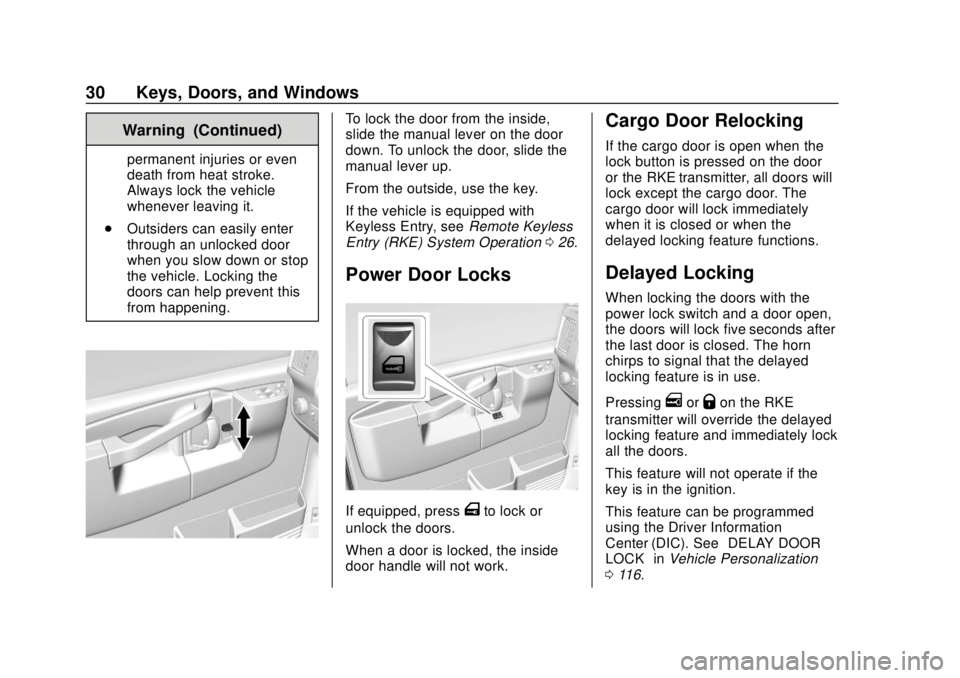
To lock the door from the inside,
slide the manual lever on the door
down. To unlock the door, slide the
manual lever up.
From the outside, use the key.
If the vehicle is equipped with
Keyless Entry, see Remote Keyless
Entry (RKE) System Operation 026.
Power Door Locks
If equipped, pressTto lock or
unlock the doors.
When a door is locked, the inside
door handle will not work.
Cargo Door Relocking
If the cargo door is open when the
lock button is pressed on the door
or the RKE transmitter, all doors will
lock except the cargo door. The
cargo door will lock immediately
when it is closed or when the
delayed locking feature functions.
Delayed Locking
When locking the doors with the
power lock switch and a door open,
the doors will lock five seconds after
the last door is closed. The horn
chirps to signal that the delayed
locking feature is in use.
Pressing
eorQon the RKE
transmitter will override the delayed
locking feature and immediately lock
all the doors.
This feature will not operate if the
key is in the ignition.
This feature can be programmed
using the Driver Information
Center (DIC). See “DELAY DOOR
LOCK” inVehicle Personalization
0 116.
Page 91 of 356
Chevrolet Express Owner Manual (GMNA-Localizing-U.S./Canada/Mexico-
11374212) - 2018 - crc - 2/2/18
90 Instruments and Controls
Instruments and
Controls
Controls
Steering Wheel Adjustment . . . . 91
Steering Wheel Controls . . . . . . . 91
Horn . . . . . . . . . . . . . . . . . . . . . . . . . . . 92
Windshield Wiper/Washer . . . . . . 92
Compass . . . . . . . . . . . . . . . . . . . . . . 93
Clock . . . . . . . . . . . . . . . . . . . . . . . . . . 95
Power Outlets . . . . . . . . . . . . . . . . . 95
Cigarette Lighter . . . . . . . . . . . . . . . 96
Ashtrays . . . . . . . . . . . . . . . . . . . . . . . 97
Warning Lights, Gauges, and
Indicators
Warning Lights, Gauges, andIndicators . . . . . . . . . . . . . . . . . . . . 97
Instrument Cluster . . . . . . . . . . . . . 98
Speedometer . . . . . . . . . . . . . . . . . . 99
Odometer . . . . . . . . . . . . . . . . . . . . . . 99
Trip Odometer . . . . . . . . . . . . . . . . . 99
Fuel Gauge . . . . . . . . . . . . . . . . . . . . 99
Engine Oil Pressure Gauge . . . . . . . . . . . . . . . . . . . . . . 100
Engine Coolant Temperature Gauge . . . . . . . . . . . . . . . . . . . . . . 101
Voltmeter Gauge . . . . . . . . . . . . . 102 Seat Belt Reminders . . . . . . . . . 102
Airbag Readiness Light . . . . . . . 102
Airbag On-Off Light . . . . . . . . . . . 103
Charging System Light . . . . . . . 104
Malfunction Indicator Lamp
(Check Engine Light) . . . . . . . . 105
Brake System Warning Light . . . . . . . . . . . . . . . . . . . . . . . . 107
Antilock Brake System (ABS) Warning Light . . . . . . . . . . . . . . . 107
Tow/Haul Mode Light . . . . . . . . . 108
StabiliTrak OFF Light . . . . . . . . . 108
Traction Control System (TCS)/ StabiliTrak Light . . . . . . . . . . . . . 108
Tire Pressure Light . . . . . . . . . . . 109
Engine Oil Pressure Light . . . . 109
Low Fuel Warning Light . . . . . . . 110
Security Light . . . . . . . . . . . . . . . . . 110
High-Beam On Light . . . . . . . . . . 110
Cruise Control Light . . . . . . . . . . 110
Information Displays
Driver Information Center (DIC) . . . . . . . . . . . . . . . . 111
Vehicle Messages
Vehicle Messages . . . . . . . . . . . . 115
Engine Power Messages . . . . . 116
Vehicle Speed Messages . . . . . 116
Vehicle Personalization
Vehicle Personalization . . . . . . . 116
Page 93 of 356
Chevrolet Express Owner Manual (GMNA-Localizing-U.S./Canada/Mexico-
11374212) - 2018 - crc - 2/2/18
92 Instruments and Controls
Navigating Folders on an iPod or
USB Device1. Press and hold
worc/x
while listening to a song until
the contents of the current
folder appear on the
infotainment display.
2. Press and hold
c/xto go
back to the previous folder list.
3. Press and release
worc/
xto scroll up or down the list.
. To select a folder, press
and hold
w, or press¨
when the folder is
highlighted.
. To go back further in the
folder list, press and hold
c/x.
b/g:Press to silence the vehicle
speakers only. Press again to turn
the sound on.
For vehicles with Bluetooth or
OnStar systems, press and hold for
longer than two seconds to interact with those systems.
See
Bluetooth 0148 andOnStar
Overview 0332, if equipped.
SRCE : Press to switch between
the radio and CD, and for equipped
vehicles, the front auxiliary.
¨: Press to go to the next radio
station while in AM, FM,
or SiriusXM, if equipped.
If equipped with a CD player or
USB port:
Press
¨to go to the next track or
chapter while sourced to the CD.
Press
¨to select a track or a folder
when navigating folders on an iPod
or USB device.
While listening to a CD, press and
hold
¨to quickly move forward
through the tracks. Release to stop
on the desired track.
+
e: Press to increase volume.
−
e: Press to decrease volume.
Horn
Press the horn symbol on the
steering wheel to sound the horn.
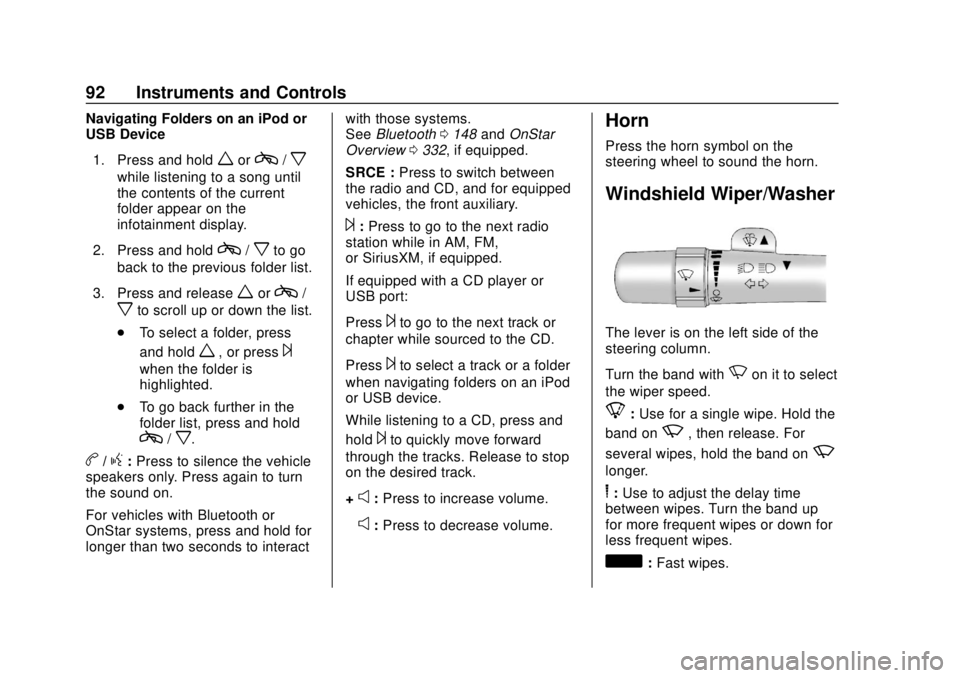
Windshield Wiper/Washer
The lever is on the left side of the
steering column.
Turn the band with
Non it to select
the wiper speed.
8: Use for a single wipe. Hold the
band on
z, then release. For
several wipes, hold the band on
z
longer.
6: Use to adjust the delay time
between wipes. Turn the band up
for more frequent wipes or down for
less frequent wipes.
d: Fast wipes.
Page 119 of 356
Chevrolet Express Owner Manual (GMNA-Localizing-U.S./Canada/Mexico-
11374212) - 2018 - crc - 2/2/18
118 Instruments and Controls
To select a setting, pressVwhile
the desired setting is displayed on
the DIC.
AUTO DOOR UNLOCK
This feature allows you to select
whether or not to turn off the
automatic door unlocking feature.
It also allows you to select which
doors and when the doors will
automatically unlock.
Press
Uuntil AUTO DOOR
UNLOCK appears on the DIC
display. Press
Vonce to access the
settings for this feature. Then press
Uto scroll through the following
settings:
OFF : None of the doors will
automatically unlock.
DRIVER AT KEY OUT : Only the
driver door will unlock when the key
is taken out of the ignition.
DRIVER IN PARK : Only the driver
door will unlock when the vehicle is
shifted into P (Park). ALL AT KEY OUT :
All of the doors
will unlock when the key is taken
out of the ignition.
ALL IN PARK (default) : All of the
doors will unlock when the vehicle is
shifted into P (Park).
NO CHANGE : No change will be
made to this feature. The current
setting will remain.
To select a setting, press
Vwhile
the desired setting is displayed on
the DIC.
REMOTE DOOR LOCK
This feature allows you to select the
type of feedback you will receive
when locking the vehicle with the
Remote Keyless Entry (RKE)
transmitter. You will not receive
feedback when locking the vehicle
with the RKE transmitter if the doors
are open. See Remote Keyless
Entry (RKE) System Operation 026. Press
Uuntil REMOTE DOOR
LOCK appears on the DIC display.
Press
Vonce to access the settings
for this feature. Then press
Uto
scroll through the following settings:
OFF : There will be no feedback
when you press
Qon the RKE
transmitter.
LIGHTS ONLY : The exterior lamps
will flash when you press
Qon the
RKE transmitter.
HORN ONLY : The horn will sound
on the second press of
Qon the
RKE transmitter.
HORN & LIGHTS (default) : The
exterior lamps will flash when you
press
Qon the RKE transmitter, and
the horn will sound when
Qis
pressed again within five seconds of
the previous command.
NO CHANGE : No change will be
made to this feature. The current
setting will remain.
Page 251 of 356
Chevrolet Express Owner Manual (GMNA-Localizing-U.S./Canada/Mexico-
11374212) - 2018 - crc - 2/2/18
250 Vehicle Care
FusesUsage
3 Right trailer stoplamp/Turnlamp
4 –
5 –
6 Fuel system control module/Ignition
7 Body control module 5
8 Body control module 7
9 Body control module 4
10 Instrument cluster
11 Trailer wiring
12 –
13 Interior rear vision camera module
14 Windshield washer
16 Horn
17 Transmission
18 A/C Fuses
Usage
19 Engine control module battery
20 Cutaway/Left stoplamp/Turnlamp
21 Left trailer stoplamp/Turnlamp
22 Cutaway/Right stoplamp/Turnlamp
23 –
24 Fuel pump
25 Auxiliary power outlet
26 Body control module 3
27 Special equipment option
28 Airbag
29 Steering wheel sensor
30 Engine control module Ignition Fuses
Usage
31 Transmission control module
Ignition
32 Transmission control module 1
battery/Engine
control module
battery power (gas
6 cyl)
33 Rear parking aid module
34 –
35 –
36 Fuel system control module battery
41 Transmission control 2 module
battery power
42 Trailer wiring
43 –
44 Starter solenoid
45 Engine control module/Powertrain
Page 268 of 356
Chevrolet Express Owner Manual (GMNA-Localizing-U.S./Canada/Mexico-
11374212) - 2018 - crc - 2/2/18
Vehicle Care 267
message should go off when the
TPMS sensors are installed and
the sensor matching process is
performed successfully. See
your dealer for service.
. Replacement tires or wheels do
not match the original equipment
tires or wheels. Tires and wheels
other than those recommended
could prevent the TPMS from
functioning properly. See Buying
New Tires 0271.
. Operating electronic devices or
being near facilities using radio
wave frequencies similar to the
TPMS could cause the TPMS
sensors to malfunction.
If the TPMS is not functioning
properly, it cannot detect or signal a
low tire pressure condition. See
your dealer for service if the TPMS
malfunction light and DIC message
come on and stay on.
TPMS Sensor Matching
Process
Each TPMS sensor has a unique
identification code. The identification
code needs to be matched to a new tire/wheel position after rotating the
vehicle’s tires or replacing one or
more of the TPMS sensors. Also,
the TPMS sensor matching process
should be performed after replacing
a spare tire with a road tire
containing the TPMS sensor. The
malfunction light and the DIC
message should go off at the next
ignition cycle. The sensors are
matched to the tire/wheel positions,
using a TPMS relearn tool, in the
following order: driver side front tire,
passenger side front tire, passenger
side rear tire, and driver side rear.
See your dealer for service or to
purchase a relearn tool. A TPMS
relearn tool can also be purchased.
See Tire Pressure Monitor Sensor
Activation Tool at
www.gmtoolsandequipment.com or
call 1-800-GM TOOLS
(1-800-468-6657).
There are two minutes to match the
first tire/wheel position, and
five minutes overall to match all four
tire/wheel positions. If it takes
longer, the matching process stops
and must be restarted.
The TPMS sensor matching
process is:
1. Set the parking brake.
2. Turn the ignition on without starting the vehicle. See
Ignition Positions 0174.
3. Press the Remote Keyless Entry (RKE) transmitter's
Q
andKbuttons at the same
time for approximately
five seconds. The horn sounds
twice to signal the receiver is in
relearn mode and TIRE
LEARNING ACTIVE message
displays on the DIC screen.
If the vehicle does not have
RKE, press the Driver
Information Center (DIC)
vehicle information button until
the PRESS VTO RELEARN
TIRE POSITIONS message
displays. The horn sounds
twice to signal the receiver is in
relearn mode and TIRE
LEARNING ACTIVE message
displays on the DIC screen.
Page 269 of 356
Chevrolet Express Owner Manual (GMNA-Localizing-U.S./Canada/Mexico-
11374212) - 2018 - crc - 2/2/18
268 Vehicle Care
4. Start with the driver sidefront tire.
5. Place the relearn tool against the tire sidewall, near the valve
stem. Then press the button to
activate the TPMS sensor.
A horn chirp confirms that the
sensor identification code has
been matched to this tire and
wheel position.
6. Proceed to the passenger side front tire, and repeat the
procedure in Step 5.
7. Proceed to the passenger side rear tire, and repeat the
procedure in Step 5.
8. Proceed to the driver side rear tire, and repeat the procedure
in Step 5. The horn sounds two
times to indicate the sensor
identification code has been
matched to the driver side rear
tire, and the TPMS sensor
matching process is no longer
active. The TIRE LEARNING
ACTIVE message on the DIC
display screen goes off.
9. Turn the vehicle off. 10. Set all four tires to the
recommended air pressure
level as indicated on the Tire
and Loading Information label.
Tire Inspection
We recommend that the tires,
including the spare tire, if the
vehicle has one, be inspected
for signs of wear or damage at
least once a month.
Replace the tire if:
.The indicators at three or
more places around the tire
can be seen.
.There is cord or fabric
showing through the tire's
rubber.
.The tread or sidewall is
cracked, cut, or snagged
deep enough to show cord or
fabric.
.The tire has a bump, bulge,
or split.
.The tire has a puncture, cut,
or other damage that cannot
be repaired well because of
the size or location of the
damage.
Tire Rotation
Tires should be rotated every
12 000 km (7,500 mi). See
Maintenance Schedule 0303.
Tires are rotated to achieve a
uniform wear for all tires. The
first rotation is the most
important.
Any time unusual wear is
noticed, rotate the tires as soon
as possible and check the wheel
alignment. Also check for
damaged tires or wheels.
See When It Is Time for New
Tires 0270 andWheel
Replacement 0275.
Page 337 of 356
Chevrolet Express Owner Manual (GMNA-Localizing-U.S./Canada/Mexico-
11374212) - 2018 - crc - 2/2/18
336 OnStar
After initial set-up, your vehicle’s
Wi-Fi hotspot will connect
automatically to your mobile
devices. Manage data usage by
turning Wi-Fi on or off on your
mobile device, using the
myChevrolet mobile app, or by
contacting an OnStar Advisor. On
some vehicles, Wi-Fi can also be
managed from the Wi-Fi
Hotspot menu.
MyChevrolet Mobile App (If
Available)
Download the myChevrolet mobile
app to compatible Apple and
Android smartphones. Chevrolet
users can access the following
services from a smartphone:
.Remotely start/stop the vehicle,
if factory-equipped.
. Lock/unlock doors, if equipped
with automatic locks.
. Activate the horn and lamps.
. Check the vehicle’s fuel level, oil
life, or tire pressure,
if factory-equipped with the Tire
Pressure Monitor System. .
Send destinations to the vehicle.
. Locate the vehicle on a map
(U.S. market only).
. Turn the vehicle's Wi-Fi hotspot
on/off, manage settings, and
monitor data consumption,
if equipped.
. Locate a dealer and schedule
service.
. Request roadside assistance.
. Set a parking reminder with pin
drop, take a photo, make a note,
and set a timer.
. Connect with Chevrolet on social
media.
For myChevrolet mobile app
information and compatibility, see
www.my.chevrolet.com.
An active OnStar service,
compatible device, factory-installed
remote start, and power locks are
required. Data rates apply. See
www.onstar.com for details and
system limitations.Remote Services
Contact an OnStar Advisor to
unlock the doors or sound the horn
and flash the lamps.
OnStar AtYourService
OnStar Advisors can provide offers
from restaurants and retailers on
your route, help locate hotels,
or book a room. These services
vary by market.
OnStar Hands-Free Calling
Make and receive calls with the
built-in wireless calling service,
which requires available minutes.
Functionality of the Voice Command
button may vary by vehicle and
region. For some vehicles, press
=
to open the OnStar app on the
infotainment display, then select
Hands-Free calling. For other
vehicles press
=as follows.
Make a Call
1. Press
=. System responds:
“OnStar ready.”