power steering CHEVROLET EXPRESS 2019 User Guide
[x] Cancel search | Manufacturer: CHEVROLET, Model Year: 2019, Model line: EXPRESS, Model: CHEVROLET EXPRESS 2019Pages: 373, PDF Size: 5.57 MB
Page 166 of 373
Chevrolet Express Owner Manual (GMNA-Localizing-U.S./Canada/Mexico-
12146162) - 2019 - crc - 11/26/18
Driving and Operating 165
Driving and
Operating
Driving Information
Distracted Driving . . . . . . . . . . . . 166
Defensive Driving . . . . . . . . . . . . . 166
Drunk Driving . . . . . . . . . . . . . . . . . 167
Control of a Vehicle . . . . . . . . . . . 167
Braking . . . . . . . . . . . . . . . . . . . . . . . 167
Steering . . . . . . . . . . . . . . . . . . . . . . 167
Off-Road Recovery . . . . . . . . . . . 168
Loss of Control . . . . . . . . . . . . . . . 168
Driving on Wet Roads . . . . . . . . 169
Hill and Mountain Roads . . . . . 170
Winter Driving . . . . . . . . . . . . . . . . 170
If the Vehicle Is Stuck . . . . . . . . 172
Vehicle Load Limits . . . . . . . . . . . 172
Starting and Operating
New Vehicle Break-In . . . . . . . . . 176
Ignition Positions . . . . . . . . . . . . . 176
Starting the Engine . . . . . . . . . . . 178
Fast Idle System . . . . . . . . . . . . . 180
Retained AccessoryPower (RAP) . . . . . . . . . . . . . . . . 180
Engine Coolant Heater . . . . . . . 180
Shifting Into Park . . . . . . . . . . . . . 182
Shifting out of Park . . . . . . . . . . . 183 Parking over Things
That Burn . . . . . . . . . . . . . . . . . . . 184
Engine Exhaust
Engine Exhaust . . . . . . . . . . . . . . 184
Running the Vehicle WhileParked . . . . . . . . . . . . . . . . . . . . . . 185
Automatic Transmission
Automatic Transmission . . . . . . 185
Manual Mode . . . . . . . . . . . . . . . . . 188
Tow/Haul Mode . . . . . . . . . . . . . . . 189
Brakes
Antilock BrakeSystem (ABS) . . . . . . . . . . . . . . . 190
Parking Brake . . . . . . . . . . . . . . . . 191
Brake Assist . . . . . . . . . . . . . . . . . . 191
Hill Start Assist (HSA) . . . . . . . . 192
Ride Control Systems
Traction Control/Electronic Stability Control . . . . . . . . . . . . . 192
Locking Rear Axle . . . . . . . . . . . . 194
Cruise Control
Cruise Control . . . . . . . . . . . . . . . . 194
Driver Assistance Systems
Driver Assistance Systems . . . 197
Rear Vision Camera (RVC) . . . 198
Park Assist . . . . . . . . . . . . . . . . . . . 199 Forward Collision Alert (FCA)
System . . . . . . . . . . . . . . . . . . . . . . 201
Side Blind Zone Alert (SBZA) . . . . . . . . . . . . . . . . 202
Lane Departure
Warning (LDW) . . . . . . . . . . . . . 204
Fuel
Top Tier Fuel . . . . . . . . . . . . . . . . . 206
Recommended Fuel . . . . . . . . . . 206
Prohibited Fuels . . . . . . . . . . . . . . 206
Fuels in Foreign Countries . . . 207
Fuel Additives . . . . . . . . . . . . . . . . 207
E85 or FlexFuel . . . . . . . . . . . . . . 207
Filling the Tank . . . . . . . . . . . . . . . 208
Filling a Portable FuelContainer . . . . . . . . . . . . . . . . . . . 209
Trailer Towing
General Towing
Information . . . . . . . . . . . . . . . . . . 210
Driving Characteristics and Towing Tips . . . . . . . . . . . . . . . . . 210
Trailer Towing . . . . . . . . . . . . . . . . 215
Towing Equipment . . . . . . . . . . . . 222
Trailer Sway Control (TSC) . . . 225
Conversions and Add-Ons
Add-On Electrical Equipment . . . . . . . . . . . . . . . . . . 227
Page 168 of 373
Chevrolet Express Owner Manual (GMNA-Localizing-U.S./Canada/Mexico-
12146162) - 2019 - crc - 11/26/18
Driving and Operating 167
.Focus on the task of driving.
Drunk Driving
Death and injury associated with
drinking and driving is a global
tragedy.
{Warning
Drinking and then driving is very
dangerous. Your reflexes,
perceptions, attentiveness, and
judgment can be affected by even
a small amount of alcohol. You
can have a serious —or even
fatal —collision if you drive after
drinking.
Do not drink and drive or ride with
a driver who has been drinking.
Ride home in a cab; or if you are
with a group, designate a driver
who will not drink.
Control of a Vehicle
Braking, steering, and accelerating
are important factors in helping to
control a vehicle while driving.
Braking
Braking action involves perception
time and reaction time. Deciding to
push the brake pedal is perception
time. Actually doing it is
reaction time.
Average driver reaction time is
about three-quarters of a second. In
that time, a vehicle moving at
100 km/h (60 mph) travels 20 m
(66 ft), which could be a lot of
distance in an emergency.
Helpful braking tips to keep in mind
include:
. Keep enough distance between
you and the vehicle in front
of you.
. Avoid needless heavy braking.
. Keep pace with traffic.
If the engine ever stops while the
vehicle is being driven, brake
normally but do not pump the
brakes. Doing so could make the
pedal harder to push down. If the
engine stops, there will be some
power brake assist but it will be
used when the brake is applied. Once the power assist is used up, it
can take longer to stop and the
brake pedal will be harder to push.
Steering
Hydraulic Power Steering
Your vehicle has hydraulic power
steering. It may require
maintenance. See
Power Steering
Fluid 0250.
If power steering assist is lost
because the engine stops or
because of a system malfunction,
the vehicle can be steered but may
require increased effort. See your
dealer if there is a problem.
Caution
If the steering wheel is turned
until it reaches the end of its
travel, and is held in that position
for more than 15 seconds,
damage may occur to the power
steering system and there may be
loss of power steering assist.
Page 178 of 373
Chevrolet Express Owner Manual (GMNA-Localizing-U.S./Canada/Mexico-
12146162) - 2019 - crc - 11/26/18
Driving and Operating 177
0 (Stopping the Engine/LOCK/
OFF) :This position turns off the
vehicle. It also locks the ignition, the
transmission, and the steering
column, if equipped with a locking
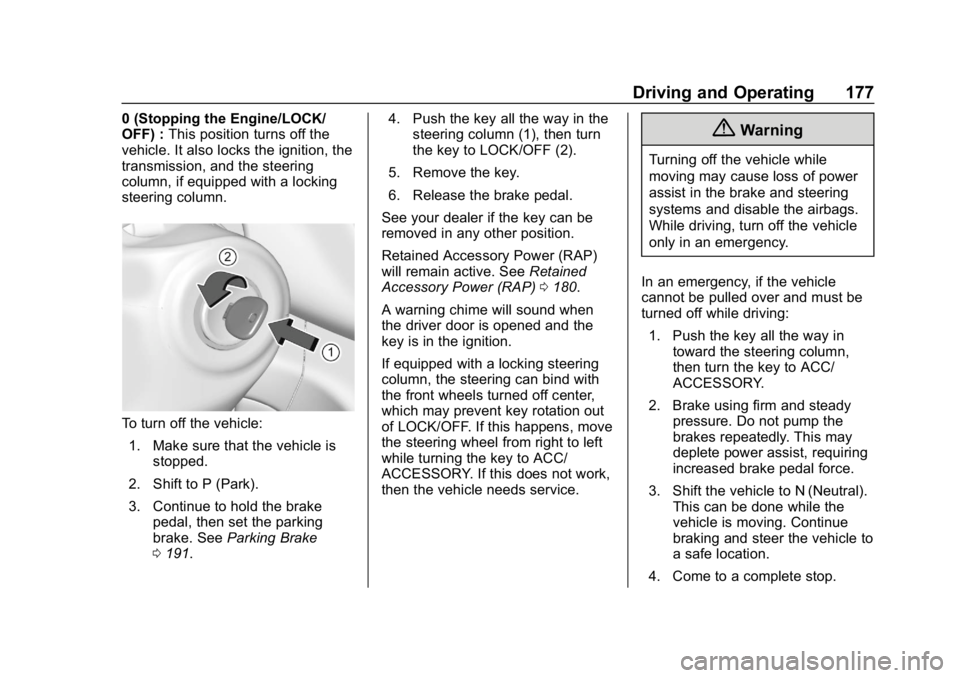
steering column.
To turn off the vehicle:
1. Make sure that the vehicle is stopped.
2. Shift to P (Park).
3. Continue to hold the brake pedal, then set the parking
brake. See Parking Brake
0 191. 4. Push the key all the way in the
steering column (1), then turn
the key to LOCK/OFF (2).
5. Remove the key.
6. Release the brake pedal.
See your dealer if the key can be
removed in any other position.
Retained Accessory Power (RAP)
will remain active. See Retained
Accessory Power (RAP) 0180.
A warning chime will sound when
the driver door is opened and the
key is in the ignition.
If equipped with a locking steering
column, the steering can bind with
the front wheels turned off center,
which may prevent key rotation out
of LOCK/OFF. If this happens, move
the steering wheel from right to left
while turning the key to ACC/
ACCESSORY. If this does not work,
then the vehicle needs service.
{Warning
Turning off the vehicle while
moving may cause loss of power
assist in the brake and steering
systems and disable the airbags.
While driving, turn off the vehicle
only in an emergency.
In an emergency, if the vehicle
cannot be pulled over and must be
turned off while driving: 1. Push the key all the way in toward the steering column,
then turn the key to ACC/
ACCESSORY.
2. Brake using firm and steady pressure. Do not pump the
brakes repeatedly. This may
deplete power assist, requiring
increased brake pedal force.
3. Shift the vehicle to N (Neutral). This can be done while the
vehicle is moving. Continue
braking and steer the vehicle to
a safe location.
4. Come to a complete stop.
Page 179 of 373
Chevrolet Express Owner Manual (GMNA-Localizing-U.S./Canada/Mexico-
12146162) - 2019 - crc - 11/26/18
178 Driving and Operating
5. Shift to P (Park) with anautomatic transmission,
or Neutral with a manual
transmission.
6. Continue to hold the brake pedal, then set the parking
brake. See Parking Brake
0 191.
7. Push the key all the way in toward the steering column,
then turn the ignition to
LOCK/OFF.
8. Remove the key.
9. Release the brake pedal.
Caution
Use the correct key, make sure it
is all the way in —or pushed all
the way in toward the steering
column when turning off the
vehicle —and turn it only with
your hand.
1 (ACC/ACCESSORY) : This
position allows features such as the
infotainment system to operate while the vehicle is off. It also
unlocks the steering column,
if equipped with a locking steering
column. Use this position if the
vehicle must be pushed or towed.
See
Retained Accessory Power
(RAP) 0180.
From ON/RUN, push the key all the
way in toward the steering column,
then turn the key to ACC/
ACCESSORY.
If the key is left in ACC/
ACCESSORY with the engine off,
the battery could drain and the
vehicle may not start.
A warning chime will sound when
the driver door is opened and the
key is in the ignition.
2 (ON/RUN) : This position can be
used to operate the electrical
accessories and to display some
instrument cluster warning and
indicator lights. This position can
also be used for service and
diagnostics, and to verify the proper
operation of the malfunction
indicator lamp as may be required
for emission inspection purposes. The switch stays in this position
when the engine is running. The
transmission is also unlocked in this
position.
If the key is left in ON/RUN with the
engine off, the battery could drain
and the vehicle may not start.
3 (START) :
This is the position that
starts the engine. When the engine
starts, release the key. The ignition
returns to ON/RUN for driving.
Starting the Engine
If the vehicle has a diesel engine,
see the Duramax diesel
supplement.
To place the transmission in the
proper gear:
Move the shift lever to P (Park) or
N (Neutral). The engine will not start
in any other position. To restart the
engine when the vehicle is already
moving, use N (Neutral) only.
Page 180 of 373
Chevrolet Express Owner Manual (GMNA-Localizing-U.S./Canada/Mexico-
12146162) - 2019 - crc - 11/26/18
Driving and Operating 179
Caution
If you add electrical parts or
accessories, you could change
the way the engine operates. Any
resulting damage would not be
covered by the vehicle warranty.
SeeAdd-On Electrical Equipment
0 227.
Caution
Do not try to shift to P (Park) if the
vehicle is moving. If you do, you
could damage the transmission.
Shift to P (Park) only when the
vehicle is stopped.
Caution
If the steering wheel is turned
until it reaches the end of its
travel, and is held in that position
while starting the vehicle, damage
(Continued)
Caution (Continued)
may occur to the hydraulic power
steering system and there may be
loss of power steering assist.
Starting Procedure 1. With your foot off the accelerator pedal, turn the
ignition key to START. When
the engine starts, let go of the
key. The idle speed will go
down as your engine gets
warm. Do not race the engine
immediately after starting it.
Operate the engine and
transmission gently to allow the
oil to warm up and lubricate all
moving parts.
When the low fuel warning light
is on and the FUEL LEVEL
LOW message is displayed in
the Driver Information Center
(DIC), the Computer-Controlled
Cranking System is disabled to
prevent possible vehicle
component damage. When this happens, hold the ignition
switch in the START position to
continue engine cranking.
Caution
Cranking the engine for long
periods of time, by returning the
ignition to the START position
immediately after cranking has
ended, can overheat and damage
the cranking motor, and drain the
battery. Wait at least 15 seconds
between each try, to let the
cranking motor cool down.
2. If the engine does not start after five to 10 seconds,
especially in very cold weather
(below −18 °C or 0 °F), it could
be flooded with too much
gasoline. Try pushing the
accelerator pedal all the way to
the floor and holding it there as
you hold the key in START for
up to 15 seconds. Wait at least
15 seconds between each try,
to allow the cranking motor to
cool down. When the engine
Page 181 of 373
Chevrolet Express Owner Manual (GMNA-Localizing-U.S./Canada/Mexico-
12146162) - 2019 - crc - 11/26/18
180 Driving and Operating
starts, let go of the key and
accelerator. If the vehicle starts
briefly but then stops again, do
the same thing. This clears the
extra gasoline from the engine.
Do not race the engine
immediately after starting it.
Operate the engine and
transmission gently until the oil
warms up and lubricates all
moving parts.
Fast Idle System
If equipped, this feature is available
only with cruise control. The manual
fast idle switch is operated using the
cruise control buttons on the left
side of the steering wheel.
This system can be used to
increase engine idle speed
whenever the following conditions
are met:
.The parking brake is set.
. The brake pedal is not pressed.
. The vehicle must not be moving
and the accelerator must not be
pressed. To control the fast idle:
.
To enable the Fast Idle System,
press and release the cruise
control on/off button and ensure
that the switch indicator light
is lit.
. Press and release the cruise
control SET- button. Engine
speed will be held at
approximately 1200 rpm.
When the fast idle is active, the
Driver Information Center (DIC) will
display FAST IDLE ON.
One of the following actions will turn
off the fast idle:
. Pressing the brake.
. Selecting the cruise control
cancel button.
. Releasing the parking brake.
. Moving the transmission shift
lever out of P (Park) or
N (Neutral).
. Selecting the cruise control on/
off button when it was
previously on. .
Pressing the cruise control SET-
button a second time.
. Pressing the accelerator more
than one-quarter of the
way down.
. Turning the ignition off.
Retained Accessory
Power (RAP)
These vehicle accessories can be
used for up to 10 minutes after the
engine is turned off:
.Audio System
. Power Windows (if equipped)
These features will work when the
ignition is on or in ACC/
ACCESSORY. Once the ignition is
turned from on to off, power to the
radio and power windows will
continue to work for 10 minutes or
until the driver door is opened.
Engine Coolant Heater
If the vehicle has a diesel engine,
see the Duramax diesel
supplement.
Page 192 of 373
Chevrolet Express Owner Manual (GMNA-Localizing-U.S./Canada/Mexico-
12146162) - 2019 - crc - 11/26/18
Driving and Operating 191
Using ABS
Do not pump the brakes. Just hold
the brake pedal down firmly and let
ABS work. You may hear the ABS
pump or motor operating and feel
the brake pedal pulsate. This is
normal.
Braking in Emergencies
ABS allows you to steer and brake
at the same time. In many
emergencies, steering can help
more than even the very best
braking.
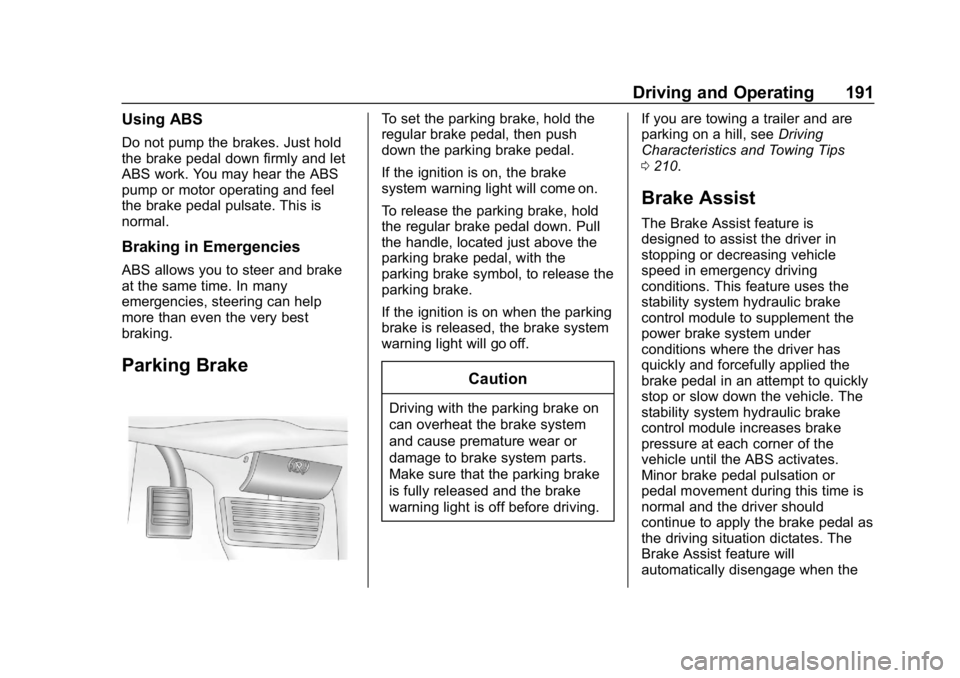
Parking Brake
To set the parking brake, hold the
regular brake pedal, then push
down the parking brake pedal.
If the ignition is on, the brake
system warning light will come on.
To release the parking brake, hold
the regular brake pedal down. Pull
the handle, located just above the
parking brake pedal, with the
parking brake symbol, to release the
parking brake.
If the ignition is on when the parking
brake is released, the brake system
warning light will go off.
Caution
Driving with the parking brake on
can overheat the brake system
and cause premature wear or
damage to brake system parts.
Make sure that the parking brake
is fully released and the brake
warning light is off before driving.If you are towing a trailer and are
parking on a hill, see
Driving
Characteristics and Towing Tips
0 210.
Brake Assist
The Brake Assist feature is
designed to assist the driver in
stopping or decreasing vehicle
speed in emergency driving
conditions. This feature uses the
stability system hydraulic brake
control module to supplement the
power brake system under
conditions where the driver has
quickly and forcefully applied the
brake pedal in an attempt to quickly
stop or slow down the vehicle. The
stability system hydraulic brake
control module increases brake
pressure at each corner of the
vehicle until the ABS activates.
Minor brake pedal pulsation or
pedal movement during this time is
normal and the driver should
continue to apply the brake pedal as
the driving situation dictates. The
Brake Assist feature will
automatically disengage when the
Page 229 of 373
Chevrolet Express Owner Manual (GMNA-Localizing-U.S./Canada/Mexico-
12146162) - 2019 - crc - 11/26/18
228 Vehicle Care
Vehicle Care
General Information
General Information . . . . . . . . . . 229
California Proposition65 Warning . . . . . . . . . . . . . . . . . 229
California Perchlorate Materials Requirements . . . . . 230
Accessories and Modifications . . . . . . . . . . . . . . . . 230
Vehicle Checks
Doing Your OwnService Work . . . . . . . . . . . . . . . 230
Hood . . . . . . . . . . . . . . . . . . . . . . . . . 231
Engine Compartment Overview . . . . . . . . . . . . . . . . . . . . 232
Engine Oil . . . . . . . . . . . . . . . . . . . . 235
Engine Oil Life System . . . . . . . 237
Automatic Transmission Fluid (6-Speed Transmission) . . . . . 238
Automatic Transmission Fluid (8-Speed Transmission) . . . . . 241
Engine Air Cleaner/Filter . . . . . . 242
Cooling System . . . . . . . . . . . . . . 244
Engine Overheating . . . . . . . . . . 248
Engine Fan . . . . . . . . . . . . . . . . . . . 249
Power Steering Fluid . . . . . . . . . 250
Washer Fluid . . . . . . . . . . . . . . . . . 250 Brakes . . . . . . . . . . . . . . . . . . . . . . . 251
Brake Fluid . . . . . . . . . . . . . . . . . . . 252
Battery - North America . . . . . . 253
Rear Axle . . . . . . . . . . . . . . . . . . . . 254
Noise Control System . . . . . . . . 255
Starter Switch Check . . . . . . . . . 256
Automatic Transmission Shift
Lock Control Function
Check . . . . . . . . . . . . . . . . . . . . . . . 256
Ignition Transmission Lock Check . . . . . . . . . . . . . . . . . . . . . . . 257
Park Brake and P (Park) Mechanism Check . . . . . . . . . . 257
Wiper Blade Replacement . . . . 257
Windshield Replacement . . . . . 258
Gas Strut(s) . . . . . . . . . . . . . . . . . . 258
Headlamp Aiming
Headlamp Aiming . . . . . . . . . . . . 259
Bulb Replacement
Bulb Replacement . . . . . . . . . . . . 260
Halogen Bulbs . . . . . . . . . . . . . . . . 260
Front Turn Signal, Sidemarker, and Parking Lamps . . . . . . . . . 260
Taillamps . . . . . . . . . . . . . . . . . . . . . 261
Center High-Mounted Stoplamp (CHMSL) . . . . . . . . . 262
License Plate Lamp . . . . . . . . . . 262
Electrical System
Electrical System Overload . . . 263
Fuses and Circuit Breakers . . . 264
Engine Compartment Fuse
Block . . . . . . . . . . . . . . . . . . . . . . . . 264
Floor Console Fuse Block . . . . 268
Wheels and Tires
Tires . . . . . . . . . . . . . . . . . . . . . . . . . . 270
All-Season Tires . . . . . . . . . . . . . . 271
Winter Tires . . . . . . . . . . . . . . . . . . 271
Tire Sidewall Labeling . . . . . . . . 272
Tire Designations . . . . . . . . . . . . . 274
Tire Terminology and
Definitions . . . . . . . . . . . . . . . . . . 275
Tire Pressure . . . . . . . . . . . . . . . . . 278
Tire Pressure Monitor System . . . . . . . . . . . . . . . . . . . . . . 279
Tire Pressure Monitor Operation . . . . . . . . . . . . . . . . . . . 280
Tire Inspection . . . . . . . . . . . . . . . . 283
Tire Rotation . . . . . . . . . . . . . . . . . 283
Dual Tire Rotation . . . . . . . . . . . . 285
When It Is Time for New Tires . . . . . . . . . . . . . . . . . . . . . . . . 285
Buying New Tires . . . . . . . . . . . . . 286
Different Size Tires and Wheels . . . . . . . . . . . . . . . . . . . . . . 287
Uniform Tire Quality Grading . . . . . . . . . . . . . . . . . . . . . 288
Page 234 of 373

Chevrolet Express Owner Manual (GMNA-Localizing-U.S./Canada/Mexico-
12146162) - 2019 - crc - 11/26/18
Vehicle Care 233
1.Battery - North America 0253.
2. Radiator Pressure Cap. See Cooling System 0244.
3. Coolant Recovery Tank. See Cooling System 0244.
4. Engine Cooling Fan (Out of View). See Cooling System
0 244.
5. Engine Air Cleaner/Filter 0242.
6. Engine Oil Dipstick. See “Checking Engine Oil” under
Engine Oil 0235.
7. Engine Oil Fill Cap. See “When
to Add Engine Oil” under
Engine Oil 0235.
8. Power Steering Fluid Reservoir. See Power Steering
Fluid 0250.
9. Engine Compartment Fuse
Block 0264. 10. Brake Master Cylinder
Reservoir. See Brake Fluid
0 252.
11. Windshield Washer Fluid Reservoir. See “Adding Washer
Fluid” under Washer Fluid
0 250.
Page 236 of 373
Chevrolet Express Owner Manual (GMNA-Localizing-U.S./Canada/Mexico-
12146162) - 2019 - crc - 11/26/18
Vehicle Care 235
1.Battery - North America 0253.
2. Radiator Pressure Cap. See Cooling System 0244.
3. Coolant Recovery Tank. See Cooling System 0244.
4. Automatic Transmission Fluid Dipstick. See “Checking the
Fluid Level” underAutomatic
Transmission Fluid (6-Speed
Transmission) 0238 or
Automatic Transmission Fluid
(8-Speed Transmission) 0241.
5. Engine Oil Fill Cap. See “When
to Add Engine Oil” under
Engine Oil 0235.
6. Engine Oil Dipstick. See “Checking Engine Oil” under
Engine Oil 0235.
7. Engine Cooling Fan (Out of View). See Cooling System
0 244.
8. Engine Air Cleaner/Filter 0242.
9. Power Steering Fluid Reservoir. See Power Steering
Fluid 0250. 10.
Engine Compartment Fuse
Block 0264.
11. Brake Master Cylinder Reservoir. See Brake Fluid
0 252.
12. Windshield Washer Fluid Reservoir. See “Adding Washer
Fluid” under Washer Fluid
0 250.
Engine Oil
For diesel engine vehicles, see
“Engine Oil” in the Duramax diesel
supplement.
To ensure proper engine
performance and long life, careful
attention must be paid to engine oil.
Following these simple, but
important steps will help protect
your investment:
. Use engine oil approved to the
proper specification and of the
proper viscosity grade. See
“Selecting the Right Engine Oil”
in this section. .
Check the engine oil level
regularly and maintain the
proper oil level. See “Checking
Engine Oil” and“When to Add
Engine Oil” in this section.
. Change the engine oil at the
appropriate time. See Engine Oil
Life System 0237.
. Always dispose of engine oil
properly. See “What to Do with
Used Oil” in this section.Checking Engine Oil
Check the engine oil level regularly,
every 650 km (400 mi), especially
prior to a long trip. The engine oil
dipstick handle is a loop. See
Engine Compartment Overview
0232 for the location.
{Warning
The engine oil dipstick handle
may be hot; it could burn you.
Use a towel or glove to touch the
dipstick handle.