air condition CHEVROLET EXPRESS 2023 User Guide
[x] Cancel search | Manufacturer: CHEVROLET, Model Year: 2023, Model line: EXPRESS, Model: CHEVROLET EXPRESS 2023Pages: 283, PDF Size: 16.23 MB
Page 117 of 283
Chevrolet Express Owner Manual (GMNA-Localizing-U.S./Canada/Mexico-
16547501) - 2023 - CRC - 6/10/22
116 Climate Controls
Heated Mirrors: If equipped with heated
outside mirrors, the mirrors heat to help
clear fog or frost from the surface of the
mirror when
1is pressed. SeeHeated
Mirrors 018.
Do not drive the vehicle until all the
windows are clear.
Caution
Do not use a razor blade or sharp object
to clear the inside rear window. Do not
adhere anything to the defogger grid
lines in the rear glass. These actions may
damage the rear defogger. Repairs would
not be covered by the vehicle warranty.
Rear Heating System
If equipped, the rear heating system lets
you adjust the amount of air flowing into
the rear of the vehicle, from the front
seating area. This feature works with the
main climate control system in the vehicle.
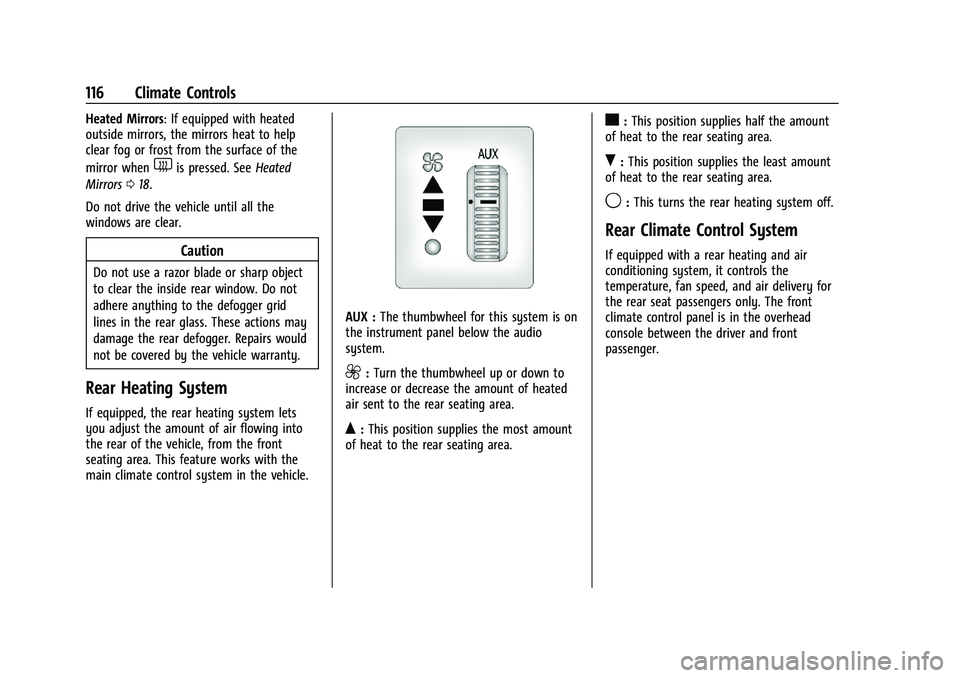
AUX : The thumbwheel for this system is on
the instrument panel below the audio
system.
9: Turn the thumbwheel up or down to
increase or decrease the amount of heated
air sent to the rear seating area.
Q: This position supplies the most amount
of heat to the rear seating area.
c: This position supplies half the amount
of heat to the rear seating area.
R: This position supplies the least amount
of heat to the rear seating area.
9: This turns the rear heating system off.
Rear Climate Control System
If equipped with a rear heating and air
conditioning system, it controls the
temperature, fan speed, and air delivery for
the rear seat passengers only. The front
climate control panel is in the overhead
console between the driver and front
passenger.
Page 119 of 283
Chevrolet Express Owner Manual (GMNA-Localizing-U.S./Canada/Mexico-
16547501) - 2023 - CRC - 6/10/22
118 Climate Controls
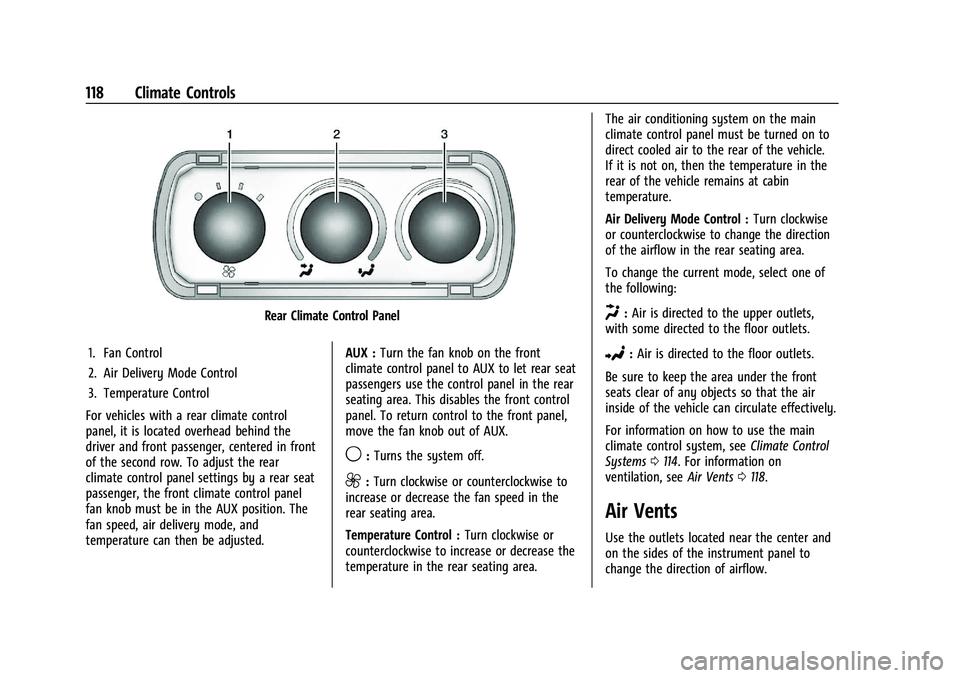
Rear Climate Control Panel
1. Fan Control
2. Air Delivery Mode Control
3. Temperature Control
For vehicles with a rear climate control
panel, it is located overhead behind the
driver and front passenger, centered in front
of the second row. To adjust the rear
climate control panel settings by a rear seat
passenger, the front climate control panel
fan knob must be in the AUX position. The
fan speed, air delivery mode, and
temperature can then be adjusted. AUX :
Turn the fan knob on the front
climate control panel to AUX to let rear seat
passengers use the control panel in the rear
seating area. This disables the front control
panel. To return control to the front panel,
move the fan knob out of AUX.
9: Turns the system off.
9:Turn clockwise or counterclockwise to
increase or decrease the fan speed in the
rear seating area.
Temperature Control : Turn clockwise or
counterclockwise to increase or decrease the
temperature in the rear seating area. The air conditioning system on the main
climate control panel must be turned on to
direct cooled air to the rear of the vehicle.
If it is not on, then the temperature in the
rear of the vehicle remains at cabin
temperature.
Air Delivery Mode Control :
Turn clockwise
or counterclockwise to change the direction
of the airflow in the rear seating area.
To change the current mode, select one of
the following:
H: Air is directed to the upper outlets,
with some directed to the floor outlets.
2: Air is directed to the floor outlets.
Be sure to keep the area under the front
seats clear of any objects so that the air
inside of the vehicle can circulate effectively.
For information on how to use the main
climate control system, see Climate Control
Systems 0114. For information on
ventilation, see Air Vents0118.
Air Vents
Use the outlets located near the center and
on the sides of the instrument panel to
change the direction of airflow.
Page 120 of 283

Chevrolet Express Owner Manual (GMNA-Localizing-U.S./Canada/Mexico-
16547501) - 2023 - CRC - 6/10/22
Climate Controls 119
Operation Tips
.Clear away any ice, snow or leaves from
the air inlets at the base of the
windshield that may block the flow of air
into the vehicle.
.Use of non-GM approved hood deflectors
may adversely affect the performance of
the system.
.Clear snow off the hood to improve
visibility and help decrease moisture
drawn into the vehicle.
.Keep the path under the front seats clear
of objects to help circulate the air inside
of the vehicle more effectively.
Maintenance
Service
All vehicles have a label underhood that
identifies the refrigerant used in the vehicle.
The refrigerant system should only be
serviced by trained and certified technicians.
The air conditioning evaporator should never
be repaired or replaced by one from a
salvage vehicle. It should only be replaced
by a new evaporator to ensure proper and
safe operation.During service, all refrigerants should be
reclaimed with proper equipment. Venting
refrigerants directly to the atmosphere is
harmful to the environment and may also
create unsafe conditions based on
inhalation, combustion, frostbite, or other
health-based concerns.
The air conditioning system requires periodic
maintenance. See
Maintenance Schedule
0 242.
Page 122 of 283

Chevrolet Express Owner Manual (GMNA-Localizing-U.S./Canada/Mexico-
16547501) - 2023 - CRC - 6/10/22
Driving and Operating 121
Driving Information
Driving for Better Fuel Economy
Driving habits can affect fuel mileage. Here
are some driving tips to get the best fuel
economy possible:
.Set the climate controls to the desired
temperature after the engine is started,
or turn them off when not required.
.Avoid fast starts and accelerate smoothly.
.Brake gradually and avoid abrupt stops.
.Avoid idling the engine for long periods
of time.
.When road and weather conditions are
appropriate, use cruise control.
.Always follow posted speed limits or
drive more slowly when conditions
require.
.Keep vehicle tires properly inflated.
.Combine several trips into a single trip.
.Replace the vehicle's tires with the same
TPC Spec number molded into the tire's
sidewall near the size.
.Follow recommended scheduled
maintenance.
Distracted Driving
Distraction comes in many forms and can
take your focus from the task of driving.
Exercise good judgment and do not let other
activities divert your attention away from
the road. Many local governments have
enacted laws regarding driver distraction.
Become familiar with the local laws in
your area.
To avoid distracted driving, keep your eyes
on the road, keep your hands on the
steering wheel, and focus your attention on
driving.
.Do not use a phone in demanding driving
situations. Use a hands-free method to
place or receive necessary phone calls.
.Watch the road. Do not read, take notes,
or look up information on phones or
other electronic devices.
.Designate a front seat passenger to
handle potential distractions.
.Become familiar with vehicle features
before driving, such as programming
favorite radio stations and adjusting
climate control and seat settings. Program
all trip information into any navigation
device prior to driving.
.Wait until the vehicle is parked to
retrieve items that have fallen to the
floor.
.Stop or park the vehicle to tend to
children.
.Keep pets in an appropriate carrier or
restraint.
.Avoid stressful conversations while
driving, whether with a passenger or on a
cell phone.
{Warning
Taking your eyes off the road too long or
too often could cause a crash resulting in
injury or death. Focus your attention on
driving.
Refer to the infotainment section for more
information on using that system and the
navigation system, if equipped, including
pairing and using a cell phone.
Defensive Driving
Defensive driving means “always expect the
unexpected.” The first step in driving
defensively is to wear the seat belt. See
Seat Belts 028.
Page 140 of 283

Chevrolet Express Owner Manual (GMNA-Localizing-U.S./Canada/Mexico-
16547501) - 2023 - CRC - 6/10/22
Driving and Operating 139
provides the lowest gear appropriate to
current road speed and continues to
downshift as the vehicle slows, eventually
downshifting to 1 (First) gear. The
transmission can be held in 1 (First) gear
using Range Selection Mode or the shift
lever. See“Range Selection Mode” under
Manual Mode 0139.
Caution
Spinning the tires or holding the vehicle
in one place on a hill using only the
accelerator pedal may damage the
transmission. The repair will not be
covered by the vehicle warranty. If the
vehicle is stuck, do not spin the tires.
When stopping on a hill, use the brakes
to hold the vehicle in place.
Normal Mode Grade Braking
This mode is enabled when the vehicle is
started, but is not enabled in Range
Selection Mode. It assists in maintaining
desired vehicle speeds when driving on
downhill grades by using the engine and
transmission to slow the vehicle. The first
time the system activates for each ignition
key cycle. To disable or enable Normal Mode Grade
Braking within the current ignition key cycle,
press and hold the Tow/Haul button for
three seconds.
For other forms of grade braking, see
Tow/
Haul Mode 0140 and Cruise Control 0143.
Manual Mode
Range Selection Mode
If equipped, Range Selection Mode helps
control the vehicle's transmission and vehicle
speed while driving downhill or towing a
trailer by letting you select a desired range
of gears.
To use this feature:
1. Move the shift lever to M (Manual Mode).
2. Press the +/− buttons on the shift lever
to select the desired range of gears for
current driving conditions. When M (Manual Mode) is selected, the
transmission will downshift and a number
displays in the Driver Information
Center (DIC) next to the M indicating the
current gear.
This number is the highest gear that can be
used. However, the vehicle can automatically
shift to lower gears as it adjusts to driving
conditions. This means that all gears below
that number are available. When 5 (Fifth) is
selected, 1 (First) through 5 (Fifth) gears are
automatically shifted by the vehicle, but
6 (Sixth) cannot be used until the +/−
button on the shift lever is used to change
to the gear.
Grade Braking is not available when Range
Selection Mode is active. See
Tow/Haul
Mode 0140.
While using Range Selection Mode, cruise
control and the Tow/Haul Mode can
be used.
Caution
Spinning the tires or holding the vehicle
in one place on a hill using only the
accelerator pedal may damage the
transmission. The repair will not be
(Continued)
Page 149 of 283

Chevrolet Express Owner Manual (GMNA-Localizing-U.S./Canada/Mexico-
16547501) - 2023 - CRC - 6/10/22
148 Driving and Operating
An obstacle detection is indicated by beeps.
The time between beeps gets shorter as the
vehicle approaches the obstacle. Repeated
beeps are heard when the distance is less
than 30 cm (12 in).
To be detected, objects must be at least
25 cm (10 in) off the ground and below rear
door level. Objects must also be within 2.5 m
(8 ft) from the rear bumper. This distance
may be less during warmer or humid
weather.
Turning the System On and Off
The system can be disabled through the
Driver Information Center (DIC). See“Park
Assist” underDriver Information Center (DIC)
0 82.
RPA defaults to the on setting each time the
vehicle is started.
Turn RPA off when towing a trailer.
When the System Does Not Seem to
Work Properly
The following messages may be displayed
on the DIC:
SERVICE PARK ASSIST : If this message
occurs, take the vehicle to your dealer for
repair. PARK ASSIST OFF :
This message occurs if
the driver disables the system or if the
vehicle is driven above 8 km/h (5 mph) in
R (Reverse).
PARK ASST BLOCKED SEE OWNERS
MANUAL : This message can occur under the
following conditions:
.The sensors are not clean. Keep the rear
bumper free of mud, dirt, snow, ice, slush,
and frost. The message may not clear
until frost or ice has melted all around
and inside the sensor.
.A trailer is attached to the vehicle, or a
bicycle or an object hanging out of the
rear door during the current or last drive
cycle. RPA will return to normal operation
after it is determined the object is
removed. This could take a few drive
cycles.
.A tow bar is attached to the vehicle.
Other conditions may affect system
performance, such as vibrations from a
jackhammer or the compression of air
brakes on a very large truck.
Forward Collision Alert (FCA)
System
If equipped, the FCA system may help to
avoid or reduce the harm caused by
front-end crashes. When approaching a
vehicle ahead too quickly, FCA provides a
red flashing alert on the windshield and
rapidly beeps. FCA also lights an amber
visual alert if following another vehicle
much too closely.
FCA detects vehicles within a distance of
approximately 60 m (197 ft) and operates at
speeds above 40 km/h (25 mph).
{Warning
FCA is a warning system and does not
apply the brakes. When approaching a
slower-moving or stopped vehicle ahead
too rapidly, or when following a vehicle
too closely, FCA may not provide a
warning with enough time to help avoid
a crash. It also may not provide any
warning at all. FCA does not warn of
pedestrians, animals, signs, guardrails,
bridges, construction barrels, or other (Continued)
Page 150 of 283

Chevrolet Express Owner Manual (GMNA-Localizing-U.S./Canada/Mexico-
16547501) - 2023 - CRC - 6/10/22
Driving and Operating 149
Warning (Continued)
objects. Be ready to take action and
apply the brakes. SeeDefensive Driving
0 121.
FCA can be disabled with the
[button on
the center stack.
Detecting the Vehicle Ahead
FCA warnings will not occur unless the FCA
system detects a vehicle ahead. When a
vehicle is detected, the vehicle ahead
indicator will display green. Vehicles may
not be detected on curves, highway exit
ramps, or hills, due to poor visibility; or if a
vehicle ahead is partially blocked by
pedestrians or other objects. FCA will not
detect another vehicle ahead until it is
completely in the driving lane.
{Warning
FCA does not provide a warning to help
avoid a crash, unless it detects a vehicle.
FCA may not detect a vehicle ahead if
the FCA sensor is blocked by dirt, snow,
or ice, or if the windshield is damaged.
It may also not detect a vehicle on
winding or hilly roads, or in conditions
that can limit visibility such as fog, rain,
or snow, or if the headlamps or
windshield are not cleaned or in proper
condition. Keep the windshield,
headlamps, and FCA sensors clean and in
good repair.
Collision Alert
When your vehicle approaches another
detected vehicle too rapidly, the red FCA
display will flash on the windshield. Also,
eight rapid high-pitched beeps will sound
from the front. When this Collision Alert occurs, the brake system may prepare for
driver braking to occur more rapidly which
can cause a brief, mild deceleration.
Continue to apply the brake pedal as
needed. Cruise control may be disengaged
when the Collision Alert occurs.
Tailgating Alert
The vehicle ahead indicator will display
amber when you are following a vehicle
much too closely.
Selecting the Alert Timing
The Collision Alert button is on the center
stack. Press
[to set the alert timing to
Far, Medium, Near, or Off. The first button
press shows the current control setting on
the DIC. Additional button presses will
change this setting. The chosen setting will
remain until it is changed and will affect the
timing of both the Collision Alert and the
Tailgating Alert features. The timing of both
alerts will vary based on vehicle speed. The
faster the vehicle speed, the farther away
Page 153 of 283

Chevrolet Express Owner Manual (GMNA-Localizing-U.S./Canada/Mexico-
16547501) - 2023 - CRC - 6/10/22
152 Driving and Operating
{Warning
The LDW system does not steer the
vehicle. The LDW system may not:
.Provide enough time to avoid a crash.
.Detect lane markings under poor
weather or visibility conditions. This
can occur if the windshield or
headlamps are blocked by dirt, snow,
or ice; if they are not in proper
condition; or if the sun shines directly
into the camera.
.Detect road edges.
.Detect lanes on winding or hilly roads.
If LDW only detects lane markings on one
side of the road, it will only warn you
when departing the lane on the side
where it has detected a lane marking.
Always keep your attention on the road
and maintain proper vehicle position
within the lane, or vehicle damage,
injury, or death could occur. Always keep
the windshield, headlamps, and camera
sensors clean and in good repair. Do not
use LDW in bad weather conditions.
How the System Works
LDW utilizes a camera sensor installed on
the windshield ahead of the rearview mirror
to detect lane markings.
To turn LDW on and off, press
@on the
center stack. The control indicator will light
when LDW is on. When LDW is on,
@is
green if LDW is available to warn of a lane
departure. If the vehicle crosses a detected
lane marking without using the turn signal
in that direction,
@changes to amber and
flashes. Additionally, there will be three
beeps on the right or left, depending on the
lane departure direction. LDW will not alert
if the turn signal is active in the direction of
lane departure, or if LDW detects that you
are accelerating, braking or actively steering.
Fuel
Top Tier Fuel
GM recommends the use of TOP TIER
Detergent Gasoline to keep the engine clean,
reduce engine deposits, and maintain
optimal vehicle performance. Look for the
TOP TIER Logo or see www.toptiergas.com
for a list of TOP TIER Detergent Gasoline
marketers and applicable countries.
Recommended Fuel
Regular unleaded gasoline meeting ASTM
specification D4814 with a posted octane
rating (R+M)/2 of 87 or greater is
recommended. Do not use gasoline with a
posted octane rating of less than 87, as this
will result in reduced performance and
driveability. If heavy knocking is heard when
using gasoline rated at 87 or greater, the
engine needs service.
Page 160 of 283

Chevrolet Express Owner Manual (GMNA-Localizing-U.S./Canada/Mexico-
16547501) - 2023 - CRC - 6/10/22
Driving and Operating 159
Maintenance when Trailer Towing
The vehicle needs service more often when
used to tow trailers. SeeMaintenance
Schedule 0242. It is especially important to
check the automatic transmission fluid,
engine oil, axle lubricant, belts, cooling
system, and brake system before and during
each trip.
Check periodically that all nuts and bolts on
the trailer hitch are tight.
Engine Cooling when Trailer Towing
The cooling system may temporarily
overheat during severe operating conditions.
See Engine Overheating 0186.
Trailer Towing
Caution
Towing a trailer improperly can damage
the vehicle and result in costly repairs
not covered by the vehicle warranty. To
tow a trailer correctly, follow the
directions in this section and see your
dealer for important information about
towing a trailer with the vehicle. Trailering is different than just driving the
vehicle by itself. Trailering means changes in
handling, acceleration, braking, durability,
and fuel economy. Successful, safe trailering
takes correct equipment, and it has to be
used properly.
The following information has many
time-tested, important trailering tips and
safety rules. Many of these are important
for your safety and that of your passengers.
Read this section carefully before pulling a
trailer.
Trailer Weight
{Warning
Never exceed the towing capacity for
your vehicle.
Safe trailering requires monitoring the
weight, speed, altitude, road grades, outside
temperature, dimensions of the front of the
trailer, and how frequently the vehicle is
used to tow a trailer.
Trailering Weight Ratings
When towing a trailer, the combined weight
of the vehicle, vehicle contents, trailer, and
trailer contents must be below all of the
maximum weight ratings for the vehicle,
including:
.Gross Combined Weight Rating (GCWR)
.Gross Vehicle Weight Rating (GVWR)
.Maximum Trailer Weight Rating
.Gross Axle Weight Rating-Rear (GAWR-RR)
.Maximum Trailer Tongue Weight Rating
See “Weight-Distributing Hitch Adjustment”
under Towing Equipment 0167 to determine
if equalizer bars are required to obtain the
maximum trailer weight rating.
See “Trailer Brakes” underTowing
Equipment 0167 to determine if brakes are
required based on the trailer weight.
The only way to be sure the weight is not
exceeding any of these ratings is to weigh
the tow vehicle and trailer combination,
fully loaded for the trip, getting individual
weights for each of these items.
Page 175 of 283

Chevrolet Express Owner Manual (GMNA-Localizing-U.S./Canada/Mexico-
16547501) - 2023 - CRC - 6/10/22
174 Vehicle Care
Caution
Damage caused by improper maintenance
can lead to costly repairs and may not be
covered by the vehicle warranty.
Maintenance intervals, checks,
inspections, recommended fluids, and
lubricants are important to keep the
vehicle in good working condition.
Do not have chemical flushes that are not
approved by GM performed on the
vehicle. The use of flushes, solvents,
cleaners, or lubricants that are not
approved by GM could damage the
vehicle, requiring expensive repairs that
are not covered by the vehicle warranty.
This vehicle has an airbag system. Before
attempting to do your own service work,
see Servicing the Airbag-Equipped Vehicle
0 44.
If equipped with remote vehicle start, open
the hood before performing any service
work to prevent remote starting the vehicle
accidentally. See Remote Vehicle Start 010. Keep a record with all parts receipts and list
the mileage and the date of any service
work performed. See
Maintenance Records
0 248.
Caution
Even small amounts of contamination can
cause damage to vehicle systems. Do not
allow contaminants to contact the fluids,
reservoir caps, or dipsticks.
Hood
{Warning
Turn the vehicle off before opening the
hood. If the engine is running with the
hood open, you or others could be
injured.
{Warning
Components under the hood can get hot
from running the engine. To help avoid
the risk of burning unprotected skin,
never touch these components until they
have cooled, and always use a glove or
towel to avoid direct skin contact. Clear any snow from the hood before
opening.
To open the hood:
1. Pull the hood release lever with the
isymbol. It is on the lower left side
of the instrument panel.
2. Go to the front of the vehicle and locate the secondary release lever under the
front center of the hood. Push the
secondary hood release lever upward to
release.