clock CHEVROLET EXPRESS CARGO 2021 User Guide
[x] Cancel search | Manufacturer: CHEVROLET, Model Year: 2021, Model line: EXPRESS CARGO, Model: CHEVROLET EXPRESS CARGO 2021Pages: 296, PDF Size: 6.68 MB
Page 120 of 296

Chevrolet Express Owner Manual (GMNA-Localizing-U.S./Canada/Mexico-
14583525) - 2021 - CRC - 12/9/20
Climate Controls 119
Climate Controls
Climate Control Systems
Climate Control Systems . . . . . . . . . . . . . . . 119
Rear Heating System . . . . . . . . . . . . . . . . . . . 121
Rear Climate Control System . . . . . . . . . . . 122
Air Vents
Air Vents . . . . . . . . . . . . . . . . . . . . . . . . . . . . . . 124
Maintenance
Service . . . . . . . . . . . . . . . . . . . . . . . . . . . . . . . . . 124
Climate Control Systems
The heating, cooling, and ventilation for the vehicle can be controlled with this system.
Vehicles without Air Conditioning
1. Fan Control
2. Temperature Control
3. Air Delivery Mode Control
9: Turn the knob clockwise or
counterclockwise to increase or decrease the
fan speed.
9: Turns the system off. Temperature Control :
Turn the knob
clockwise or counterclockwise to increase or
decrease the temperature inside the vehicle.
Air Delivery Mode Control : Turn the knob
clockwise or counterclockwise to change the
current airflow mode.H: Air is directed to the instrument panel
outlets.
Page 124 of 296
Chevrolet Express Owner Manual (GMNA-Localizing-U.S./Canada/Mexico-
14583525) - 2021 - CRC - 12/9/20
Climate Controls 123
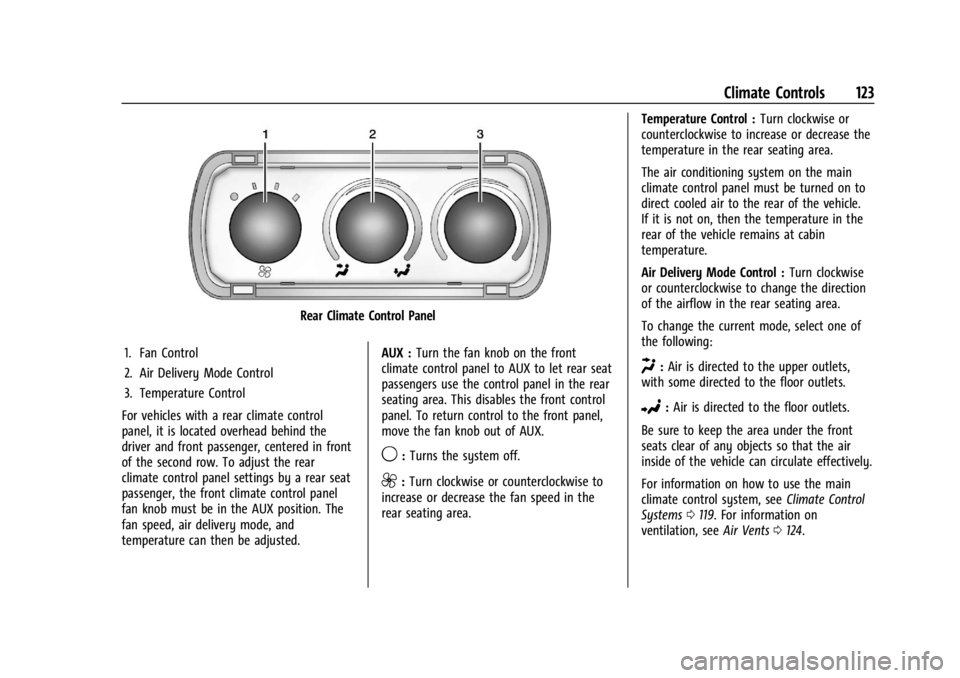
Rear Climate Control Panel
1. Fan Control
2. Air Delivery Mode Control
3. Temperature Control
For vehicles with a rear climate control
panel, it is located overhead behind the
driver and front passenger, centered in front
of the second row. To adjust the rear
climate control panel settings by a rear seat
passenger, the front climate control panel
fan knob must be in the AUX position. The
fan speed, air delivery mode, and
temperature can then be adjusted. AUX :
Turn the fan knob on the front
climate control panel to AUX to let rear seat
passengers use the control panel in the rear
seating area. This disables the front control
panel. To return control to the front panel,
move the fan knob out of AUX.
9: Turns the system off.
9:Turn clockwise or counterclockwise to
increase or decrease the fan speed in the
rear seating area. Temperature Control :
Turn clockwise or
counterclockwise to increase or decrease the
temperature in the rear seating area.
The air conditioning system on the main
climate control panel must be turned on to
direct cooled air to the rear of the vehicle.
If it is not on, then the temperature in the
rear of the vehicle remains at cabin
temperature.
Air Delivery Mode Control : Turn clockwise
or counterclockwise to change the direction
of the airflow in the rear seating area.
To change the current mode, select one of
the following:
H: Air is directed to the upper outlets,
with some directed to the floor outlets.
2: Air is directed to the floor outlets.
Be sure to keep the area under the front
seats clear of any objects so that the air
inside of the vehicle can circulate effectively.
For information on how to use the main
climate control system, see Climate Control
Systems 0119. For information on
ventilation, see Air Vents0124.
Page 160 of 296
Chevrolet Express Owner Manual (GMNA-Localizing-U.S./Canada/Mexico-
14583525) - 2021 - CRC - 12/9/20
Driving and Operating 159
{Warning
Fuel vapors and fuel fires burn violently
and can cause injury or death.
Follow these guidelines to help avoid
injuries to you and others:
.Read and follow all the instructions on
the fuel pump island.
.Turn off the engine when refueling.
.Keep sparks, flames, and smoking
materials away from fuel.
.Do not leave the fuel pump
unattended.
.Avoid using electronic devices while
refueling.
.Do not re-enter the vehicle while
pumping fuel.
.Keep children away from the fuel
pump and never let children
pump fuel.
.Before touching the fill nozzle, touch a
metallic object to discharge static
electricity from your body.(Continued)
Warning (Continued)
.Fuel can spray out if the fuel cap is
opened too quickly. This spray can
happen if the tank is nearly full, and is
more likely in hot weather. Open the
fuel cap slowly and wait for any hiss
noise to stop, then unscrew the cap all
the way.
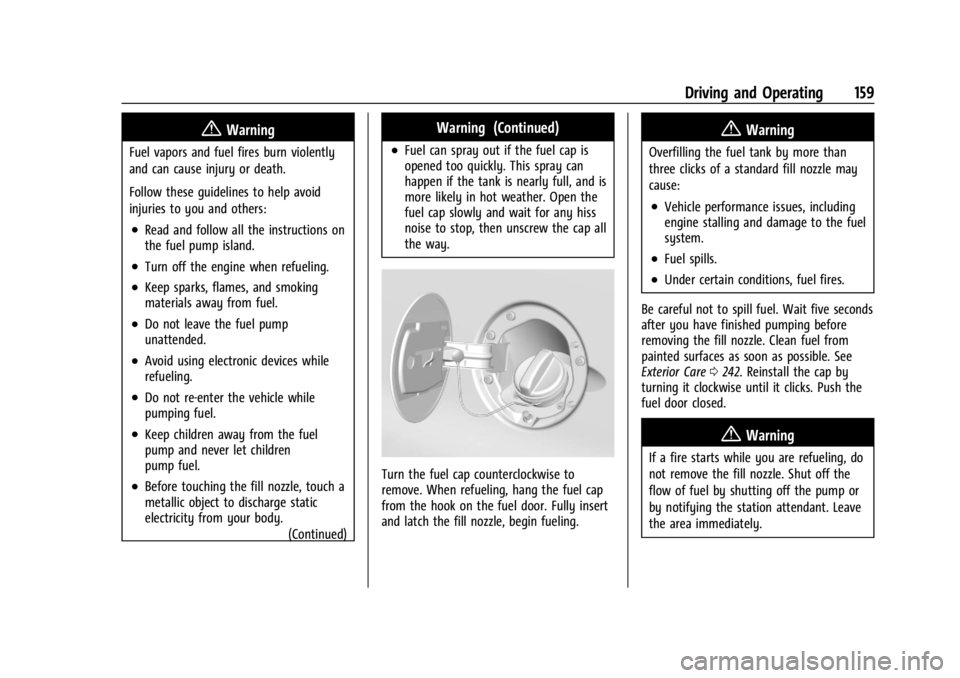
Turn the fuel cap counterclockwise to
remove. When refueling, hang the fuel cap
from the hook on the fuel door. Fully insert
and latch the fill nozzle, begin fueling.
{Warning
Overfilling the fuel tank by more than
three clicks of a standard fill nozzle may
cause:
.Vehicle performance issues, including
engine stalling and damage to the fuel
system.
.Fuel spills.
.Under certain conditions, fuel fires.
Be careful not to spill fuel. Wait five seconds
after you have finished pumping before
removing the fill nozzle. Clean fuel from
painted surfaces as soon as possible. See
Exterior Care 0242. Reinstall the cap by
turning it clockwise until it clicks. Push the
fuel door closed.
{Warning
If a fire starts while you are refueling, do
not remove the fill nozzle. Shut off the
flow of fuel by shutting off the pump or
by notifying the station attendant. Leave
the area immediately.
Page 194 of 296
Chevrolet Express Owner Manual (GMNA-Localizing-U.S./Canada/Mexico-
14583525) - 2021 - CRC - 12/9/20
Vehicle Care 193
How to Add Coolant to the Recovery
Tank for Gasoline Engines
{Warning
Spilling coolant on hot engine parts can
burn you. Coolant contains ethylene
glycol and it will burn if the engine parts
are hot enough.
{Warning
Plain water, or other liquids such as
alcohol, can boil before the proper
coolant mixture will. With plain water or
the wrong mixture, the engine could get
too hot but there would not be an
overheat warning. The engine could catch
fire and you or others could be burned.
{Warning
Steam and scalding liquids from a hot
cooling system are under pressure.
Turning the pressure cap, even a little,
can cause them to come out at high
speed and you could be burned. Never
turn the cap when the cooling system,(Continued)
Warning (Continued)
including the pressure cap, is hot. Wait
for the cooling system and pressure cap
to cool.
Caution
Failure to follow the specific coolant fill
procedure could cause the engine to
overheat and could cause system
damage. If coolant is not visible in the
surge tank, contact your dealer.
If coolant is needed, add the proper
DEX-COOL coolant mixture at the coolant
recovery tank.
How to Add Coolant to the Radiator
{Warning
Steam and scalding liquids from a hot
cooling system are under pressure.
Turning the pressure cap, even a little,
can cause them to come out at high
speed and you could be burned. Never
turn the cap when the cooling system, (Continued)
Warning (Continued)
including the pressure cap, is hot. Wait
for the cooling system and pressure cap
to cool.
If coolant is needed, add the proper mixture
directly to the radiator, but be sure the
cooling system is cool before this is done.
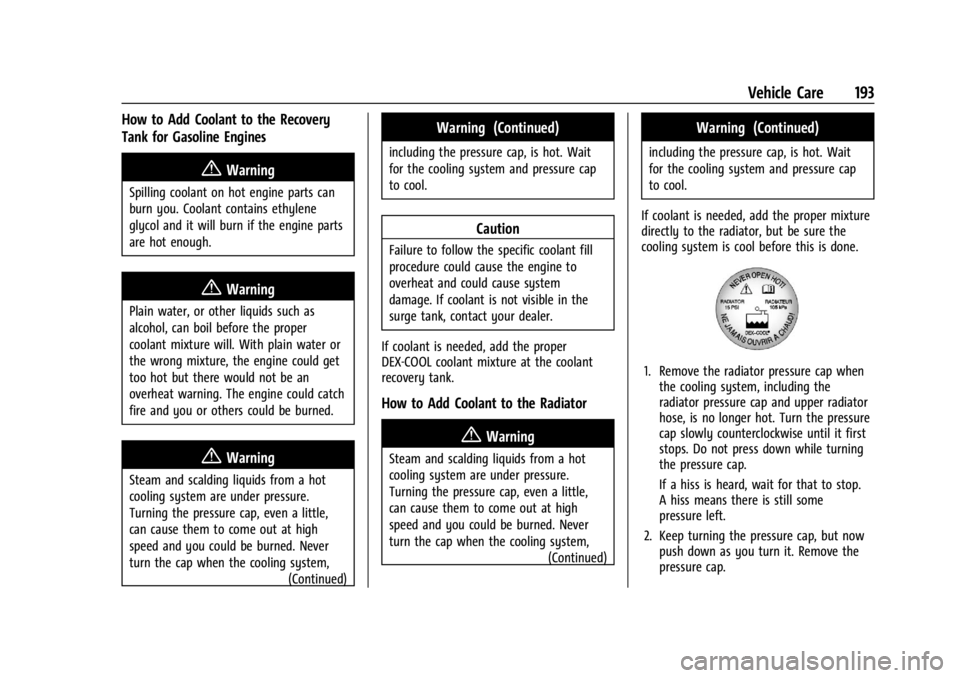
1. Remove the radiator pressure cap when the cooling system, including the
radiator pressure cap and upper radiator
hose, is no longer hot. Turn the pressure
cap slowly counterclockwise until it first
stops. Do not press down while turning
the pressure cap.
If a hiss is heard, wait for that to stop.
A hiss means there is still some
pressure left.
2. Keep turning the pressure cap, but now push down as you turn it. Remove the
pressure cap.
Page 204 of 296
Chevrolet Express Owner Manual (GMNA-Localizing-U.S./Canada/Mexico-
14583525) - 2021 - CRC - 12/9/20
Vehicle Care 203
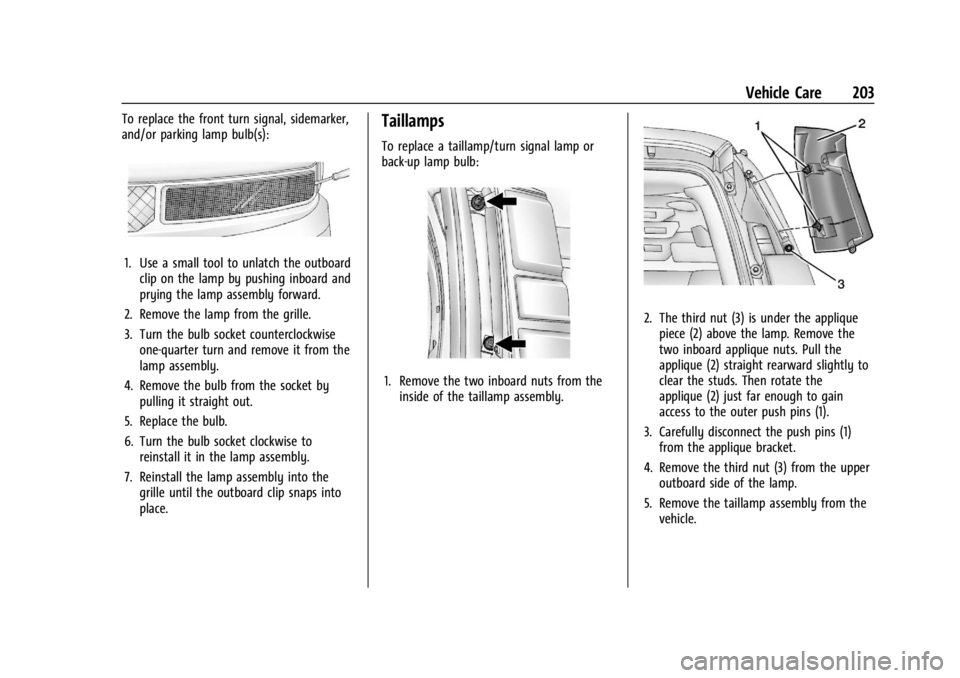
To replace the front turn signal, sidemarker,
and/or parking lamp bulb(s):
1. Use a small tool to unlatch the outboardclip on the lamp by pushing inboard and
prying the lamp assembly forward.
2. Remove the lamp from the grille.
3. Turn the bulb socket counterclockwise one-quarter turn and remove it from the
lamp assembly.
4. Remove the bulb from the socket by pulling it straight out.
5. Replace the bulb.
6. Turn the bulb socket clockwise to reinstall it in the lamp assembly.
7. Reinstall the lamp assembly into the grille until the outboard clip snaps into
place.
Taillamps
To replace a taillamp/turn signal lamp or
back-up lamp bulb:
1. Remove the two inboard nuts from theinside of the taillamp assembly.
2. The third nut (3) is under the appliquepiece (2) above the lamp. Remove the
two inboard applique nuts. Pull the
applique (2) straight rearward slightly to
clear the studs. Then rotate the
applique (2) just far enough to gain
access to the outer push pins (1).
3. Carefully disconnect the push pins (1) from the applique bracket.
4. Remove the third nut (3) from the upper outboard side of the lamp.
5. Remove the taillamp assembly from the vehicle.
Page 205 of 296
Chevrolet Express Owner Manual (GMNA-Localizing-U.S./Canada/Mexico-
14583525) - 2021 - CRC - 12/9/20
204 Vehicle Care
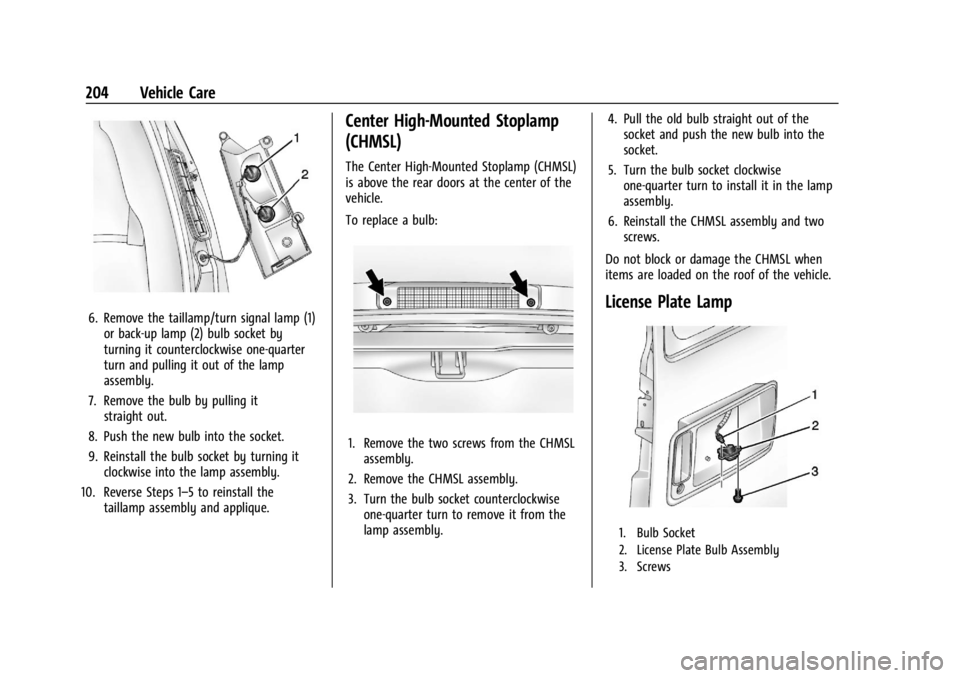
6. Remove the taillamp/turn signal lamp (1)or back-up lamp (2) bulb socket by
turning it counterclockwise one-quarter
turn and pulling it out of the lamp
assembly.
7. Remove the bulb by pulling it straight out.
8. Push the new bulb into the socket.
9. Reinstall the bulb socket by turning it clockwise into the lamp assembly.
10. Reverse Steps 1–5 to reinstall the taillamp assembly and applique.
Center High-Mounted Stoplamp
(CHMSL)
The Center High-Mounted Stoplamp (CHMSL)
is above the rear doors at the center of the
vehicle.
To replace a bulb:
1. Remove the two screws from the CHMSLassembly.
2. Remove the CHMSL assembly.
3. Turn the bulb socket counterclockwise one-quarter turn to remove it from the
lamp assembly. 4. Pull the old bulb straight out of the
socket and push the new bulb into the
socket.
5. Turn the bulb socket clockwise one-quarter turn to install it in the lamp
assembly.
6. Reinstall the CHMSL assembly and two screws.
Do not block or damage the CHMSL when
items are loaded on the roof of the vehicle.
License Plate Lamp
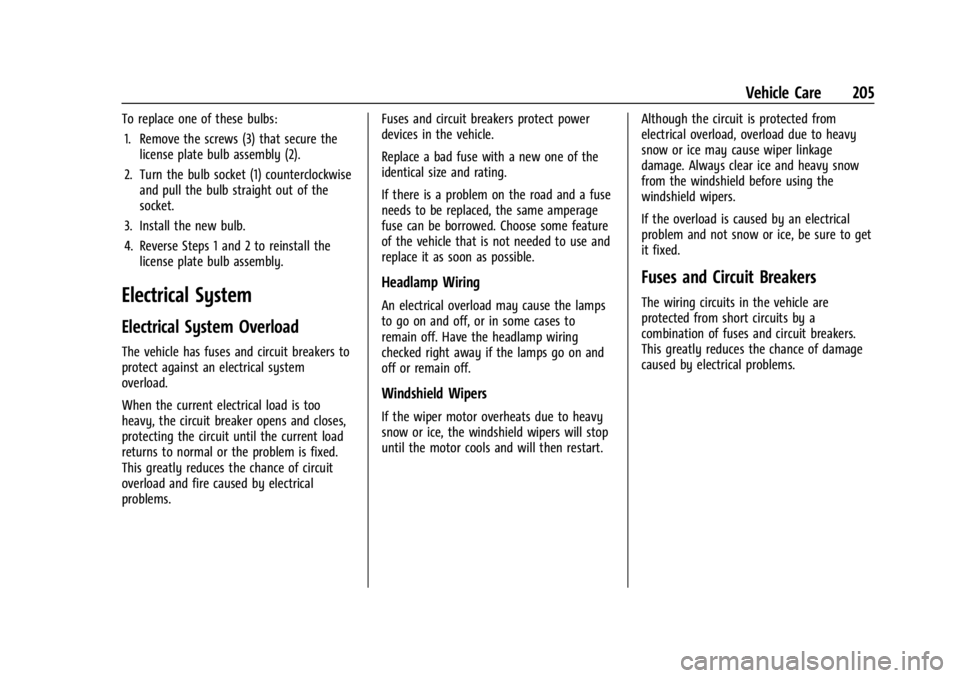
1. Bulb Socket
2. License Plate Bulb Assembly
3. Screws
Page 206 of 296
Chevrolet Express Owner Manual (GMNA-Localizing-U.S./Canada/Mexico-
14583525) - 2021 - CRC - 12/9/20
Vehicle Care 205
To replace one of these bulbs:1. Remove the screws (3) that secure the license plate bulb assembly (2).
2. Turn the bulb socket (1) counterclockwise and pull the bulb straight out of the
socket.
3. Install the new bulb.
4. Reverse Steps 1 and 2 to reinstall the license plate bulb assembly.
Electrical System
Electrical System Overload
The vehicle has fuses and circuit breakers to
protect against an electrical system
overload.
When the current electrical load is too
heavy, the circuit breaker opens and closes,
protecting the circuit until the current load
returns to normal or the problem is fixed.
This greatly reduces the chance of circuit
overload and fire caused by electrical
problems. Fuses and circuit breakers protect power
devices in the vehicle.
Replace a bad fuse with a new one of the
identical size and rating.
If there is a problem on the road and a fuse
needs to be replaced, the same amperage
fuse can be borrowed. Choose some feature
of the vehicle that is not needed to use and
replace it as soon as possible.
Headlamp Wiring
An electrical overload may cause the lamps
to go on and off, or in some cases to
remain off. Have the headlamp wiring
checked right away if the lamps go on and
off or remain off.
Windshield Wipers
If the wiper motor overheats due to heavy
snow or ice, the windshield wipers will stop
until the motor cools and will then restart.
Although the circuit is protected from
electrical overload, overload due to heavy
snow or ice may cause wiper linkage
damage. Always clear ice and heavy snow
from the windshield before using the
windshield wipers.
If the overload is caused by an electrical
problem and not snow or ice, be sure to get
it fixed.
Fuses and Circuit Breakers
The wiring circuits in the vehicle are
protected from short circuits by a
combination of fuses and circuit breakers.
This greatly reduces the chance of damage
caused by electrical problems.
Page 231 of 296
Chevrolet Express Owner Manual (GMNA-Localizing-U.S./Canada/Mexico-
14583525) - 2021 - CRC - 12/9/20
230 Vehicle Care
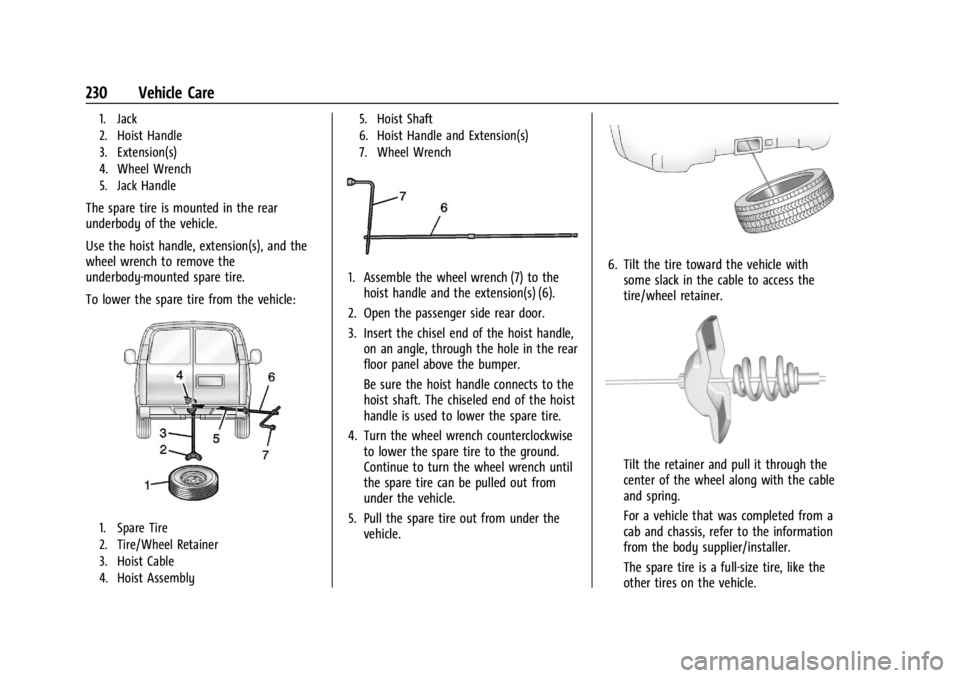
1. Jack
2. Hoist Handle
3. Extension(s)
4. Wheel Wrench
5. Jack Handle
The spare tire is mounted in the rear
underbody of the vehicle.
Use the hoist handle, extension(s), and the
wheel wrench to remove the
underbody-mounted spare tire.
To lower the spare tire from the vehicle:
1. Spare Tire
2. Tire/Wheel Retainer
3. Hoist Cable
4. Hoist Assembly5. Hoist Shaft
6. Hoist Handle and Extension(s)
7. Wheel Wrench
1. Assemble the wheel wrench (7) to the
hoist handle and the extension(s) (6).
2. Open the passenger side rear door.
3. Insert the chisel end of the hoist handle, on an angle, through the hole in the rear
floor panel above the bumper.
Be sure the hoist handle connects to the
hoist shaft. The chiseled end of the hoist
handle is used to lower the spare tire.
4. Turn the wheel wrench counterclockwise to lower the spare tire to the ground.
Continue to turn the wheel wrench until
the spare tire can be pulled out from
under the vehicle.
5. Pull the spare tire out from under the vehicle.6. Tilt the tire toward the vehicle withsome slack in the cable to access the
tire/wheel retainer.
Tilt the retainer and pull it through the
center of the wheel along with the cable
and spring.
For a vehicle that was completed from a
cab and chassis, refer to the information
from the body supplier/installer.
The spare tire is a full-size tire, like the
other tires on the vehicle.
Page 232 of 296
Chevrolet Express Owner Manual (GMNA-Localizing-U.S./Canada/Mexico-
14583525) - 2021 - CRC - 12/9/20
Vehicle Care 231
7. Put the spare tire near the flat tire.
8. Close the passenger side rear door.
Removing the Flat Tire and Installing the
Spare Tire
If the vehicle has plastic wheel nut caps,
loosen them by turning the wheel wrench
counterclockwise. The wheel nut caps are
designed to remain with the center cap.
Remove the center cap.
If the wheel has a smooth center piece,
place the chisel end of the wheel wrench in
the slot on the wheel and gently pry it out.
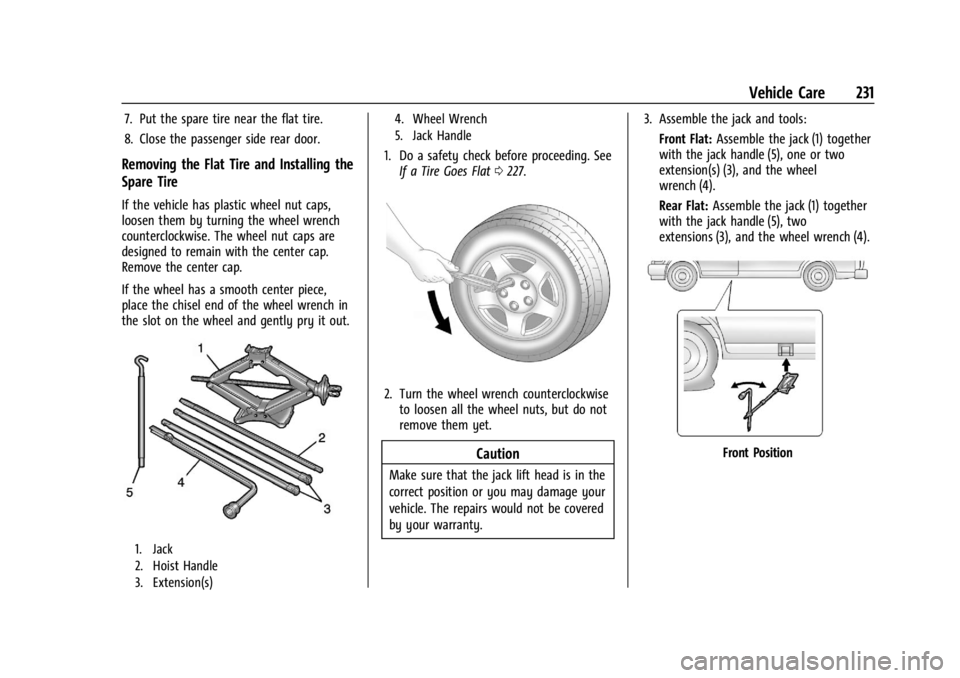
1. Jack
2. Hoist Handle
3. Extension(s)4. Wheel Wrench
5. Jack Handle
1. Do a safety check before proceeding. See
If a Tire Goes Flat 0227.
2. Turn the wheel wrench counterclockwise
to loosen all the wheel nuts, but do not
remove them yet.
Caution
Make sure that the jack lift head is in the
correct position or you may damage your
vehicle. The repairs would not be covered
by your warranty. 3. Assemble the jack and tools:
Front Flat: Assemble the jack (1) together
with the jack handle (5), one or two
extension(s) (3), and the wheel
wrench (4).
Rear Flat: Assemble the jack (1) together
with the jack handle (5), two
extensions (3), and the wheel wrench (4).
Front Position
Page 234 of 296
Chevrolet Express Owner Manual (GMNA-Localizing-U.S./Canada/Mexico-
14583525) - 2021 - CRC - 12/9/20
Vehicle Care 233
Warning (Continued)
badly injured or killed if the vehicle slips
off the jack. If a jack is provided with the
vehicle, only use it for changing a
flat tire.
Caution
Using a jack to raise the vehicle without
positioning it correctly could damage
your vehicle. When raising your vehicle
on a jack, be sure to position it correctly
under the frame and avoid contact with
the plastic molding.
5. Turn the wheel wrench clockwise to raise the vehicle. Raise the vehicle far enough
off the ground so there is enough room
for the spare tire to fit.
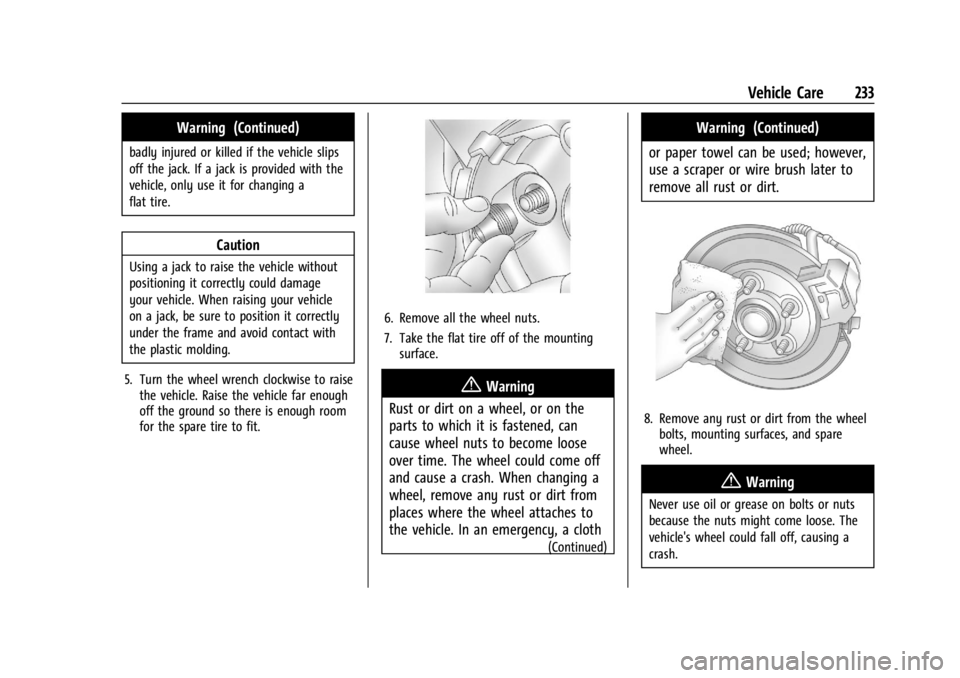
6. Remove all the wheel nuts.
7. Take the flat tire off of the mountingsurface.
{Warning
Rust or dirt on a wheel, or on the
parts to which it is fastened, can
cause wheel nuts to become loose
over time. The wheel could come off
and cause a crash. When changing a
wheel, remove any rust or dirt from
places where the wheel attaches to
the vehicle. In an emergency, a cloth
(Continued)
Warning (Continued)
or paper towel can be used; however,
use a scraper or wire brush later to
remove all rust or dirt.
8. Remove any rust or dirt from the wheel bolts, mounting surfaces, and spare
wheel.
{Warning
Never use oil or grease on bolts or nuts
because the nuts might come loose. The
vehicle's wheel could fall off, causing a
crash.