air condition CHEVROLET EXPRESS CARGO VAN 2003 1.G Owners Manual
[x] Cancel search | Manufacturer: CHEVROLET, Model Year: 2003, Model line: EXPRESS CARGO VAN, Model: CHEVROLET EXPRESS CARGO VAN 2003 1.GPages: 386, PDF Size: 2.73 MB
Page 76 of 386
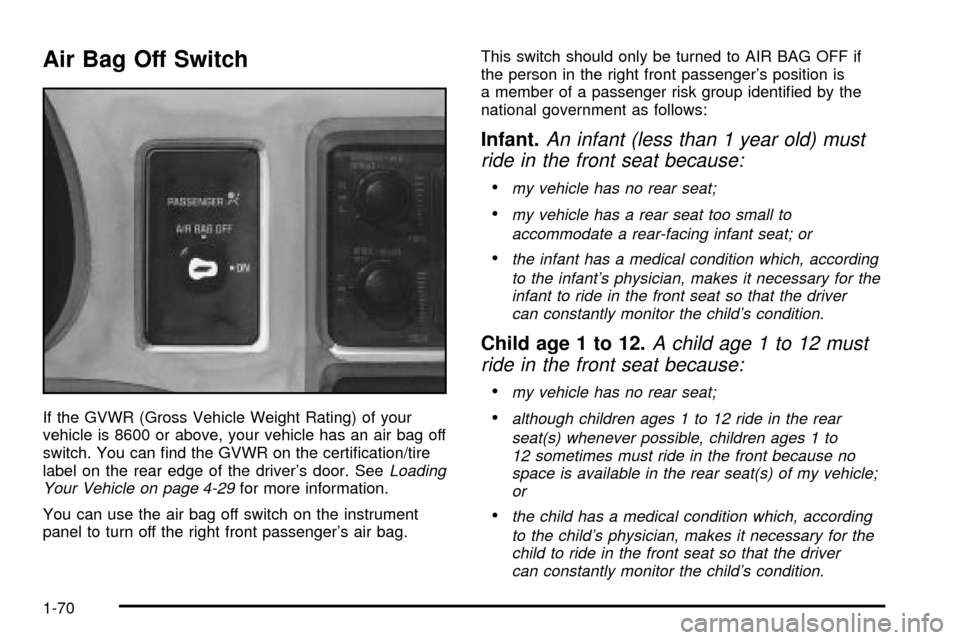
Air Bag Off Switch
If the GVWR (Gross Vehicle Weight Rating) of your
vehicle is 8600 or above, your vehicle has an air bag off
switch. You can ®nd the GVWR on the certi®cation/tire
label on the rear edge of the driver's door. See
Loading
Your Vehicle on page 4-29for more information.
You can use the air bag off switch on the instrument
panel to turn off the right front passenger's air bag.This switch should only be turned to AIR BAG OFF if
the person in the right front passenger's position is
a member of a passenger risk group identi®ed by the
national government as follows:
Infant.An infant (less than 1 year old) must
ride in the front seat because:
·my vehicle has no rear seat;
·my vehicle has a rear seat too small to
accommodate a rear-facing infant seat; or
·the infant has a medical condition which, according
to the infant's physician, makes it necessary for the
infant to ride in the front seat so that the driver
can constantly monitor the child's condition.
Child age 1 to 12.A child age 1 to 12 must
ride in the front seat because:
·my vehicle has no rear seat;
·although children ages 1 to 12 ride in the rear
seat(s) whenever possible, children ages 1 to
12 sometimes must ride in the front because no
space is available in the rear seat(s) of my vehicle;
or
·the child has a medical condition which, according
to the child's physician, makes it necessary for the
child to ride in the front seat so that the driver
can constantly monitor the child's condition.
1-70
Page 77 of 386
Medical Condition.A passenger has a
medical condition which, according to his or
her physician:
·causes the passenger air bag to pose a special risk
for the passenger; and
·makes the potential harm from the passenger air
bag in a crash greater than the potential harm
from turning off the air bag and allowing the
passenger, even if belted, to hit the dashboard or
windshield in a crash.
{CAUTION:
If the right front passenger's air bag is turned
off for a person who isn't in a risk group
identi®ed by the national government, that
person won't have the extra protection of an
air bag. In a crash, the air bag wouldn't be able
to in¯ate and help protect the person sitting
there. Don't turn off the passenger's air bag
unless the person sitting there is in a risk
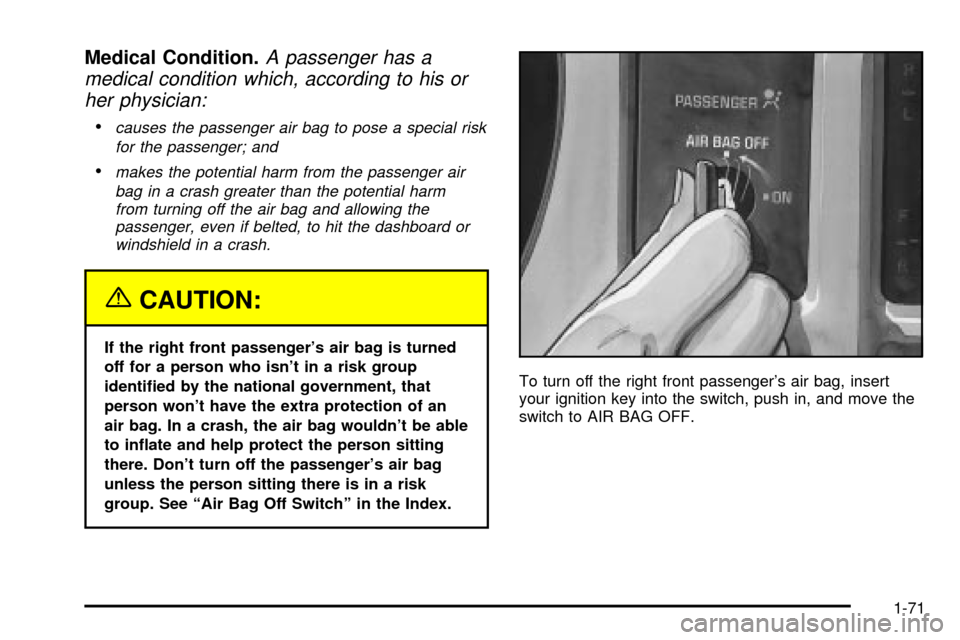
group. See ªAir Bag Off Switchº in the Index.To turn off the right front passenger's air bag, insert
your ignition key into the switch, push in, and move the
switch to AIR BAG OFF.
1-71
Page 85 of 386

This vehicle has one
double-sided key for the
ignition and door locks.
It will ®t with either side up.
When a new vehicle is delivered, the dealer
provides the owner with a pair of identical keys and a
bar-coded tag.
The bar-coded tag has a code on it that tells your
dealer or a quali®ed locksmith how to make extra keys.
Keep this tag in a safe place. If you lose your keys,
you'll be able to have new ones made easily using
this tag.
Notice:Your vehicle has a number of features
that can help prevent theft. You can have a lot of
trouble getting into your vehicle if you ever lock
your keys inside. You may even have to damage
your vehicle to get in. So be sure you have
spare keys.If you ever do get locked out of your vehicle, call GM
Roadside Assistance Center. See
Roadside Assistance
Program on page 7-5.
Remote Keyless Entry System
If equipped, the remote keyless entry system operates
on a radio frequency subject to Federal Communications
Commission (FCC) Rules and with Industry Canada.
This device complies with Part 15 of the FCC Rules.
Operation is subject to the following two conditions:
1. This device may not cause interference, and
2. This device must accept any interference received,
including interference that may cause undesired
operation of the device.
This device complies with RSS-210 of Industry Canada.
Operation is subject to the following two conditions:
1. This device may not cause interference, and
2. This device must accept any interference received,
including interference that may cause undesired
operation of the device.
Changes or modi®cations to this system by other than
an authorized service facility could void authorization to
use this equipment.
2-3
Page 108 of 386

All-Wheel Drive
If your vehicle has all-wheel drive, your engine's driving
power is sent to all four wheels for extra traction
when needed.
This is like four-wheel drive, but there is no separate
lever or switch to engage or disengage the front axle.
It is fully automatic, and adjusts itself as needed for road
conditions.
You may experience a brief vehicle vibration upon
acceleration when driving in slippery conditions. This is
normal and is an indication that the all-wheel drive
system is functioning properly.
Parking Brake
To set the parking brake, hold the regular brake pedal
down with your right foot. Push down the parking
brake pedal with your left foot.
If the ignition is on, the brake system warning light will
come on.
To release the parking brake, hold the regular brake
pedal down. Pull the handle, located just above
the parking brake pedal, marked BRAKE RELEASE to
release the parking brake.
If the ignition is on when the parking brake is released,
the brake system warning light will go off.
Notice:Driving with the parking brake on can
cause your rear brakes to overheat. You may
have to replace them, and you could also damage
other parts of your vehicle. Always check to be
sure your parking brake is fully released before
you drive.
If you are towing a trailer and are parking on any hill,
see
Towing a Trailer on page 4-31. That section shows
what to do ®rst to keep the trailer from moving.
Shifting Into Park (P)
{CAUTION:
It can be dangerous to get out of your vehicle
if the shift lever is not fully in PARK (P) with
the parking brake ®rmly set. Your vehicle can
roll. If you have left the engine running, the
vehicle can move suddenly. You or others
could be injured. To be sure your vehicle won't
move, even when you're on fairly level ground,
use the steps that follow. If you're pulling a
trailer, see ªTowing a Trailerº in the Index.
2-26
Page 117 of 386
OnStaržSystem
Your vehicle may be equipped with the OnStarž
System. OnStaržuses global positioning system (GPS)
satellite technology, wireless communications, and
call centers to provide you with a wide range of safety,
security, information and convenience services.
A complete OnStar
žuser's guide and the terms and
conditions of the OnStaržSubscription Service
Agreement are included in your vehicle's glove box
literature. For more information, visit www.onstar.com,
contact OnStar
žat 1-888-4-ONSTAR (1-888-466-7827),
or press the blue OnStaržbutton to speak to an
OnStaržadvisor 24 hours a day, 7 days a week.
A completed Subscription Service Agreement is required
prior to delivery of OnStar
žservices and prepaid
calling minutes are also required for OnStaržPersonal
Calling and OnStaržVirtual Advisor use. Terms and
conditions of the Subscription Service Agreement can be
found at www.onstar.com.
OnStaržServices
One of the following plans is normally included for a
speci®c duration with each vehicle equipped with
OnStar
ž. You can upgrade or extend your OnStarž
service plan to meet your needs.
Safe and Sound Plan
·
Automatic Noti®cation of Air Bag Deployment
·Emergency Services
·Roadside Assistance
·Stolen Vehicle Assistance
·AccidentAssist
·Remote Door Unlock
·Remote Diagnostics
·Online Concierge
Directions and Connections Plan
·
All Safe and Sound Plan services
·Route Support
·RideAssist
·Information and Convenience Services
2-35
Page 119 of 386

Instrument Panel Overview...............................3-4
Hazard Warning Flashers................................3-5
Other Warning Devices...................................3-6
Horn.............................................................3-6
Tilt Wheel.....................................................3-7
Turn Signal/Multifunction Lever.........................3-7
Exterior Lamps.............................................3-13
Interior Lamps..............................................3-16
Accessory Power Outlets...............................3-18
Ashtrays and Cigarette Lighter........................3-18
Climate Controls............................................3-19
Climate Control System.................................3-19
Rear Heating System....................................3-20
Rear Air Conditioning and Heating System.......3-21Warning Lights, Gages and Indicators.............3-23
Instrument Panel Cluster................................3-24
Speedometer...............................................3-25
Safety Belt Reminder Light.............................3-26
Air Bag Readiness Light................................3-27
Air Bag Off Light..........................................3-28
Charging System Light..................................3-29
Voltmeter Gage............................................3-30
Brake System Warning Light..........................3-31
Anti-Lock Brake System
Warning Light...........................................3-32
Engine Coolant Temperature Gage..................3-32
Low Coolant Warning Light............................3-33
Malfunction Indicator Lamp.............................3-33
Section 3 Instrument Panel
3-1
Page 138 of 386
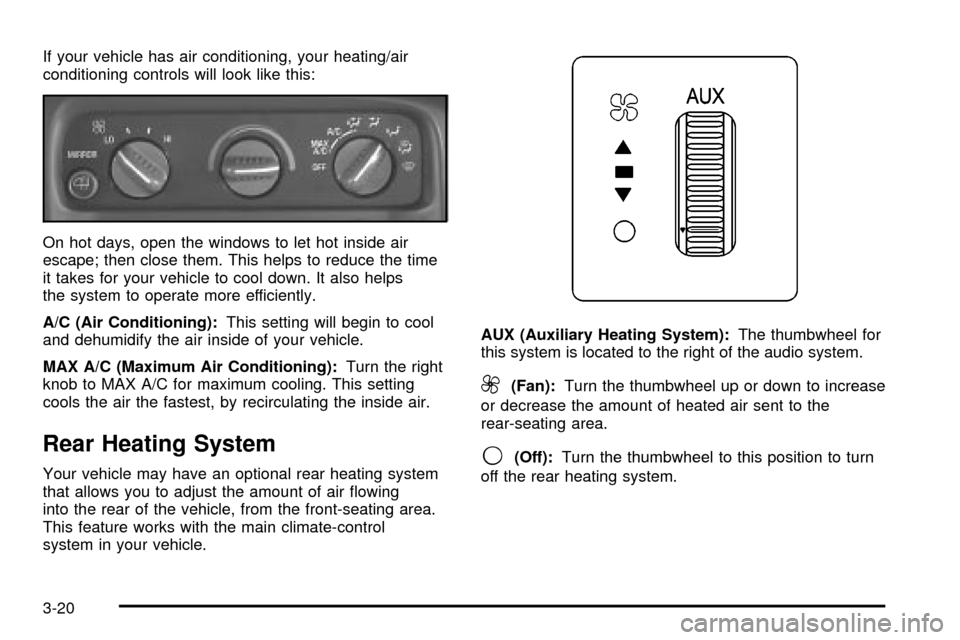
If your vehicle has air conditioning, your heating/air
conditioning controls will look like this:
On hot days, open the windows to let hot inside air
escape; then close them. This helps to reduce the time
it takes for your vehicle to cool down. It also helps
the system to operate more efficiently.
A/C (Air Conditioning):This setting will begin to cool
and dehumidify the air inside of your vehicle.
MAX A/C (Maximum Air Conditioning):Turn the right
knob to MAX A/C for maximum cooling. This setting
cools the air the fastest, by recirculating the inside air.
Rear Heating System
Your vehicle may have an optional rear heating system
that allows you to adjust the amount of air ¯owing
into the rear of the vehicle, from the front-seating area.
This feature works with the main climate-control
system in your vehicle.AUX (Auxiliary Heating System):The thumbwheel for
this system is located to the right of the audio system.
9(Fan):Turn the thumbwheel up or down to increase
or decrease the amount of heated air sent to the
rear-seating area.
9(Off):Turn the thumbwheel to this position to turn
off the rear heating system.
3-20
Page 139 of 386
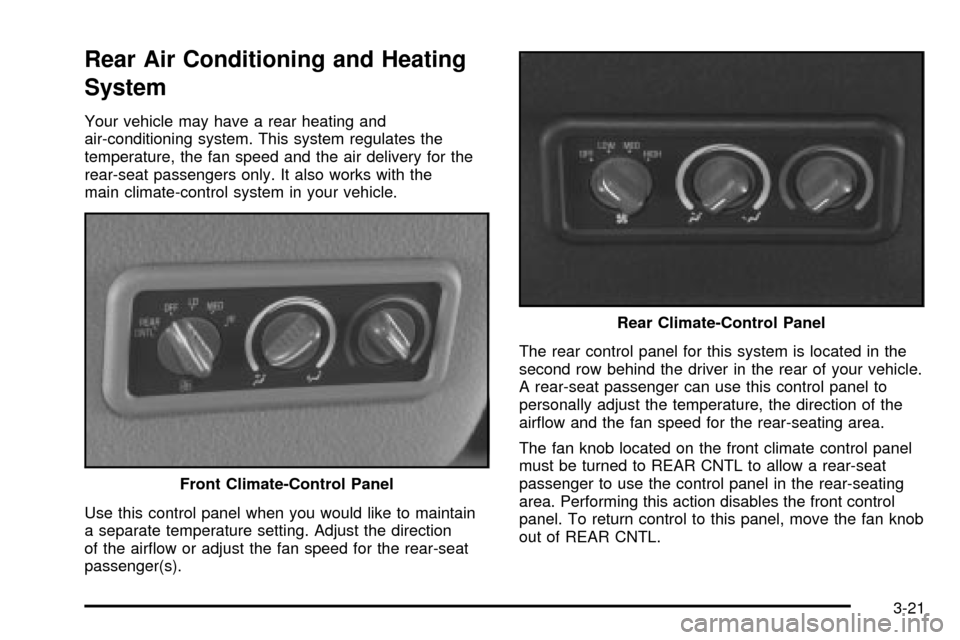
Rear Air Conditioning and Heating
System
Your vehicle may have a rear heating and
air-conditioning system. This system regulates the
temperature, the fan speed and the air delivery for the
rear-seat passengers only. It also works with the
main climate-control system in your vehicle.
Use this control panel when you would like to maintain
a separate temperature setting. Adjust the direction
of the air¯ow or adjust the fan speed for the rear-seat
passenger(s).The rear control panel for this system is located in the
second row behind the driver in the rear of your vehicle.
A rear-seat passenger can use this control panel to
personally adjust the temperature, the direction of the
air¯ow and the fan speed for the rear-seating area.
The fan knob located on the front climate control panel
must be turned to REAR CNTL to allow a rear-seat
passenger to use the control panel in the rear-seating
area. Performing this action disables the front control
panel. To return control to this panel, move the fan knob
out of REAR CNTL. Front Climate-Control Panel
Rear Climate-Control Panel
3-21
Page 140 of 386

Turn the center knob clockwise or counterclockwise
to change the direction of the air¯ow in the
rear-seating area.
To change the current mode, select one of the following:
D(Vent):Use this mode to direct air to the upper
outlets, with a little air directed to the ¯oor outlets.
2(Floor):Use this mode to direct most of the air to
the ¯oor outlets.
9(Fan):Turn the left knob clockwise or
counterclockwise to HIGH, MED (Medium) or LOW to
increase or decrease the fan speed in the rear-seating
area. Turn the knob to OFF to turn off the fan.
(Temperature Control):To increase or decrease the
temperature for the rear of the vehicle, turn the right
knob located on the climate-control panel.
The air-conditioning system on the main climate-control
panel must be turned on to direct cooled air to the
rear of the vehicle. If it is not on, then the temperature
in the rear of the vehicle will remain at cabin
temperature.
Be sure to keep the area under the front seats clear of
any objects so that the air inside of your vehicle can
circulate effectively.For information on how to use the main climate-control
system, see
Climate Control System on page 3-19listed previously in this section. For information
on ventilation, see ªOutlet Adjustmentº earlier in this
section.
Defogging and Defrosting
Fog on the inside of windows is a result of high humidity
(moisture) condensing on the cool window glass. This
can be minimized if the climate control is used properly.
There are two modes to clear fog or frost from your
windshield and side windows.
Use the defog mode to clear the windows of fog or
moisture and warm the passengers. Use the defrost
mode to remove fog or frost from the windshield more
quickly. For best results, clear all snow and ice from the
windshield before defrosting.
Turn the knob on the right of the climate control panel
to select the defog or defrost mode.
-(Blend):With this setting, the outside air comes out
of both the ¯oor and defroster outlets. Adjust the
temperature knob for warmer or cooler air. The air
conditioning compressor may operate in this setting to
dehumidify the air.
1(Defrost):This setting operates the defroster.
Most of the air comes out near the windshield, with
some going to the ¯oor outlets and front side windows.
3-22
Page 141 of 386

The air conditioning compressor may operate in this
setting to dehumidify the air.
The blend setting is useful for cold weather with a large
number of passengers or very humid conditions to
help keep the windshield clear. Use defrost to remove
fog or ice from the windshield quickly in extremely
cold conditions. The temperature knob should be in the
red area and the fan control toward high. Do not
drive the vehicle until all the windows are clear.
Rear Window Defogger
Press this button to turn the rear window defogger on or
off. Be sure to clear as much snow from the window
as possible.
The rear window defogger uses a warming grid to
remove fog or frost from the rear window and will only
work when the ignition is RUN.
The rear window defogger will turn off several minutes
after the button is pressed. If turned on again, the
defogger will run for several more minutes before turning
off. The defogger can also be turned off by pressing
the button again or by turning off the engine.
Notice:Don't use a razor blade or something else
sharp on the inside of the rear window. If you
do, you could cut or damage the defogger and the
repairs would not be covered by your warranty.
Do not attach a temporary vehicle license, tape, a
decal or anything similar to the defogger grid.
Warning Lights, Gages and
Indicators
This part describes the warning lights and gages
that may be on your vehicle. The pictures will help
you locate them.
Warning lights and gages can signal that something is
wrong before it becomes serious enough to cause
an expensive repair or replacement. Paying attention to
your warning lights and gages could also save you
or others from injury.
Warning lights come on when there may be or is a
problem with one of your vehicle's functions. As you will
see in the details on the next few pages, some
warning lights come on brie¯y when you start the
engine just to let you know they're working. If you are
familiar with this section, you should not be alarmed
when this happens.
Gages can indicate when there may be or is a problem
with one of your vehicle's functions. Often gages
and warning lights work together to let you know when
there's a problem with your vehicle.
When one of the warning lights comes on and stays
on when you are driving, or when one of the gages
shows there may be a problem, check the section
that tells you what to do about it. Please follow this
manual's advice. Waiting to do repairs can be
costly ± and even dangerous. So please get to know
your warning lights and gages. They're a big help.
3-23