turn signal CHEVROLET EXPRESS CARGO VAN 2003 1.G Owners Manual
[x] Cancel search | Manufacturer: CHEVROLET, Model Year: 2003, Model line: EXPRESS CARGO VAN, Model: CHEVROLET EXPRESS CARGO VAN 2003 1.GPages: 386, PDF Size: 2.73 MB
Page 86 of 386
At times you may notice a decrease in range. This is
normal for any remote keyless entry system. If the
transmitter does not work or if you have to stand closer
to your vehicle for the transmitter to work, try this:
·Check the distance. You may be too far from your
vehicle. You may need to stand closer during
rainy or snowy weather.
·Check the location. Other vehicles or objects may
be blocking the signal. Take a few steps to the
left or right, hold the transmitter higher, and
try again.
·Check to determine if battery replacement or
resynchronization is necessary. See ªBattery
Replacementº and ªResynchronizationº under
ªRemote Keyless Entry System Operationº following
this section.
·If you are still having trouble, see your dealer or a
quali®ed technician for service.
Remote Keyless Entry System
Operation
Your vehicle may have this feature.
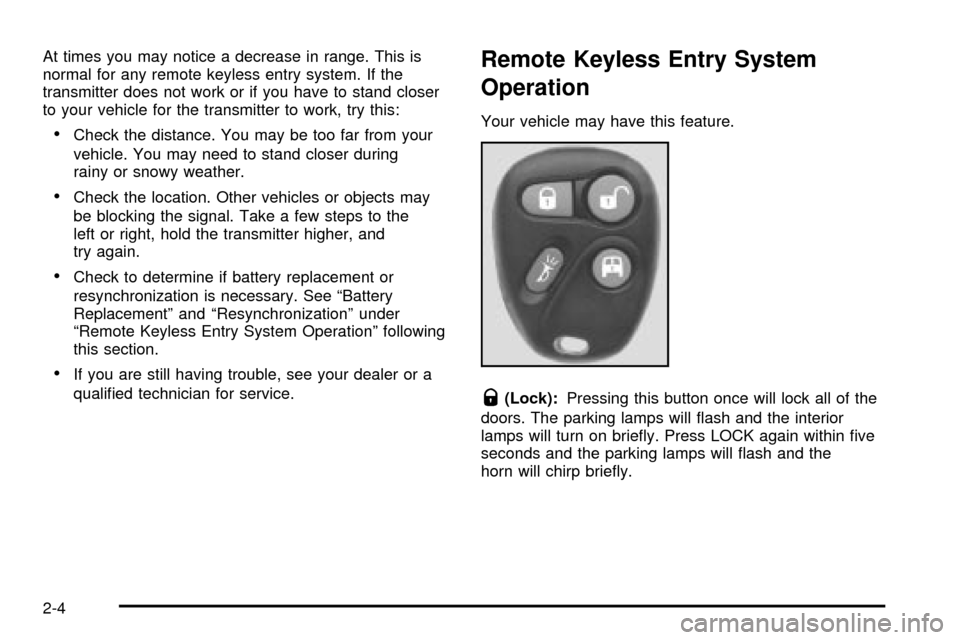
Q(Lock):Pressing this button once will lock all of the
doors. The parking lamps will ¯ash and the interior
lamps will turn on brie¯y. Press LOCK again within ®ve
seconds and the parking lamps will ¯ash and the
horn will chirp brie¯y.
2-4
Page 87 of 386

W(Unlock):Pressing this button once will unlock the
driver's door. The parking lamps will ¯ash twice and
the interior lamps will turn on. Press UNLOCK
again within ®ve seconds to unlock the remaining doors.
The parking lamps will ¯ash.
L(Panic Alarm):The remote keyless entry transmitter
comes equipped with an instant panic alarm. To use
the alarm, press the horn symbol when the ignition
is turned off. The horn will sound and both the interior
and exterior lamps will ¯ash for up to thirty seconds. To
stop the instant panic alarm, press the panic button
again, wait for thirty seconds, or start the vehicle.
j(Cargo Door):Press this button to unlock the cargo
doors only.
Matching Transmitter(s) to Your
Vehicle
Each remote keyless entry transmitter is coded to
prevent another transmitter from unlocking your vehicle.
If a transmitter is lost or stolen, a replacement can
be purchased through your dealer.Remember to bring any remaining transmitters with
you when you go to your dealer. When the dealer
matches the replacement transmitter to your vehicle,
any remaining transmitters must also be matched. Once
your dealer has coded the new transmitter, the lost
transmitter will not unlock your vehicle. Each vehicle can
have a maximum of four transmitters matched to it.
Resynchronization
Resynchronization may be necessary due to the
security method used by this system. The transmitter
does not send the same signal twice to the receiver. The
receiver will not respond to a signal that has been
sent previously. This prevents anyone from recording
and playing back the signal from the transmitter.
To resynchronize your transmitter, stand close to your
vehicle and press and hold the LOCK and UNLOCK
buttons on the transmitter at the same time for seven
seconds. The door locks should cycle to con®rm
synchronization. If the locks do not cycle, see your
dealer for service.
2-5
Page 119 of 386

Instrument Panel Overview...............................3-4
Hazard Warning Flashers................................3-5
Other Warning Devices...................................3-6
Horn.............................................................3-6
Tilt Wheel.....................................................3-7
Turn Signal/Multifunction Lever.........................3-7
Exterior Lamps.............................................3-13
Interior Lamps..............................................3-16
Accessory Power Outlets...............................3-18
Ashtrays and Cigarette Lighter........................3-18
Climate Controls............................................3-19
Climate Control System.................................3-19
Rear Heating System....................................3-20
Rear Air Conditioning and Heating System.......3-21Warning Lights, Gages and Indicators.............3-23
Instrument Panel Cluster................................3-24
Speedometer...............................................3-25
Safety Belt Reminder Light.............................3-26
Air Bag Readiness Light................................3-27
Air Bag Off Light..........................................3-28
Charging System Light..................................3-29
Voltmeter Gage............................................3-30
Brake System Warning Light..........................3-31
Anti-Lock Brake System
Warning Light...........................................3-32
Engine Coolant Temperature Gage..................3-32
Low Coolant Warning Light............................3-33
Malfunction Indicator Lamp.............................3-33
Section 3 Instrument Panel
3-1
Page 123 of 386

The main components of your instrument panel are the
following:
A. Air Outlets
B. Turn Signal/Multifunction Lever
C. Instrument Panel Cluster
D. Shift Lever
E. Climate Control System
F. Audio System
G. Headlamp and Parking Lamp Controls
H. Tow/Haul Mode Button
I. Rear Heating System (If Equipped)
J. Accessory Power Outlets/Cigarette Lighter
K. Storage CompartmentHazard Warning Flashers
Your hazard warning ¯ashers let you warn others. They
also let police know you have a problem. Your front
and rear turn signal lamps will ¯ash on and off.
3-5
Page 124 of 386
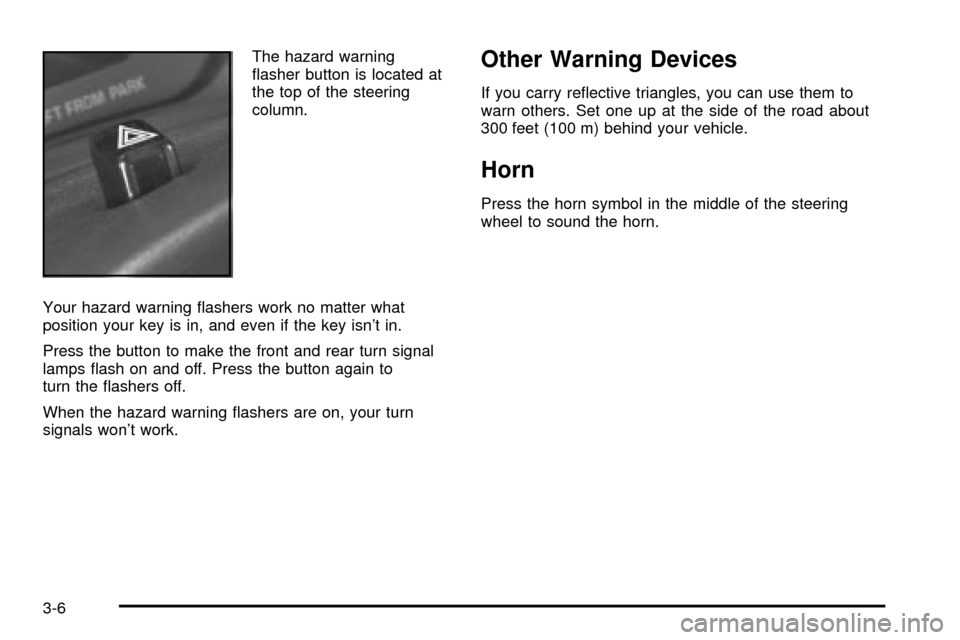
The hazard warning
¯asher button is located at
the top of the steering
column.
Your hazard warning ¯ashers work no matter what
position your key is in, and even if the key isn't in.
Press the button to make the front and rear turn signal
lamps ¯ash on and off. Press the button again to
turn the ¯ashers off.
When the hazard warning ¯ashers are on, your turn
signals won't work.Other Warning Devices
If you carry re¯ective triangles, you can use them to
warn others. Set one up at the side of the road about
300 feet (100 m) behind your vehicle.
Horn
Press the horn symbol in the middle of the steering
wheel to sound the horn.
3-6
Page 125 of 386
Tilt Wheel
A tilt steering wheel allows you to adjust the steering
wheel before you drive. You can also raise it to the
highest level to give your legs more room when
you enter and exit the vehicle.
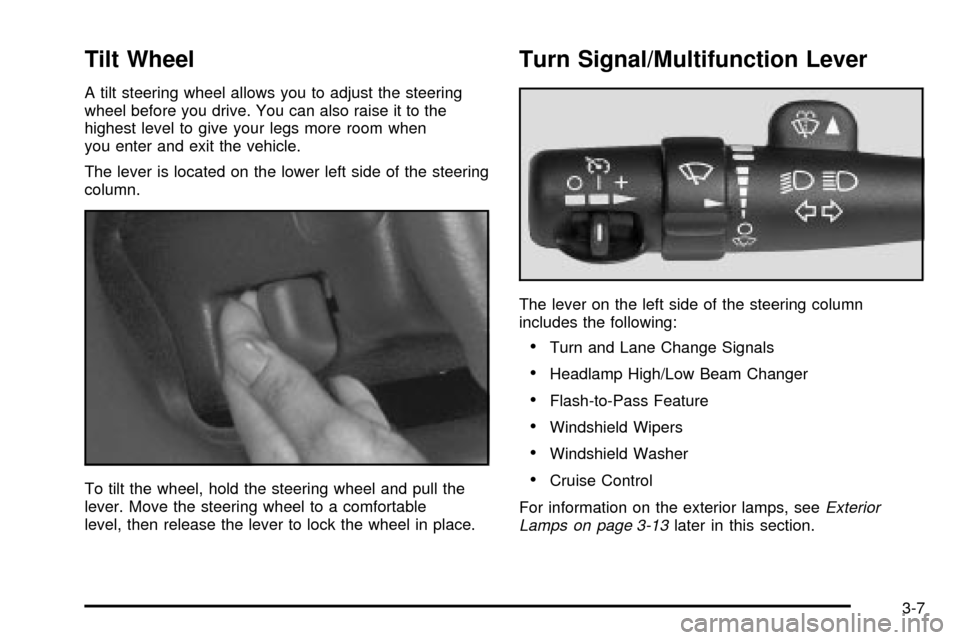
The lever is located on the lower left side of the steering
column.
To tilt the wheel, hold the steering wheel and pull the
lever. Move the steering wheel to a comfortable
level, then release the lever to lock the wheel in place.
Turn Signal/Multifunction Lever
The lever on the left side of the steering column
includes the following:
·Turn and Lane Change Signals
·Headlamp High/Low Beam Changer
·Flash-to-Pass Feature
·Windshield Wipers
·Windshield Washer
·Cruise Control
For information on the exterior lamps, see
Exterior
Lamps on page 3-13later in this section.
3-7
Page 126 of 386

Turn and Lane Change Signals
The turn signal has two upward (for right) and
two downward (for left) positions. These positions
allow you to signal a turn or a lane change.
To signal a turn, move the lever all the way up or down.
When the turn is ®nished, the lever will return
automatically.
An arrow on the instrument
panel cluster will ¯ash in
the direction of the
turn or lane change.
To signal a lane change, just raise or lower the lever
until the arrow starts to ¯ash. Hold it there until you
complete your lane change. The lever will return by itself
when you release it.
If you move the lever all the way up or down, and the
arrow ¯ashes at twice the normal rate, a signal bulb may
be burned out and other drivers may not see your
turn signal.If a bulb is burned out, replace it to help avoid an
accident. If the arrows don't go on at all when you signal
a turn, check for burned-out bulbs or a blown fuse.
See
Fuses and Circuit Breakers on page 5-92.
Turn Signal On Chime
If your turn signal is left on for more than 3/4 of a mile
(1.2 km), a chime will sound at each ¯ash of the
turn signal. To turn off the chime, move the turn signal
lever to the off position.
Headlamp High/Low Beam Changer
23
(Headlamp High/Low Beam Changer):To
change the headlamps from low to high beam, pull the
mutlifunction lever all the way toward you. Then
release it.
When the high beams are
on, this light on the
instrument panel cluster
also will be on.
3-8
Page 127 of 386

Flash-To-Pass Feature
This feature allows you to use your high-beam
headlamps to signal a driver in front of you that you
want to pass. It works even if your headlamps are off.
To use it, pull the turn signal lever toward you, but not so
far that you hear it click.
If your headlamps are off or on low-beam, your
high-beam headlamps will turn on and stay on as long
as you hold the lever toward you and the high-beam
indicator on the instrument panel will come on. Release
the lever to turn the high-beam headlamps off.
Windshield Wipers
You control the windshield wipers by turning the band
with the wiper symbol on it.
8(Mist):For a single wiping cycle, turn the band to
mist. Hold it there until the wipers start, then let go. The
wipers will stop after one wipe. If you want more
wipes, hold the band on mist longer.(Delay):You can set the wiper speed for a long or
short delay between wipes. This can be very useful in
light rain or snow. Turn the band to choose the
delay time. The closer to the top of the lever, the shorter
the delay.
d(Low Speed):For steady wiping at low speed,
turn the band away from you to the ®rst solid band past
the delay settings. position. For high-speed wiping,
turn the band further, to the second solid band past the
delay settings. To stop the wipers, move the band to
off position.
a(High Speed):For high-speed wiping, turn the
band further, to the second solid band past the
delay settings.
9(Off):To stop the wipers, move the band to off.
Be sure to clear ice and snow from the wiper blades
before using them. If they're frozen to the windshield,
carefully loosen or thaw them. If your blades do become
worn or damaged, get new blades or blade inserts.
3-9
Page 132 of 386

i(Daytime Running Lamps (DRL)):Turning the
control to this position selects the DRLs. When the
vehicle is shifted out of PARK (P), the instrument panel
lamps will illuminate and the DRLs will turn on, unless
defeated. When the DRLs are active, the DRL indicator
will illuminate.
;(Parking Lamps):Turn the control to this position
to turn on the parking lamps, together with the
following:
·Instrument Panel Lights
·Daytime Running Lamps
·Sidemarker Lamps
·Taillamps
·License Plate Lamps
·Ashtray Lamp
If the DRLs are active when the control is turned to this
position, the DRLs will turn off.
For vehicles ®rst sold in Canada, the DRLs will remain
active along with the lamps mentioned above.
5(Headlamps):Turn the control to this position to
turn on the headlamps together with the parking
lamps and turn off the daytime running lamps.
You can switch your headlamps from high to
low-beam by pulling the turn signal/high-beam lever
toward you.
A circuit breaker protects your headlamps. If you have
an electrical overload, your headlamps will ¯icker on and
off. Have your headlamp wiring checked right away if
this happens.
Lamps On Reminder
A reminder chime will sound when your control is turned
to the headlamps or parking lamps position, your key
is out of the ignition, and your driver's door is open. To
disable the chime, turn the control to the Daytime
Running Lamp (DRL) position and then back to the
parking lamps or headlamps position.
3-14
Page 141 of 386

The air conditioning compressor may operate in this
setting to dehumidify the air.
The blend setting is useful for cold weather with a large
number of passengers or very humid conditions to
help keep the windshield clear. Use defrost to remove
fog or ice from the windshield quickly in extremely
cold conditions. The temperature knob should be in the
red area and the fan control toward high. Do not
drive the vehicle until all the windows are clear.
Rear Window Defogger
Press this button to turn the rear window defogger on or
off. Be sure to clear as much snow from the window
as possible.
The rear window defogger uses a warming grid to
remove fog or frost from the rear window and will only
work when the ignition is RUN.
The rear window defogger will turn off several minutes
after the button is pressed. If turned on again, the
defogger will run for several more minutes before turning
off. The defogger can also be turned off by pressing
the button again or by turning off the engine.
Notice:Don't use a razor blade or something else
sharp on the inside of the rear window. If you
do, you could cut or damage the defogger and the
repairs would not be covered by your warranty.
Do not attach a temporary vehicle license, tape, a
decal or anything similar to the defogger grid.
Warning Lights, Gages and
Indicators
This part describes the warning lights and gages
that may be on your vehicle. The pictures will help
you locate them.
Warning lights and gages can signal that something is
wrong before it becomes serious enough to cause
an expensive repair or replacement. Paying attention to
your warning lights and gages could also save you
or others from injury.
Warning lights come on when there may be or is a
problem with one of your vehicle's functions. As you will
see in the details on the next few pages, some
warning lights come on brie¯y when you start the
engine just to let you know they're working. If you are
familiar with this section, you should not be alarmed
when this happens.
Gages can indicate when there may be or is a problem
with one of your vehicle's functions. Often gages
and warning lights work together to let you know when
there's a problem with your vehicle.
When one of the warning lights comes on and stays
on when you are driving, or when one of the gages
shows there may be a problem, check the section
that tells you what to do about it. Please follow this
manual's advice. Waiting to do repairs can be
costly ± and even dangerous. So please get to know
your warning lights and gages. They're a big help.
3-23