wheel CHEVROLET EXPRESS CARGO VAN 2004 1.G Workshop Manual
[x] Cancel search | Manufacturer: CHEVROLET, Model Year: 2004, Model line: EXPRESS CARGO VAN, Model: CHEVROLET EXPRESS CARGO VAN 2004 1.GPages: 406, PDF Size: 2.66 MB
Page 331 of 406
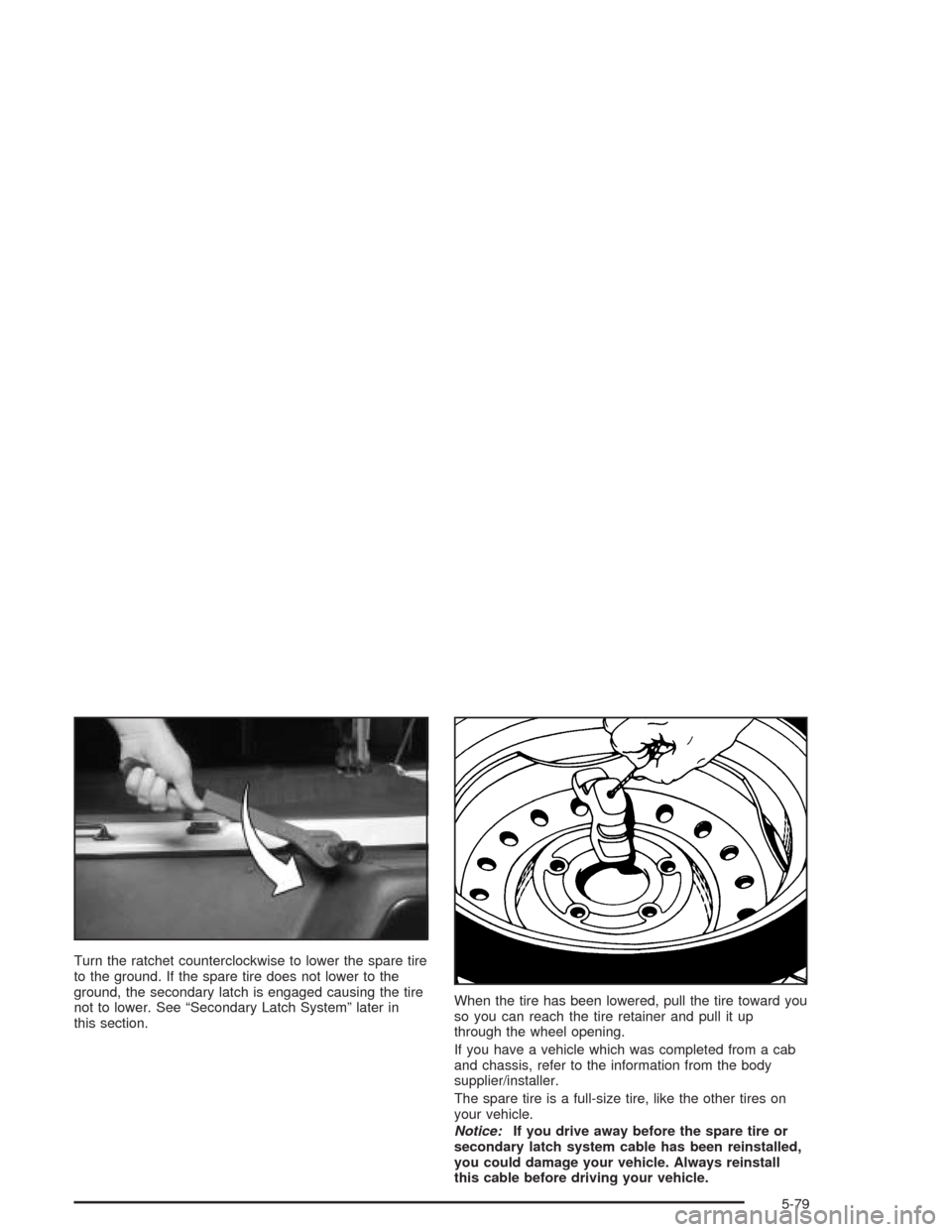
Turn the ratchet counterclockwise to lower the spare tire
to the ground. If the spare tire does not lower to the
ground, the secondary latch is engaged causing the tire
not to lower. See “Secondary Latch System” later in
this section.When the tire has been lowered, pull the tire toward you
so you can reach the tire retainer and pull it up
through the wheel opening.
If you have a vehicle which was completed from a cab
and chassis, refer to the information from the body
supplier/installer.
The spare tire is a full-size tire, like the other tires on
your vehicle.
Notice:If you drive away before the spare tire or
secondary latch system cable has been reinstalled,
you could damage your vehicle. Always reinstall
this cable before driving your vehicle.
5-79
Page 335 of 406
8. Lower the jack by turning the ratchet
counterclockwise. Keep lowering the jack until the
spare tire slides off the jack or is hanging by
the cable.
9. Disconnect the jack handle from the jack and
carefully remove the jack. Use one hand to
push against the spare while rmly pulling the jack
out from under the spare tire with the other
hand.
If the spare tire is hanging from the cable, slide the
ratchet onto the wheel wrench and insert the
wheel wrench into the hoist shaft hole above the
bumper. Turn the wheel wrench counterclockwise to
lower the spare the rest of the way. Be sure the
DOWN mark on the ratchet is facing you.
10. Tilt the retainer at the end of the cable and pull it
through the wheel opening. Pull the tire out from
under the vehicle.
11. If the cable is hanging under the vehicle, turn the
wheel wrench in the hoist shaft hole in the bumper
clockwise to raise the cable back up.Have the hoist assembly inspected as soon as you can.
You will not be able to store a spare or at tire using
the hoist assembly until it has been repaired or replaced.
To continue changing the at tire, return to Step 4 of
“Removing the Flat Tire and Installing the Spare
Tire” later in this section.
Removing the Wheel Covers
If your vehicle has plastic wheel nut caps, loosen them
by turning the wheel wrench counterclockwise. The
wheel nut caps are designed to remain with the center
cap. Remove the center cap.
If the wheel has a smooth center piece, place the chisel
end of the wheel wrench in the slot on the wheel and
gently pry it out.
5-83
Page 336 of 406
Removing the Flat Tire and Installing
the Spare Tire
1. With the DOWN side facing you, use the ratchet
and wheel wrench to loosen all the wheel nuts.
Do not remove them yet.
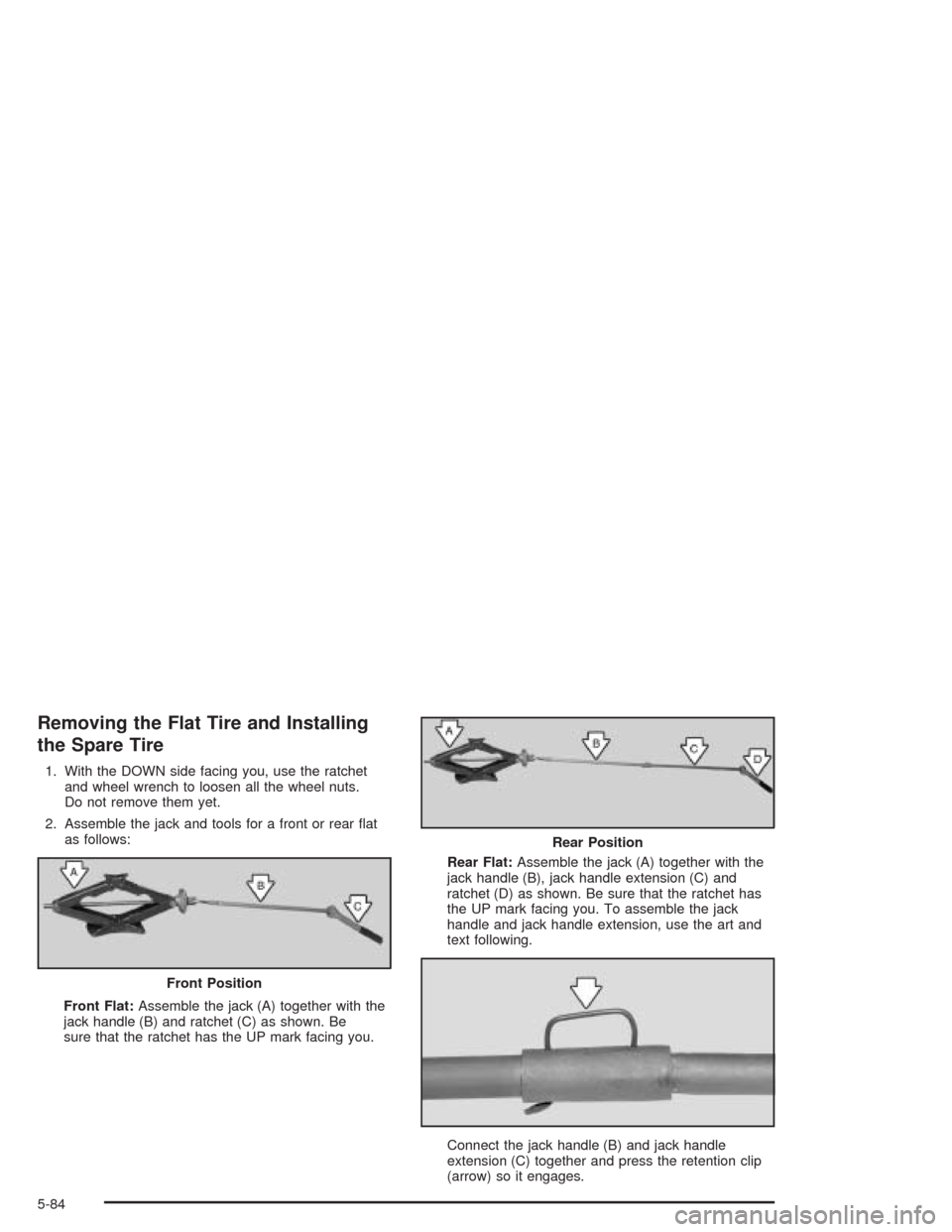
2. Assemble the jack and tools for a front or rear at
as follows:
Front Flat:Assemble the jack (A) together with the
jack handle (B) and ratchet (C) as shown. Be
sure that the ratchet has the UP mark facing you.Rear Flat:Assemble the jack (A) together with the
jack handle (B), jack handle extension (C) and
ratchet (D) as shown. Be sure that the ratchet has
the UP mark facing you. To assemble the jack
handle and jack handle extension, use the art and
text following.
Connect the jack handle (B) and jack handle
extension (C) together and press the retention clip
(arrow) so it engages. Front Position
Rear Position
5-84
Page 339 of 406
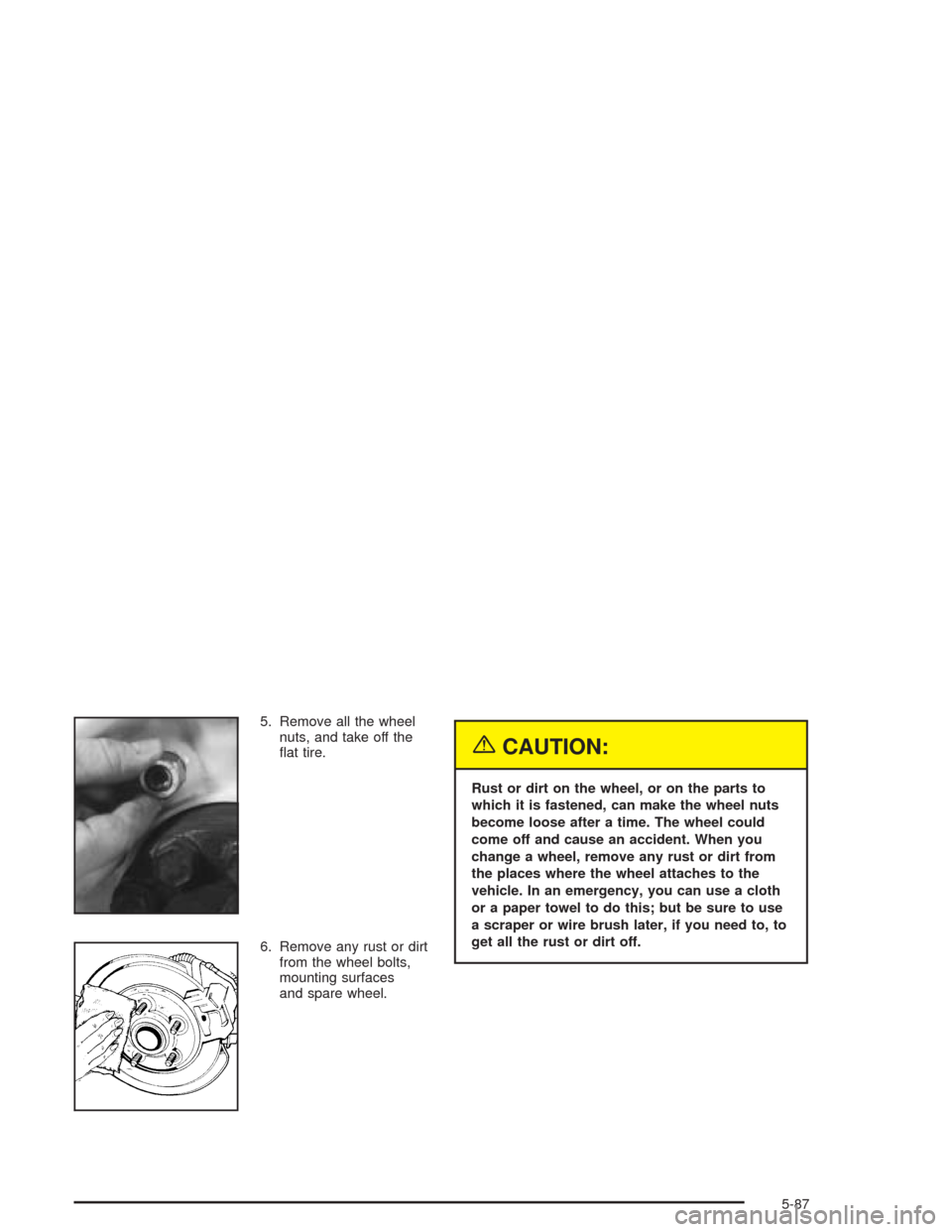
5. Remove all the wheel
nuts, and take off the
at tire.
6. Remove any rust or dirt
from the wheel bolts,
mounting surfaces
and spare wheel.
{CAUTION:
Rust or dirt on the wheel, or on the parts to
which it is fastened, can make the wheel nuts
become loose after a time. The wheel could
come off and cause an accident. When you
change a wheel, remove any rust or dirt from
the places where the wheel attaches to the
vehicle. In an emergency, you can use a cloth
or a paper towel to do this; but be sure to use
a scraper or wire brush later, if you need to, to
get all the rust or dirt off.
5-87
Page 340 of 406
{CAUTION:
Never use oil or grease on studs or nuts. If
you do, the nuts might come loose. Your wheel
could fall off, causing a serious accident.
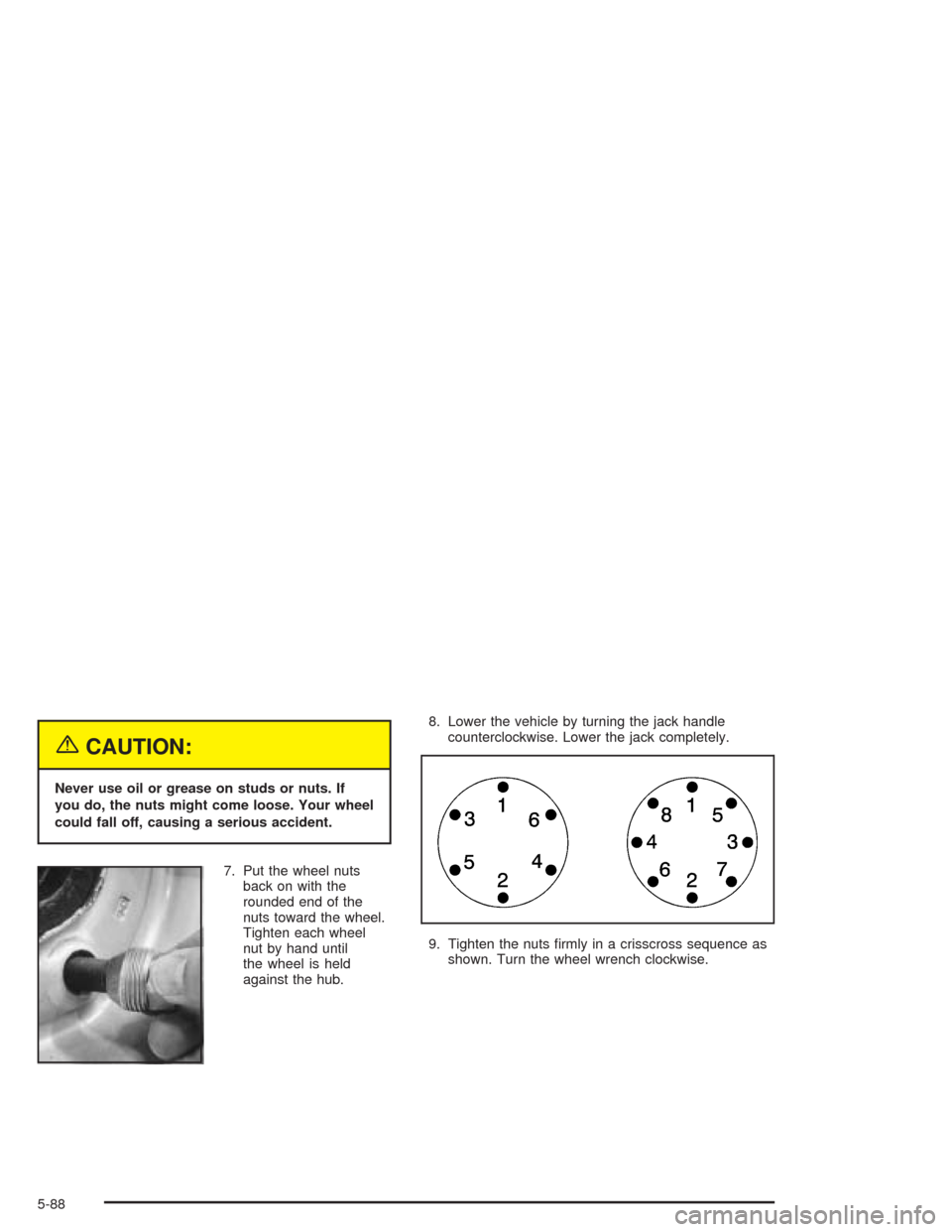
7. Put the wheel nuts
back on with the
rounded end of the
nuts toward the wheel.
Tighten each wheel
nut by hand until
the wheel is held
against the hub.8. Lower the vehicle by turning the jack handle
counterclockwise. Lower the jack completely.
9. Tighten the nuts rmly in a crisscross sequence as
shown. Turn the wheel wrench clockwise.
5-88
Page 341 of 406
{CAUTION:
Incorrect wheel nuts or improperly tightened
wheel nuts can cause the wheel to come loose
and even come off. This could lead to an
accident. Be sure to use the correct wheel
nuts. If you have to replace them, be sure to
get new GM original equipment wheel nuts.
Stop somewhere as soon as you can and have
the nuts tightened with a torque wrench to the
proper torque specication. See “Capacities
and Specications” in the Index for wheel nut
torque specication.Notice:Improperly tightened wheel nuts can lead
to brake pulsation and rotor damage. To avoid
expensive brake repairs, evenly tighten the wheel
nuts in the proper sequence and to the proper
torque specication. See “Capacities and
Specications” in the index for the wheel nut torque
specication.
10. Put the wheel cover back on, or put the center cap
and plastic wheel nut caps back on. Remove any
wheel blocks.
Remember that the jack, jacking equipment and tire
must be properly stored in their original storage position
before you begin driving again. The next part will
show you how.
5-89
Page 342 of 406
Storing a Flat or Spare Tire and Tools
{CAUTION:
Storing a jack, a tire, or other equipment in the
passenger compartment of the vehicle could
cause injury. In a sudden stop or collision,
loose equipment could strike someone. Store
all these in the proper place.1. Put the tire on the ground at the rear of the vehicle
with the valve stem pointed down.
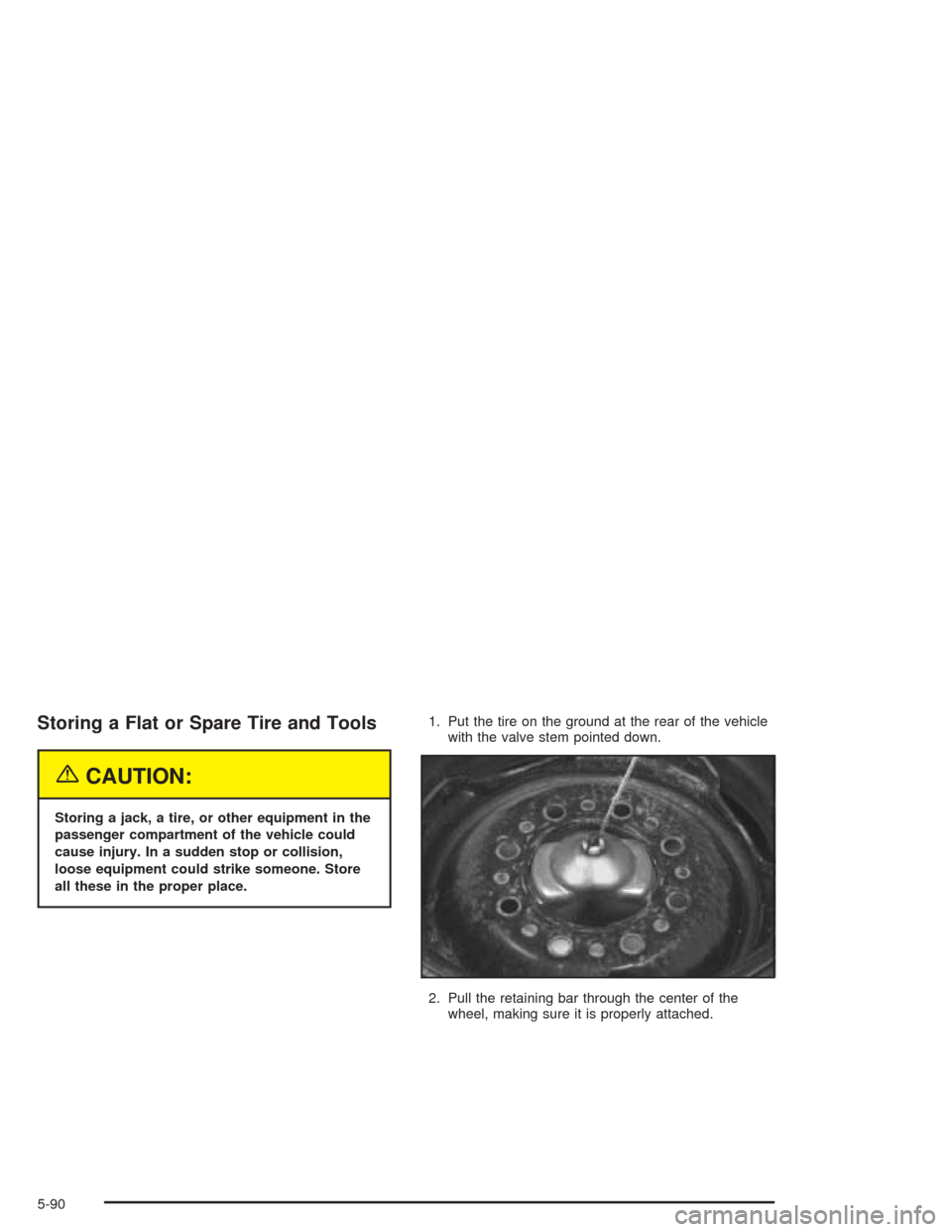
2. Pull the retaining bar through the center of the
wheel, making sure it is properly attached.
5-90
Page 343 of 406
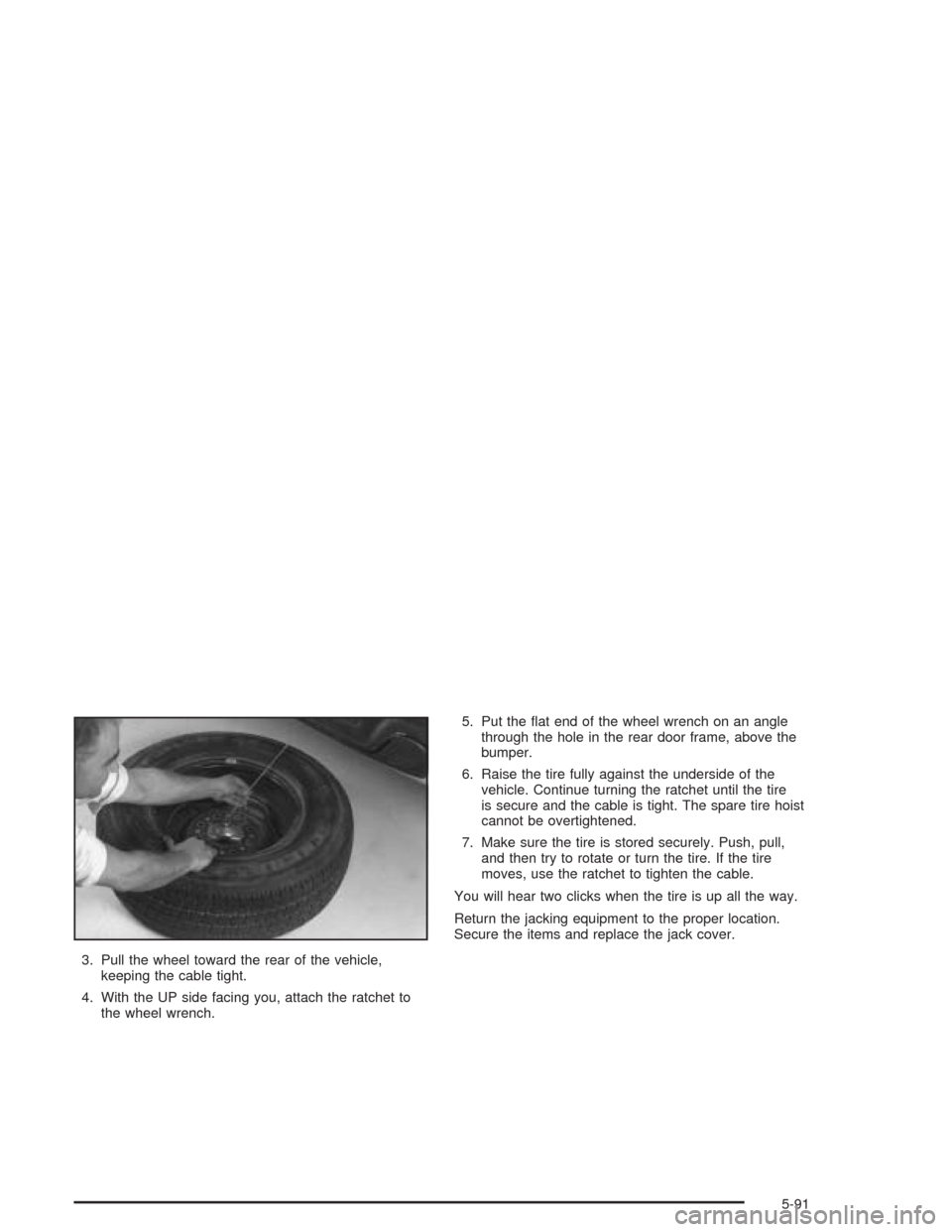
3. Pull the wheel toward the rear of the vehicle,
keeping the cable tight.
4. With the UP side facing you, attach the ratchet to
the wheel wrench.5. Put the at end of the wheel wrench on an angle
through the hole in the rear door frame, above the
bumper.
6. Raise the tire fully against the underside of the
vehicle. Continue turning the ratchet until the tire
is secure and the cable is tight. The spare tire hoist
cannot be overtightened.
7. Make sure the tire is stored securely. Push, pull,
and then try to rotate or turn the tire. If the tire
moves, use the ratchet to tighten the cable.
You will hear two clicks when the tire is up all the way.
Return the jacking equipment to the proper location.
Secure the items and replace the jack cover.
5-91
Page 349 of 406
Cleaning the Windshield and Wiper
Blades
If the windshield is not clear after using the windshield
washer, or if the wiper blade chatters when running,
wax, sap or other material may be on the blade or
windshield.
Clean the outside of the windshield with a full-strength
glass cleaning liquid. The windshield is clean if beads do
not form when you rinse it with water.
Grime from the windshield will stick to the wiper blades
and affect their performance. Clean the blade by
wiping vigorously with a cloth soaked in full-strength
windshield washer solvent. Then rinse the blade
with water.
Check the wiper blades and clean them as necessary;
replace blades that look worn.
Cleaning Aluminum Wheels
Keep your wheels clean using a soft clean cloth with
mild soap and water. Rinse with clean water. After
rinsing thoroughly, dry with a soft clean towel. A wax
may then be applied.
The surface of these wheels is similar to the painted
surface of your vehicle. Do not use strong soaps,
chemicals, abrasive polishes, abrasive cleaners,
cleaners with acid, or abrasive cleaning brushes on
them because you could damage the surface. Do not
use chrome polish on aluminum wheels.
Do not take your vehicle through an automatic car wash
that has silicone carbide tire cleaning brushes. These
brushes can also damage the surface of these wheels.
Cleaning Tires
To clean your tires, use a stiff brush with tire cleaner.
Notice:Using petroleum-based tire dressing
products on your vehicle may damage the paint
nish and/or tires. When applying a tire dressing,
always wipe off any overspray from all painted
surfaces on your vehicle.
5-97
Page 351 of 406
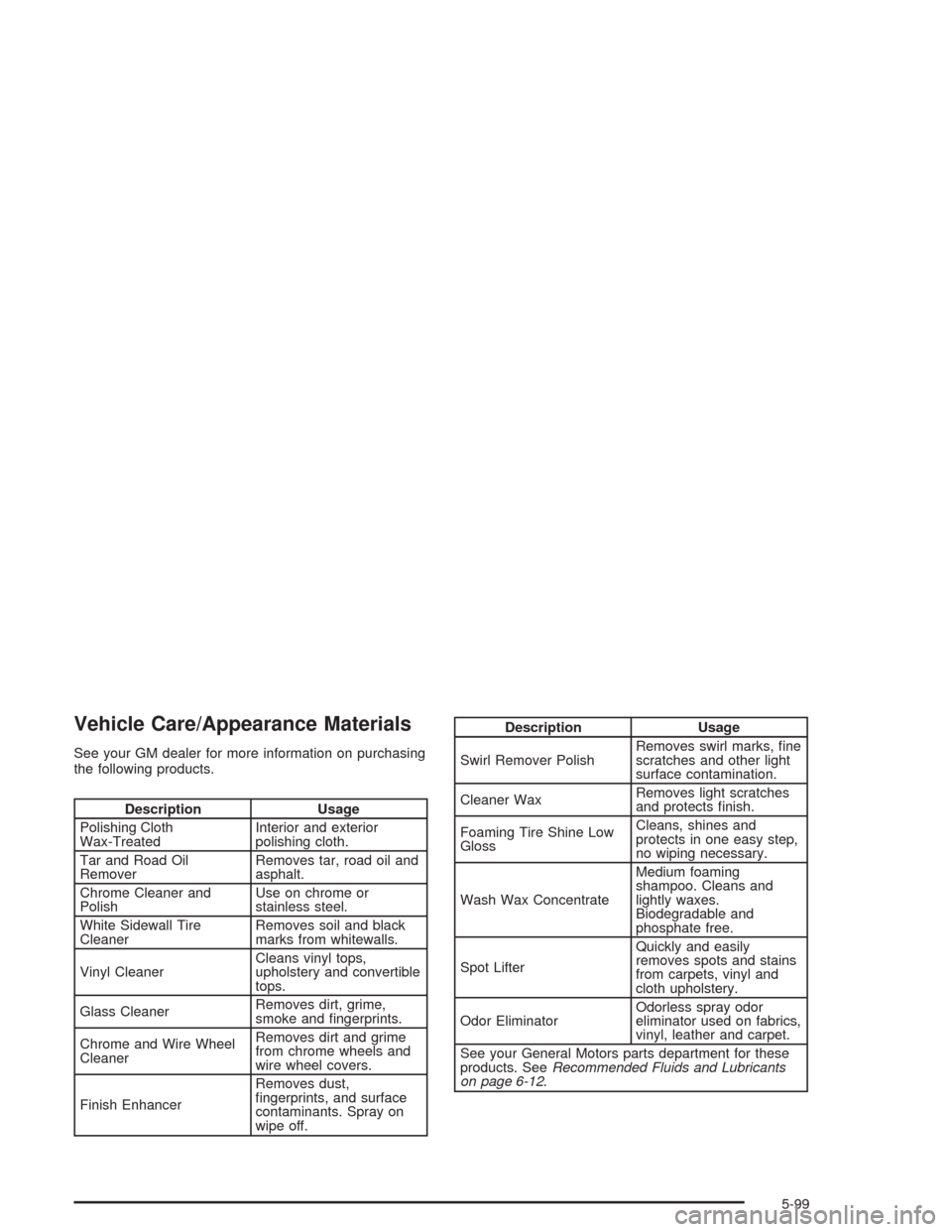
Vehicle Care/Appearance Materials
See your GM dealer for more information on purchasing
the following products.
Description Usage
Polishing Cloth
Wax-TreatedInterior and exterior
polishing cloth.
Tar and Road Oil
RemoverRemoves tar, road oil and
asphalt.
Chrome Cleaner and
PolishUse on chrome or
stainless steel.
White Sidewall Tire
CleanerRemoves soil and black
marks from whitewalls.
Vinyl CleanerCleans vinyl tops,
upholstery and convertible
tops.
Glass CleanerRemoves dirt, grime,
smoke and ngerprints.
Chrome and Wire Wheel
CleanerRemoves dirt and grime
from chrome wheels and
wire wheel covers.
Finish EnhancerRemoves dust,
ngerprints, and surface
contaminants. Spray on
wipe off.
Description Usage
Swirl Remover PolishRemoves swirl marks, ne
scratches and other light
surface contamination.
Cleaner WaxRemoves light scratches
and protects nish.
Foaming Tire Shine Low
GlossCleans, shines and
protects in one easy step,
no wiping necessary.
Wash Wax ConcentrateMedium foaming
shampoo. Cleans and
lightly waxes.
Biodegradable and
phosphate free.
Spot LifterQuickly and easily
removes spots and stains
from carpets, vinyl and
cloth upholstery.
Odor EliminatorOdorless spray odor
eliminator used on fabrics,
vinyl, leather and carpet.
See your General Motors parts department for these
products. SeeRecommended Fluids and Lubricants
on page 6-12.
5-99