service schedule CHEVROLET EXPRESS CARGO VAN 2009 1.G User Guide
[x] Cancel search | Manufacturer: CHEVROLET, Model Year: 2009, Model line: EXPRESS CARGO VAN, Model: CHEVROLET EXPRESS CARGO VAN 2009 1.GPages: 408, PDF Size: 2.36 MB
Page 369 of 408
Park on a fairly steep hill, with the vehicle facing
downhill. Keeping your foot on the regular brake,
set the parking brake.
•To check the parking brake’s holding ability:
With the engine running and the transmission
in N (Neutral), slowly remove foot pressure from the
regular brake pedal. Do this until the vehicle is
held by the parking brake only.
•To check the P (Park) mechanism’s holding ability:
With the engine running, shift to P (Park). Then
release the parking brake followed by the regular
brake.
Contact your dealer/retailer if service is required.
Underbody Flushing Service
At least every spring, use plain water to flush any
corrosive materials from the underbody. Take care to
clean thoroughly any areas where mud and other debris
can collect.
Recommended Fluids and
Lubricants
This maintenance section applies to vehicles with a
gasoline engine. If your vehicle has a diesel engine,
see the maintenance schedule section in the
DURAMAX
®Diesel manual.
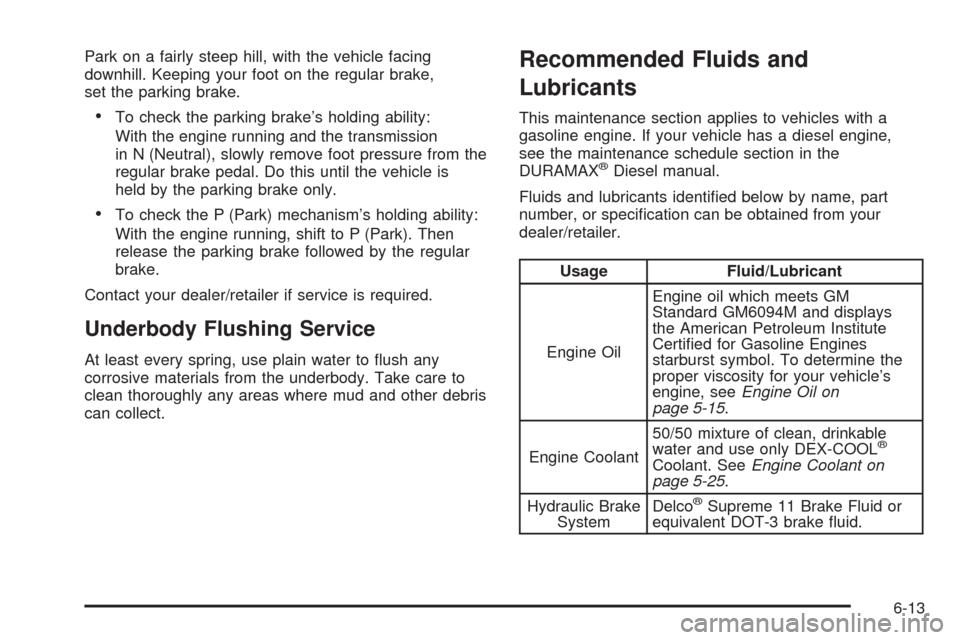
Fluids and lubricants identified below by name, part
number, or specification can be obtained from your
dealer/retailer.
Usage Fluid/Lubricant
Engine OilEngine oil which meets GM
Standard GM6094M and displays
the American Petroleum Institute
Certified for Gasoline Engines
starburst symbol. To determine the
proper viscosity for your vehicle’s
engine, seeEngine Oil on
page 5-15.
Engine Coolant50/50 mixture of clean, drinkable
water and use only DEX-COOL
®
Coolant. SeeEngine Coolant on
page 5-25.
Hydraulic Brake
SystemDelco
®Supreme 11 Brake Fluid or
equivalent DOT-3 brake fluid.
6-13
Page 373 of 408
Maintenance Record
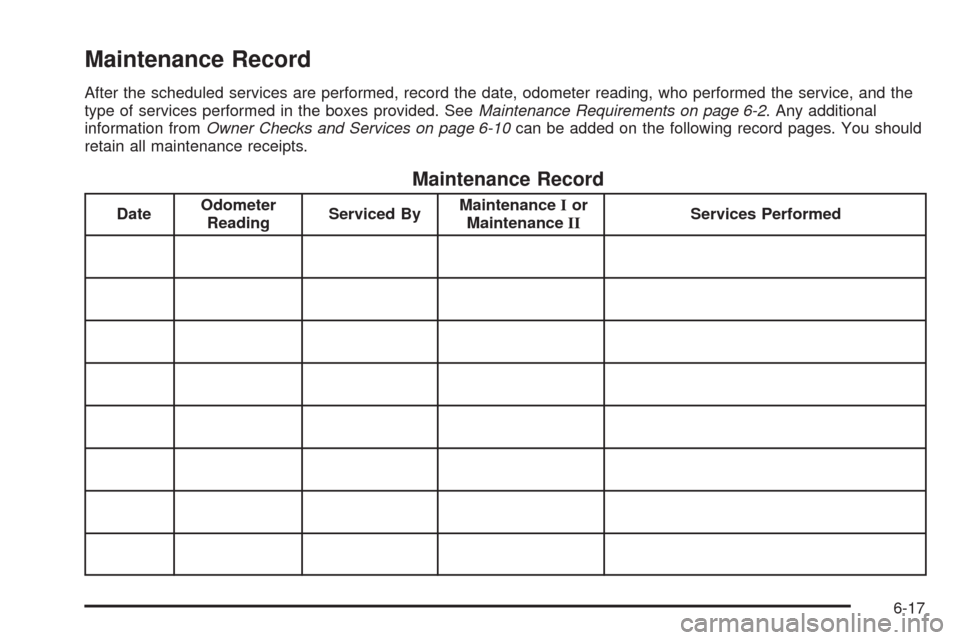
After the scheduled services are performed, record the date, odometer reading, who performed the service, and the
type of services performed in the boxes provided. SeeMaintenance Requirements on page 6-2. Any additional
information fromOwner Checks and Services on page 6-10can be added on the following record pages. You should
retain all maintenance receipts.
Maintenance Record
DateOdometer
ReadingServiced ByMaintenanceIor
MaintenanceIIServices Performed
6-17
Page 381 of 408
Online Owner Center
(United States only)
The Owner Center is a resource for your GM ownership
needs. Specific vehicle information can be found in
one place.
The Online Owner Center allows you to:
•Get e-mail service reminders.
•Access information about your specific vehicle,
including tips and videos and an electronic
version of this owner manual.
•Keep track of your vehicle’s service history and
maintenance schedule.
•Find GM dealers/retailers for service nationwide.
•Receive special promotions and privileges only
available to members.
Refer to MyGMLink.com on the web for updated
information and to register your vehicle.
My GM Canada (Canada only)
My GM Canada is a password-protected section of
gmcanada.com where you can save information on GM
vehicles, get personalized offers, and use handy
tools and forms with greater ease.
Here are a few of the valuable tools and services you
will have access to:
•My Showroom: Find and save information on
vehicles and current offers in your area.
•My Dealers/Retailers: Save details such as address
and phone number for each of your preferred GM
Dealers or Retailers.
•My Driveway: Receive service reminders and
helpful advice on owning and maintaining your
vehicle.
•My Preferences: Manage your profile, subscribe to
E-News and use tools and forms with greater ease.
To sign up to My GM Canada, visit the My GM Canada
section within gmcanada.com.
7-5
Page 386 of 408
•Trip Interruption Benets and Assistance:
Must be over 250 kilometres from where your trip
was started to qualify. General Motors of Canada
Limited requires pre-authorization, original detailed
receipts, and a copy of the repair orders. Once
authorization has been received, the Roadside
Assistance advisor will help you make arrangements
and explain how to receive payment.
•Alternative Service:If assistance cannot be
provided right away, the Roadside Assistance
advisor may give you permission to get local
emergency road service. You will receive payment,
up to $100, after sending the original receipt to
Roadside Assistance. Mechanical failures may be
covered, however any cost for parts and labor for
repairs not covered by the warranty are the owner
responsibility.
Scheduling Service Appointments
When your vehicle requires warranty service, contact
your dealer/retailer and request an appointment.
By scheduling a service appointment and advising your
service consultant of your transportation needs, your
dealer/retailer can help minimize your inconvenience.If your vehicle cannot be scheduled into the service
department immediately, keep driving it until it can be
scheduled for service, unless, of course, the problem is
safety-related. If it is, please call your dealership/retailer,
let them know this, and ask for instructions.
If the dealer/retailer requests you to bring the vehicle for
service, you are urged to do so as early in the work
day as possible to allow for the same day repair.
Courtesy Transportation
To enhance your ownership experience, we and our
participating dealers are proud to offer Courtesy
Transportation, a customer support program for vehicles
with the Bumper to Bumper (Base Warranty Coverage
period in Canada) and extended powertrain warranty
in both the U.S. and Canada.
Several courtesy transportation options are available to
assist in reducing your inconvenience when warranty
repairs are required.
Courtesy Transportation is not a part of the New Vehicle
Limited Warranty. A separate booklet entitled “Warranty
and Owner Assistance Information” furnished with each
new vehicle provides detailed warranty coverage
information.
7-10
Page 387 of 408
Transportation Options
Warranty service can generally be completed while you
wait. However, if you are unable to wait, GM helps
to minimize your inconvenience by providing several
transportation options. Depending on the circumstances,
your dealer can offer you one of the following:
Shuttle Service
Shuttle service is the preferred means of offering
Courtesy Transportation. Dealers may provide you
with shuttle service to get you to your destination with
minimal interruption of your daily schedule. This includes
one-way or round trip shuttle service within reasonable
time and distance parameters of the dealer’s area.
Public Transportation or Fuel
Reimbursement
If your vehicle requires overnight warranty repairs, and
public transportation is used instead of the dealer’s
shuttle service, the expense must be supported by
original receipts and can only be up to the maximum
amount allowed by GM for shuttle service. In addition,
for U.S. customers, should you arrange transportation
through a friend or relative, limited reimbursement for
reasonable fuel expenses may be available. Claim
amounts should reflect actual costs and be supported
by original receipts. See your dealer for information
regarding the allowance amounts for reimbursement of
fuel or other transportation costs.
Courtesy Rental Vehicle
Your dealer may arrange to provide you with a courtesy
rental vehicle or reimburse you for a rental vehicle that
you obtain if your vehicle is kept for an overnight warranty
repair. Rental reimbursement will be limited and must
be supported by original receipts. This requires that you
sign and complete a rental agreement and meet state/
provincial, local, and rental vehicle provider requirements.
Requirements vary and may include minimum age
requirements, insurance coverage, credit card, etc.
You are responsible for fuel usage charges and may also
be responsible for taxes, levies, usage fees, excessive
mileage, or rental usage beyond the completion of the
repair.
It may not be possible to provide a like-vehicle as a
courtesy rental.
Additional Program Information
All program options, such as shuttle service, may not be
available at every dealer. Please contact your dealer for
specific information about availability. All Courtesy
Transportation arrangements will be administered by
appropriate dealer personnel.
General Motors reserves the right to unilaterally modify,
change or discontinue Courtesy Transportation at
any time and to resolve all questions of claim eligibility
pursuant to the terms and conditions described
herein at its sole discretion.
7-11
Page 393 of 408
Owner Information
Owner publications are written specifically for owners
and intended to provide basic operational information
about the vehicle. The owner manual includes the
Maintenance Schedule for all models.
In-Portfolio: Includes a Portfolio, Owner Manual, and
Warranty Booklet.
RETAIL SELL PRICE: $35.00 (U.S.) plus processing fee
Without Portfolio: Owner Manual only.
RETAIL SELL PRICE: $25.00 (U.S.) plus processing fee
Current and Past Model Order Forms
Technical Service Bulletins and Manuals are available
for current and past model GM vehicles. To request
an order form, specify year and model name of
the vehicle.
ORDER TOLL FREE: 1-800-551-4123
Monday-Friday 8:00 AM - 6:00 PM
Eastern Time
For Credit Card Orders Only
(VISA-MasterCard-Discover), visit Helm, Inc.
on the World Wide Web at: helminc.com
Or you can write to:
Helm, Incorporated
P.O. Box 07130
Detroit, MI 48207
Prices are subject to change without notice and without
incurring obligation. Allow ample time for delivery.
Note to Canadian Customers: All listed prices are
quoted in U.S. funds. Canadian residents are to make
checks payable in U.S. funds.
7-17
Page 403 of 408
Light (cont.)
Brake System Warning.................................3-31
Charging System.........................................3-30
Cruise Control.............................................3-39
Highbeam On.............................................3-39
Oil Pressure...............................................3-38
Passenger Airbag Status Indicator..................3-29
Safety Belt Reminders..................................3-26
Security.....................................................3-39
StabiliTrak
®Indicator....................................3-33
Tire Pressure..............................................3-34
Tow/Haul Mode ...........................................3-40
Lighting
Entry/Exit...................................................3-16
Lights
Exterior Lamps............................................3-12
Flash-to-Pass............................................... 3-8
High/Low Beam Changer................................ 3-8
On Reminder..............................................3-14
Loading Your Vehicle.......................................4-19
Locking Rear Axle............................................ 4-8
Lockout Protection............................................ 2-9
Locks
Automatic Door Lock..................................... 2-8
Automatic Door Unlock.................................. 2-8
Cargo Door Relocking.................................... 2-7
Delayed Locking........................................... 2-7
Door ........................................................... 2-6
Lockout Protection......................................... 2-9Locks (cont.)
Power Door .................................................. 2-6
Programmable Automatic Door Locks............... 2-7
Rear Door Security Locks............................... 2-8
Loss of Control...............................................4-11
Lower Anchors and Tethers for Children.............1-41M
Maintenance Schedule
Additional Required Services........................... 6-6
At Each Fuel Fill.........................................6-10
At Least Once a Month................................6-11
At Least Once a Year..................................6-11
At the First 100, 1,000 and 6,000 Miles
(160, 1 600 and 10 000 km)......................6-10
Introduction.................................................. 6-2
Maintenance Footnotes.................................. 6-8
Maintenance Record....................................6-17
Maintenance Replacement Parts....................6-15
Maintenance Requirements............................. 6-2
Owner Checks and Services.........................6-10
Recommended Fluids and Lubricants.............6-13
Scheduled Maintenance................................. 6-4
Using.......................................................... 6-3
Your Vehicle and the Environment................... 6-2
Malfunction Indicator Lamp...............................3-34
Manual Seats................................................... 1-2
Manual Windows............................................2-14
7
Page 406 of 408
S
Safety Belt Reminders.....................................3-26
Safety Belts
Care of ....................................................5-100
How to Wear Safety Belts Properly................1-15
Lap-Shoulder Belt........................................1-24
Safety Belt Extender....................................1-30
Safety Belt Use During Pregnancy.................1-29
Safety Belts Are for Everyone.......................1-10
Safety Warnings and Symbols.............................. iii
Scheduled Maintenance..................................... 6-4
Seats
Power Seat.................................................. 1-3
Rear Seat Operation...................................... 1-6
Reclining Seatbacks...................................... 1-3
Secondary Latch System.................................5-92
Securing a Child Restraint
Rear Seat Position......................................1-48
Right Front Seat Position......................1-50, 1-54
Security Light.................................................3-39
Service........................................................... 5-3
Accessories and Modifications......................... 5-3
Adding Equipment to the Outside of the
Vehicle..................................................... 5-5
California Perchlorate Materials
Requirements............................................ 5-4
California Proposition 65 Warning.................... 5-4Service (cont.)
Doing Your Own Work................................... 5-4
Engine Soon Lamp......................................3-34
Publications Ordering Information...................7-16
Service, Scheduling Appointments.....................7-10
Servicing Your Airbag-Equipped Vehicle..............1-76
Setting the Clock............................................3-64
Sheet Metal Damage.....................................5-103
Shifting Into Park............................................2-27
Shifting Out of Park........................................2-29
Signals, Turn and Lane-Change.......................... 3-7
Sliding Side Door............................................. 2-9
Spare Tire.....................................................5-96
Installing....................................................5-84
Removing...................................................5-81
Storing.......................................................5-95
Specifications, Capacities
...............................5-111
Speedometer..................................................3-25
StabiliTrak
®Indicator Light...............................3-33
StabiliTrak®System.......................................... 4-5
Starting the Engine.........................................2-20
Steering.......................................................... 4-8
Steering Wheel Controls, Audio.........................3-83
Steering Wheel, Tilt Wheel................................. 3-6
Storage Areas................................................2-34
Stuck in Sand, Mud, Ice, or Snow.....................4-18
Sun Visors.....................................................2-16
Swing-Out Side Door, 60/40.............................2-10
Swing-Out Windows........................................2-15
10