change time CHEVROLET EXPRESS CARGO VAN 2009 1.G Owner's Manual
[x] Cancel search | Manufacturer: CHEVROLET, Model Year: 2009, Model line: EXPRESS CARGO VAN, Model: CHEVROLET EXPRESS CARGO VAN 2009 1.GPages: 408, PDF Size: 2.36 MB
Page 309 of 408
Federal Communications
Commission (FCC) and
Industry and Science Canada
The Tire Pressure Monitor System (TPMS) operates
on a radio frequency and complies with Part 15 of
the FCC Rules. Operation is subject to the following
two conditions:
1. This device may not cause harmful interference.
2. This device must accept any interference received,
including interference that may cause undesired
operation.
The TPMS operates on a radio frequency and complies
with RSS-210 of Industry and Science Canada.
Operation is subject to the following two conditions:
1. This device may not cause interference.
2. This device must accept any interference received,
including interference that may cause undesired
operation of the device.
Changes or modifications to this system by other than
an authorized service facility could void authorization to
use this equipment.
Tire Pressure Monitor Operation
The Tire Pressure Monitor System (TPMS), if your
vehicle has this feature, is designed to warn the driver
when a low tire pressure condition exists. TPMS sensors
are mounted onto each tire and wheel assembly,
excluding the spare tire and wheel assembly. The TPMS
sensors monitor the air pressure in the vehicle’s tires and
transmits the tire pressure readings to a receiver located
in the vehicle.
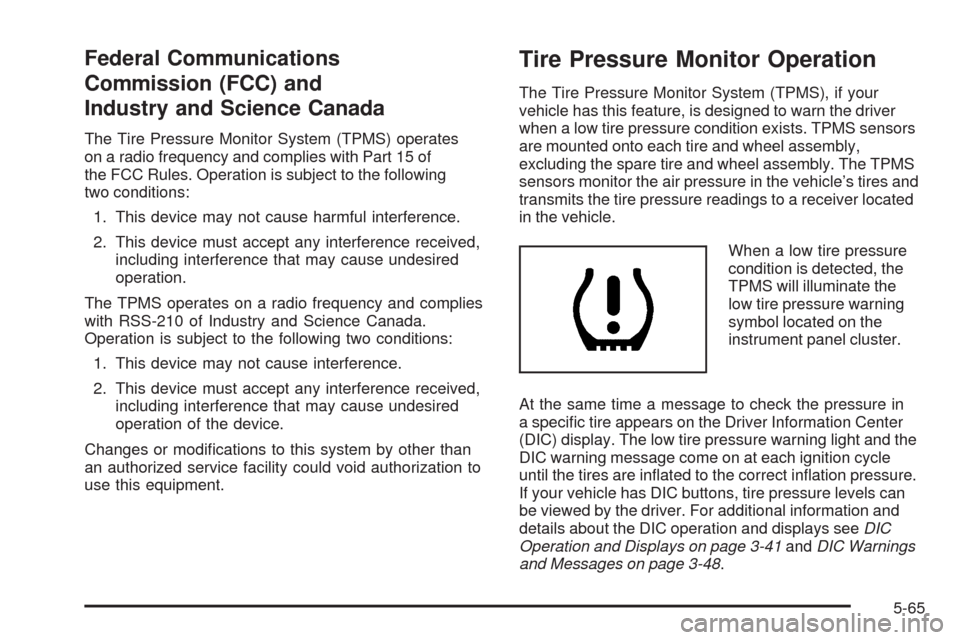
When a low tire pressure
condition is detected, the
TPMS will illuminate the
low tire pressure warning
symbol located on the
instrument panel cluster.
At the same time a message to check the pressure in
a specific tire appears on the Driver Information Center
(DIC) display. The low tire pressure warning light and the
DIC warning message come on at each ignition cycle
until the tires are inflated to the correct inflation pressure.
If your vehicle has DIC buttons, tire pressure levels can
be viewed by the driver. For additional information and
details about the DIC operation and displays seeDIC
Operation and Displays on page 3-41andDIC Warnings
and Messages on page 3-48.
5-65
Page 314 of 408
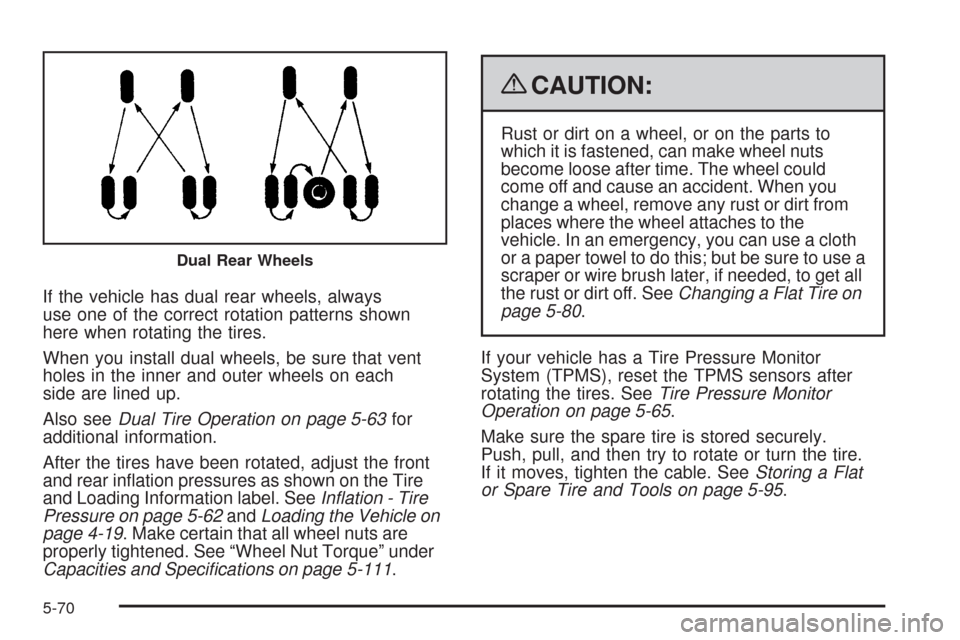
If the vehicle has dual rear wheels, always
use one of the correct rotation patterns shown
here when rotating the tires.
When you install dual wheels, be sure that vent
holes in the inner and outer wheels on each
side are lined up.
Also seeDual Tire Operation on page 5-63for
additional information.
After the tires have been rotated, adjust the front
and rear inflation pressures as shown on the Tire
and Loading Information label. SeeInflation - Tire
Pressure on page 5-62andLoading the Vehicle on
page 4-19. Make certain that all wheel nuts are
properly tightened. See “Wheel Nut Torque” under
Capacities and Specifications on page 5-111.
{CAUTION:
Rust or dirt on a wheel, or on the parts to
which it is fastened, can make wheel nuts
become loose after time. The wheel could
come off and cause an accident. When you
change a wheel, remove any rust or dirt from
places where the wheel attaches to the
vehicle. In an emergency, you can use a cloth
or a paper towel to do this; but be sure to use a
scraper or wire brush later, if needed, to get all
the rust or dirt off. SeeChanging a Flat Tire on
page 5-80.
If your vehicle has a Tire Pressure Monitor
System (TPMS), reset the TPMS sensors after
rotating the tires. SeeTire Pressure Monitor
Operation on page 5-65.
Make sure the spare tire is stored securely.
Push, pull, and then try to rotate or turn the tire.
If it moves, tighten the cable. SeeStoring a Flat
or Spare Tire and Tools on page 5-95.
Dual Rear Wheels
5-70
Page 343 of 408
To clean:
1. Saturate a lint-free, clean white cloth with water or
club soda.
2. Wring the cloth to remove excess moisture.
3. Start on the outside edge of the soil and gently rub
toward the center. Continue cleaning, using a clean
area of the cloth each time it becomes soiled.
4. Continue to gently rub the soiled area until the
cleaning cloth remains clean.
5. If the soil is not completely removed, use a mild
soap solution and repeat the cleaning process
that was used with plain water.
If any of the soil remains, a commercial fabric cleaner
or spot lifter may be necessary. When a commercial
upholstery cleaner or spot lifter is to be used, test
a small hidden area for colorfastness first. If the
locally cleaned area gives any impression that a
ring formation may result, clean the entire surface.
After the cleaning process has been completed, a paper
towel can be used to blot excess moisture from the
fabric or carpet.Instrument Panel, Vinyl, and Other
Plastic Surfaces
A soft cloth dampened with water may be used to
remove dust. If a more thorough cleaning is necessary,
a clean soft cloth dampened with a mild soap solution
can be used to gently remove dust and dirt. Never use
spot lifters or removers on plastic surfaces. Many
commercial cleaners and coatings that are sold to
preserve and protect soft plastic surfaces may
permanently change the appearance and feel of the
interior and are not recommended. Do not use silicone
or wax-based products, or those containing organic
solvents to clean the vehicle’s interior because they
can alter the appearance by increasing the gloss in a
non-uniform manner.
Some commercial products may increase gloss on the
instrument panel. The increase in gloss may cause
annoying reflections in the windshield and even make
it difficult to see through the windshield under certain
conditions.
5-99
Page 360 of 408
To purchase service information, seeService
Publications Ordering Information on page 7-16.
Owner Checks and Services on page 6-10tells what
should be checked, when to check it, and what can easily
be done to help keep the vehicle in good condition.
The proper replacement parts, fluids, and lubricants to
use are listed inRecommended Fluids and Lubricants
on page 6-13andMaintenance Replacement Parts
on page 6-15. When the vehicle is serviced, make sure
these are used. All parts should be replaced and all
necessary repairs done before you or anyone else
drives the vehicle. We recommend the use of genuine
parts from your dealer/retailer.
Scheduled Maintenance
This maintenance section applies to vehicles with a
gasoline engine. For diesel engine vehicles, see
the maintenance schedule section in the DURAMAX
®
Diesel manual.
When the CHANGE ENGINE OIL SOON message
displays, service is required for the vehicle. Have the
vehicle serviced as soon as possible within the next
600 miles (1 000 km). It is possible that, if driving under
the best conditions, the engine oil life system may
not indicate that vehicle service is necessary for over
a year. However, the engine oil and filter must be
changed at least once a year and at this time the systemmust be reset. Your dealer/retailer has trained service
technicians who will perform this work using genuine
parts and reset the system.
If the engine oil life system is ever reset accidentally,
service the vehicle within 3,000 miles (5 000 km)
since the last service. Remember to reset the oil life
system whenever the oil is changed. SeeEngine Oil Life
System on page 5-18for information on the Engine
Oil Life System and resetting the system.
When the CHANGE ENGINE OIL SOON message
appears, certain services, checks, and inspections are
required. Required services are described in the
following for “MaintenanceI” and “MaintenanceII.”
Generally, it is recommended that the first service be
MaintenanceI, the second service be MaintenanceII,
and then alternate MaintenanceIand MaintenanceII
thereafter. However, in some cases, MaintenanceIImay
be required more often.
MaintenanceI— Use MaintenanceIif the CHANGE
ENGINE OIL SOON message displays within 10 months
since the vehicle was purchased or MaintenanceII
was performed.
MaintenanceII— Use MaintenanceIIif the previous
service performed was MaintenanceI. Always use
MaintenanceIIwhenever the message displays
10 months or more since the last service or if the
message has not come on at all for one year.
6-4
Page 384 of 408
Calling for Assistance
When calling Roadside Assistance, have the following
information ready:
•Your name, home address, and home telephone
number
•Telephone number of your location
•Location of the vehicle
•Model, year, color, and license plate number of the
vehicle
•Odometer reading, Vehicle Identification
Number (VIN), and delivery date of the vehicle
•Description of the problem
Coverage
Services are provided up to 5 years/100,000 miles
(160 000 km), whichever comes first.
In the U.S., anyone driving the vehicle is covered.
In Canada, a person driving the vehicle without
permission from the owner is not covered.
Roadside Assistance is not a part of the New Vehicle
Limited Warranty. Chevrolet and General Motors of
Canada Limited reserve the right to make any changes
or discontinue the Roadside Assistance program at
any time without notification.
Chevrolet and General Motors of Canada Limited
reserve the right to limit services or payment to an owner
or driver if they decide the claims are made too often,
or the same type of claim is made many times.
7-8
Page 387 of 408
Transportation Options
Warranty service can generally be completed while you
wait. However, if you are unable to wait, GM helps
to minimize your inconvenience by providing several
transportation options. Depending on the circumstances,
your dealer can offer you one of the following:
Shuttle Service
Shuttle service is the preferred means of offering
Courtesy Transportation. Dealers may provide you
with shuttle service to get you to your destination with
minimal interruption of your daily schedule. This includes
one-way or round trip shuttle service within reasonable
time and distance parameters of the dealer’s area.
Public Transportation or Fuel
Reimbursement
If your vehicle requires overnight warranty repairs, and
public transportation is used instead of the dealer’s
shuttle service, the expense must be supported by
original receipts and can only be up to the maximum
amount allowed by GM for shuttle service. In addition,
for U.S. customers, should you arrange transportation
through a friend or relative, limited reimbursement for
reasonable fuel expenses may be available. Claim
amounts should reflect actual costs and be supported
by original receipts. See your dealer for information
regarding the allowance amounts for reimbursement of
fuel or other transportation costs.
Courtesy Rental Vehicle
Your dealer may arrange to provide you with a courtesy
rental vehicle or reimburse you for a rental vehicle that
you obtain if your vehicle is kept for an overnight warranty
repair. Rental reimbursement will be limited and must
be supported by original receipts. This requires that you
sign and complete a rental agreement and meet state/
provincial, local, and rental vehicle provider requirements.
Requirements vary and may include minimum age
requirements, insurance coverage, credit card, etc.
You are responsible for fuel usage charges and may also
be responsible for taxes, levies, usage fees, excessive
mileage, or rental usage beyond the completion of the
repair.
It may not be possible to provide a like-vehicle as a
courtesy rental.
Additional Program Information
All program options, such as shuttle service, may not be
available at every dealer. Please contact your dealer for
specific information about availability. All Courtesy
Transportation arrangements will be administered by
appropriate dealer personnel.
General Motors reserves the right to unilaterally modify,
change or discontinue Courtesy Transportation at
any time and to resolve all questions of claim eligibility
pursuant to the terms and conditions described
herein at its sole discretion.
7-11
Page 393 of 408
Owner Information
Owner publications are written specifically for owners
and intended to provide basic operational information
about the vehicle. The owner manual includes the
Maintenance Schedule for all models.
In-Portfolio: Includes a Portfolio, Owner Manual, and
Warranty Booklet.
RETAIL SELL PRICE: $35.00 (U.S.) plus processing fee
Without Portfolio: Owner Manual only.
RETAIL SELL PRICE: $25.00 (U.S.) plus processing fee
Current and Past Model Order Forms
Technical Service Bulletins and Manuals are available
for current and past model GM vehicles. To request
an order form, specify year and model name of
the vehicle.
ORDER TOLL FREE: 1-800-551-4123
Monday-Friday 8:00 AM - 6:00 PM
Eastern Time
For Credit Card Orders Only
(VISA-MasterCard-Discover), visit Helm, Inc.
on the World Wide Web at: helminc.com
Or you can write to:
Helm, Incorporated
P.O. Box 07130
Detroit, MI 48207
Prices are subject to change without notice and without
incurring obligation. Allow ample time for delivery.
Note to Canadian Customers: All listed prices are
quoted in U.S. funds. Canadian residents are to make
checks payable in U.S. funds.
7-17
Page 402 of 408
H
Hazard Warning Flashers................................... 3-6
Headlamp Wiring...........................................5-105
Headlamps....................................................5-48
Bulb Replacement.......................................5-48
Daytime Running Lamp................................3-14
Exterior Lamps............................................3-12
Flash-to-Pass............................................... 3-8
Front Turn Signal, Sidemarker and
Parking Lamps.........................................5-50
Halogen Bulbs............................................5-48
High/Low Beam Changer................................ 3-8
On Reminder..............................................3-14
Heater...........................................................3-19
Engine Coolant...........................................2-22
Highbeam On Light.........................................3-39
Highway Hypnosis...........................................4-14
Hill and Mountain Roads..................................4-15
Hood
Checking Things Under................................5-12
Release.....................................................5-13
Horn ............................................................... 3-6
How to Wear Safety Belts Properly...................1-15
I
Ignition Positions.............................................2-19
Infants and Young Children, Restraints...............1-33
Inflation - Tire Pressure...................................5-62Instrument Panel
Brightness..................................................3-15
Cluster.......................................................3-24
Overview..................................................... 3-4
J
Jump Starting.................................................5-40
K
Keyless Entry System....................................... 2-3
Keys............................................................... 2-2
L
Labeling, Tire Sidewall.....................................5-55
Lamp
Malfunction Indicator....................................3-34
Lamps
Dome ........................................................3-16
Dome Lamp Override...................................3-16
Reading.....................................................3-16
Lap-Shoulder Belt...........................................1-24
LATCH System for Child Restraints...................1-41
Light
Airbag Off..................................................3-28
Airbag Readiness........................................3-27
Antilock Brake System (ABS) Warning............3-32
6
Page 407 of 408
T
Taillamps.......................................................5-51
Theft-Deterrent, Radio.....................................3-82
Theft-Deterrent Systems...................................2-16
PASS-Key
®III+ Electronic Immobilizer............2-17
PASS-Key®III+ Electronic Immobilizer
Operation................................................2-17
Tilt Wheel........................................................ 3-6
Time, Setting..................................................3-64
Tire
Pressure Light.............................................3-34
Tires.............................................................5-54
Aluminum Wheels, Cleaning........................5-102
Buying New Tires........................................5-72
Chains.......................................................5-78
Changing a Flat Tire....................................5-80
Cleaning...................................................5-103
Different Size..............................................5-73
Dual Tire Operation.....................................5-63
If a Tire Goes Flat.......................................5-79
Inflation - Tire Pressure................................5-62
Inspection and Rotation................................5-69
Installing the Spare Tire................................5-84
Pressure Monitor Operation...........................5-65
Pressure Monitor System..............................5-64
Removing the Flat Tire.................................5-84
Removing the Spare Tire and Tools...............5-81
Secondary Latch System..............................5-92Tires (cont.)
Spare Tire..................................................5-96
Storing a Flat or Spare Tire and Tools............5-95
Tire Sidewall Labeling..................................5-55
Tire Terminology and Definitions....................5-59
Uniform Tire Quality Grading.........................5-74
Wheel Alignment and Tire Balance.................5-76
Wheel Replacement.....................................5-76
When It Is Time for New Tires......................5-71
Tow/Haul Mode ...............................................2-25
Tow/Haul Mode Light.......................................3-40
Towing
Recreational Vehicle.....................................4-25
Towing a Trailer..........................................4-27
Your Vehicle...............................................4-25
Traction
StabiliTrak
®System....................................... 4-5
Transmission
Fluid, Automatic...........................................5-21
Transmission Operation, Automatic....................2-23
Trip Odometer................................................3-25
Turn and Lane-Change Signals.......................... 3-7
Turn Signal/Multifunction Lever........................... 3-7
U
Uniform Tire Quality Grading............................5-74
11