ignition CHEVROLET EXPRESS CARGO VAN 2014 1.G Owner's Manual
[x] Cancel search | Manufacturer: CHEVROLET, Model Year: 2014, Model line: EXPRESS CARGO VAN, Model: CHEVROLET EXPRESS CARGO VAN 2014 1.GPages: 406, PDF Size: 5.29 MB
Page 124 of 406
Black plate (24,1)Chevrolet Express Owner Manual (GMNA-Localizing-U.S./Canada/Mexico-
6014662) - 2014 - crc - 8/26/13
5-24 Instruments and Controls
Engine Oil Pressure Light
{Caution
Lack of proper engine oil
maintenance can damage the
engine. Driving with the engine
oil low can also damage the
engine. The repairs would not be
covered by the vehicle warranty.
Check the oil level as soon as
possible. Add oil if required, but if
the oil level is within the operating
range and the oil pressure is still
low, have the vehicle serviced.
Always follow the maintenance
schedule for changing engine oil.
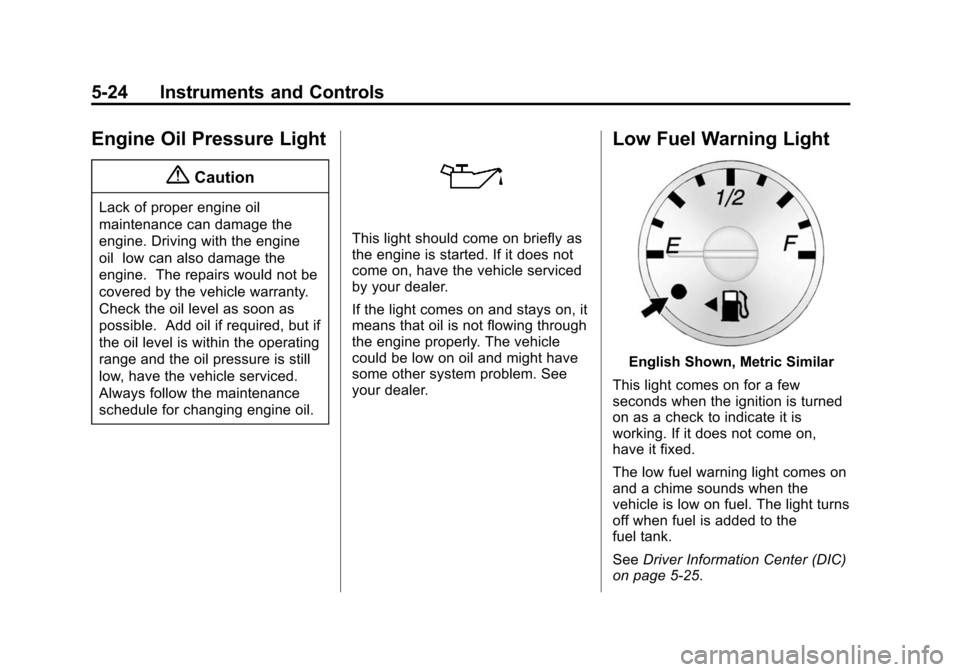
This light should come on briefly as
the engine is started. If it does not
come on, have the vehicle serviced
by your dealer.
If the light comes on and stays on, it
means that oil is not flowing through
the engine properly. The vehicle
could be low on oil and might have
some other system problem. See
your dealer.
Low Fuel Warning Light
English Shown, Metric Similar
This light comes on for a few
seconds when the ignition is turned
on as a check to indicate it is
working. If it does not come on,
have it fixed.
The low fuel warning light comes on
and a chime sounds when the
vehicle is low on fuel. The light turns
off when fuel is added to the
fuel tank.
See Driver Information Center (DIC)
on page 5-25.
Page 125 of 406
Black plate (25,1)Chevrolet Express Owner Manual (GMNA-Localizing-U.S./Canada/Mexico-
6014662) - 2014 - crc - 8/26/13
Instruments and Controls 5-25
Security Light
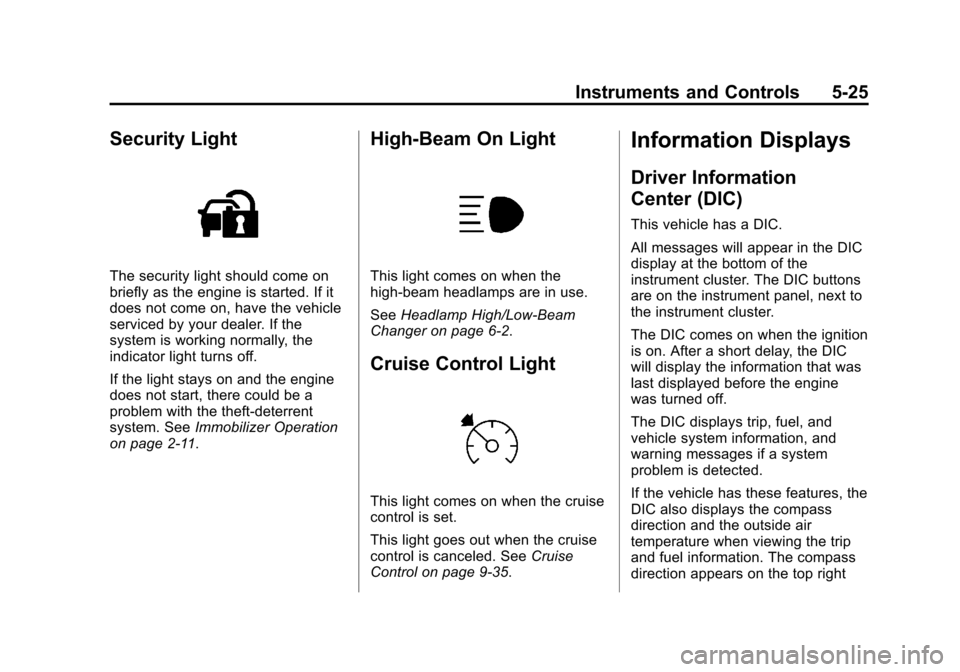
The security light should come on
briefly as the engine is started. If it
does not come on, have the vehicle
serviced by your dealer. If the
system is working normally, the
indicator light turns off.
If the light stays on and the engine
does not start, there could be a
problem with the theft-deterrent
system. SeeImmobilizer Operation
on page 2-11.
High-Beam On Light
This light comes on when the
high-beam headlamps are in use.
See Headlamp High/Low-Beam
Changer on page 6-2.
Cruise Control Light
This light comes on when the cruise
control is set.
This light goes out when the cruise
control is canceled. See Cruise
Control on page 9-35.
Information Displays
Driver Information
Center (DIC)
This vehicle has a DIC.
All messages will appear in the DIC
display at the bottom of the
instrument cluster. The DIC buttons
are on the instrument panel, next to
the instrument cluster.
The DIC comes on when the ignition
is on. After a short delay, the DIC
will display the information that was
last displayed before the engine
was turned off.
The DIC displays trip, fuel, and
vehicle system information, and
warning messages if a system
problem is detected.
If the vehicle has these features, the
DIC also displays the compass
direction and the outside air
temperature when viewing the trip
and fuel information. The compass
direction appears on the top right
Page 127 of 406
Black plate (27,1)Chevrolet Express Owner Manual (GMNA-Localizing-U.S./Canada/Mexico-
6014662) - 2014 - crc - 8/26/13
Instruments and Controls 5-27
Trip/Fuel Menu Items
3(Trip/Fuel):Press this button
to scroll through the following menu
items:
Odometer
Press
3until XX km (mi)
displays. This display shows the
distance the vehicle has been
driven in either kilometers (km) or
miles (mi).
Trip Odometers
Press
3until A or B displays.
This display shows the current
distance traveled in either
kilometers (km) or miles (mi) since
the last reset for each trip odometer.
Both trip odometers can be used at
the same time.
Each trip odometer can be reset to
zero separately by pressing
Vwhile
the desired trip odometer is
displayed. The trip odometer has a feature
called the retro-active reset. This
can be used to set the trip odometer
to the number of kilometers (miles)
driven since the ignition was last
turned on. This can be used if the
trip odometer is not reset at the
beginning of the trip.
To use the retro-active reset feature,
press and hold
Vfor at least
four seconds. The trip odometer will
display the number of
kilometers (km) or miles (mi) driven
since the ignition was last turned on
and the vehicle was moving. Once
the vehicle begins moving, the trip
odometer will accumulate mileage.
For example, if the vehicle was
driven 8 km (5 miles) before it is
started again, and then the
retro-active reset feature is
activated, the display will show 8 km
(5 miles). As the vehicle begins
moving, the display will then
increase to 8.1 km (5.1 miles),
8.2 km (5.2 miles), etc. If the retro-active reset feature is
activated after the vehicle is started,
but before it begins moving, the
display will show the number of
kilometers (km) or miles (mi) that
were driven during the last ignition
cycle.
Fuel Range
Press3until FUEL RANGE
displays. This display shows the
approximate number of remaining
kilometers (km) or miles (mi) the
vehicle can be driven without
refueling. The display will show
LOW if the fuel level is low.
The fuel range estimate is based on
an average of the fuel economy
over recent driving history and the
amount of fuel remaining in the fuel
tank. This estimate will change if
driving conditions change. For
example, if driving in traffic and
making frequent stops, this display
may read one number, but if the
vehicle is driven on a freeway, the
number may change even though
the same amount of fuel is in the
Page 128 of 406
Black plate (28,1)Chevrolet Express Owner Manual (GMNA-Localizing-U.S./Canada/Mexico-
6014662) - 2014 - crc - 8/26/13
5-28 Instruments and Controls
fuel tank. This is because different
driving conditions produce different
fuel economies. Generally, freeway
driving produces better fuel
economy than city driving.
If the vehicle is low on fuel, the
FUEL LEVEL LOW message will be
displayed. See“FUEL LEVEL LOW”
under Fuel System Messages on
page 5-33 for more information.
Average Economy
Press
3until AVG ECONOMY
displays. This display shows the
approximate average liters per
100 kilometers (L/100 km) or miles
per gallon (mpg). This number is
calculated based on the number of
L/100 km (mpg) recorded since the
last time this menu item was reset.
To reset AVG ECONOMY, press and
hold
V. The display will return
to zero. Fuel Used
Press
3until FUEL USED
displays. This display shows the
number of liters (L) or gallons (gal)
of fuel used since the last reset of
this menu item. To reset the fuel
used information, press and hold
V
while FUEL USED is displayed.
Timer
Press
3until TIMER displays.
This display can be used as a timer.
To start the timer, press
Vwhile
TIMER is displayed. The display will
show the amount of time that has
passed since the timer was last
reset, not including time the ignition
is off. Time will continue to be
counted as long as the ignition is
on, even if another display is being
shown on the DIC. The timer will
record up to 99 hours, 59 minutes
and 59 seconds (99:59:59) after
which the display will return to zero.
To stop the timer, press
Vbriefly
while TIMER is displayed. To reset the timer to zero, press and
hold
Vwhile TIMER is displayed.
Average Speed
Press
3until AVERAGE SPEED
displays. This display shows the
average speed of the vehicle in
kilometers per hour (km/h) or miles
per hour (mph). This average is
calculated based on the various
vehicle speeds recorded since the
last reset of this value. To reset the
value, press and hold
V. The
display will return to zero.
Digital Tachometer
Press
3until
Tachometer ##00 RPM displays.
This display shows the engine
speed in revolutions per
minute (RPM).
Blank Display
This display shows no information.
Page 131 of 406
Black plate (31,1)Chevrolet Express Owner Manual (GMNA-Localizing-U.S./Canada/Mexico-
6014662) - 2014 - crc - 8/26/13
Instruments and Controls 5-31
Battery Voltage and
Charging Messages
SERVICE BATTERY
CHARGING SYSTEM
On some vehicles, this message
displays if there is a problem with
the battery charging system. Under
certain conditions, the charging
system light may also turn on in the
instrument cluster. SeeCharging
System Light on page 5-18. Driving
with this problem could drain the
battery. Turn off all unnecessary
accessories. Have the electrical
system checked as soon as
possible. See your dealer.
Brake System Messages
SERVICE BRAKE SYSTEM
This message displays along with
the brake system warning light if
there is a problem with the brake
system. See Brake System Warning
Light on page 5-21. If this message
appears, stop as soon as possible and turn off the vehicle. Restart the
vehicle and check for the message
on the DIC display. If the message
is still displayed or appears again
when you begin driving, the brake
system needs service as soon as
possible. See your dealer.
Compass Messages
CALIBRATING: DRIVE IN
CIRCLES
This message displays when
calibrating the compass. Drive the
vehicle in circles at less than 8 km/h
(5 mph) to complete the calibration.
See
Compass on page 5-4 for more
information.
CALIBRATION COMPLETE
This message displays when the
compass calibration is complete.
See Compass on page 5-4 for more
information.
Door Ajar Messages
CARGO DOOR OPEN
This message displays and a chime
sounds if the cargo door is open
while the ignition is in ON/RUN.
Turn off the vehicle and check the
cargo door. Restart the vehicle and
check for the message on the DIC
display.
DRIVER DOOR OPEN
This message displays and a chime
sounds if the driver door is not fully
closed and the vehicle is in a drive
gear. Stop and turn off the vehicle,
check the door for obstructions, and
close the door again. Check to see
if the message still appears on
the DIC.
LEFT REAR DOOR OPEN
On some vehicles, this message
displays and a chime sounds if the
driver side rear door is not fully
closed and the vehicle is in a drive
gear. Stop and turn off the vehicle,
check the door for obstructions, and
Page 133 of 406
Black plate (33,1)Chevrolet Express Owner Manual (GMNA-Localizing-U.S./Canada/Mexico-
6014662) - 2014 - crc - 8/26/13
Instruments and Controls 5-33
Engine Oil Messages
CHANGE ENGINE OIL SOON
This message displays when the
engine oil needs to be changed.
When you change the engine oil, be
sure to reset the CHANGE ENGINE
OIL SOON message. SeeEngine
Oil Life System on page 10-10 for
information on how to reset the
message. See Engine Oil on
page 10-7 andMaintenance
Schedule on page 11-3.
ENGINE OIL LOW ADD OIL
If the vehicle has an oil level sensor,
this message displays if the oil level
in the vehicle is low. Check the oil
level and correct it as necessary.
You may need to let the vehicle cool
or warm up and cycle the ignition to
be sure this message clears. See
Engine Oil on page 10-7.
OIL PRESSURE LOW STOP
ENGINE
This message displays if low oil
pressure levels occur. Stop the
vehicle as soon as safely possible
and do not operate it until the cause
of the low oil pressure has been
corrected. Check the oil as soon as
possible and have the vehicle
serviced by your dealer. See Engine
Oil on page 10-7.
Engine Power Messages
ENGINE POWER IS REDUCED
This message displays and a chime
sounds when the cooling system
temperature gets too hot and the
engine further enters the engine
coolant protection mode. See
Engine Overheating on page 10-22
for further information. This message also displays when
the engine power is reduced.
Reduced engine power can affect
the vehicle's ability to accelerate.
If this message is on, but there is no
reduction in performance, proceed
to your destination. The
performance may be reduced the
next time the vehicle is driven. The
vehicle may be driven at a reduced
speed while this message is on, but
acceleration and speed may be
reduced. Anytime this message
stays on, the vehicle should be
taken to your dealer for service as
soon as possible.
Fuel System Messages
FUEL LEVEL LOW
This message displays and a chime
sounds if the fuel level is low. Refuel
as soon as possible. See
Fuel
Gauge on page 5-11 andFuel on
page 9-42 for more information.
Page 137 of 406
Black plate (37,1)Chevrolet Express Owner Manual (GMNA-Localizing-U.S./Canada/Mexico-
6014662) - 2014 - crc - 8/26/13
Instruments and Controls 5-37
STARTING DISABLED
SERVICE THROTTLE
This message displays if the starting
of the engine is disabled due to the
electronic throttle control system.
Have the vehicle serviced by your
dealer immediately.
This message only appears while
the ignition is in ON/RUN, and will
not disappear until the problem is
resolved.
This message cannot be
acknowledged.
Tire Messages
CHECK TIRE PRESSURE or
TIRE LOW ADD AIR TO TIRE
If the vehicle has the Tire Pressure
Monitor System (TPMS), this
message displays when the
pressure in one or more of the tires
is low. The low tire pressure warning
light will also come on. SeeTire
Pressure Light on page 5-23. This
message will also indicate which tire
needs to be checked. You can receive more than one tire pressure
message at a time. To read the
other messages that may have been
sent at the same time, press the set/
reset button. If a tire pressure
message appears on the DIC, stop
as soon as you can. Have the tire
pressures checked and set to those
shown on the Tire Loading
Information label. See
Tires on
page 10-46, Vehicle Load Limits on
page 9-10, and Tire Pressure on
page 10-55. The DIC also shows
the tire pressure values. See Driver
Information Center (DIC) on
page 5-25.
SERVICE TIRE MONITOR
SYSTEM
If the vehicle has the Tire Pressure
Monitor System (TPMS), this
message displays if a part on the
system is not working properly. The
tire pressure light also flashes and
then remains on during the same
ignition cycle. See Tire Pressure
Light on page 5-23. Several
conditions may cause this message to appear. See
Tire Pressure
Monitor Operation on page 10-57 for
more information. If the warning
comes on and stays on, there may
be a problem with the TPMS. See
your dealer.
TIRE LEARNING ACTIVE
If the vehicle has the Tire Pressure
Monitor System (TPMS), this
message displays when the system
is re-learning the tire positions on
the vehicle. See Driver Information
Center (DIC) on page 5-25 for more
information. The tire positions must
be re-learned after rotating the tires
or after replacing a tire or sensor.
See Tire Inspection on page 10-61,
Tire Rotation on page 10-61, Tire
Pressure Monitor Operation on
page 10-57, and Tire Pressure on
page 10-55 for more information.
Page 138 of 406
Black plate (38,1)Chevrolet Express Owner Manual (GMNA-Localizing-U.S./Canada/Mexico-
6014662) - 2014 - crc - 8/26/13
5-38 Instruments and Controls
Transmission Messages
GRADE BRAKING DISABLED
This message displays when the
grade braking has been disabled
with the Tow/Haul Mode button on
the end of the shift lever. SeeTow/
Haul Mode on page 9-30, Automatic
Transmission (Six Speed) on
page 9-23 orAutomatic
Transmission (Four Speed) on
page 9-26, and Cruise Control on
page 9-35.
GRADE BRAKING ENABLED
This message displays when the
grade braking has been enabled
with the Tow/Haul Mode button on
the end of the shift lever. See Tow/
Haul Mode on page 9-30, Automatic
Transmission (Six Speed) on
page 9-23 orAutomatic
Transmission (Four Speed) on
page 9-26, and Cruise Control on
page 9-35.
GRADE BRAKING ON
This message displays when the
grade braking has been activated
while driving on downhill grades.
This message will only appear the
first time the feature is activated in
an ignition cycle. See Tow/Haul
Mode on page 9-30, Automatic
Transmission (Six Speed) on
page 9-23 orAutomatic
Transmission (Four Speed) on
page 9-26, and Cruise Control on
page 9-35.
SERVICE TRANSMISSION
This message displays when there
is a problem with the transmission.
See your dealer for service.
TRANSMISSION HOT IDLE
ENGINE
{Caution
Do not drive the vehicle while the
transmission fluid is overheating,
or the transmission can be
damaged. This could lead to
costly repairs that would not be
covered by the warranty.
This message displays along with a
chime if the transmission fluid in the
vehicle gets hot. Driving with the
transmission fluid temperature high
can cause damage to the vehicle.
Stop the vehicle and let it idle to
allow the transmission to cool. This
message clears and the chime
stops when the fluid temperature
reaches a safe level.
Page 139 of 406
Black plate (39,1)Chevrolet Express Owner Manual (GMNA-Localizing-U.S./Canada/Mexico-
6014662) - 2014 - crc - 8/26/13
Instruments and Controls 5-39
Vehicle Reminder
Messages
ICE POSSIBLE DRIVE
WITH CARE
This message displays when the
outside air temperature is cold
enough to create icy road
conditions. Adjust your driving
accordingly.
Vehicle
Personalization
This vehicle may have
customization capabilities that allow
you to program certain features to
one preferred setting. Customization
features can only be programmed to
one setting on the vehicle and
cannot be programmed to a
preferred setting for two different
drivers.
All of the customization options may
not be available on your vehicle.
Only the options available will be
displayed on the DIC.
The default settings for the
customization features were set
when the vehicle left the factory, but
may have been changed from their
default state since then.
The customization preferences are
automatically recalled.
To change customization
preferences, use the following
procedure.
Entering the Feature
Settings Menu
1. Turn the ignition on and placethe vehicle in P (Park).
To avoid excessive drain on the
battery, it is recommended that
the headlamps are turned off.
2. Press
Uto enter the feature
settings menu.
If the menu is not available,
FEATURE SETTINGS
AVAILABLE IN PARK will
display. Before entering the
menu, make sure the vehicle is
in P (Park).
Page 141 of 406
Black plate (41,1)Chevrolet Express Owner Manual (GMNA-Localizing-U.S./Canada/Mexico-
6014662) - 2014 - crc - 8/26/13
Instruments and Controls 5-41
It also allows you to select which
doors and when the doors will
automatically unlock.
Press
Uuntil AUTO DOOR
UNLOCK appears on the DIC
display. Press
Vonce to access the
settings for this feature. Then press
Uto scroll through the following
settings:
OFF: None of the doors will
automatically unlock.
DRIVER AT KEY OUT: Only the
driver door will unlock when the key
is taken out of the ignition.
DRIVER IN PARK: Only the driver
door will unlock when the vehicle is
shifted into P (Park) .
ALL AT KEY OUT: All of the doors
will unlock when the key is taken
out of the ignition.
ALL IN PARK (default): All of the
doors will unlock when the vehicle is
shifted into P (Park). NO CHANGE:
No change will be
made to this feature. The current
setting will remain.
To select a setting, press
Vwhile
the desired setting is displayed on
the DIC.
REMOTE DOOR LOCK
This feature allows you to select the
type of feedback you will receive
when locking the vehicle with the
Remote Keyless Entry (RKE)
transmitter. You will not receive
feedback when locking the vehicle
with the RKE transmitter if the doors
are open. See Remote Keyless
Entry (RKE) System Operation on
page 2-2 for more information.
Press
Uuntil REMOTE DOOR
LOCK appears on the DIC display.
Press
Vonce to access the settings
for this feature. Then press
Uto
scroll through the following settings:
OFF: There will be no feedback
when you press
Qon the RKE
transmitter. LIGHTS ONLY:
The exterior lamps
will flash when you press
Qon the
RKE transmitter.
HORN ONLY: The horn will sound
on the second press of
Qon the
RKE transmitter.
HORN & LIGHTS (default): The
exterior lamps will flash when you
press
Qon the RKE transmitter, and
the horn will sound when
Qis
pressed again within five seconds of
the previous command.
NO CHANGE: No change will be
made to this feature. The current
setting will remain.
To select a setting, press
Vwhile
the desired setting is displayed on
the DIC.
REMOTE DOOR UNLOCK
This feature allows you to select the
type of feedback you will receive
when unlocking the vehicle with the
Remote Keyless Entry (RKE)
transmitter. You will not receive