remote start CHEVROLET EXPRESS CARGO VAN 2017 1.G User Guide
[x] Cancel search | Manufacturer: CHEVROLET, Model Year: 2017, Model line: EXPRESS CARGO VAN, Model: CHEVROLET EXPRESS CARGO VAN 2017 1.GPages: 346, PDF Size: 6.54 MB
Page 216 of 346
Chevrolet Express Owner Manual (GMNA-Localizing-U.S./Canada/Mexico-9967827) - 2017 - crc - 5/2/16
Vehicle Care 215
Tire Chains . . . . . . . . . . . . . . . . . . . 272If a Tire Goes Flat . . . . . . . . . . . . 273Tire Changing . . . . . . . . . . . . . . . . 274Full-Size Spare Tire . . . . . . . . . . 282
Jump Starting
Jump Starting - NorthAmerica . . . . . . . . . . . . . . . . . . . . . 282
Towing the Vehicle
To w i n g t h e V e h i c l e . . . . . . . . . . . 2 8 6Recreational VehicleTo w i n g . . . . . . . . . . . . . . . . . . . . . . 2 8 6
Appearance Care
Exterior Care . . . . . . . . . . . . . . . . . 288Interior Care . . . . . . . . . . . . . . . . . . 292Floor Mats . . . . . . . . . . . . . . . . . . . . 295
General Information
For service and parts needs, visityour dealer. You will receivegenuine GM parts and GM-trainedand supported service people.
Genuine GM parts have one ofthese marks:
California Proposition
65 Warning
WARNING:Most motor vehicles,including this one, as well as manyof its service parts and fluids,contain and/or emit chemicalsknown to the State of California to
cause cancer and birth defects orother reproductive harm. Engineexhaust, many parts and systems,many fluids, and some componentwear by-products contain and/oremit these chemicals.
SeeBattery - North America0236andJump Starting - NorthAmerica0282.
California Perchlorate
Materials Requirements
Certain types of automotiveapplications, such as airbaginitiators, safety belt pretensioners,and lithium batteries contained inRemote Keyless Entry transmitters,may contain perchlorate materials.Special handling may be necessary.For additional information, seewww.dtsc.ca.gov/hazardouswaste/perchlorate.
Page 265 of 346
Chevrolet Express Owner Manual (GMNA-Localizing-U.S./Canada/Mexico-9967827) - 2017 - crc - 5/2/16
264 Vehicle Care
the sensor matching process isperformed successfully. Seeyour dealer for service.
.Replacement tires or wheels donot match the original equipmenttires or wheels. Tires and wheelsother than those recommendedcould prevent the TPMS fromfunctioning properly. SeeBuyingNew Tires0268.
.Operating electronic devices orbeing near facilities using radiowave frequencies similar to theTPMS could cause the TPMSsensors to malfunction.
If the TPMS is not functioningproperly, it cannot detect or signal alow tire condition. See your dealerfor service if the TPMS malfunctionlight and DIC message come onand stay on.
TPMS Sensor Matching
Process
Each TPMS sensor has a uniqueidentification code. The identificationcode needs to be matched to a newtire/wheel position after rotating thevehicle’stiresorreplacingoneor
more of the TPMS sensors. Also,the TPMS sensor matching processshould be performed after replacingasparetirewitharoadtirecontaining the TPMS sensor. Themalfunction light and the DICmessage should go off at the nextignition cycle. The sensors arematched to the tire/wheel positions,using a TPMS relearn tool, in thefollowing order: driver side front tire,passenger side front tire, passengerside rear tire, and driver side rear.See your dealer for service or topurchase a relearn tool. A TPMSrelearn tool can also be purchased.See Tire Pressure Monitor SensorActivation Tool atwww.gmtoolsandequipment.com orcall 1-800-GM TOOLS(1-800-468-6657).
There are two minutes to match thefirst tire/wheel position, andfive minutes overall to match all fourtire/wheel positions. If it takeslonger, the matching process stopsand must be restarted.
The TPMS sensor matchingprocess is:
1. Set the parking brake.
2. Turn the ignition to ON/RUNwith the engine off.
3. Press the Remote Keyless
Entry (RKE) transmitter'sQ
andKbuttons at the same
time for approximatelyfive seconds. The horn soundstwice to signal the receiver is inrelearn mode and TIRELEARNING ACTIVE messagedisplays on the DIC screen.
If the vehicle does not haveRKE, press the DriverInformation Center (DIC)vehicle information button untilthe PRESSVTO RELEARNTIRE POSITIONS messagedisplays. The horn soundstwice to signal the receiver is inrelearn mode and TIRELEARNING ACTIVE messagedisplays on the DIC screen.
4. Start with the driver sidefront tire.
Page 284 of 346
Chevrolet Express Owner Manual (GMNA-Localizing-U.S./Canada/Mexico-9967827) - 2017 - crc - 5/2/16
Vehicle Care 283
Caution
Ignoring these steps could result
in costly damage to the vehicle
that would not be covered by the
vehicle warranty. Trying to start
the vehicle by pushing or pulling it
will not work, and it could damage
the vehicle.
1. Check the other vehicle.It must have a 12-volt batterywith a negative ground system.
Caution
If the other vehicle does not have
a12-voltsystemwithanegative
ground, both vehicles can be
damaged. Only use a vehicle that
has a 12-volt system with a
negative ground for jump starting.
2. Get the vehicles close enoughso the jumper cables canreach, but be sure the vehiclesare not touching each other.If they are, it could cause a
ground connection you do notwant. You would not be able tostart your vehicle, and the badgrounding could damage theelectrical systems.
To a v o i d t h e p o s s i b i l i t y o f t h evehicles rolling, set the parkingbrake firmly on both vehiclesinvolved in the jump startprocedure. Put an automatictransmission in P (Park) or amanual transmission in Neutralbefore setting the parkingbrake.
Caution
If any accessories are left on or
plugged in during the jump
starting procedure, they could be
damaged. The repairs would not
be covered by the vehicle
warranty. Whenever possible, turn
off or unplug all accessories on
either vehicle when jump starting.
3. Turn off the ignition on bothvehicles. Unplug unnecessaryaccessories plugged into the
cigarette lighter or theaccessory power outlet. Turnoff the radio and all lamps thatare not needed. This will avoidsparks and help save bothbatteries. And it could save theradio!
4. Open the hoods and locate thepositive (+) and negative (✓)terminal locations of the othervehicle.
On your van, use the unpaintedradio antenna bracket as aremote negative (✓)terminal.
{Warning
Using a match near a battery can
cause battery gas to explode.
People have been hurt doing this,
and some have been blinded.
Use a flashlight if you need more
light.
Battery fluid contains acid that
can burn you. Do not get it on
you. If you accidentally get it in
(Continued)
Page 286 of 346
Chevrolet Express Owner Manual (GMNA-Localizing-U.S./Canada/Mexico-9967827) - 2017 - crc - 5/2/16
Vehicle Care 285
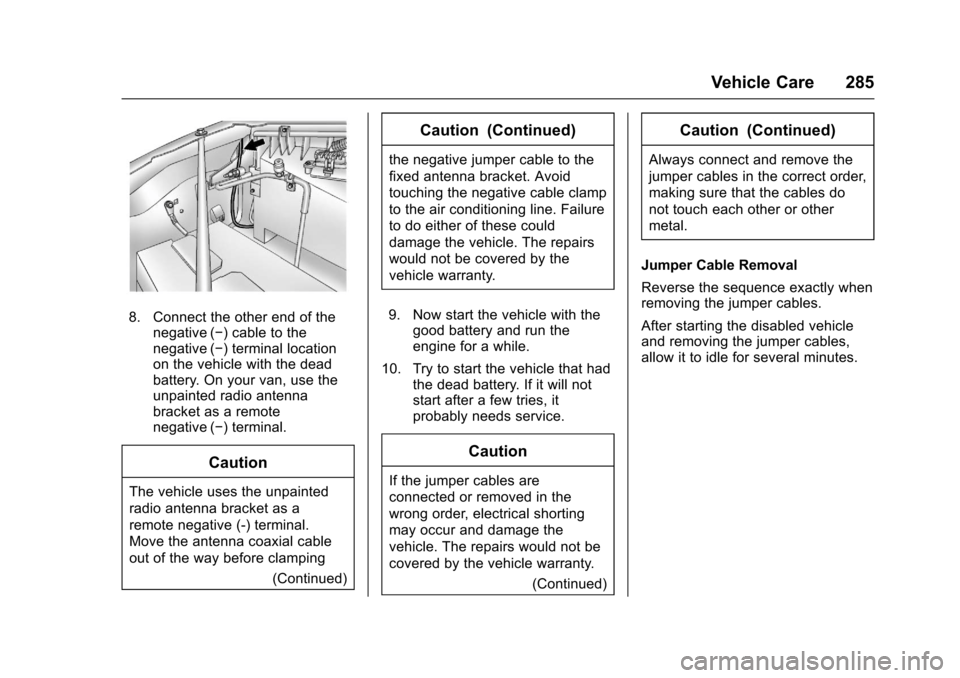
8. Connect the other end of thenegative (✓)cabletothenegative (✓)terminallocationon the vehicle with the deadbattery. On your van, use theunpainted radio antennabracket as a remotenegative (✓)terminal.
Caution
The vehicle uses the unpainted
radio antenna bracket as a
remote negative (-) terminal.
Move the antenna coaxial cable
out of the way before clamping
(Continued)
Caution (Continued)
the negative jumper cable to the
fixed antenna bracket. Avoid
touching the negative cable clamp
to the air conditioning line. Failure
to do either of these could
damage the vehicle. The repairs
would not be covered by the
vehicle warranty.
9. Now start the vehicle with thegood battery and run theengine for a while.
10. Try to start the vehicle that hadthe dead battery. If it will notstart after a few tries, itprobably needs service.
Caution
If the jumper cables are
connected or removed in the
wrong order, electrical shorting
may occur and damage the
vehicle. The repairs would not be
covered by the vehicle warranty.
(Continued)
Caution (Continued)
Always connect and remove the
jumper cables in the correct order,
making sure that the cables do
not touch each other or other
metal.
Jumper Cable Removal
Reverse the sequence exactly whenremoving the jumper cables.
After starting the disabled vehicleand removing the jumper cables,allow it to idle for several minutes.
Page 318 of 346
Chevrolet Express Owner Manual (GMNA-Localizing-U.S./Canada/Mexico-9967827) - 2017 - crc - 5/2/16
Customer Information 317
Services Provided
.Emergency Fuel Delivery:Delivery of enough fuel for thevehicle to get to the nearestservice station.
.Lock-Out Service:Service tounlock the vehicle if you arelocked out. A remote unlock maybe available if you have OnStar.For security reasons, the drivermust present identificationbefore this service is given.
.Emergency Tow from a PublicRoad or Highway:To w t o t h enearest Chevrolet dealer forwarranty service, or if the vehiclewas in a crash and cannot bedriven. Assistance is not givenwhen the vehicle is stuck in thesand, mud, or snow.
.Flat Tire Change:Service tochange a flat tire with the sparetire. The spare tire, if equipped,must be in good condition andproperly inflated. It is the owner'sresponsibility for the repair orreplacement of the tire if it is notcovered by the warranty.
.Battery Jump Start:Service tojump start a dead battery.
.Tr i p I n t e r r u p t i o n B e n e f i t s a n dAssistance:If your trip isinterrupted due to a warrantyevent, incidental expenses maybe reimbursed within thePowertrain warranty period.Items considered are reasonableand customary hotel, meals,rental car, or a vehicle beingdelivered back to the customer,up to 805 km (500 mi).
Services Not Included in
Roadside Assistance
.Impound towing caused byviolation of any laws.
.Legal fines.
.Mounting, dismounting,or changing of snow tires,chains, or other traction devices.
Service is not provided if a vehicleis in an area that is not accessibleto the service vehicle or is not aregularly traveled or maintainedpublic road, which includes ice andwinter roads. Off-road use is notcovered.
Services Specific to
Canadian-Purchased Vehicles
.Fuel Delivery:Reimbursementis up to 7 liters. If available,diesel fuel delivery may berestricted. Propane and otherfuels are not provided throughthis service.
.Lock-Out Service:Vehicleregistration is required.
.Tr i p I n t e r r u p t i o n B e n e f i t s a n dAssistance:Must be over150 km from where your trip wasstarted to qualify.Pre-authorization, originaldetailed receipts, and a copy ofthe repair orders are required.Once authorization has beenreceived, the RoadsideAssistance advisor will help tomake arrangements and explainhow to receive payment.
.Alternative Service:Ifassistance cannot be providedright away, the RoadsideAssistance advisor may givepermission to get localemergency road service. You willreceive payment, up to $100,
Page 328 of 346
Chevrolet Express Owner Manual (GMNA-Localizing-U.S./Canada/Mexico-9967827) - 2017 - crc - 5/2/16
OnStar 327
.Obtain and customize the Wi-Fi®
hotspot name or SSID andpassword, if equipped.
PressQto connect to an
Advisor to:
.Verify account information orupdate contact information.
.Get driving directions.
.Receive a Diagnostic check ofthe vehicle's key operatingsystems.
.Receive Roadside Assistance.
.Manage Wi-Fi Settings,if equipped.
Press>to get a priority connection
to an OnStar Advisor available 24/7to:
.Get help for an emergency.
.Be a Good Samaritan orrespond to an AMBER Alert.
.Get assistance in severeweather or other crisis situationsand find evacuation routes.
OnStar Services
Emergency
Emergency Services require anactive, OnStar service plan(excludes Basic Plan). WithAutomatic Crash Response, built-insensors can automatically alert aspecially trained OnStar Advisorwho is immediately connected in tothe vehicle to help.
Press>for a priority connection to
an OnStar Advisor who can contactemergency service providers, directthem to your exact location, andrelay important information.
With OnStar Crisis Assist, speciallytrained Advisors are available24 hours a day, 7 days a week, toprovide a central point of contact,assistance, and information during acrisis.
With Roadside Assistance, Advisorscan locate a nearby service providerto help with a flat tire, a batteryjump, or an empty gas tank.
Security
If equipped, OnStar provides theseservices:
.With Stolen Vehicle Assistance,OnStar Advisors can use GPS topinpoint the vehicle and helpauthorities quickly recover it.
.With Remote Ignition Block™,if equipped, OnStar can blockthe engine from being restarted.
.With Stolen Vehicle Slowdown®,if equipped, OnStar can workwith law enforcement togradually slow the vehicle down.
Theft Alarm Notification
If equipped, if the doors are lockedand the vehicle alarm sounds, anotification by text, e-mail, or phonecall will be sent. If the vehicle isstolen, an OnStar Advisor can workwith authorities to recover thevehicle.
Page 330 of 346
Chevrolet Express Owner Manual (GMNA-Localizing-U.S./Canada/Mexico-9967827) - 2017 - crc - 5/2/16
OnStar 329
from each other and use acombination of letters, numbers,and symbols to increase thesecurity.
.Change the default name of theSSID (Service Set Identifier).This is your network’snamethatis visible to other wirelessdevices. Choose a unique nameand avoid family names orvehicle descriptions.
OnStar Wi-Fi®Hotspot (IfEquipped)
The vehicle may have a built-inWi-Fi hotspot that provides accessto the Internet and web content at4G LTE speed. Up to seven mobiledevices can be connected. A dataplan is required. Use the in-vehiclecontrols only when it is safe todo so.
1. To retrieve Wi-Fi hotspot
information, press=,waitfor
the prompt, then say“Wi-Fisettings.”On some vehicles,touch Wi-Fi Settings on thescreen.
2. The Wi-Fi settings will displaythe Wi-Fi hotspot name (SSID),password, and on somevehicles, the connection type(no Internet connection, 3G,4G, 4G LTE), and signal quality(poor, good, excellent).
3. To change the SSID or
password, pressQor call
1-888-4ONSTAR to connectwith an Advisor.
After initial set-up, your vehicle’sWi-Fi hotspot will connectautomatically to your mobiledevices. Manage data usage byturning Wi-Fi on or off on yourmobile device, using theRemoteLink mobile app, or bycontacting an OnStar Advisor.
OnStar RemoteLink®Mobile App(If Equipped)
Download the OnStar RemoteLinkmobile app to select Apple®iOS,Android™,BlackBerry®,or Windows®mobile devices.OnStar Subscribers can access thefollowing services from a mobiledevice:
.Remotely start/stop the vehicle,if factory-equipped.
.Lock/unlock doors, if equippedwith automatic locks.
.Activate the horn and lamps.
.Check the vehicle’sfuellevel,oillife, or tire pressure,if factory-equipped with the TirePressure Monitor System.
.Send directions to the vehicle.
.Locate the vehicle on a map(U.S. market only).
.Turn the vehicle's Wi-Fi hotspoton/off, manage settings, andmonitor data consumption,if equipped.
For OnStar RemoteLink informationand compatibility, seewww.onstar.com (U.S.) orwww.onstar.ca (Canada).
Remote Services
Contact an OnStar Advisor tounlock the doors or sound the hornand flash the lamps.
Page 333 of 346
Chevrolet Express Owner Manual (GMNA-Localizing-U.S./Canada/Mexico-9967827) - 2017 - crc - 5/2/16
332 OnStar
to the vehicle in a crash, or wirelessphone network congestion orjamming—may prevent service.
SeeRadio FrequencyStatement0322.
Services for People with
Disabilities
Advisors provide services to helpSubscribers with physical disabilitiesand medical conditions.
PressQto help:
.Locate a gas station with anattendant to pump gas.
.Find a hotel, restaurant, etc.,that meets accessibility needs.
.Provide directions to the closesthospital or pharmacy in urgentsituations.
TTY Users
OnStar has the ability tocommunicate to deaf,hard-of-hearing, or speech-impairedcustomers while in the vehicle. Theavailable dealer-installed TTYsystem can provide in-vehicle
access to all OnStar services,except Virtual Advisor and OnStarTurn-by-Turn Navigation.
OnStar Personal Identification
Number (PIN)
APINisneededtoaccesssomeOnStar services. The PIN will needto be changed the first time whenspeaking with an Advisor. Tochange the OnStar PIN, contact an
OnStar Advisor by pressingQor
calling 1-888-4ONSTAR.
Warranty
OnStar equipment may bewarranted as part of the vehiclewarranty.
Languages
The vehicle can be programmed torespond in multiple languages.
PressQand ask for an Advisor.
Advisors are available in English,Spanish, and French. Availablelanguages may vary by country.
Potential Issues
OnStar cannot perform RemoteDoor Unlock or Stolen VehicleAssistance after the vehicle hasbeen off continuously for 10 dayswithout an ignition cycle. If thevehicle has not been started forfive days, OnStar can contactRoadside Assistance or a locksmithto help gain access to the vehicle.
Global Positioning
System (GPS)
.Obstruction of the GPS canoccur in a large city with tallbuildings; in parking garages;around airports; in tunnels andunderpasses; or in an area withvery dense trees. If GPS signalsare not available, the OnStarsystem should still operate tocall OnStar. However, OnStarcould have difficulty identifyingthe exact location.
.In emergency situations, OnStarcan use the last stored GPSlocation to send to emergencyresponders.
Page 341 of 346

Chevrolet Express Owner Manual (GMNA-Localizing-U.S./Canada/Mexico-9967827) - 2017 - crc - 5/2/16
340 Index
G
Gauges
Engine Coolant Temperature . . . 98
Engine Oil Pressure . . . . . . . . . . . . 97
Fuel . . . . . . . . . . . . . . . . . . . . . . . . . . . . 96
Odometer . . . . . . . . . . . . . . . . . . . . . . . 96
Speedometer . . . . . . . . . . . . . . . . . . . 96
Trip Odometer . . . . . . . . . . . . . . . . . . 96
Voltmeter . . . . . . . . . . . . . . . . . . . . . . . 99
Warning Lights and
Indicators . . . . . . . . . . . . . . . . . . . . . 94
General Information
Service and Maintenance . . . . . 296
To w i n g . . . . . . . . . . . . . . . . . . . . . . . . 2 0 2
Vehicle Care . . . . . . . . . . . . . . . . . . 215
Glass, Enhanced Technology . . . . 38
GM Mobility Reimbursement
Program . . . . . . . . . . . . . . . . . . . . . . . 316
H
Halogen Bulbs . . . . . . . . . . . . . . . . . . 240
Hazard Warning Flashers . . . . . . . 128
Head Restraints . . . . . . . . . . . . . . . . . 41
Headlamps . . . . . . . . . . . . . . . . . . . . . 241
Aiming . . . . . . . . . . . . . . . . . . . . . . . . 240
Automatic . . . . . . . . . . . . . . . . . . . . . 127
Bulb Replacement . . . . . . . . . . . . 240
Daytime Running
Lamps (DRL) . . . . . . . . . . . . . . . . 126
Headlamps (cont'd)
Flash-to-Pass . . . . . . . . . . . . . . . . . 126
High-Beam On Light . . . . . . . . . . 107
High/Low Beam Changer . . . . . 126
Heated Mirrors . . . . . . . . . . . . . . . . . . . 36
Heater
Engine . . . . . . . . . . . . . . . . . . . . . . . . 179
Heating and Air Conditioning . . . 158
High-Beam On Light . . . . . . . . . . . . 107
Hill and Mountain Roads . . . . . . . . 169
Hood . . . . . . . . . . . . . . . . . . . . . . . . . . . 217
Horn . . . . . . . . . . . . . . . . . . . . . . . . . . . . . 89
How to Wear Safety Belts
Properly . . . . . . . . . . . . . . . . . . . . . . . . 47
I
Idle System
Fast . . . . . . . . . . . . . . . . . . . . . . . . . . 178
Ignition Positions . . . . . . . . . . . . . . . 176
Ignition Transmission Lock
Check . . . . . . . . . . . . . . . . . . . . . . . . . 239
Immobilizer . . . . . . . . . . . . . . . . . . . . . . 33
Infants and Young Children,
Restraints . . . . . . . . . . . . . . . . . . . . . . 68
Infotainment . . . . . . . . . . . . . . . . . . . . 132
Infotainment System . . . . . . . . . . . . 325
Instrument Cluster . . . . . . . . . . . . . . . 95
Interior Rearview Mirrors . . . . . . . . . 36
Introduction . . . . . . . . . . . . . . . . . . . . . . . 2
J
Jump Starting - North
America . . . . . . . . . . . . . . . . . . . . . . . 282
K
Key and Lock Messages . . . . . . . . 115
Keyless Entry
Remote (RKE) System . . . . . . . . . 25
Keys . . . . . . . . . . . . . . . . . . . . . . . . . . . . . 23
L
Labeling, Tire Sidewall . . . . . . . . . . 254
Lamps
Daytime Running (DRL) . . . . . . 126
Dome . . . . . . . . . . . . . . . . . . . . . . . . . 129
Exterior Controls . . . . . . . . . . . . . . 125
Exterior Lamps Off
Reminder . . . . . . . . . . . . . . . . . . . 126
License Plate . . . . . . . . . . . . . . . . . 244
Malfunction Indicator . . . . . . . . . 102
Messages . . . . . . . . . . . . . . . . . . . . .115
Reading . . . . . . . . . . . . . . . . . . . . . . 130
Ta i l l a m p s . . . . . . . . . . . . . . . . . . . . . 2 4 3
Lamps, Bulb Replacement . . . . . . 242
Lap-Shoulder Belt . . . . . . . . . . . . . . . 48
LATCH System
Replacing Parts after a
Crash . . . . . . . . . . . . . . . . . . . . . . . . . 79
Page 344 of 346

Chevrolet Express Owner Manual (GMNA-Localizing-U.S./Canada/Mexico-9967827) - 2017 - crc - 5/2/16
Index 343
Rear Axle . . . . . . . . . . . . . . . . . . . . . . . 236
Locking . . . . . . . . . . . . . . . . . . . . . . . 191
Rear Climate Control System . . . 161
Rear Doors . . . . . . . . . . . . . . . . . . . . . . 32
Rear Heating System . . . . . . . . . . . 160
Rear Seats . . . . . . . . . . . . . . . . . . . . . . 43
Rear Vision Camera (RVC) . . . . . 194
Rearview Mirrors . . . . . . . . . . . . . . . . 36
Reclining Seatbacks . . . . . . . . . . . . . 42
Recommended Fluids and
Lubricants . . . . . . . . . . . . . . . . . . . . . 305
Records
Maintenance . . . . . . . . . . . . . . . . . . 307
Recreational Vehicle Towing . . . . 286
Reimbursement Program,
GM Mobility . . . . . . . . . . . . . . . . . . . 316
Remote Keyless Entry (RKE)
System . . . . . . . . . . . . . . . . . . . . . . . . . 25
Remote Vehicle Start . . . . . . . . . . . . 27
Replacement Bulbs . . . . . . . . . . . . . 245
Replacement Parts
Airbags . . . . . . . . . . . . . . . . . . . . . . . . . 66
Maintenance . . . . . . . . . . . . . . . . . . 306
Replacing Airbag System . . . . . . . . 66
Replacing LATCH System
Parts after a Crash . . . . . . . . . . . . . 79
Replacing Safety Belt System
Parts after a Crash . . . . . . . . . . . . . 54
Reporting Safety Defects
Canadian Government . . . . . . . . 323
General Motors . . . . . . . . . . . . . . . 323
U.S. Government . . . . . . . . . . . . . 323
Restraints
Where to Put . . . . . . . . . . . . . . . . . . . 72
Retained Accessory
Power (RAP) . . . . . . . . . . . . . . . . . . 180
Ride Control Systems
Messages . . . . . . . . . . . . . . . . . . . . .116
Roads
Driving, Wet . . . . . . . . . . . . . . . . . . 168
Roadside Assistance
Program . . . . . . . . . . . . . . . . . . . . . . . 316
Rotation, Tires . . . . . . . . . . . . . . . . . . 265
Routing, Engine Drive Belt . . . . . . 311
Running the Vehicle While
Parked . . . . . . . . . . . . . . . . . . . . . . . . 183
S
Safety Belts . . . . . . . . . . . . . . . . . . . . . 46
Care . . . . . . . . . . . . . . . . . . . . . . . . . . . . 54
Extender . . . . . . . . . . . . . . . . . . . . . . . . 53
How to Wear Safety Belts
Properly . . . . . . . . . . . . . . . . . . . . . . . 47
Lap-Shoulder Belt . . . . . . . . . . . . . . 48
Reminders . . . . . . . . . . . . . . . . . . . . . . 99
Replacing after a Crash . . . . . . . . 54
Use During Pregnancy . . . . . . . . . . 53
Safety Defects Reporting
Canadian Government . . . . . . . . 323
General Motors . . . . . . . . . . . . . . . 323
U.S. Government . . . . . . . . . . . . . 323
Safety Locks . . . . . . . . . . . . . . . . . . . . . 30
Safety System Check . . . . . . . . . . . . 54
Satellite Radio . . . . . . . . . . . . . . . . . . 139
Scheduling Appointments . . . . . . . 318
Seats
Adjustment, Front . . . . . . . . . . . . . . . 41
Head Restraints . . . . . . . . . . . . . . . . 41
Power Adjustment, Front . . . . . . . 41
Rear . . . . . . . . . . . . . . . . . . . . . . . . . . . . 43
Reclining Seatbacks . . . . . . . . . . . . 42
Securing Child Restraints . . . . 79, 81
Security
Light . . . . . . . . . . . . . . . . . . . . . . . . . . 107
Messages . . . . . . . . . . . . . . . . . . . . .117
OnStar®...................... 327
Vehicle . . . . . . . . . . . . . . . . . . . . . . . . . 33
Service . . . . . . . . . . . . . . . . . . . . . . . . . 163
Accessories and
Modifications . . . . . . . . . . . . . . . . 216
Climate Control System . . . . . . . 158
Doing Your Own Work . . . . . . . . 216
Engine Soon Light . . . . . . . . . . . . 102
Maintenance Records . . . . . . . . 307