manual radio set CHEVROLET EXPRESS CARGO VAN 2017 1.G Owner's Manual
[x] Cancel search | Manufacturer: CHEVROLET, Model Year: 2017, Model line: EXPRESS CARGO VAN, Model: CHEVROLET EXPRESS CARGO VAN 2017 1.GPages: 346, PDF Size: 6.54 MB
Page 265 of 346
Chevrolet Express Owner Manual (GMNA-Localizing-U.S./Canada/Mexico-9967827) - 2017 - crc - 5/2/16
264 Vehicle Care
the sensor matching process isperformed successfully. Seeyour dealer for service.
.Replacement tires or wheels donot match the original equipmenttires or wheels. Tires and wheelsother than those recommendedcould prevent the TPMS fromfunctioning properly. SeeBuyingNew Tires0268.
.Operating electronic devices orbeing near facilities using radiowave frequencies similar to theTPMS could cause the TPMSsensors to malfunction.
If the TPMS is not functioningproperly, it cannot detect or signal alow tire condition. See your dealerfor service if the TPMS malfunctionlight and DIC message come onand stay on.
TPMS Sensor Matching
Process
Each TPMS sensor has a uniqueidentification code. The identificationcode needs to be matched to a newtire/wheel position after rotating thevehicle’stiresorreplacingoneor
more of the TPMS sensors. Also,the TPMS sensor matching processshould be performed after replacingasparetirewitharoadtirecontaining the TPMS sensor. Themalfunction light and the DICmessage should go off at the nextignition cycle. The sensors arematched to the tire/wheel positions,using a TPMS relearn tool, in thefollowing order: driver side front tire,passenger side front tire, passengerside rear tire, and driver side rear.See your dealer for service or topurchase a relearn tool. A TPMSrelearn tool can also be purchased.See Tire Pressure Monitor SensorActivation Tool atwww.gmtoolsandequipment.com orcall 1-800-GM TOOLS(1-800-468-6657).
There are two minutes to match thefirst tire/wheel position, andfive minutes overall to match all fourtire/wheel positions. If it takeslonger, the matching process stopsand must be restarted.
The TPMS sensor matchingprocess is:
1. Set the parking brake.
2. Turn the ignition to ON/RUNwith the engine off.
3. Press the Remote Keyless
Entry (RKE) transmitter'sQ
andKbuttons at the same
time for approximatelyfive seconds. The horn soundstwice to signal the receiver is inrelearn mode and TIRELEARNING ACTIVE messagedisplays on the DIC screen.
If the vehicle does not haveRKE, press the DriverInformation Center (DIC)vehicle information button untilthe PRESSVTO RELEARNTIRE POSITIONS messagedisplays. The horn soundstwice to signal the receiver is inrelearn mode and TIRELEARNING ACTIVE messagedisplays on the DIC screen.
4. Start with the driver sidefront tire.
Page 284 of 346

Chevrolet Express Owner Manual (GMNA-Localizing-U.S./Canada/Mexico-9967827) - 2017 - crc - 5/2/16
Vehicle Care 283
Caution
Ignoring these steps could result
in costly damage to the vehicle
that would not be covered by the
vehicle warranty. Trying to start
the vehicle by pushing or pulling it
will not work, and it could damage
the vehicle.
1. Check the other vehicle.It must have a 12-volt batterywith a negative ground system.
Caution
If the other vehicle does not have
a12-voltsystemwithanegative
ground, both vehicles can be
damaged. Only use a vehicle that
has a 12-volt system with a
negative ground for jump starting.
2. Get the vehicles close enoughso the jumper cables canreach, but be sure the vehiclesare not touching each other.If they are, it could cause a
ground connection you do notwant. You would not be able tostart your vehicle, and the badgrounding could damage theelectrical systems.
To a v o i d t h e p o s s i b i l i t y o f t h evehicles rolling, set the parkingbrake firmly on both vehiclesinvolved in the jump startprocedure. Put an automatictransmission in P (Park) or amanual transmission in Neutralbefore setting the parkingbrake.
Caution
If any accessories are left on or
plugged in during the jump
starting procedure, they could be
damaged. The repairs would not
be covered by the vehicle
warranty. Whenever possible, turn
off or unplug all accessories on
either vehicle when jump starting.
3. Turn off the ignition on bothvehicles. Unplug unnecessaryaccessories plugged into the
cigarette lighter or theaccessory power outlet. Turnoff the radio and all lamps thatare not needed. This will avoidsparks and help save bothbatteries. And it could save theradio!
4. Open the hoods and locate thepositive (+) and negative (✓)terminal locations of the othervehicle.
On your van, use the unpaintedradio antenna bracket as aremote negative (✓)terminal.
{Warning
Using a match near a battery can
cause battery gas to explode.
People have been hurt doing this,
and some have been blinded.
Use a flashlight if you need more
light.
Battery fluid contains acid that
can burn you. Do not get it on
you. If you accidentally get it in
(Continued)
Page 285 of 346
Chevrolet Express Owner Manual (GMNA-Localizing-U.S./Canada/Mexico-9967827) - 2017 - crc - 5/2/16
284 Vehicle Care
Warning (Continued)
your eyes or on your skin, flush
the place with water and get
medical help immediately.
{Warning
Fans or other moving engine
parts can injure you badly. Keep
your hands away from moving
parts once the engine is running.
5. Check that the jumper cablesdo not have loose or missinginsulation. If they do, you couldget a shock. The vehiclescould be damaged too.
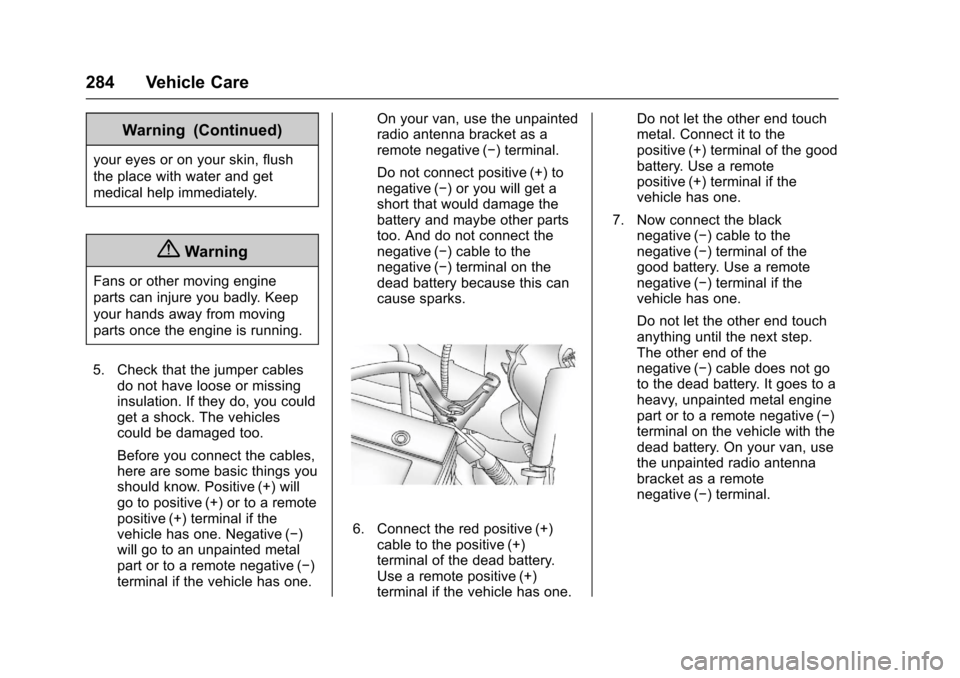
Before you connect the cables,here are some basic things youshould know. Positive (+) willgo to positive (+) or to a remotepositive (+) terminal if thevehicle has one. Negative (✓)will go to an unpainted metalpart or to a remote negative (✓)terminal if the vehicle has one.
On your van, use the unpaintedradio antenna bracket as aremote negative (✓)terminal.
Do not connect positive (+) tonegative (✓)oryouwillgetashort that would damage thebattery and maybe other partstoo. And do not connect thenegative (✓)cabletothenegative (✓)terminalonthedead battery because this cancause sparks.
6. Connect the red positive (+)cable to the positive (+)terminal of the dead battery.Use a remote positive (+)terminal if the vehicle has one.
Do not let the other end touchmetal. Connect it to thepositive (+) terminal of the goodbattery. Use a remotepositive (+) terminal if thevehicle has one.
7. Now connect the blacknegative (✓)cabletothenegative (✓)terminalofthegood battery. Use a remotenegative (✓)terminalifthevehicle has one.
Do not let the other end touchanything until the next step.The other end of thenegative (✓)cabledoesnotgoto the dead battery. It goes to aheavy, unpainted metal enginepart or to a remote negative (✓)terminal on the vehicle with thedead battery. On your van, usethe unpainted radio antennabracket as a remotenegative (✓)terminal.
Page 295 of 346
Chevrolet Express Owner Manual (GMNA-Localizing-U.S./Canada/Mexico-9967827) - 2017 - crc - 5/2/16
294 Vehicle Care
2. Remove excess moisture bygently wringing until water doesnot drip from the cleaning cloth.
3. Start on the outside edge of thesoil and gently rub toward thecenter. Rotate the cleaningcloth to a clean area frequentlyto prevent forcing the soil in tothe fabric.
4. Continue gently rubbing thesoiled area until there is nolonger any color transfer fromthe soil to the cleaning cloth.
5. If the soil is not completelyremoved, use a mild soapsolution followed only by plainwater.
If the soil is not completelyremoved, it may be necessary touse a commercial upholsterycleaner or spot lifter. Test a smallhidden area for colorfastness beforeusing a commercial upholsterycleaner or spot lifter. If ringformation occurs, clean the entirefabric or carpet.
After cleaning use a paper towel toblot excess moisture.
Cleaning High Gloss Surfaces
and Vehicle Information and
Radio Displays
Use a microfiber cloth on high glosssurfaces or vehicle displays. First,use a soft bristle brush to removedirt that can scratch the surface.Then gently clean by rubbing with amicrofiber cloth. Never use windowcleaners or solvents. Periodicallyhand wash the microfiber clothseparately, using mild soap. Do notuse bleach or fabric softener. Rinsethoroughly and air dry beforenext use.
Caution
Do not attach a device with a
suction cup to the display. This
may cause damage and would
not be covered by the vehicle
warranty.
Instrument Panel, Leather,
Vinyl, Other Plastic Surfaces,
Low Gloss Paint Surfaces and
Natural Open Pore Wood
Surfaces
Use a soft microfiber clothdampened with water to removedust and loose dirt. For a morethorough cleaning, use a softmicrofiber cloth dampened with amild soap solution.
Caution
Soaking or saturating leather,
especially perforated leather, as
well as other interior surfaces,
may cause permanent damage.
Wipe excess moisture from these
surfaces after cleaning and allow
them to dry naturally. Never use
heat, steam, or spot removers. Do
not use cleaners that contain
silicone or wax-based products.
Cleaners containing these
solvents can permanently change
(Continued)
Page 325 of 346
Chevrolet Express Owner Manual (GMNA-Localizing-U.S./Canada/Mexico-9967827) - 2017 - crc - 5/2/16
324 Customer Information
Vehicle Data
Recording and
Privacy
The vehicle has a number ofcomputers that record informationabout the vehicle’sperformanceandhow it is driven. For example, thevehicle uses computer modules tomonitor and control engine andtransmission performance, tomonitor the conditions for airbagdeployment and deploy them in acrash, and, if equipped, to provideantilock braking to help the drivercontrol the vehicle. These modulesmay store data to help the dealertechnician service the vehicle.Some modules may also store dataabout how the vehicle is operated,such as rate of fuel consumption oraverage speed. These modules mayretain personal preferences, such asradio presets, seat positions, andtemperature settings.
Event Data Recorders
This vehicle is equipped with anevent data recorder (EDR). Themain purpose of an EDR is torecord, in certain crash or nearcrash-like situations, such as an airbag deployment or hitting a roadobstacle, data that will assist inunderstanding how a vehicle’ssystems performed. The EDR isdesigned to record data related tovehicle dynamics and safetysystems for a short period of time,typically 30 seconds or less. TheEDR in this vehicle is designed torecord such data as:
.How various systems in yourvehicle were operating;
.Whether or not the driver andpassenger safety belts werebuckled/fastened;
.How far (if at all) the driver wasdepressing the accelerator and/or brake pedal; and,
.How fast the vehicle wastraveling.
These data can help provide abetter understanding of thecircumstances in which crashes andinjuries occur.
Note
EDR data are recorded by yourvehicle only if a non-trivial crashsituation occurs; no data arerecorded by the EDR under normaldriving conditions and no personaldata (e.g., name, gender, age, andcrash location) are recorded.However, other parties, such as lawenforcement, could combine theEDR data with the type ofpersonally identifying data routinelyacquired during a crashinvestigation.
To r e a d d a t a r e c o r d e d b y a n E D R ,special equipment is required, andaccess to the vehicle or the EDR isneeded. In addition to the vehiclemanufacturer, other parties, such aslaw enforcement, that have thespecial equipment, can read theinformation if they have access tothe vehicle or the EDR.
Page 334 of 346
Chevrolet Express Owner Manual (GMNA-Localizing-U.S./Canada/Mexico-9967827) - 2017 - crc - 5/2/16
OnStar 333
AtemporarylossofGPScancauseloss of the ability to send aTurn-by-Turn Navigation route. TheAdvisor may give a verbal route ormay ask for a call back after thevehicle is driven into an open area.
Cellular and GPS Antennas
Cellular reception is required forOnStar to send remote signals tothe vehicle. Do not place items overor near the antenna to preventblocking cellular and GPS signalreception.
Unable to Connect to OnStar
Message
If there is limited cellular coverageor the cellular network has reachedmaximum capacity, this message
may come on. PressQto try the
call again or try again after driving afew miles into another cellular area.
Vehicle and Power Issues
OnStar services require a vehicleelectrical system, wireless service,and GPS satellite technologies to beavailable and operating for features
to function properly. These systemsmay not operate if the battery isdischarged or disconnected.
Add-on Electrical Equipment
The OnStar system is integratedinto the electrical architecture of thevehicle. Do not add any electricalequipment. SeeAdd-On ElectricalEquipment0212.Addedelectricalequipment may interfere with theoperation of the OnStar system andcause it to not operate.
Vehicle Software Updates
OnStar or GM may remotely deliversoftware updates or changes to thevehicle without further notice orconsent. These updates or changesmay enhance or maintain safety,security, or the operation of thevehicle or the vehicle systems.Software updates or changes mayaffect or erase data or settings thatare stored in the vehicle, such asOnStar Hands-Free Calling nametags, saved navigation destinations,or pre-set radio stations. NeitherOnStar nor GM is responsible forany affected or erased data or
settings. These updates or changesmay also collect personalinformation. Such collection isdescribed in the OnStar privacystatement or separately disclosed atthe time of installation. Theseupdates or changes may also causeasystemtoautomaticallycommunicate with GM servers tocollect information about vehiclesystem status, identify whetherupdates or changes are available,or deliver updates or changes. Anactive OnStar agreement constitutesconsent to these software updatesor changes and agreement thateither OnStar or GM may remotelydeliver them to the vehicle.
Privacy
The complete OnStar PrivacyStatement may be found atwww.onstar.com (U.S.),or www.onstar.ca (Canada). Werecommend that you review it. If youhave any questions, call1-888-4ONSTAR (1-888-466-7827)
or pressQto speak with an
Advisor. Users of wirelesscommunications are cautioned that