battery CHEVROLET EXPRESS CARGO VAN 2017 1.G Owner's Guide
[x] Cancel search | Manufacturer: CHEVROLET, Model Year: 2017, Model line: EXPRESS CARGO VAN, Model: CHEVROLET EXPRESS CARGO VAN 2017 1.GPages: 346, PDF Size: 6.54 MB
Page 283 of 346
Chevrolet Express Owner Manual (GMNA-Localizing-U.S./Canada/Mexico-9967827) - 2017 - crc - 5/2/16
282 Vehicle Care
Full-Size Spare Tire
If this vehicle came with a full-sizespare tire, it was fully inflated whennew, however, it can lose air overtime. Check the inflation pressureregularly. SeeTire Pressure0260andVehicle Load Limits0171.Forinstructions on how to remove,install, or store a spare tire, seeTireChanging0274.
After installing the spare tire on thevehicle, stop as soon as possibleand check that the spare is correctlyinflated. The spare tire is made toperform well at speeds up to11 2 k m / h ( 7 0 m p h ) a t t h erecommended inflation pressure, soyou can finish your trip.
Have the damaged or flat road tirerepaired or replaced back onto thevehicle, as soon as possible, so thespare tire will be available in case itis needed again.
Do not mix tires and wheels ofdifferent sizes, because they will notfit. Keep the spare tire and its wheeltogether.
Jump Starting
Jump Starting - North
America
For more information about thevehicle battery, seeBattery - NorthAmerica0236.
If the vehicle battery has run down,you may want to use anothervehicle and some jumper cables tostart your vehicle. Be sure to usethe following steps to do it safely.
{Warning
WA R N I N G :Battery posts,
terminals, and related
accessories contain lead and lead
compounds, chemicals known to
the State of California to cause
cancer and birth defects or other
reproductive harm. Batteries also
contain other chemicals known to
the State of California to cause
cancer.WASH HANDS AFTER
HANDLING.
(Continued)
Warning (Continued)
SeeCalifornia Proposition
65 Warning0215.
{Warning
Batteries can hurt you. They can
be dangerous because:
.They contain acid that canburn you.
.They contain gas that canexplode or ignite.
.They contain enoughelectricity to burn you.
If you do not follow these steps
exactly, some or all of these
things can hurt you.
Page 284 of 346

Chevrolet Express Owner Manual (GMNA-Localizing-U.S./Canada/Mexico-9967827) - 2017 - crc - 5/2/16
Vehicle Care 283
Caution
Ignoring these steps could result
in costly damage to the vehicle
that would not be covered by the
vehicle warranty. Trying to start
the vehicle by pushing or pulling it
will not work, and it could damage
the vehicle.
1. Check the other vehicle.It must have a 12-volt batterywith a negative ground system.
Caution
If the other vehicle does not have
a12-voltsystemwithanegative
ground, both vehicles can be
damaged. Only use a vehicle that
has a 12-volt system with a
negative ground for jump starting.
2. Get the vehicles close enoughso the jumper cables canreach, but be sure the vehiclesare not touching each other.If they are, it could cause a
ground connection you do notwant. You would not be able tostart your vehicle, and the badgrounding could damage theelectrical systems.
To a v o i d t h e p o s s i b i l i t y o f t h evehicles rolling, set the parkingbrake firmly on both vehiclesinvolved in the jump startprocedure. Put an automatictransmission in P (Park) or amanual transmission in Neutralbefore setting the parkingbrake.
Caution
If any accessories are left on or
plugged in during the jump
starting procedure, they could be
damaged. The repairs would not
be covered by the vehicle
warranty. Whenever possible, turn
off or unplug all accessories on
either vehicle when jump starting.
3. Turn off the ignition on bothvehicles. Unplug unnecessaryaccessories plugged into the
cigarette lighter or theaccessory power outlet. Turnoff the radio and all lamps thatare not needed. This will avoidsparks and help save bothbatteries. And it could save theradio!
4. Open the hoods and locate thepositive (+) and negative (✓)terminal locations of the othervehicle.
On your van, use the unpaintedradio antenna bracket as aremote negative (✓)terminal.
{Warning
Using a match near a battery can
cause battery gas to explode.
People have been hurt doing this,
and some have been blinded.
Use a flashlight if you need more
light.
Battery fluid contains acid that
can burn you. Do not get it on
you. If you accidentally get it in
(Continued)
Page 285 of 346
Chevrolet Express Owner Manual (GMNA-Localizing-U.S./Canada/Mexico-9967827) - 2017 - crc - 5/2/16
284 Vehicle Care
Warning (Continued)
your eyes or on your skin, flush
the place with water and get
medical help immediately.
{Warning
Fans or other moving engine
parts can injure you badly. Keep
your hands away from moving
parts once the engine is running.
5. Check that the jumper cablesdo not have loose or missinginsulation. If they do, you couldget a shock. The vehiclescould be damaged too.
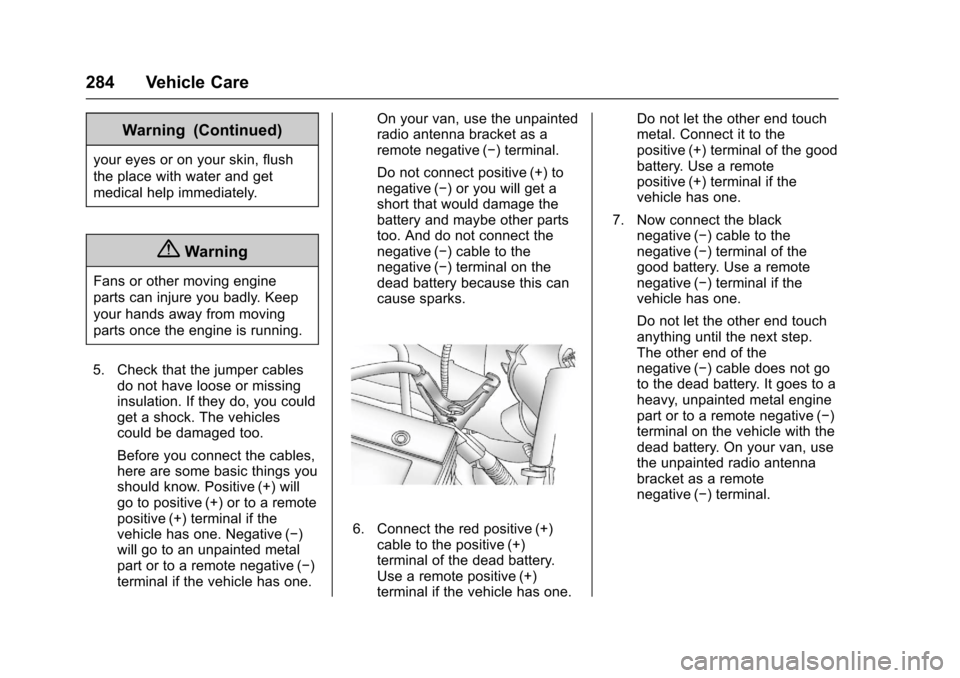
Before you connect the cables,here are some basic things youshould know. Positive (+) willgo to positive (+) or to a remotepositive (+) terminal if thevehicle has one. Negative (✓)will go to an unpainted metalpart or to a remote negative (✓)terminal if the vehicle has one.
On your van, use the unpaintedradio antenna bracket as aremote negative (✓)terminal.
Do not connect positive (+) tonegative (✓)oryouwillgetashort that would damage thebattery and maybe other partstoo. And do not connect thenegative (✓)cabletothenegative (✓)terminalonthedead battery because this cancause sparks.
6. Connect the red positive (+)cable to the positive (+)terminal of the dead battery.Use a remote positive (+)terminal if the vehicle has one.
Do not let the other end touchmetal. Connect it to thepositive (+) terminal of the goodbattery. Use a remotepositive (+) terminal if thevehicle has one.
7. Now connect the blacknegative (✓)cabletothenegative (✓)terminalofthegood battery. Use a remotenegative (✓)terminalifthevehicle has one.
Do not let the other end touchanything until the next step.The other end of thenegative (✓)cabledoesnotgoto the dead battery. It goes to aheavy, unpainted metal enginepart or to a remote negative (✓)terminal on the vehicle with thedead battery. On your van, usethe unpainted radio antennabracket as a remotenegative (✓)terminal.
Page 286 of 346
Chevrolet Express Owner Manual (GMNA-Localizing-U.S./Canada/Mexico-9967827) - 2017 - crc - 5/2/16
Vehicle Care 285
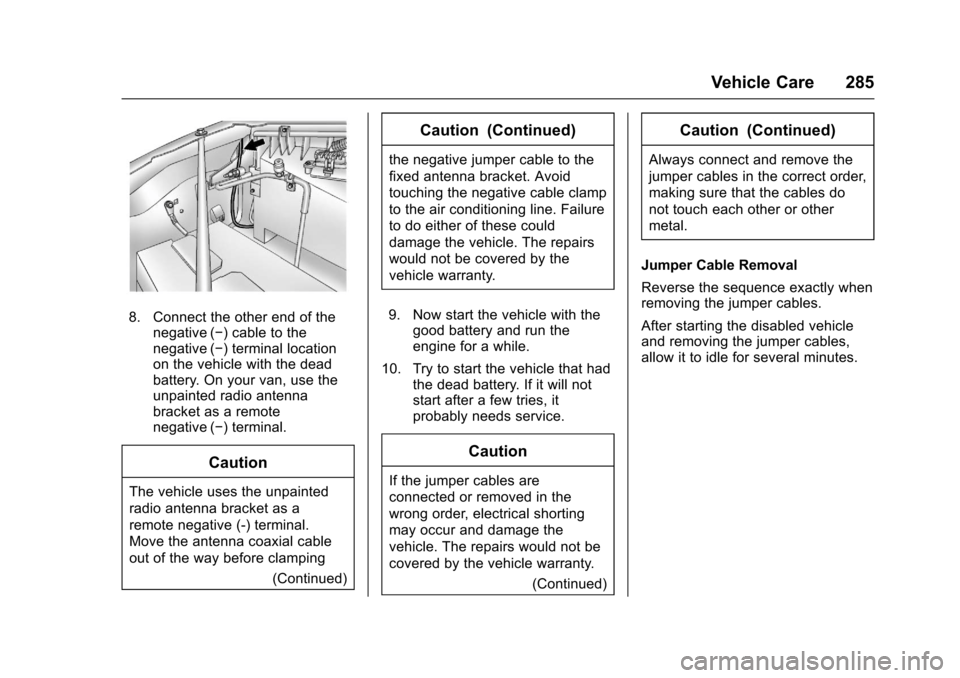
8. Connect the other end of thenegative (✓)cabletothenegative (✓)terminallocationon the vehicle with the deadbattery. On your van, use theunpainted radio antennabracket as a remotenegative (✓)terminal.
Caution
The vehicle uses the unpainted
radio antenna bracket as a
remote negative (-) terminal.
Move the antenna coaxial cable
out of the way before clamping
(Continued)
Caution (Continued)
the negative jumper cable to the
fixed antenna bracket. Avoid
touching the negative cable clamp
to the air conditioning line. Failure
to do either of these could
damage the vehicle. The repairs
would not be covered by the
vehicle warranty.
9. Now start the vehicle with thegood battery and run theengine for a while.
10. Try to start the vehicle that hadthe dead battery. If it will notstart after a few tries, itprobably needs service.
Caution
If the jumper cables are
connected or removed in the
wrong order, electrical shorting
may occur and damage the
vehicle. The repairs would not be
covered by the vehicle warranty.
(Continued)
Caution (Continued)
Always connect and remove the
jumper cables in the correct order,
making sure that the cables do
not touch each other or other
metal.
Jumper Cable Removal
Reverse the sequence exactly whenremoving the jumper cables.
After starting the disabled vehicleand removing the jumper cables,allow it to idle for several minutes.
Page 288 of 346
Chevrolet Express Owner Manual (GMNA-Localizing-U.S./Canada/Mexico-9967827) - 2017 - crc - 5/2/16
Vehicle Care 287
Dinghy Towing
Caution
If the vehicle is towed with all four
wheels on the ground, the
drivetrain components could be
damaged. The repairs would not
be covered by the vehicle
warranty. Do not tow the vehicle
with all four wheels on the
ground.
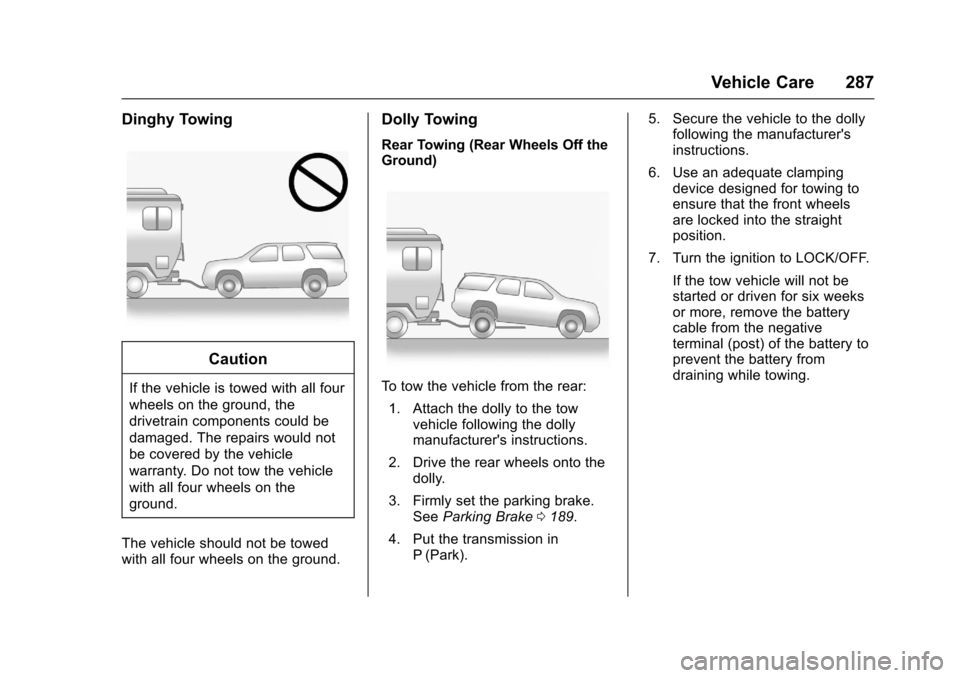
The vehicle should not be towedwith all four wheels on the ground.
Dolly Towing
Rear Towing (Rear Wheels Off theGround)
To t o w t h e v e h i c l e f r o m t h e r e a r :
1. Attach the dolly to the towvehicle following the dollymanufacturer's instructions.
2. Drive the rear wheels onto thedolly.
3. Firmly set the parking brake.SeeParking Brake0189.
4. Put the transmission inP(Park).
5. Secure the vehicle to the dollyfollowing the manufacturer'sinstructions.
6. Use an adequate clampingdevice designed for towing toensure that the front wheelsare locked into the straightposition.
7. Turn the ignition to LOCK/OFF.
If the tow vehicle will not bestarted or driven for six weeksor more, remove the batterycable from the negativeterminal (post) of the battery toprevent the battery fromdraining while towing.
Page 303 of 346
Chevrolet Express Owner Manual (GMNA-Localizing-U.S./Canada/Mexico-9967827) - 2017 - crc - 5/2/16
302 Service and Maintenance
Special Application
Services
.Vehicles with Dual Wheels:Check dual wheel nut torque at160, 1 600, and 10 000 km (100,1,000, and 6,000 mi) of driving.Repeat this service whenever atire/wheel is serviced orremoved.
.Severe Commercial UseVehicles Only: Lubricate chassiscomponents every oil change.
.Have underbody flushing serviceperformed. See“UnderbodyMaintenance”inExteriorCare0288.
Additional
Maintenance and Care
Yo u r v e h i c l e i s a n i m p o r t a n tinvestment and caring for it properlymay help to avoid future costlyrepairs. To maintain vehicleperformance, additionalmaintenance services may berequired.
It is recommended that your dealerperform these services—theirtrained dealer technicians knowyour vehicle best. Your dealer canalso perform a thoroughassessment with a multi-pointinspection to recommend when yourvehicle may need attention.
The following list is intended toexplain the services and conditionsto look for that may indicateservices are required.
Battery
The 12-volt battery supplies powerto start the engine and operate anyadditional electrical accessories.
.To a v o i d b r e a k - d o w n o r f a i l u r e t ostart the vehicle, maintain abattery with full cranking power.
.Trained dealer technicians havethe diagnostic equipment to testthe battery and ensure that theconnections and cables arecorrosion-free.
Belts
.Belts may need replacing if theysqueak or show signs ofcracking or splitting.
.Trained dealer technicians haveaccess to tools and equipmentto inspect the belts andrecommend adjustment orreplacement when necessary.
Brakes
Brakes stop the vehicle and arecrucial to safe driving.
.Signs of brake wear may includechirping, grinding, or squealingnoises, or difficulty stopping.
Page 318 of 346
Chevrolet Express Owner Manual (GMNA-Localizing-U.S./Canada/Mexico-9967827) - 2017 - crc - 5/2/16
Customer Information 317
Services Provided
.Emergency Fuel Delivery:Delivery of enough fuel for thevehicle to get to the nearestservice station.
.Lock-Out Service:Service tounlock the vehicle if you arelocked out. A remote unlock maybe available if you have OnStar.For security reasons, the drivermust present identificationbefore this service is given.
.Emergency Tow from a PublicRoad or Highway:To w t o t h enearest Chevrolet dealer forwarranty service, or if the vehiclewas in a crash and cannot bedriven. Assistance is not givenwhen the vehicle is stuck in thesand, mud, or snow.
.Flat Tire Change:Service tochange a flat tire with the sparetire. The spare tire, if equipped,must be in good condition andproperly inflated. It is the owner'sresponsibility for the repair orreplacement of the tire if it is notcovered by the warranty.
.Battery Jump Start:Service tojump start a dead battery.
.Tr i p I n t e r r u p t i o n B e n e f i t s a n dAssistance:If your trip isinterrupted due to a warrantyevent, incidental expenses maybe reimbursed within thePowertrain warranty period.Items considered are reasonableand customary hotel, meals,rental car, or a vehicle beingdelivered back to the customer,up to 805 km (500 mi).
Services Not Included in
Roadside Assistance
.Impound towing caused byviolation of any laws.
.Legal fines.
.Mounting, dismounting,or changing of snow tires,chains, or other traction devices.
Service is not provided if a vehicleis in an area that is not accessibleto the service vehicle or is not aregularly traveled or maintainedpublic road, which includes ice andwinter roads. Off-road use is notcovered.
Services Specific to
Canadian-Purchased Vehicles
.Fuel Delivery:Reimbursementis up to 7 liters. If available,diesel fuel delivery may berestricted. Propane and otherfuels are not provided throughthis service.
.Lock-Out Service:Vehicleregistration is required.
.Tr i p I n t e r r u p t i o n B e n e f i t s a n dAssistance:Must be over150 km from where your trip wasstarted to qualify.Pre-authorization, originaldetailed receipts, and a copy ofthe repair orders are required.Once authorization has beenreceived, the RoadsideAssistance advisor will help tomake arrangements and explainhow to receive payment.
.Alternative Service:Ifassistance cannot be providedright away, the RoadsideAssistance advisor may givepermission to get localemergency road service. You willreceive payment, up to $100,
Page 327 of 346
Chevrolet Express Owner Manual (GMNA-Localizing-U.S./Canada/Mexico-9967827) - 2017 - crc - 5/2/16
326 OnStar
OnStar
OnStar Overview
OnStar Overview . . . . . . . . . . . . . 326
OnStar Services
Emergency . . . . . . . . . . . . . . . . . . . 327Security . . . . . . . . . . . . . . . . . . . . . . 327Navigation . . . . . . . . . . . . . . . . . . . . 328Connections . . . . . . . . . . . . . . . . . . 328Diagnostics . . . . . . . . . . . . . . . . . . . 330
OnStar Additional Information
OnStar AdditionalInformation . . . . . . . . . . . . . . . . . . 331
OnStar Overview
=Voice Command Button
QBlue OnStar Button
>Red Emergency Button
This vehicle may be equipped with acomprehensive, in-vehicle systemthat can connect to an OnStarAdvisor for Emergency, Security,Navigation, Connections, andDiagnostics Services. OnStarservices may require a paidsubscription and data plan. OnStarrequires the vehicle battery andelectrical system, cellular service,and GPS satellite signals to beavailable and operating. OnStar actsas a link to existing emergencyservice providers. OnStar maycollect information about you andyour vehicle, including locationinformation. See OnStar User
Te r m s , P r i v a c y S t a t e m e n t , a n dSoftware Terms for more detailsincluding system limitations atwww.onstar.com (U.S.) orwww.onstar.ca (Canada).
The OnStar system status light isnext to the OnStar buttons. If thestatus light is:
.Solid Green: System is ready.
.Flashing Green: On a call.
.Red: Indicates a problem.
.Off: System is active. PressQ
twice to speak with an OnStarAdvisor.
PressQor call 1-888-4ONSTAR
(1-888-466-7827) to speak to anAdvisor.
Press=to:
.Make a call, end a call,or answer an incoming call.
.Give OnStar Hands-Free Callingvoice commands.
.Give OnStar Turn-by-TurnNavigation voice commands.
Page 328 of 346
Chevrolet Express Owner Manual (GMNA-Localizing-U.S./Canada/Mexico-9967827) - 2017 - crc - 5/2/16
OnStar 327
.Obtain and customize the Wi-Fi®
hotspot name or SSID andpassword, if equipped.
PressQto connect to an
Advisor to:
.Verify account information orupdate contact information.
.Get driving directions.
.Receive a Diagnostic check ofthe vehicle's key operatingsystems.
.Receive Roadside Assistance.
.Manage Wi-Fi Settings,if equipped.
Press>to get a priority connection
to an OnStar Advisor available 24/7to:
.Get help for an emergency.
.Be a Good Samaritan orrespond to an AMBER Alert.
.Get assistance in severeweather or other crisis situationsand find evacuation routes.
OnStar Services
Emergency
Emergency Services require anactive, OnStar service plan(excludes Basic Plan). WithAutomatic Crash Response, built-insensors can automatically alert aspecially trained OnStar Advisorwho is immediately connected in tothe vehicle to help.
Press>for a priority connection to
an OnStar Advisor who can contactemergency service providers, directthem to your exact location, andrelay important information.
With OnStar Crisis Assist, speciallytrained Advisors are available24 hours a day, 7 days a week, toprovide a central point of contact,assistance, and information during acrisis.
With Roadside Assistance, Advisorscan locate a nearby service providerto help with a flat tire, a batteryjump, or an empty gas tank.
Security
If equipped, OnStar provides theseservices:
.With Stolen Vehicle Assistance,OnStar Advisors can use GPS topinpoint the vehicle and helpauthorities quickly recover it.
.With Remote Ignition Block™,if equipped, OnStar can blockthe engine from being restarted.
.With Stolen Vehicle Slowdown®,if equipped, OnStar can workwith law enforcement togradually slow the vehicle down.
Theft Alarm Notification
If equipped, if the doors are lockedand the vehicle alarm sounds, anotification by text, e-mail, or phonecall will be sent. If the vehicle isstolen, an OnStar Advisor can workwith authorities to recover thevehicle.
Page 334 of 346
Chevrolet Express Owner Manual (GMNA-Localizing-U.S./Canada/Mexico-9967827) - 2017 - crc - 5/2/16
OnStar 333
AtemporarylossofGPScancauseloss of the ability to send aTurn-by-Turn Navigation route. TheAdvisor may give a verbal route ormay ask for a call back after thevehicle is driven into an open area.
Cellular and GPS Antennas
Cellular reception is required forOnStar to send remote signals tothe vehicle. Do not place items overor near the antenna to preventblocking cellular and GPS signalreception.
Unable to Connect to OnStar
Message
If there is limited cellular coverageor the cellular network has reachedmaximum capacity, this message
may come on. PressQto try the
call again or try again after driving afew miles into another cellular area.
Vehicle and Power Issues
OnStar services require a vehicleelectrical system, wireless service,and GPS satellite technologies to beavailable and operating for features
to function properly. These systemsmay not operate if the battery isdischarged or disconnected.
Add-on Electrical Equipment
The OnStar system is integratedinto the electrical architecture of thevehicle. Do not add any electricalequipment. SeeAdd-On ElectricalEquipment0212.Addedelectricalequipment may interfere with theoperation of the OnStar system andcause it to not operate.
Vehicle Software Updates
OnStar or GM may remotely deliversoftware updates or changes to thevehicle without further notice orconsent. These updates or changesmay enhance or maintain safety,security, or the operation of thevehicle or the vehicle systems.Software updates or changes mayaffect or erase data or settings thatare stored in the vehicle, such asOnStar Hands-Free Calling nametags, saved navigation destinations,or pre-set radio stations. NeitherOnStar nor GM is responsible forany affected or erased data or
settings. These updates or changesmay also collect personalinformation. Such collection isdescribed in the OnStar privacystatement or separately disclosed atthe time of installation. Theseupdates or changes may also causeasystemtoautomaticallycommunicate with GM servers tocollect information about vehiclesystem status, identify whetherupdates or changes are available,or deliver updates or changes. Anactive OnStar agreement constitutesconsent to these software updatesor changes and agreement thateither OnStar or GM may remotelydeliver them to the vehicle.
Privacy
The complete OnStar PrivacyStatement may be found atwww.onstar.com (U.S.),or www.onstar.ca (Canada). Werecommend that you review it. If youhave any questions, call1-888-4ONSTAR (1-888-466-7827)
or pressQto speak with an
Advisor. Users of wirelesscommunications are cautioned that