run CHEVROLET EXPRESS CARGO VAN 2017 1.G Owners Manual
[x] Cancel search | Manufacturer: CHEVROLET, Model Year: 2017, Model line: EXPRESS CARGO VAN, Model: CHEVROLET EXPRESS CARGO VAN 2017 1.GPages: 346, PDF Size: 6.54 MB
Page 9 of 346
Chevrolet Express Owner Manual (GMNA-Localizing-U.S./Canada/Mexico-9967827) - 2017 - crc - 5/2/16
8 In Brief
Initial Drive
Information
This section provides a briefoverview about some of theimportant features that may or maynot be on your specific vehicle.
For more detailed information, referto each of the features which can befound later in this owner manual.
Remote Keyless Entry
(RKE) System
If equipped, the Remote KeylessEntry (RKE) transmitter is used toremotely lock and unlock the doorsfrom up to 60 m (197 ft) away fromthe vehicle.
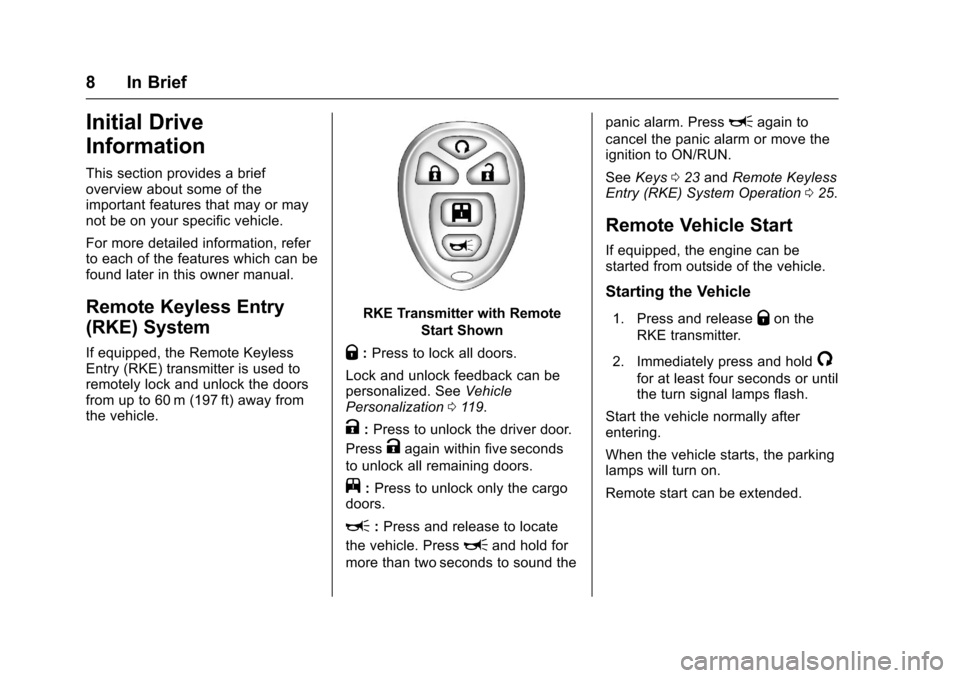
RKE Transmitter with Remote
Start Shown
Q:Press to lock all doors.
Lock and unlock feedback can bepersonalized. SeeVehiclePersonalization011 9.
K:Press to unlock the driver door.
PressKagain within five seconds
to unlock all remaining doors.
j:Press to unlock only the cargodoors.
L:Press and release to locate
the vehicle. PressLand hold for
more than two seconds to sound the
panic alarm. PressLagain to
cancel the panic alarm or move theignition to ON/RUN.
SeeKeys023andRemote KeylessEntry (RKE) System Operation025.
Remote Vehicle Start
If equipped, the engine can bestarted from outside of the vehicle.
Starting the Vehicle
1. Press and releaseQon the
RKE transmitter.
2. Immediately press and hold/
for at least four seconds or untilthe turn signal lamps flash.
Start the vehicle normally afterentering.
When the vehicle starts, the parkinglamps will turn on.
Remote start can be extended.
Page 15 of 346
Chevrolet Express Owner Manual (GMNA-Localizing-U.S./Canada/Mexico-9967827) - 2017 - crc - 5/2/16
14 In Brief
Exterior Lighting
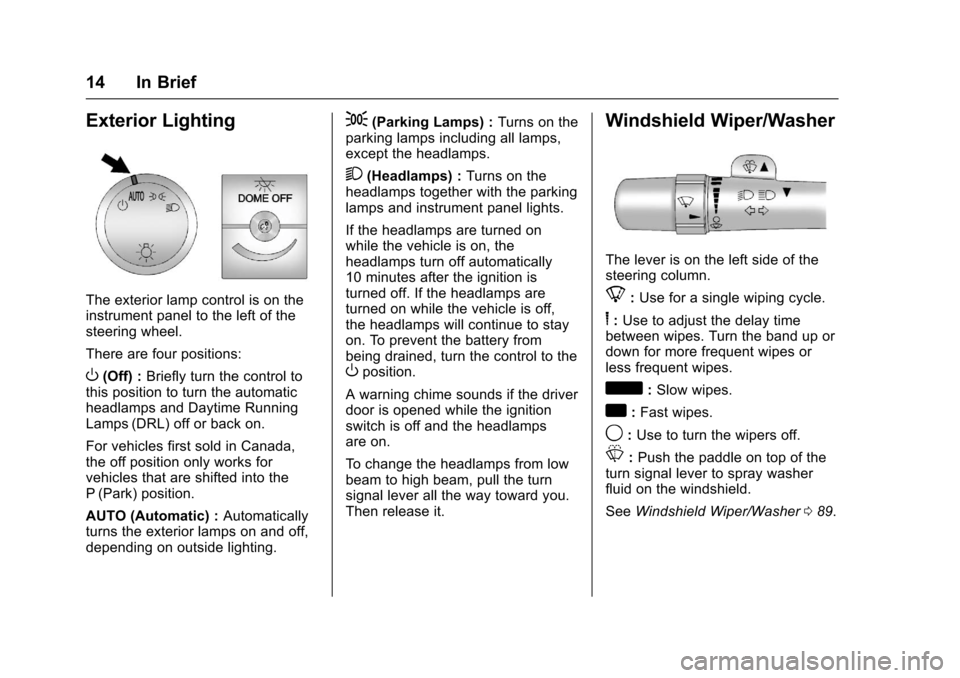
The exterior lamp control is on theinstrument panel to the left of thesteering wheel.
There are four positions:
O(Off) :Briefly turn the control tothis position to turn the automaticheadlamps and Daytime RunningLamps (DRL) off or back on.
For vehicles first sold in Canada,the off position only works forvehicles that are shifted into theP(Park) position.
AUTO (Automatic) :Automaticallyturns the exterior lamps on and off,depending on outside lighting.
;(Parking Lamps) :Turns on theparking lamps including all lamps,except the headlamps.
2(Headlamps) :Turns on theheadlamps together with the parkinglamps and instrument panel lights.
If the headlamps are turned onwhile the vehicle is on, theheadlamps turn off automatically10 minutes after the ignition isturned off. If the headlamps areturned on while the vehicle is off,the headlamps will continue to stayon. To prevent the battery frombeing drained, turn the control to theOposition.
Awarningchimesoundsifthedriverdoor is opened while the ignitionswitch is off and the headlampsare on.
To c h a n g e t h e h e a d l a m p s f r o m l o wbeam to high beam, pull the turnsignal lever all the way toward you.Then release it.
Windshield Wiper/Washer
The lever is on the left side of thesteering column.
8:Use for a single wiping cycle.
6:Use to adjust the delay timebetween wipes. Turn the band up ordown for more frequent wipes orless frequent wipes.
d:Slow wipes.
a:Fast wipes.
9:Use to turn the wipers off.
L:Push the paddle on top of theturn signal lever to spray washerfluid on the windshield.
SeeWindshield Wiper/Washer089.
Page 23 of 346
Chevrolet Express Owner Manual (GMNA-Localizing-U.S./Canada/Mexico-9967827) - 2017 - crc - 5/2/16
22 In Brief
Engine Oil Life System
The engine oil life system calculatesengine oil life based on vehicle useand displays a DIC message whenit is necessary to change the engineoil and filter. The oil life systemshould be reset to 100% onlyfollowing an oil change.
Resetting the Oil Life System
1. Turn the ignition to ON/RUN,with the engine off.
2. Fully press and release theaccelerator pedal slowly threetimes within five seconds.
3. Turn the key to LOCK/OFF.
SeeEngine Oil Life System0221.
Driving for Better Fuel
Economy
Driving habits can affect fuelmileage. Here are some driving tipsto get the best fuel economypossible.
.Avoid fast starts and acceleratesmoothly.
.Brake gradually and avoidabrupt stops.
.Avoid idling the engine for longperiods of time.
.When road and weatherconditions are appropriate, usecruise control.
.Always follow posted speedlimits or drive more slowly whenconditions require.
.Keep vehicle tires properlyinflated.
.Combine several trips into asingle trip.
.Replace the vehicle's tires withthe same TPC Spec numbermolded into the tire's sidewallnear the size.
.Follow recommended scheduledmaintenance.
Roadside Assistance
Program
U.S.: 1-800-243-8872
TTY Users (U.S. Only):1-888-889-2438
Canada: 1-800-268-6800
New Chevrolet owners areautomatically enrolled in theRoadside Assistance Program.
SeeRoadside AssistanceProgram0316.
Page 25 of 346
Chevrolet Express Owner Manual (GMNA-Localizing-U.S./Canada/Mexico-9967827) - 2017 - crc - 5/2/16
24 Keys, Doors, and Windows
{Warning
If the key is unintentionally
rotated while the vehicle is
running, the ignition could be
moved out of the RUN position.
This could be caused by heavy
items hanging from the key ring,
or by large or long items attached
to the key ring that could be
contacted by the driver or
steering wheel. If the ignition
moves out of the RUN position,
the engine will shut off, braking
and steering power assist may be
(Continued)
Warning (Continued)
impacted, and airbags may not
deploy. To reduce the risk of
unintentional rotation of the
ignition key, do not change the
way the ignition key and Remote
Keyless Entry (RKE) transmitter,
if equipped, are connected to the
provided key rings.
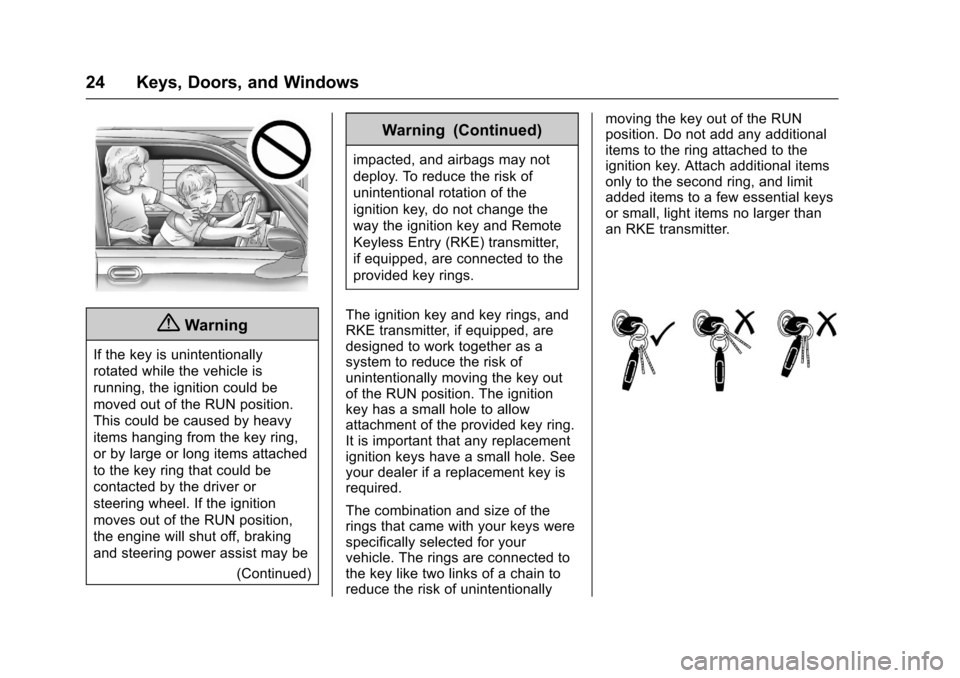
The ignition key and key rings, andRKE transmitter, if equipped, aredesigned to work together as asystem to reduce the risk ofunintentionally moving the key outof the RUN position. The ignitionkey has a small hole to allowattachment of the provided key ring.It is important that any replacementignition keys have a small hole. Seeyour dealer if a replacement key isrequired.
The combination and size of therings that came with your keys werespecifically selected for yourvehicle. The rings are connected tothe key like two links of a chain toreduce the risk of unintentionally
moving the key out of the RUNposition. Do not add any additionalitems to the ring attached to theignition key. Attach additional itemsonly to the second ring, and limitadded items to a few essential keysor small, light items no larger thanan RKE transmitter.
Page 27 of 346
Chevrolet Express Owner Manual (GMNA-Localizing-U.S./Canada/Mexico-9967827) - 2017 - crc - 5/2/16
26 Keys, Doors, and Windows
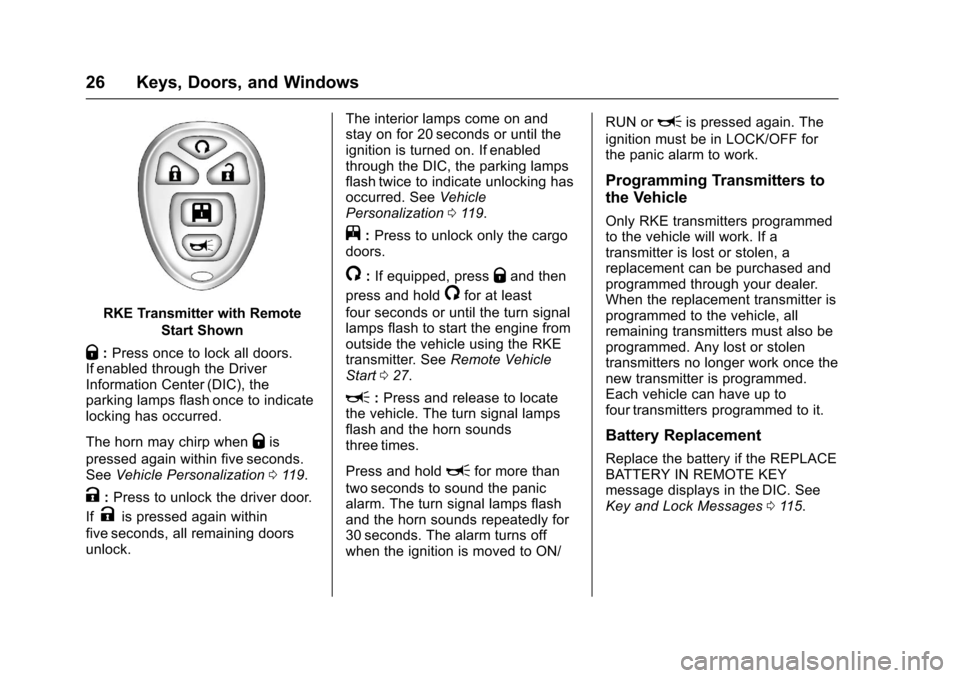
RKE Transmitter with Remote
Start Shown
Q:Press once to lock all doors.If enabled through the DriverInformation Center (DIC), theparking lamps flash once to indicatelocking has occurred.
The horn may chirp whenQis
pressed again within five seconds.SeeVehicle Personalization011 9.
K:Press to unlock the driver door.
IfKis pressed again within
five seconds, all remaining doorsunlock.
The interior lamps come on andstay on for 20 seconds or until theignition is turned on. If enabledthrough the DIC, the parking lampsflash twice to indicate unlocking hasoccurred. SeeVehiclePersonalization011 9.
j:Press to unlock only the cargodoors.
/:If equipped, pressQand then
press and hold/for at least
four seconds or until the turn signallamps flash to start the engine fromoutside the vehicle using the RKEtransmitter. SeeRemote VehicleStart027.
L:Press and release to locatethe vehicle. The turn signal lampsflash and the horn soundsthree times.
Press and holdLfor more than
two seconds to sound the panicalarm. The turn signal lamps flashand the horn sounds repeatedly for30 seconds. The alarm turns offwhen the ignition is moved to ON/
RUN orLis pressed again. The
ignition must be in LOCK/OFF forthe panic alarm to work.
Programming Transmitters to
the Vehicle
Only RKE transmitters programmedto the vehicle will work. If atransmitter is lost or stolen, areplacement can be purchased andprogrammed through your dealer.When the replacement transmitter isprogrammed to the vehicle, allremaining transmitters must also beprogrammed. Any lost or stolentransmitters no longer work once thenew transmitter is programmed.Each vehicle can have up tofour transmitters programmed to it.
Battery Replacement
Replace the battery if the REPLACEBATTERY IN REMOTE KEYmessage displays in the DIC. SeeKey and Lock Messages011 5.
Page 28 of 346
Chevrolet Express Owner Manual (GMNA-Localizing-U.S./Canada/Mexico-9967827) - 2017 - crc - 5/2/16
Keys, Doors, and Windows 27
Caution
When replacing the battery, do
not touch any of the circuitry on
the transmitter. Static from your
body could damage the
transmitter.
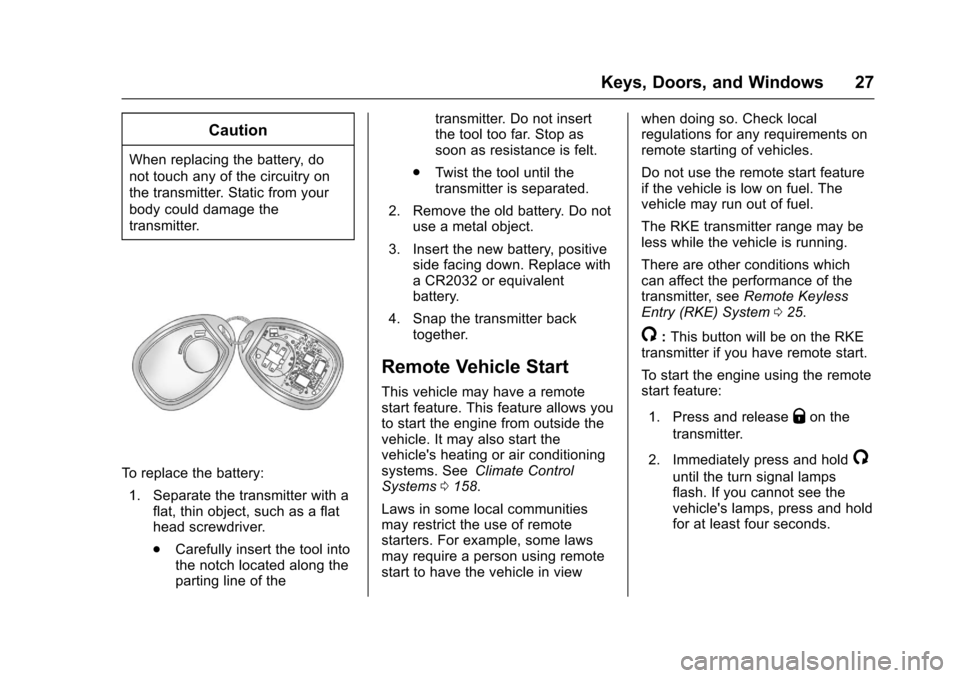
To r e p l a c e t h e b a t t e r y :
1. Separate the transmitter with aflat, thin object, such as a flathead screwdriver.
.Carefully insert the tool intothe notch located along theparting line of the
transmitter. Do not insertthe tool too far. Stop assoon as resistance is felt.
.Tw i s t t h e t o o l u n t i l t h etransmitter is separated.
2. Remove the old battery. Do notuse a metal object.
3. Insert the new battery, positiveside facing down. Replace withaCR2032orequivalentbattery.
4. Snap the transmitter backtogether.
Remote Vehicle Start
This vehicle may have a remotestart feature. This feature allows youto start the engine from outside thevehicle. It may also start thevehicle's heating or air conditioningsystems. SeeClimate ControlSystems0158.
Laws in some local communitiesmay restrict the use of remotestarters. For example, some lawsmay require a person using remotestart to have the vehicle in view
when doing so. Check localregulations for any requirements onremote starting of vehicles.
Do not use the remote start featureif the vehicle is low on fuel. Thevehicle may run out of fuel.
The RKE transmitter range may beless while the vehicle is running.
There are other conditions whichcan affect the performance of thetransmitter, seeRemote KeylessEntry (RKE) System025.
/:This button will be on the RKEtransmitter if you have remote start.
To s t a r t t h e e n g i n e u s i n g t h e r e m o t estart feature:
1. Press and releaseQon the
transmitter.
2. Immediately press and hold/
until the turn signal lampsflash. If you cannot see thevehicle's lamps, press and holdfor at least four seconds.
Page 29 of 346
Chevrolet Express Owner Manual (GMNA-Localizing-U.S./Canada/Mexico-9967827) - 2017 - crc - 5/2/16
28 Keys, Doors, and Windows
When the engine starts, theparking lamps will turn on andremain on while the engine isrunning. The doors will belocked.
The engine will continue to runfor 10 minutes. After30 seconds, repeat the steps ifa10-minuteextensionisdesired. Remote start can beextended only once.
After entering the vehicle during aremote start, insert and turn the keyto ON/RUN to drive the vehicle.
The maximum number of remotestarts between ignition cycles withthe key is two.
If the remote start procedure is usedagain before the first 10 minute timeframe has ended, the first10 minutes will immediately expireand the second 10 minute timeframe will start.
After the engine has been remotestarted two times, the ignition switchmust be turned to ON/RUN and then
back to LOCK/OFF using the keybefore the remote start procedurecan be used again.
To c a n c e l a r e m o t e s t a r t d o a n y o fthe following:
.Press and hold/until the
parking lamps turn off.
.Turn on the hazard warningflashers.
.Turn the ignition on and thenback off.
The remote vehicle start feature willnot operate if:
.The key is in the ignition.
.The hood is open.
.The hazard warning flashersare on.
.There is an emission controlsystem malfunction. SeeMalfunction Indicator Lamp(Check Engine Light)0102.
.The engine coolant temperatureis too high.
.The oil pressure is low.
.Tw o r e m o t e v e h i c l e s t a r t s h a v ealready been provided.
Door Locks
{Warning
Unlocked doors can be
dangerous.
.Passengers, especiallychildren, can easily openthe doors and fall out of amoving vehicle. When adoor is locked, the handlewill not open it. The chanceof being thrown out of thevehicle in a crash isincreased if the doors arenot locked. So, allpassengers should wearsafety belts properly and thedoors should be lockedwhenever the vehicle isdriven.
.Yo u n g c h i l d r e n w h o g e t i n t ounlocked vehicles may beunable to get out. A childcan be overcome by
(Continued)
Page 35 of 346
Chevrolet Express Owner Manual (GMNA-Localizing-U.S./Canada/Mexico-9967827) - 2017 - crc - 5/2/16
34 Keys, Doors, and Windows
If the engine does not start and thesecurity message comes on, thekey may have a damagedtransponder. Turn the ignition offand try again.
If the engine still does not start, andthe key appears to be undamaged,try another ignition key. If the enginestill does not start with the other key,the vehicle needs service. If thevehicle does start, the first key maybe faulty. See your dealer or alocksmith who can service thePA S S - K e y I I I + t o h a v e a n e wkey made.
It is possible for the PASS-Key III+decoder to learn the transpondervalue of a new or replacement key.Up to eight keys may beprogrammed for the vehicle. Thisprocedure is for learning additionalkeys only. If all the currentlyprogrammed keys are lost or do notoperate, you must see your dealeror a locksmith who can servicePA S S - K e y I I I + t o h a v e k e y s m a d eand programmed to the system.
See your dealer or a locksmith whocan service PASS-Key III+ to get anew key blank that is cut exactly asthe ignition key that operates thesystem.
To p r o g r a m t h e n e w k e y :
1. Verify the new key has1
stamped on it.
2. Insert the original, alreadyprogrammed key into theignition lock cylinder and startthe engine. If the engine willnot start, see your dealer forservice.
3. After the engine has started,turn the key to LOCK/OFF andremove the key.
4. Insert the key to beprogrammed and turn it to ON/RUN within 10 seconds ofremoving the previous key.
The security message will turnoff once the key has beenprogrammed. It may not beapparent that the securitymessage went on due to howquickly the key is programmed.
5. Repeat Steps 1–4ifadditionalkeys are to be programmed.
If you lose or damage aPA S S - K e y I I I + k e y, s e e y o u r d e a l e ror a locksmith who can servicePA S S - K e y I I I + t o h a v e a n e wkey made.
Do not leave the key or device thatdisarms or deactivates thetheft-deterrent system in the vehicle.
Page 38 of 346
Chevrolet Express Owner Manual (GMNA-Localizing-U.S./Canada/Mexico-9967827) - 2017 - crc - 5/2/16
Keys, Doors, and Windows 37
Manual Windows
Operate the manual windows byturning the hand crank on each doorto raise or lower the side doorwindows.
Power Windows
{Warning
Children could be seriously
injured or killed if caught in the
path of a closing window. Never
leave keys in a vehicle with
children. SeeKeys023.
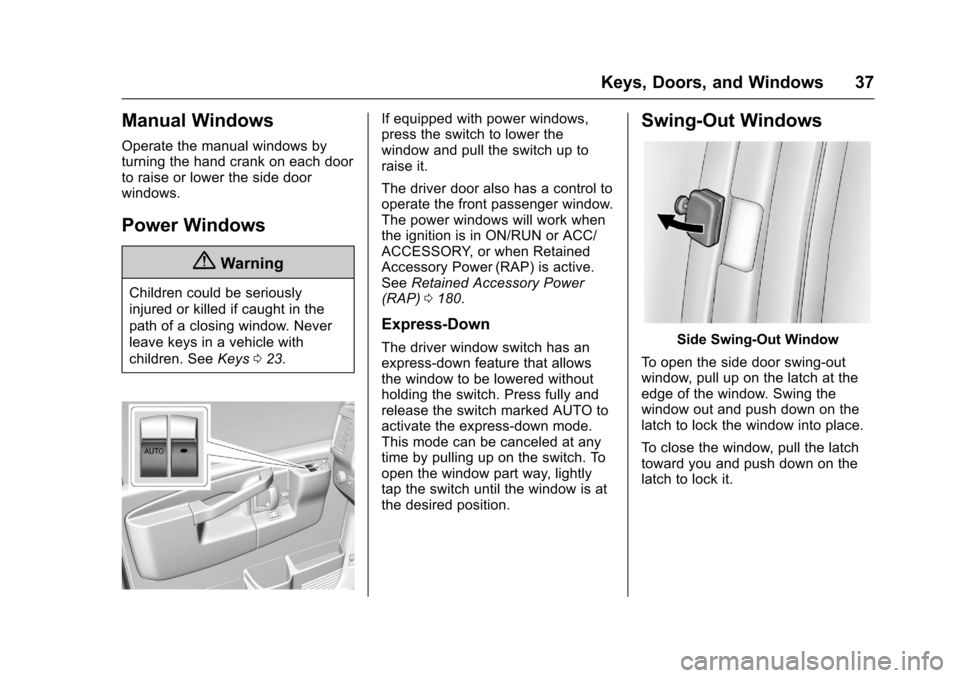
If equipped with power windows,press the switch to lower thewindow and pull the switch up toraise it.
The driver door also has a control tooperate the front passenger window.The power windows will work whenthe ignition is in ON/RUN or ACC/ACCESSORY, or when RetainedAccessory Power (RAP) is active.SeeRetained Accessory Power(RAP)0180.
Express-Down
The driver window switch has anexpress-down feature that allowsthe window to be lowered withoutholding the switch. Press fully andrelease the switch marked AUTO toactivate the express-down mode.This mode can be canceled at anytime by pulling up on the switch. Toopen the window part way, lightlytap the switch until the window is atthe desired position.
Swing-Out Windows
Side Swing-Out Window
To o p e n t h e s i d e d o o r s w i n g - o u twindow, pull up on the latch at theedge of the window. Swing thewindow out and push down on thelatch to lock the window into place.
To c l o s e t h e w i n d o w, p u l l t h e l a t c htoward you and push down on thelatch to lock it.
Page 81 of 346
Chevrolet Express Owner Manual (GMNA-Localizing-U.S./Canada/Mexico-9967827) - 2017 - crc - 5/2/16
80 Seats and Restraints
If the child restraint or vehicle seatposition does not have the LATCHsystem, you will be using the safetybelt to secure the child restraint.Be sure to follow the instructionsthat came with the child restraint.
If more than one child restraintneeds to be installed in the rearseat, be sure to readWhere to Putthe Restraint072.
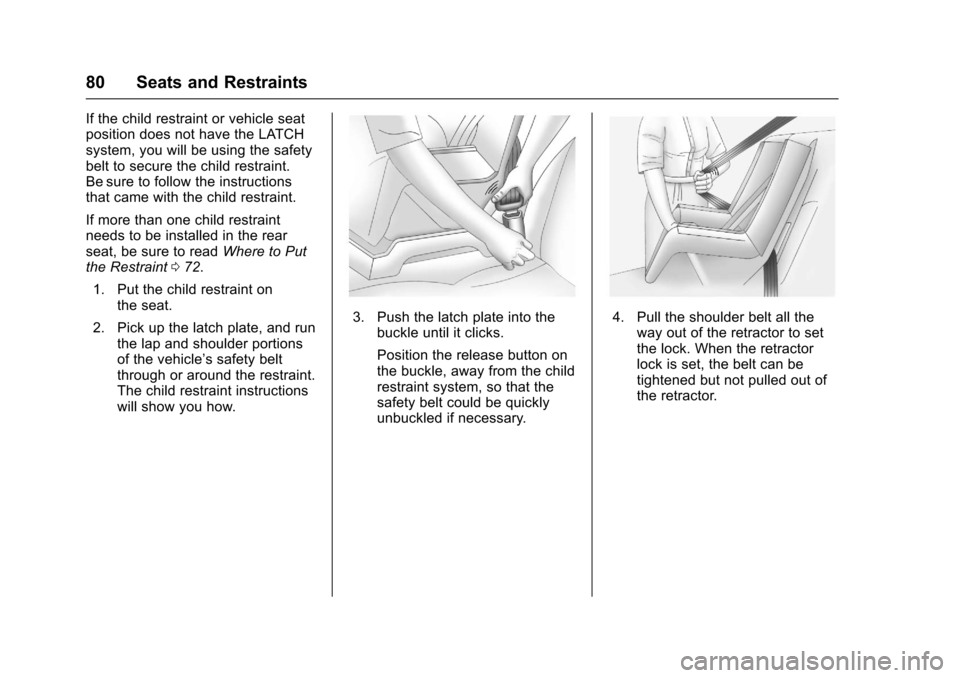
1. Put the child restraint onthe seat.
2. Pick up the latch plate, and runthe lap and shoulder portionsof the vehicle’ssafetybeltthrough or around the restraint.The child restraint instructionswill show you how.
3. Push the latch plate into thebuckle until it clicks.
Position the release button onthe buckle, away from the childrestraint system, so that thesafety belt could be quicklyunbuckled if necessary.
4. Pull the shoulder belt all theway out of the retractor to setthe lock. When the retractorlock is set, the belt can betightened but not pulled out ofthe retractor.