remote start CHEVROLET EXPRESS PASSANGER 2012 1.G User Guide
[x] Cancel search | Manufacturer: CHEVROLET, Model Year: 2012, Model line: EXPRESS PASSANGER, Model: CHEVROLET EXPRESS PASSANGER 2012 1.GPages: 430, PDF Size: 6.35 MB
Page 130 of 430
Black plate (18,1)Chevrolet Express Owner Manual - 2012
5-18 Instruments and Controls
The passenger safety belt reminder
light and chime may turn on if an
object is put on the seat such as a
briefcase, handbag, grocery bag,
laptop, or other electronic device.
To turn off the reminder light and/or
chime, remove the object from the
seat or buckle the safety belt.
Airbag Readiness Light
The system checks the airbag's
electrical system for possible
malfunctions. If the light stays on
it indicates there is an electrical
problem. The system check
includes the airbag sensor(s), the
pretensioners, the airbag modules,
the wiring and the crash sensing
and diagnostic module. For more
information on the airbag system,
seeAirbag System on page 3‑18.
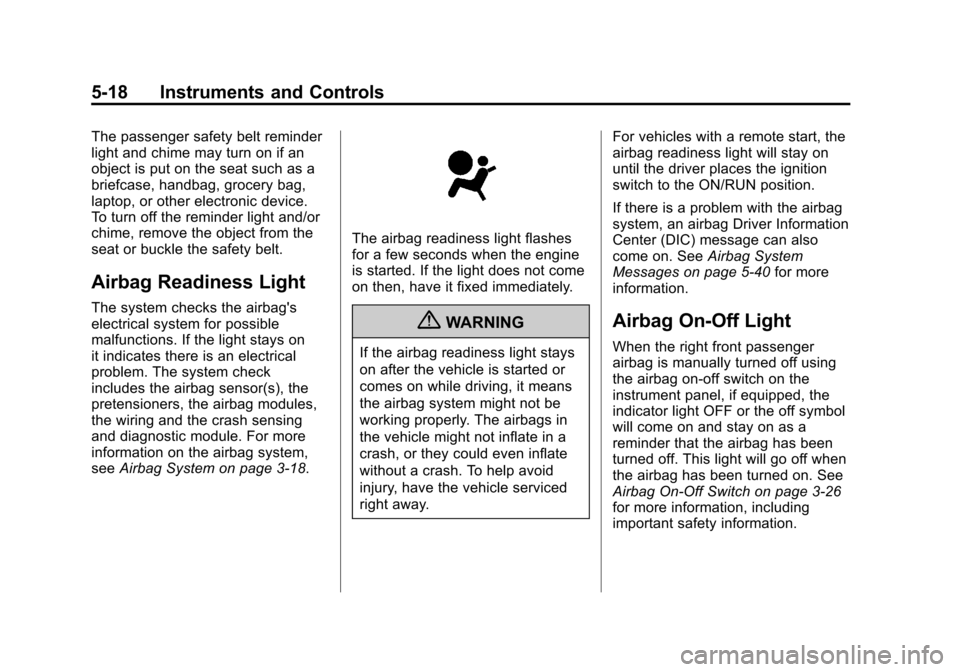
The airbag readiness light flashes
for a few seconds when the engine
is started. If the light does not come
on then, have it fixed immediately.
{WARNING
If the airbag readiness light stays
on after the vehicle is started or
comes on while driving, it means
the airbag system might not be
working properly. The airbags in
the vehicle might not inflate in a
crash, or they could even inflate
without a crash. To help avoid
injury, have the vehicle serviced
right away. For vehicles with a remote start, the
airbag readiness light will stay on
until the driver places the ignition
switch to the ON/RUN position.
If there is a problem with the airbag
system, an airbag Driver Information
Center (DIC) message can also
come on. See
Airbag System
Messages on page 5‑40 for more
information.
Airbag On-Off Light
When the right front passenger
airbag is manually turned off using
the airbag on-off switch on the
instrument panel, if equipped, the
indicator light OFF or the off symbol
will come on and stay on as a
reminder that the airbag has been
turned off. This light will go off when
the airbag has been turned on. See
Airbag On-Off Switch on page 3‑26
for more information, including
important safety information.
Page 132 of 430
Black plate (20,1)Chevrolet Express Owner Manual - 2012
5-20 Instruments and Controls
Passenger Airbag Status
Indicator
If the vehicle has a passenger
sensing system, the instrument
panel will have a passenger airbag
status indicator. SeePassenger
Sensing System on page 3‑30 for
important safety information.
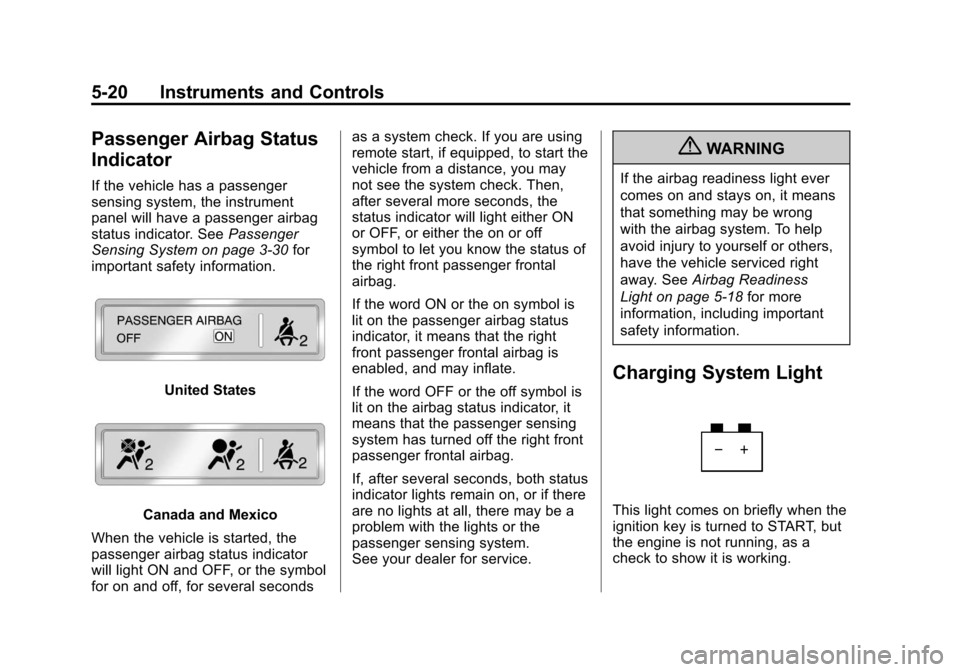
United States
Canada and Mexico
When the vehicle is started, the
passenger airbag status indicator
will light ON and OFF, or the symbol
for on and off, for several seconds as a system check. If you are using
remote start, if equipped, to start the
vehicle from a distance, you may
not see the system check. Then,
after several more seconds, the
status indicator will light either ON
or OFF, or either the on or off
symbol to let you know the status of
the right front passenger frontal
airbag.
If the word ON or the on symbol is
lit on the passenger airbag status
indicator, it means that the right
front passenger frontal airbag is
enabled, and may inflate.
If the word OFF or the off symbol is
lit on the airbag status indicator, it
means that the passenger sensing
system has turned off the right front
passenger frontal airbag.
If, after several seconds, both status
indicator lights remain on, or if there
are no lights at all, there may be a
problem with the lights or the
passenger sensing system.
See your dealer for service.
{WARNING
If the airbag readiness light ever
comes on and stays on, it means
that something may be wrong
with the airbag system. To help
avoid injury to yourself or others,
have the vehicle serviced right
away. See
Airbag Readiness
Light on page 5‑18 for more
information, including important
safety information.
Charging System Light
This light comes on briefly when the
ignition key is turned to START, but
the engine is not running, as a
check to show it is working.
Page 150 of 430
Black plate (38,1)Chevrolet Express Owner Manual - 2012
5-38 Instruments and Controls
Fuel System Messages
FUEL LEVEL LOW
This message displays and a chime
sounds if the fuel level is low. Refuel
as soon as possible. SeeFuel
Gauge on page 5‑14 andFuel on
page 9‑40 for more information.
TIGHTEN GAS CAP
This message may display along
with the check engine light on the
instrument panel cluster if the fuel
cap is not tightened properly. See
Malfunction Indicator Lamp on
page 5‑21. Reinstall the fuel cap
fully. SeeFilling the Tank on
page 9‑44. The diagnostic system
can determine if the fuel cap has
been left off or improperly installed.
A loose or missing fuel cap
allows fuel to evaporate into the
atmosphere. A few driving trips with
the cap properly installed should
turn this light and message off.
Key and Lock Messages
REPLACE BATTERY IN
REMOTE KEY
This message displays if a Remote
Keyless Entry (RKE) transmitter
battery is low. The battery needs to
be replaced in the transmitter.
See “Battery Replacement” under
Remote Keyless Entry (RKE)
System Operation on page 2‑3.
Lamp Messages
AUTOMATIC LIGHT
CONTROL OFF
This message displays when the
automatic headlamps are turned off.
See Exterior Lamp Controls on
page 6‑1 for more information.
AUTOMATIC LIGHT
CONTROL ON
This message displays when the
automatic headlamps are turned on.
SeeExterior Lamp Controls on
page 6‑1 for more information.
TURN SIGNAL ON
This message displays and a chime
sounds if a turn signal is left on for
1.2 km (3/4 of a mile). Move the turn
signal/multifunction lever to the
off position.
Ride Control System
Messages
SERVICE STABILITRAK
If the vehicle has StabiliTrak®and
this message displays, it means
there may be a problem with the
StabiliTrak system. If you see this
message, try to reset the system.
Stop; turn off the engine for at least
15 seconds; then start the engine
again. If this message still comes
on, it means there is a problem. You
should see your dealer for service.
The vehicle is safe to drive,
however, you do not have the
benefit of StabiliTrak, so reduce
your speed and drive accordingly.
Page 266 of 430
Black plate (2,1)Chevrolet Express Owner Manual - 2012
10-2 Vehicle Care
When It Is Time for NewTires . . . . . . . . . . . . . . . . . . . . . . 10-64
Buying New Tires . . . . . . . . . . . 10-65
Different Size Tires and Wheels . . . . . . . . . . . . . . . . . . . 10-67
Uniform Tire Quality Grading . . . . . . . . . . . . . . . . . . . 10-68
Wheel Alignment and Tire Balance . . . . . . . . . . . . . . . . . . . 10-69
Wheel Replacement . . . . . . . . 10-70
Tire Chains . . . . . . . . . . . . . . . . . 10-71
If a Tire Goes Flat . . . . . . . . . . 10-72
Tire Changing . . . . . . . . . . . . . . 10-74
Secondary Latch System . . . 10-83
Full-Size Spare Tire . . . . . . . . 10-85
Jump Starting
Jump Starting . . . . . . . . . . . . . . 10-86
Towing
Towing the Vehicle . . . . . . . . . 10-90
Recreational Vehicle Towing . . . . . . . . . . . . . . . . . . . . 10-90
Appearance Care
Exterior Care . . . . . . . . . . . . . . . 10-93
Interior Care . . . . . . . . . . . . . . . . 10-97
Floor Mats . . . . . . . . . . . . . . . . . . 10-99
General Information
For service and parts needs, visit
your dealer. You will receive
genuine GM parts and GM-trained
and supported service people.
Genuine GM parts have one of
these marks:
California Proposition
65 Warning
Most motor vehicles, including this
one, contain and/or emit chemicals
known to the State of California to
cause cancer and birth defects or
other reproductive harm. Engine
exhaust, many parts and systems,
many fluids, and some component
wear by-products contain and/or
emit these chemicals.
California Perchlorate
Materials Requirements
Certain types of automotive
applications, such as airbag
initiators, seat belt pretensioners,
and lithium batteries contained in
Remote Keyless Entry transmitters,
may contain perchlorate materials.
Special handling may be necessary.
For additional information, see
www.dtsc.ca.gov/hazardouswaste/
perchlorate.
Page 325 of 430
Black plate (61,1)Chevrolet Express Owner Manual - 2012
Vehicle Care 10-61
.Operating electronic devices or
being near facilities using radio
wave frequencies similar to the
TPMS could cause the TPMS
sensors to malfunction.
If the TPMS is not functioning
properly, it cannot detect or signal a
low tire condition. See your dealer
for service if the TPMS malfunction
light and DIC message come on
and stay on.
TPMS Sensor Matching
Process
Each TPMS sensor has a unique
identification code. The identification
code needs to be matched to a
new tire/wheel position after rotating
the vehicle’ s tires or replacing one
or more of the TPMS sensors. Also,
the TPMS sensor matching process
should be performed after replacing
a spare tire with a road tire
containing the TPMS sensor.
The malfunction light and the DIC
message should go off at the next
ignition cycle. The sensors are
matched to the tire/wheel positions, using a TPMS relearn tool, in the
following order: driver side front tire,
passenger side front tire, passenger
side rear tire, and driver side rear.
See your dealer for service or to
purchase a relearn tool.
There are two minutes to match
the first tire/wheel position, and
five minutes overall to match all
four tire/wheel positions. If it takes
longer, the matching process stops
and must be restarted.
The TPMS sensor matching
process is:
1. Set the parking brake.
2. Turn the ignition to ON/RUN with
the engine off.
3. Press the Remote Keyless Entry (RKE) transmitter's LOCK
and UNLOCK buttons at the
same time for approximately
five seconds. The horn sounds
twice to signal the receiver is
in relearn mode and TIRE
LEARNING ACTIVE message
displays on the DIC screen. If the vehicle does not have
RKE, press the Driver
Information Center (DIC) vehicle
information button until the
PRESS
VTO RELEARN TIRE
POSITIONS message displays.
The horn sounds twice to signal
the receiver is in relearn mode
and TIRE LEARNING ACTIVE
message displays on the DIC
screen.
If the vehicle does not have RKE
or DIC buttons, press the trip
odometer reset stem located on
the instrument panel cluster until
the PRESS
VTO RELEARN
TIRE POSITIONS message
displays. The horn sounds twice
to signal the receiver is in
relearn mode and TIRE
LEARNING ACTIVE message
displays on the DIC screen.
4. Start with the driver side front tire.
Page 353 of 430
Black plate (89,1)Chevrolet Express Owner Manual - 2012
Vehicle Care 10-89
Notice:Your vehicle uses the
unpainted radio antenna bracket
as a remote negative (−) terminal.
Move the antenna coax cable out
of the way before clamping the
negative jumper cable to the fixed
antenna bracket. Avoid touching
the negative cable clamp to the
air conditioning line. Failure to do
either of these could damage
your vehicle. The repairs would
not be covered by the warranty.
9. Now start the vehicle with the
good battery and run the engine
for a while.
10. Try to start the vehicle that had the dead battery. If it will not
start after a few tries, it
probably needs service.
Notice: If the jumper cables are
connected or removed in the
wrong order, electrical shorting
may occur and damage the
vehicle. The repairs would not be
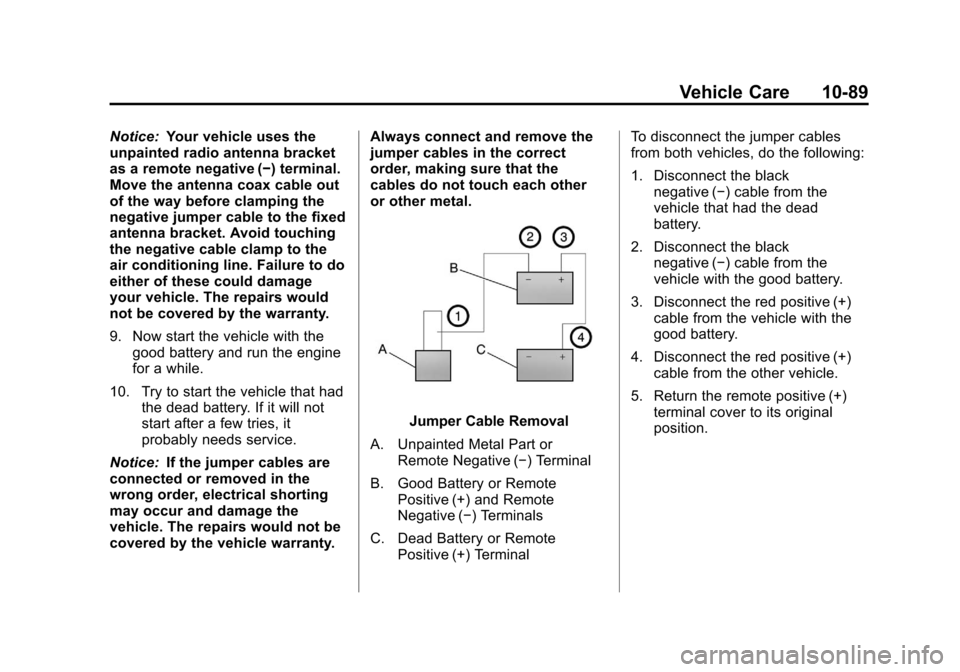
covered by the vehicle warranty. Always connect and remove the
jumper cables in the correct
order, making sure that the
cables do not touch each other
or other metal.
Jumper Cable Removal
A. Unpainted Metal Part or Remote Negative (−) Terminal
B. Good Battery or Remote Positive (+) and Remote
Negative (−) Terminals
C. Dead Battery or Remote Positive (+) Terminal To disconnect the jumper cables
from both vehicles, do the following:
1. Disconnect the black
negative (−) cable from the
vehicle that had the dead
battery.
2. Disconnect the black negative (−) cable from the
vehicle with the good battery.
3. Disconnect the red positive (+) cable from the vehicle with the
good battery.
4. Disconnect the red positive (+) cable from the other vehicle.
5. Return the remote positive (+) terminal cover to its original
position.
Page 397 of 430
Black plate (9,1)Chevrolet Express Owner Manual - 2012
Customer Information 13-9
Chevrolet and General Motors of
Canada Limited reserve the right to
limit services or payment to an
owner or driver if they decide
the claims are made too often,
or the same type of claim is made
many times.
Services Provided
.Emergency Fuel Delivery:
Delivery of enough fuel for the
vehicle to get to the nearest
service station.
.Lock‐Out Service:Service to
unlock the vehicle if you are
locked out. A remote unlock may
be available if you have OnStar.
For security reasons, the driver
must present identification
before this service is given.
.Emergency Tow From a Public
Road or Highway: Tow to the
nearest Chevrolet dealer for
warranty service, or if the vehicle
was in a crash and cannot be
driven. Assistance is also given
when the vehicle is stuck in the
sand, mud, or snow.
.Flat Tire Change: Service to
change a flat tire with the spare
tire. The spare tire, if equipped,
must be in good condition and
properly inflated. It is the owner's
responsibility for the repair or
replacement of the tire if it is not
covered by the warranty.
.Battery Jump Start: Service to
jump start a dead battery.
Services Not Included in
Roadside Assistance
.Impound towing caused by
violation of any laws.
.Legal fines.
.Mounting, dismounting,
or changing of snow tires,
chains, or other traction devices.
.Towing or services for vehicles
driven on a non-public road or
highway.
Services Specific to Canadian
Purchased Vehicles
.Fuel Delivery: Reimbursement
is approximately $5 Canadian.
Diesel fuel delivery may be
restricted. Propane and other
fuels are not provided through
this service.
.Lock-Out Service: Vehicle
registration is required.
.Trip Routing Service: Detailed
maps of North America are
provided when requested either
with the most direct route or the
most scenic route. There is a
limit of six requests per year.
Additional travel information is
also available. Allow three
weeks for delivery.
Page 410 of 430
Black plate (22,1)Chevrolet Express Owner Manual - 2012
13-22 Customer Information
Navigation System
If the vehicle has a navigation
system, use of the system may
result in the storage of destinations,
addresses, telephone numbers, and
other trip information. Refer to the
navigation manual for information on
stored data and for deletion
instructions.
Radio Frequency
Identification (RFID)
RFID technology is used in some
vehicles for functions such as tire
pressure monitoring and ignition
system security, as well as in
connection with conveniences such
as key fobs for remote door locking/
unlocking and starting, and
in-vehicle transmitters for garage
door openers. RFID technology in
GM vehicles does not use or record
personal information or link with any
other GM system containing
personal information.
Radio Frequency
Statement
This vehicle has systems that
operate on a radio frequency that
comply with Part 15 of the Federal
Communications Commission (FCC)
rules and with Industry Canada
Standards RSS‐GEN/210/220/310.
Operation is subject to the following
two conditions:
1. The device may not causeharmful interference.
2. The device must accept any interference received, including
interference that may cause
undesired operation of the
device.
Changes or modifications to any of
these systems by other than an
authorized service facility could void
authorization to use this equipment.
Page 414 of 430
Black plate (4,1)Chevrolet Express Owner Manual - 2012
14-4 OnStar
Connections
OnStar Hands-Free Calling allows
calls to be made and received from
the vehicle. The vehicle can also be
controlled from a cell phone through
the OnStar mobile app. See
www.onstar.com for coverage maps.
Hands-Free Calling
1. PushX. System responds:
“OnStar ready.”
2. Say “Dial.”System responds:
“Please say the name or number
to call.”
3. Say the entire number without pausing, including a “1”and the
area code. System responds:
“OK calling.”
Retrieve My Number
1. PushX. System responds:
“OnStar ready.”
2. Say “My Number.” System
responds: “Your OnStar
Hands-Free Calling number is.”
End a Call
PushX. System responds: “Call
ended.”
Store a Name Tag for Speed
Dialing
1. PushX. System responds:
“OnStar ready.”
2. Say “Store.” System responds:
“Please say the number you
would like to store.”
3. Say the entire number without pausing. System responds:
“Please say the name tag.”
4. Pick a name tag. “System
responds: ”About to store
5. Say “Yes”or“No” to try again.
System responds: “OK, storing
Place a Call Using a Stored
Number
1. PushX. System responds:
“OnStar ready.”
2. Say “Call
System responds: “OK, calling
Verify Minutes and Expiration
PushXand say “minutes” then
“verify” to check how many minutes
remain and their expiration date.
OnStar Mobile App
With an iPhone®or
Android™-based mobile device,
an OnStar mobile app can be
downloaded. The vehicle can be
remote started, if equipped, or the
doors can be unlocked from
anywhere there is cell phone
service. It can also check the fuel
level, tire pressure, and oil life.
It can connect to an OnStar Advisor
anytime. For OnStar mobile app
compatibility or further information,
see www.onstar.com.
Page 424 of 430

Black plate (6,1)Chevrolet Express Owner Manual - 2012
i-6 INDEX
J
Jump Starting . . . . . . . . . . . . . . . . . 10-86
K
Key and Lock Messages . . . . . . . 5-38
Keyless EntryRemote (RKE) System . . . . . . . . 2-3
Keys . . . . . . . . . . . . . . . . . . . . . . . . . . . . 2-2
L
Labeling, Tire Sidewall . . . . . . . . 10-50
Lamp Messages . . . . . . . . . . . . . . . 5-38
Lamps Daytime Running (DRL) . . . . . . . 6-3
Dome . . . . . . . . . . . . . . . . . . . . . . . . . . 6-6
Exterior Controls . . . . . . . . . . . . . . . 6-1
Exterior Lamps OffReminder . . . . . . . . . . . . . . . . . . . . 6-2
License Plate . . . . . . . . . . . . . . . 10-40
Malfunction Indicator . . . . . . . . . 5-21
Reading . . . . . . . . . . . . . . . . . . . . . . . 6-7
Taillamps . . . . . . . . . . . . . . . . . . . 10-38
Lap-Shoulder Belt . . . . . . . . . . . . . 3-11 LATCH System
Replacing Parts after a
Crash . . . . . . . . . . . . . . . . . . . . . . . 3-52
LATCH, Lower Anchors and Tethers for Children . . . . . . . . . . 3-46
Light StabiliTrak
®OFF . . . . . . . . . . . . . 5-25
Lighter, Cigarette . . . . . . . . . . . . . . 5-10
Lighting Entry/Exit . . . . . . . . . . . . . . . . . . . . . . 6-7
Illumination Control . . . . . . . . . . . . 6-6
Lights Airbag On-Off . . . . . . . . . . . . . . . . . 5-18
Airbag Readiness . . . . . . . . . . . . . 5-18
Antilock Brake System(ABS) Warning . . . . . . . . . . . . . . 5-24
Brake System Warning . . . . . . . 5-23
Charging System . . . . . . . . . . . . . 5-20
Cruise Control . . . . . . . . . . . . . . . . 5-28
Engine Oil Pressure . . . . . . . . . . 5-27
Flash-to-Pass . . . . . . . . . . . . . . . . . . 6-3
High-Beam On . . . . . . . . . . . . . . . . 5-28
High/Low Beam Changer . . . . . . 6-2
Safety Belt Reminders . . . . . . . . 5-17
Security . . . . . . . . . . . . . . . . . . . . . . 5-27 Lights (cont'd)
Tire Pressure . . . . . . . . . . . . . . . . . 5-26
Tow/Haul Mode . . . . . . . . . . . . . . . 5-25
Traction Control System
(TCS)/StabiliTrak
®. . . . . . . . . . 5-26
Locking Rear Axle . . . . . . . . . . . . . 9-37
Locks Automatic Door . . . . . . . . . . . . . . . . 2-8
Cargo Door Relocking . . . . . . . . . 2-7
Delayed Locking . . . . . . . . . . . . . . . 2-8
Door . . . . . . . . . . . . . . . . . . . . . . . . . . . 2-7
Lockout Protection . . . . . . . . . . . . . 2-8
Power Door . . . . . . . . . . . . . . . . . . . . 2-7
Safety . . . . . . . . . . . . . . . . . . . . . . . . . 2-8
Loss of Control . . . . . . . . . . . . . . . . . 9-5
Lower Anchors and Tethers for Children (LATCH
System) . . . . . . . . . . . . . . . . . . . . . . 3-46