AUX CHEVROLET EXPRESS PASSANGER 2013 1.G User Guide
[x] Cancel search | Manufacturer: CHEVROLET, Model Year: 2013, Model line: EXPRESS PASSANGER, Model: CHEVROLET EXPRESS PASSANGER 2013 1.GPages: 402, PDF Size: 6.46 MB
Page 172 of 402
Black plate (18,1)Chevrolet Express Owner Manual - 2013 - 1stPrintReady - 6/19/12
7-18 Infotainment System
The USB port is on the instrument
panel and uses the USB 2.0
standard.
USB-Supported Devices
.USB flash drive
.Portable USB hard drive
.Fifth generation or later iPod
.iPod nano®
.iPod touch®
.iPod classic®
Not all iPods and USB drives are
compatible with the USB port.
Make sure the iPod has the latest
firmware from Apple
®for proper
operation. iPod firmware can be
updated using the latest iTunes
®
application. See www.apple.com/
itunes.
For help with identifying the iPod, go
to www.apple.com/support. Radios that have a USB port can
play .mp3 and .wma files that are
stored on a USB storage device as
well as AAC files that are stored on
an iPod.
USB-Supported File and Folder
Structure
The radio supports:
.Up to 700 folders.
.Up to eight folders in depth.
.Up to 65,535 files.
.Folder and file names up to
64 bytes.
.Files with an .mp3 or .wma file
extension.
.AAC files stored on an iPod.
.FAT16.
.FAT32.
Connecting a USB Storage
Device or iPod
The USB port can be used to
control an iPod or a USB storage
device.To connect a USB storage device,
connect the device to the USB port
on the instrument panel.
To connect an iPod, connect one
end of the USB cable that came
with the iPod to the iPod’s dock
connector and connect the other
end to the USB port on the
instrument panel. If the vehicle is on
and the USB connection works,
“OK
to disconnect” and a GM logo may
appear on the iPod, and iPod
appears on the radio display. The
iPod music appears on the radio
display and begins playing.
The iPod charges while it is
connected to the vehicle if the
vehicle is in the ACC/ACCESSORY
or ON/RUN position. When the
vehicle is turned off, the iPod
automatically powers off and will not
charge or draw power from the
vehicle's battery.
If you have an older iPod model that
is not supported, it can still be used
by connecting it to the auxiliary
input jack using a standard 3.5 mm
Page 173 of 402
Black plate (19,1)Chevrolet Express Owner Manual - 2013 - 1stPrintReady - 6/19/12
Infotainment System 7-19
(1/8 in) stereo cable. See“Using the
Auxiliary Input Jack” previously in
this section.
Using the Radio to Control a
USB Storage Device or iPod
The radio can control a USB
storage device or an iPod using the
radio buttons and knobs, and
display song information on the
radio display.
f(Tune): Turn to select files.
©SEEK:Press to go to the start of
the track, if more than 10 seconds
have played. Press and hold or
press multiple times to continue
moving backward through tracks.
¨SEEK: Press to go to the next
track. Press and hold or press
multiple times to continue moving
forward through tracks.
sREV (Reverse): Press and hold
to reverse playback quickly. Sound
is heard at a reduced volume. Release
sREV to resume playing.
The elapsed time of the file
displays.
\FWD (Fast Forward): Press
and hold to advance playback
quickly. Sound is heard at a reduced
volume. Release
\FWD to
resume playing. The elapsed time of
the file displays.
4(Information): Press to display
additional information about the
selected track.
Using Softkeys to Control a
USB Storage Device or iPod
The five softkeys below the radio
display are used to control the
functions listed below.
To use the softkeys:
1. Press the first or fifth softkey
below the radio display to
display the functions listed
below, or press the softkey
below the function if it is
currently displayed. 2. Press the softkey below the tab
with the function on it to use that
function.
j(Pause): Press the softkey belowjto pause the track. The tab
appears raised when pause is being
used. Press the softkey below
j
again to resume playback.
Back: Press the softkey below the
Back tab to go back to the main
display screen on an iPod, or the
root directory on a USB storage
device.
c(Folder View): Press the
softkey below
cto view the
contents of the current folder on the
USB drive. To browse and select
files:
1. Press the softkey below
c.
2. Turn
fto scroll through the list
of folders.
3. Press
fto select the desired
folder. If there is more then one
folder, repeat Steps 1 and 2 until
the desired folder is reached.
Page 186 of 402
Black plate (4,1)Chevrolet Express Owner Manual - 2013 - 1stPrintReady - 6/19/12
8-4 Climate Controls
Rear Heating System
For vehicles with a rear heating
system, it lets you adjust the
amount of air flowing into the rear of
the vehicle, from the front-seating
area. This feature works with the
main climate-control system in the
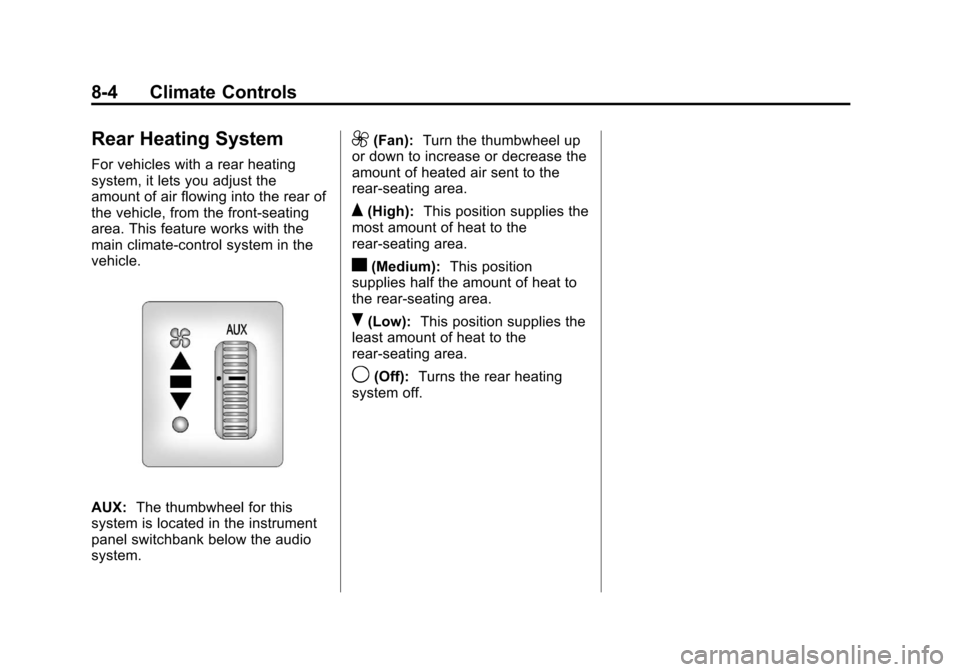
vehicle.
AUX:The thumbwheel for this
system is located in the instrument
panel switchbank below the audio
system.
9(Fan): Turn the thumbwheel up
or down to increase or decrease the
amount of heated air sent to the
rear-seating area.
Q(High): This position supplies the
most amount of heat to the
rear-seating area.
c(Medium): This position
supplies half the amount of heat to
the rear‐seating area.
R(Low): This position supplies the
least amount of heat to the
rear-seating area.
9(Off): Turns the rear heating
system off.
Page 187 of 402
Black plate (5,1)Chevrolet Express Owner Manual - 2013 - 1stPrintReady - 6/19/12
Climate Controls 8-5
Rear Climate Control System
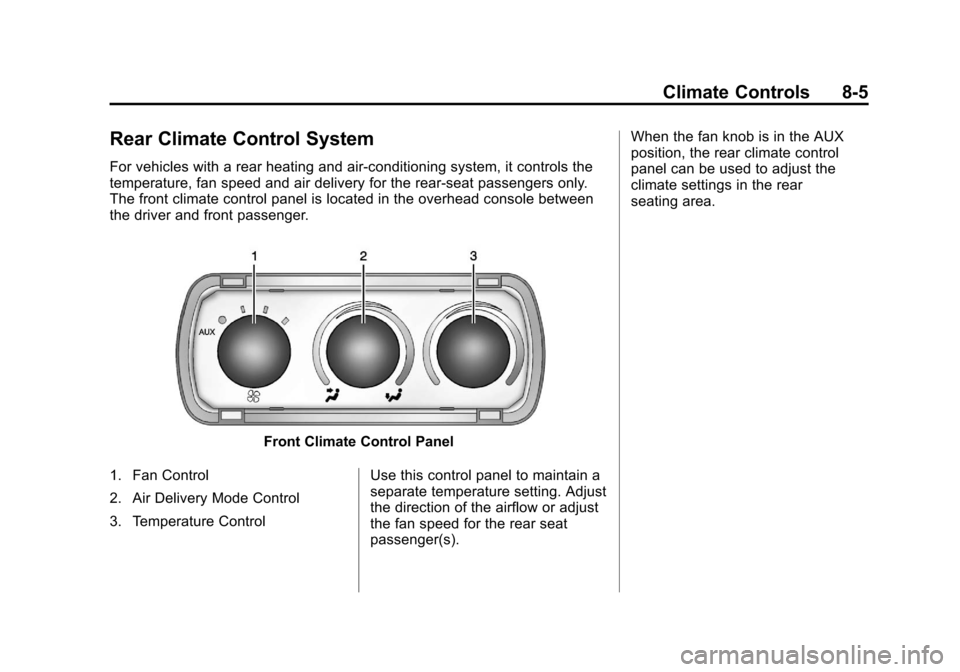
For vehicles with a rear heating and air-conditioning system, it controls the
temperature, fan speed and air delivery for the rear-seat passengers only.
The front climate control panel is located in the overhead console between
the driver and front passenger.
Front Climate Control Panel
1. Fan Control
2. Air Delivery Mode Control
3. Temperature Control Use this control panel to maintain a
separate temperature setting. Adjust
the direction of the airflow or adjust
the fan speed for the rear seat
passenger(s).When the fan knob is in the AUX
position, the rear climate control
panel can be used to adjust the
climate settings in the rear
seating area.
Page 188 of 402
Black plate (6,1)Chevrolet Express Owner Manual - 2013 - 1stPrintReady - 6/19/12
8-6 Climate Controls
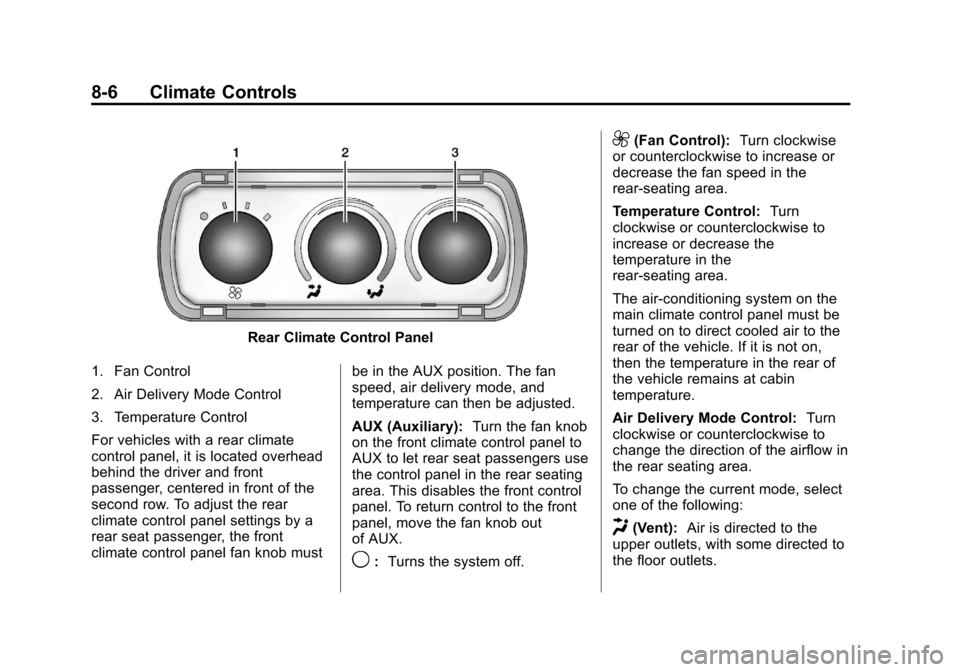
Rear Climate Control Panel
1. Fan Control
2. Air Delivery Mode Control
3. Temperature Control
For vehicles with a rear climate
control panel, it is located overhead
behind the driver and front
passenger, centered in front of the
second row. To adjust the rear
climate control panel settings by a
rear seat passenger, the front
climate control panel fan knob must be in the AUX position. The fan
speed, air delivery mode, and
temperature can then be adjusted.
AUX (Auxiliary):
Turn the fan knob
on the front climate control panel to
AUX to let rear seat passengers use
the control panel in the rear seating
area. This disables the front control
panel. To return control to the front
panel, move the fan knob out
of AUX.
9: Turns the system off.
9(Fan Control): Turn clockwise
or counterclockwise to increase or
decrease the fan speed in the
rear-seating area.
Temperature Control: Turn
clockwise or counterclockwise to
increase or decrease the
temperature in the
rear-seating area.
The air-conditioning system on the
main climate control panel must be
turned on to direct cooled air to the
rear of the vehicle. If it is not on,
then the temperature in the rear of
the vehicle remains at cabin
temperature.
Air Delivery Mode Control: Turn
clockwise or counterclockwise to
change the direction of the airflow in
the rear seating area.
To change the current mode, select
one of the following:
H(Vent): Air is directed to the
upper outlets, with some directed to
the floor outlets.
Page 288 of 402
Black plate (40,1)Chevrolet Express Owner Manual - 2013 - 1stPrintReady - 6/19/12
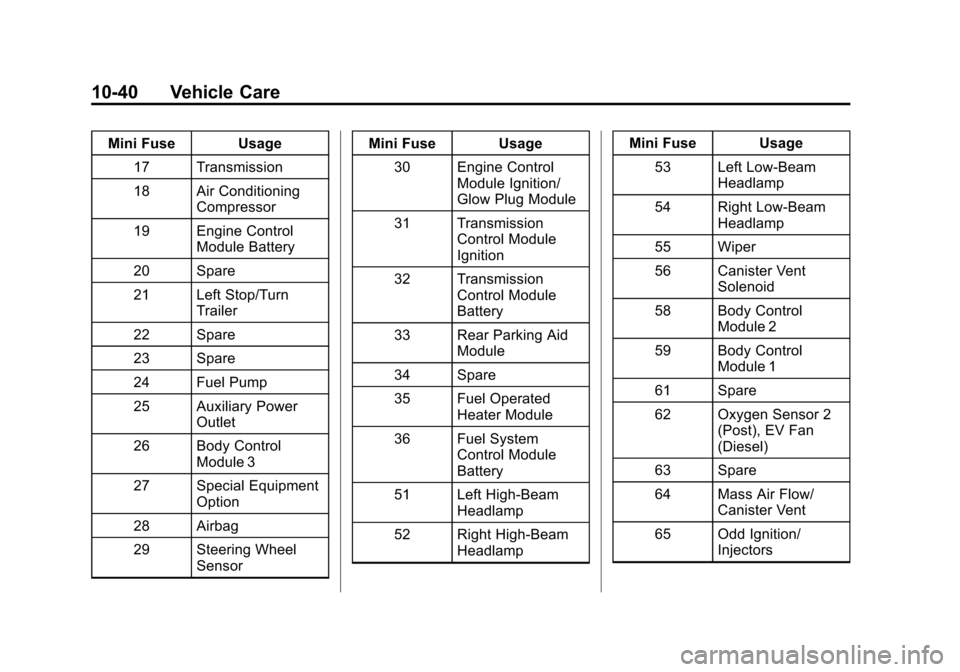
10-40 Vehicle Care
Mini Fuse Usage17 Transmission
18 Air Conditioning Compressor
19 Engine Control Module Battery
20 Spare
21 Left Stop/Turn Trailer
22 Spare
23 Spare
24 Fuel Pump
25 Auxiliary Power Outlet
26 Body Control Module 3
27 Special Equipment Option
28 Airbag
29 Steering Wheel Sensor Mini Fuse Usage
30 Engine Control Module Ignition/
Glow Plug Module
31 Transmission Control Module
Ignition
32 Transmission Control Module
Battery
33 Rear Parking Aid Module
34 Spare
35 Fuel Operated Heater Module
36 Fuel System Control Module
Battery
51 Left High-Beam Headlamp
52 Right High-Beam Headlamp Mini Fuse Usage
53 Left Low-Beam Headlamp
54 Right Low-Beam Headlamp
55 Wiper
56 Canister Vent Solenoid
58 Body Control Module 2
59 Body Control Module 1
61 Spare
62 Oxygen Sensor 2 (Post), EV Fan
(Diesel)
63 Spare
64 Mass Air Flow/ Canister Vent
65 Odd Ignition/ Injectors
Page 289 of 402
Black plate (41,1)Chevrolet Express Owner Manual - 2013 - 1stPrintReady - 6/19/12
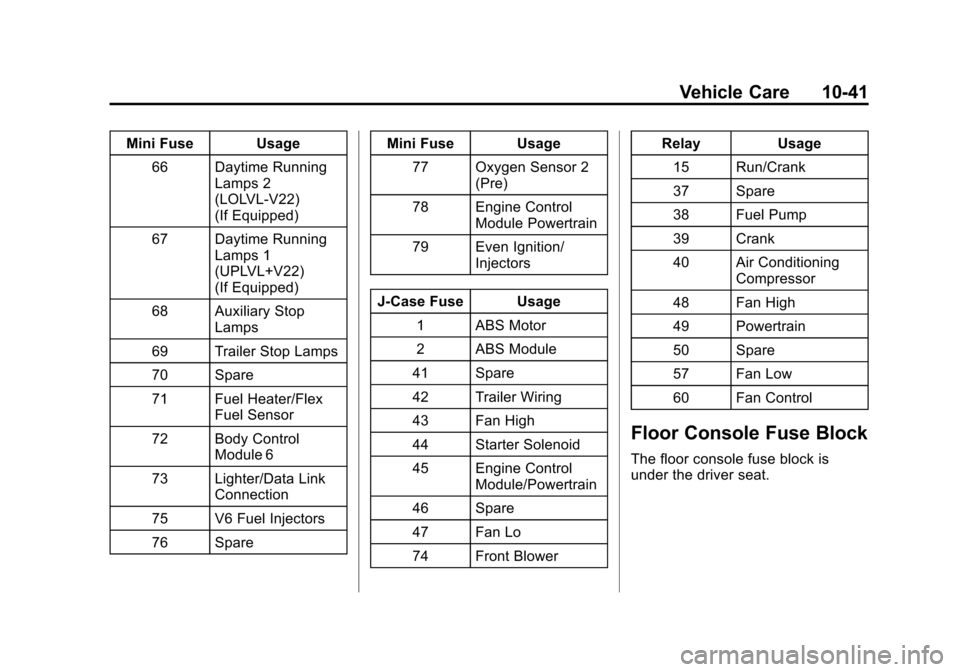
Vehicle Care 10-41
Mini Fuse Usage66 Daytime Running Lamps 2
(LOLVL-V22)
(If Equipped)
67 Daytime Running Lamps 1
(UPLVL+V22)
(If Equipped)
68 Auxiliary Stop Lamps
69 Trailer Stop Lamps
70 Spare
71 Fuel Heater/Flex Fuel Sensor
72 Body Control Module 6
73 Lighter/Data Link Connection
75 V6 Fuel Injectors
76 Spare Mini Fuse Usage
77 Oxygen Sensor 2 (Pre)
78 Engine Control Module Powertrain
79 Even Ignition/ Injectors
J-Case Fuse Usage 1 ABS Motor
2 ABS Module
41 Spare
42 Trailer Wiring
43 Fan High
44 Starter Solenoid
45 Engine Control Module/Powertrain
46 Spare
47 Fan Lo
74 Front Blower Relay Usage
15 Run/Crank
37 Spare
38 Fuel Pump
39 Crank
40 Air Conditioning Compressor
48 Fan High
49 Powertrain
50 Spare
57 Fan Low
60 Fan Control
Floor Console Fuse Block
The floor console fuse block is
under the driver seat.
Page 290 of 402
Black plate (42,1)Chevrolet Express Owner Manual - 2013 - 1stPrintReady - 6/19/12
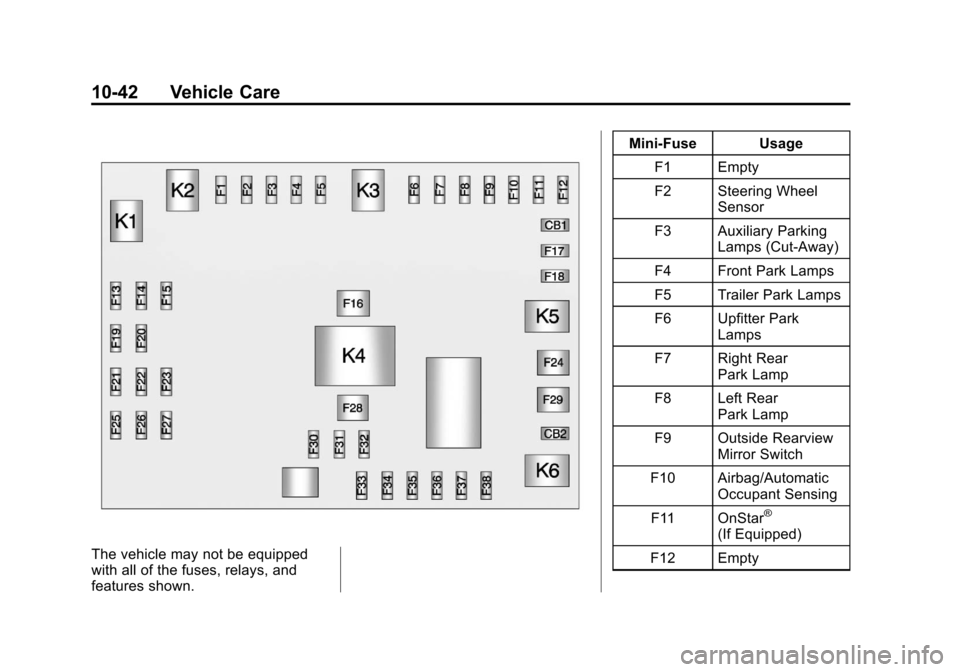
10-42 Vehicle Care
The vehicle may not be equipped
with all of the fuses, relays, and
features shown.Mini-Fuse Usage
F1 Empty
F2 Steering Wheel Sensor
F3 Auxiliary Parking Lamps (Cut-Away)
F4 Front Park Lamps
F5 Trailer Park Lamps
F6 Upfitter Park Lamps
F7 Right Rear Park Lamp
F8 Left Rear Park Lamp
F9 Outside Rearview Mirror Switch
F10 Airbag/Automatic Occupant Sensing
F11 OnStar
®
(If Equipped)
F12 Empty
Page 291 of 402
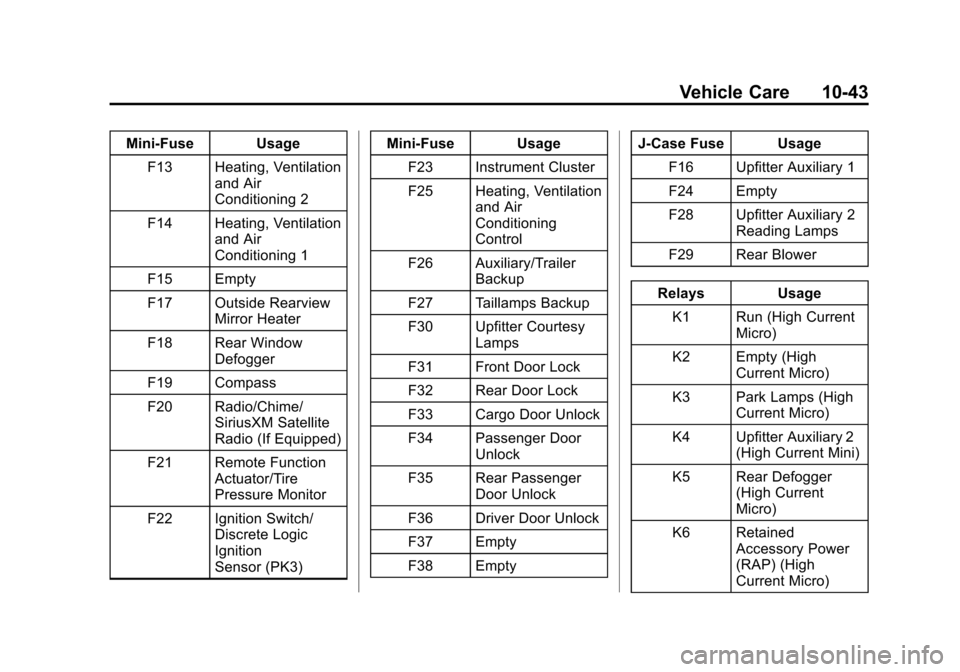
Black plate (43,1)Chevrolet Express Owner Manual - 2013 - 1stPrintReady - 6/19/12
Vehicle Care 10-43
Mini-Fuse UsageF13 Heating, Ventilation and Air
Conditioning 2
F14 Heating, Ventilation and Air
Conditioning 1
F15 Empty
F17 Outside Rearview Mirror Heater
F18 Rear Window Defogger
F19 Compass
F20 Radio/Chime/ SiriusXM Satellite
Radio (If Equipped)
F21 Remote Function Actuator/Tire
Pressure Monitor
F22 Ignition Switch/ Discrete Logic
Ignition
Sensor (PK3) Mini-Fuse Usage
F23 Instrument Cluster
F25 Heating, Ventilation and Air
Conditioning
Control
F26 Auxiliary/Trailer Backup
F27 Taillamps Backup
F30 Upfitter Courtesy Lamps
F31 Front Door Lock
F32 Rear Door Lock
F33 Cargo Door Unlock
F34 Passenger Door Unlock
F35 Rear Passenger Door Unlock
F36 Driver Door Unlock
F37 Empty
F38 Empty J-Case Fuse Usage
F16 Upfitter Auxiliary 1
F24 Empty
F28 Upfitter Auxiliary 2 Reading Lamps
F29 Rear Blower
Relays Usage K1 Run (High Current Micro)
K2 Empty (High Current Micro)
K3 Park Lamps (High Current Micro)
K4 Upfitter Auxiliary 2 (High Current Mini)
K5 Rear Defogger (High Current
Micro)
K6 Retained Accessory Power
(RAP) (High
Current Micro)
Page 391 of 402

Black plate (1,1)Chevrolet Express Owner Manual - 2013 - 1stPrintReady - 6/19/12
INDEX i-1
A
Accessories andModifications . . . . . . . . . . . . . . . . . 10-3
Accessory Power . . . . . . . . . . . . . . 9-19
Add-On Electrical Equipment . . . . . . . . . . . . . . . . . . . 9-57
Additional Information
OnStar
®. . . . . . . . . . . . . . . . . . . . . . 14-5
Air Cleaner/Filter, Engine . . . . . 10-15
Air Vents . . . . . . . . . . . . . . . . . . . . . . . 8-7
Airbag System Check . . . . . . . . . . . . . . . . . . . . . . . . 3-32
How Does an AirbagRestrain? . . . . . . . . . . . . . . . . . . . 3-21
Passenger Sensing System . . . . . . . . . . . . . . . . . . . . . . 3-26
What Makes an Airbag Inflate? . . . . . . . . . . . . . . . . . . . . . . 3-21
What Will You See after an Airbag Inflates? . . . . . . . . . . . . . 3-22
When Should an Airbag Inflate? . . . . . . . . . . . . . . . . . . . . . . 3-20
Where Are the Airbags? . . . . . . 3-18 Airbags
Adding Equipment to the
Vehicle . . . . . . . . . . . . . . . . . . . . . . 3-31
Light On-Off . . . . . . . . . . . . . . . . . . 5-15
On-Off Light . . . . . . . . . . . . . . . . . . 5-15
On-Off Switch . . . . . . . . . . . . . . . . 3-23
Passenger Status Indicator . . . 5-16
Readiness Light . . . . . . . . . . . . . . 5-14
Servicing Airbag-Equipped Vehicles . . . . . . . . . . . . . . . . . . . . . 3-31
System Check . . . . . . . . . . . . . . . . 3-16
All-Wheel Drive . . . . . . . . . 10-27, 9-30
AM-FM Radio . . . . . . . . . . . . . . . . . . . 7-7
Antilock Brake System (ABS) . . . . . . . . . . . . . . . . 9-30
Warning Light . . . . . . . . . . . . . . . . . 5-21
Appearance Care Exterior . . . . . . . . . . . . . . . . . . . . . 10-84
Interior . . . . . . . . . . . . . . . . . . . . . . 10-87
Ashtrays . . . . . . . . . . . . . . . . . . . . . . . . 5-8 Assistance Program,
Roadside . . . . . . . . . . . . . . 13-7, 13-11
Audio Players . . . . . . . . . . . . . . . . . 7-12 CD . . . . . . . . . . . . . . . . . . . . . . . . . . . 7-12
Audio System Fixed Mast Antenna . . . . . . . . . . 7-11
Radio Reception . . . . . . . . . . . . . . 7-10
Theft-Deterrent Feature . . . . . . . . 7-2
Automatic Door Locks . . . . . . . . . . . . . . . . . . . . 2-8
Headlamp System . . . . . . . . . . . . . 6-3
Transmission . . . . . . . . . . . 9-22, 9-26
TransmissionFluid . . . . . . . . . . . . . . . 10-10, 10-12
Automatic Transmission Manual Mode . . . . . . . . . . . . . . . . . 9-28
Shift Lock Control
Function Check . . . . . . . . . . . 10-30
Auxiliary Devices . . . . . . . . . . . . . . . . . . . . . . . 7-17
Axle, Front . . . . . . . . . . . . . . . . . . . . 10-28
Axle, Rear . . . . . . . . . . . . . . . . . . . . 10-28