mirror CHEVROLET HHR 2008 1.G User Guide
[x] Cancel search | Manufacturer: CHEVROLET, Model Year: 2008, Model line: HHR, Model: CHEVROLET HHR 2008 1.GPages: 430, PDF Size: 5.63 MB
Page 229 of 430
A cornering skid is best handled by easing your foot off
the accelerator pedal.
If your vehicle has the Traction Control System (TCS) or
the Enhanced Traction System (ETS), remember: It
helps to avoid only the acceleration skid. SeeTraction
Control System (TCS) on page 4-6orEnhanced
Traction System (ETS) on page 4-9. If you do not have
TCS or ETS, or if the system is off, then an acceleration
skid is also best handled by easing your foot off the
accelerator pedal.
If your vehicle starts to slide, ease your foot off the
accelerator pedal and quickly steer the way you want
the vehicle to go. If you start steering quickly enough,
your vehicle may straighten out. Always be ready
for a second skid if it occurs.
If your vehicle has Electronic Stability Control (ESC),
the ESC might activate. SeeElectronic Stability
Control (ESC) on page 4-10.
Of course, traction is reduced when water, snow, ice,
gravel, or other material is on the road. For safety, you
will want to slow down and adjust your driving to
these conditions. It is important to slow down on slippery
surfaces because stopping distance will be longer and
vehicle control more limited.While driving on a surface with reduced traction, try your
best to avoid sudden steering, acceleration, or braking,
including reducing vehicle speed by shifting to a lower
gear. Any sudden changes could cause the tires to
slide. You may not realize the surface is slippery until
your vehicle is skidding. Learn to recognize warning
clues — such as enough water, ice, or packed snow on
the road to make a mirrored surface — and slow down
when you have any doubt.
If you have the Antilock Brake System (ABS),
remember: It helps avoid only the braking skid. If you do
not have ABS, then in a braking skid, where the
wheels are no longer rolling, release enough pressure
on the brakes to get the wheels rolling again. This
restores steering control. Push the brake pedal down
steadily when you have to stop suddenly. As long as the
wheels are rolling, you will have steering control.
4-17
Page 230 of 430
Driving at Night
Night driving is more dangerous than day driving because
some drivers are likely to be impaired — by alcohol or
drugs, with night vision problems, or by fatigue.
Night driving tips include:
Drive defensively.
Do not drink and drive.
Reduce headlamp glare by adjusting the inside
rearview mirror.
Slow down and keep more space between you and
other vehicles because your headlamps can only
light up so much road ahead.
Watch for animals.
When tired, pull off the road.
Do not wear sunglasses.
Avoid staring directly into approaching headlamps.
Keep the windshield and all glass on your vehicle
clean — inside and out.
Keep your eyes moving, especially during turns or
curves.
No one can see as well at night as in the daytime.
But, as we get older, these differences increase.
A 50-year-old driver might need at least twice as much
light to see the same thing at night as a 20-year-old.
Driving in Rain and on Wet Roads
Rain and wet roads can reduce vehicle traction
and affect your ability to stop and accelerate. Always
drive slower in these types of driving conditions
and avoid driving through large puddles and
deep-standing or owing water.
4-18
Page 232 of 430
Before Leaving on a Long Trip
To prepare your vehicle for a long trip, consider having
it serviced by your dealer/retailer before departing.
Things to check on your own include:
Windshield Washer Fluid:Reservoir full? Windows
clean — inside and outside?
Wiper Blades:In good shape?
Fuel, Engine Oil, Other Fluids:All levels checked?
Lamps:Do they all work and are lenses clean?
Tires:Are treads good? Are tires inated to
recommended pressure?
Weather and Maps:Safe to travel? Have
up-to-date maps?
Highway Hypnosis
Always be alert and pay attention to your surroundings
while driving. If you become tired or sleepy, nd a
safe place to park your vehicle and rest.
Other driving tips include:
Keep the vehicle well ventilated.
Keep interior temperature cool.
Keep your eyes moving — scan the road ahead
and to the sides.
Check the rearview mirror and vehicle instruments
often.
Hill and Mountain Roads
Driving on steep hills or through mountains is different
than driving on at or rolling terrain. Tips for driving
in these conditions include:
Keep your vehicle serviced and in good shape.
Check all uid levels and brakes, tires, cooling
system, and transmission.
Going down steep or long hills, shift to a
lower gear.
4-20
Page 252 of 430
Before you start, check all trailer hitch parts and
attachments, safety chains, electrical connector, lamps,
tires and mirror adjustment. If the trailer has electric
brakes, start your vehicle and trailer moving and then
apply the trailer brake controller by hand to be sure
the brakes are working. This lets you check your
electrical connection at the same time.
During your trip, check occasionally to be sure that the
load is secure, and that the lamps and any trailer
brakes are still working.
Following Distance
Stay at least twice as far behind the vehicle ahead as
you would when driving your vehicle without a trailer.
This can help you avoid situations that require
heavy braking and sudden turns.
Passing
You will need more passing distance up ahead when
you are towing a trailer. And, because the vehicle
is a good deal longer, you will need to go much farther
beyond the passed vehicle before you can return to
your lane.
Backing Up
Hold the bottom of the steering wheel with one hand.
Then, to move the trailer to the left, just move that hand
to the left. To move the trailer to the right, move your
hand to the right. Always back up slowly and, if possible,
have someone guide you.
Making Turns
Notice:Making very sharp turns while trailering
could cause the trailer to come in contact with the
vehicle. Your vehicle could be damaged. Avoid
making very sharp turns while trailering.
When you are turning with a trailer, make wider turns
than normal. Do this so your trailer will not strike
soft shoulders, curbs, road signs, trees or other objects.
Avoid jerky or sudden maneuvers. Signal well in
advance.
Turn Signals When Towing a Trailer
When you tow a trailer, your vehicle may need a
different turn signal asher and/or extra wiring. Check
with your dealer/retailer. The arrows on your instrument
panel will ash whenever you signal a turn or lane
change. Properly hooked up, the trailer lamps will also
ash, telling other drivers you are about to turn,
change lanes or stop.
4-40
Page 376 of 430
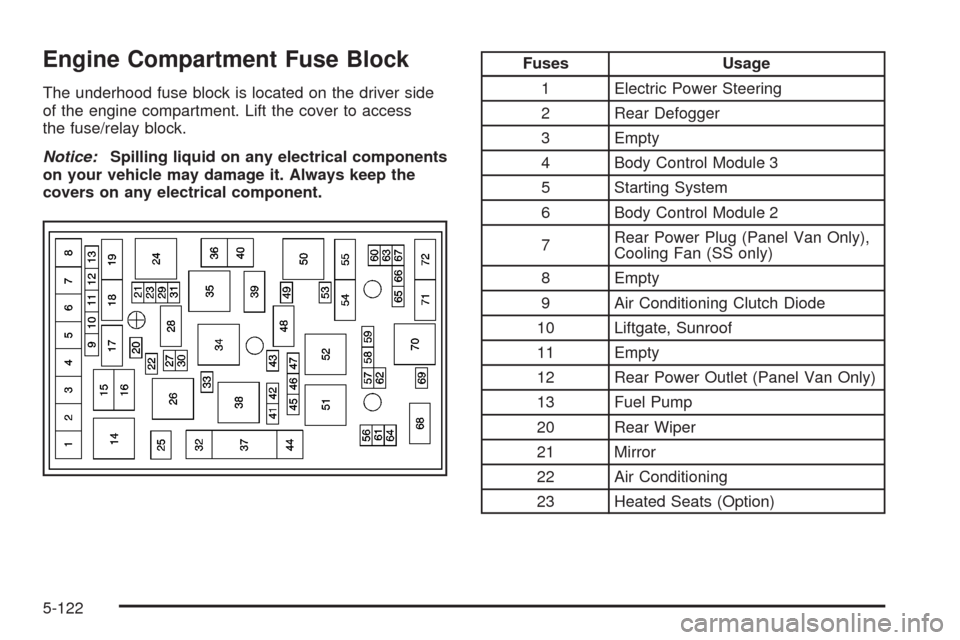
Engine Compartment Fuse Block
The underhood fuse block is located on the driver side
of the engine compartment. Lift the cover to access
the fuse/relay block.
Notice:Spilling liquid on any electrical components
on your vehicle may damage it. Always keep the
covers on any electrical component.
Fuses Usage
1 Electric Power Steering
2 Rear Defogger
3 Empty
4 Body Control Module 3
5 Starting System
6 Body Control Module 2
7Rear Power Plug (Panel Van Only),
Cooling Fan (SS only)
8 Empty
9 Air Conditioning Clutch Diode
10 Liftgate, Sunroof
11 Empty
12 Rear Power Outlet (Panel Van Only)
13 Fuel Pump
20 Rear Wiper
21 Mirror
22 Air Conditioning
23 Heated Seats (Option)
5-122
Page 423 of 430
Hood
Checking Things Under................................5-10
Release.....................................................5-11
Horn............................................................... 3-6
How to Wear Safety Belts Properly...................1-18
Hydraulic Clutch.............................................5-23
I
Ignition Positions.............................................2-22
Infants and Young Children, Restraints...............1-36
Ination - Tire Pressure...................................5-60
Inator Kit, Tire...............................................5-76
Instrument Panel
Overview..................................................... 3-4
Storage Area..............................................2-47
Instrument Panel (I/P)
Brightness..................................................3-18
Cluster.......................................................3-29
J
Jump Starting.................................................5-38
K
Keyless Entry System....................................... 2-4
Keys............................................................... 2-3
L
Labeling, Tire Sidewall.....................................5-53
Lamps
Dome........................................................3-19
Mirror Reading............................................3-19
Rear Reading.............................................3-19
Lap-Shoulder Belt...........................................1-26
LATCH System
Child Restraints...........................................1-43
License Plate Lamps.......................................5-50
Liftgate
Carbon Monoxide........................................2-12
Light
Airbag Readiness........................................3-31
Antilock Brake System Warning.....................3-36
Brake System Warning.................................3-35
Charging System.........................................3-34
Engine Coolant Temperature Warning.............3-38
7
Page 425 of 430
Message
DIC Warnings and Messages........................3-48
Mirror Reading Lamps.....................................3-19
Mirrors
Automatic Dimming Rearview with Compass....2-41
Automatic Dimming Rearview with OnStar
®
and Compass..........................................2-39
Manual Rearview Mirror................................2-39
Outside Convex Mirror.................................2-43
Outside Power Mirrors..................................2-43
MP3 .............................................................3-72
MyGMLink.com................................................ 7-4
N
Navigation System, Privacy..............................7-17
New Vehicle Break-In......................................2-21
O
Odometer......................................................3-30
Off-Road Recovery..........................................4-15
Oil
Engine.......................................................5-15
Pressure Light.............................................3-43Oil, Engine Oil Life System..............................5-19
Older Children, Restraints................................1-33
Online Owner Center........................................ 7-4
OnStar, Privacy..............................................7-17
OnStar
®System, see OnStar®Manual...............2-44
Other Warning Devices...................................... 3-6
Outlet Adjustment............................................3-26
Outlets
Accessory Power.........................................3-20
Outside
Convex Mirror.............................................2-43
Power Mirrors.............................................2-43
Owner Checks and Services.............................. 6-8
Owners, Canadian............................................... ii
P
Paint, Damage..............................................5-116
Park Brake....................................................2-33
Park (P)
Shifting Into................................................2-34
Shifting Out of............................................2-36
Parking
Over Things That Burn.................................2-37
Parking Your Vehicle.......................................2-36
Passenger Airbag Status Indicator.....................3-32
Passenger Compartment Air Filter.....................3-26
9
Page 426 of 430
Passenger Sensing System..............................1-65
Passing.........................................................4-16
PASS-Key
®III+..............................................2-19
PASS-Key®III+ Operation................................2-20
Perchlorate Materials Requirements, California...... 5-4
Power
Door Locks.................................................. 2-9
Electrical System.......................................5-119
Lumbar Controls........................................... 1-4
Retained Accessory (RAP)............................2-25
Seat............................................................ 1-3
Windows....................................................2-16
Pressure Cap.................................................5-26
Privacy..........................................................7-16
Event Data Recorders..................................7-16
Navigation System.......................................7-17
OnStar.......................................................7-17
Radio Frequency Identication.......................7-17
Programmable Automatic Door Unlock...............2-10
R
Radio Frequency Identication (RFID), Privacy....7-17
Radios..........................................................3-59
Radio(s)........................................................3-62
Radios
Reception...................................................3-79
Setting the Clock.........................................3-60Radios (cont.)
Theft-Deterrent............................................3-78
Rear Compartment Storage Panel/Cover............2-48
Rear Door Security Locks................................2-11
Rear Reading Lamps......................................3-19
Rear Side Cargo Door.....................................2-12
Rear Storage Area..........................................2-48
Rear Windshield Washer/Wiper.........................3-11
Rearview Mirror, Automatic Dimming with
Compass....................................................2-41
Rearview Mirror, Automatic Dimming with
OnStar
®and Compass.................................2-39
Rearview Mirrors.............................................2-39
Reclining Seatbacks.......................................... 1-5
Recommended Fluids and Lubricants.................6-12
Recreational Vehicle Towing.............................4-32
Remote Keyless Entry (RKE) System.................. 2-4
Remote Keyless Entry (RKE) System, Operation . . . 2-5
Remote Vehicle Start........................................ 2-7
Removing the Flat Tire and Installing
the Spare Tire...................................5-90, 5-101
Removing the Spare Tire and Tools...................5-87
Replacement Bulbs.........................................5-50
Replacement Parts, Maintenance......................6-14
Reporting Safety Defects
Canadian Government..................................7-14
General Motors...........................................7-14
United States Government............................7-13
10