display CHEVROLET HHR 2008 1.G Owner's Manual
[x] Cancel search | Manufacturer: CHEVROLET, Model Year: 2008, Model line: HHR, Model: CHEVROLET HHR 2008 1.GPages: 430, PDF Size: 5.63 MB
Page 186 of 430
DIC Vehicle Personalization
Your vehicle has personalization capabilities that allow
you to program certain features to a preferred setting.
All of the features listed may not be available on
your vehicle. Only the features available will be
displayed on the DIC.
The default settings for the features were set when your
vehicle left the factory, but may have been changed
from their default state since that time.
To change feature settings, use the following procedure:
Entering Personalization Menu
1. Turn the ignition on while the vehicle is stopped.
To avoid excessive drain on the battery, it is
recommended that the headlamps are turned off.
2. Press and hold the information and reset buttons at
the same time for one second, then release to enter
the personalization menu.
If the vehicle speed is greater than 2 mph (3 km/h),
only the UNITS menu will be accessible.
3. Press the information button to scroll through the
available personalization menu modes.
Press the reset button to scroll through the available
settings for each mode.
If you do not make a selection within ten seconds,
the display will go back to the previous information
displayed.
Personalization Menu Modes
OIL LIFE RESET
When this feature is displayed, you can reset the engine
oil life system. To reset the system, seeEngine Oil
Life System on page 5-19. See “OIL LIFE” underDIC
Operation and Displays on page 3-46for more
information.
UNITS
This feature allows you to select the units of
measurement in which the DIC will display the vehicle
information. When UNITS appears on the display, press
and hold the reset button for at least one second to
scroll through the available settings:
ENGLISH (default in United States):All information
will be displayed in English units.
METRIC (default in Canada):All information will be
displayed in metric units.
To select a setting and move on to the next feature,
press the information button while the desired setting is
displayed on the DIC.
3-54
Page 187 of 430
REMOTE START
If your vehicle has remote start, this feature allows
remote start to be turned off or on. Remote start allows
you to start the engine from outside of the vehicle
using your Remote Keyless Entry (RKE) transmitter.
When REMOTE START appears on the display, press
and hold the reset button for at least one second to
scroll through the available settings:
OFF:The remote start feature will be disabled.
ON (default):The remote start feature will be enabled.
SeeRemote Vehicle Start on page 2-7for more
information.
To select a setting and move on to the next feature,
press the information button while the desired setting is
displayed on the DIC.
LOCK HORN
This feature, which allows the vehicle’s horn to chirp
every time the lock button on the Remote Keyless Entry
(RKE) transmitter is pressed, can be enabled or
disabled. When LOCK HORN appears on the display,
press and hold the reset button for at least one
second to scroll through the available settings:
OFF (default):The horn will not chirp on the rst press
of the lock button on the RKE transmitter. The horn
will still chirp on the second press.ON:The horn will chirp on the rst press of the lock
button on the RKE transmitter.
SeeRemote Keyless Entry (RKE) System Operation on
page 2-5for more information.
To select a setting and move on to the next feature,
press the information button while the desired setting is
displayed on the DIC.
UNLOCK HORN
This feature, which allows the vehicle’s horn to chirp on
the rst press of the unlock button on the Remote
Keyless Entry (RKE) transmitter, can be enabled or
disabled. When UNLOCK HORN appears on the display,
press and hold the reset button for at least one
second to scroll through the available settings:
OFF (default):The horn will not chirp when the unlock
button on the RKE transmitter is pressed.
ON:The horn will chirp on the rst press of the unlock
button on the RKE transmitter.
SeeRemote Keyless Entry (RKE) System Operation on
page 2-5for more information.
To select a setting and move on to the next feature,
press the information button while the desired setting is
displayed on the DIC.
3-55
Page 188 of 430
LIGHT FLASH
This feature, which allows the vehicle’s exterior
hazard/turn signal lighting to ash every time the lock or
unlock button on the Remote Keyless Entry (RKE)
transmitter is pressed, can be enabled or disabled.
When LIGHT FLASH appears on the display, press and
hold the reset button for at least one second to scroll
through the available settings:
OFF:The exterior hazard/turn signal lighting will not
ash when the lock or unlock button on the RKE
transmitter is pressed.
ON (default):The exterior hazard/turn signal lighting
will ash when the lock or unlock button on the
RKE transmitter is pressed.
SeeRemote Keyless Entry (RKE) System Operation on
page 2-5for more information.
To select a setting and move on to the next feature,
press the information button while the desired setting is
displayed on the DIC.
DELAY LOCK
This feature, which delays the actual locking of the
vehicle, can be enabled or disabled. When DELAY
LOCK appears on the display, press and hold the reset
button for at least one second to scroll through the
available settings:
ON (default):The doors will not lock until ve seconds
after the last door is closed. You can temporarily
override delayed locking by pressing the power lock
switch or the lock button on the Remote Keyless Entry
(RKE) transmitter a second time.
OFF:The doors will lock immediately when pressing
the power lock switch or the lock button on the
RKE transmitter.
SeePower Door Locks on page 2-9,Delayed Locking
on page 2-10, andRemote Keyless Entry (RKE) System
Operation on page 2-5for more information.
To select a setting and move on to the next feature,
press the information button while the desired setting is
displayed on the DIC.
3-56
Page 189 of 430
AUTO UNLK (Unlock)
This feature, which allows the vehicle to automatically
unlock certain doors, can be enabled or disabled. When
AUTO UNLK appears on the display, press and hold
the reset button for at least one second to scroll through
the available settings:
ALL (default):All of the doors will automatically unlock.
DRIVER:The driver’s door will automatically unlock.
NONE:None of the doors will automatically unlock. You
will need to manually unlock the doors.
If you have a manual transmission vehicle, the door(s)
will automatically unlock when the key is turned off.
If you have an automatic transmission vehicle, you can
select when the automatic unlocking will occur. See
“UNLK (Unlock) (Automatic Transmission Only)”
following.
SeeProgrammable Automatic Door Unlock on
page 2-10for more information.
To select a setting and move on to the next feature,
press the information button while the desired setting is
displayed on the DIC.
UNLK (Unlock) (Automatic
Transmission Only)
This screen displays only if your vehicle has an
automatic transmission and DRIVER or ALL is selected
for the AUTO UNLK feature. This feature determines
when the automatic door unlocking will occur. When
UNLK appears on the display, press and hold the reset
button for at least one second to scroll through the
available settings:
KEY OFF:The door(s) will unlock when the key is
turned off.
SHIFT TO P (Park) (default):The door(s) will unlock
when the vehicle is shifted into PARK (P).
SeeProgrammable Automatic Door Unlock on
page 2-10for more information.
To select a setting and move on to the next feature,
press the information button while the desired setting is
displayed on the DIC.
3-57
Page 190 of 430
EXT (Exterior) LIGHTS
This feature, which allows the vehicle’s exterior
perimeter lighting to turn on each time the unlock button
on the Remote Keyless Entry (RKE) transmitter is
pressed, can be enabled or disabled. When EXT
LIGHTS appears on the display, press and hold the
reset button for at least one second to scroll through the
available settings:
OFF:The exterior perimeter lighting will not turn on
when the unlock button on the RKE transmitter is
pressed.
ON (default):The exterior perimeter lighting will turn on
when the unlock button on the RKE transmitter is
pressed.
SeeRemote Keyless Entry (RKE) System Operation on
page 2-5for more information.
To select a setting and move on to the next feature,
press the information button while the desired setting is
displayed on the DIC.
LANGUAGE
This feature allows you to select the language in which
the DIC will display. When LANGUAGE appears on
the display, press and hold the reset button for at least
one second to scroll through the available settings:
ENGLISH (default):All messages will appear in
English.
FRENCH:All messages will appear in French.
SPANISH:All messages will appear in Spanish.
GERMAN:All messages will appear in German.
To select a setting and exit out of the personalization
menu mode, press the information button while the
desired setting is displayed on the DIC.
Exiting Personalization Menu
The personalization menu will be exited when any of the
following conditions occur:
A ten second time period has elapsed.
The ignition is turned off.
The end of the personalization menu list is reached.
3-58
Page 192 of 430
Setting the Clock
Without Date Display
AM/FM Base Radio with a Single CD
Player
This type of radio has aH(clock) button for setting the
time. You can set the time by following these steps:
1. Turn the ignition key to ACC/ACCESSORY
or ON/RUN. Press the
O(power) knob, located in
the center of the radio, to turn the radio on.
2. Press the
Hbutton until the hour begins ashing
on the display. Press the
Hbutton a second time
and the minute begins ashing on the display.
3. While either the hour or the minute numbers are
ashing, turn the
f(tune) knob, located on the
upper right side of the radio, clockwise or
counterclockwise to increase or decrease the time.
4. Press the
Hbutton again until the clock display
stops ashing to set the currently displayed time;
otherwise, the ashing stops after ve seconds and
the current time displayed is automatically set.To change the time default setting from 12 hour to
24 hour, press the
Hbutton and then the pushbutton
located under the forward arrow label. Once the
time 12H and 24H are displayed, press the pushbutton
located under the desired option to select the default.
Press the
Hbutton again to apply the selected default,
or let the screen time out.
With Date Display
Single CD (MP3) Player
This type of radio has aHbutton for setting the time
and date.
To set the time and date, follow these instructions:
1. Turn the ignition key to ACC/ACCESSORY
or ON/RUN. Press the
Oknob, located in
the center of the radio, to turn the radio on.
2. Press the
Hbutton and the HR, MIN, MM, DD,
YYYY (hour, minute, month, day, and year)
displays.
3-60
Page 193 of 430
3. Press the pushbutton located under any one of the
labels that you want to change. Every time the
pushbutton is pressed again, the time or the date if
selected, increases by one.
Another way to increase the time or date, is to
press the right
¨SEEK arrow or\FWD
button.
To decrease the time or date, press the left©
SEEK arrow orsREV button, or turn thef
knob, located on the upper right side of the radio.
The date does not automatically display. To see the
date press the
Hbutton while the radio is on. The date
with display times out after a few seconds and goes
back to the normal radio and time display.
Six-Disc CD (MP3) Player
This type of radio has a MENU button instead of theH
button to set the time and date.
To set the time and date, follow these instructions:
1. Turn the ignition key to ACC/ACCESSORY
or ON/RUN. Press the
Oknob, located in the
center of the radio, to turn the radio on.
2. Press the MENU button. Once the clock option is
displayed.
3. Press the pushbutton located under that label. The
HR, MIN, MM, DD, YYYY displays.
4. Press the pushbutton located under any one of the
labels you want to change. Every time the
pushbutton is pressed again, the time or the date if
selected, increases by one.
Another way to increase the time or date, is to
press the right
¨SEEK arrow or\FWD
button.
To decrease the time or date, press the left©
SEEK arrow orsREV button, or turn thef
knob, located on the upper right side of the radio.
3-61
Page 194 of 430
The date does not automatically display. To see the
date press the MENU button and then the
Hbutton
while the radio is on. The date with display times
out after a few seconds and goes back to the normal
radio and time display.
To change the time default setting from 12 hour to
24 hour or to change the date default setting from
month/day/year to day/month/year, follow these
instructions:
1. Press the
Hbutton and then the pushbutton
located under the forward arrow label. Once
the time 12H and 24H, and the date MM/DD/YYYY
(month, day, and year) and DD/MM/YYYY (day,
month, and year) displays.
2. Press the pushbutton located under the desired
option.
3. Press the
Hor MENU button again to apply the
selected default, or let the screen time out.
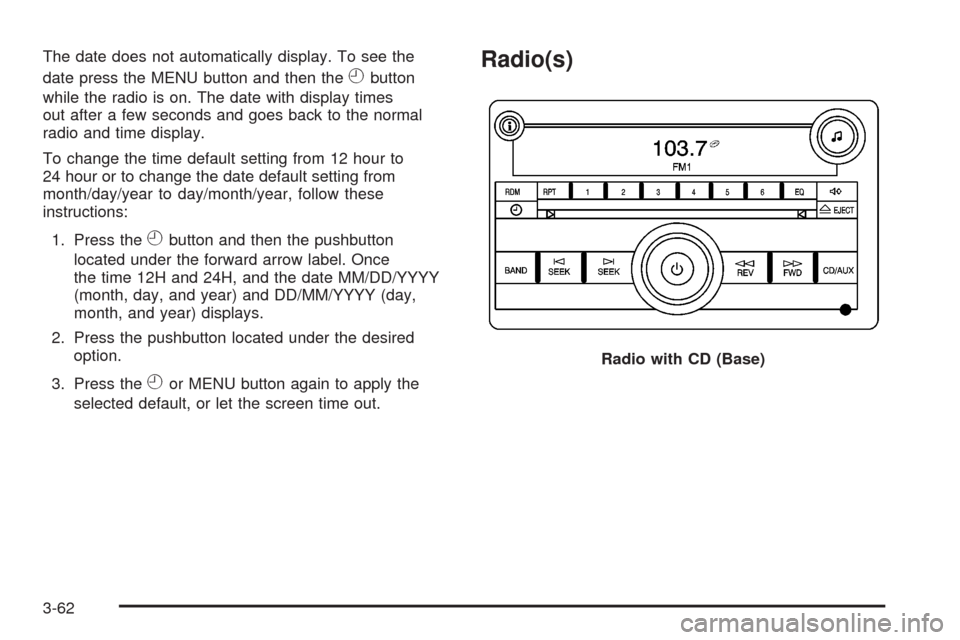
Radio(s)
Radio with CD (Base)
3-62
Page 195 of 430
Radio Data System (RDS)
Your radio may have a Radio Data System (RDS). The
RDS feature is available for use only on FM stations
that broadcast RDS information. This system relies upon
receiving specic information from these stations and
only works when the information is available. While the
radio is tuned to an FM-RDS station, the station
name or call letters display. In rare cases, a radio station
can broadcast incorrect information that causes the
radio features to work improperly. If this happens,
contact the radio station.
Playing the Radio
O
(Power/Volume): Press this knob to turn the system
on and off.
Turn this knob clockwise or counterclockwise to increase
or decrease the volume.
Speed Compensated Volume (SCV):Radios with the
Speed Compensated Volume (SCV) feature will
automatically adjust the radio volume to compensate for
road and wind noise as the vehicle’s speed changes
while driving, so that the volume level is consistent. To
activate SCV:
1. Set the radio volume to the desired level.
2. Press the MENU button to display the radio
setup menu.
3. Press the pushbutton under the AUTO VOLUM
(automatic volume) label on the radio display.
4. Press the pushbutton under the desired Speed
Compensated Volume setting (OFF, Low, Med,
or High) to select the level of radio volume
compensation. The display times out after
approximately 10 seconds. Each higher setting
allows for more radio volume compensation at faster
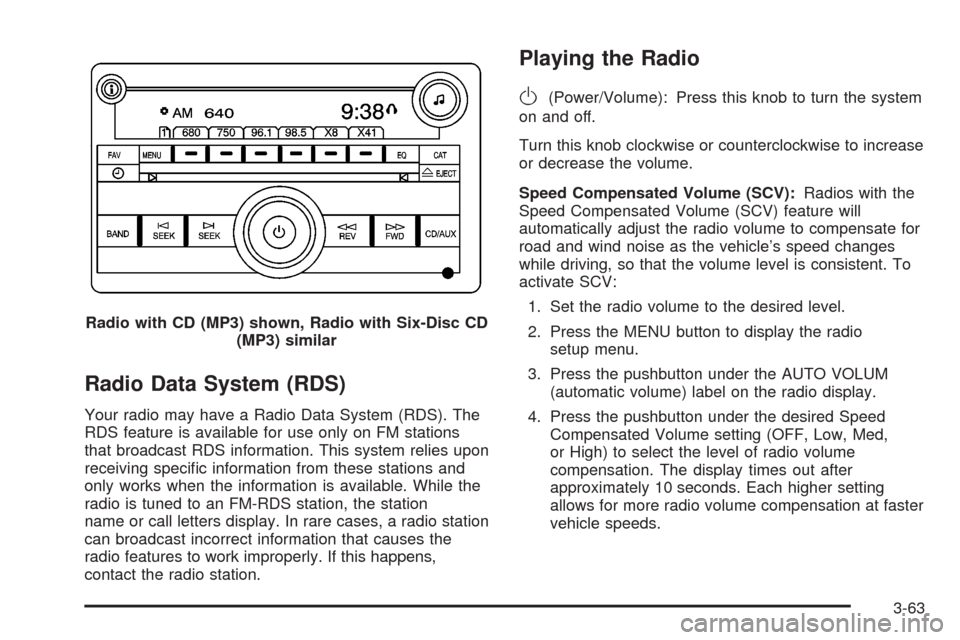
vehicle speeds. Radio with CD (MP3) shown, Radio with Six-Disc CD
(MP3) similar
3-63
Page 196 of 430
Finding a Station
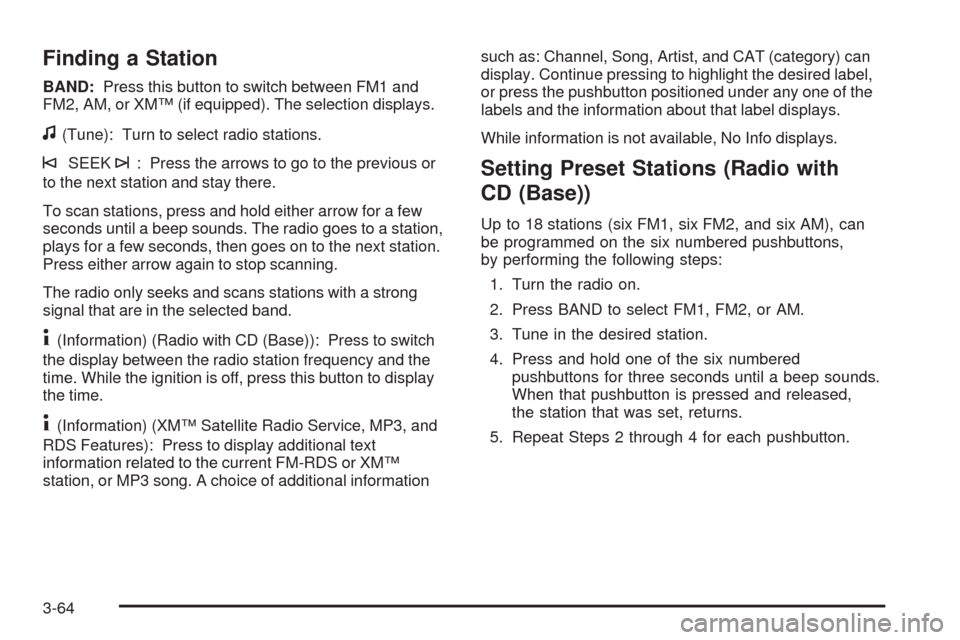
BAND:Press this button to switch between FM1 and
FM2, AM, or XM™ (if equipped). The selection displays.
f(Tune): Turn to select radio stations.
©SEEK¨: Press the arrows to go to the previous or
to the next station and stay there.
To scan stations, press and hold either arrow for a few
seconds until a beep sounds. The radio goes to a station,
plays for a few seconds, then goes on to the next station.
Press either arrow again to stop scanning.
The radio only seeks and scans stations with a strong
signal that are in the selected band.
4(Information) (Radio with CD (Base)): Press to switch
the display between the radio station frequency and the
time. While the ignition is off, press this button to display
the time.
4(Information) (XM™ Satellite Radio Service, MP3, and
RDS Features): Press to display additional text
information related to the current FM-RDS or XM™
station, or MP3 song. A choice of additional informationsuch as: Channel, Song, Artist, and CAT (category) can
display. Continue pressing to highlight the desired label,
or press the pushbutton positioned under any one of the
labels and the information about that label displays.
While information is not available, No Info displays.
Setting Preset Stations (Radio with
CD (Base))
Up to 18 stations (six FM1, six FM2, and six AM), can
be programmed on the six numbered pushbuttons,
by performing the following steps:
1. Turn the radio on.
2. Press BAND to select FM1, FM2, or AM.
3. Tune in the desired station.
4. Press and hold one of the six numbered
pushbuttons for three seconds until a beep sounds.
When that pushbutton is pressed and released,
the station that was set, returns.
5. Repeat Steps 2 through 4 for each pushbutton.
3-64