audio CHEVROLET HHR 2008 1.G Owners Manual
[x] Cancel search | Manufacturer: CHEVROLET, Model Year: 2008, Model line: HHR, Model: CHEVROLET HHR 2008 1.GPages: 430, PDF Size: 5.63 MB
Page 1 of 430
Seats and Restraint Systems........................... 1-1
Front Seats
............................................... 1-2
Rear Seats
..............................................1-10
Safety Belts
.............................................1-12
Child Restraints
.......................................1-33
Airbag System
.........................................1-57
Restraint System Check
............................1-72
Features and Controls..................................... 2-1
Keys
........................................................ 2-3
Doors and Locks
....................................... 2-9
Windows
.................................................2-15
Theft-Deterrent Systems
............................2-18
Starting and Operating Your Vehicle
...........2-21
Mirrors
....................................................2-39
OnStar
®System
......................................2-44
Storage Areas
.........................................2-47
Sunroof
..................................................2-52
Instrument Panel............................................. 3-1
Instrument Panel Overview
.......................... 3-4
Climate Controls
......................................3-23
Warning Lights, Gages, and Indicators
........3-28
Driver Information Center (DIC)
..................3-46
Audio System(s)
.......................................3-59Driving Your Vehicle....................................... 4-1
Your Driving, the Road, and Your Vehicle
..... 4-2
Towing
...................................................4-32
Service and Appearance Care.......................... 5-1
Service
..................................................... 5-3
Fuel
......................................................... 5-5
Checking Things Under the Hood
...............5-10
Headlamp Aiming
.....................................5-43
Bulb Replacement
....................................5-46
Windshield Wiper Blade Replacement
.........5-50
Tires
......................................................5-52
Appearance Care
...................................5-110
Vehicle Identication
...............................5-118
Electrical System
....................................5-118
Capacities and Specications
...................5-125
Maintenance Schedule..................................... 6-1
Maintenance Schedule
............................... 6-2
Customer Assistance Information.................... 7-1
Customer Assistance and Information
........... 7-2
Reporting Safety Defects
...........................7-13
Vehicle Data Recording and Privacy
...........7-16
Index................................................................ 1
2008 Chevrolet HHR Owner ManualM
Page 103 of 430
Retained Accessory Power (RAP)
These vehicle accessories may be used for up to
10 minutes after the engine is turned off.
Audio System
Power Windows
Sunroof
The power windows and sunroof will continue to work
for up to 10 minutes or until any door is opened.
The radio will work when the key is in ON/RUN or
ACC/ACCESSORY. Once the key is turned from
ON/RUN to OFF/LOCK, the radio will continue to work
for 10 minutes or until the driver’s door is opened.
Starting the Engine
Place the transmission in the proper gear.
Automatic Transmission
Move the shift lever to PARK (P) or NEUTRAL (N). The
engine will not start in any other position -- this is a
safety feature. To restart when you are already moving,
use NEUTRAL (N) only.
Notice:Do not try to shift to PARK (P) if your
vehicle is moving. If you do, you could damage the
transmission. Shift to PARK (P) only when your
vehicle is stopped.
Manual Transmission
The shift lever should be in neutral position and the
parking brake engaged. Hold the clutch pedal down to
the oor and start the engine. Your vehicle will not
start if the clutch pedal is not all the way down. That is
a safety feature.
2-25
Page 124 of 430
OnStar Steering Wheel Controls
Your vehicle may have a Talk/Mute button that can be
used to interact with OnStar Hands-Free Calling.
SeeAudio Steering Wheel Controls on page 3-79for
more information.
On some vehicles, you may have to hold the button for
a few seconds and give the command “ONSTAR” to
activate the OnStar Hands-Free Calling.
On some vehicles, the mute button can be used to dial
numbers into voicemail systems, or to dial phone
extensions. See the OnStar Owner’s Guide for more
information.
How OnStar Service Works
Your vehicle’s OnStar system has the capability of
recording and transmitting vehicle information. This
information is automatically sent to an OnStar Call
Center at the time of an OnStar button press,
Emergency button press or if your airbags or AACN
system deploys. The vehicle information usually includes
your GPS location and, in the event of a crash,
additional information regarding the accident that your
vehicle has been involved in (e.g. the direction from
which your vehicle was hit). When you use the Virtual
Advisor feature of OnStar Hands-Free Calling, your
vehicle also sends OnStar your GPS location so that we
can provide you with location-based services.OnStar service cannot work unless your vehicle is in a
place where OnStar has an agreement with a wireless
service provider for service in that area. OnStar
service also cannot work unless you are in a place
where the wireless service provider OnStar has hired for
that area has coverage, network capacity and reception
when the service is needed, and technology that is
compatible with the OnStar service. Not all services are
available everywhere, particularly in remote or
enclosed areas, or at all times.
Location information about your vehicle is only available if
the GPS satellite signals are unobstructed and available.
Your vehicle must have a working electrical system
(including adequate battery power) for the OnStar
equipment to operate. There are other problems OnStar
cannot control that may prevent OnStar from providing
OnStar service to you at any particular time or place.
Some examples are damage to important parts of your
vehicle in an accident, hills, tall buildings, tunnels,
weather or wireless phone network congestion.
2-46
Page 134 of 430
Oil Pressure Light.........................................3-43
Security Light...............................................3-44
Fog Lamp Light............................................3-44
Highbeam On Light.......................................3-44
Fuel Gage...................................................3-44
Boost Gage.................................................3-45
Driver Information Center (DIC).......................3-46
DIC Operation and Displays...........................3-46
DIC Warnings and Messages.........................3-48
DIC Vehicle Personalization............................3-54Audio System(s).............................................3-59
Setting the Clock..........................................3-60
Radio(s)......................................................3-62
Using an MP3..............................................3-72
XM Radio Messages.....................................3-77
Theft-Deterrent Feature..................................3-78
Audio Steering Wheel Controls.......................3-79
Radio Reception...........................................3-79
Fixed Mast Antenna......................................3-80
XM™ Satellite Radio Antenna System.............3-80
Section 3 Instrument Panel
3-2
Page 137 of 430
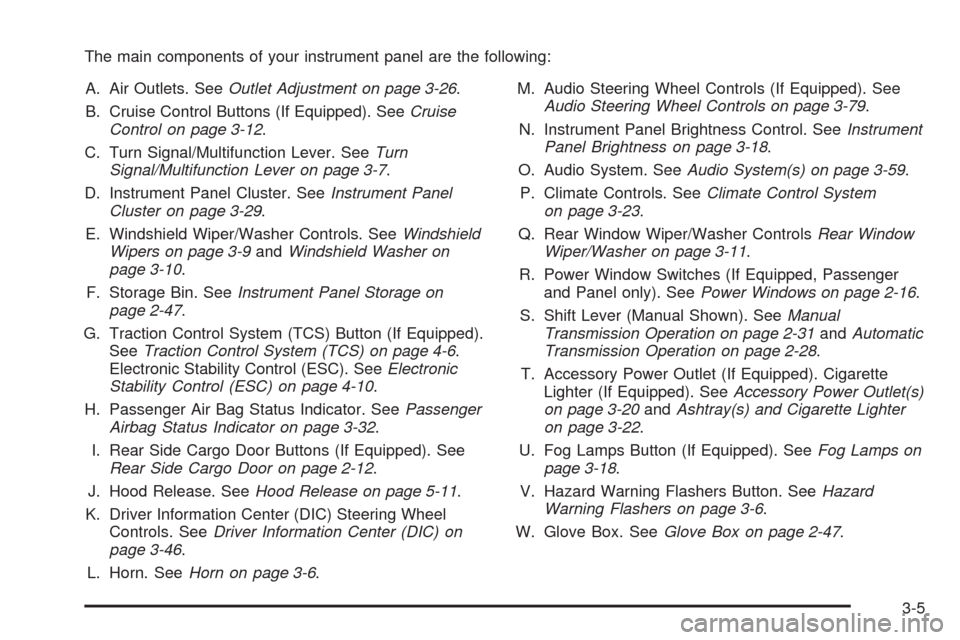
The main components of your instrument panel are the following:
A. Air Outlets. SeeOutlet Adjustment on page 3-26.
B. Cruise Control Buttons (If Equipped). SeeCruise
Control on page 3-12.
C. Turn Signal/Multifunction Lever. SeeTurn
Signal/Multifunction Lever on page 3-7.
D. Instrument Panel Cluster. SeeInstrument Panel
Cluster on page 3-29.
E. Windshield Wiper/Washer Controls. SeeWindshield
Wipers on page 3-9andWindshield Washer on
page 3-10.
F. Storage Bin. SeeInstrument Panel Storage on
page 2-47.
G. Traction Control System (TCS) Button (If Equipped).
SeeTraction Control System (TCS) on page 4-6.
Electronic Stability Control (ESC). SeeElectronic
Stability Control (ESC) on page 4-10.
H. Passenger Air Bag Status Indicator. SeePassenger
Airbag Status Indicator on page 3-32.
I. Rear Side Cargo Door Buttons (If Equipped). See
Rear Side Cargo Door on page 2-12.
J. Hood Release. SeeHood Release on page 5-11.
K. Driver Information Center (DIC) Steering Wheel
Controls. SeeDriver Information Center (DIC) on
page 3-46.
L. Horn. SeeHorn on page 3-6.M. Audio Steering Wheel Controls (If Equipped). See
Audio Steering Wheel Controls on page 3-79.
N. Instrument Panel Brightness Control. SeeInstrument
Panel Brightness on page 3-18.
O. Audio System. SeeAudio System(s) on page 3-59.
P. Climate Controls. SeeClimate Control System
on page 3-23.
Q. Rear Window Wiper/Washer ControlsRear Window
Wiper/Washer on page 3-11.
R. Power Window Switches (If Equipped, Passenger
and Panel only). SeePower Windows on page 2-16.
S. Shift Lever (Manual Shown). SeeManual
Transmission Operation on page 2-31andAutomatic
Transmission Operation on page 2-28.
T. Accessory Power Outlet (If Equipped). Cigarette
Lighter (If Equipped). SeeAccessory Power Outlet(s)
on page 3-20andAshtray(s) and Cigarette Lighter
on page 3-22.
U. Fog Lamps Button (If Equipped). SeeFog Lamps on
page 3-18.
V. Hazard Warning Flashers Button. SeeHazard
Warning Flashers on page 3-6.
W. Glove Box. SeeGlove Box on page 2-47.
3-5
Page 191 of 430
Audio System(s)
Determine which radio your vehicle has and then read
the pages following to familiarize yourself with its
features.
{CAUTION:
This system provides you with far greater
access to audio stations and song listings.
Giving extended attention to entertainment
tasks while driving can cause a crash and you
or others can be injured or killed. Always keep
your eyes on the road and your mind on the
drive — avoid engaging in extended searching
while driving.
Keeping your mind on the drive is important for safe
driving. SeeDefensive Driving on page 4-2. Here
are some ways in which you can help avoid distraction
while driving.
While your vehicle is parked:
Familiarize yourself with all of its controls.
Familiarize yourself with its operation.
Set up your audio system by presetting your
favorite radio stations, setting the tone, and
adjusting the speakers. Then, when driving
conditions permit, you can tune to your favorite
radio stations using the presets and steering wheel
controls if the vehicle has them.
Notice:Before adding any sound equipment to
your vehicle, such as an audio system, CD player,
CB radio, mobile telephone, or two-way radio, make
sure that it can be added by checking with your
dealer/retailer. Also, check federal rules covering
mobile radio and telephone units. If sound
equipment can be added, it is very important to do
it properly. Added sound equipment may interfere
with the operation of your vehicle’s engine, radio, or
other systems, and even damage them. Your
vehicle’s systems may interfere with the operation
of sound equipment that has been added.
Your vehicle has a feature called Retained Accessory
Power (RAP). With RAP, the audio system can be
played even after the ignition is turned off. SeeRetained
Accessory Power (RAP) on page 2-25for more
information.
3-59
Page 200 of 430
Radio Messages
Calibration Error:The audio system has been
calibrated for your vehicle from the factory. If Calibration
Error displays, it means that the radio has not been
congured properly for your vehicle and it must
be returned to your dealer/retailer for service.
Loc or Locked:This message displays when the
THEFTLOCK
®system has locked up the radio. Take
the vehicle to your dealer/retailer for service.
If any error occurs repeatedly or if an error cannot be
corrected, contact your dealer/retailer.
XM™ Satellite Radio Service
XM™ is a satellite radio service that is based in the 48
contiguous United States and 10 Canadian provinces.
XM™ Satellite Radio has a wide variety of programming
and commercial-free music, coast-to-coast, and in
digital-quality sound. During your trial or when you
subscribe, you will get unlimited access to XM™ Radio
Online for when you are not in your vehicle. A service
fee is required to receive the XM™ service. For
more information, contact XM™ at www.xmradio.com or
call 1-800-929-2100 in the U.S. and www.xmradio.ca
or call 1-877-438-9677 in Canada.
Radio Messages for XM Only
SeeXM Radio Messages on page 3-77later in this
section for further detail.
Playing a CD (Single CD Player)
Insert a CD partway into the slot, label side up. The
player pulls it in and the CD should begin playing.
Playing a CD(s) (Six-Disc CD Player)
LOAD^: Press this button to load CDs into the CD
player. This CD player holds up to six CDs.
To insert one CD, do the following:
1. Press and release the
^button.
2. Wait for the message to insert the disc.
3. Load a CD. Insert the CD partway into the slot,
label side up. The player pulls the CD in.
To insert multiple CDs, do the following:
1. Press and hold the
^button for two seconds. A
beep sounds and Load All Discs displays.
2. Follow the displayed instruction on when to insert
the discs. The CD player takes up to six CDs.
3. Press the
^button again to cancel loading
more CDs.
3-68
Page 201 of 430
If the ignition or radio is turned off, with a CD in the
player, it stays in the player. When the ignition or radio
is turned on, the CD starts playing where it stopped,
if it was the last selected audio source.
When a CD is inserted, the CD symbol displays on the
CD. As each new track starts to play, the track
number displays.
The CD player can play the smaller 3 inch (8 cm) single
CDs with an adapter ring. Full-size CDs and the
smaller CDs are loaded in the same manner.
Care of Your CDs
If playing a CD-R, the sound quality can be reduced
due to CD-R quality, the method of recording, the quality
of the music that has been recorded, and the way the
CD-R has been handled. Handle them carefully.
Store CD-R(s) in their original cases or other protective
cases and away from direct sunlight and dust. The
CD player scans the bottom surface of the disc. If the
surface of a CD is damaged, such as cracked, broken,
or scratched, the CD does not play properly or not
at all. Do not touch the bottom side of a CD while
handling it; this could damage the surface. Pick up CDs
by grasping the outer edges or the edge of the hole
and the outer edge.If the surface of a CD is soiled, take a soft, lint free cloth
or dampen a clean, soft cloth in a mild, neutral detergent
solution mixed with water, and clean it. Make sure the
wiping process starts from the center to the edge.
If there is no apparent damage, try a known good CD.
Care of Your CD Player
Do not add any label to a CD, it could get caught in the
CD player. If a CD is recorded on a personal computer
and a description label is needed, try labeling the top of
the recorded CD with a marking pen instead.
The use of CD lens cleaners for CDs is not advised,
due to the risk of contaminating the lens of the CD optics
with lubricants internal to the CD player mechanism.
Notice:If a label is added to a CD, or more than one
CD is inserted into the slot at a time, or an attempt
is made to play scratched or damaged CDs, the
CD player could be damaged. While using the CD
player, use only CDs in good condition without any
label, load one CD at a time, and keep the CD
player and the loading slot free of foreign materials,
liquids, and debris.
If an error displays, see “CD Messages” later in this
section.
3-69
Page 203 of 430
RPT (Repeat):For Radios with CD (Base), one track
can be repeated by using the repeat setting.
To repeat the track you are listening to, press and
release the RPT button. An arrow symbol displays.
Press RPT again to turn off repeat play.
4(Information) (Radio with CD (Base)): Press to switch
the display between the track number, elapsed time
of the track, and the time. When the ignition is off, press
this button to display the time.
BAND:Press to listen to the radio while a CD is
playing. The CD remains inside the radio for future
listening.
CD/AUX (CD/Auxiliary):Press to play a CD while
listening to the radio. The CD icon and a message
showing disc and/or track number displays when a CD
is in the player. Press again and the system
automatically searches for an auxiliary input device,
such as a portable audio player. If a portable audio
player is not connected, “No Aux Input Device” displays.
Playing an MP3 CD-R or CD-RW Disc
Radios with the MP3 feature are capable of playing an
MP3 CD-R or CD-RW disc. For more information on
how to play an MP3 CD-R or CD-RW disc, seeUsing an
MP3 on page 3-72later in this section.
CD Messages
CHECK DISC:If an error message displays and/or the
CD comes out, it could be for one of the following
reasons:
It is very hot. When the temperature returns to
normal, the CD should play.
You are driving on a very rough road. When the
road becomes smoother, the CD should play.
The CD is dirty, scratched, wet, or upside down.
The air is very humid. If so, wait about an hour and
try again.
There could have been a problem while burning
the CD.
The label could be caught in the CD player.
If the CD is not playing correctly, for any other reason,
try a known good CD.
If any error occurs repeatedly or if an error cannot be
corrected, contact your dealer/retailer. If the radio
displays an error message, write it down and provide it
to your dealer/retailer while reporting the problem.
3-71
Page 204 of 430
Using the Auxiliary Input Jack
Your radio system has an auxiliary input jack located on
the lower right side of the faceplate. This is not an
audio output; do not plug the headphone set into the
front auxiliary input jack. You can however, connect an
external audio device such as an iPod, laptop
computer, MP3 player, CD changer, or cassette tape
player, etc. to the auxiliary input jack for use as another
source for audio listening.
Drivers are encouraged to set up any auxiliary device
while the vehicle is in PARK (P). SeeDefensive Driving
on page 4-2for more information on driver distraction.
To use a portable audio player, connect a 3.5 mm
(1/8 inch) cable to the radio’s front auxiliary input jack.
When a device is connected, press the radio CD/AUX
button to begin playing audio from the device over
the vehicle speakers.
O(Power/Volume): Turn clockwise or
counterclockwise to increase or decrease the volume of
the portable player. Additional volume adjustments
might need to be made from the portable device.
BAND:Press to listen to the radio while a portable audio
device is playing. The portable audio device continues to
play, so you might want to stop it or turn it off.CD/AUX (CD/Auxiliary):Press to play a CD while a
portable audio device is playing. Press again and
the system begins to play audio from the connected
portable audio player. If a portable audio player is not
connected, “No Aux Input Device” displays.
Using an MP3
MP3 CD-R or CD-RW Disc
The radio plays MP3 les that were recorded on a CD-R
or CD-RW disc. The les can be recorded with the
following xed bit rates: 32 kbps, 40 kbps, 56 kbps,
64 kbps, 80 kbps, 96 kbps, 112 kbps, 128 kbps,
160 kbps, 192 kbps, 224 kbps, 256 kbps, and 320 kbps or
a variable bit rate. Song title, artist name, and album can
display when recorded using ID3 tags version 1 and 2.
Compressed Audio
The radio also plays discs that contain both
uncompressed CD audio (.CDA les) and MP3 les. By
default the radio reads only the uncompressed audio
and ignores the MP3 les. Pressing the CAT (category)
button toggles between compressed and uncompressed
audio format.
3-72