reset CHEVROLET HHR 2009 1.G Owner's Manual
[x] Cancel search | Manufacturer: CHEVROLET, Model Year: 2009, Model line: HHR, Model: CHEVROLET HHR 2009 1.GPages: 450, PDF Size: 2.49 MB
Page 209 of 450
EQ (Equalization):Press this button to select preset
equalization settings.
To return to the manual mode, press EQ until Manual
displays or start to manually adjust the bass, midrange,
or treble by pressing
f.
Adjusting the Speakers (Balance/Fade)
Depending on which radio the vehicle has, the
Balance/Fade can be adjusted using
for`.
To adjust balance or fade using
f:
1. Press
funtil the speaker control tabs display.
2. Press the softkey under the desired tab, or continue
pressing
fto highlight the desired tab.
3. Turn
fto adjust the highlighted setting.
The highlighted setting can also be adjusted
by pressing either SEEK arrow.
On some radios,
\FWD andsREV can also
be used to adjust the highlighted level.To adjust balance or fade using
`:
1. Press
`until the speaker control labels display.
2. Continue pressing
`until the desired speaker
control label displays.
3. Turn
fto adjust the setting. The setting can also be
adjusted by pressing either SEEK arrow,
\FWD,
or
sREV.
The radio may be capable of adjusting balance or fade to
the middle position by pressing the softkey below the BAL
or FADE tab for more than two seconds. The radio beeps
once and the level adjusts to the middle position.
The radio may also be capable of adjusting all tone and
speaker controls to the middle position by pressing
ffor
more than two seconds until the radio beeps once.
3-69
Page 222 of 450
Channel Unavail:This previously assigned channel is
no longer assigned. Tune to another station. If this
station was one of the presets, choose another station
for that preset button.
No Artist Info:No artist information is available at this
time on this channel. The system is working properly.
No Title Info:No song title information is available
at this time on this channel. The system is working
properly.
No CAT Info:No category information is available at
this time on this channel. The system is working properly.
No Information:No text or informational messages are
available at this time on this channel. The system is
working properly.
CAT Not Found:There are no channels available for
the selected category. The system is working properly.
XM Theftlocked:The XM receiver in the vehicle could
have previously been in another vehicle. For security
purposes, XM receivers cannot be swapped between
vehicles. If this message is received after having the
vehicle serviced, check with your dealer/retailer.XM Radio ID:If tuned to channel 0, this message
alternates with the XM™ Radio 8 digit radio ID label.
This label is needed to activate the service.
Unknown:If this message is received when tuned to
channel 0, there could be a receiver fault. Consult
with your dealer/retailer.
Check XM Receivr:If this message does not clear
within a short period of time, the receiver could have a
fault. Consult with your dealer/retailer.
XM Not Available:If this message does not clear within
a short period of time, the receiver could have a fault.
Consult with your dealer/retailer.
Bluetooth®
Vehicles with a Bluetooth system can use a Bluetooth
capable cell phone with a Hands Free Prole to make and
receive phone calls. The system can be used while the
key is in ON/RUN or ACC/ACCESSORY position. The
range of the Bluetooth system can be up to 30 ft. (9.1 m).
Not all phones support all functions, and not all phones
are guaranteed to work with the in-vehicle Bluetooth
system. See gm.com/bluetooth for more information on
compatible phones.
3-82
Page 234 of 450
Theft-Deterrent Feature
THEFTLOCK®is designed to discourage theft of the
vehicle’s radio by learning a portion of the Vehicle
Identication Number (VIN). The radio does not operate
if it is stolen or moved to a different vehicle.
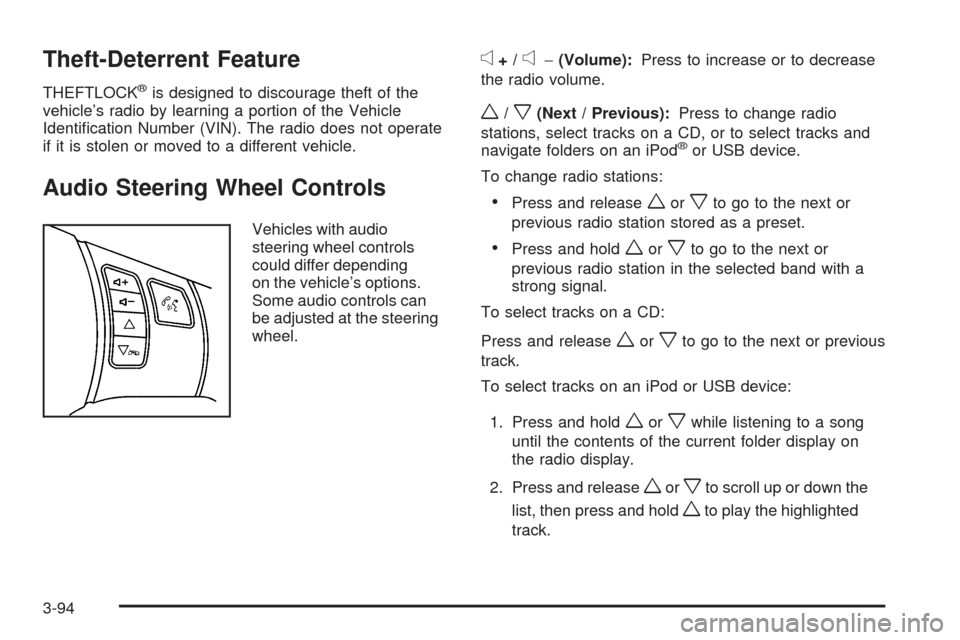
Audio Steering Wheel Controls
Vehicles with audio
steering wheel controls
could differ depending
on the vehicle’s options.
Some audio controls can
be adjusted at the steering
wheel.
e+/e−(Volume):Press to increase or to decrease
the radio volume.
w/x(Next / Previous):Press to change radio
stations, select tracks on a CD, or to select tracks and
navigate folders on an iPod
®or USB device.
To change radio stations:
Press and releaseworxto go to the next or
previous radio station stored as a preset.
Press and holdworxto go to the next or
previous radio station in the selected band with a
strong signal.
To select tracks on a CD:
Press and release
worxto go to the next or previous
track.
To select tracks on an iPod or USB device:
1. Press and hold
worxwhile listening to a song
until the contents of the current folder display on
the radio display.
2. Press and release
worxto scroll up or down the
list, then press and hold
wto play the highlighted
track.
3-94
Page 299 of 450
Cold Temperature Operation
For Vehicles With the 2.2L or
2.4L L4 Engine
If in an area of extreme cold, where the temperature
falls below−20°F (−29°C), use either an SAE 5W-30
synthetic oil or an SAE 0W-30 engine oil. Both provide
easier cold starting for the engine at extremely low
temperatures. Always use an oil that meets the required
specication, GM6094M. See “What Kind of Engine
Oil to Use” for more information.
Engine Oil Additives/Engine Oil Flushes
Do not add anything to the oil. The recommended oils
with the starburst symbol that meet GM standards are
all that is needed for good performance and engine
protection.
Engine oil system ushes are not recommended and
could cause engine damage not covered by the vehicle
warranty.
Engine Oil Life System
When to Change Engine Oil
This vehicle has the Engine Oil Life System, a computer
system that indicates when to change the engine oil and
lter. This is based on engine revolutions and engine
temperature, and not on mileage. Based on driving
conditions, the mileage at which an oil change is
indicated can vary considerably. For the oil life system
to work properly, the system must be reset every time
the oil is changed.
When the system has calculated that oil life has been
diminished, it indicates that an oil change is necessary.
A CHANGE OIL SOON message comes on. SeeDIC
Warnings and Messages on page 3-50. Change the oil
as soon as possible within the next 600 miles (1 000 km).
It is possible that, if driving under the best conditions, the
oil life system might not indicate that an oil change is
necessary for over a year. However, the engine oil and
lter must be changed at least once a year and at this
time the system must be reset. Your dealer/retailer has
trained service people who will perform this work using
genuine parts and reset the system. It is also important to
check the oil regularly and keep it at the proper level.
If the system is ever reset accidentally, the oil must be
changed at 3,000 miles (5 000 km) since the last oil
change. Remember to reset the oil life system whenever
the oil is changed.
5-21
Page 300 of 450
How to Reset the Engine Oil Life
System
The Engine Oil Life System calculates when to change
your engine oil and lter based on vehicle use. Whenever
the oil is changed, reset the system so it can calculate
when the next oil change is required. If a situation occurs
where the oil is changed prior to a CHANGE OIL SOON
message being turned on, reset the system.
After changing the engine oil, the system must be reset:
1. Turn the ignition to ON/RUN, with the engine off.
2. Press the information and reset buttons on the
Driver Information Center (DIC) at the same
time to enter the personalization menu. SeeDIC
Vehicle Personalization on page 3-56.
3. Press the information button to scroll through the
available personalization menu modes until the
DIC display shows OIL-LIFE RESET.
4. Press and hold the reset button until the DIC display
shows ACKNOWLEDGED. This will tell you the
system has been reset.
5. Turn the key to LOCK/OFF.For vehicles with the 2.2L (VIN code V) or 2.4L (VIN
code B) engines, you can also reset the system
as follows:
1. Turn the ignition key to ON/RUN with the engine off.
2. Fully press and release the accelerator pedal slowly
three times within ve seconds.
3. Turn the key to LOCK/OFF, then start the engine.
If the CHANGE OIL SOON message comes back
on when the vehicle is started, the engine oil life system
has not reset. Repeat the reset procedure.
What to Do with Used Oil
Used engine oil contains certain elements that can be
unhealthy for your skin and could even cause cancer.
Do not let used oil stay on your skin for very long. Clean
your skin and nails with soap and water, or a good
hand cleaner. Wash or properly dispose of clothing or
rags containing used engine oil. See the manufacturer’s
warnings about the use and disposal of oil products.
5-22
Page 322 of 450
Headlamp Aiming
The vehicle has a visual optical headlamp aiming
system. The aim has been preset at the factory and
should need no further adjustment.
However, if the vehicle is damaged in a crash, the
headlamp aim may be affected and adjustment may be
necessary.
If oncoming vehicles ash their high beams at you, this
may also mean the vertical aim needs to be adjusted.
It is recommended that the vehicle is taken to your
dealer/retailer for service if the headlamps need to
be re-aimed. It is possible however, to re-aim the
headlamps as described.
The vehicle should:
Be placed so the headlamps are 25 ft. (7.6 m) from
a light colored wall.
Have all four tires on a level surface which is level
all the way to the wall.
Be placed so it is perpendicular to the wall or other
at surface.
Not have any snow, ice, or mud on it.
Be fully assembled and all other work stopped while
headlamp aiming is being performed.
Normally loaded with a full tank of fuel and one
person or 160 lbs (75 kg) sitting on the driver seat.
Have all tires properly inated.
Have the spare tire is in its original location in the
vehicle.
Headlamp aiming is done with the vehicle’s low-beam
headlamps. The high-beam headlamps will be correctly
aimed if the low-beam headlamps are aimed properly.
5-44
Page 346 of 450
Any time you notice unusual wear, rotate the tires
as soon as possible and check wheel alignment.
Also check for damaged tires or wheels.
SeeWhen It Is Time for New Tires on page 5-69
andWheel Replacement on page 5-73.
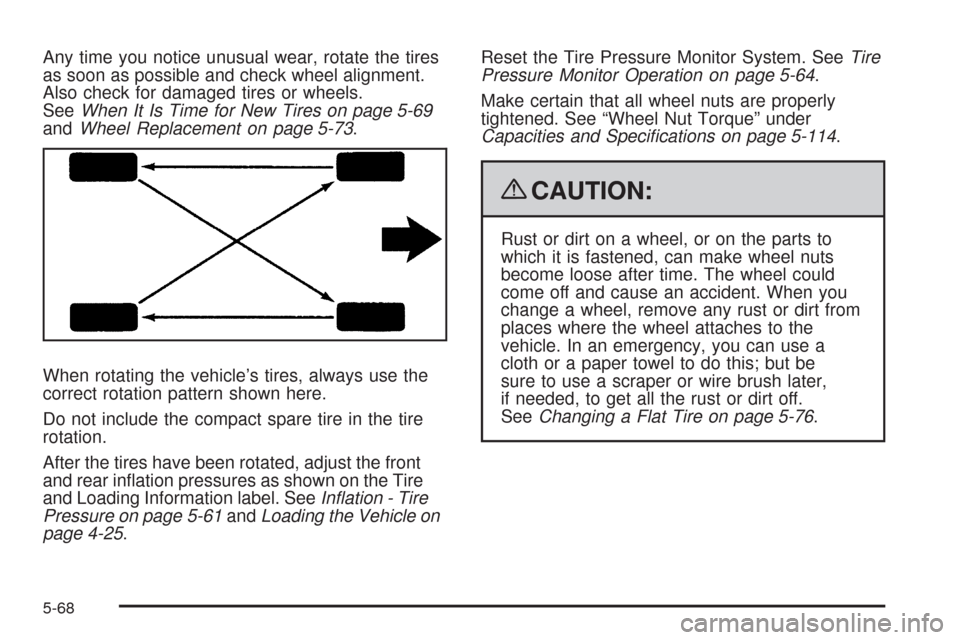
When rotating the vehicle’s tires, always use the
correct rotation pattern shown here.
Do not include the compact spare tire in the tire
rotation.
After the tires have been rotated, adjust the front
and rear ination pressures as shown on the Tire
and Loading Information label. SeeInflation - Tire
Pressure on page 5-61andLoading the Vehicle on
page 4-25.Reset the Tire Pressure Monitor System. SeeTire
Pressure Monitor Operation on page 5-64.
Make certain that all wheel nuts are properly
tightened. See “Wheel Nut Torque” under
Capacities and Specifications on page 5-114.
{CAUTION:
Rust or dirt on a wheel, or on the parts to
which it is fastened, can make wheel nuts
become loose after time. The wheel could
come off and cause an accident. When you
change a wheel, remove any rust or dirt from
places where the wheel attaches to the
vehicle. In an emergency, you can use a
cloth or a paper towel to do this; but be
sure to use a scraper or wire brush later,
if needed, to get all the rust or dirt off.
SeeChanging a Flat Tire on page 5-76.
5-68
Page 398 of 450
Scheduled Maintenance
When the CHANGE OIL SOON message displays,
service is required for the vehicle. Have the vehicle
serviced as soon as possible within the next 600 miles
(1 000 km). It is possible that, if driving under the best
conditions, the engine oil life system may not indicate that
vehicle service is necessary for over a year. However, the
engine oil and lter must be changed at least once a year
and at this time the system must be reset. Your dealer/
retailer has trained service technicians who will perform
this work using genuine parts and reset the system.
If the engine oil life system is ever reset accidentally,
service the vehicle within 3,000 miles (5 000 km) since
the last service. Remember to reset the oil life system
whenever the oil is changed. SeeEngine Oil Life System
on page 5-21for information on the Engine Oil Life
System and resetting the system.When the CHANGE OIL SOON message appears,
certain services, checks, and inspections are required.
Required services are described in the following for
“MaintenanceI” and “MaintenanceII.” Generally, it is
recommended that the rst service be MaintenanceI, the
second service be MaintenanceII, and then alternate
MaintenanceIand MaintenanceIIthereafter. However,
in some cases, MaintenanceIImay be required more
often.
MaintenanceI— Use MaintenanceIif the CHANGE
OIL SOON message displays within 10 months since the
vehicle was purchased or MaintenanceIIwas performed.
MaintenanceII— Use MaintenanceIIif the previous
service performed was MaintenanceI. Always use
MaintenanceIIwhenever the CHANGE OIL SOON
message displays 10 months or more since the last
service or if the message has not come on at all for
one year.
6-4
Page 399 of 450
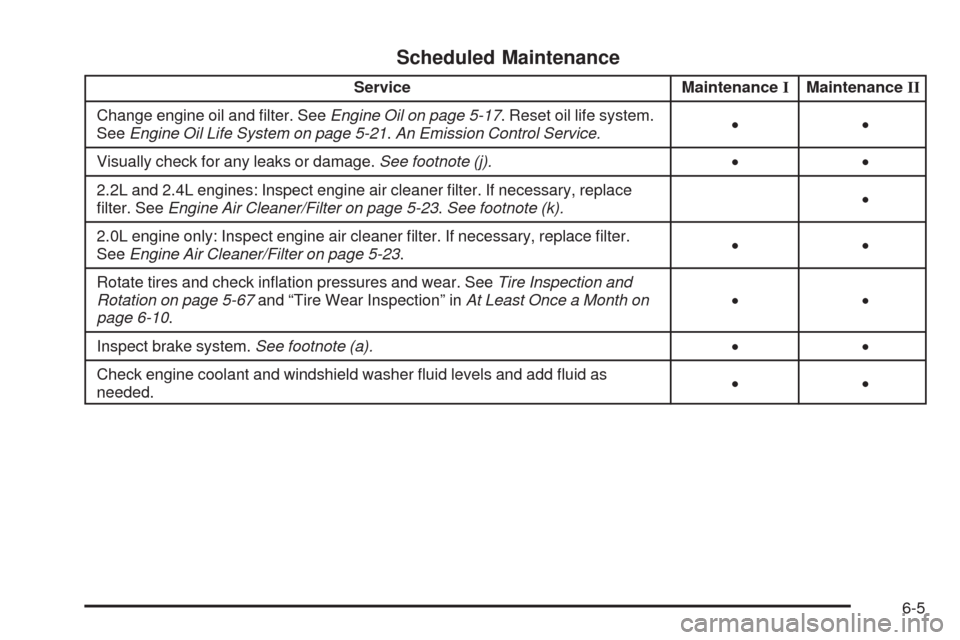
Scheduled Maintenance
Service MaintenanceIMaintenanceII
Change engine oil and lter. SeeEngine Oil on page 5-17. Reset oil life system.
SeeEngine Oil Life System on page 5-21.An Emission Control Service.••
Visually check for any leaks or damage.See footnote (j).••
2.2L and 2.4L engines: Inspect engine air cleaner lter. If necessary, replace
lter. SeeEngine Air Cleaner/Filter on page 5-23.See footnote (k).•
2.0L engine only: Inspect engine air cleaner lter. If necessary, replace lter.
SeeEngine Air Cleaner/Filter on page 5-23.••
Rotate tires and check ination pressures and wear. SeeTire Inspection and
Rotation on page 5-67and “Tire Wear Inspection” inAt Least Once a Month on
page 6-10.••
Inspect brake system.See footnote (a).••
Check engine coolant and windshield washer uid levels and add uid as
needed.••
6-5