sunroof CHEVROLET HHR 2009 1.G Owners Manual
[x] Cancel search | Manufacturer: CHEVROLET, Model Year: 2009, Model line: HHR, Model: CHEVROLET HHR 2009 1.GPages: 450, PDF Size: 2.49 MB
Page 1 of 450
Seats and Restraint System............................. 1-1
Front Seats
............................................... 1-2
Rear Seats
..............................................1-10
Safety Belts
.............................................1-13
Child Restraints
.......................................1-32
Airbag System
.........................................1-58
Restraint System Check
............................1-79
Features and Controls..................................... 2-1
Keys
........................................................ 2-3
Doors and Locks
....................................... 2-9
Windows
.................................................2-16
Theft-Deterrent Systems
............................2-18
Starting and Operating Your Vehicle
...........2-22
Mirrors
....................................................2-39
Object Detection Systems
..........................2-44
OnStar
®System
......................................2-47
Storage Areas
.........................................2-51
Sunroof
..................................................2-56
Instrument Panel............................................. 3-1
Instrument Panel Overview
.......................... 3-4
Climate Controls
......................................3-21
Warning Lights, Gages, and Indicators
........3-26
Driver Information Center (DIC)
..................3-48
Audio System(s)
.......................................3-61Driving Your Vehicle....................................... 4-1
Your Driving, the Road, and the Vehicle
....... 4-2
Towing
...................................................4-31
Service and Appearance Care.......................... 5-1
Service
..................................................... 5-3
Fuel
......................................................... 5-5
Checking Things Under the Hood
...............5-12
Headlamp Aiming
.....................................5-44
Bulb Replacement
....................................5-47
Windshield Wiper Blade Replacement
.........5-52
Tires
......................................................5-53
Appearance Care
.....................................5-99
Vehicle Identication
...............................5-107
Electrical System
....................................5-108
Capacities and Specications
...................5-114
Maintenance Schedule..................................... 6-1
Maintenance Schedule
................................ 6-2
Customer Assistance Information.................... 7-1
Customer Assistance and Information
........... 7-2
Reporting Safety Defects
...........................7-16
Vehicle Data Recording and Privacy
...........7-18
Index................................................................ 1
2009 Chevrolet HHR Owner ManualM
Page 86 of 450
Mirrors...........................................................2-39
Manual Rearview Mirror.................................2-39
Automatic Dimming Rearview Mirror................2-39
Compass.....................................................2-39
Outside Power Mirrors...................................2-41
Blind Spot Mirrors.........................................2-41
Outside Convex Mirror...................................2-43
Object Detection Systems...............................2-44
Rear Vision Camera (RVC)............................2-44
OnStar
®System.............................................2-47Storage Areas................................................2-51
Glove Box...................................................2-51
Cupholders..................................................2-51
Instrument Panel Storage...............................2-51
Floor Console Storage Area...........................2-51
Rear Storage Area........................................2-51
Rear Compartment Storage Panel/Cover..........2-52
Roof Rack System........................................2-54
Convenience Net..........................................2-54
Hideaway Rear Storage Bins..........................2-55
Sunroof.........................................................2-56
Section 2 Features and Controls
2-2
Page 109 of 450
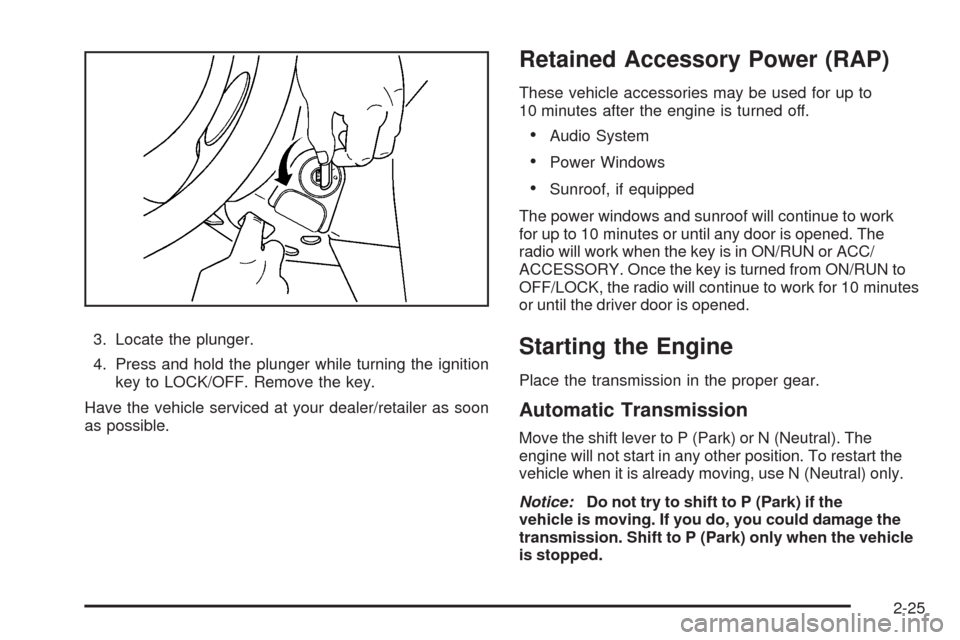
3. Locate the plunger.
4. Press and hold the plunger while turning the ignition
key to LOCK/OFF. Remove the key.
Have the vehicle serviced at your dealer/retailer as soon
as possible.
Retained Accessory Power (RAP)
These vehicle accessories may be used for up to
10 minutes after the engine is turned off.
Audio System
Power Windows
Sunroof, if equipped
The power windows and sunroof will continue to work
for up to 10 minutes or until any door is opened. The
radio will work when the key is in ON/RUN or ACC/
ACCESSORY. Once the key is turned from ON/RUN to
OFF/LOCK, the radio will continue to work for 10 minutes
or until the driver door is opened.
Starting the Engine
Place the transmission in the proper gear.
Automatic Transmission
Move the shift lever to P (Park) or N (Neutral). The
engine will not start in any other position. To restart the
vehicle when it is already moving, use N (Neutral) only.
Notice:Do not try to shift to P (Park) if the
vehicle is moving. If you do, you could damage the
transmission. Shift to P (Park) only when the vehicle
is stopped.
2-25
Page 140 of 450
Sunroof
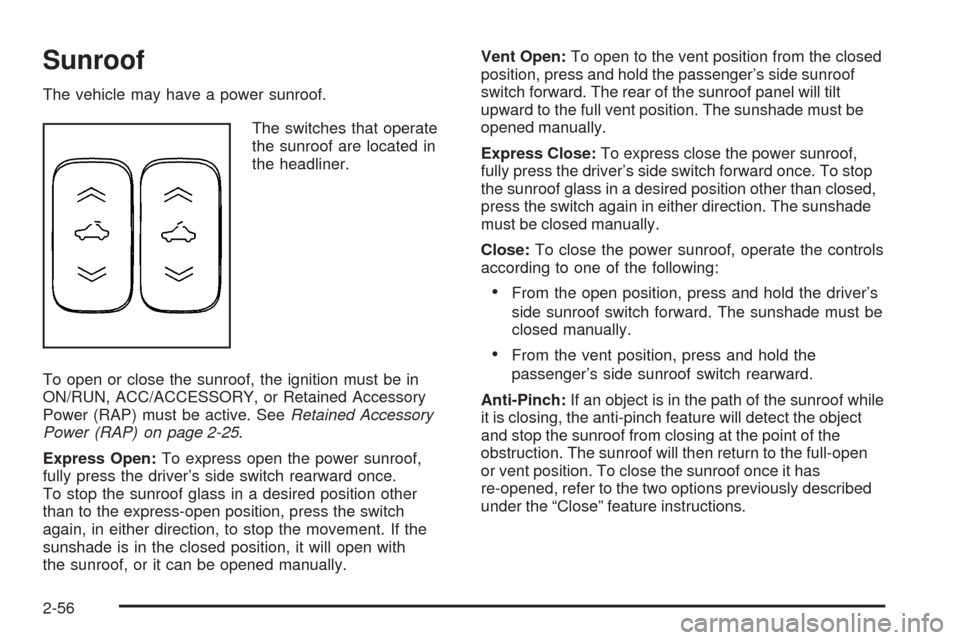
The vehicle may have a power sunroof.
The switches that operate
the sunroof are located in
the headliner.
To open or close the sunroof, the ignition must be in
ON/RUN, ACC/ACCESSORY, or Retained Accessory
Power (RAP) must be active. SeeRetained Accessory
Power (RAP) on page 2-25.
Express Open:To express open the power sunroof,
fully press the driver’s side switch rearward once.
To stop the sunroof glass in a desired position other
than to the express-open position, press the switch
again, in either direction, to stop the movement. If the
sunshade is in the closed position, it will open with
the sunroof, or it can be opened manually.Vent Open:To open to the vent position from the closed
position, press and hold the passenger’s side sunroof
switch forward. The rear of the sunroof panel will tilt
upward to the full vent position. The sunshade must be
opened manually.
Express Close:To express close the power sunroof,
fully press the driver’s side switch forward once. To stop
the sunroof glass in a desired position other than closed,
press the switch again in either direction. The sunshade
must be closed manually.
Close:To close the power sunroof, operate the controls
according to one of the following:
From the open position, press and hold the driver’s
side sunroof switch forward. The sunshade must be
closed manually.
From the vent position, press and hold the
passenger’s side sunroof switch rearward.
Anti-Pinch:If an object is in the path of the sunroof while
it is closing, the anti-pinch feature will detect the object
and stop the sunroof from closing at the point of the
obstruction. The sunroof will then return to the full-open
or vent position. To close the sunroof once it has
re-opened, refer to the two options previously described
under the “Close” feature instructions.
2-56
Page 236 of 450
XM™ Satellite Radio Service
XM Satellite Radio Service gives digital radio reception
from coast-to-coast in the 48 contiguous United States,
and in Canada. Just as with FM, tall buildings or hills can
interfere with satellite radio signals, causing the sound to
fade in and out. In addition, traveling or standing under
heavy foliage, bridges, garages, or tunnels may cause
loss of the XM signal for a period of time.
Cellular Phone Usage
Cellular phone usage may cause interference with the
vehicle’s radio. This interference may occur when making
or receiving phone calls, charging the phone’s battery,
or simply having the phone on. This interference causes
an increased level of static while listening to the radio.
If static is received while listening to the radio, unplug
the cellular phone and turn it off.
Fixed Mast Antenna
The xed mast antenna can withstand most car washes
without being damaged as long as it is securely attached
to the base. If the mast becomes slightly bent, straighten
it out by hand. If the mast is badly bent, replace it.Occasionally check to make sure the antenna is
tightened to its base. If tightening is required, tighten by
hand until fully seated plus one quarter turn.
XM™ Satellite Radio Antenna
System
The XM Satellite Radio antenna is located on the roof of
the vehicle. Keep the antenna clear of obstructions for
clear radio reception.
If the vehicle has a sunroof, the performance of the XM
system may be affected if the sunroof is open.
Chime Level Adjustment
The radio may be used to adjust the vehicle’s chime
level. If the radio can be used to change the volume
level of the chime, press and hold the sixth numbered
pushbutton or the sixth FAV pushbutton with the ignition
on and the radio power off. The volume level changes
between Normal and Loud. The selected volume
level appears on the radio display.
Removing the radio and not replacing it with a factory
radio or chime module will disable vehicle chimes.
3-96
Page 388 of 450
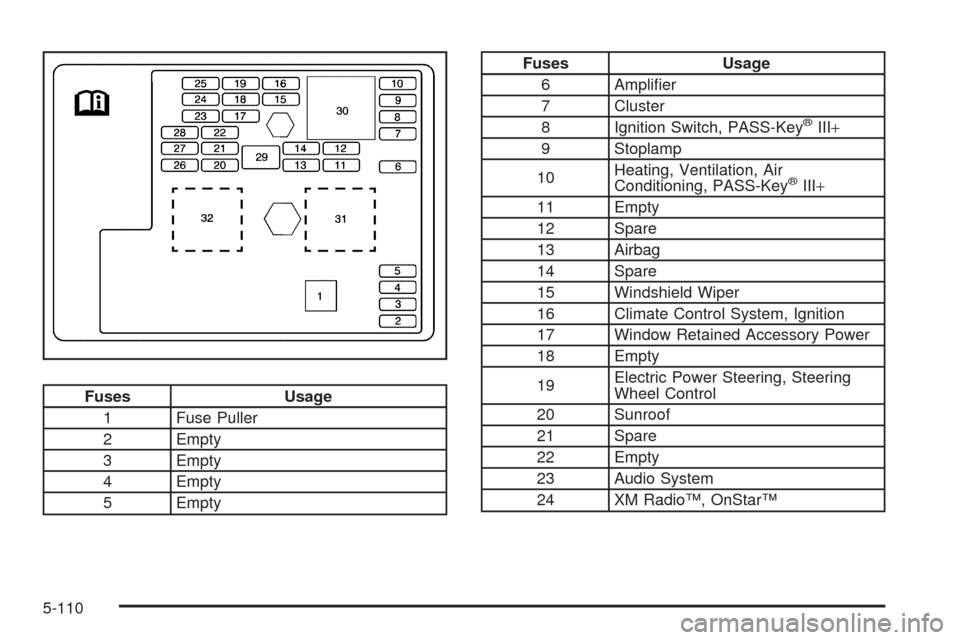
Fuses Usage
1 Fuse Puller
2 Empty
3 Empty
4 Empty
5 Empty
Fuses Usage
6 Amplier
7 Cluster
8 Ignition Switch, PASS-Key
®III+
9 Stoplamp
10Heating, Ventilation, Air
Conditioning, PASS-Key
®III+
11 Empty
12 Spare
13 Airbag
14 Spare
15 Windshield Wiper
16 Climate Control System, Ignition
17 Window Retained Accessory Power
18 Empty
19Electric Power Steering, Steering
Wheel Control
20 Sunroof
21 Spare
22 Empty
23 Audio System
24 XM Radio™, OnStar™
5-110
Page 390 of 450
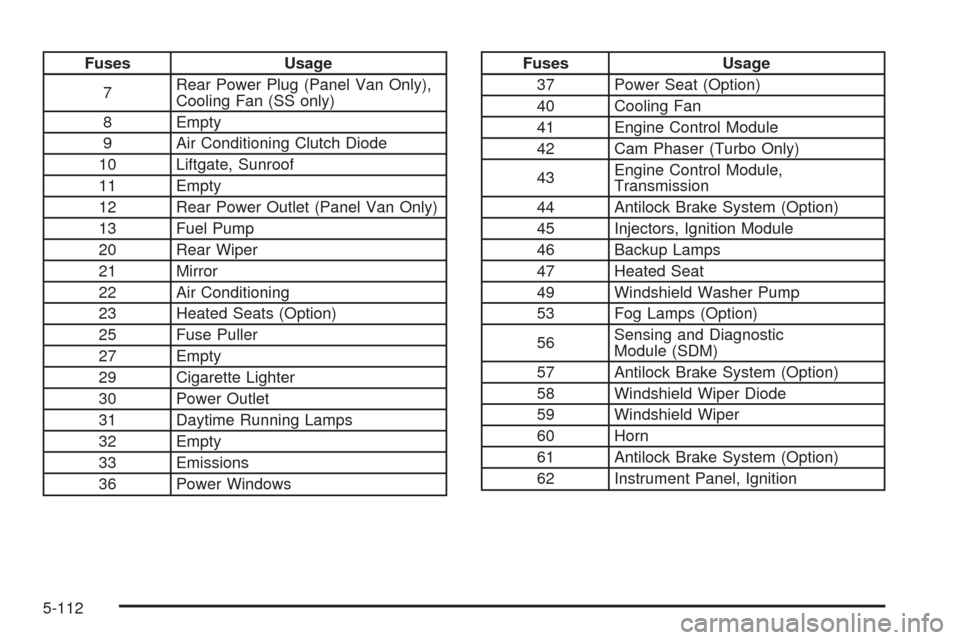
Fuses Usage
7Rear Power Plug (Panel Van Only),
Cooling Fan (SS only)
8 Empty
9 Air Conditioning Clutch Diode
10 Liftgate, Sunroof
11 Empty
12 Rear Power Outlet (Panel Van Only)
13 Fuel Pump
20 Rear Wiper
21 Mirror
22 Air Conditioning
23 Heated Seats (Option)
25 Fuse Puller
27 Empty
29 Cigarette Lighter
30 Power Outlet
31 Daytime Running Lamps
32 Empty
33 Emissions
36 Power WindowsFuses Usage
37 Power Seat (Option)
40 Cooling Fan
41 Engine Control Module
42 Cam Phaser (Turbo Only)
43Engine Control Module,
Transmission
44 Antilock Brake System (Option)
45 Injectors, Ignition Module
46 Backup Lamps
47 Heated Seat
49 Windshield Washer Pump
53 Fog Lamps (Option)
56Sensing and Diagnostic
Module (SDM)
57 Antilock Brake System (Option)
58 Windshield Wiper Diode
59 Windshield Wiper
60 Horn
61 Antilock Brake System (Option)
62 Instrument Panel, Ignition
5-112
Page 446 of 450
Recongurable Performance Display (RPD)........3-43
Recreational Vehicle Towing.............................4-31
Reimbursement Program, GM Mobility................. 7-7
Remote Keyless Entry (RKE) System.................. 2-4
Remote Keyless Entry (RKE) System, Operation . . . 2-4
Remote Vehicle Start........................................ 2-7
Removing the Flat Tire and Installing
the Spare Tire.....................................5-80, 5-85
Removing the Spare Tire and Tools...................5-77
Replacement Bulbs.........................................5-51
Replacement Parts, Maintenance......................6-16
Reporting Safety Defects
Canadian Government..................................7-16
General Motors...........................................7-16
United States Government............................7-16
Restraint System Check
Checking the Restraint Systems....................1-79
Replacing Restraint System Parts
After a Crash..........................................1-80
Retained Accessory Power (RAP)......................2-25
Ride Control Systems....................................... 4-7
Electronic Stability (ESC)................................ 4-7
Enhanced Traction System (ETS)...................4-13
Roadside Assistance Program............................ 7-7
Rocking Your Vehicle to Get it Out....................4-25
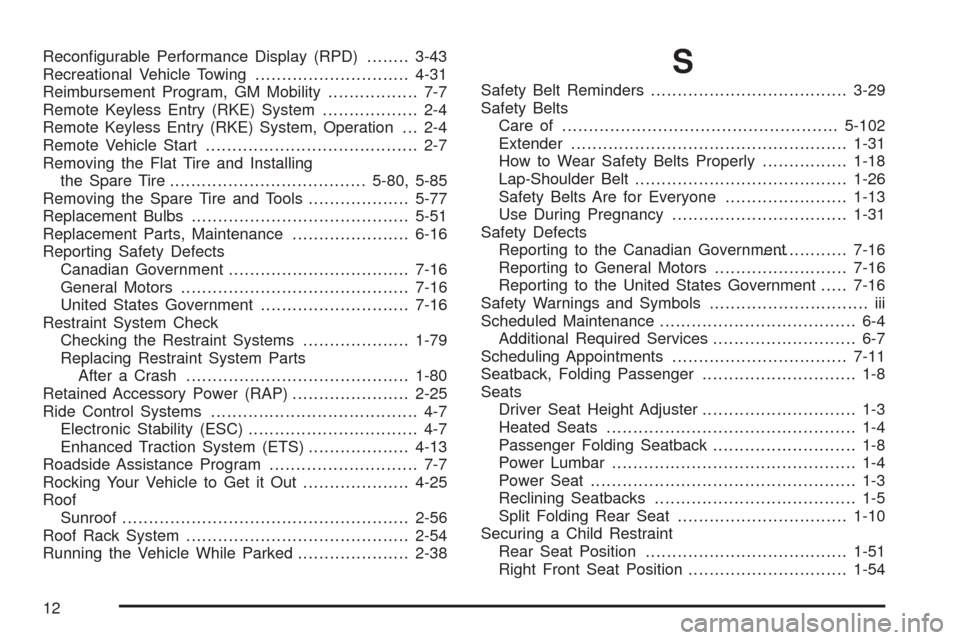
Roof
Sunroof......................................................2-56
Roof Rack System..........................................2-54
Running the Vehicle While Parked.....................2-38S
Safety Belt Reminders.....................................3-29
Safety Belts
Care of ....................................................5-102
Extender....................................................1-31
How to Wear Safety Belts Properly................1-18
Lap-Shoulder Belt........................................1-26
Safety Belts Are for Everyone.......................1-13
Use During Pregnancy.................................1-31
Safety Defects
Reporting to the Canadian Government................7-16
Reporting to General Motors.........................7-16
Reporting to the United States Government.....7-16
Safety Warnings and Symbols.............................. iii
Scheduled Maintenance..................................... 6-4
Additional Required Services........................... 6-7
Scheduling Appointments.................................7-11
Seatback, Folding Passenger............................. 1-8
Seats
Driver Seat Height Adjuster............................. 1-3
Heated Seats............................................... 1-4
Passenger Folding Seatback........................... 1-8
Power Lumbar .............................................. 1-4
Power Seat.................................................. 1-3
Reclining Seatbacks...................................... 1-5
Split Folding Rear Seat................................1-10
Securing a Child Restraint
Rear Seat Position......................................1-51
Right Front Seat Position..............................1-54
12
Page 447 of 450
Security Light.................................................3-41
Service........................................................... 5-3
Accessories and Modications......................... 5-3
Adding Equipment to the Outside of the
Vehicle..................................................... 5-5
Doing Your Own Work................................... 5-4
Engine Soon Lamp......................................3-37
Publications Ordering Information...................7-17
Scheduling Appointments..............................7-11
Service Parts Identication Label.....................5-107
Servicing Your Airbag-Equipped Vehicle..............1-77
Setting the Clock............................................3-62
Sheet Metal Damage.....................................5-106
Shifting
Out of Park................................................2-35
Shifting Into Park............................................2-34
Signals, Turn and Lane-Change.......................... 3-7
Spare Tire
Compact....................................................5-98
Installing............................................5-80, 5-85
Removing...................................................5-77
Storing.......................................................5-94
Specications and Capacities..........................5-114
Speedometer..................................................3-28
Split Folding Rear Seat....................................1-10
Start Vehicle, Remote....................................... 2-7
Starting the Engine.........................................2-25
Steering........................................................4-14
Steering Wheel Controls, Audio.........................3-94Steering Wheel, Tilt Wheel................................. 3-6
Storage Areas
Convenience Net.........................................2-54
Cupholders.................................................2-51
Floor Console Storage Area..........................2-51
Glove Box..................................................2-51
Hideaway Rear Storage Bins.........................2-55
Instrument Panel.........................................2-51
Rear Compartment Storage Panel/Cover.........2-52
Roof Rack System.......................................
2-54
Stuck in Sand, Mud, Ice, or Snow.....................4-24
Sun Visors.....................................................2-18
Sunroof.........................................................2-56
T
Tachometer....................................................3-28
Taillamps
Turn Signal, Stoplamps and Back-up Lamps....5-50
Text Telephone (TTY) Users............................... 7-6
Theft-Deterrent Feature....................................3-94
Theft-Deterrent Systems...................................2-18
Content Theft-Deterrent................................2-19
PASS-Key
®III+ Electronic Immobilizer............2-20
PASS-Key®III+ Electronic Immobilizer
Operation................................................2-21
Tilt Wheel........................................................ 3-6
Time, Setting..................................................3-62
13