automatic transmission CHEVROLET HHR 2010 1.G User Guide
[x] Cancel search | Manufacturer: CHEVROLET, Model Year: 2010, Model line: HHR, Model: CHEVROLET HHR 2010 1.GPages: 480, PDF Size: 5.25 MB
Page 142 of 480
D (Drive):This position is for normal driving with the
automatic transmission. It provides the best fuel
economy. If you need more power for passing and
you are:
.Going less than about 35 mph (55 km/h), push
the accelerator pedal about halfway down.
.Going about 35 mph (55 km/h), push the
accelerator all the way down.
Downshifting the transmission in slippery road
conditions could result in skidding, see “Skidding”
under Loss of Control on page 5‑15.
I (Intermediate): This position is also used for normal
driving. However, it reduces vehicle speed without using
the brakes for slight downgrades where the vehicle
would otherwise accelerate due to steepness of grade.
If constant upshifting or downshifting occurs while
driving up steep hills, this position can be used to
prevent repetitive types of shifts. You might choose
I (Intermediate) instead of D (Drive) when driving on
hilly, winding roads and when towing a trailer, so that
there is less shifting between gears. PERFORMANCE SHIFTING:
If the vehicle has this
feature, it can detect a change in driving patterns
while in the Intermediate position. If you make an
aggressive driving maneuver, the vehicle's transmission
automatically shifts to the lowest possible gear to
maximize vehicle performance. The vehicle will
automatically return to normal operation when you
return to normal driving patterns.
L (Low): This position reduces vehicle speed more than
I (Intermediate) without actually using the brakes. You
can use it on very steep hills, or in deep snow or mud.
If the shift lever is put in L (Low), the transmission will
not shift into L (Low) until the vehicle is going slowly
enough.
Notice: Spinning the tires or holding the vehicle in
one place on a hill using only the accelerator pedal
may damage the transmission. The repair will not be
covered by the vehicle warranty. If you are stuck, do
not spin the tires. When stopping on a hill, use the
brakes to hold the vehicle in place.
3-30
Page 148 of 480
Shifting Into Park
(Automatic Transmission)
{WARNING:
It can be dangerous to get out of the vehicle if the
shift lever is not fully in P (Park) with the parking
brake firmly set. The vehicle can roll. If you have
left the engine running, the vehicle can move
suddenly. You or others could be injured. To be
sure the vehicle will not move, even when you are
on fairly level ground, use the steps that follow.
If you are pulling a trailer, seeTowing a Trailer
(Automatic Transmission)
on page 5‑32or
Towing a Trailer (Manual Transmission)
on
page 5‑40
.
To shift into P (Park): 1. Hold the brake pedal down and set the parking brake. See Parking Brake
on page 3‑34for more
information.
2. Move the shift lever into P (Park) by holding in the button on the shift lever and pushing the lever all
the way toward the front of the vehicle.
3. Turn the ignition key to LOCK/OFF.
Leaving the Vehicle With the Engine
Running (Automatic Transmission)
{WARNING:
It can be dangerous to leave the vehicle with the
engine running. The vehicle could move suddenly
if the shift lever is not fully in P (Park) with the
parking brake firmly set. And, if you leave the
vehicle with the engine running, it could overheat
and even catch fire. You or others could be
injured. Do not leave the vehicle with the engine
running.
If you have to leave an automatic transmission vehicle
with the engine running, be sure the vehicle is in
P (Park) and the parking brake is firmly set before
you leave it. After you have moved the shift lever into
P (Park), hold the brake pedal down. Then, see if you
can move the shift lever away from P (Park) without first
pushing the button. If you can, it means that the shift
lever was not fully locked into P (Park).
3-36
Page 149 of 480
Torque Lock (Automatic Transmission)
If you are parking on a hill and you do not shift into
P (Park) properly, the weight of the vehicle may put too
much force on the parking pawl in the transmission. You
may find it difficult to pull the shift lever out of P (Park).
This is called“torque lock.” To prevent torque lock, set
the parking brake and then shift into P (Park) properly
before you leave the driver seat. To find out how, see
Shifting Into Park (Automatic Transmission)
on
page 3‑36.
Move the shift lever out of P (Park) before you release
the parking brake.
If torque lock does occur, you may need to have
another vehicle push yours a little uphill to take
some of the pressure from the parking pawl in the
transmission, so you can pull the shift lever out of
P (Park).
Shifting Out of Park
(Automatic Transmission)
This vehicle is equipped with an electronic shift lock
release system. The shift lock release is designed to:
.Prevent ignition key removal unless the shift lever
is in P (Park) with the shift lever button fully
released, and
.Prevent movement of the shift lever out of
P (Park) unless the ignition is in ON/RUN or
ACC/ACCESSORY and the regular brake pedal
is applied.
The shift lock release is always functional except in the
case of a an uncharged or low voltage (less than 9 volt)
battery.
3-37
Page 152 of 480
Running the Vehicle While Parked
It is better not to park with the engine running. But if you
ever have to, here are some things to know.
{WARNING:
Idling a vehicle in an enclosed area with poor
ventilation is dangerous. Engine exhaust may
enter the vehicle. Engine exhaust contains
Carbon Monoxide (CO) which cannot be seen or
smelled. It can cause unconsciousness and even
death. Never run the engine in an enclosed area
that has no fresh air ventilation. For more
information, seeEngine Exhaust on page 3‑39.
{WARNING:
It can be dangerous to get out of the vehicle if the
automatic transmission shift lever is not fully in
P (Park) with the parking brake firmly set. The
vehicle can roll. Do not leave the vehicle when the
engine is running unless you have to. If you have
left the engine running, the vehicle can move
suddenly. You or others could be injured. To be
sure the vehicle will not move, even when you are
on fairly level ground, always set the parking
brake and move the shift lever to P (Park).
Follow the proper steps to be sure the vehicle will not
move. See Shifting Into Park (Automatic Transmission)
on page 3‑36.
If parking on a hill and pulling a trailer, see Towing a
Trailer (Automatic Transmission)
on page 5‑32or
Towing a Trailer (Manual Transmission) on page 5‑40.
3-40
Page 159 of 480
The rear vision camera system display in the rearview
mirror may turn off or not appear as expected due to
one of the following conditions. If this occurs the left
indicator light on the mirror will flash.
.A slow flash may indicate a loss of video signal,
or no video signal present during the reverse cycle.
.A fast flash may indicate that the display has
been on for the maximum allowable time during
a reverse cycle, or the display has reached an
Over Temperature limit.
The fast flash conditions are used to protect the
video device from high temperature conditions.
Once conditions return to normal the device will
reset and the green indicator will stop flashing.
During any of these fault conditions, the display will be
blank and the indicator will continue to flash as long as
the vehicle is in R (Reverse) or until the conditions
return to normal.
Pressing and holding
zwhen the left indicator light is
flashing will turn off the video display along with the left
indicator light.
Storage Areas
Glove Box
Lift up on the glove box lever to open it.
Cupholders
There are two cupholders located in the floor console
between the front seats. There is also a cupholder for
the rear seat passenger located at the rear of the floor
console.
Automatic transmission vehicles have a cupholder in
front of the shift lever.
Instrument Panel Storage
The vehicle has a storage compartment on the
instrument panel above the air vents. Push the button
on the compartment to open the cover.
Floor Console Storage Area
There are two small storage compartments on the floor
console.
3-47
Page 177 of 480
Erasing Speed Memory
The cruise control set speed memory is erased when
the cruise control or the ignition is turned off.
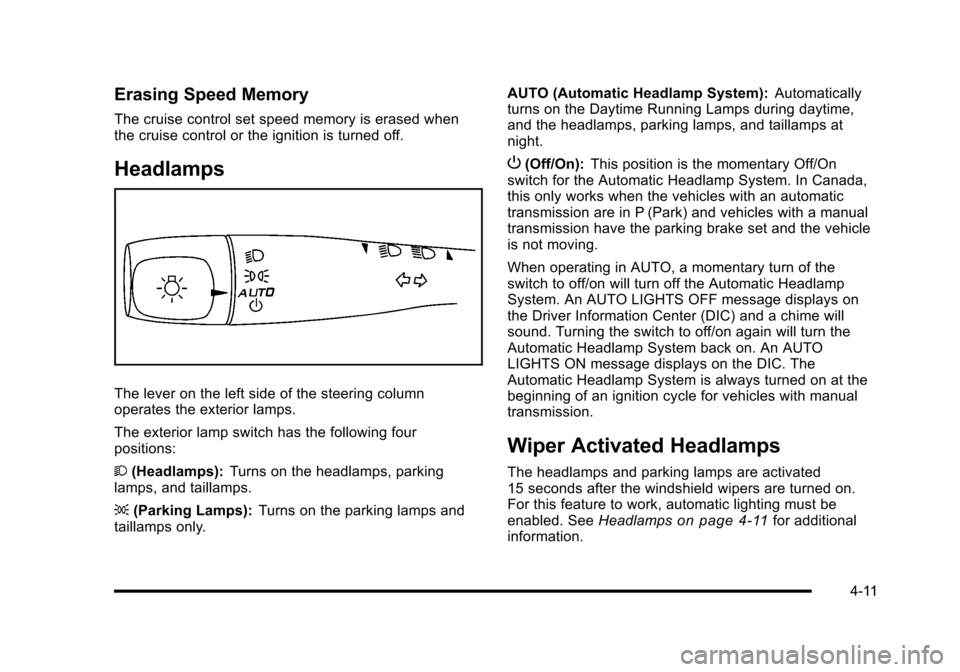
Headlamps
The lever on the left side of the steering column
operates the exterior lamps.
The exterior lamp switch has the following four
positions:
2(Headlamps): Turns on the headlamps, parking
lamps, and taillamps.
; (Parking Lamps): Turns on the parking lamps and
taillamps only. AUTO (Automatic Headlamp System):
Automatically
turns on the Daytime Running Lamps during daytime,
and the headlamps, parking lamps, and taillamps at
night.
P (Off/On): This position is the momentary Off/On
switch for the Automatic Headlamp System. In Canada,
this only works when the vehicles with an automatic
transmission are in P (Park) and vehicles with a manual
transmission have the parking brake set and the vehicle
is not moving.
When operating in AUTO, a momentary turn of the
switch to off/on will turn off the Automatic Headlamp
System. An AUTO LIGHTS OFF message displays on
the Driver Information Center (DIC) and a chime will
sound. Turning the switch to off/on again will turn the
Automatic Headlamp System back on. An AUTO
LIGHTS ON message displays on the DIC. The
Automatic Headlamp System is always turned on at the
beginning of an ignition cycle for vehicles with manual
transmission.
Wiper Activated Headlamps
The headlamps and parking lamps are activated
15 seconds after the windshield wipers are turned on.
For this feature to work, automatic lighting must be
enabled. See Headlamps
on page 4‑11for additional
information.
4-11
Page 178 of 480
When the ignition is turned off, the wiper-activated
headlamps will immediately turn off. They also turn
off 15 seconds after the windshield wiper control is
turned off.
Headlamps on Reminder
If the drivers door is opened with the ignition off and the
lamps on, a warning chime will sound. This indicates
that the headlamps are still on.
Daytime Running Lamps (DRL)
Daytime Running Lamps (DRL) can make it easier for
others to see the front of your vehicle during the day.
Fully functional daytime running lamps are required on
all vehicles first sold in Canada.
The vehicle has a light sensor on top of the instrument
panel. Do not cover this sensor or the headlamps will
come on when they are not needed.
The DRL system will make the headlamps come on at
reduced brightness when the following conditions
are met:
.The ignition is on.
.The exterior lamp control is turned to AUTO.
.The light sensor detects daytime light.
.The shift lever is not in P (Park).While the DRL system is on, the taillamps, sidemarker
lamps, and instrument panel lights will not be on.
For vehicles with an Automatic Transmission, the DRL
system is off any time the vehicle is in P (Park). For
vehicles with a Manual Transmission, the DRL system
will be off when the vehicle is first started, the park
brake is applied, and the vehicle has not moved. The
DRL system on U.S. vehicles can also be turned off by
using the off/on switch for one ignition cycle.
The regular headlamp system should be turned on
when needed.
Automatic Headlamp System
When it is dark enough outside, the automatic system
turns on the headlamps at the normal brightness along
with other lamps such as the taillamps, sidemarker,
parking lamps, instrument panel lights, and interior
switch backlighting.
Do not cover the light sensor, located on top of the
instrument panel. If the sensor is covered the
headlamps may remain on when they are not needed.
If the vehicle is driven through a parking garage,
overcast weather or a tunnel, the automatic headlamp
system may turn on.
4-12
Page 179 of 480
There is a delay in the transition between the daytime
and nighttime operation of the automatic lamp control
system so that driving under bridges or bright overhead
street lights does not affect the system. The automatic
lamp control system will only be affected when the light
sensor sees a change in lighting lasting longer than
this delay.
If the vehicle is started in a dark garage, the automatic
lamp system turns on immediately. Once the vehicle
exits the garage, it will take about 20 seconds for the
automatic lamp system to change to DRL if it is light
outside. During that delay, the instrument panel
cluster may not be as bright as usual. Make sure the
instrument panel brightness control is in the full bright
position. SeeInstrument Panel Brightness
on
page 4‑14.
To idle the vehicle with the system off, turn the ignition
on and turn the exterior light switch to the off/on
position. For vehicles first sold in Canada, the
transmission must stay in P (Park) for this function
or the parking brake must be set for vehicles with
manual transmissions.
Turn on the regular headlamps when they are needed.
Fog Lamps
For vehicles with fog lamps, the button is located on the
instrument panel, to the right of the steering wheel.
The ignition must be on to use the fog lamps.
#: Press to turn the fog lamps on and off. An indicator
light on the button comes on when the fog lamps
are on.
The parking lamps automatically turn on and off when
the fog lamps are turned on and off.
The fog lamps will turn off while the high-beam
headlamps are turned on.
Some localities have laws that require the headlamps to
be on along with the fog lamps.
4-13
Page 190 of 480
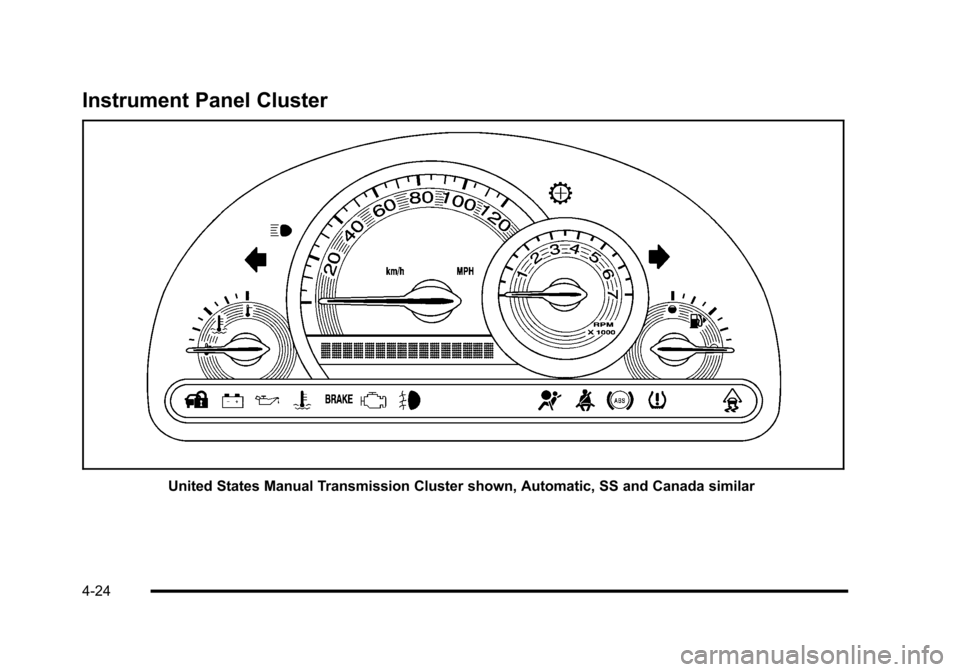
Instrument Panel Cluster
United States Manual Transmission Cluster shown, Automatic, SS and Canada similar
4-24
Page 215 of 480
AUTO (Automatic) LIGHTS OFF
This message displays if the automatic headlamp
system is disabled with the headlamp switch. See
Automatic Headlamp System
on page 4‑12for more
information.
AUTO (Automatic) LIGHTS ON
This message displays if the automatic headlamp
system is enabled with the headlamp switch. See
Automatic Headlamp System
on page 4‑12for more
information.
BRAKE FLUID
This message displays, while the ignition is on, when
the brake fluid level is low. The brake system warning
light on the instrument panel cluster also comes on.
See Brake System Warning Light
on page 4‑30for
more information. Have the brake system serviced by
your dealer/retailer as soon as possible.
CHANGE OIL SOON
This message displays when the life of the engine oil
has expired and it should be changed.
When this message is acknowledged and cleared from
the display, the engine oil life system must still be reset
separately. See Engine Oil Life System
on page 6‑23andScheduled Maintenanceon page 7‑3for more
information.
CHECK GAS CAP
This message displays if the fuel cap has not been fully
tightened. Recheck the fuel cap to make sure that it is
on properly. A few driving trips with the cap properly
installed should turn the message off.
COMPETITIVE MODE
If your vehicle has this feature, this message displays
when the Competitive Driving mode is selected. The
Traction Control System (TCS) will not be operating
while in the Competitive Driving mode and the ESC/
TCS light on the instrument panel cluster will be on
solid. Adjust your driving accordingly. See Traction
Control System (TCS)
on page 5‑9, Electronic
Stability Control (ESC)on page 5‑6, and Electronic
Stability Control (ESC)/Traction Control System (TCS)
Indicator/Warning Light
on page 4‑33for more
information.
COOLING MODE ON
This message may display on some vehicles. Under
severe conditions, hot ambient temperatures, steep
grades, and towing, your vehicle may experience more
transmission shifting. This is temporary and normal
under these conditions. This does not require engine or
transmission service.
4-49