remote start CHEVROLET HHR 2010 1.G User Guide
[x] Cancel search | Manufacturer: CHEVROLET, Model Year: 2010, Model line: HHR, Model: CHEVROLET HHR 2010 1.GPages: 480, PDF Size: 5.25 MB
Page 187 of 480
The rear window defogger turns off approximately
15 minutes after the button is pressed. If turned on
again, the defogger only runs for approximately seven
minutes before turning off.
If the vehicle speed is greater than 80 km/h (50 mph)
and the rear defogger is on, it remains on as long as the
speed is greater than 80 km/h (50 mph). The defogger
can also be turned off by turning off the engine.
For vehicles with the remote start feature, the rear
defogger automatically turns on if it is cold outside.
When the vehicle transitions out of the remote start
mode, the rear defogger turns off. SeeRemote Keyless
Entry (RKE) System Operation on page 3‑4
Notice: Do not use anything sharp on the inside of
the rear window. If you do, you could cut or damage
the warming grid, and the repairs would not be
covered by the vehicle warranty. Do not attach a
temporary vehicle license, tape, a decal or anything
similar to the defogger grid.Outlet Adjustment
Turn the outlets and move the outlet vanes to change
the direction of the airflow and to open and close the
outlets.
Operation Tips
.Clear away any ice, snow or leaves from the air
inlets at the base of the windshield that may block
the flow of air into the vehicle.
.Use of non-GM approved hood deflectors may
adversely affect the performance of the system.
.Keep the path under the front seats clear of
objects to help circulate the air inside of the vehicle
more effectively.
Passenger Compartment Air Filter
The filter removes dust and pollen from the air which is
drawn into the vehicle. Airflow reduction is an indication
that the filter needs to be replaced.
The filter should be replaced as part of routine
scheduled maintenance. See Scheduled Maintenance
on page 7‑3for replacement intervals. To find out
what type of filter to use, see Maintenance
Replacement Parts on page 7‑12.
4-21
Page 194 of 480
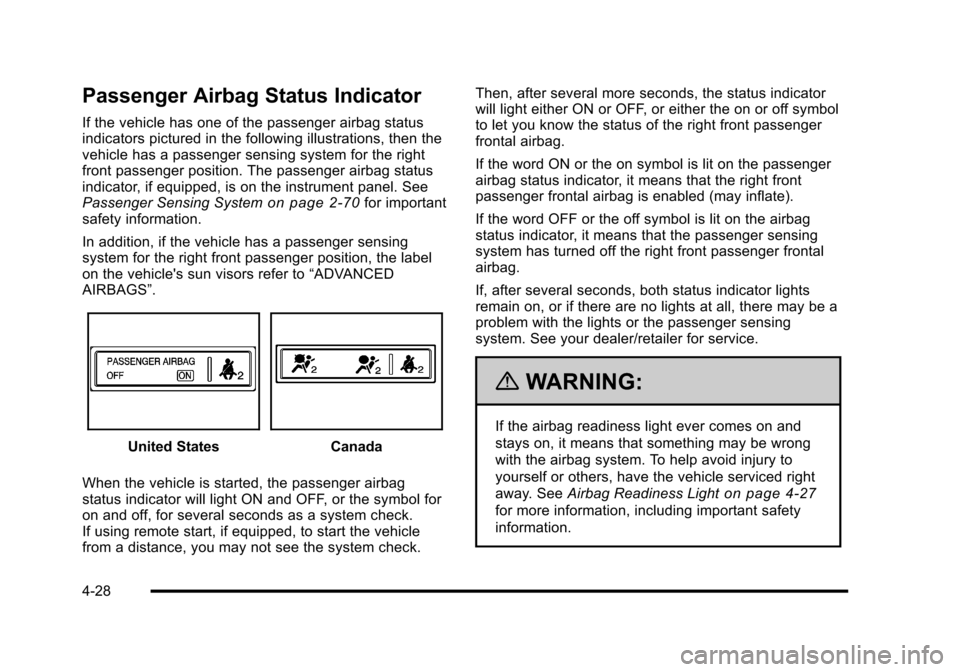
Passenger Airbag Status Indicator
If the vehicle has one of the passenger airbag status
indicators pictured in the following illustrations, then the
vehicle has a passenger sensing system for the right
front passenger position. The passenger airbag status
indicator, if equipped, is on the instrument panel. See
Passenger Sensing System
on page 2‑70for important
safety information.
In addition, if the vehicle has a passenger sensing
system for the right front passenger position, the label
on the vehicle's sun visors refer to “ADVANCED
AIRBAGS”.
United StatesCanada
When the vehicle is started, the passenger airbag
status indicator will light ON and OFF, or the symbol for
on and off, for several seconds as a system check.
If using remote start, if equipped, to start the vehicle
from a distance, you may not see the system check. Then, after several more seconds, the status indicator
will light either ON or OFF, or either the on or off symbol
to let you know the status of the right front passenger
frontal airbag.
If the word ON or the on symbol is lit on the passenger
airbag status indicator, it means that the right front
passenger frontal airbag is enabled (may inflate).
If the word OFF or the off symbol is lit on the airbag
status indicator, it means that the passenger sensing
system has turned off the right front passenger frontal
airbag.
If, after several seconds, both status indicator lights
remain on, or if there are no lights at all, there may be a
problem with the lights or the passenger sensing
system. See your dealer/retailer for service.
{WARNING:
If the airbag readiness light ever comes on and
stays on, it means that something may be wrong
with the airbag system. To help avoid injury to
yourself or others, have the vehicle serviced right
away. See
Airbag Readiness Light
on page 4‑27
for more information, including important safety
information.
4-28
Page 221 of 480
Personalization Menu Modes
OIL LIFE RESET
When this feature is displayed, you can reset the
engine oil life system. To reset the system, seeEngine
Oil Life System
on page 6‑23. See “OIL LIFE” under
DIC Operation and Displayson page 4‑46for more
information.
UNITS
This feature allows you to select the units of
measurement in which the DIC will display the vehicle
information. When UNITS appears on the display, press
and hold the reset button for at least one second to
scroll through the available settings:
ENGLISH (default in United States): All information
will be displayed in English units.
METRIC (default in Canada): All information will be
displayed in metric units.
To select a setting and move on to the next feature,
press the information button while the desired setting is
displayed on the DIC.
REMOTE START
If your vehicle has remote start, this feature allows
remote start to be turned off or on. Remote start allows
you to start the engine from outside of the vehicle using
your Remote Keyless Entry (RKE) transmitter. When
REMOTE START appears on the display, press and
hold the reset button for at least one second to scroll
through the available settings:
OFF: The remote start feature will be disabled.
ON (default): The remote start feature will be enabled.
See Remote Vehicle Start
on page 3‑7for more
information.
To select a setting and move on to the next feature,
press the information button while the desired setting is
displayed on the DIC.
4-55
Page 319 of 480

A. Windshield Washer Fluid Reservoir. See“Adding
Washer Fluid” underWindshield Washer Fluidon
page 6‑36.
B. Pressure Cap. See Cooling System on page 6‑28.
C. Coolant Recovery Tank. See “Checking Coolant”
under Engine Coolant on page 6‑29.
D. Engine Air Cleaner/Filter. See Engine Air Cleaner/
Filter on page 6‑25.
E. Electric Engine Cooling Fan (Out of View). See Cooling System Cooling System on page 6‑28.
F. Engine Oil Fill Cap. See “When to Add Engine Oil”
under Engine Oil on page 6‑19. G. Engine Oil Dipstick (Out of View). See
“Checking
Engine Oil” underEngine Oil on page 6‑19.
H. Brake Master Cylinder Reservoir. See Brakeson
page 6‑37and Hydraulic Clutch on page 6‑28.
I. Remote Positive (+) Terminal. See Jump Starting
on page 6‑41.
J. Engine Compartment Fuse Block. See Engine
Compartment Fuse Block on page 6‑122.
K. Remote Negative (−) Terminal (Out of View). See Jump Starting on page 6‑41.
6-17
Page 321 of 480
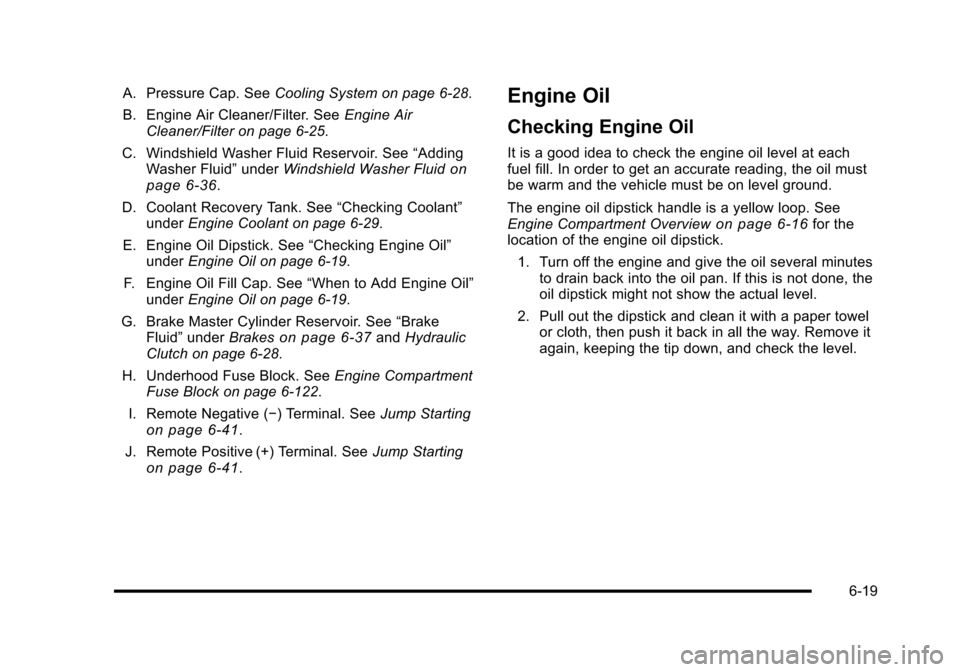
A. Pressure Cap. SeeCooling System on page 6‑28.
B. Engine Air Cleaner/Filter. See Engine Air
Cleaner/Filter on page 6‑25.
C. Windshield Washer Fluid Reservoir. See “Adding
Washer Fluid” underWindshield Washer Fluid
on
page 6‑36.
D. Coolant Recovery Tank. See “Checking Coolant”
under Engine Coolant on page 6‑29.
E. Engine Oil Dipstick. See “Checking Engine Oil”
under Engine Oil on page 6‑19.
F. Engine Oil Fill Cap. See “When to Add Engine Oil”
under Engine Oil on page 6‑19.
G. Brake Master Cylinder Reservoir. See “Brake
Fluid” under Brakes
on page 6‑37andHydraulic
Clutch on page 6‑28.
H. Underhood Fuse Block. See Engine Compartment
Fuse Block on page 6‑122.
I. Remote Negative (−) Terminal. See Jump Starting
on page 6‑41.
J. Remote Positive (+) Terminal. See Jump Starting
on page 6‑41.
Engine Oil
Checking Engine Oil
It is a good idea to check the engine oil level at each
fuel fill. In order to get an accurate reading, the oil must
be warm and the vehicle must be on level ground.
The engine oil dipstick handle is a yellow loop. See
Engine Compartment Overview
on page 6‑16for the
location of the engine oil dipstick.
1. Turn off the engine and give the oil several minutes to drain back into the oil pan. If this is not done, the
oil dipstick might not show the actual level.
2. Pull out the dipstick and clean it with a paper towel or cloth, then push it back in all the way. Remove it
again, keeping the tip down, and check the level.
6-19
Page 344 of 480
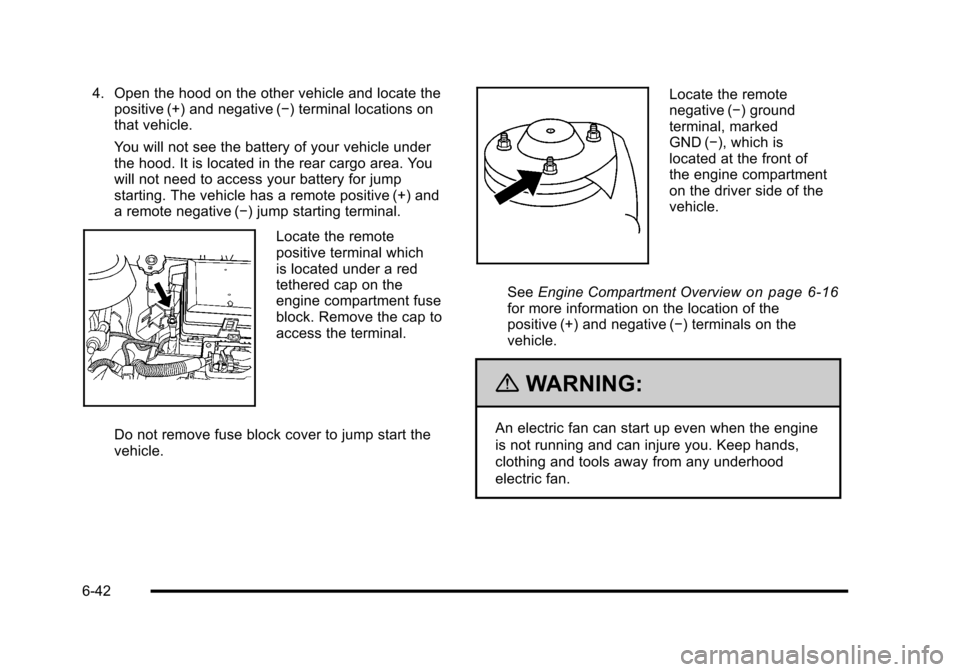
4. Open the hood on the other vehicle and locate thepositive (+) and negative (−) terminal locations on
that vehicle.
You will not see the battery of your vehicle under
the hood. It is located in the rear cargo area. You
will not need to access your battery for jump
starting. The vehicle has a remote positive (+) and
a remote negative (−) jump starting terminal.
Locate the remote
positive terminal which
is located under a red
tethered cap on the
engine compartment fuse
block. Remove the cap to
access the terminal.
Do not remove fuse block cover to jump start the
vehicle.
Locate the remote
negative (−) ground
terminal, marked
GND (−), which is
located at the front of
the engine compartment
on the driver side of the
vehicle.
See Engine Compartment Overview
on page 6‑16for more information on the location of the
positive (+) and negative (−) terminals on the
vehicle.
{WARNING:
An electric fan can start up even when the engine
is not running and can injure you. Keep hands,
clothing and tools away from any underhood
electric fan.
6-42
Page 346 of 480
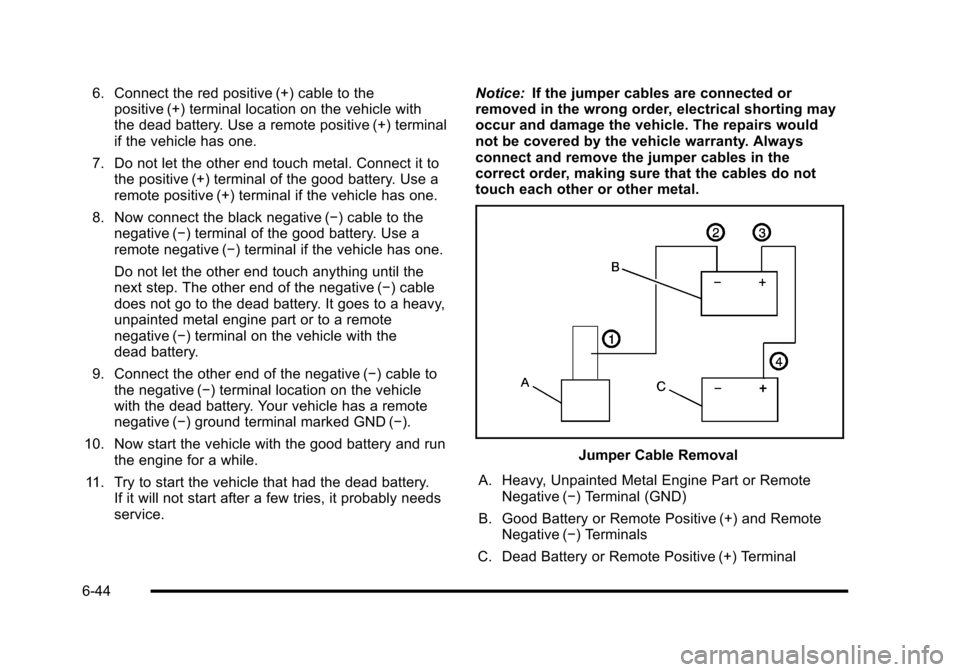
6. Connect the red positive (+) cable to thepositive (+) terminal location on the vehicle with
the dead battery. Use a remote positive (+) terminal
if the vehicle has one.
7. Do not let the other end touch metal. Connect it to the positive (+) terminal of the good battery. Use a
remote positive (+) terminal if the vehicle has one.
8. Now connect the black negative (−) cable to the negative (−) terminal of the good battery. Use a
remote negative (−) terminal if the vehicle has one.
Do not let the other end touch anything until the
next step. The other end of the negative (−) cable
does not go to the dead battery. It goes to a heavy,
unpainted metal engine part or to a remote
negative (−) terminal on the vehicle with the
dead battery.
9. Connect the other end of the negative (−) cable to the negative (−) terminal location on the vehicle
with the dead battery. Your vehicle has a remote
negative (−) ground terminal marked GND (−).
10. Now start the vehicle with the good battery and run the engine for a while.
11. Try to start the vehicle that had the dead battery. If it will not start after a few tries, it probably needs
service. Notice:
If the jumper cables are connected or
removed in the wrong order, electrical shorting may
occur and damage the vehicle. The repairs would
not be covered by the vehicle warranty. Always
connect and remove the jumper cables in the
correct order, making sure that the cables do not
touch each other or other metal.
Jumper Cable Removal
A. Heavy, Unpainted Metal Engine Part or Remote Negative (−) Terminal (GND)
B. Good Battery or Remote Positive (+) and Remote Negative (−) Terminals
C. Dead Battery or Remote Positive (+) Terminal
6-44
Page 370 of 480
TPMS Sensor Matching Process
Each TPMS sensor has a unique identification code.
Any time you replace one or more of the TPMS sensors
or rotate the vehicle's tires, the identification codes
need to be matched to the new tire/wheel location. The
sensors are matched, to the tire/wheel locations, in the
following order: driver side front tire, passenger side
front tire, passenger side rear tire, and driver side rear
tire using a TPMS diagnostic tool. See your dealer/
retailer for service.
The TPMS sensors can also be matched to each
tire/wheel position by increasing or decreasing the tire's
air pressure. When increasing the tire's pressure, do not
exceed the maximum inflation pressure indicated on the
tire's sidewall. To decrease the tire's air-pressure use
the pointed end of the valve cap, a pencil-style air
pressure gauge, or a key.
You have two minutes to match each tire and wheel
position. If it takes longer than two minutes to match
any tire and wheel position, the matching process stops
and you need to start over.
The TPMS matching process is outlined below:1. Set the parking brake.
2. Turn the ignition switch to ON/RUN with the engine off. 3. Press and hold the Remote Keyless Entry (RKE)
transmitter's LOCK and UNLOCK buttons, at the
same time, for about five seconds to start the
TPMS learn mode. The horn sounds twice
indicating the TPMS receiver is ready and in
learn mode.
4. Start with the driver side front tire. The driver side front turn signal also comes on to indicate that
corner's sensor is ready to be learned.
5. Remove the valve cap from the tire's valve stem. Activate the TPMS sensor by increasing or
decreasing the tire's air pressure for about
eight seconds. The horn chirp, can take up to
30 seconds to sound. It chirps one time and then
all the turn signals flash one time to confirm the
sensor identification code has been matched to the
tire/wheel position.
6. The passenger side front turn signal comes on to indicate that corner sensor is ready to be learned.
Proceed to the passenger side front tire and repeat
the procedure in Step 5.
7. The passenger side rear turn signal comes on to indicate that corner sensor is ready to be learned.
Proceed to the passenger side rear tire and repeat
the procedure in Step 5.
6-68
Page 451 of 480
.Model, year, color, and license plate number of the
vehicle
.Odometer reading, Vehicle Identification Number
(VIN), and delivery date of the vehicle
.Description of the problem
Coverage
Services are provided up to 5 years/100,000 miles
(160 000 km), whichever comes first.
In the U.S., anyone driving the vehicle is covered.
In Canada, a person driving the vehicle without
permission from the owner is not covered.
Roadside Assistance is not a part of the New Vehicle
Limited Warranty. Chevrolet and General Motors of
Canada Limited reserve the right to make any changes
or discontinue the Roadside Assistance program at any
time without notification.
Chevrolet and General Motors of Canada Limited
reserve the right to limit services or payment to an
owner or driver if they decide the claims are made too
often, or the same type of claim is made many times.
Services Provided
.Emergency Fuel Delivery:Delivery of enough
fuel for the vehicle to get to the nearest service
station.
.Lock‐Out Service: Service is provided to unlock
the vehicle if you are locked out. A remote unlock
may be available if you have OnStar
®. For security
reasons, the driver must present identification
before this service is given.
.Emergency Tow From a Public Road or
Highway: Tow to the nearest Chevrolet dealer for
warranty service, or if the vehicle was in a crash
and cannot be driven. Assistance is also given
when the vehicle is stuck in the sand, mud,
or snow.
.Flat Tire Change: Service is provided to change
a flat tire with the spare tire. The spare tire,
if equipped, must be in good condition and
properly inflated. It is the owner's responsibility for
the repair or replacement of the tire if it is not
covered by the warranty.
.Battery Jump Start: Service is provided to jump
start a dead battery.
8-7
Page 461 of 480
Navigation System
If your vehicle has a navigation system, use of the
system may result in the storage of destinations,
addresses, telephone numbers, and other trip
information. Refer to the navigation system operating
manual for information on stored data and for deletion
instructions.
Radio Frequency
Identification (RFID)
RFID technology is used in some vehicles for functions
such as tire pressure monitoring and ignition system
security, as well as in connection with conveniences
such as key fobs for remote door locking/unlocking and
starting, and in-vehicle transmitters for garage door
openers. RFID technology in GM vehicles does not
use or record personal information or link with any other
GM system containing personal information.
Radio Frequency Statement
This vehicle has systems that operate on a radio
frequency that comply with Part 15 of the Federal
Communications Commission (FCC) Rules and with
RSS-210/211 of Industry Canada.
Operation is subject to the following two conditions:1. The device may not cause interference.
2. The device must accept any interference received, including interference that may cause undesired
operation of the device.
Changes or modifications to any of these systems by
other than an authorized service facility could void
authorization to use this equipment.
8-17