change time CHEVROLET HHR 2010 1.G Owners Manual
[x] Cancel search | Manufacturer: CHEVROLET, Model Year: 2010, Model line: HHR, Model: CHEVROLET HHR 2010 1.GPages: 480, PDF Size: 5.25 MB
Page 22 of 480

Setting the Clock
To set the time and date for the Radio with CD (MP3)
and USB port or Radio with a Single CD (MP3) player:1. Turn the ignition key to ACC/ACCESSORY or ON/RUN.
2. Press
Oto turn the radio on.
3. Press
Hand the HR, MIN, MM, DD, YYYY
(hour, minute, month, day, and year) displays.
4. Press the softkey located below any one of the tabs that you want to change.
5. Increase or decrease the time or date by turning
fclockwise or counterclockwise.
For detailed instructions on setting the clock for your
specific audio system, see Setting the Clock
on
page 4‑61.
Satellite Radio
XM is a satellite radio service that is based in the
48 contiguous United States and 10 Canadian
provinces. XM satellite radio has a wide variety of
programming and commercial-free music,
coast-to-coast, and in digital-quality sound.
A fee is required to receive the XM service.
For more information, refer to:
.www.xmradio.com or call 1-800-929-2100 (U.S.)
.www.xmradio.ca or call 1-877-438-9677 (Canada)
See “XM Satellite Radio Service” underRadio(s)
on
page 4‑62.
Portable Audio Devices (Auxiliary
Input or USB Port)
This vehicle may have an auxiliary input jack and a
USB port, located on the audio faceplate. External
devices such as iPods
®, laptop computers, MP3
players, CD changers, USB storage devices, etc. can
be connected to the auxiliary input jack using a 3.5 mm
(1/8 in) cable or the USB port depending on the audio
system.
1-16
Page 29 of 480

Engine Oil Life System
The engine oil life system calculates engine oil life
based on vehicle use and displays a DIC message
when it is necessary to change the engine oil and filter.
The oil life system should be reset to 100% only
following an oil change.
Resetting the Oil Life System
1. Turn the ignition to ON/RUN, with the engine off.
2. Press the information and reset buttons on theDriver Information Center (DIC) at the same time
to enter the personalization menu.
3. Press the information button to scroll through the available personalization menu modes until the
DIC display shows OIL-LIFE RESET.
4. Press and hold the reset button until the DIC display shows ACKNOWLEDGED. This will tell
you the system has been reset.
5. Turn the key to LOCK/OFF. For vehicles with the 2.2L (VIN Code V) or
2.4L (VIN Code B) engines, you can also reset
the system as follows:
1. Turn the ignition key to ON/RUN with the engine off.
2. Fully press and release the accelerator pedal slowly three times within five seconds.
3. Turn the key to LOCK/OFF, then start the engine.
See Engine Oil Life System on page 6‑23.
Fuel E85 (85% Ethanol)
Vehicles that have the 2.2L L4 engine (VIN Code B) or
the 2.4L L4 engine (VIN Code V) have a yellow fuel cap
and can use either unleaded gasoline or ethanol fuel
containing up to 85% ethanol (E85). See Fuel E85
(85% Ethanol)
on page 6‑8. In all other engines,
use only the unleaded gasoline described under
Gasoline Octane on page 6‑6.
1-23
Page 38 of 480
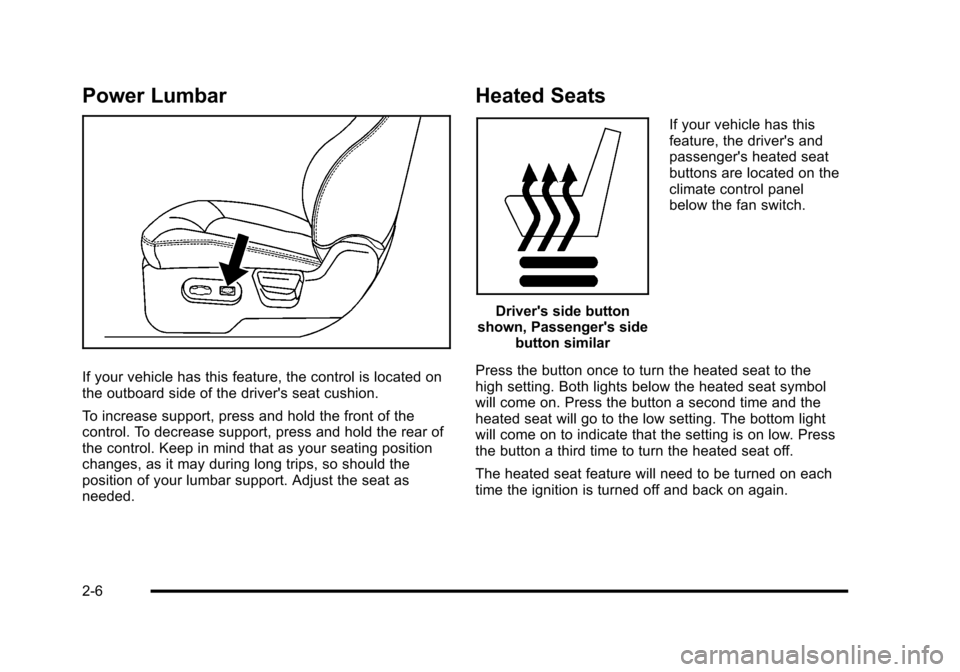
Power Lumbar
If your vehicle has this feature, the control is located on
the outboard side of the driver's seat cushion.
To increase support, press and hold the front of the
control. To decrease support, press and hold the rear of
the control. Keep in mind that as your seating position
changes, as it may during long trips, so should the
position of your lumbar support. Adjust the seat as
needed.
Heated Seats
Driver's side button
shown, Passenger's side button similar If your vehicle has this
feature, the driver's and
passenger's heated seat
buttons are located on the
climate control panel
below the fan switch.
Press the button once to turn the heated seat to the
high setting. Both lights below the heated seat symbol
will come on. Press the button a second time and the
heated seat will go to the low setting. The bottom light
will come on to indicate that the setting is on low. Press
the button a third time to turn the heated seat off.
The heated seat feature will need to be turned on each
time the ignition is turned off and back on again.
2-6
Page 70 of 480
Infants and Young Children
Everyone in a vehicle needs protection! This includes
infants and all other children. Neither the distance
traveled nor the age and size of the traveler changes
the need, for everyone, to use safety restraints. In fact,
the law in every state in the United States and in every
Canadian province says children up to some age must
be restrained while in a vehicle.
{WARNING:
Children can be seriously injured or strangled if a
shoulder belt is wrapped around their neck and
the safety belt continues to tighten. Never leave
children unattended in a vehicle and never allow
children to play with the safety belts.
Airbags plus lap‐shoulder belts offer protection for
adults and older children, but not for young children
and infants. Neither the vehicle's safety belt system
nor its airbag system is designed for them. Every time infants and young children ride in vehicles, they
should have the protection provided by appropriate
child restraints.
Children who are not restrained properly can strike
other people, or can be thrown out of the vehicle.
{WARNING:
Never do this.
Never hold an infant or a child while riding in a
vehicle. Due to crash forces, an infant or a child
will become so heavy it is not possible to hold it
during a crash. For example, in a crash at only
40 km/h (25 mph), a 5.5 kg (12 lb) infant will
suddenly become a 110 kg (240 lb) force on a
person's arms. An infant should be secured in an
appropriate restraint.
2-38
Page 138 of 480
Manual Transmission
The shift lever should be in N (Neutral) and the parking
brake engaged. Hold the clutch pedal down to the floor
and start the engine. The vehicle will not start if the
clutch pedal is not all the way down.
Starting Procedure
1. With your foot off the accelerator pedal, turn theignition key to START. When the engine starts, let
go of the key. The idle speed will go down as the
engine warms. Do not race the engine immediately
after starting it. Operate the engine and
transmission gently to allow the oil to warm up and
lubricate all moving parts.
The vehicle has a Computer-Controlled Cranking
System. This feature assists in starting the engine
and protects components. If the ignition key is
turned to the START position, and then released
when the engine begins cranking, the engine will
continue cranking for a few seconds or until the
vehicle starts. If the engine does not start and the
key is held in START for many seconds, cranking
will be stopped after 15 seconds to prevent
cranking motor damage. To prevent gear damage,
this system also prevents cranking if the engine is
already running. Engine cranking can be stopped
by turning the ignition switch to ACC/ACCESSORY
or LOCK/OFF. Notice:
Cranking the engine for long periods of
time, by returning the key to the START position
immediately after cranking has ended, can overheat
and damage the cranking motor, and drain the
battery. Wait at least 15 seconds between each try,
to let the cranking motor cool down.
2. If the engine does not start after 5‐10 seconds, especially in very cold weather (below 0°F or
−18°C), it could be flooded with too much gasoline.
Push the accelerator pedal all the way to the floor
and holding it there as you hold the key in START
for a maximum of 15 seconds. Wait at least
15 seconds between each try, to allow the cranking
motor to cool. When the engine starts, let go of the
key and accelerator. If the vehicle starts briefly but
then stops again, repeat the procedure. This clears
the extra gasoline from the engine. Do not race the
engine immediately after starting it. Operate the
engine and transmission gently until the oil warms
up and lubricates all moving parts.
Notice: The engine is designed to work with the
electronics in the vehicle. If you add electrical parts
or accessories, you could change the way the
engine operates. Before adding electrical
equipment, check with your dealer/retailer. If you
do not, the engine might not perform properly.
Any resulting damage would not be covered by the
vehicle warranty.
3-26
Page 167 of 480
Section 4 Instrument Panel
Instrument Panel Overview. . . . . . . . . . . . . . . . . . . . . . . . 4-3
Hazard Warning Flashers . . . . . . . . . . . . . . . . . . . . . . . 4-3
Horn . . . . . . . . . . . . . . . . . . . . . . . . . . . . . . . . . . . . . . . . . . . . 4-3
Tilt Wheel . . . . . . . . . . . . . . . . . . . . . . . . . . . . . . . . . . . . . . . 4-3
Turn Signal/Multifunction Lever . . . . . . . . . . . . . . . . . . 4-4
Turn and Lane-Change Signals . . . . . . . . . . . . . . . . . 4-4
Headlamp High/Low-Beam Changer . . . . . . . . . . . . 4-5
Flash-to-Pass . . . . . . . . . . . . . . . . . . . . . . . . . . . . . . . . . . . 4-5
Windshield Wipers . . . . . . . . . . . . . . . . . . . . . . . . . . . . . . 4-5
Windshield Washer . . . . . . . . . . . . . . . . . . . . . . . . . . . . . 4-6
Rear Window Wiper/Washer . . . . . . . . . . . . . . . . . . . . 4-7
Cruise Control . . . . . . . . . . . . . . . . . . . . . . . . . . . . . . . . . . 4-8
Headlamps . . . . . . . . . . . . . . . . . . . . . . . . . . . . . . . . . . . . 4-11
Wiper Activated Headlamps . . . . . . . . . . . . . . . . . . . . 4-11
Headlamps on Reminder . . . . . . . . . . . . . . . . . . . . . . 4-12
Daytime Running Lamps (DRL) . . . . . . . . . . . . . . . . 4-12
Automatic Headlamp System . . . . . . . . . . . . . . . . . . 4-12
Fog Lamps . . . . . . . . . . . . . . . . . . . . . . . . . . . . . . . . . . . . 4-13
Instrument Panel Brightness . . . . . . . . . . . . . . . . . . . 4-14
Dome Lamp . . . . . . . . . . . . . . . . . . . . . . . . . . . . . . . . . . . 4-14
Entry/Exit Lighting . . . . . . . . . . . . . . . . . . . . . . . . . . . . . 4-14
Reading Lamps . . . . . . . . . . . . . . . . . . . . . . . . . . . . . . . . 4-14
Electric Power Management . . . . . . . . . . . . . . . . . . . 4-15
Battery Run-Down Protection . . . . . . . . . . . . . . . . . . 4-15
Accessory Power Outlet(s) . . . . . . . . . . . . . . . . . . . . . 4-16
Ashtray(s) and Cigarette Lighter . . . . . . . . . . . . . . . 4-18 Climate Controls
. . . . . . . . . . . . . . . . . . . . . . . . . . . . . . . . . . 4-18
Climate Control System . . . . . . . . . . . . . . . . . . . . . . . . 4-18
Outlet Adjustment . . . . . . . . . . . . . . . . . . . . . . . . . . . . . . 4-21
Passenger Compartment Air Filter . . . . . . . . . . . . . 4-21
Warning Lights, Gauges, and Indicators . . . . . . . . 4-23
Instrument Panel Cluster . . . . . . . . . . . . . . . . . . . . . . . 4-24
Speedometer and Odometer . . . . . . . . . . . . . . . . . . . 4-25
Tachometer . . . . . . . . . . . . . . . . . . . . . . . . . . . . . . . . . . . . 4-25
Safety Belt Reminders . . . . . . . . . . . . . . . . . . . . . . . . . 4-26
Airbag Readiness Light . . . . . . . . . . . . . . . . . . . . . . . . 4-27
Passenger Airbag Status Indicator . . . . . . . . . . . . . 4-28
Charging System Light . . . . . . . . . . . . . . . . . . . . . . . . 4-29
Up-Shift Light . . . . . . . . . . . . . . . . . . . . . . . . . . . . . . . . . . 4-29
Brake System Warning Light . . . . . . . . . . . . . . . . . . . 4-30
Antilock Brake System (ABS) Warning Light . . . 4-31
Enhanced Traction System (ETS) Indicator/Warning Light . . . . . . . . . . . . . . . . . . . . . 4-32
Electronic Stability Control (ESC)/Traction Control System
(TCS) Indicator/Warning Light . . . . . . . . . . . . . . . 4-33
Engine Coolant Temperature Warning Light . . . . 4-34
Engine Coolant Temperature Gauge . . . . . . . . . . . 4-34
Tire Pressure Light . . . . . . . . . . . . . . . . . . . . . . . . . . . . 4-35
Malfunction Indicator Lamp . . . . . . . . . . . . . . . . . . . . 4-35
Oil Pressure Light . . . . . . . . . . . . . . . . . . . . . . . . . . . . . 4-38
Security Light . . . . . . . . . . . . . . . . . . . . . . . . . . . . . . . . . . 4-39
4-1
Page 174 of 480
Cruise Control
With cruise control, a speed of about 40 km (25 mph) or
more can be maintained without keeping your foot on
the accelerator. Cruise control does not work at speeds
below 40 km (25 mph).
The brake must be applied at least one time, after the
vehicle has been started, before cruise control will
function.
{WARNING:
Cruise control can be dangerous where you
cannot drive safely at a steady speed. So, do
not use the cruise control on winding roads or in
heavy traffic.
Cruise control can be dangerous on slippery
roads. On such roads, fast changes in tire traction
can cause excessive wheel slip, and you could
lose control. Do not use cruise control on slippery
roads.
Setting Cruise Control
{WARNING:
If you leave your cruise control on when you are
not using cruise, you might hit a button and go
into cruise when you do not want to. You could be
startled and even lose control. Keep the cruise
control switch off until you want to use cruise
control.
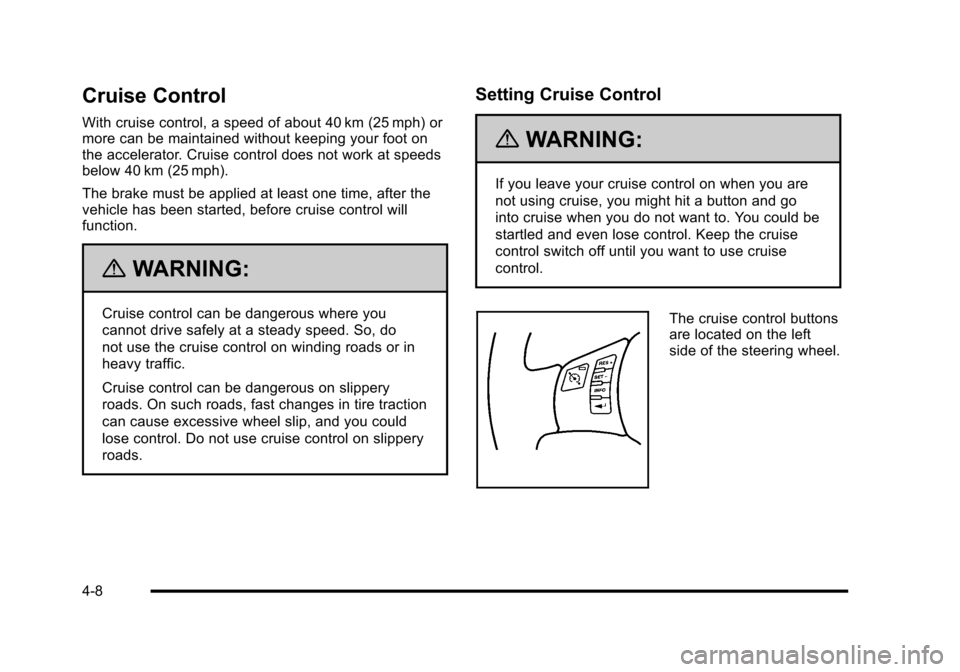
The cruise control buttons
are located on the left
side of the steering wheel.
4-8
Page 179 of 480
There is a delay in the transition between the daytime
and nighttime operation of the automatic lamp control
system so that driving under bridges or bright overhead
street lights does not affect the system. The automatic
lamp control system will only be affected when the light
sensor sees a change in lighting lasting longer than
this delay.
If the vehicle is started in a dark garage, the automatic
lamp system turns on immediately. Once the vehicle
exits the garage, it will take about 20 seconds for the
automatic lamp system to change to DRL if it is light
outside. During that delay, the instrument panel
cluster may not be as bright as usual. Make sure the
instrument panel brightness control is in the full bright
position. SeeInstrument Panel Brightness
on
page 4‑14.
To idle the vehicle with the system off, turn the ignition
on and turn the exterior light switch to the off/on
position. For vehicles first sold in Canada, the
transmission must stay in P (Park) for this function
or the parking brake must be set for vehicles with
manual transmissions.
Turn on the regular headlamps when they are needed.
Fog Lamps
For vehicles with fog lamps, the button is located on the
instrument panel, to the right of the steering wheel.
The ignition must be on to use the fog lamps.
#: Press to turn the fog lamps on and off. An indicator
light on the button comes on when the fog lamps
are on.
The parking lamps automatically turn on and off when
the fog lamps are turned on and off.
The fog lamps will turn off while the high-beam
headlamps are turned on.
Some localities have laws that require the headlamps to
be on along with the fog lamps.
4-13
Page 185 of 480
9(Off):Turn the fan control to this position to turn
the fan off.
Temperature Control: Turn clockwise or
counterclockwise to increase or decrease the
temperature.
9(Fan): Turn clockwise or counterclockwise to
increase or decrease the fan speed. In any setting other
than off, the fan runs continuously while the ignition is in
ON/RUN. The fan must be turned on to run the air
conditioning (AC) compressor.
Air Delivery Mode Control: Turn clockwise or
counterclockwise to change the direction of the airflow
inside the vehicle.
To change the current mode, select:
H(Vent): Air is directed to the instrument panel
outlets.
)(Bi-Level): Air is divided between the instrument
panel outlets and the floor outlets.
6(Floor): Air is directed to the floor outlets, with some
air directed to the windshield and side windows.
-(Defog): This mode clears the windows of fog or
moisture. Air is directed to the windshield, side window,
and floor outlets. In this mode, the system runs the air
conditioning compressor. To defog the windows faster,
turn the temperature control knob clockwise to the
warmest setting.
0(Defrost): This mode removes fog or frost from
the windshield more quickly. Air is directed to the
windshield, with some air directed to the side window
and floor outlets. In this mode, the system runs the air
conditioning compressor. To defrost the windows faster,
turn the temperature control knob clockwise to the
warmest setting.
#(Air Conditioning): Press to turn the air
conditioning system on or off. An indicator light comes
on to show that the air conditioning is on.
On hot days, open the windows to let hot inside air
escape; then close them. This helps to reduce the time
it takes for your vehicle to cool down. It also helps the
system to operate more efficiently.
4-19
Page 207 of 480
This gauge displays the air pressure level in the intake
manifold before it enters the engine's combustion
chamber.
It is automatically centered at zero every time the
engine is started. Actual vacuum or boost is displayed
from this zero point. Changes in ambient pressure, such
as driving in mountains and changing weather, will
slightly change the zero reading.
Reconfigurable Performance
Display (RPD)
For vehicles with the RPD, the screen displays
information that can be used to monitor vehicle
performance. The RPD knob located next to the screen
is used to configure the display and select information
to be viewed.
A short video plays whenever the ignition key is turned
on. Press the RPD knob to stop the video and go
directly to RPD displays.
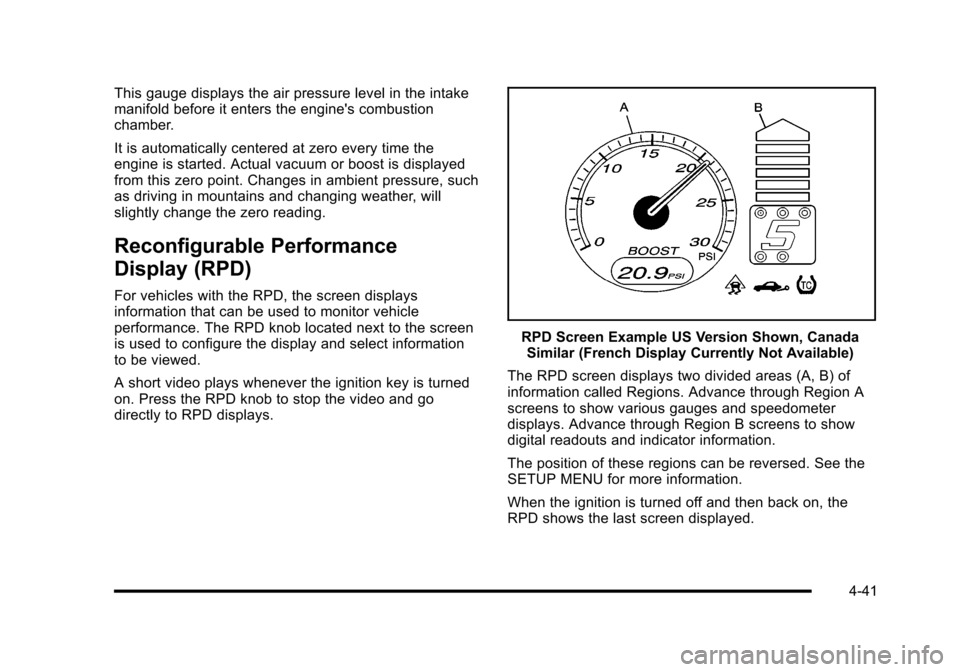
RPD Screen Example US Version Shown, CanadaSimilar (French Display Currently Not Available)
The RPD screen displays two divided areas (A, B) of
information called Regions. Advance through Region A
screens to show various gauges and speedometer
displays. Advance through Region B screens to show
digital readouts and indicator information.
The position of these regions can be reversed. See the
SETUP MENU for more information.
When the ignition is turned off and then back on, the
RPD shows the last screen displayed.
4-41