lock CHEVROLET HHR 2011 1.G Manual Online
[x] Cancel search | Manufacturer: CHEVROLET, Model Year: 2011, Model line: HHR, Model: CHEVROLET HHR 2011 1.GPages: 430, PDF Size: 4.57 MB
Page 258 of 430
Black plate (20,1)Chevrolet HHR Owner Manual - 2011
Blizzard Conditions
Being stuck in snow can be in a serious situation. Stay
with the vehicle unless there is help nearby. If possible,
use theRoadside Assistance Program
on page 8‑6.
To get help and keep everyone in the vehicle safe:
.Turn on the Hazard Warning Flasherson
page 4‑3.
.Tie a red cloth to an outside mirror.
{WARNING:
Snow can trap engine exhaust under the vehicle.
This may cause exhaust gases to get inside.
Engine exhaust contains carbon monoxide (CO)
which cannot be seen or smelled. It can cause
unconsciousness and even death.
If the vehicle is stuck in the snow:
.Clear away snow from around the base of
your vehicle, especially any that is blocking
the exhaust pipe.
.Check again from time to time to be sure
snow does not collect there.
(Continued)
WARNING: (Continued)
.Open a window about 5 cm (two inches) on
the side of the vehicle that is away from the
wind to bring in fresh air.
.Fully open the air outlets on or under the
instrument panel.
.Adjust the Climate Control system to a setting
that circulates the air inside the vehicle and
set the fan speed to the highest setting. See
Climate Control System in the Index.
For more information about carbon monoxide, see
Engine Exhaust on page 3‑34.
Snow can trap exhaust gases under your vehicle.
This can cause deadly CO (carbon monoxide) gas
to get inside. CO could overcome you and kill you.
You cannot see it or smell it, so you might not
know it is in your vehicle. Clear away snow from
around the base of your vehicle, especially any
that is blocking the exhaust.
Run the engine for short periods only as needed to
keep warm, but be careful.
5-20
Page 260 of 430
Black plate (22,1)Chevrolet HHR Owner Manual - 2011
reverse directions causes a rocking motion that could
free the vehicle. If that does not get the vehicle out after
a few tries, it might need to be towed out. If the vehicle
does need to be towed out, seeTowing Your Vehicle
on
page 5‑28.
Loading the Vehicle
It is very important to know how much weight your
vehicle can carry. Two labels on your vehicle
show how much weight it may properly carry, the
Tire and Loading Information label and the Vehicle
Certification label.
{WARNING:
Do not load the vehicle any heavier than the
Gross Vehicle Weight Rating (GVWR),
or either the maximum front or rear Gross
Axle Weight Rating (GAWR). If you do, parts
on the vehicle can break, and it can change
the way the vehicle handles. These could
cause you to lose control and crash. Also,
overloading can shorten the life of the
vehicle.
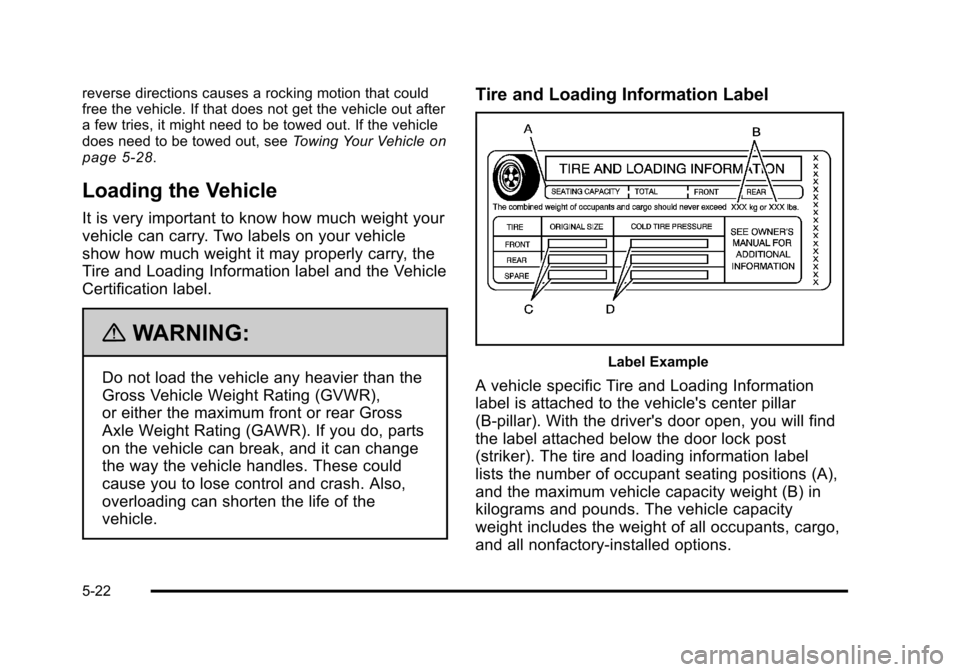
Tire and Loading Information Label
Label Example
A vehicle specific Tire and Loading Information
label is attached to the vehicle's center pillar
(B-pillar). With the driver's door open, you will find
the label attached below the door lock post
(striker). The tire and loading information label
lists the number of occupant seating positions (A),
and the maximum vehicle capacity weight (B) in
kilograms and pounds. The vehicle capacity
weight includes the weight of all occupants, cargo,
and all nonfactory‐installed options.
5-22
Page 267 of 430
Black plate (29,1)Chevrolet HHR Owner Manual - 2011
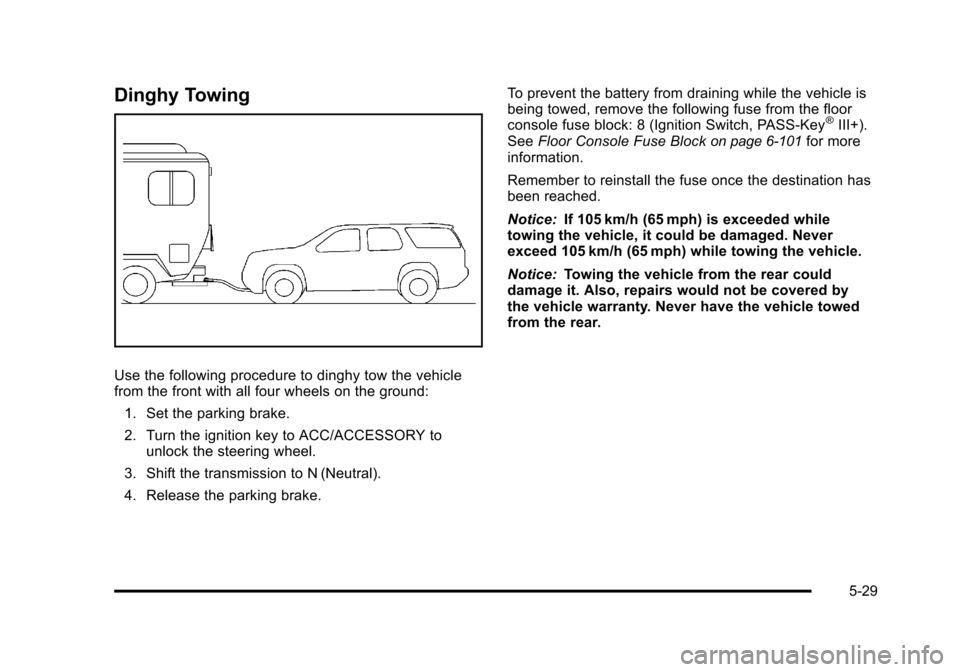
Dinghy Towing
Use the following procedure to dinghy tow the vehicle
from the front with all four wheels on the ground:1. Set the parking brake.
2. Turn the ignition key to ACC/ACCESSORY to unlock the steering wheel.
3. Shift the transmission to N (Neutral).
4. Release the parking brake. To prevent the battery from draining while the vehicle is
being towed, remove the following fuse from the floor
console fuse block: 8 (Ignition Switch, PASS‐Key
®III+).
See Floor Console Fuse Blockon page 6‑101for more
information.
Remember to reinstall the fuse once the destination has
been reached.
Notice: If 105 km/h (65 mph) is exceeded while
towing the vehicle, it could be damaged. Never
exceed 105 km/h (65 mph) while towing the vehicle.
Notice: Towing the vehicle from the rear could
damage it. Also, repairs would not be covered by
the vehicle warranty. Never have the vehicle towed
from the rear.
5-29
Page 278 of 430
Black plate (2,1)Chevrolet HHR Owner Manual - 2011
Section 6 Service and Appearance Care
When It Is Time for New Tires . . . . . . . . . . . . . . . . . 6-62
Buying New Tires . . . . . . . . . . . . . . . . . . . . . . . . . . . . . . 6-62
Different Size Tires and Wheels . . . . . . . . . . . . . . . 6-65
Uniform Tire Quality Grading . . . . . . . . . . . . . . . . . . . 6-65
Wheel Alignment and Tire Balance . . . . . . . . . . . . 6-67
Wheel Replacement . . . . . . . . . . . . . . . . . . . . . . . . . . . 6-67
Tire Chains . . . . . . . . . . . . . . . . . . . . . . . . . . . . . . . . . . . . 6-68
If a Tire Goes Flat . . . . . . . . . . . . . . . . . . . . . . . . . . . . . 6-68
Tire Sealant and Compressor Kit . . . . . . . . . . . . . . 6-70
Tire Sealant and Compressor Kit Storage . . . . . . 6-78
Changing a Flat Tire . . . . . . . . . . . . . . . . . . . . . . . . . . . 6-78
Removing the Spare Tire and Tools . . . . . . . . . . . . 6-80
Removing the Flat Tire and Installing theSpare Tire . . . . . . . . . . . . . . . . . . . . . . . . . . . . . . . . . . . 6-82
Storing a Flat or Spare Tire and Tools . . . . . . . . . 6-87
Compact Spare Tire . . . . . . . . . . . . . . . . . . . . . . . . . . . 6-91
Appearance Care . . . . . . . . . . . . . . . . . . . . . . . . . . . . . . . . . 6-92
Interior Cleaning . . . . . . . . . . . . . . . . . . . . . . . . . . . . . . 6-92
Fabric/Carpet . . . . . . . . . . . . . . . . . . . . . . . . . . . . . . . . . . 6-93
Leather . . . . . . . . . . . . . . . . . . . . . . . . . . . . . . . . . . . . . . . . 6-94
Instrument Panel, Vinyl, and Other Plastic Surfaces . . . . . . . . . . . . . . . . . . . . . . . . . . . . . . . . . . . . . 6-94
Care of Safety Belts . . . . . . . . . . . . . . . . . . . . . . . . . . . 6-95
Weatherstrips . . . . . . . . . . . . . . . . . . . . . . . . . . . . . . . . . . 6-95 Washing Your Vehicle . . . . . . . . . . . . . . . . . . . . . . . . . 6-95
Cleaning Exterior Lamps/Lenses . . . . . . . . . . . . . . 6-95
Finish Care . . . . . . . . . . . . . . . . . . . . . . . . . . . . . . . . . . . . 6-96
Windshield and Wiper Blades . . . . . . . . . . . . . . . . . . 6-96
Aluminum or Chrome-Plated Wheels
and Trim . . . . . . . . . . . . . . . . . . . . . . . . . . . . . . . . . . . . . 6-97
Tires . . . . . . . . . . . . . . . . . . . . . . . . . . . . . . . . . . . . . . . . . . . 6-98
Sheet Metal Damage . . . . . . . . . . . . . . . . . . . . . . . . . . 6-98
Finish Damage . . . . . . . . . . . . . . . . . . . . . . . . . . . . . . . . 6-98
Underbody Maintenance . . . . . . . . . . . . . . . . . . . . . . . 6-98
Chemical Paint Spotting . . . . . . . . . . . . . . . . . . . . . . . 6-98
Vehicle Identification . . . . . . . . . . . . . . . . . . . . . . . . . . . . . 6-99
Vehicle Identification Number (VIN) . . . . . . . . . . . . 6-99
Service Parts Identification Label . . . . . . . . . . . . . . 6-99
Electrical System . . . . . . . . . . . . . . . . . . . . . . . . . . . . . . . . 6-100
Add-On Electrical Equipment . . . . . . . . . . . . . . . . . 6-100
Headlamp Wiring . . . . . . . . . . . . . . . . . . . . . . . . . . . . . 6-100
Windshield Wiper Fuses . . . . . . . . . . . . . . . . . . . . . . 6-100
Power Windows and Other Power Options . . . 6-100
Fuses and Circuit Breakers . . . . . . . . . . . . . . . . . . . 6-101
Floor Console Fuse Block . . . . . . . . . . . . . . . . . . . . 6-101
Engine Compartment Fuse Block . . . . . . . . . . . . . 6-104
Capacities and Specifications . . . . . . . . . . . . . . . . . .6-107
6-2
Page 279 of 430
Black plate (3,1)Chevrolet HHR Owner Manual - 2011
Service
For service and parts needs, visit your dealer. You will
receive genuine GM parts and GM-trained and
supported service people.
Genuine GM parts have one of these marks:
Accessories and Modifications
When non‐dealer/non‐retailer accessories are added to
the vehicle, they can affect vehicle performance and
safety, including such things as airbags, braking,
stability, ride and handling, emissions systems,
aerodynamics, durability, and electronic systems like
antilock brakes, traction control, and stability control.
Some of these accessories could even cause
malfunction or damage not covered by the vehicle
warranty.
Damage to vehicle components resulting from the
installation or use of non‐GM certified parts, including
control module modifications, is not covered under the
terms of the vehicle warranty and may affect remaining
warranty coverage for affected parts.
GM Accessories are designed to complement and
function with other systems on the vehicle. Your
GM dealer can accessorize the vehicle using genuine
GM Accessories. When you go to your GM dealer and
ask for GM Accessories, you will know that GM-trained
and supported service technicians will perform the work
using genuine GM Accessories.
Also, seeAdding Equipment to Your Airbag-Equipped
Vehicle on page 2‑72.
6-3
Page 286 of 430
Black plate (10,1)Chevrolet HHR Owner Manual - 2011
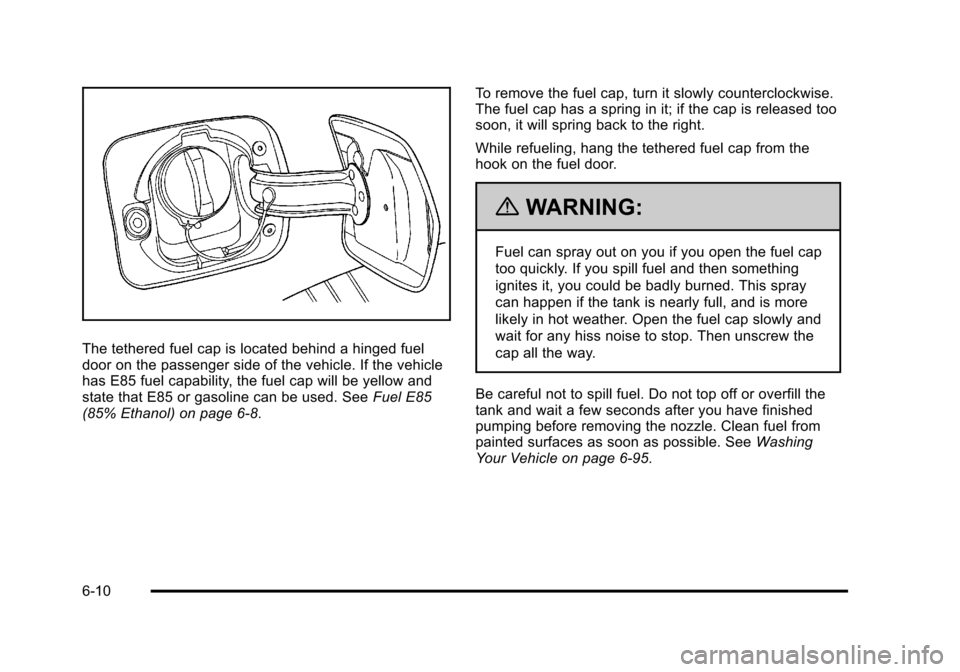
The tethered fuel cap is located behind a hinged fuel
door on the passenger side of the vehicle. If the vehicle
has E85 fuel capability, the fuel cap will be yellow and
state that E85 or gasoline can be used. SeeFuel E85
(85% Ethanol) on page 6‑8. To remove the fuel cap, turn it slowly counterclockwise.
The fuel cap has a spring in it; if the cap is released too
soon, it will spring back to the right.
While refueling, hang the tethered fuel cap from the
hook on the fuel door.
{WARNING:
Fuel can spray out on you if you open the fuel cap
too quickly. If you spill fuel and then something
ignites it, you could be badly burned. This spray
can happen if the tank is nearly full, and is more
likely in hot weather. Open the fuel cap slowly and
wait for any hiss noise to stop. Then unscrew the
cap all the way.
Be careful not to spill fuel. Do not top off or overfill the
tank and wait a few seconds after you have finished
pumping before removing the nozzle. Clean fuel from
painted surfaces as soon as possible. See Washing
Your Vehicle on page 6‑95.
6-10
Page 287 of 430
Black plate (11,1)Chevrolet HHR Owner Manual - 2011
When replacing the fuel cap, turn it clockwise until it
clicks. Make sure the cap is fully installed. The
diagnostic system can determine if the fuel cap has
been left off or improperly installed. This would allow
fuel to evaporate into the atmosphere. SeeMalfunction
Indicator Lamp on page 4‑33.
The CHECK GAS CAP message displays on the Driver
Information Center (DIC) if the fuel cap is not properly
installed. See DIC Warnings and Messages
on
page 4‑40for more information.
To close the fuel door securely, push the door to the
closed position.
{WARNING:
If a fire starts while you are refueling, do not
remove the nozzle. Shut off the flow of fuel by
shutting off the pump or by notifying the station
attendant. Leave the area immediately.
Notice: If you need a new fuel cap, be sure to get
the right type. Your dealer can get one for you.
If you get the wrong type, it may not fit properly.
This may cause the malfunction indicator lamp to
light and may damage the fuel tank and emissions
system. See Malfunction Indicator Lamp
on
page 4‑33.
6-11
Page 291 of 430

Black plate (15,1)Chevrolet HHR Owner Manual - 2011
A. Windshield Washer Fluid Reservoir. See“Adding
Washer Fluid” underWindshield Washer Fluidon
page 6‑30.
B. Pressure Cap. See Cooling System on page 6‑22.
C. Coolant Recovery Tank. See “Checking Coolant”
under Engine Coolant on page 6‑24.
D. Engine Air Cleaner/Filter. See Engine Air Cleaner/
Filter on page 6‑20.
E. Electric Engine Cooling Fan (Out of View). See Cooling System Cooling System on page 6‑22.
F. Engine Oil Fill Cap. See “When to Add Engine Oil”
under Engine Oil on page 6‑16. G. Engine Oil Dipstick (Out of View). See
“Checking
Engine Oil” underEngine Oil on page 6‑16.
H. Brake Master Cylinder Reservoir. See Brakeson
page 6‑30and Hydraulic Clutch on page 6‑22.
I. Remote Positive (+) Terminal. See Jump Starting
on page 6‑34.
J. Engine Compartment Fuse Block. See Engine
Compartment Fuse Block on page 6‑104.
K. Remote Negative (−) Terminal (Out of View). See Jump Starting on page 6‑34.
6-15
Page 295 of 430
Black plate (19,1)Chevrolet HHR Owner Manual - 2011
Used oil can be a threat to the environment. If you
change your own oil, be sure to drain all the oil from the
filter before disposal. Never dispose of oil by putting it in
the trash or pouring it on the ground, into sewers,
or into streams or bodies of water. Recycle it by taking it
to a place that collects used oil.
Engine Oil Life System
When to Change Engine Oil
This vehicle has the Engine Oil Life System, a computer
system that indicates when to change the engine oil
and filter. This is based on engine revolutions and
engine temperature, and not on mileage. Based on
driving conditions, the mileage at which an oil change is
indicated can vary considerably. For the oil life system
to work properly, the system must be reset every time
the oil is changed.
When the system has calculated that oil life has been
diminished, it indicates that an oil change is necessary.
A CHANGE OIL SOON message comes on. SeeDIC
Warnings and Messages
on page 4‑40. Change the
oil as soon as possible within the next 600 miles
(1 000 km). It is possible that, if driving under the best
conditions, the oil life system might indicate that an oil
change is not necessary for up to a year. The engine oil
and filter must be changed at least once a year and, at
this time, the system must be reset. Your dealer has
trained service people who will perform this work and reset the system. It is also important to check the oil
regularly over the course of an oil drain interval and
keep it at the proper level.
If the system is ever reset accidentally, the oil must be
changed at 3,000 miles (5 000 km) since the last oil
change. Remember to reset the oil life system
whenever the oil is changed.
How to Reset the Engine Oil Life
System
Reset the system whenever the engine oil is changed
so that the system can calculate the next engine oil
change. To reset the system:
1. Turn the ignition to ON/RUN, with the engine off.
2. Press the information and reset buttons on the Driver Information Center (DIC) at the same time to
enter the personalization menu. See DIC Vehicle
Personalization on page 4‑45.
3. Press the information button to scroll through the available personalization menu modes until the
DIC display shows OIL‐LIFE RESET.
4. Press and hold the reset button until the DIC display shows ACKNOWLEDGED. This will tell you
the system has been reset.
5. Turn the key to LOCK/OFF.
6-19
Page 296 of 430
Black plate (20,1)Chevrolet HHR Owner Manual - 2011
For vehicles with the 2.2L (VIN Code V) or 2.4L
(VIN Code B) engines, you can also reset the system
as follows:1. Turn the ignition key to ON/RUN with the engine off.
2. Fully press and release the accelerator pedal slowly three times within five seconds.
3. Turn the key to LOCK/OFF, then start the engine.
If the CHANGE ENGINE OIL SOON message comes
back on when the vehicle is started, the engine oil life
system has not been reset. Repeat the procedure.
Engine Air Cleaner/Filter
When to Inspect the Engine Air Cleaner/
Filter
Inspect the air cleaner/filter at the scheduled
maintenance intervals and replace it at the first oil
change after each 80 000 km (50,000 mi) interval. See
Scheduled Maintenance
on page 7‑3for more
information. If you are driving in dusty/dirty conditions,
inspect the filter at each engine oil change. Replace
filter if appears dusty or dirty.
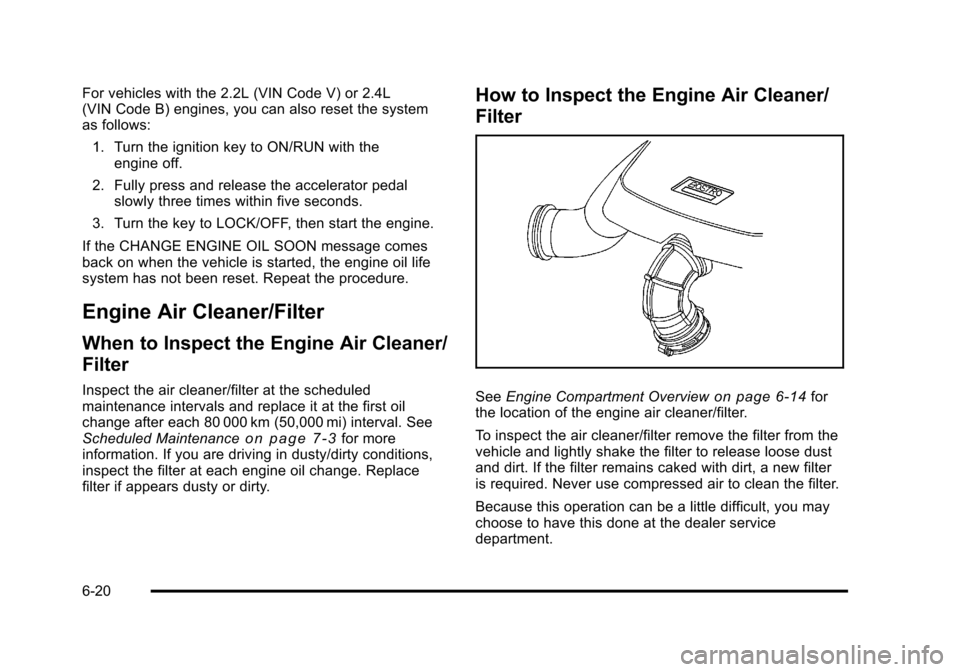
How to Inspect the Engine Air Cleaner/
Filter
See Engine Compartment Overviewon page 6‑14for
the location of the engine air cleaner/filter.
To inspect the air cleaner/filter remove the filter from the
vehicle and lightly shake the filter to release loose dust
and dirt. If the filter remains caked with dirt, a new filter
is required. Never use compressed air to clean the filter.
Because this operation can be a little difficult, you may
choose to have this done at the dealer service
department.
6-20