remote control CHEVROLET HHR 2011 1.G Owners Manual
[x] Cancel search | Manufacturer: CHEVROLET, Model Year: 2011, Model line: HHR, Model: CHEVROLET HHR 2011 1.GPages: 430, PDF Size: 4.57 MB
Page 5 of 430
Black plate (5,1)Chevrolet HHR Owner Manual - 2011
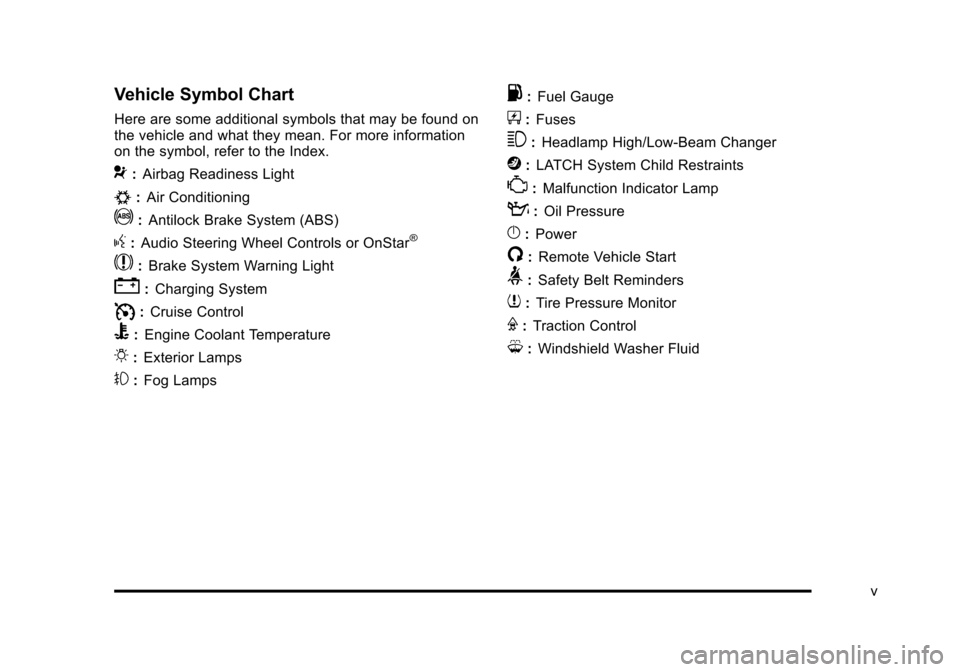
Vehicle Symbol Chart
Here are some additional symbols that may be found on
the vehicle and what they mean. For more information
on the symbol, refer to the Index.
9:Airbag Readiness Light
#:Air Conditioning
!:Antilock Brake System (ABS)
g:Audio Steering Wheel Controls or OnStar®
$: Brake System Warning Light
":Charging System
I:Cruise Control
B: Engine Coolant Temperature
O:Exterior Lamps
#:Fog Lamps
.: Fuel Gauge
+:Fuses
3: Headlamp High/Low-Beam Changer
j:LATCH System Child Restraints
*: Malfunction Indicator Lamp
::Oil Pressure
}:Power
/:Remote Vehicle Start
>:Safety Belt Reminders
7:Tire Pressure Monitor
F:Traction Control
M:Windshield Washer Fluid
v
Page 7 of 430
Black plate (1,1)Chevrolet HHR Owner Manual - 2011
Section 1 In Brief
Instrument Panel. . . . . . . . . . . . . . . . . . . . . . . . . . . . . . . . . . . 1-2
Initial Drive Information . . . . . . . . . . . . . . . . . . . . . . . . . . . 1-4
Remote Keyless Entry (RKE) System . . . . . . . . . . . 1-4
Remote Vehicle Start . . . . . . . . . . . . . . . . . . . . . . . . . . . 1-4
Door Locks . . . . . . . . . . . . . . . . . . . . . . . . . . . . . . . . . . . . . 1-5
Liftgate . . . . . . . . . . . . . . . . . . . . . . . . . . . . . . . . . . . . . . . . . . 1-5
Windows . . . . . . . . . . . . . . . . . . . . . . . . . . . . . . . . . . . . . . . . 1-6
Seat Adjustment . . . . . . . . . . . . . . . . . . . . . . . . . . . . . . . . 1-6
Second Row Seats . . . . . . . . . . . . . . . . . . . . . . . . . . . . . 1-8
Heated Seats . . . . . . . . . . . . . . . . . . . . . . . . . . . . . . . . . . . 1-9
Head Restraint Adjustment . . . . . . . . . . . . . . . . . . . . . . 1-9
Safety Belt . . . . . . . . . . . . . . . . . . . . . . . . . . . . . . . . . . . . . . 1-9
Sensing System for Passenger Airbag . . . . . . . . . 1-10
Mirror Adjustment . . . . . . . . . . . . . . . . . . . . . . . . . . . . . . 1-10
Steering Wheel Adjustment . . . . . . . . . . . . . . . . . . . . 1-11
Interior Lighting . . . . . . . . . . . . . . . . . . . . . . . . . . . . . . . . 1-12
Exterior Lighting . . . . . . . . . . . . . . . . . . . . . . . . . . . . . . . 1-12
Windshield Wiper/Washer . . . . . . . . . . . . . . . . . . . . . . 1-13
Climate Controls . . . . . . . . . . . . . . . . . . . . . . . . . . . . . . . 1-14
Vehicle Features . . . . . . . . . . . . . . . . . . . . . . . . . . . . . . . . . . 1-15
Radio(s) . . . . . . . . . . . . . . . . . . . . . . . . . . . . . . . . . . . . . . . 1-15
Satellite Radio . . . . . . . . . . . . . . . . . . . . . . . . . . . . . . . . . 1-16 Portable Audio Devices (Auxiliary Input or
USB Port) . . . . . . . . . . . . . . . . . . . . . . . . . . . . . . . . . . . 1-16
Steering Wheel Controls . . . . . . . . . . . . . . . . . . . . . . . 1-17
Bluetooth
®. . . . . . . . . . . . . . . . . . . . . . . . . . . . . . . . . . . . . 1-17
Driver Information Center (DIC) . . . . . . . . . . . . . . . . 1-17
Cruise Control . . . . . . . . . . . . . . . . . . . . . . . . . . . . . . . . . 1-18
Storage Compartments . . . . . . . . . . . . . . . . . . . . . . . . 1-19
Power Outlets . . . . . . . . . . . . . . . . . . . . . . . . . . . . . . . . . 1-20
Performance and Maintenance . . . . . . . . . . . . . . . . . .1-20
Traction Control System (TCS) . . . . . . . . . . . . . . . . 1-20
Electronic Stability Control (ESC) . . . . . . . . . . . . . . 1-20
Tire Pressure Monitor . . . . . . . . . . . . . . . . . . . . . . . . . . 1-21
Tire Sealant and Compressor Kit . . . . . . . . . . . . . . 1-21
Engine Oil Life System . . . . . . . . . . . . . . . . . . . . . . . . 1-21
Fuel E85 (85% Ethanol) . . . . . . . . . . . . . . . . . . . . . . . 1-22
Driving for Better Fuel Economy . . . . . . . . . . . . . . . 1-22
Battery . . . . . . . . . . . . . . . . . . . . . . . . . . . . . . . . . . . . . . . . . 1-23
Roadside Assistance Program . . . . . . . . . . . . . . . . . 1-23
OnStar
®. . . . . . . . . . . . . . . . . . . . . . . . . . . . . . . . . . . . . . . 1-23
1-1
Page 11 of 430
Black plate (5,1)Chevrolet HHR Owner Manual - 2011
When the vehicle starts, the parking lamps will turn on
and remain on as long as the engine is running. The
doors will be locked and the climate control system may
come on.
The engine will continue to run for 10 minutes. Repeat
the steps for a 10-minute time extension. Remote start
can be extended only once.
Canceling a Remote Start
To cancel a remote start:
.Aim the RKE transmitter at the vehicle and press
and hold
/until the parking lamps turn off.
.Turn on the hazard warning flashers.
.Turn the ignition on and then back off.
See Remote Vehicle Start on page 3‑6.
Door Locks
From outside the vehicle, unlock the door using either
the key or the Remote Keyless Entry (RKE) transmitter.
From inside, use the manual lock knobs located at the
top of the door panel near the window.
SeeDoor Locks on page 3‑8.
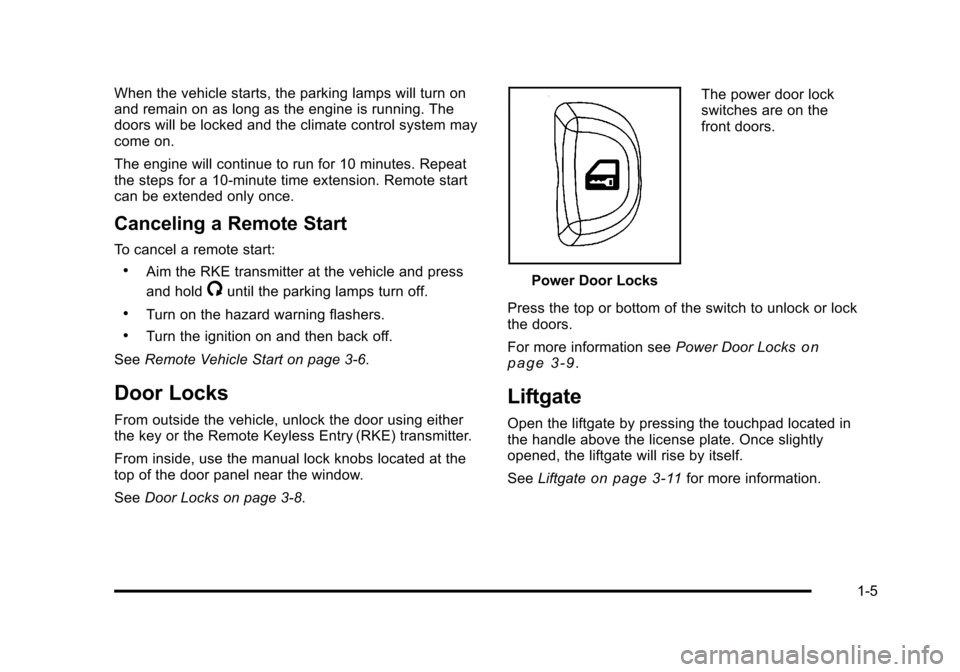
Power Door Locks The power door lock
switches are on the
front doors.
Press the top or bottom of the switch to unlock or lock
the doors.
For more information see Power Door Locks
on
page 3‑9.
Liftgate
Open the liftgate by pressing the touchpad located in
the handle above the license plate. Once slightly
opened, the liftgate will rise by itself.
See Liftgate
on page 3‑11for more information.
1-5
Page 30 of 430
Black plate (24,1)Chevrolet HHR Owner Manual - 2011
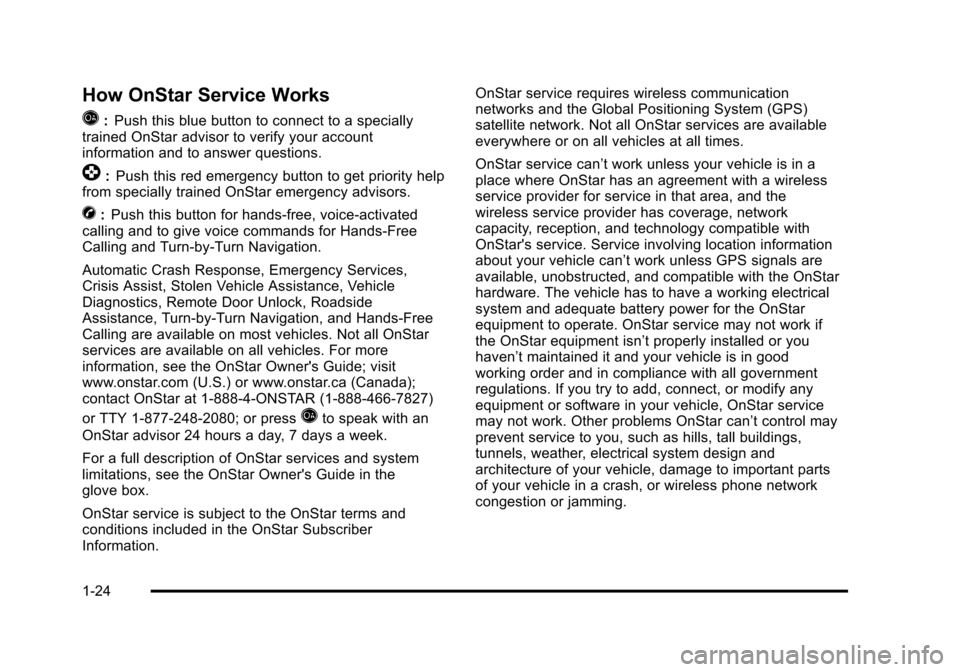
How OnStar Service Works
Q
:Push this blue button to connect to a specially
trained OnStar advisor to verify your account
information and to answer questions.
]: Push this red emergency button to get priority help
from specially trained OnStar emergency advisors.
X: Push this button for hands‐free, voice‐activated
calling and to give voice commands for Hands‐Free
Calling and Turn‐by‐Turn Navigation.
Automatic Crash Response, Emergency Services,
Crisis Assist, Stolen Vehicle Assistance, Vehicle
Diagnostics, Remote Door Unlock, Roadside
Assistance, Turn‐by‐Turn Navigation, and Hands‐Free
Calling are available on most vehicles. Not all OnStar
services are available on all vehicles. For more
information, see the OnStar Owner's Guide; visit
www.onstar.com (U.S.) or www.onstar.ca (Canada);
contact OnStar at 1-888-4-ONSTAR (1‐888‐466‐7827)
or TTY 1‐877‐248‐2080; or press
Qto speak with an
OnStar advisor 24 hours a day, 7 days a week.
For a full description of OnStar services and system
limitations, see the OnStar Owner's Guide in the
glove box.
OnStar service is subject to the OnStar terms and
conditions included in the OnStar Subscriber
Information. OnStar service requires wireless communication
networks and the Global Positioning System (GPS)
satellite network. Not all OnStar services are available
everywhere or on all vehicles at all times.
OnStar service can’t work unless your vehicle is in a
place where OnStar has an agreement with a wireless
service provider for service in that area, and the
wireless service provider has coverage, network
capacity, reception, and technology compatible with
OnStar's service. Service involving location information
about your vehicle can’t work unless GPS signals are
available, unobstructed, and compatible with the OnStar
hardware. The vehicle has to have a working electrical
system and adequate battery power for the OnStar
equipment to operate. OnStar service may not work if
the OnStar equipment isn’t properly installed or you
haven’t maintained it and your vehicle is in good
working order and in compliance with all government
regulations. If you try to add, connect, or modify any
equipment or software in your vehicle, OnStar service
may not work. Other problems OnStar can’t control may
prevent service to you, such as hills, tall buildings,
tunnels, weather, electrical system design and
architecture of your vehicle, damage to important parts
of your vehicle in a crash, or wireless phone network
congestion or jamming.
1-24
Page 107 of 430
Black plate (1,1)Chevrolet HHR Owner Manual - 2011
Section 3 Features and Controls
Keys. . . . . . . . . . . . . . . . . . . . . . . . . . . . . . . . . . . . . . . . . . . . . . . . 3-3
Remote Keyless Entry (RKE) System . . . . . . . . . . . 3-4
Remote Keyless Entry (RKE) System Operation . . . . . . . . . . . . . . . . . . . . . . . . . . . . . . . . . . . . . 3-4
Remote Vehicle Start . . . . . . . . . . . . . . . . . . . . . . . . . . . 3-6
Doors and Locks . . . . . . . . . . . . . . . . . . . . . . . . . . . . . . . . . . 3-8
Door Locks . . . . . . . . . . . . . . . . . . . . . . . . . . . . . . . . . . . . . 3-8
Power Door Locks . . . . . . . . . . . . . . . . . . . . . . . . . . . . . . 3-9
Delayed Locking . . . . . . . . . . . . . . . . . . . . . . . . . . . . . . . . 3-9
Automatic Door Lock . . . . . . . . . . . . . . . . . . . . . . . . . . 3-10
Programmable Automatic Door Unlock . . . . . . . . 3-10
Rear Door Security Locks . . . . . . . . . . . . . . . . . . . . . 3-10
Lockout Protection . . . . . . . . . . . . . . . . . . . . . . . . . . . . . 3-11
Rear Side Cargo Door . . . . . . . . . . . . . . . . . . . . . . . . . 3-11
Liftgate . . . . . . . . . . . . . . . . . . . . . . . . . . . . . . . . . . . . . . . . 3-11
Windows . . . . . . . . . . . . . . . . . . . . . . . . . . . . . . . . . . . . . . . . . . 3-15
Power Windows . . . . . . . . . . . . . . . . . . . . . . . . . . . . . . . 3-16
Sun Visors . . . . . . . . . . . . . . . . . . . . . . . . . . . . . . . . . . . . . 3-17 Theft-Deterrent Systems
. . . . . . . . . . . . . . . . . . . . . . . . .3-17
Content Theft-Deterrent . . . . . . . . . . . . . . . . . . . . . . . . 3-17
PASS-Key
®III+ Electronic Immobilizer . . . . . . . . . 3-19
PASS-Key®III+ Electronic Immobilizer
Operation . . . . . . . . . . . . . . . . . . . . . . . . . . . . . . . . . . . . 3-19
Starting and Operating Your Vehicle . . . . . . . . . . . .3-20
New Vehicle Break-In . . . . . . . . . . . . . . . . . . . . . . . . . . 3-20
Ignition Positions . . . . . . . . . . . . . . . . . . . . . . . . . . . . . . 3-21
Retained Accessory Power (RAP) . . . . . . . . . . . . . 3-24
Starting the Engine . . . . . . . . . . . . . . . . . . . . . . . . . . . . 3-24
Engine Coolant Heater . . . . . . . . . . . . . . . . . . . . . . . . . 3-25
Automatic Transmission Operation . . . . . . . . . . . . . 3-26
Manual Transmission Operation . . . . . . . . . . . . . . . 3-29
Parking Brake . . . . . . . . . . . . . . . . . . . . . . . . . . . . . . . . . 3-30
Shifting Into Park (Automatic Transmission) . . . 3-31
Shifting Out of Park (Automatic Transmission) . . . . . . . . . . . . . . . . . . . . . . . . . . . . . . . 3-33
Parking the Vehicle (Manual Transmission) . . . . 3-33
Parking Over Things That Burn . . . . . . . . . . . . . . . . 3-34
Engine Exhaust . . . . . . . . . . . . . . . . . . . . . . . . . . . . . . . . 3-34
Running the Vehicle While Parked . . . . . . . . . . . . . 3-35
3-1
Page 112 of 430
Black plate (6,1)Chevrolet HHR Owner Manual - 2011
Battery Replacement
Replace the battery if the KEY FOB BATT LOW
message displays in the DIC. See“KEY FOB BATT
LOW” underDIC Warnings and Messages
on
page 4‑40for additional information.
Notice: When replacing the battery, do not touch
any of the circuitry on the transmitter. Static from
your body could damage the transmitter.
To replace the battery:
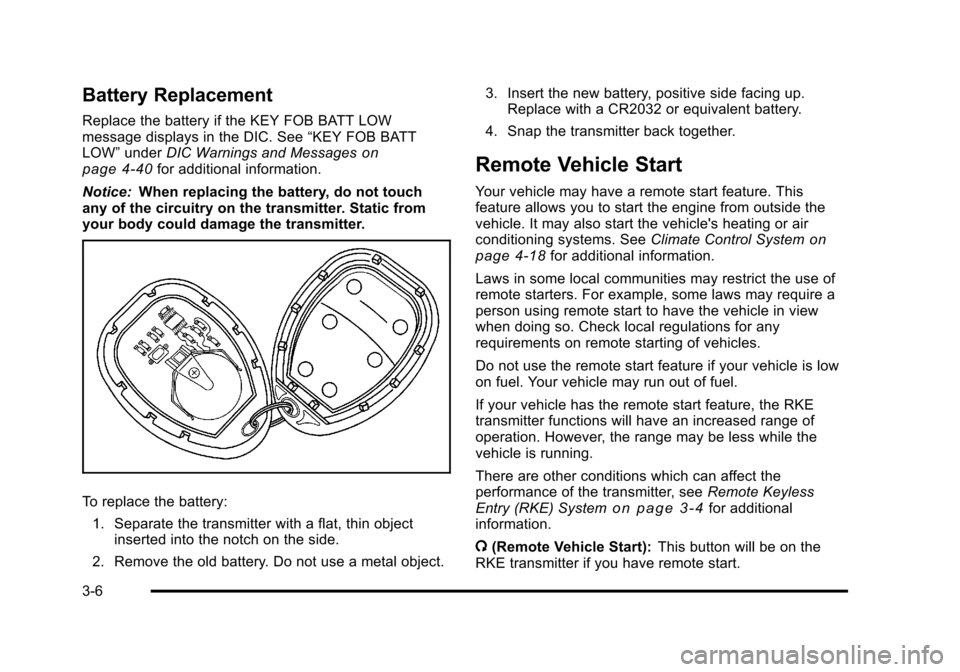
1. Separate the transmitter with a flat, thin object inserted into the notch on the side.
2. Remove the old battery. Do not use a metal object. 3. Insert the new battery, positive side facing up.
Replace with a CR2032 or equivalent battery.
4. Snap the transmitter back together.
Remote Vehicle Start
Your vehicle may have a remote start feature. This
feature allows you to start the engine from outside the
vehicle. It may also start the vehicle's heating or air
conditioning systems. See Climate Control System
on
page 4‑18for additional information.
Laws in some local communities may restrict the use of
remote starters. For example, some laws may require a
person using remote start to have the vehicle in view
when doing so. Check local regulations for any
requirements on remote starting of vehicles.
Do not use the remote start feature if your vehicle is low
on fuel. Your vehicle may run out of fuel.
If your vehicle has the remote start feature, the RKE
transmitter functions will have an increased range of
operation. However, the range may be less while the
vehicle is running.
There are other conditions which can affect the
performance of the transmitter, see Remote Keyless
Entry (RKE) System
on page 3‑4for additional
information.
/ (Remote Vehicle Start): This button will be on the
RKE transmitter if you have remote start.
3-6
Page 113 of 430
Black plate (7,1)Chevrolet HHR Owner Manual - 2011
To start the engine using the remote start feature:1. Aim the RKE transmitter at the vehicle.
2. Press and release the transmitter's lock button, then immediately press and hold the remote
vehicle start button for four seconds or until the
vehicle's turn signal lamps flash.
When the vehicle's engine starts, the parking
lamps will turn on and remain on while the engine
is running. The vehicle's doors will be locked.
3. If it is the first remote start since the vehicle has been driven, repeat these steps, while the engine
is still running, to extend the engine running time
by 10 minutes. Remote start can be extended
one time.
After entering the vehicle during a remote start, insert
and turn the key to ON/RUN to drive the vehicle.
After a remote start, the engine will automatically shut
off after 10 minutes unless a time extension has been
done or the vehicle's key is inserted into the ignition
switch and turned to ON/RUN.
The maximum number of remote starts between ignition
cycles with the key is two.
If the remote start procedure is used again before the
first 10 minute time frame has ended, the first
10 minutes will immediately expire and the second
10 minute time frame will start. After your vehicle's engine has been started two times
using the remote start button, the vehicle's ignition
switch must be turned to ON/RUN and then back to
LOCK/OFF using the key before the remote start
procedure can be used again.
To manually shut off the engine after a remote start:
.Aim the RKE transmitter at the vehicle and press
the remote start button until the parking lamps
turn off.
.Turn on the hazard warning flashers. See
Hazard
Warning Flashers on page 4‑3.
.Insert the vehicle's key into the ignition switch and
turn the switch to ON/RUN and then back to
LOCK/OFF.
The remote vehicle start feature will not operate if:
.The vehicle's key is in the ignition.
.The vehicle's hood is open
.The hazard warning flashers are on.
.There is an emission control system malfunction.
See Malfunction Indicator Lamp on page 4‑33.
.The engine coolant temperature is too high.
.The oil pressure is low.
.Two remote vehicle starts have already been
provided.
3-7
Page 170 of 430
Black plate (14,1)Chevrolet HHR Owner Manual - 2011
Instrument Panel Brightness
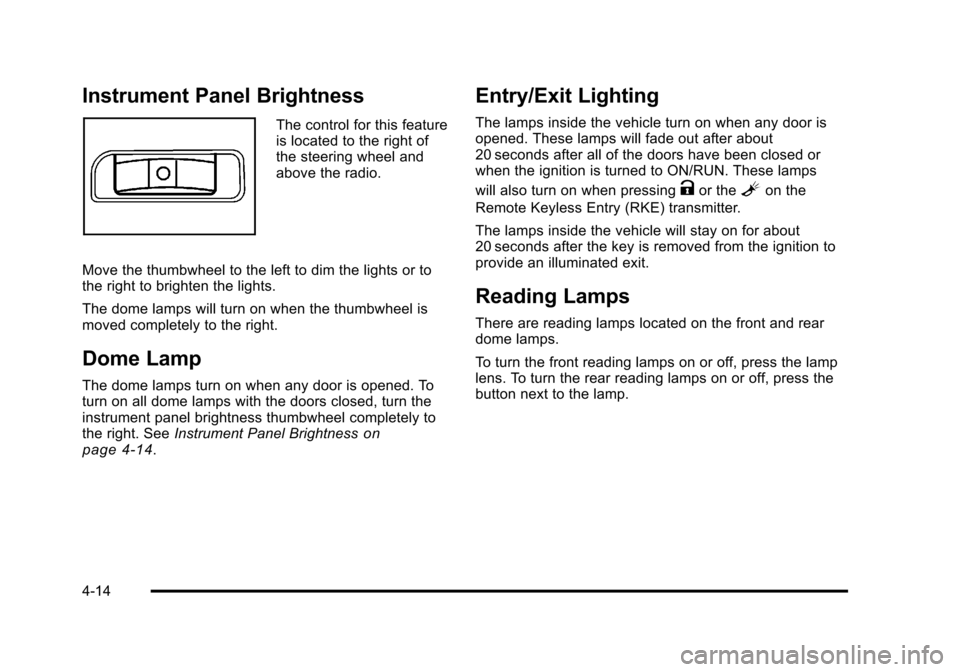
The control for this feature
is located to the right of
the steering wheel and
above the radio.
Move the thumbwheel to the left to dim the lights or to
the right to brighten the lights.
The dome lamps will turn on when the thumbwheel is
moved completely to the right.
Dome Lamp
The dome lamps turn on when any door is opened. To
turn on all dome lamps with the doors closed, turn the
instrument panel brightness thumbwheel completely to
the right. See Instrument Panel Brightness
on
page 4‑14.
Entry/Exit Lighting
The lamps inside the vehicle turn on when any door is
opened. These lamps will fade out after about
20 seconds after all of the doors have been closed or
when the ignition is turned to ON/RUN. These lamps
will also turn on when pressing
Kor theLon the
Remote Keyless Entry (RKE) transmitter.
The lamps inside the vehicle will stay on for about
20 seconds after the key is removed from the ignition to
provide an illuminated exit.
Reading Lamps
There are reading lamps located on the front and rear
dome lamps.
To turn the front reading lamps on or off, press the lamp
lens. To turn the rear reading lamps on or off, press the
button next to the lamp.
4-14
Page 174 of 430
Black plate (18,1)Chevrolet HHR Owner Manual - 2011
Climate Controls
Climate Control System
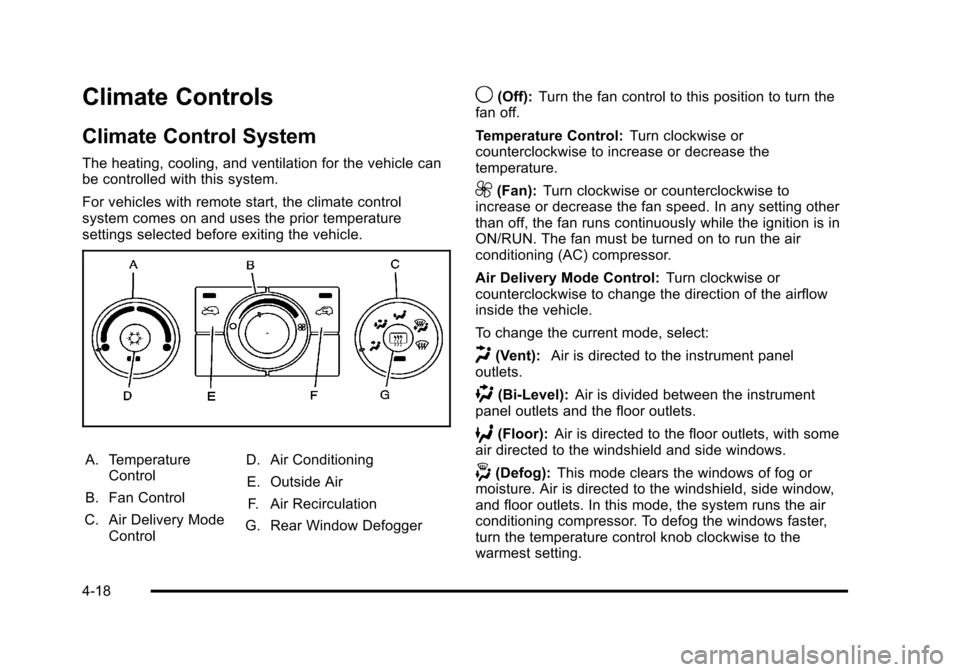
The heating, cooling, and ventilation for the vehicle can
be controlled with this system.
For vehicles with remote start, the climate control
system comes on and uses the prior temperature
settings selected before exiting the vehicle.
A. TemperatureControl
B. Fan Control
C. Air Delivery Mode Control D. Air Conditioning
E. Outside Air F. Air Recirculation
G. Rear Window Defogger
9(Off): Turn the fan control to this position to turn the
fan off.
Temperature Control: Turn clockwise or
counterclockwise to increase or decrease the
temperature.
9(Fan): Turn clockwise or counterclockwise to
increase or decrease the fan speed. In any setting other
than off, the fan runs continuously while the ignition is in
ON/RUN. The fan must be turned on to run the air
conditioning (AC) compressor.
Air Delivery Mode Control: Turn clockwise or
counterclockwise to change the direction of the airflow
inside the vehicle.
To change the current mode, select:
H(Vent): Air is directed to the instrument panel
outlets.
)(Bi-Level): Air is divided between the instrument
panel outlets and the floor outlets.
6(Floor): Air is directed to the floor outlets, with some
air directed to the windshield and side windows.
-(Defog): This mode clears the windows of fog or
moisture. Air is directed to the windshield, side window,
and floor outlets. In this mode, the system runs the air
conditioning compressor. To defog the windows faster,
turn the temperature control knob clockwise to the
warmest setting.
4-18
Page 199 of 430
Black plate (43,1)Chevrolet HHR Owner Manual - 2011
ICE POSSIBLE
This message displays when the outside air
temperature is cold enough to create icy road
conditions. Adjust your driving accordingly.
KEY FOB BATT (Battery) LOW
This message displays if the Remote Keyless Entry
(RKE) transmitter battery is low. Replace the battery in
the transmitter. See“Battery Replacement” under
Remote Keyless Entry (RKE) System Operation
on
page 3‑4.
LOW FUEL
This message displays when your vehicle is low on fuel.
Refill the fuel tank as soon as possible. See Fuel
Gauge
on page 4‑37, Fuelon page 6‑5, and Filling
the Tankon page 6‑9for more information.
LOW TRACTION
If your vehicle has the Enhanced Traction System
(ETS) or Traction Control System (TCS), this message
displays and the ETS light or the ESC/TCS light on the
instrument panel cluster flashes when the system is
actively limiting wheel spin. Slippery road conditions may exist if this message is displayed, so adjust your
driving accordingly. This message stays on for a few
seconds after the system stops limiting wheel spin. See
Enhanced Traction System (ETS)
on page 5‑10or
Traction Control System (TCS)on page 5‑8and
Enhanced Traction System (ETS) Indicator/Warning
Light
on page 4‑30or Electronic Stability Control
(ESC)/Traction Control System (TCS) Indicator/Warning
Light
on page 4‑31for more information.
PARKING BRAKE
This message displays if the parking brake is left
engaged. See Parking Brakeon page 3‑30for more
information.
POWER STEERING
This message displays if a problem has been detected
with the electric power steering. Have your vehicle
serviced by your dealer immediately.
SERVICE AIR BAG
This message displays when there is a problem with the
airbag system. Have your vehicle serviced by your
dealer immediately.
4-43