engine CHEVROLET IMPALA 2002 8.G Owner's Guide
[x] Cancel search | Manufacturer: CHEVROLET, Model Year: 2002, Model line: IMPALA, Model: CHEVROLET IMPALA 2002 8.GPages: 397, PDF Size: 2.64 MB
Page 158 of 397
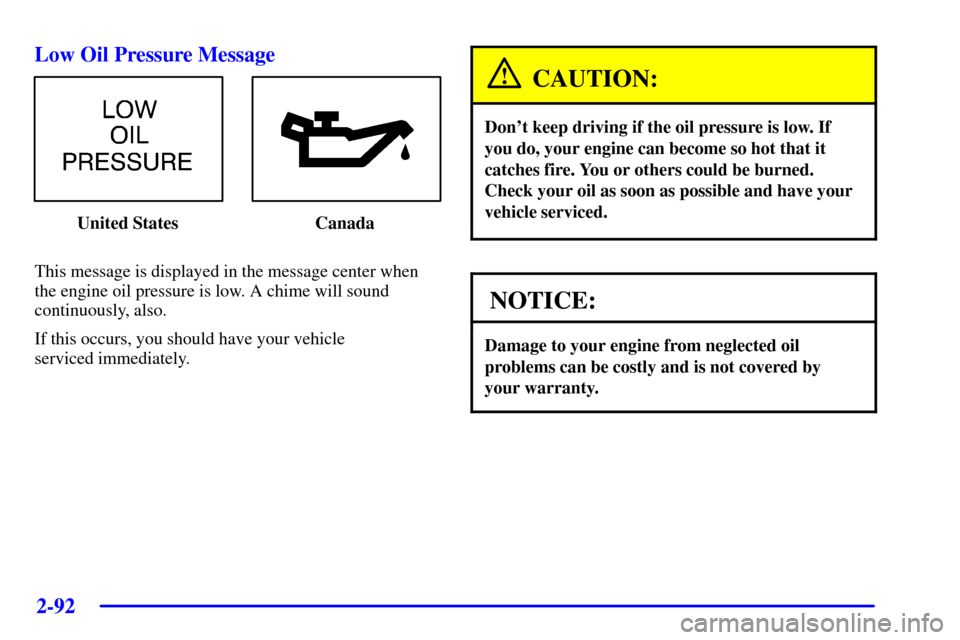
2-92 Low Oil Pressure Message
United States Canada
This message is displayed in the message center when
the engine oil pressure is low. A chime will sound
continuously, also.
If this occurs, you should have your vehicle
serviced immediately.
CAUTION:
Don't keep driving if the oil pressure is low. If
you do, your engine can become so hot that it
catches fire. You or others could be burned.
Check your oil as soon as possible and have your
vehicle serviced.
NOTICE:
Damage to your engine from neglected oil
problems can be costly and is not covered by
your warranty.
Page 159 of 397

2-93
Cruise Light (If Equipped)
The CRUISE light comes
on whenever you set your
cruise control. See ªCruise
Controlº in the Index.
Fuel Gage
United States-3400 V6
Engine ClusterUnited States-3800 V6
Engine Cluster
Canada-3400 V6
Engine ClusterCanada-3800 V6
Engine Cluster
The fuel gage, when the ignition is on, tells you about
how much fuel you have left in your tank.
The gage will first indicate empty before you are out of
fuel, and you should get more fuel as soon as possible.
Page 161 of 397

2-95
Traction Active (If Equipped)
United States Canada
This message will appear when the traction control
system is limiting wheel spin.
The message will stay on a few seconds after the
traction system stops limiting wheel spin.Battery Life Indicator
When the vehicle is started
this message will be
displayed for three seconds.
If the message is displayed when the engine is running,
you may have a problem with your charging system. If
there is a problem with the charging system, four chimes
will sound when the message comes on. The battery
display will also stay on while the key is in ON until the
engine is started.
If the message stays on after starting the engine it
could indicate a problem with the generator drive belt,
or some other charging system problem. Have it
checked right away. Driving with this message on could
drain your battery.
If you must drive a short distance with this message
displayed, it helps to turn off all your accessories.
Page 162 of 397

2-96
Hot Coolant Temp
United States Canada
This message is displayed when the cooling system
temperature gets hot. A chime will sound
continuously, also.
Check the coolant temperature gage and the coolant
level. See ªEngine Coolant,º ªEngine Coolant
Temperature Gageº and ªEngine Overheatingº in the
Index for further information.Low Coolant LevelUnited States Canada
This message is displayed when the cooling system is
low on coolant. Four chimes will also sound.
The engine may overheat. See ªEngine Coolantº in the
Index and have your vehicle serviced as soon as you can.
Page 163 of 397

2-97
Low Oil Pressure
United States Canada
This message is displayed when the engine oil pressure
is low. A chime will sound continuously, also. See ªLow
Oil Pressure Lightº earlier in this section.Low Eng Oil LevelUnited States Canada
This message is displayed for 60 seconds at the start of
each ignition cycle when the engine oil level is low.
Four chimes will also sound.
When the ignition is turned off, this message will be
displayed again for three seconds to remind you that
your engine oil level is low. Be sure to have your vehicle
serviced right away.
See ªEngine Oilº in the Index on how to check the oil
level and for what type of oil to add.
Page 164 of 397

2-98
Change Engine Oil
United States Canada
This message is displayed when the engine oil needs to
be changed. It will appear for 60 seconds. After 60
seconds, it will go out.
Once the engine oil has been changed, the CHANGE
ENGINE OIL message must be reset. Until it is reset,
this message will be displayed for 60 seconds each time
you start the engine. For more information on resetting
the system, see ªEngine Oil, When to Changeº in
the Index.Door AjarUnited States Canada
This message will appear if the driver's door or one of
the passenger's doors is not completely closed and the
ignition is in ON.
If you are in a forward or reverse gear position you will
also hear four chimes.
Page 167 of 397

2-101
Low Tire Pressure (If Equipped)
United States Canada
The low tire pressure system monitors the inflation
pressure of the tires.
After the system has learned tire pressure with properly
inflated tires, the LOW TIRE PRESSURE message will
be displayed and four warning chimes will sound if the
tire pressure in one tire becomes 12 psi (83 kPa) lower
than the other three tires.
When you have checked the tire pressures, be sure to
reset the tire inflation monitor. See ªTiresº in the Index.Service Vehicle SoonUnited States Canada
This message will come on if you have engine problems.
These problems may not be obvious and may not
affect vehicle performance or durability. Consult a
qualified dealership for necessary repairs to maintain
top vehicle performance.
This message may also appear if there are electrical
problems with the trunk release sensor. See ªTrunk
Release Sensorº in the Index for more information.
Page 179 of 397
3-7
Audio Systems
Your audio system has been designed to operate easily
and give years of listening pleasure. You will get the
most enjoyment out of it if you acquaint yourself with it
first. Find out what your audio system can do and how
to operate all of its controls to be sure you're getting the
most out of the advanced engineering that went into it.
Your vehicle has a feature called Retained Accessory
Power (RAP). With RAP, you can play your audio
system even after the ignition is turned off.
See ªRetained Accessory Powerº in the Index.
Setting the Clock
Press and hold the HR or MN buttons, located below the
TUNE knob, for two seconds. Then press and hold HR
until the correct hour appears. AM or PM will appear on
the display. Press and hold MN until the correct minute
appears. The clock may be set with the ignition on
or off. The clock symbol will appear on the display in
time
-set mode.
To set the clock to the time of an FM station
broadcasting Radio Data System (RDS) information,
press and hold HR and MN at the same time for two
seconds until UPDATED and the clock symbol appear
on the display. If the time is not available from the
station, NO UPDAT will appear on the display instead.
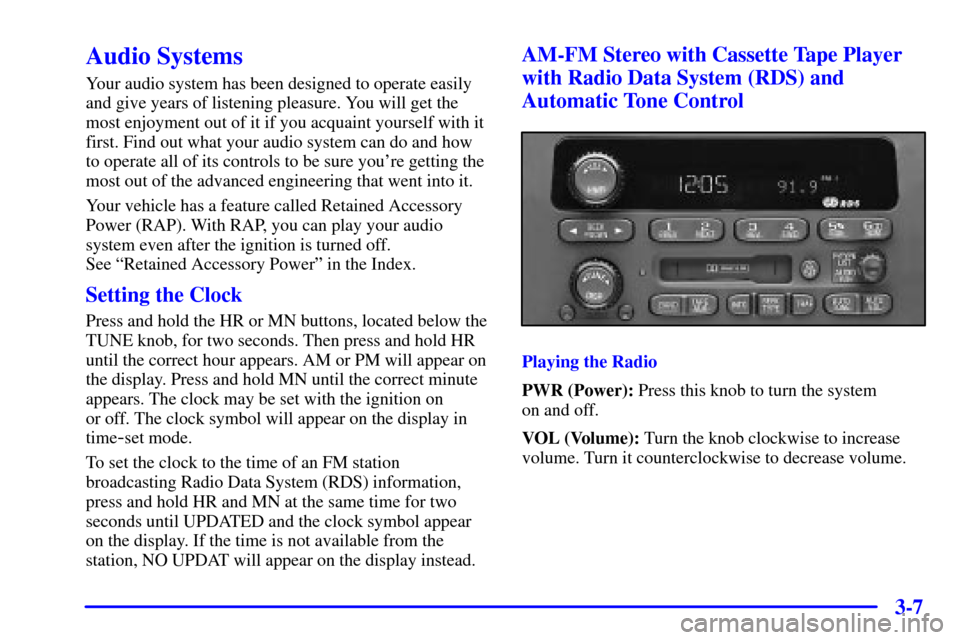
AM-FM Stereo with Cassette Tape Player
with Radio Data System (RDS) and
Automatic Tone Control
Playing the Radio
PWR (Power): Press this knob to turn the system
on and off.
VOL (Volume): Turn the knob clockwise to increase
volume. Turn it counterclockwise to decrease volume.
Page 209 of 397
3-37 Understanding Radio Reception
AM
The range for most AM stations is greater than for FM,
especially at night. The longer range, however, can
cause stations to interfere with each other. AM can pick
up noise from things like storms and power lines. Try
reducing the treble to reduce this noise if you ever get it.
FM Stereo
FM stereo will give you the best sound, but FM signals
will reach only about 10 to 40 miles (16 to 65 km).
Tall buildings or hills can interfere with FM signals,
causing the sound to come and go.
Tips About Your Audio System
Hearing damage from loud noise is almost undetectable
until it is too late. Your hearing can adapt to higher
volumes of sound. Sound that seems normal can be
loud and harmful to your hearing. Take precautions by
adjusting the volume control on your radio to a safe
sound level before your hearing adapts to it.To help avoid hearing loss or damage do the following:
1. Adjust the volume knob to the lowest setting.
2. Increase volume slowly until you hear comfortably
and clearly.
NOTICE:
Before you add any sound equipment to your
vehicle
-- like a tape player, CB radio, mobile
telephone or two
-way radio -- be sure you
can add what you want. If you can, it's very
important to do it properly. Added sound
equipment may interfere with the operation
of your vehicle's engine, Delphi Electronics
radio or other systems, and even damage them.
Your vehicle's systems may interfere with the
operation of sound equipment that has been
added improperly.
So, before adding sound equipment, check with
your dealer and be sure to check federal rules
covering mobile radio and telephone units.
Page 213 of 397
4-
4-1
Section 4 Your Driving and the Road
Here you'll find information about driving on different kinds of roads and in varying weather conditions. We've also
included many other useful tips on driving.
4
-2 Defensive Driving
4
-3 Drunken Driving
4
-6 Control of a Vehicle
4
-6 Braking
4
-9 Traction Control System (3800 V6 Engine)
4
-11 Steering
4
-13 Off-Road Recovery
4
-14 Passing
4
-15 Loss of Control
4
-16 Driving at Night4
-18 Driving in Rain and on Wet Roads
4
-21 City Driving
4
-22 Freeway Driving
4
-23 Before Leaving on a Long Trip
4
-24 Highway Hypnosis
4
-24 Hill and Mountain Roads
4
-26 Winter Driving
4
-30 Recreational Vehicle Towing
4
-32 Loading Your Vehicle
4
-34 Towing a Trailer