ECO mode CHEVROLET IMPALA 2003 8.G User Guide
[x] Cancel search | Manufacturer: CHEVROLET, Model Year: 2003, Model line: IMPALA, Model: CHEVROLET IMPALA 2003 8.GPages: 408, PDF Size: 2.75 MB
Page 121 of 408

FOB PROG (Remote Keyless Entry
Transmitter Programming)
This feature allows you to match the remote keyless
entry transmitter to your vehicle. To match the
transmitter do the following:
1. Scroll, using the SEEK/PSCAN up or down arrows,
until FOB PROG appears on the display.
2. Press the PREV or NEXT button to enter the
submenu. BEGIN will be displayed.
3. Press the TUNE/DISP button to start programming.
When the message PUSH FOB ¯ashes, press and
hold the LOCK and UNLOCK buttons on the
®rst transmitter at the same time for 15 seconds. A
chime will be heard to verify the transmitter is
learned.
4. Repeat Step 3 for each additional transmitter.
The transmitter is programmed now. You can either exit
the programming mode by following the instructions
later in this section or program the next feature available
on your vehicle.
EXIT (Exit Feature Customization
Mode)
This feature allows you to exit the vehicle customization
programming. To exit do the following:
·Scroll until EXIT appears on the display.
·Press the TUNE/DISP button to exit programming.
A chime will be heard to verify the exit.
2-53
Page 140 of 408

Delayed Exit Lighting
This feature illuminates the interior for a period of time
after the key is removed from the ignition.
The ignition must be off for delayed exit lighting to work.
When the key is removed, interior illumination will
activate and remain on until one of the following occurs:
·The ignition is moved to ON,
·the power door locks are activated, or
·an illumination period of 25 seconds has elapsed.
If during the illumination period a door is opened,
the timed illumination period will be canceled and the
interior lamps will remain on because a door is open.
Parade Dimming
The instrument panel has an added feature called
parade mode. This feature prohibits the dimming of your
instrument panel displays during the daylight while
the headlamps are on so that you'll still be able to see
the displays.
Reading Lamps
Your vehicle may be equipped with reading lamps that
are located on the assist handles in the headliner.
These lamps and the interior courtesy lamps come on
when any door is opened. Press the lens to turn
them on. Press it again to turn them off.
Dome Lamp
If your vehicle has this feature, the dome lamp will
come on when you open a door. You can also turn this
lamp on by turning the exterior lamps control clockwise
as far as it will go. Vehicles that have the optional
sunroof do not have a dome lamp.
Battery Rundown Protection
Your vehicle has a feature to help prevent you from
draining the battery in case you accidentally leave on the
interior courtesy lamps, reading/map lamps, visor
vanity lamps, trunk lamp or glove box lamps. If you leave
any of these lamps on, they will automatically turn off
after 10 minutes, if the ignition is moved to OFF.
The lamps won't come back on again until you do
the following:
·Turn the ignition on, or
·turn the exterior lamps control off, then on again.
If your vehicle has less than 15 miles (25 km) on
the odometer, the battery saver will turn off the lamps
after only three minutes.
Battery rundown protection will also work if the
headlamps are left on. After having been left on for
10 minutes, the headlamps and the parking lamps will
¯ash three times. They will remain on for one more
minute before being turned off automatically.
3-18
Page 145 of 408

:(Outside Air):Press this button to turn the
outside air mode on. When this mode is on, outside air
will circulate throughout your vehicle. When the
button is pressed, an indicator light in the button will
come on to let you know that it is activated. The outside
air mode can be used with all modes, but it cannot
be used with the recirculation mode.
You may have to set the instrument panel brightness
control to the highest setting during the day to see
the indicator lamp.
The outside air mode can be used with all modes, but it
cannot be used with the recirculation mode.
If you are in city traffic, your vehicle is stopped and
idling, or the weather is hot, the system may switch from
the outside air mode to the recirculation mode. To
prevent the air inside of your vehicle from becoming too
stale, be sure to return to the outside air mode
periodically.?(Recirculation):This mode keeps outside air
from coming in the vehicle. It can be used to prevent
outside air and odors from entering your vehicle or help
heat or cool the air inside your vehicle more quickly.
Press this button to turn the recirculation mode on.
When the button is pressed, an indicator light will come
on. The air-conditioning compressor also comes on.
You may have to set the instrument panel brightness
control to the highest setting during the day to see
the indicator lamp.
The recirculation mode cannot be used with outside air
modes.
D or P (Temperature Control):Slide the levers
marked D (Driver) or P (Passenger) to increase or
decrease the temperature on the driver's side or
the passenger's side of the vehicle.
#A/C (Air Conditioning):Press this button to turn
the air-conditioning system on or off. When A/C is
pressed, an indicator light will come on to let you know
that air conditioning is activated.
You may have to set the instrument panel brightness
control to the highest setting during the day to see
the indicator lamp.
3-23
Page 146 of 408

On hot days, open the windows to let hot inside air
escape; then close them. This helps to reduce the time
it takes for your vehicle to cool down. It also helps
the system to operate more efficiently.
For quick cool down on hot days, do the following:
1. Select the vent mode.
2. Select the recirculation mode.
3. Select A/C.
4. Select the coolest temperature for both zones.
5. Select the highest fan speeds.
Using these settings together for long periods of time
may cause the air inside of your vehicle to become too
dry. To prevent this from happening, after the air
inside of your vehicle has cooled, turn the recirculation
mode off.
The air-conditioning system removes moisture from the
air, so you may sometimes notice a small amount of
water dripping underneath your vehicle while idling
or after turning off the engine. This is normal.Defogging and Defrosting
Fog on the inside of the windows is a result of high
humidity (moisture) condensing on the cool window
glass. This can be minimized if the climate control
system is used properly. There are two modes to clear
fog or frost from your windshield. Use the defog
mode to clear the windows of fog or moisture and warm
the passengers. Use the defrost mode to remove fog
or frost from the windshield more quickly.
Turn the right knob clockwise to select the defog or
defrost mode.
-(Defog):This mode directs air equally to the
windshield and the ¯oor outlets. When you select this
mode, the system turns off recirculation and runs
the air-conditioning compressor unless the outside
temperature is below 40ÉF (4ÉC). The recirculation mode
cannot be selected while in the defog mode.
Do not drive the vehicle until all the windows are clear.
0(Defrost):This mode directs half of the air to
the windshield and side window vents and half to the
¯oor vents. In this mode, the system will automatically
force outside air into your vehicle. The recirculation
mode cannot be selected while in the defog mode. The
air conditioning compressor will run automatically in
this setting, unless the outside temperature is below
40ÉF (4ÉC).
Do not drive the vehicle until all the windows are clear.
3-24
Page 153 of 408

Speedometer and Odometer
Your speedometer lets you see your speed in both
miles per hour (mph) and kilometers per hour (km/h).
Your odometer shows how far your vehicle has
been driven in either miles (used in the United States)
or in kilometers (used in Canada).
Your vehicle has a tamper-resistant odometer. If you
see ERROR, you'll know someone has probably
tampered with it and the numbers may not be accurate.
You may wonder what happens if your vehicle needs
a new odometer installed. If the new one can be set to
the mileage total of the old odometer, then that will
be done. But if it can't, then it will be set at zero and a
label must be put on the driver's door to show the
old mileage reading when the new odometer
was installed.
Trip Odometer
Your trip odometer tells how far you have driven since
you last reset it.
Your trip/select reset switch will go back and forth
between the odometer and the trip odometer if the
button is pressed and released within 1.5 seconds. If the
button is pressed and held for longer than 1.5 seconds
while in the trip odometer mode, it will be reset to
zero. If the button is pressed and held for longer than
1.5 seconds while in the odometer mode, it will have
no effect.
Your trip odometer will work no matter what position
your key is in, and even if the key isn't in.
3-31
Page 171 of 408
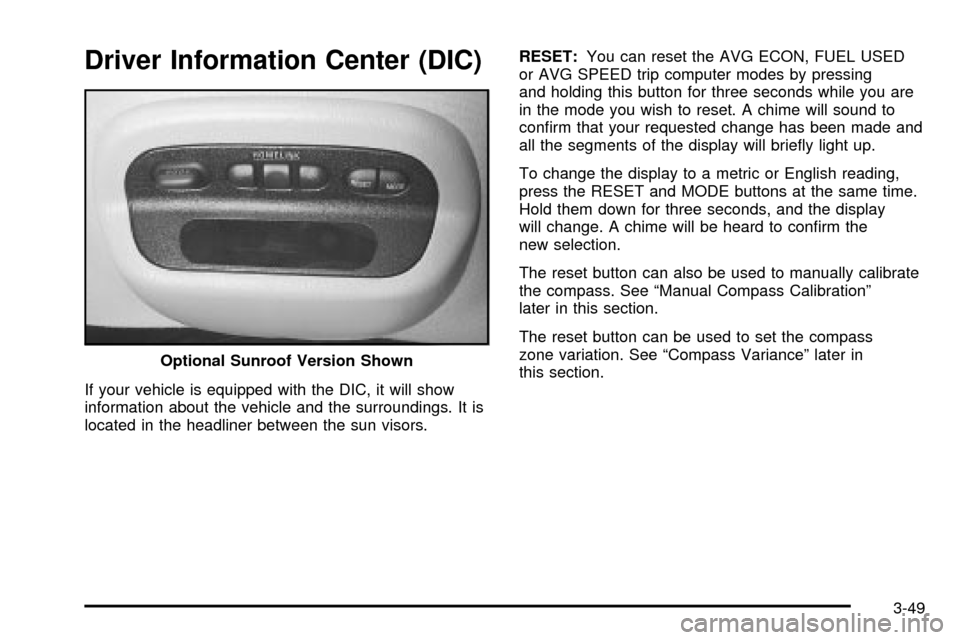
Driver Information Center (DIC)
If your vehicle is equipped with the DIC, it will show
information about the vehicle and the surroundings. It is
located in the headliner between the sun visors.RESET:You can reset the AVG ECON, FUEL USED
or AVG SPEED trip computer modes by pressing
and holding this button for three seconds while you are
in the mode you wish to reset. A chime will sound to
con®rm that your requested change has been made and
all the segments of the display will brie¯y light up.
To change the display to a metric or English reading,
press the RESET and MODE buttons at the same time.
Hold them down for three seconds, and the display
will change. A chime will be heard to con®rm the
new selection.
The reset button can also be used to manually calibrate
the compass. See ªManual Compass Calibrationº
later in this section.
The reset button can be used to set the compass
zone variation. See ªCompass Varianceº later in
this section. Optional Sunroof Version Shown
3-49
Page 172 of 408

MODE:Press this button to cycle through three modes
of operation: Off, Compass/Temperature and Trip
Computer mode.
·Off:No driver information is displayed in this mode
of operation.
·Compass/Temperature Mode:One of eight
compass readings and the outside temperature are
displayed. If the temperature is below 38ÉF
(3ÉC), the word ICE is displayed for two minutes.
·Trip Computer:Pressing the MODE button cycles
through the ®ve displays. Press the MODE button
after the last Trip Computer display to return
the DIC to the OFF mode.
Compass Variance
Compass variance is the difference between magnetic
north and geographic north. In some areas of the
country, the difference is great enough to cause the
compass to give false readings. If this occurs, the
compass variance must be set.
Setting the Variance
Turn the ignition on and cycle the DIC to the
Compass/Temperature mode. Press the RESET button
for about ®ve seconds. The last entered variance
zone number and VAR will be displayed. Press the
MODE button until the proper variance zone number on
the map is shown. Press the RESET button to set
the new variance zone and resume normal operation.
3-50
Page 173 of 408

All the display segments will be illuminated brie¯y to
acknowledge the change in zone number. A chime will
sound to con®rm that the new zone number has
been set.
Automatic Compass Calibration
The compass is self-calibrating, which eliminates the
need to manually set the compass. When the vehicle is
new, the calibration process may not be complete. In
these cases CAL will be displayed, and all segments of
the compass will be illuminated where the compass
reading is normally displayed.
To calibrate the compass, in an area free from large
metal objects, make one to two 360É turns. The
calibration symbol will turn off and the compass reading
will be displayed.
Manual Compass Calibration
If the compass appears erratic and the calibration
symbol does not appear, you must manually put the
compass into the calibration mode.
Turn the ignition on and cycle the DIC to the
Compass/Temperature mode. Press the RESET button
for at least 10 seconds until the calibration symbol
appears and all segments of the compass display are
illuminated. A chime will sound to con®rm that the
calibration mode is active. Release the button and
complete two or three 360É turns in an area free from
large metal objects. The calibration symbol will turn
off and the compass reading will be displayed. A chime
will sound to verify that the calibration is complete.
Error Displays
·
An error of the speed sensor or fuel sender will
cause -E- to be displayed.
·In the absence of vehicle communications, a
dash Ð is displayed.
If one of these error messages appear, see your dealer.
3-51
Page 174 of 408

Trip Computer
There are ®ve trip computer displays which may be
stepped through by pushing the MODE button.
The information will appear in the following order:
AVG ECON (Average Fuel Economy):This shows the
average fuel economy since the last reset.
INST ECON (Instantaneous Fuel Economy):This
shows fuel economy for the most recent second
of driving.
RANGE (Trip Range):This shows the estimated
distance that can be traveled with the remaining fuel.
The fuel economy used to calculate range is based
on the last few hours of driving. When in a low
fuel condition, LO is displayed.FUEL USED (Trip Fuel Used):This shows the
accumulated fuel used since the last reset.
AVG SPEED (Average Speed):This shows the
average speed since the last reset.
Resetting the Trip Computer
Press and hold the RESET button for at least three
seconds. The reset is acknowledged with all segments
of the display lit brie¯y and a chime. A reset can
only be done in AVG ECON, FUEL USED and AVG
SPEED displays. Each setting must be reset individually.
3-52
Page 175 of 408

Audio System(s)
Notice:Before you add any sound equipment to
your vehicle ± like a tape player, CB radio, mobile
telephone or two-way radio ± be sure you can
add what you want. If you can, it's very important to
do it properly. Added sound equipment may
interfere with the operation of your vehicle's engine,
radio or other systems, and even damage them.
Your vehicle's systems may interfere with the
operation of sound equipment that has been added
improperly.
So, before adding sound equipment, check with
your dealer and be sure to check federal rules
covering mobile radio and telephone units.
Your audio system has been designed to operate easily
and to give years of listening pleasure. You will get
the most enjoyment out of it if you acquaint yourself with
it ®rst. Figure out which radio you have in your vehicle,
®nd out what your audio system can do and how to
operate all of its controls to be sure you're getting the
most out of the advanced engineering that went into it.
Your vehicle has a feature called Retained Accessory
Power (RAP). With RAP, you can play your audio
system even after the ignition is turned off. See
ªRetained Accessory Power (RAP)º under
Ignition
Positions on page 2-18.
Setting the Time
Press and hold the HR or MN buttons, located below
the tune knob, for two seconds. Then press and hold HR
until the correct hour appears on the display. AM or
PM will also appear. Press and hold MN until the correct
minute appears on the display. The time may be set
with the ignition on or off. The clock symbol will appear
on the display in time-set mode.
To synchronize the time with an FM station broadcasting
Radio Data System (RDS) information, press and
hold HR and MN at the same time for two seconds until
UPDATED and the clock symbol appear on the
display. If the time is not available from the station, NO
UPDAT will appear on the display instead.
3-53